change time SUBARU LEGACY 2016 6.G Owner's Manual
[x] Cancel search | Manufacturer: SUBARU, Model Year: 2016, Model line: LEGACY, Model: SUBARU LEGACY 2016 6.GPages: 572
Page 184 of 572
Instruments and controls/Information display
Information display
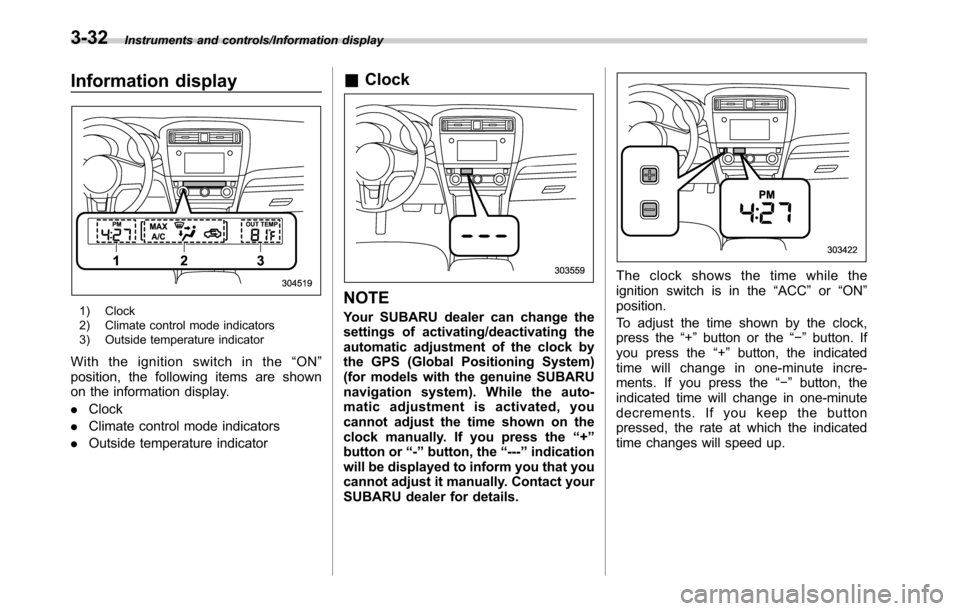
1) Clock
2) Climate control mode indicators
3) Outside temperature indicator
With the ignition switch in the“ON”
position, the following items are shown
on the information display.
.Clock
.Climate control mode indicators
.Outside temperature indicator
&Clock
NOTE
Your SUBARU dealer can change the
settings of activating/deactivating the
automatic adjustment of the clock by
the GPS (Global Positioning System)
(for models with the genuine SUBARU
navigation system). While the auto-
matic adjustment is activated, you
cannot adjust the time shown on the
clock manually. If you press the“+”
button or“-”button, the“---”indication
will be displayed to inform you that you
cannot adjust it manually. Contact your
SUBARU dealer for details.
The clock shows the time while the
ignition switch is in the“ACC”or“ON”
position.
To adjust the time shown by the clock,
press the“+”button or the“−”button. If
you press the“+”button, the indicated
time will change in one-minute incre-
ments. If you press the“−”button, the
indicated time will change in one-minute
decrements. If you keep the button
pressed, the rate at which the indicated
time changes will speed up.
3-32
Page 192 of 572

Instruments and controls/Multi information display
First menuSecond menu
Third menu Settings
Vehicle Setting Keyless Entry System
Audible Signal*1ON/OFF
Hazard Warning FlasherON/OFF
Driver Door Unlock
*1 *2Driver Door Only, All
Rear Gate Unlock
*1 *2 *3Rear Gate Only, All
Defogger
—15 minutes/Continuous
Interior Light
—10 seconds–30 seconds, OFF
Auto Headlights
Light SensitivityMax/Mid/Low/Min
Wiper LinkON/OFF
Welcome Lighting
Approaching Time Set30 seconds–90 seconds, OFF
Leaving Time Set30 seconds–90 seconds, OFF
Default Settings OK To Reset?
—Yes/No
*1: The setting menu is available only for models with“keyless access with push-button start system”.
*2: The setting can only be changed for the“keyless access”entry function. For details, refer to“Door unlock selection function”F2-17.
*3: For Outback only
3-40
Page 196 of 572
Instruments and controls/Light control switch
&Headlights
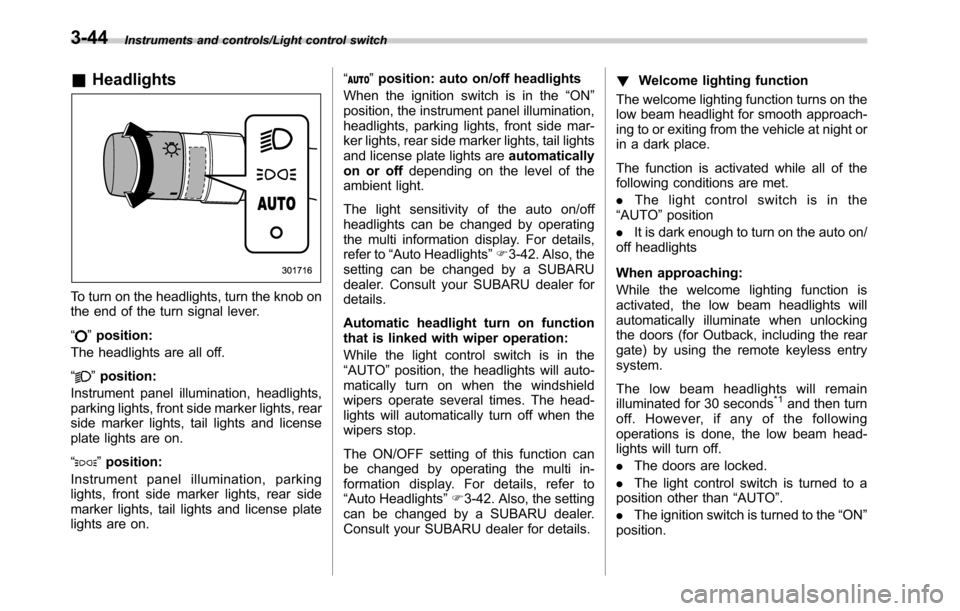
To turn on the headlights, turn the knob on
the end of the turn signal lever.
“
”position:
The headlights are all off.
“
”position:
Instrument panel illumination, headlights,
parking lights, front side marker lights, rear
side marker lights, tail lights and license
plate lights are on.
“
”position:
Instrument panel illumination, parking
lights, front side marker lights, rear side
marker lights, tail lights and license plate
lights are on.“
”position: auto on/off headlights
When the ignition switch is in the“ON”
position, the instrument panel illumination,
headlights, parking lights, front side mar-
ker lights, rear side marker lights, tail lights
and license plate lights areautomatically
on or offdepending on the level of the
ambient light.
The light sensitivity of the auto on/off
headlights can be changed by operating
the multi information display. For details,
refer to“Auto Headlights”F3-42. Also, the
setting can be changed by a SUBARU
dealer. Consult your SUBARU dealer for
details.
Automatic headlight turn on function
that is linked with wiper operation:
While the light control switch is in the
“AUTO”position, the headlights will auto-
matically turn on when the windshield
wipers operate several times. The head-
lights will automatically turn off when the
wipers stop.
The ON/OFF setting of this function can
be changed by operating the multi in-
formation display. For details, refer to
“Auto Headlights”F3-42. Also, the setting
can be changed by a SUBARU dealer.
Consult your SUBARU dealer for details.!Welcome lighting function
The welcome lighting function turns on the
low beam headlight for smooth approach-
ing to or exiting from the vehicle at night or
in a dark place.
The function is activated while all of the
following conditions are met.
.The light control switch is in the
“AUTO”position
.It is dark enough to turn on the auto on/
off headlights
When approaching:
While the welcome lighting function is
activated, the low beam headlights will
automatically illuminate when unlocking
the doors (for Outback, including the rear
gate) by using the remote keyless entry
system.
The low beam headlights will remain
illuminated for 30 seconds
*1and then turn
off. However, if any of the following
operations is done, the low beam head-
lights will turn off.
.The doors are locked.
.The light control switch is turned to a
position other than“AUTO”.
.The ignition switch is turned to the“ON”
position.
3-44
Page 197 of 572
When exiting:
While the welcome lighting function is
activated, the low beam headlights will
remain illuminated even when either of the
following operation is done.
.Thepush-buttonignitionswitchis
turned to the“OFF”status (models with
“keyless access with push-button start
system”)
.The key is pulled out from the ignition
switch (models without“keyless access
with push-button start system”)
The low beam headlights will turn off
under any of the following conditions.
.3 minutes have passed since the low
beam headlights were illuminated by the
welcome lighting function.
.30 seconds have passed since the
door is opened and closed.
*1
.The light control switch is turned to a
position other than“AUTO”.
.The locking procedure is performed
twice. When performing the unlocking
procedure after performing the locking
procedure, perform the locking procedure
twice again.
*1: The setting for the period of time in which
the low beam headlights remain on by the
welcome lighting function can be changed by a
SUBARU dealer. Contact your SUBARU dealerfor details. Also, you can change the setting by
operating the multi information display. For
details, refer to“Welcome Lighting”F3-42
.For models with the genuine SUBARU naviga-
tion system, you can change the setting by
using the navigation system. For details, refer to
the Owner’s Manual supplement for the naviga-
tion system.
!Sensor for the auto on/off head-
lights
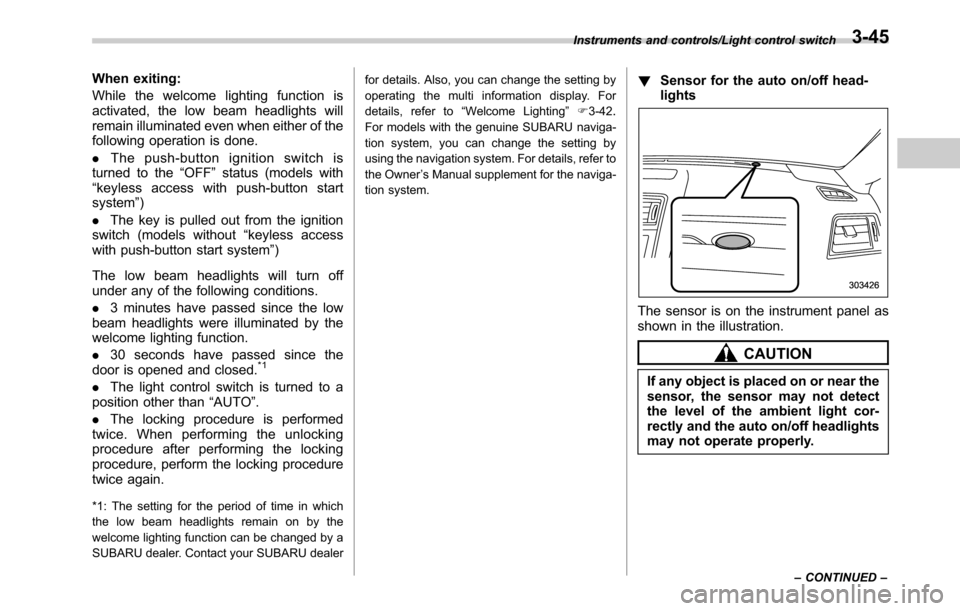
The sensor is on the instrument panel as
shown in the illustration.
CAUTION
If any object is placed on or near the
sensor, the sensor may not detect
the level of the ambient light cor-
rectly and the auto on/off headlights
may not operate properly.
Instruments and controls/Light control switch
–CONTINUED–3-45
Page 198 of 572
Instruments and controls/Light control switch
&High/low beam change
(dimmer)
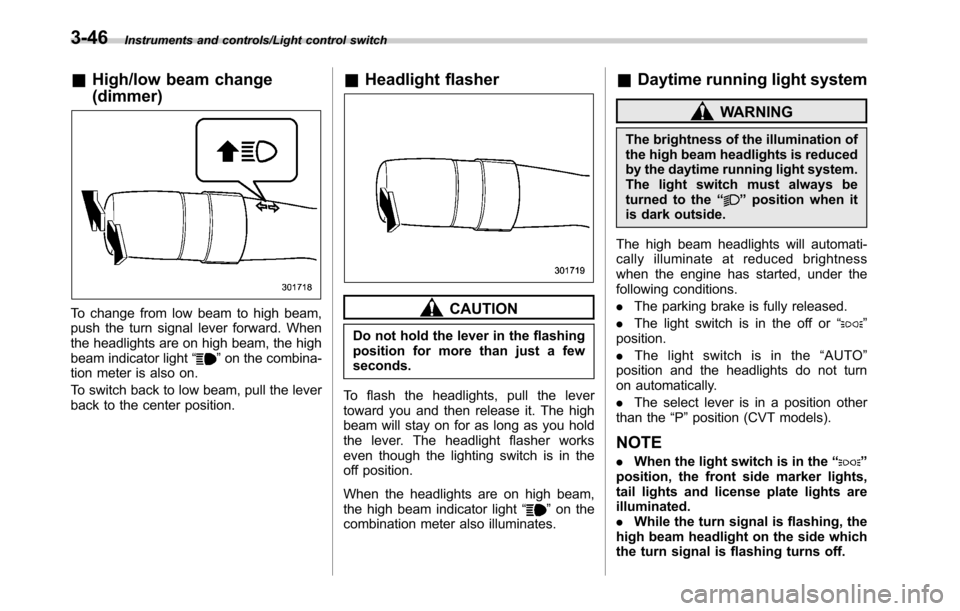
To change from low beam to high beam,
push the turn signal lever forward. When
the headlights are on high beam, the high
beam indicator light“
”on the combina-
tion meter is also on.
To switch back to low beam, pull the lever
back to the center position.
&Headlight flasher
CAUTION
Do not hold the lever in the flashing
position for more than just a few
seconds.
To flash the headlights, pull the lever
toward you and then release it. The high
beam will stay on for as long as you hold
the lever. The headlight flasher works
even though the lighting switch is in the
off position.
When the headlights are on high beam,
the high beam indicator light“
”on the
combination meter also illuminates.
&Daytime running light system
WARNING
The brightness of the illumination of
the high beam headlights is reduced
by the daytime running light system.
The light switch must always be
turned to the“
”position when it
is dark outside.
The high beam headlights will automati-
cally illuminate at reduced brightness
when the engine has started, under the
following conditions.
.The parking brake is fully released.
.The light switch is in the off or“
”
position.
.The light switch is in the“AUTO”
position and the headlights do not turn
on automatically.
.The select lever is in a position other
than the“P”position (CVT models).
NOTE
.When the light switch is in the“”
position, the front side marker lights,
tail lights and license plate lights are
illuminated.
.While the turn signal is flashing, the
high beam headlight on the side which
the turn signal is flashing turns off.
3-46
Page 200 of 572
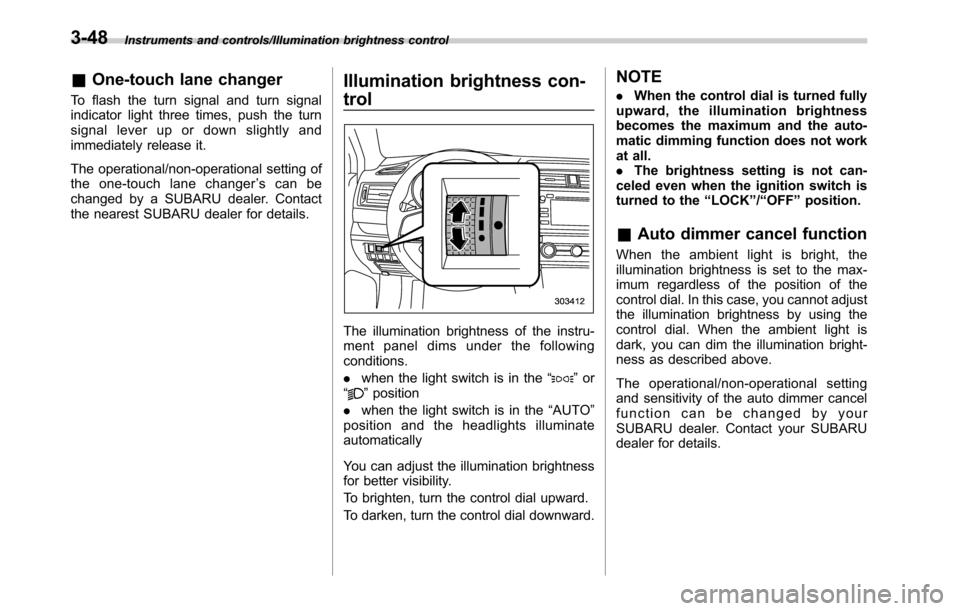
Instruments and controls/Illumination brightness control
&One-touch lane changer
To flash the turn signal and turn signal
indicator light three times, push the turn
signal lever up or down slightly and
immediately release it.
The operational/non-operational setting of
the one-touch lane changer’s can be
changed by a SUBARU dealer. Contact
the nearest SUBARU dealer for details.
Illumination brightness con-
trol
The illumination brightness of the instru-
ment panel dims under the following
conditions.
.when the light switch is in the“
”or
“”position
.when the light switch is in the“AUTO”
position and the headlights illuminate
automatically
You can adjust the illumination brightness
for better visibility.
To brighten, turn the control dial upward.
To darken, turn the control dial downward.
NOTE
.When the control dial is turned fully
upward, the illumination brightness
becomes the maximum and the auto-
matic dimming function does not work
at all.
.The brightness setting is not can-
celed even when the ignition switch is
turned to the“LOCK”/“OFF”position.
&Auto dimmer cancel function
When the ambient light is bright, the
illumination brightness is set to the max-
imum regardless of the position of the
control dial. In this case, you cannot adjust
the illumination brightness by using the
control dial. When the ambient light is
dark, you can dim the illumination bright-
ness as described above.
The operational/non-operational setting
and sensitivity of the auto dimmer cancel
function can be changed by your
SUBARU dealer. Contact your SUBARU
dealer for details.
3-48
Page 223 of 572

the instrument panel and some through
windshield defroster outlets (A small
amount of air flows to the windshield and
both side windows to prevent fogging.)
A) Models with rear ventilators
(Heat-def): Windshield defroster outlets,
foot outlets and both side outlets of the
instrument panel
A) Models with rear ventilators
(Defrost): Windshield defroster outlets and
both side outlets of the instrument panel
NOTE
.When the“”mode or“”mode
is selected, the air conditioner com-
pressor automatically operates to more
quickly defog the windshield. At the
same time, the air inlet selection is
automatically set to the outside air
mode.
In this state:
–The air conditioner indicator light
does not illuminate.
–You cannot stop the air condi-
tioner compressor by pressing the
air conditioner button.
&Temperature control
Turn the temperature control dial over a
range from the blue side (cool) to red side
(warm) to regulate the temperature of
airflow from the air outlets.
!MAX A/C mode
Perform the following operation to select
the MAX A/C mode.
.Turn the temperature control dial to the
“MAX A/C”position (models with type A
climate control system).
.Press the“MAX A/C”button (models
with type B climate control system).
When this mode is selected, some of the
settings will be changed as follows.
Type A climate control system:
.The air inlet selection mode will be
changed to the ON position (recirculation).
.The air conditioner will turn on.
Type B climate control system:
.The temperature setting will be chan-
ged to the maximum cooling mode.
.The fan speed setting will be changed
to the maximum speed.
.The airflow mode setting will be chan-
ged to the“
”(ventilation) mode.
.The air inlet selection mode will be
changed to the ON position (recirculation).
Climate control/Manual climate control
–CONTINUED–4-7
Page 226 of 572

Climate control/Air filtration system
allow outside air to circulate into the
heated interior. This results in quicker
cooling by the air conditioner. Keep the
windows closed during the operation of
the air conditioner for maximum cooling
efficiency.
&Lubrication oil circulation in
the refrigerant circuit
Operate the air conditioner compressor at
a low engine speed (at idle or low driving
speeds) a few minutes each month during
the off-season to circulate its oil.
&Checking air conditioning
system before summer sea-
son
Check the air conditioner unit for refriger-
ant leaks, hose conditions, and proper
operation each spring. Have the air con-
ditioning system checked by your
SUBARU dealer.
&Cooling and dehumidifying in
high humidity and low tem-
perature weather condition
Under certain weather conditions (high
relative humidity, low temperatures, etc.) a
small amount of water vapor emission
from the air outlets may be noticed. This
condition is normal and does not indicateany problem with the air conditioning
system.
&Air conditioner compressor
shut-off when engine is
heavily loaded
To improve acceleration and gas mileage,
the air conditioner compressor is designed
to temporarily shut off during air condi-
tioner operation whenever the accelerator
is fully depressed such as during rapid
acceleration or when driving on a steep
upgrade.
&Refrigerant for your climate
control system
Your air conditioner uses ozone friendly
refrigerant HFC134a. Therefore, the meth-
od of adding, changing or checking the
refrigerant is different from the method for
CFC12 (freon). Consult your SUBARU
dealer for service. Repairs needed as a
result of using the wrong refrigerant are
not covered under warranty.
Air filtration system (if
equipped)
Your vehicle’s air conditioning system is
equipped with an air filtration system.
Replace the air filter element according
to the replacement schedule shown in the
following table. This schedule should be
followed to maintain the filter’sdust
collection ability. Under extremely dusty
conditions, the filter should be replaced
more frequently. Have your filter checked
or replaced by your SUBARU dealer. For
replacement, use only a genuine
SUBARU air filter kit. For the replacement
schedule, refer to the“Warranty and
Maintenance Booklet”.
CAUTION
Contact your SUBARU dealer if the
following occurs, even if it is not yet
time to change the filter.
.Reduction of the airflow through
the vents.
.Windshield gets easily fogged or
misted.
NOTE
The filter can influence the air condi-
tioning, heating and defroster perfor-
4-10
Page 229 of 572

Antenna................................................................ 5-2
Printed antenna................................................... 5-2
Roof antenna (if equipped).................................. 5-2
Audio set............................................................. 5-2Base display audio set (if equipped).................... 5-4
SUBARU STARLINKTMMultimedia Plus audio set
(U.S. spec. models only, if equipped)................. 5-6
Tips for operating the audio/visual system........... 5-7
Basic information before use.............................. 5-15
Basic operation.................................................. 5-18
Unit settings...................................................... 5-19
STARLINK (if equipped)...................................... 5-26
AM/FM radio....................................................... 5-28
SiriusXM Satellite Radio (if equipped)................. 5-37
aha
TMby HARMAN............................................. 5-44
Pandora®(if equipped)....................................... 5-50
CD ..................................................................... 5-53
USB memory...................................................... 5-55
iPod................................................................... 5-56
Bluetooth audio.................................................. 5-58
AUX ................................................................... 5-61
Steering switches for audio.............................. 5-63
Bluetooth®settings............................................ 5-66Regulatory information....................................... 5-66Registering/connecting Bluetooth
®device.......... 5-66
Setting Bluetooth details.................................... 5-69
Hands-free phone system................................. 5-71
Control screen................................................... 5-72
Registering/connecting a Bluetooth phone......... 5-73
Using the phone switch/microphone................... 5-73
How to change the hands-free phone system..... 5-73
Making a call..................................................... 5-73
Receiving a call................................................. 5-77
Talking on the phone......................................... 5-78
Phone settings.................................................. 5-79
Voice command system.................................... 5-81Using the voice command system...................... 5-81
Voice command system operation...................... 5-82
Command list.................................................... 5-84
What to do if....................................................... 5-88Troubleshooting................................................. 5-88
Appendix............................................................ 5-92Certification....................................................... 5-92
Certification for the Hands-free system............... 5-92
Certification for Mexico models.......................... 5-93
Audio
5
Page 235 of 572

&Tips for operating the audio/
visual system
CAUTION
To avoid damage to the audio/visual
system:
.Be careful not to spill beverages
over the audio/visual system.
.Do not put anything other than an
appropriate disc into the disc
slot.
NOTE
The use of a cell phone inside or near
the vehicle may cause a noise from the
speakers of the audio/visual system
which you are listening to. However,
this does not indicate a malfunction.
!Radio
Usually, a problem with radio reception
does not mean there is a problem with the
radio—it is just the normal result of
conditions outside the vehicle.
For example, nearby buildings and terrain
can interfere with FM reception. Power
lines or phone wires can interfere with AM
signals. And of course, radio signals have
a limited range. The farther the vehicle isfrom a station, the weaker its signal will
be. In addition, reception conditions
change constantly as the vehicle moves.
Here, some common reception problems
that probably do not indicate a problem
with the radio are described.
!FM
Fading and drifting stations: Generally, the
effective range of FM is about 25 miles (40
km). Once outside this range, you may
notice fading and drifting, which increase
with the distance from the radio transmit-
ter. They are often accompanied by
distortion.
Multi-path: FM signals are reflective,
making it possible for 2 signals to reach
the vehicle’s antenna at the same time. If
this happens, the signals will cancel each
other out, causing a momentary flutter or
loss of reception.
Static and fluttering: These occur when
signals are blocked by buildings, trees or
other large objects. Increasing the bass
level may reduce static and fluttering.
Station swapping: If the FM signal being
listened to is interrupted or weakened, and
there is another strong station nearby on
the FM band, the radio may tune in the
second station until the original signal can
be picked up again.!AM
Fading: AM broadcasts are reflected by
the upper atmosphere—especially at
night. These reflected signals can inter-
fere with those received directly from the
radio station, causing the radio station to
sound alternately strong and weak.
Station interference: When a reflected
signal and a signal received directly from
a radio station are very nearly the same
frequency, they can interfere with each
other, making it difficult to hear the broad-
cast.
Static: AM is easily affected by external
sources of electrical noise, such as high
tension power lines, lightening or electrical
motors. This results in static.
!SiriusXM (if equipped)
.Cargo loaded on the roof luggage
carrier, especially metal objects, may
adversely affect the reception of SiriusXM
Satellite Radio.
.Alternation or modifications carried out
without appropriate authorization may in-
validate the user’s right to operate the
equipment.
Audio/Audio set
–CONTINUED–5-7