lights SUBARU LEGACY 2016 6.G Workshop Manual
[x] Cancel search | Manufacturer: SUBARU, Model Year: 2016, Model line: LEGACY, Model: SUBARU LEGACY 2016 6.GPages: 572
Page 365 of 572
!Automatic engine shutdown
The remote engine start system will
automatically shut down or will not start
the engine under the following conditions.
.The total run-time has exceeded 20
minutes.
.Any door or the rear gate is opened.
.The select lever is moved to any
position other than“P”.
.The engine hood is opened.
.Thepush-buttonignitionswitchis
pressed.
.The brake pedal is depressed.
.The engine speed is 3,000 rpm or
more.
The time until the engine automatically
stops differs according to the setting.
To change the time until the engine
automatically stops, contact your
SUBARU dealer. However, local laws
and regulations may prohibit changing
this time.&Models without“keyless ac-
cess with push-button start
system”
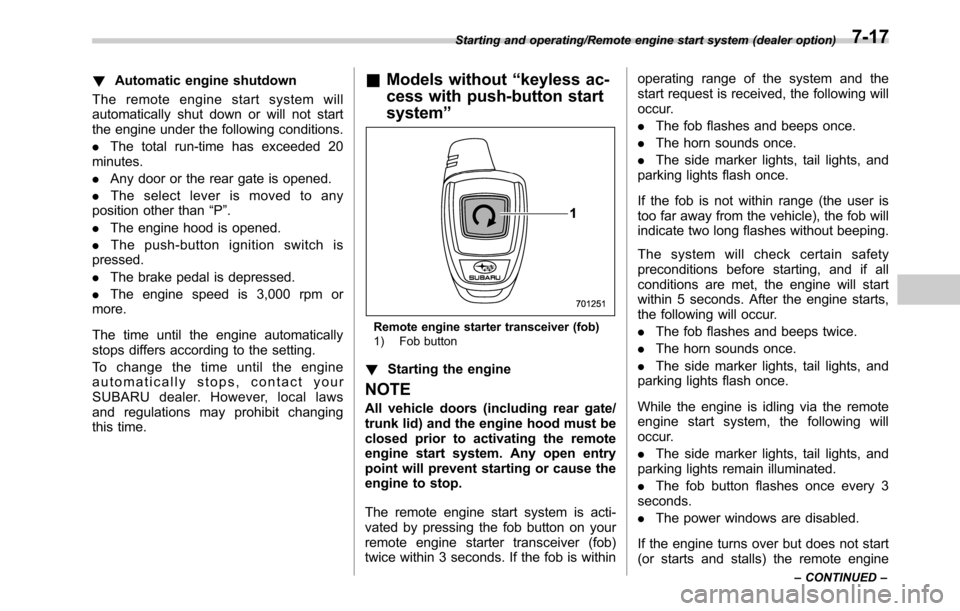
Remote engine starter transceiver (fob)
1) Fob button
!Starting the engine
NOTE
All vehicle doors (including rear gate/
trunk lid) and the engine hood must be
closed prior to activating the remote
engine start system. Any open entry
point will prevent starting or cause the
engine to stop.
The remote engine start system is acti-
vated by pressing the fob button on your
remote engine starter transceiver (fob)
twice within 3 seconds. If the fob is withinoperating range of the system and the
start request is received, the following will
occur.
.The fob flashes and beeps once.
.The horn sounds once.
.The side marker lights, tail lights, and
parking lights flash once.
If the fob is not within range (the user is
too far away from the vehicle), the fob will
indicate two long flashes without beeping.
The system will check certain safety
preconditions before starting, and if all
conditions are met, the engine will start
within 5 seconds. After the engine starts,
the following will occur.
.The fob flashes and beeps twice.
.The horn sounds once.
.The side marker lights, tail lights, and
parking lights flash once.
While the engine is idling via the remote
engine start system, the following will
occur.
.The side marker lights, tail lights, and
parking lights remain illuminated.
.The fob button flashes once every 3
seconds.
.The power windows are disabled.
If the engine turns over but does not start
(or starts and stalls) the remote engine
Starting and operating/Remote engine start system (dealer option)
–CONTINUED–7-17
Page 366 of 572

Starting and operating/Remote engine start system (dealer option)
start system will power off and then
attempt to start the engine 3 additional
times. The system will not attempt to
restart the engine if it determines a vehicle
malfunction is preventing starting. If the
engine does not start after 3 additional
attempts, the remote engine start request
will be aborted.
!Stopping the engine
Press and hold the fob button for at least 2
seconds to stop the engine. The fob will
flash and beep three times, indicating the
engine has stopped. If the stop request is
not received (for example, if the user is too
far away from the vehicle), the fob will
continue to flash once every 3 seconds.
The system will automatically stop the
engine after 15 minutes.
!Remote start safety features
For safety and security reasons, the
remote engine start system will prevent
starting (or stop the engine if running) and
sound the horn twice if any of the following
conditions is detected. In addition, the fob
will flash and beep 3 times.
.The brake pedal is depressed
.A key is in the ignition switch
.The engine hood is open
.The remote start system“Service
mode”is engaged
.The engine idle speed exceeds 3,500RPM
.The security alarm is triggered
.The select lever is not in the“P”
position
If the system detects any door (including
the rear gate/trunk lid) open during opera-
tion, it will prevent starting or stop the
engine, and sound the horn and flash side
marker lights, tail lights, and parking lights
6 times.
In addition to the items above, if the
vehicle’s engine management system
determines there is a safety risk due to a
vehicle-related problem, the vehicle will
power down and the horn will sound 3
times.
NOTE
.If the alarm system is armed at the
time of remote engine starter activation
(the security indicator light on the
combination meter is flashing), the
alarm system will remain armed
throughout the remote start run cycle.
.If the alarm system is disarmed at
the time of remote engine starter
activation (the security indicator light
on the combination meter is not flash-
ing), the alarm system will remain
disarmed throughout the remote start
run cycle.!Remote start operation - fob con-
firmation
Your remote engine starter fob is a
bidirectional transceiver that can confirm
system operation with several different
visual and audible indications. The fob’s
LED-backlit button and internal piezo
buzzer will indicate status of the system
using the following flash and beep se-
quences, provided the fob is within opera-
tional range of the system.
7-18
Page 369 of 572

event that a transmitter is lost, stolen,
damaged or additional transmitters are
desired (the system will accept up to eight
transmitters). New remote engine start
transmitters can be programmed accord-
ing to the following procedure.
1. Open the driver’s door (the driver’s
door must remain opened throughout the
entire process).
2. Depress and hold the brake pedal.
3. Turn the ignition switch to“ON”then
“LOCK”, back to“ON”then“LOCK”, back
to“ON”then“LOCK”, then back to“ON”
again and leave the ignition“ON”through-
out the programming process.
4. The system will flash the side marker
lights, tail lights and parking lights and
honk the horn three times, indicating that
the system has entered the transmitter
learn mode.
5. Press and release the“
”button on
the transmitter that you want to program.
6. The system will flash the side marker
lights, tail lights and parking lights and
honk the horn one time, indicating that the
system has learned the transmitter. Upon
successful programming, the remote start
confirmation transmitter button will flash
one time.
7. Repeat step 5 for any additional
transmitters (the system will accept up toeight transmitters).
8. The system will exit the transmitter
learn mode if the key is turned to the
“LOCK”position, the door is closed or
after 2 minutes.
&System maintenance
NOTE
For models without“keyless access
with push-button start system”:
In the event that the vehicle’s battery is
replaced, discharged or disconnected,
it will be necessary to start the vehicle
a minimum of one time using the key
prior to activating the remote engine
start system. This is required to allow
the vehicle electronic systems to re-
synchronize.
!Changing the batteries
CAUTION
.Do not let dust, oil or water get on
or in the remote engine start
transmitter when replacing the
battery.
.Be careful not to damage the
printed circuit board in the re-
mote engine start transmitter
when replacing the battery..Be careful not to allow children to
touch the battery and any re-
moved parts; children could
swallow them.
.There is a danger of explosion if
an incorrect replacement battery
is used. Replace only with the
same or equivalent type of bat-
tery.
.Batteries should not be exposed
to excessive heat such as sun-
shine, fire or the like.
For models with“keyless access with
push-button start system:
Perform the procedure described in“Re-
placing battery of access key”F11-50.
For models without“keyless access
with push-button start system”:
The 3-volt lithium battery (model CR-
2032) supplied in your remote engine start
transmitter should last approximately one
year, depending on usage. When the
battery begins to weaken, you will notice
a decrease in range (distance from the
vehicle that your remote control operates).
Follow the instructions below to change
the remote engine start transmitter battery.
Starting and operating/Remote engine start system (dealer option)
–CONTINUED–7-21
Page 382 of 572
Starting and operating/Electronic Brake Force Distribution (EBD) system
Electronic Brake Force Dis-
tribution (EBD) system
The EBD system maximizes the effective-
ness of the brakes by allowing the rear
brakes to supply a greater proportion of
the braking force. It functions by adjusting
the distribution of braking force to the rear
wheels in accordance with the vehicle’s
loading condition and speed.
The EBD system is an integral part of the
ABS and uses some of the ABS compo-
nents to perform its function of optimizing
the distribution of braking force. If any of
the ABS components used by the EBD
function fails, the EBD system also stops
working.
When the EBD system is operating, you
may hear a chattering noise or feel a slight
vibration in the brake pedal. This is normal
and does not indicate a malfunction.
&Steps to take if EBD system
malfunctions
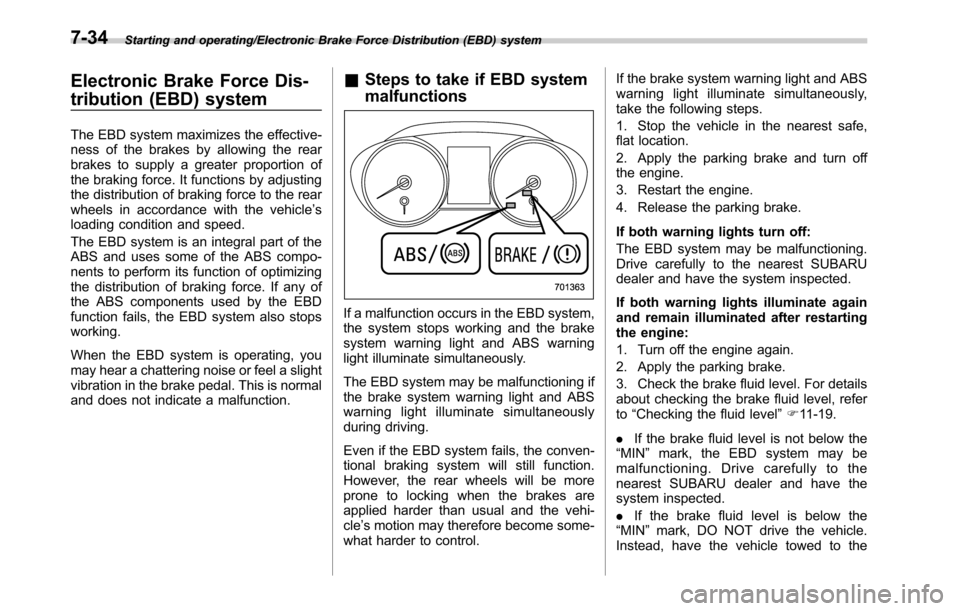
If a malfunction occurs in the EBD system,
the system stops working and the brake
system warning light and ABS warning
light illuminate simultaneously.
The EBD system may be malfunctioning if
the brake system warning light and ABS
warning light illuminate simultaneously
during driving.
Even if the EBD system fails, the conven-
tional braking system will still function.
However, the rear wheels will be more
prone to locking when the brakes are
applied harder than usual and the vehi-
cle’s motion may therefore become some-
what harder to control.If the brake system warning light and ABS
warning light illuminate simultaneously,
take the following steps.
1. Stop the vehicle in the nearest safe,
flat location.
2. Apply the parking brake and turn off
the engine.
3. Restart the engine.
4. Release the parking brake.
If both warning lights turn off:
The EBD system may be malfunctioning.
Drive carefully to the nearest SUBARU
dealer and have the system inspected.
If both warning lights illuminate again
and remain illuminated after restarting
the engine:
1. Turn off the engine again.
2. Apply the parking brake.
3. Check the brake fluid level. For details
about checking the brake fluid level, refer
to“Checking the fluid level”F11-19.
.If the brake fluid level is not below the
“MIN”mark, the EBD system may be
malfunctioning. Drive carefully to the
nearest SUBARU dealer and have the
system inspected.
.If the brake fluid level is below the
“MIN”mark, DO NOT drive the vehicle.
Instead, have the vehicle towed to the
7-34
Page 405 of 572

warn the driver of dangers. When rever-
sing the vehicle, the indicator light flashes
when the system detects a vehicle ap-
proaching from either side.
!BSD/RCTA approach indicator
light dimming function
When the headlights are turned on, the
brightness of the BSD/RCTA approach
indicator light will be reduced.
NOTE
.When affected by direct sunlight,
you may have difficulty recognizing
the BSD/RCTA approach indicator light.
.When affected by the headlight
beams from the vehicles behind, you
may have difficulty recognizing the
BSD/RCTA approach indicator light.
.While the illumination brightness
control dial is in the fully upward
position, even if the headlights are
turned on, the brightness of the BSD/
RCTA approach indicator light will not
be reduced. For details about the
illumination brightness control dial,
refer to“Illumination brightness con-
trol”F3-48.!BSD/RCTA approach warning buz-
zer (only when reversing)
A warning buzzer sounds along with
flashing of the BSD/RCTA approach in-
dicator light to warn the driver of dangers.
The setting of the warning buzzer volume
can be changed by operating the multi
information display of the combination
meter. For details, refer to“BSD/RCTA”
F3-42.
!Safety tips regarding the BSD/RCTA
approach indicator light/warning
buzzer
.In the following cases, operation of the
BSD/RCTA approach indicator light and
the warning buzzer may be delayed or the
system may fail to issue these warnings.
–Whenavehiclemovestothe
neighboring lane from a lane next to
the neighboring lane
–When driving on a steep incline or
on repeated sharp uphill and downhill
grades
–When going beyond a pass
–When both your vehicle and a
vehicle driving on a neighboring lane
are driving on the far side of each lane.
–When several narrowly-spaced ve-
hicles are approaching in a row
–In low radius bends (tight bends orwhen making turns at an intersection)
–When there is a difference in height
between your lane and the neighbor-
ing lane
–Immediately after the BSD/RCTA is
activated by pressing the BSD/RCTA
OFF switch
–Immediately after the shift lever/
select lever is shifted to the“R”
position
–When extremely heavy cargo is
loaded in the trunk or cargo area
.During reversing, operation of the BSD/
RCTA approach indicator light and the
warning buzzer may be delayed or the
system may fail to issue these warnings
under the following conditions.
–When backing out of an angled
parking space
–When a large-sized vehicle is
parked next to your vehicle (That
vehicle prevents the propagation of
radar waves.)
–When reversing on sloped roads
–When reversing at a high speed
Starting and operating/BSD/RCTA
–CONTINUED–7-57
Page 430 of 572
Driving tips/Trailer hitch (Outback—if equipped)
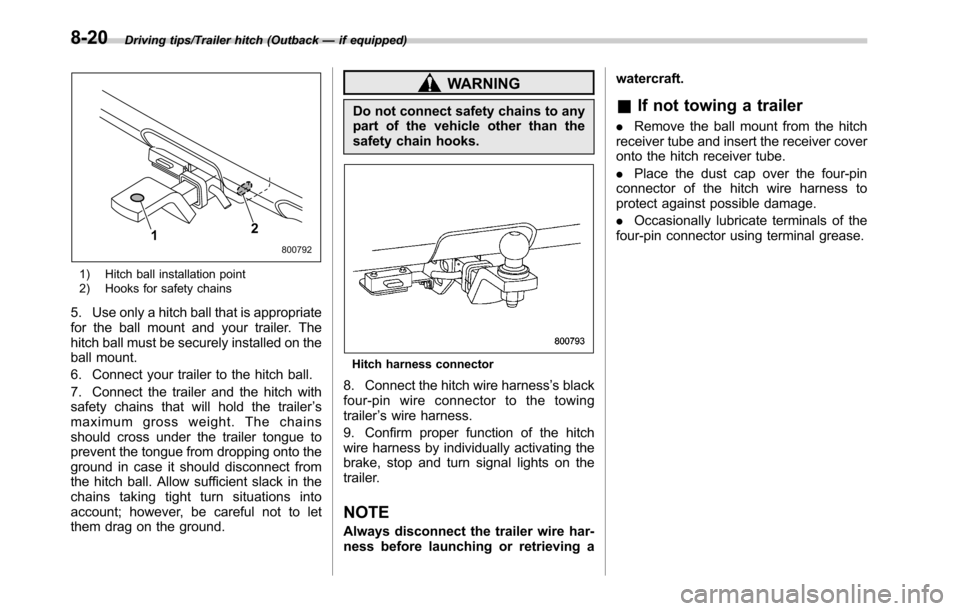
1) Hitch ball installation point
2) Hooks for safety chains
5. Use only a hitch ball that is appropriate
for the ball mount and your trailer. The
hitch ball must be securely installed on the
ball mount.
6. Connect your trailer to the hitch ball.
7. Connect the trailer and the hitch with
safety chains that will hold the trailer’s
maximum gross weight. The chains
should cross under the trailer tongue to
prevent the tongue from dropping onto the
ground in case it should disconnect from
the hitch ball. Allow sufficient slack in the
chains taking tight turn situations into
account; however, be careful not to let
them drag on the ground.
WARNING
Do not connect safety chains to any
part of the vehicle other than the
safety chain hooks.
Hitch harness connector
8. Connect the hitch wire harness’s black
four-pin wire connector to the towing
trailer’s wire harness.
9. Confirm proper function of the hitch
wire harness by individually activating the
brake, stop and turn signal lights on the
trailer.
NOTE
Always disconnect the trailer wire har-
ness before launching or retrieving awatercraft.
&If not towing a trailer
.Remove the ball mount from the hitch
receiver tube and insert the receiver cover
onto the hitch receiver tube.
.Place the dust cap over the four-pin
connector of the hitch wire harness to
protect against possible damage.
.Occasionally lubricate terminals of the
four-pin connector using terminal grease.
8-20
Page 436 of 572
Driving tips/Trailer towing (Outback)
ground.
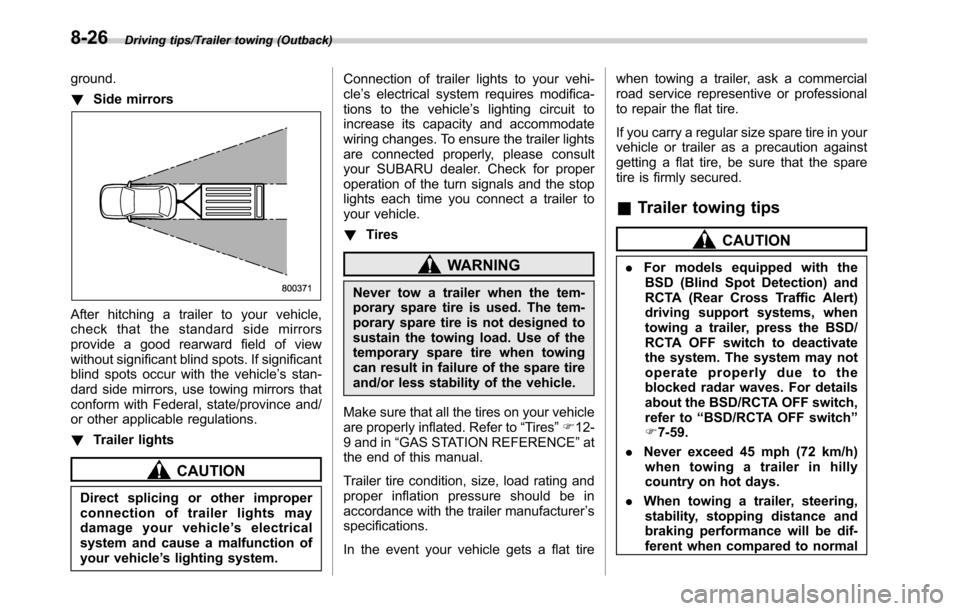
!Side mirrors
After hitching a trailer to your vehicle,
check that the standard side mirrors
provide a good rearward field of view
without significant blind spots. If significant
blind spots occur with the vehicle’s stan-
dard side mirrors, use towing mirrors that
conform with Federal, state/province and/
or other applicable regulations.
!Trailer lights
CAUTION
Direct splicing or other improper
connection of trailer lights may
damage your vehicle’s electrical
system and cause a malfunction of
your vehicle’s lighting system.Connection of trailer lights to your vehi-
cle’s electrical system requires modifica-
tions to the vehicle’s lighting circuit to
increase its capacity and accommodate
wiring changes. To ensure the trailer lights
are connected properly, please consult
your SUBARU dealer. Check for proper
operation of the turn signals and the stop
lights each time you connect a trailer to
your vehicle.
!Tires
WARNING
Never tow a trailer when the tem-
porary spare tire is used. The tem-
porary spare tire is not designed to
sustain the towing load. Use of the
temporary spare tire when towing
can result in failure of the spare tire
and/or less stability of the vehicle.
Make sure that all the tires on your vehicle
are properly inflated. Refer to“Tires”F12-
9 and in“GAS STATION REFERENCE”at
the end of this manual.
Trailer tire condition, size, load rating and
proper inflation pressure should be in
accordance with the trailer manufacturer’s
specifications.
In the event your vehicle gets a flat tirewhen towing a trailer, ask a commercial
road service representive or professional
to repair the flat tire.
If you carry a regular size spare tire in your
vehicle or trailer as a precaution against
getting a flat tire, be sure that the spare
tire is firmly secured.
&Trailer towing tips
CAUTION
.For models equipped with the
BSD (Blind Spot Detection) and
RCTA (Rear Cross Traffic Alert)
driving support systems, when
towing a trailer, press the BSD/
RCTA OFF switch to deactivate
the system. The system may not
operate properly due to the
blocked radar waves. For details
about the BSD/RCTA OFF switch,
refer to“BSD/RCTA OFF switch”
F7-59.
.Never exceed 45 mph (72 km/h)
when towing a trailer in hilly
country on hot days.
.When towing a trailer, steering,
stability, stopping distance and
braking performance will be dif-
ferent when compared to normal
8-26
Page 437 of 572

operation. You should never
drive at excessive speeds but
always employ extra caution
when towing a trailer. You should
also keep the following tips in
mind.
!Before starting out on a trip
.Check the towing regulations for trailer
or caravan vehicles that vary by state/
region. Failure to comply with the proce-
dures set forth will not only compromise
your safety, but will also negate your
insurance coverage and/or may violate
the state road and traffic acts and regula-
tions.
.Check that the vehicle and vehicle-to-
hitch mounting are in good condition. If
any problems are apparent, do not tow the
trailer.
.Check that the vehicle rests horizon-
tally with the trailer attached. If the vehicle
is tipped sharply up at the front and down
at the rear, check the total trailer weight,
GVW, GAWs and tongue load again, then
confirm that the load and its distribution
are acceptable.
.Check that the tire pressures are
correct.
.Check that the vehicle and trailer are
connected properly. Confirm that–the trailer tongue is connected
properly to the hitch ball.
–the trailer lights connector is con-
nected properly and trailer’s stop lights
illuminate when the vehicle’s brake
pedal is pressed, and that the trailer’s
turn signal lights flash when the
vehicle’s turn signal lever is operated.
–the safety chains are connected
properly.
–all cargo in the trailer is secured
safely in position.
–the side mirrors provide a good
rearward field of view without a sig-
nificant blind spot.
.Sufficient time should be taken to learn
the“feel”of the vehicle/trailer combination
before starting out on a trip. In an area free
of traffic, practice turning, stopping and
backing up.
!Driving with a trailer
.You should allow for considerably more
stopping distance when towing a trailer.
Avoid sudden braking because it may
result in skidding or jackknifing and loss of
control.
.Avoid abrupt starts and sudden accel-
erations. For MT models, always start out
in first gear and release the clutch pedal at
moderate engine revolution.
.Avoid uneven steering, sharp turns andrapid lane changes.
.Slow down before turning. Make a
longer than normal turning radius because
the trailer wheels will be closer than the
vehicle wheels to the inside of the turn. In
a tight turn, the trailer could hit your
vehicle.
.Crosswinds will adversely affect the
handling of your vehicle and trailer, caus-
ing sway. Crosswinds can be due to
weather conditions or the passing of large
trucks or buses. If swaying occurs, firmly
grip the steering wheel and promptly begin
decelerating your vehicle at a gradual
pace.
.When passing other vehicles, consid-
erable distance is required because of the
added weight and length caused by
attaching the trailer to your vehicle.
Driving tips/Trailer towing (Outback)
–CONTINUED–8-27
Page 449 of 572
Jump starting
WARNING
.Battery fluid is SULFURIC ACID.
Do not let it come in contact with
the eyes, skin, clothing or the
vehicle.
If battery fluid gets on you,
thoroughly flush the exposed
area with water immediately. Get
medical help if the fluid has
entered your eyes.
If battery fluid is accidentally
swallowed, immediately drink a
large amount of milk or water,
and obtain immediate medical
help.
Keep everyone including chil-
dren away from the battery.
.The gas generated by a battery
explodes if a flame or spark is
brought near it. Do not smoke or
light a match while jump starting.
.Never attempt jump starting if the
discharged battery is frozen. It
could cause the battery to burst
or explode.
.Whenever working on or around
a battery, always wear suitableeye protectors, and remove metal
objects such as rings, bands or
other metal jewelry.
.Be sure the jumper cables and
clamps on them do not have
loose or missing insulation.
.Do not jump start unless cables
in suitable condition are avail-
able.
.A running engine can be danger-
ous. Keep your fingers, hands,
clothing, hair and tools away
from the cooling fan, belts and
any other moving engine parts.
Removing rings, watches and
ties is advisable.
.Jump starting is dangerous if it is
done incorrectly. If you are un-
sure about the proper procedure
for jump starting, consult a com-
petent mechanic.
When your vehicle does not start due to a
run down (discharged) battery, the vehicle
may be jump started by connecting your
battery to another battery (called the
booster battery) with jumper cables.
&How to jump start
1. Make sure the booster battery is 12
volts and the negative terminal is
grounded.
2. If the booster battery is in another
vehicle, do not let the two vehicles touch.
3. Turn off all unnecessary lights and
accessories.
4. Connect the jumper cables exactly in
the sequence illustrated.
In case of emergency/Jump starting
–CONTINUED–9-11
Page 470 of 572

Maintenance and service
Wheel replacement........................................... 11-31
Aluminum wheels............................................. 11-31
Windshield washer fluid.................................. 11-32
Replacement of wiper blades.......................... 11-33
Windshield wiper blade assembly..................... 11-34
Windshield wiper blade rubber......................... 11-34
Rear window wiper blade assembly
(Outback)....................................................... 11-35
Rear window wiper blade rubber (Outback) ....... 11-36
Battery............................................................... 11-37
Fuses................................................................ 11-38
Installation of accessories............................... 11-40
Replacing bulbs............................................... 11-40
HID headlights (if equipped)............................. 11-40
Halogen headlights.......................................... 11-40Front turn signal light...................................... 11-42
Front side marker light..................................... 11-42
Front fog light (if equipped).............................. 11-42
Rear combination lights................................... 11-43
Backup light.................................................... 11-45
License plate light........................................... 11-47
Dome light....................................................... 11-48
Map light......................................................... 11-48
Door step light................................................. 11-48
Cargo area light (Outback)............................... 11-49
Trunk light (Legacy)......................................... 11-49
Other bulbs..................................................... 11-49
Replacing battery............................................. 11-49Replacing battery of access key....................... 11-50
Replacing battery of transmitter....................... 11-51