display SUBARU LEGACY 2016 6.G Manual Online
[x] Cancel search | Manufacturer: SUBARU, Model Year: 2016, Model line: LEGACY, Model: SUBARU LEGACY 2016 6.GPages: 572
Page 303 of 572
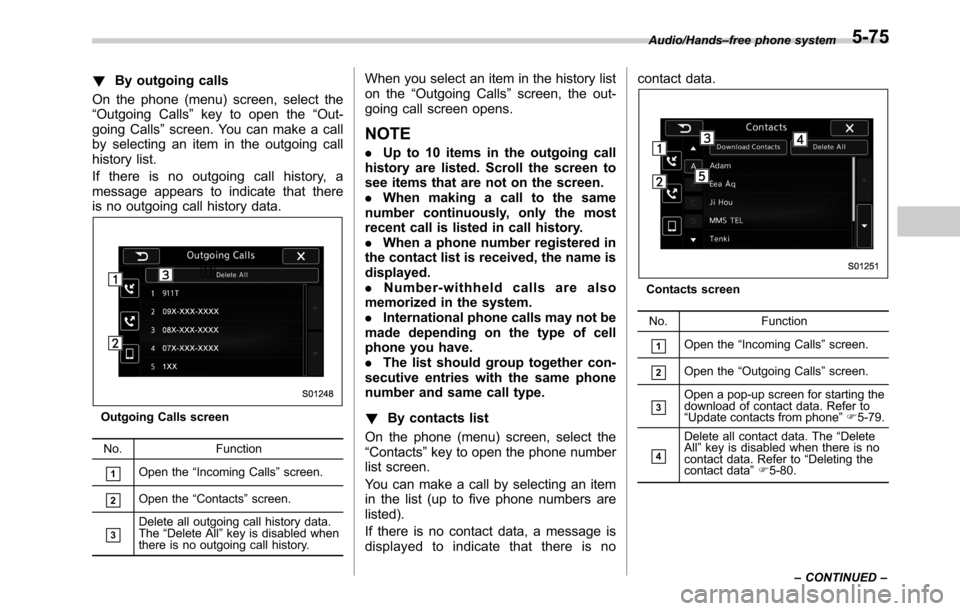
!By outgoing calls
On the phone (menu) screen, select the
“Outgoing Calls”key to open the“Out-
going Calls”screen. You can make a call
by selecting an item in the outgoing call
history list.
If there is no outgoing call history, a
message appears to indicate that there
is no outgoing call history data.
Outgoing Calls screen
No. Function
&1Open the“Incoming Calls”screen.
&2Open the“Contacts”screen.
&3Delete all outgoing call history data.
The“Delete All”key is disabled when
there is no outgoing call history.
When you select an item in the history list
on the“Outgoing Calls”screen, the out-
going call screen opens.
NOTE
.Up to 10 items in the outgoing call
history are listed. Scroll the screen to
see items that are not on the screen.
.When making a call to the same
number continuously, only the most
recent call is listed in call history.
.When a phone number registered in
the contact list is received, the name is
displayed.
.Number-withheld calls are also
memorized in the system.
.International phone calls may not be
made depending on the type of cell
phone you have.
.The list should group together con-
secutive entries with the same phone
number and same call type.
!By contacts list
On the phone (menu) screen, select the
“Contacts”key to open the phone number
list screen.
You can make a call by selecting an item
in the list (up to five phone numbers are
listed).
If there is no contact data, a message is
displayed to indicate that there is nocontact data.
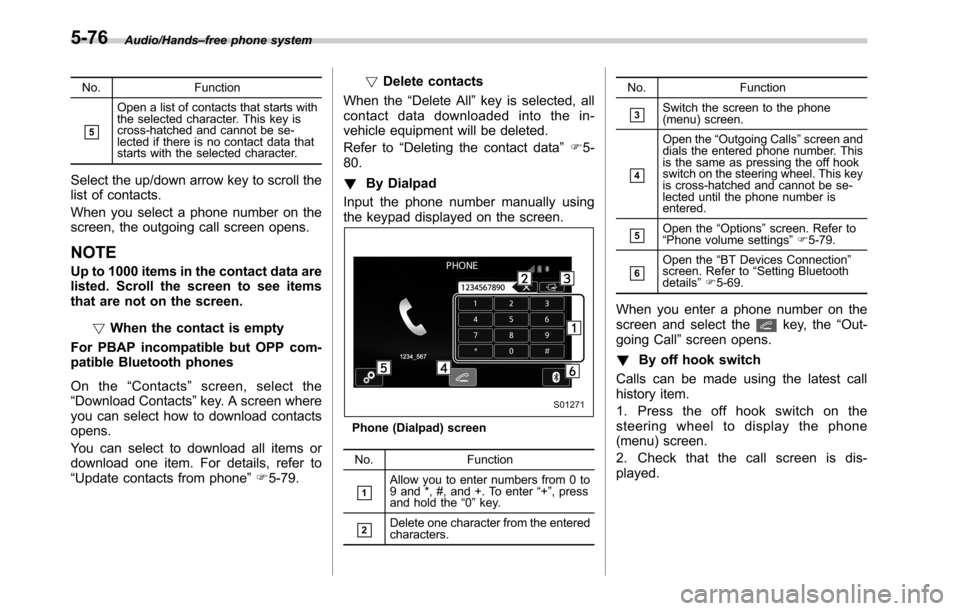
Contacts screen
No. Function
&1Open the“Incoming Calls”screen.
&2Open the“Outgoing Calls”screen.
&3Open a pop-up screen for starting the
download of contact data. Refer to
“Update contacts from phone”F5-79.
&4
Delete all contact data. The“Delete
All”key is disabled when there is no
contact data. Refer to“Deleting the
contact data”F5-80. Audio/Hands–free phone system
–CONTINUED–
5-75
Page 304 of 572
Audio/Hands–free phone system
No. Function
&5
Open a list of contacts that starts with
the selected character. This key is
cross-hatched and cannot be se-
lected if there is no contact data that
starts with the selected character.
Select the up/down arrow key to scroll the
list of contacts.
When you select a phone number on the
screen, the outgoing call screen opens.
NOTE
Up to 1000 items in the contact data are
listed. Scroll the screen to see items
that are not on the screen.
!When the contact is empty
For PBAP incompatible but OPP com-
patible Bluetooth phones
On the“Contacts”screen, select the
“Download Contacts”key. A screen where
you can select how to download contacts
opens.
You can select to download all items or
download one item. For details, refer to
“Update contacts from phone”F5-79.!Delete contacts
When the“Delete All”key is selected, all
contact data downloaded into the in-
vehicle equipment will be deleted.
Refer to“Deleting the contact data”F5-
80.
!By Dialpad
Input the phone number manually using
the keypad displayed on the screen.
Phone (Dialpad) screen
No. Function
&1Allow you to enter numbers from 0 to
9 and *, #, and +. To enter“+”, press
and hold the“0”key.
&2Delete one character from the entered
characters.No. Function
&3Switch the screen to the phone
(menu) screen.
&4
Open the“Outgoing Calls”screen and
dials the entered phone number. This
is the same as pressing the off hook
switch on the steering wheel. This key
is cross-hatched and cannot be se-
lected until the phone number is
entered.
&5Open the“Options”screen. Refer to
“Phone volume settings”F5-79.
&6Open the“BT Devices Connection”
screen. Refer to“Setting Bluetooth
details”F5-69.
When you enter a phone number on the
screen and select thekey, the“Out-
going Call”screen opens.
!By off hook switch
Calls can be made using the latest call
history item.
1. Press the off hook switch on the
steering wheel to display the phone
(menu) screen.
2. Check that the call screen is dis-
played.
5-76
Page 305 of 572
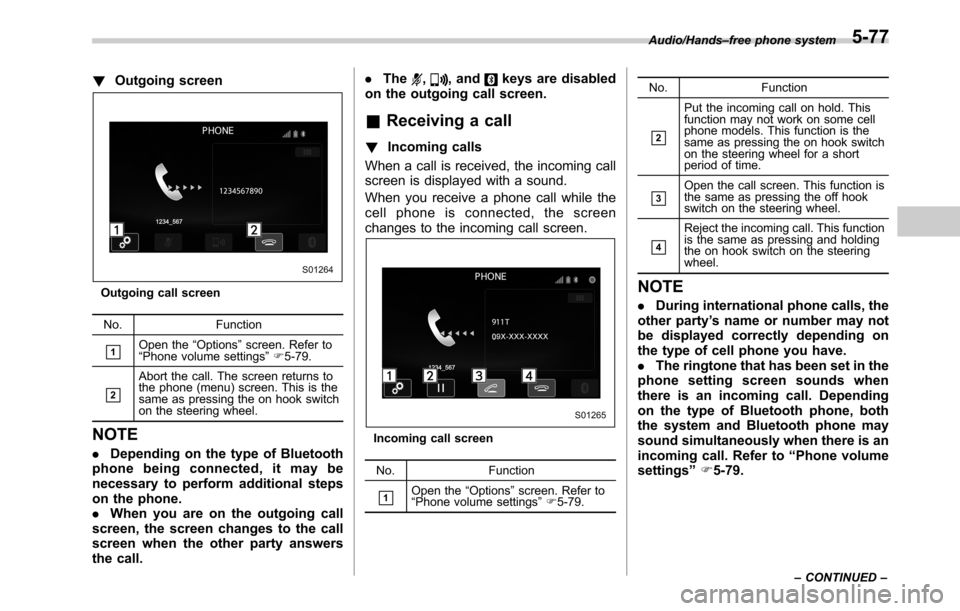
!Outgoing screen
Outgoing call screen
No. Function
&1Open the“Options”screen. Refer to
“Phone volume settings”F5-79.
&2
Abort the call. The screen returns to
the phone (menu) screen. This is the
same as pressing the on hook switch
on the steering wheel.
NOTE
.Depending on the type of Bluetooth
phone being connected, it may be
necessary to perform additional steps
on the phone.
.When you are on the outgoing call
screen, the screen changes to the call
screen when the other party answers
the call..The
,, andkeys are disabled
on the outgoing call screen.
&Receiving a call
!Incoming calls
When a call is received, the incoming call
screen is displayed with a sound.
When you receive a phone call while the
cell phone is connected, the screen
changes to the incoming call screen.
Incoming call screen
No. Function
&1Open the“Options”screen. Refer to
“Phone volume settings”F5-79.No. Function
&2
Put the incoming call on hold. This
function may not work on some cell
phone models. This function is the
same as pressing the on hook switch
on the steering wheel for a short
period of time.
&3Open the call screen. This function is
the same as pressing the off hook
switch on the steering wheel.
&4
Reject the incoming call. This function
is the same as pressing and holding
the on hook switch on the steering
wheel.
NOTE
.During international phone calls, the
other party’s name or number may not
be displayed correctly depending on
the type of cell phone you have.
.The ringtone that has been set in the
phone setting screen sounds when
there is an incoming call. Depending
on the type of Bluetooth phone, both
the system and Bluetooth phone may
sound simultaneously when there is an
incoming call. Refer to“Phone volume
settings”F5-79.
Audio/Hands–free phone system
–CONTINUED–5-77
Page 306 of 572
Audio/Hands–free phone system
!By off/on hook switch
When you receive a call, you can also
answer it by pressing the off hook switch
on the steering switch. To end a call, press
the on hook switch.
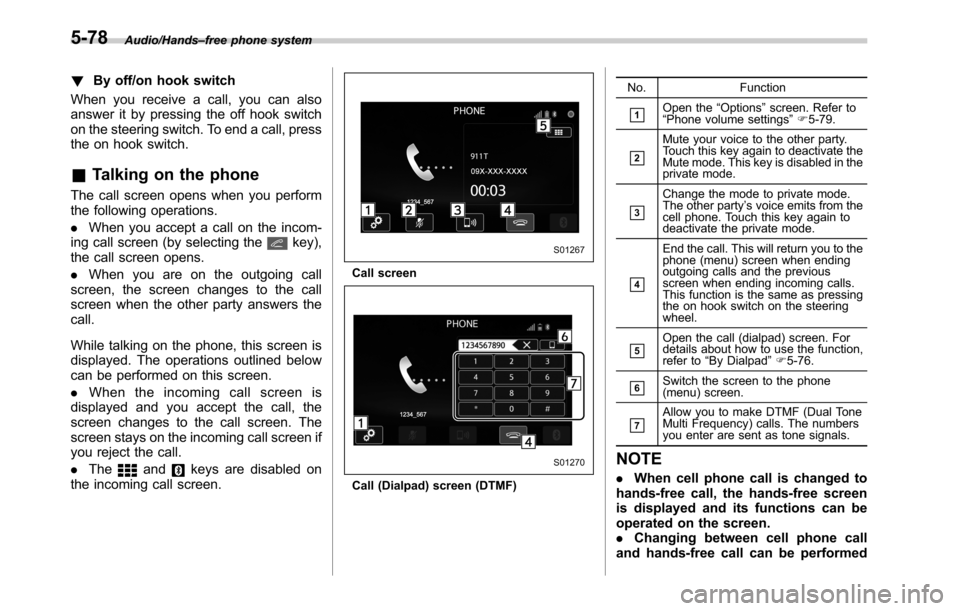
&Talking on the phone
The call screen opens when you perform
the following operations.
.When you accept a call on the incom-
ing call screen (by selecting the
key),
the call screen opens.
.When you are on the outgoing call
screen, the screen changes to the call
screen when the other party answers the
call.
While talking on the phone, this screen is
displayed. The operations outlined below
can be performed on this screen.
.When the incoming call screen is
displayed and you accept the call, the
screen changes to the call screen. The
screen stays on the incoming call screen if
you reject the call.
.The
andkeys are disabled on
the incoming call screen.
Call screen
Call (Dialpad) screen (DTMF)No. Function
&1Open the“Options”screen. Refer to
“Phone volume settings”F5-79.
&2
Mute your voice to the other party.
Touch this key again to deactivate the
Mute mode. This key is disabled in the
private mode.
&3
Change the mode to private mode.
The other party’s voice emits from the
cell phone. Touch this key again to
deactivate the private mode.
&4
End the call. This will return you to the
phone (menu) screen when ending
outgoing calls and the previous
screen when ending incoming calls.
This function is the same as pressing
the on hook switch on the steering
wheel.
&5Open the call (dialpad) screen. For
details about how to use the function,
refer to“By Dialpad”F5-76.
&6Switch the screen to the phone
(menu) screen.
&7Allow you to make DTMF (Dual Tone
Multi Frequency) calls. The numbers
you enter are sent as tone signals.
NOTE
.When cell phone call is changed to
hands-free call, the hands-free screen
is displayed and its functions can be
operated on the screen.
.Changing between cell phone call
and hands-free call can be performed
5-78
Page 307 of 572
by operating the cell phone directly.
.Transferring methods and opera-
tions will be different depending on
the type of cell phone you have.
.For the operation of the cell phone,
see the manual that comes with it.
.The sound quality of the voice heard
from the other party’s speaker may be
negatively impacted.
&Phone settings
You can transfer the phonebook informa-
tion and adjust the volume of your phone
using the Buletooth phone system.
NOTE
.The ringer volume for outgoing and
incoming calls, as well as the volume
while on hold or during a call are
controlled independently from the vo-
lume of the audio source. The volume
setting in the phone setting is applied.
.When making a call, receiving a call
or while talking on the phone, you can
adjust the volume by using the AUDIO/
TUNE knob on the audio panel or the
volume control switch on the steering
wheel.!Phone volume settings
The call and ringtone volume can be
adjusted. A ringtone can be selected.
1. Display the“PHONE”screen. Refer to
“How to change the hands-free phone
system”F5-73.
2. Touch the
key.
3. Select the desired item to be set.
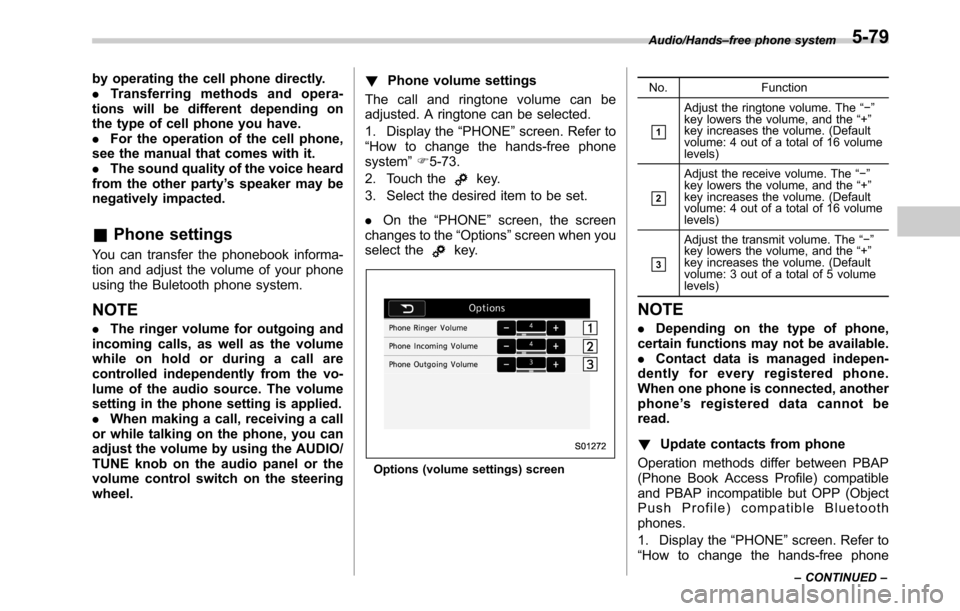
.On the“PHONE”screen, the screen
changes to the“Options”screen when you
select the
key.
Options (volume settings) screenNo. Function
&1
Adjust the ringtone volume. The“−”
key lowers the volume, and the“+”
key increases the volume. (Default
volume: 4 out of a total of 16 volume
levels)
&2
Adjust the receive volume. The“−”
key lowers the volume, and the“+”
key increases the volume. (Default
volume: 4 out of a total of 16 volume
levels)
&3
Adjust the transmit volume. The“−”
key lowers the volume, and the“+”
key increases the volume. (Default
volume: 3 out of a total of 5 volume
levels)
NOTE
.Depending on the type of phone,
certain functions may not be available.
.Contact data is managed indepen-
dently for every registered phone.
When one phone is connected, another
phone’s registered data cannot be
read.
!Update contacts from phone
Operation methods differ between PBAP
(Phone Book Access Profile) compatible
and PBAP incompatible but OPP (Object
Push Profile) compatible Bluetooth
phones.
1. Display the“PHONE”screen. Refer to
“How to change the hands-free phone
Audio/Hands–free phone system
–CONTINUED–5-79
Page 308 of 572
Audio/Hands–free phone system
system”F5-73.
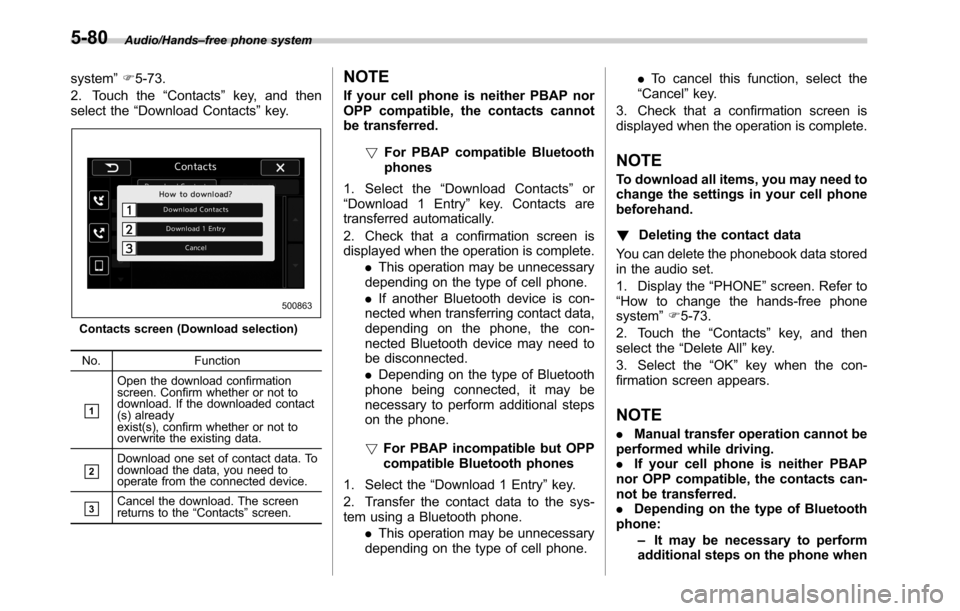
2. Touch the“Contacts”key, and then
select the“Download Contacts”key.
Contacts screen (Download selection)
No. Function
&1
Open the download confirmation
screen. Confirm whether or not to
download. If the downloaded contact
(s) already
exist(s), confirm whether or not to
overwrite the existing data.
&2Download one set of contact data. To
download the data, you need to
operate from the connected device.
&3Cancel the download. The screen
returns to the“Contacts”screen.
NOTE
If your cell phone is neither PBAP nor
OPP compatible, the contacts cannot
be transferred.
!For PBAP compatible Bluetooth
phones
1. Select the“Download Contacts”or
“Download 1 Entry”key. Contacts are
transferred automatically.
2. Check that a confirmation screen is
displayed when the operation is complete.
.This operation may be unnecessary
depending on the type of cell phone.
.If another Bluetooth device is con-
nected when transferring contact data,
depending on the phone, the con-
nected Bluetooth device may need to
be disconnected.
.Depending on the type of Bluetooth
phone being connected, it may be
necessary to perform additional steps
on the phone.
!For PBAP incompatible but OPP
compatible Bluetooth phones
1. Select the“Download 1 Entry”key.
2. Transfer the contact data to the sys-
tem using a Bluetooth phone.
.This operation may be unnecessary
depending on the type of cell phone..To cancel this function, select the
“Cancel”key.
3. Check that a confirmation screen is
displayed when the operation is complete.
NOTE
To download all items, you may need to
change the settings in your cell phone
beforehand.
!Deleting the contact data
You can delete the phonebook data stored
in the audio set.
1. Display the“PHONE”screen. Refer to
“How to change the hands-free phone
system”F5-73.
2. Touch the“Contacts”key, and then
select the“Delete All”key.
3. Select the“OK”key when the con-
firmation screen appears.
NOTE
.Manual transfer operation cannot be
performed while driving.
.If your cell phone is neither PBAP
nor OPP compatible, the contacts can-
not be transferred.
.Depending on the type of Bluetooth
phone:
–It may be necessary to perform
additional steps on the phone when
5-80
Page 310 of 572
Audio/Voice command system
open.
–Passengers are talking while
voice commands are spoken.
–The air conditioning speed is set
high.
–The air conditioning vents are
turned towards the microphone.
.In the following conditions, the sys-
tem may not recognize the command
properly and using voice commands
may not be possible:
–The command is incorrect or
unclear. Note that certain words,
accents or speech patterns may be
difficult for the system to recognize.
–There is excessive background
noise, such as wind noise.&Voice command system op-
eration
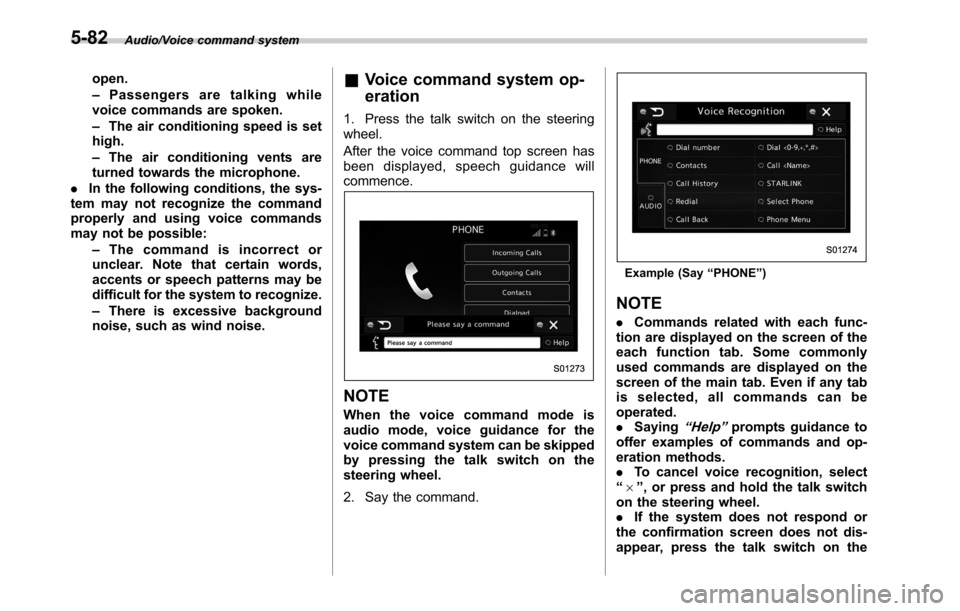
1. Press the talk switch on the steering
wheel.
After the voice command top screen has
been displayed, speech guidance will
commence.
NOTE
When the voice command mode is
audio mode, voice guidance for the
voice command system can be skipped
by pressing the talk switch on the
steering wheel.
2. Say the command.
Example (Say“PHONE”)
NOTE
.Commands related with each func-
tion are displayed on the screen of the
each function tab. Some commonly
used commands are displayed on the
screen of the main tab. Even if any tab
is selected, all commands can be
operated.
.Saying
“Help”prompts guidance to
offer examples of commands and op-
eration methods.
.To cancel voice recognition, select
“6”, or press and hold the talk switch
on the steering wheel.
.If the system does not respond or
the confirmation screen does not dis-
appear, press the talk switch on the
5-82
Page 311 of 572

steering wheel and try again.
.The notations used in the com-
mands are as follows.
–< >: Numbers, titles or names to
be spoken
!Voice command example: Call
name
1. Press the talk switch on the steering
wheel.
2. Say
“Call
.A confirmation screen will be dis-
played showing the recognition re-
sults. If multiple matching items are
found, a selection screen will be
displayed. Say
“
the number.
NOTE
.In the same manner as it is dis-
played on the screen,“Call
“Call a contact”say the name of a contact. For exam-
ple:“Call a contact”,“John Smith”or“Call a contact”,“Mary Davis”.Short or abbreviated names in the
contacts list may not be recognized.
Change names in the contacts list to
full names.
.Sometimes a voice recognition re-
sult confirmation screen will be dis-
played. After confirming the result, say
“Ye s”or“No”.
.When the system recognizes multi-
ple names from the contacts list, a
name candidate list will be displayed
on the screen. If the desired name is
not displayed on the top of the screen,
say or select the number of the name
from the candidate list (number 1,
number 2, etc.) to select a name from
the candidate list.
.When a contact has multiple phone
numbers registered in the contacts list,
a candidate list will be displayed. If the
desired phone number is not displayed
on the top of the screen, say or select
the number of the desired phone
number from the candidate list (num-
ber 1, number 2, etc.) to select a phone
number from the candidate list.
!Voice command example: Dial
number
1. Press the talk switch on the steering
wheel.
2. Say
“Dial a number”.
3. Say
“Dial
For example, if the phone number is
2345678:
Say
“two three four five six seven
eight”
Do not say“twenty three forty five sixty
seven eight”
4. Say“Call”or press the off hook switch
on the steering wheel.
NOTE
.When the system recognizes multi-
ple phone numbers, a phone number
candidate list will be displayed on the
screen. Pressing the off hook switch on
the steering wheel makes a call to the
top entry on the list. If the desired
phone number is not displayed on the
top of the screen, say the number of
the desired phone number from the
candidate list to select a phone number
from the candidate list.
.Calling to the following phone num-
bers
–3 digit numbers (911, 411, 611)
–7 digit numbers (Local phone
numbers)
–10 digit numbers (Area code +
Local phone number)
–11 digit phone numbers (1 + Area
code + Local phone number)
.As the system cannot recognize
additional numbers, say the complete
number without stopping.
Audio/Voice command system
–CONTINUED–5-83
Page 312 of 572

Audio/Voice command system
!Casual speech recognization
Due to natural language speech recogni-
tion technology, this system enables re-
cognition of a command when spoken
naturally. However, the system cannot
recognize every variation of each com-
mand. In some situations, it is possible to
omit the command for the procedure and
directly state the desired operation. Not all
voice commands are displayed in the
function menu.
NOTE
If the command cannot be recognized
completely, the command input screen
will be displayed. (Search results will
be shown based on the part of the
command that was recognized.)
!Expression examples for each
function
Command Expression examples
“Dial
Phone
&Command list
Recognizable voice commands and their
actions are shown below.
NOTE
.Some voice commands may not be
available depending on the market,
vehicle specifications or the device
connection status.
.Frequently used commands are
listed in the following tables.
.For devices that are not installed in
the vehicle, the related commands will
not be displayed on the screen. Also,
according to conditions, other com-
mands may not be displayed on the
screen.
.The functions available may vary
according to the system installed.
.Voice recognition language can be
changed. Refer to“Unit settings”F5-
19.
.The notations used in the com-
mands are as follows.
–<
>: Numbers, titles or
names to be spoken
–(
): There is no need to
speak the command, the voice
command system will recognize
the content.!Basic command
Voice command Function
BackGo back one hierar-
chy or cancel the
voice recognition
(voice command top
screen)
HelpAsk for help with the
current task
Cancel, CloseCancel the current
task
Ye s
No
Display OFF Turns the display off
Audio ONTurns the audio sys-
tem on
Audio OFFTurns the audio sys-
tem off
STARLINKSwitch to APPS mode
5-84
Page 313 of 572

!Commands for changing the audio
mode
Voice command Function
Change to AM Switch to AM mode
Change to AM1Switch to AM mode
band 1
Change to AM2Switch to AM mode
band 2
Change to FM Switch to FM mode
Change to FM1Switch to FM mode
band 1
Change to FM2Switch to FM mode
band 2
Change to FM3Switch to FM mode
band 3
Change to SiriusXM Switch to XM mode
Change to BT AudioSwitch to Bluetooth
Audio mode
Change to CD Switch to CD mode
Change to USB Switch to USB mode
Change to iPod Switch to iPod mode
Change to ahaSwitch to aha radio
mode
Change to PandoraSwitch to Pandora
mode
Change to AUXSwitch to AUX mode
!Commands for hands-free phone
Voice command Function
Dial Number?<0-9,
+, *, #>?Change
number, DialPlaces a call to the
said phone number
Dial <0-9, +, *, #>?
Change number, Dial
Contacts, Phonebook
?
?DialMake a call by using
the phonebook
Call
<1-5>?Dial
Call History?In-
coming call, Outgoing
call?Next (page),
Previous (page)?
<1-5>?DialMake a call by using
the call history
Incoming CallsDisplay the call his-
tory screen
Outgoing CallsDisplay the call his-
tory screen
RedialPlaces a call to the
phone number of the
latest outgoing call
CallbackPlaces a call to the
phone number of the
latest incoming call
Select Phone?
<1-5>Display the phone
select screen
Phone MenuDisplay the hands
free top screen
!Commands for Pandora
Voice command Function
Like Mark“Like”flag
Dislike Mark“Dislike”flag
Skip, NextSkip to the next song
!Commands for aha
Voice command Function
Thumbs Up, Heart,
LikeMark“Like”flag
Thumbs Down, Ban,
DislikeMark“Dislike”flag
Refresh, updateRefresh the selected
station to get the lat-
est information
Content UpPlayback next Con-
tent
Content DownPlayback previous
Content Audio/Voice command system
–CONTINUED–
5-85