display SUBARU LEGACY 2017 6.G Owners Manual
[x] Cancel search | Manufacturer: SUBARU, Model Year: 2017, Model line: LEGACY, Model: SUBARU LEGACY 2017 6.GPages: 610
Page 422 of 610
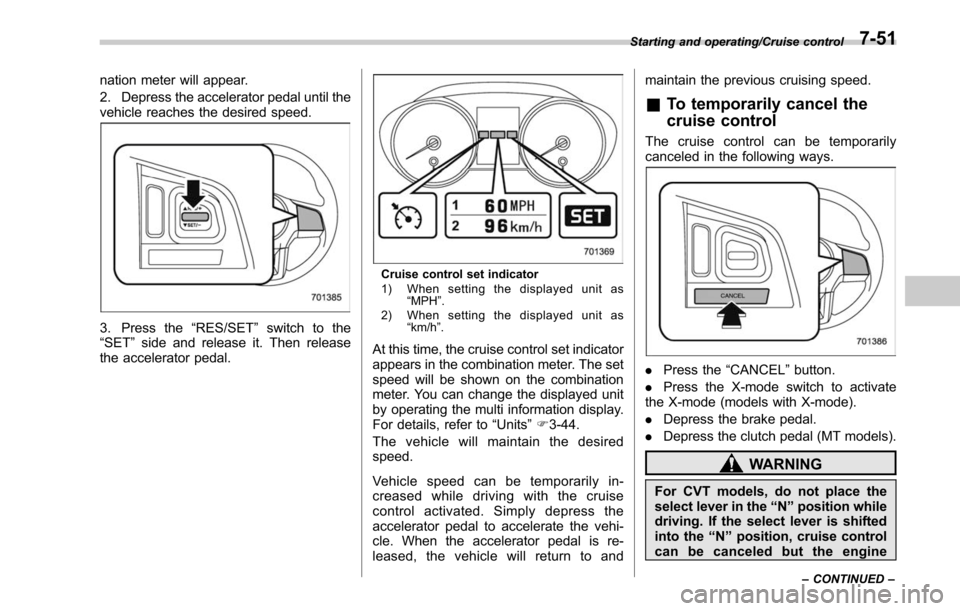
nation meter will appear.
2. Depress the accelerator pedal until the
vehicle reaches the desired speed.
3. Press the“RES/SET”switch to the
“SET ”side and release it. Then release
the accelerator pedal.
Cruise control set indicator
1) When setting the displayed unit as “MPH ”.
2) When setting the displayed unit as “km/h ”.
At this time, the cruise control set indicator
appears in the combination meter. The set
speed will be shown on the combination
meter. You can change the displayed unit
by operating the multi information display.
For details, refer to “Units”F 3-44.
The vehicle will maintain the desired
speed.
Vehicle speed can be temporarily in-
creased while driving with the cruise
control activated. Simply depress the
accelerator pedal to accelerate the vehi-
cle. When the accelerator pedal is re-
leased, the vehicle will return to and maintain the previous cruising speed.
&
To temporarily cancel the
cruise control
The cruise control can be temporarily
canceled in the following ways.
. Press the “CANCEL”button.
. Press the X-mode switch to activate
the X-mode (models with X-mode).
. Depress the brake pedal.
. Depress the clutch pedal (MT models).
WARNING
For CVT models, do not place the
select lever in the “N ” position while
driving. If the select lever is shifted
into the “N ” position, cruise control
can be canceled but the engine
Starting and operating/Cruise control
–CONTINUED –7-51
Page 423 of 610
Starting and operating/Cruise control
brake will no longer work. This
could result in an accident.
The cruise control set indicator in the
combination meter disappears when the
cruise control is canceled.
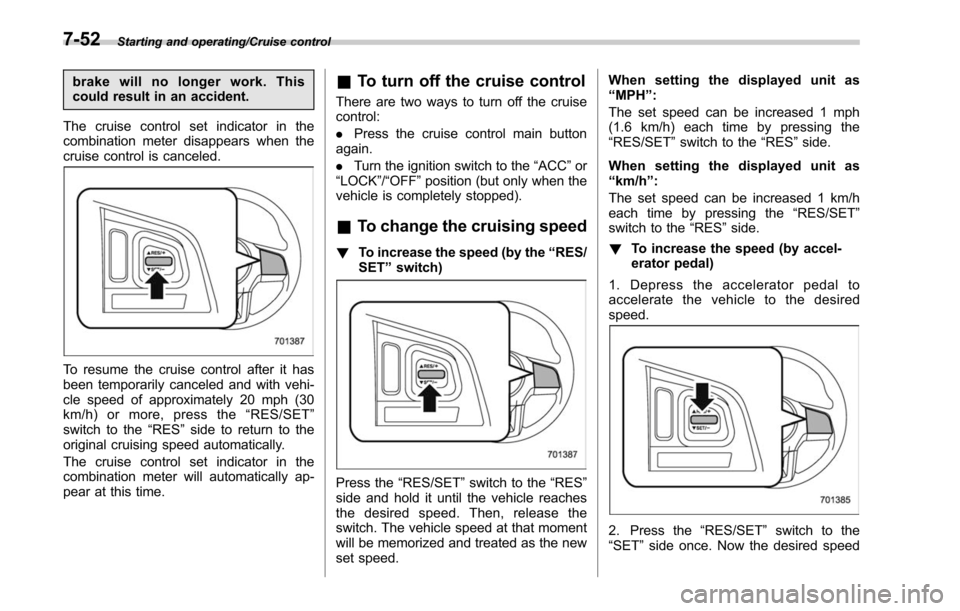
To resume the cruise control after it has
been temporarily canceled and with vehi-
cle speed of approximately 20 mph (30
km/h) or more, press the “RES/SET ”
switch to the “RES ”side to return to the
original cruising speed automatically.
The cruise control set indicator in the
combination meter will automatically ap-
pear at this time.
& To turn off the cruise control
There are two ways to turn off the cruise
control:
. Press the cruise control main button
again.
. Turn the ignition switch to the “ACC”or
“LOCK” /“OFF ”position (but only when the
vehicle is completely stopped).
& To change the cruising speed
! To increase the speed (by the “RES/
SET ”switch)
Press the “RES/SET ”switch to the “RES”
side and hold it until the vehicle reaches
the desired speed. Then, release the
switch. The vehicle speed at that moment
will be memorized and treated as the new
set speed. When setting the displayed unit as
“
MPH ”:
The set speed can be increased 1 mph
(1.6 km/h) each time by pressing the
“RES/SET ”switch to the “RES”side.
When setting the displayed unit as
“ km/h ”:
The set speed can be increased 1 km/h
each time by pressing the “RES/SET ”
switch to the “RES”side.
! To increase the speed (by accel-
erator pedal)
1. Depress the accelerator pedal to
accelerate the vehicle to the desired
speed.
2. Press the “RES/SET ”switch to the
“SET ”side once. Now the desired speed
7-52
Page 424 of 610
is set and the vehicle will keep running at
that speed without depressing the accel-
erator pedal.
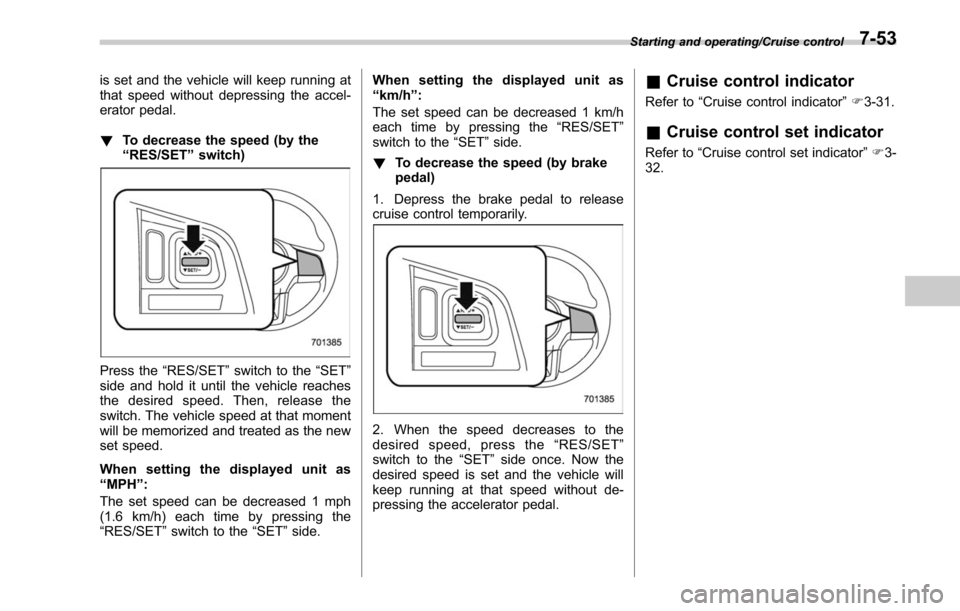
!To decrease the speed (by the
“RES/SET ”switch)
Press the “RES/SET ”switch to the “SET”
side and hold it until the vehicle reaches
the desired speed. Then, release the
switch. The vehicle speed at that moment
will be memorized and treated as the new
set speed.
When setting the displayed unit as
“ MPH ”:
The set speed can be decreased 1 mph
(1.6 km/h) each time by pressing the
“RES/SET ”switch to the “SET”side. When setting the displayed unit as
“
km/h ”:
The set speed can be decreased 1 km/h
each time by pressing the “RES/SET”
switch to the “SET ”side.
! To decrease the speed (by brake
pedal)
1. Depress the brake pedal to release
cruise control temporarily.
2. When the speed decreases to the
desired speed, press the “RES/SET ”
switch to the “SET”side once. Now the
desired speed is set and the vehicle will
keep running at that speed without de-
pressing the accelerator pedal.
& Cruise control indicator
Refer to “Cruise control indicator ”F 3-31.
& Cruise control set indicator
Refer to “Cruise control set indicator ”F 3-
32.
Starting and operating/Cruise control7-53
Page 429 of 610
Starting and operating/BSD/RCTA
tected.
The indicator light will
flash to warn the
driver of dangers under the following
conditions.
. While the indicator light is illuminating,
if the turn signal lever is operated toward
the side in which this light turned on
. When reversing the vehicle while the
system detects a vehicle approaching
from either side
! BSD/RCTA approach indicator
light dimming function
When the headlights are turned on, the
brightness of the BSD/RCTA approach
indicator light will be reduced.
NOTE
. You may have difficulty seeing the
BSD/RCTA approach indicator light
under the following conditions.
–When sunlight shines directly on
it
– When the headlight beams from a
vehicle traveling behind shines di-
rectly on it
. While the illumination brightness
control dial is in the fully upward
position, even if the headlights are
turned on, the brightness of the BSD/
RCTA approach indicator light will not
be reduced. For details about the illumination brightness control dial,
refer to
“Illumination brightness con-
trol” F3-55.
! BSD/RCTA approach warning buz-
zer (only when reversing)
A warning buzzer sounds along with
flashing of the BSD/RCTA approach in-
dicator light to warn the driver of dangers.
The setting of the warning buzzer volume
can be changed by operating the multi
information display of the combination
meter. For details, refer to “BSD/RCTA”
F 3-45.
! Safety tips regarding the BSD/RCTA
approach indicator light/warning
buzzer
. In the following cases, operation of the
BSD/RCTA approach indicator light and
the warning buzzer may be delayed or the
system may fail to issue these warnings.
–Whenavehiclemovestothe
neighboring lane from a lane next to
the neighboring lane
– When driving on a steep incline or
on repeated sharp uphill and downhill
grades
– When going beyond a pass
– When both your vehicle and a
vehicle driving on a neighboring lane
are driving on the far side of each lane. –
When several narrowly-spaced ve-
hicles are approaching in a row
– In low radius bends (tight bends or
when making turns at an intersection)
– When there is a difference in height
between your lane and the neighbor-
ing lane
– Immediately after the BSD/RCTA is
activated by pressing the BSD/RCTA
OFF switch
– Immediately after the shift lever/
select lever is shifted to the “R ”
position
– When extremely heavy cargo is
loaded in the trunk or cargo area
. During reversing, operation of the BSD/
RCTA approach indicator light and the
warning buzzer may be delayed or the
system may fail to issue these warnings
under the following conditions.
–When backing out of an angled
parking space
– When a large-sized vehicle is
parked next to your vehicle (That
vehicle prevents the propagation of
radar waves.)
– When reversing on sloped roads
– When reversing at a high speed
7-58
Page 430 of 610
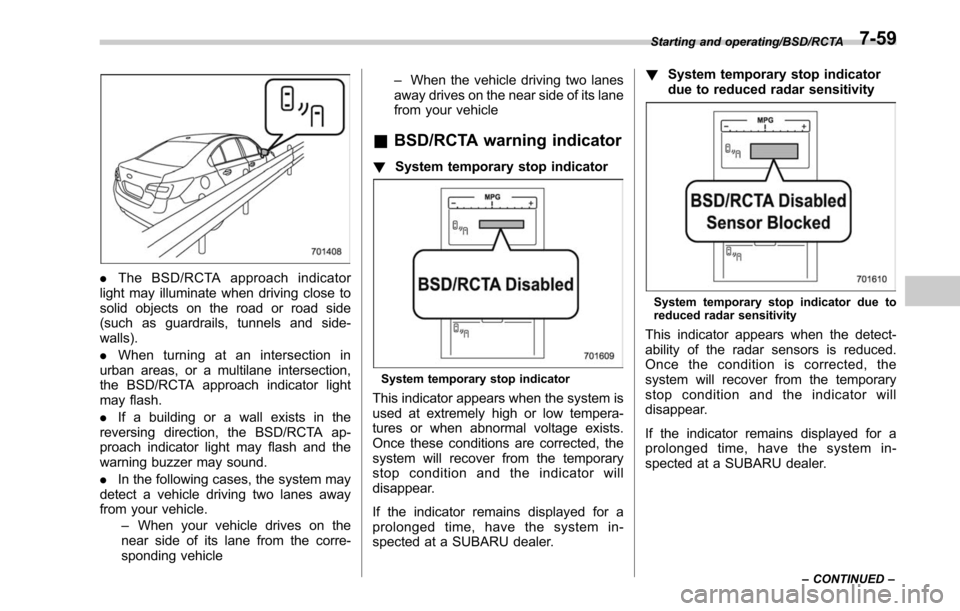
.The BSD/RCTA approach indicator
light may illuminate when driving close to
solid objects on the road or road side
(such as guardrails, tunnels and side-
walls).
. When turning at an intersection in
urban areas, or a multilane intersection,
the BSD/RCTA approach indicator light
may flash.
. If a building or a wall exists in the
reversing direction, the BSD/RCTA ap-
proach indicator light may flash and the
warning buzzer may sound.
. In the following cases, the system may
detect a vehicle driving two lanes away
from your vehicle.
–When your vehicle drives on the
near side of its lane from the corre-
sponding vehicle –
When the vehicle driving two lanes
away drives on the near side of its lane
from your vehicle
& BSD/RCTA warning indicator
! System temporary stop indicator
System temporary stop indicator
This indicator appears when the system is
used at extremely high or low tempera-
tures or when abnormal voltage exists.
Once these conditions are corrected, the
system will recover from the temporary
stop condition and the indicator will
disappear.
If the indicator remains displayed for a
prolonged time, have the system in-
spected at a SUBARU dealer. !
System temporary stop indicator
due to reduced radar sensitivity
System temporary stop indicator due to
reduced radar sensitivity
This indicator appears when the detect-
ability of the radar sensors is reduced.
Once the condition is corrected, the
system will recover from the temporary
stop condition and the indicator will
disappear.
If the indicator remains displayed for a
prolonged time, have the system in-
spected at a SUBARU dealer.
Starting and operating/BSD/RCTA
–CONTINUED –7-59
Page 431 of 610
Starting and operating/BSD/RCTA
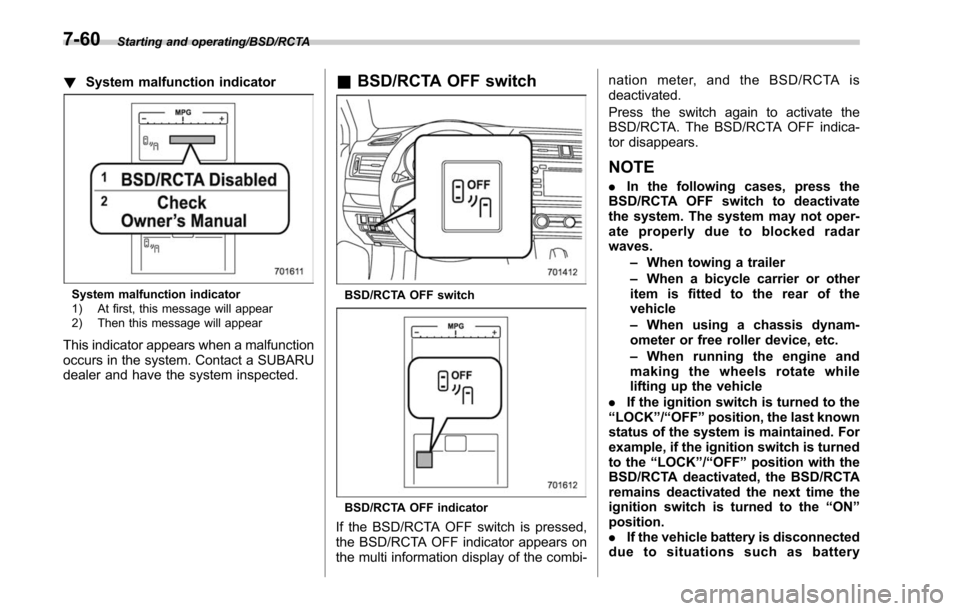
!System malfunction indicator
System malfunction indicator
1) At first, this message will appear
2) Then this message will appear
This indicator appears when a malfunction
occurs in the system. Contact a SUBARU
dealer and have the system inspected.
&BSD/RCTA OFF switch
BSD/RCTA OFF switch
BSD/RCTA OFF indicator
If the BSD/RCTA OFF switch is pressed,
the BSD/RCTA OFF indicator appears on
the multi information display of the combi- nation meter, and the BSD/RCTA is
deactivated.
Press the switch again to activate the
BSD/RCTA. The BSD/RCTA OFF indica-
tor disappears.
NOTE
.
In the following cases, press the
BSD/RCTA OFF switch to deactivate
the system. The system may not oper-
ate properly due to blocked radar
waves.
–When towing a trailer
– When a bicycle carrier or other
item is fitted to the rear of the
vehicle
– When using a chassis dynam-
ometer or free roller device, etc.
– When running the engine and
making the wheels rotate while
lifting up the vehicle
. If the ignition switch is turned to the
“ LOCK ”/“ OFF ”position, the last known
status of the system is maintained. For
example, if the ignition switch is turned
to the “LOCK ”/“ OFF ”position with the
BSD/RCTA deactivated, the BSD/RCTA
remains deactivated the next time the
ignition switch is turned to the “ON ”
position.
. If the vehicle battery is disconnected
due to situations such as battery
7-60
Page 435 of 610
Starting and operating/Reverse Automatic Braking System
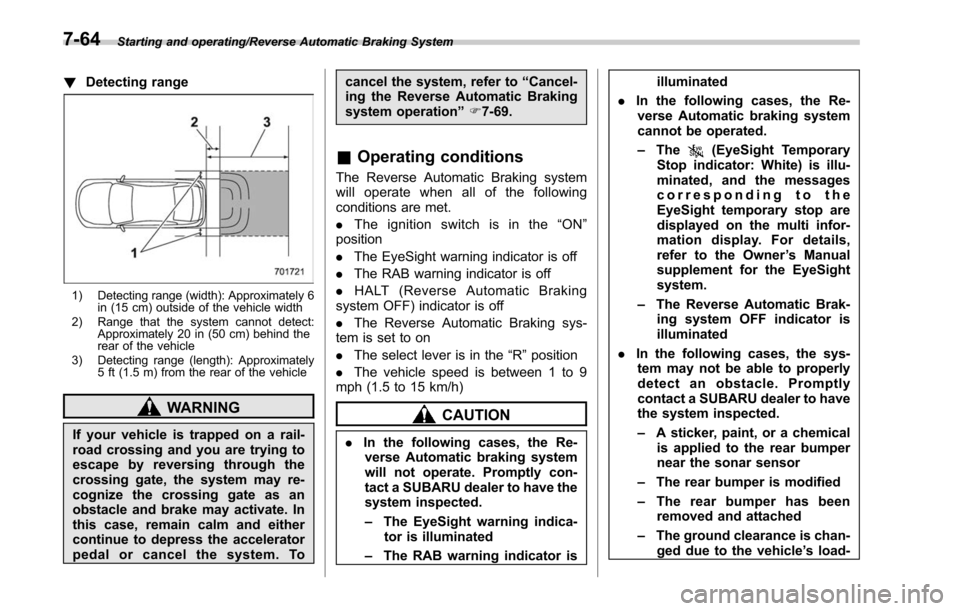
!Detecting range
1) Detecting range (width): Approximately 6
in (15 cm) outside of the vehicle width
2) Range that the system cannot detect: Approximately 20 in (50 cm) behind the
rear of the vehicle
3) Detecting range (length): Approximately 5 ft (1.5 m) from the rear of the vehicle
WARNING
If your vehicle is trapped on a rail-
road crossing and you are trying to
escape by reversing through the
crossing gate, the system may re-
cognize the crossing gate as an
obstacle and brake may activate. In
this case, remain calm and either
continue to depress the accelerator
pedal or cancel the system. To cancel the system, refer to
“Cancel-
ing the Reverse Automatic Braking
system operation ”F 7-69.
& Operating conditions
The Reverse Automatic Braking system
will operate when all of the following
conditions are met.
. The ignition switch is in the “ON ”
position
. The EyeSight warning indicator is off
. The RAB warning indicator is off
. HALT (Reverse Automatic Braking
system OFF) indicator is off
. The Reverse Automatic Braking sys-
tem is set to on
. The select lever is in the “R”position
. The vehicle speed is between 1 to 9
mph (1.5 to 15 km/h)
CAUTION
. In the following cases, the Re-
verse Automatic braking system
will not operate. Promptly con-
tact a SUBARU dealer to have the
system inspected.
– The EyeSight warning indica-
tor is illuminated
– The RAB warning indicator is illuminated
. In the following cases, the Re-
verse Automatic braking system
cannot be operated.
– The
(EyeSight Temporary
Stop indicator: White) is illu-
minated, and the messages
corresponding to the
EyeSight temporary stop are
displayed on the multi infor-
mation display. For details,
refer to the Owner ’s Manual
supplement for the EyeSight
system.
– The Reverse Automatic Brak-
ing system OFF indicator is
illuminated
. In the following cases, the sys-
tem may not be able to properly
detect an obstacle. Promptly
contact a SUBARU dealer to have
the system inspected.
– A sticker, paint, or a chemical
is applied to the rear bumper
near the sonar sensor
– The rear bumper is modified
– The rear bumper has been
removed and attached
– The ground clearance is chan-
ged due to the vehicle ’s load-
7-64
Page 438 of 610
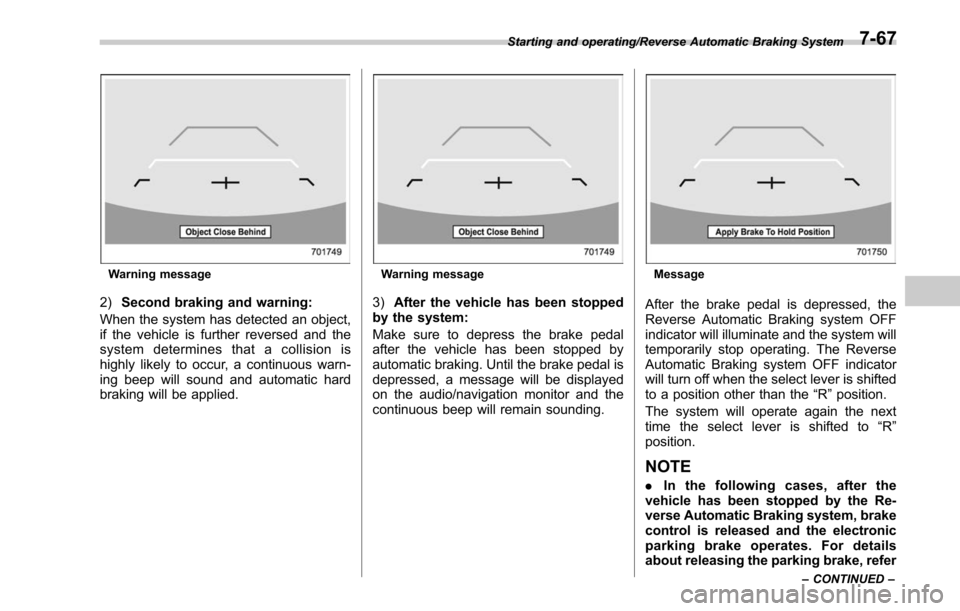
Warning message
2)Second braking and warning:
When the system has detected an object,
if the vehicle is further reversed and the
system determines that a collision is
highly likely to occur, a continuous warn-
ing beep will sound and automatic hard
braking will be applied.
Warning message
3) After the vehicle has been stopped
by the system:
Make sure to depress the brake pedal
after the vehicle has been stopped by
automatic braking. Until the brake pedal is
depressed, a message will be displayed
on the audio/navigation monitor and the
continuous beep will remain sounding.
Message
After the brake pedal is depressed, the
Reverse Automatic Braking system OFF
indicator will illuminate and the system will
temporarily stop operating. The Reverse
Automatic Braking system OFF indicator
will turn off when the select lever is shifted
to a position other than the “R”position.
The system will operate again the next
time the select lever is shifted to “R”
position.
NOTE
. In the following cases, after the
vehicle has been stopped by the Re-
verse Automatic Braking system, brake
control is released and the electronic
parking brake operates. For details
about releasing the parking brake, refer
Starting and operating/Reverse Automatic Braking System
–CONTINUED –7-67
Page 439 of 610
Starting and operating/Reverse Automatic Braking System
to“Electronic parking brake ”F 7-43.
– When 2 minutes pass after the
vehicle is stopped
– When any door is opened
– When the EyeSight system mal-
functions
– When the EyeSight system stops
temporarily
– When the Reverse Automatic
Braking system malfunctions
– When the Reverse Automatic
Braking system stops temporarily
. The message/warning message will
not display for approximately 8 sec-
onds after turning the ignition switch to
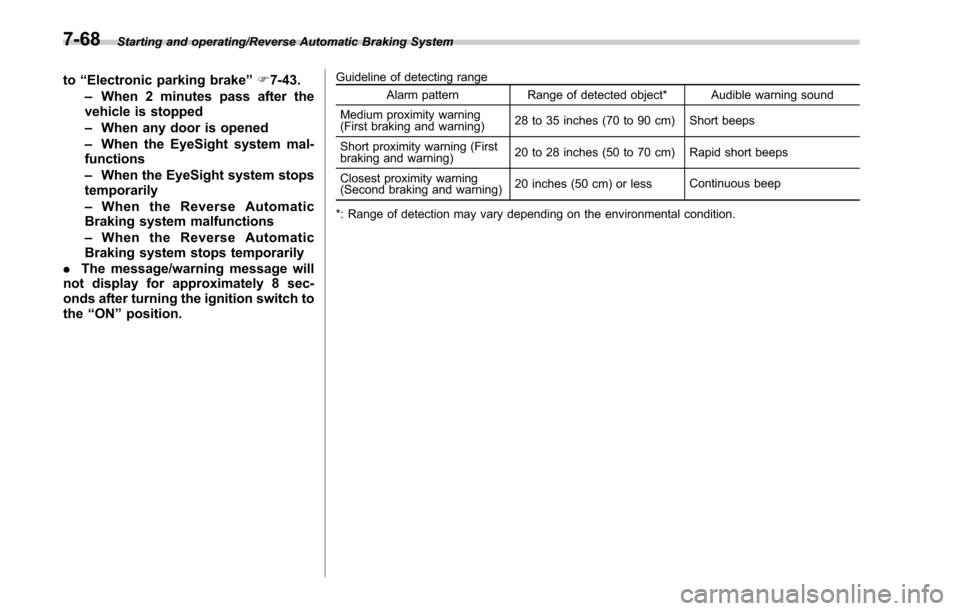
the “ON ”position.Guideline of detecting range
Alarm pattern Range of detected object* Audible warning sound
Medium proximity warning
(First braking and warning) 28 to 35 inches (70 to 90 cm) Short beeps
Short proximity warning (First
braking and warning) 20 to 28 inches (50 to 70 cm) Rapid short beeps
Closest proximity warning
(Second braking and warning) 20 inches (50 cm) or less
Continuous beep
*: Range of detection may vary depending on the environmental condition.
7-68
Page 441 of 610
Starting and operating/Reverse Automatic Braking System
When the OFF setting is shown, the
corresponding setting is OFF.
Touch and hold the OFF setting key to turn
the setting ON.
When the Reverse Automatic Braking
system and/or the object detection warn-
ing beeping sounds are turned OFF, the
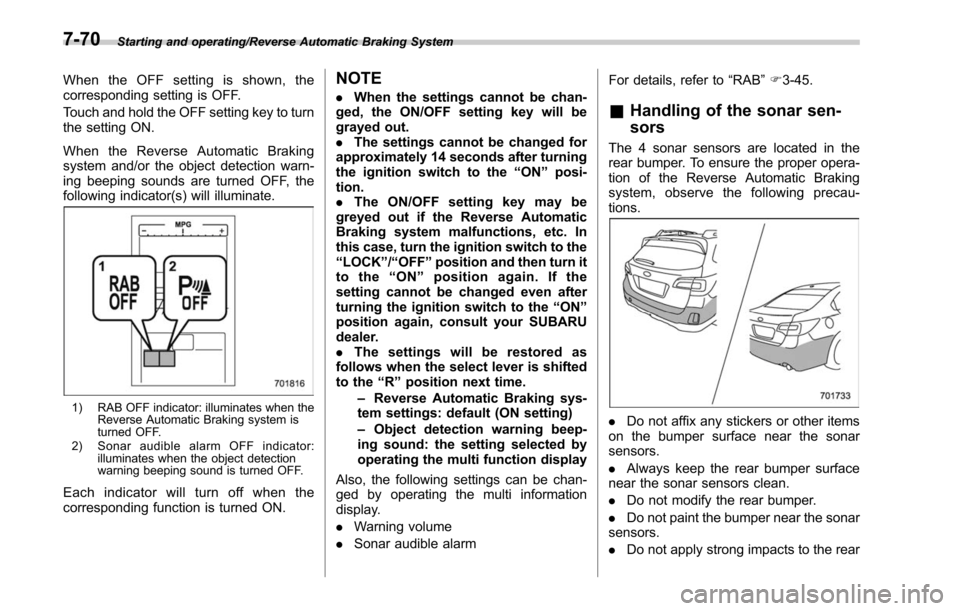
following indicator(s) will illuminate.
1) RAB OFF indicator: illuminates when theReverse Automatic Braking system is
turned OFF.
2) Sonar audible alarm OFF indicator: illuminates when the object detection
warning beeping sound is turned OFF.
Each indicator will turn off when the
corresponding function is turned ON.
NOTE
.When the settings cannot be chan-
ged, the ON/OFF setting key will be
grayed out.
. The settings cannot be changed for
approximately 14 seconds after turning
the ignition switch to the “ON ”posi-
tion.
. The ON/OFF setting key may be
greyed out if the Reverse Automatic
Braking system malfunctions, etc. In
this case, turn the ignition switch to the
“ LOCK ”/“ OFF ”position and then turn it
to the “ON ”position again. If the
setting cannot be changed even after
turning the ignition switch to the “ON ”
position again, consult your SUBARU
dealer.
. The settings will be restored as
follows when the select lever is shifted
to the “R ” position next time.
– Reverse Automatic Braking sys-
tem settings: default (ON setting)
– Object detection warning beep-
ing sound: the setting selected by
operating the multi function display
Also, the following settings can be chan-
ged by operating the multi information
display.
. Warning volume
. Sonar audible alarm For details, refer to
“RAB”F 3-45.& Handling of the sonar sen-
sors
The 4 sonar sensors are located in the
rear bumper. To ensure the proper opera-
tion of the Reverse Automatic Braking
system, observe the following precau-
tions.
. Do not affix any stickers or other items
on the bumper surface near the sonar
sensors.
. Always keep the rear bumper surface
near the sonar sensors clean.
. Do not modify the rear bumper.
. Do not paint the bumper near the sonar
sensors.
. Do not apply strong impacts to the rear
7-70