warning SUBARU LEGACY 2017 6.G Owners Manual
[x] Cancel search | Manufacturer: SUBARU, Model Year: 2017, Model line: LEGACY, Model: SUBARU LEGACY 2017 6.GPages: 610
Page 317 of 610
Audio/Bluetooth®settings
Bluetooth®settings
WARNING
Be sure to park the vehicle in a safe
location before connecting or oper-
ating a Bluetooth phone or audio
device. Failure to do so may result
in loss of control of your vehicle and
cause an accident or serious injury.
&Regulatory information
The Bluetooth®word mark and logos are
registered trademarks owned by Bluetooth
SIG, Inc.
& Registering/connecting
Bluetooth®device
You can register up to five devices,
regardless of whether they are Bluetooth
phones or audio devices.
NOTE
. Once the phone has been regis-
tered, it is possible to use the hands-
free system or Bluetooth audio.
. Devices cannot be registered during
driving.
! Registering a Bluetooth phone for
the first time
To use the hands-free system, it is
necessary to register a Bluetooth phone
with the system.
For details about registering a Bluetooth
device: Refer to “Registering a Bluetooth
Audio device for the first time ”F 5-67.
1. Turn the Bluetooth connection setting
of your cell phone on. .This function is not available when
Bluetooth connection setting of your
cell phone is set to off.
2. Press the HOME button and select the
“SETTINGS ”key. 3. Touch the
tab and then the
“SET-
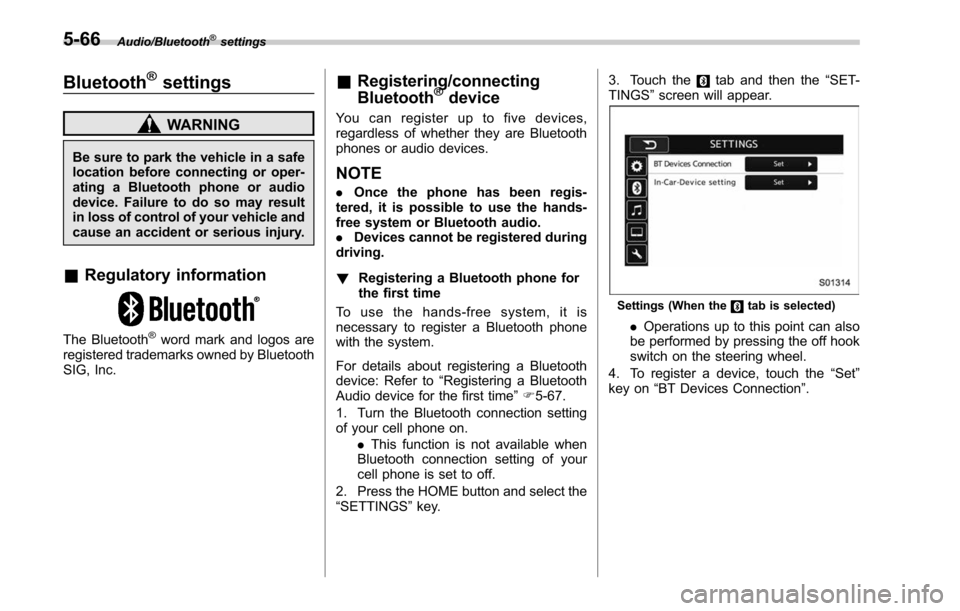
TINGS ”screen will appear.
Settings (When thetab is selected)
. Operations up to this point can also
be performed by pressing the off hook
switch on the steering wheel.
4. To register a device, touch the “Set”
key on “BT Devices Connection ”.
5-66
Page 322 of 610
Hands-free phone system
The hands-free system enables calls to be
made and received without having to take
your hands off the steering wheel.
This system supports Bluetooth. Bluetooth
is a wireless data system that enables cell
phones to be used without being con-
nected by a cable or placed in a cradle.
The operating procedure of the phone is
explained here.
WARNING
.While driving, do not use a cell
phone or connect the Bluetooth
phone. Doing so may result in
loss of control of your vehicle
and cause an accident or serious
injury.
. Your audio unit is fitted with
Bluetooth antennas. People with
implantable cardiac pacemakers,
cardiac resynchronization ther-
apy-pacemakers or implantable
cardioverter defibrillators should
maintain a reasonable distance
between themselves and the
Bluetooth antennas. The radio
waves may affect the operation
of such devices. .
Before using Bluetooth devices,
users of any electrical medical
device other than implantable
cardiac pacemakers, cardiac re-
synchronization therapy-pace-
makers or implantable cardiover-
ter defibrillators should consult
the manufacturer of the device
for information about its opera-
tion under the influence of radio
waves. Radio waves could have
unexpected effects on the opera-
tion of such medical devices.CAUTION
Do not leave your cell phone in the
vehicle. The temperature inside may
rise to a level that could damage the
phone.
NOTE
. If your cell phone does not support
Bluetooth, this system cannot function.
. In the following conditions, the sys-
tem may not function:
–The cell phone is turned off.
– The current position is outside
the communication area.
– The cell phone is not connected.
– The cell phone has a low battery. .
When using the hands free function
and other Bluetooth functions at the
same time, the following problems may
occur:
–The Bluetooth connection may
be cut.
– Noise may be heard when play-
ing back voice with the Bluetooth
function.
. The other party’ s voice will be heard
from the front speakers. The audio/
visual system will be muted during
phone calls or when hands-free voice
commands are used.
. Talk alternately with the other party
on the phone. If both parties speak at
the same time, the other party may not
hear what has been said. (This is not a
malfunction.)
. Keep call volume down. Otherwise,
the other party’ s voice may be audible
outside the vehicle and voice echo may
increase. When talking on the phone,
speak clearly towards the microphone.
. The other party may not hear you
clearly when:
–Drivingonanunpavedroad.
(Making excessive traffic noise.)
– Driving at high speeds.
– The moonroof or windows are
open.
– The air conditioning vents are
Audio/Hands –free phone system
–CONTINUED –5-71
Page 358 of 610
WARNING
Do not place hangers or other hard
objects on the coat hooks. If such
items were hanging on the coat
hooks during deployment of the
SRS curtain airbags, they could
cause serious injuries by coming
off the coat hooks and being thrown
through the cabin or by preventing
correct airbag deployment. Before
hanging clothing on the coat hooks,
make sure there are no pointed
objects in the pockets. Hang cloth-
ing directly on the coat hooks with-
out using hangers.
CAUTION
Never hang anything on the coat
hook that might obstruct the driver’s
view or that could cause injury in
sudden stops or in a collision. And
do not hang items on the coat hook
that weigh 11 lbs (5 kg) or more.
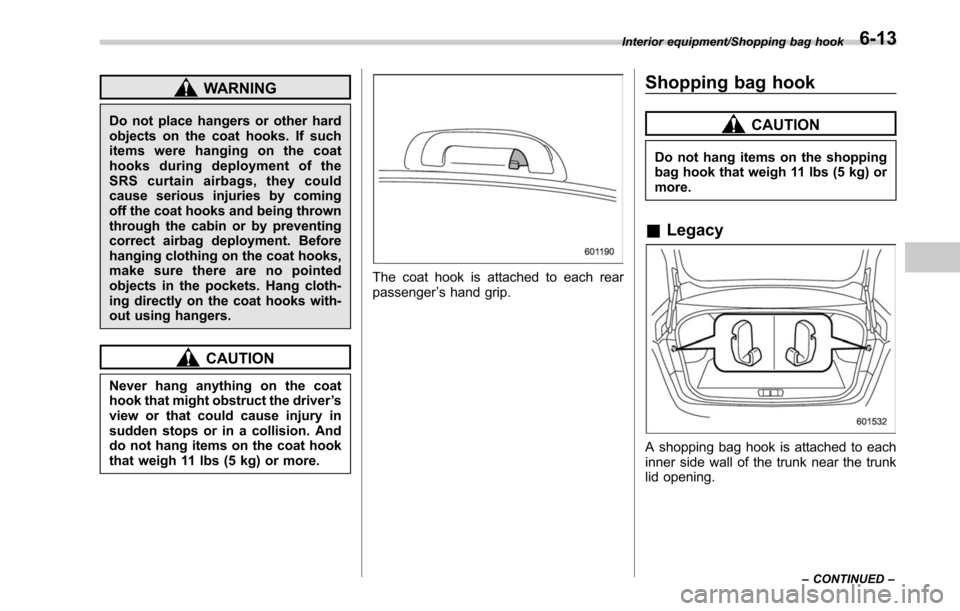
The coat hook is attached to each rear
passenger ’s hand grip.
Shopping bag hook
CAUTION
Do not hang items on the shopping
bag hook that weigh 11 lbs (5 kg) or
more.
& Legacy
A shopping bag hook is attached to each
inner side wall of the trunk near the trunk
lid opening.
Interior equipment/Shopping bag hook
–CONTINUED –6-13
Page 361 of 610
Interior equipment/Cargo area cover (Outback–if equipped)
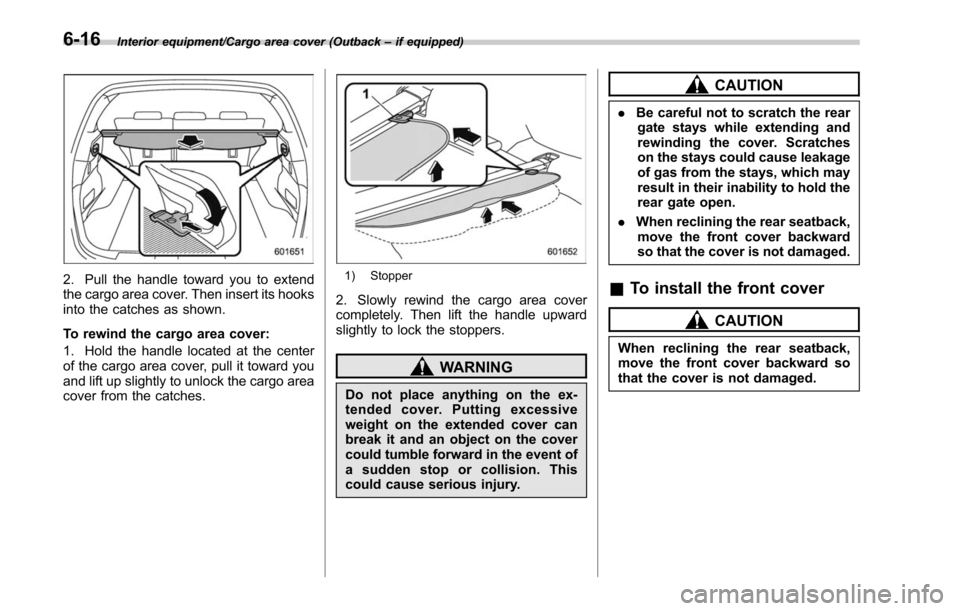
2. Pull the handle toward you to extend
the cargo area cover. Then insert its hooks
into the catches as shown.
To rewind the cargo area cover:
1. Hold the handle located at the center
of the cargo area cover, pull it toward you
and lift up slightly to unlock the cargo area
cover from the catches.1) Stopper
2. Slowly rewind the cargo area cover
completely. Then lift the handle upward
slightly to lock the stoppers.
WARNING
Do not place anything on the ex-
tended cover. Putting excessive
weight on the extended cover can
break it and an object on the cover
could tumble forward in the event of
a sudden stop or collision. This
could cause serious injury.
CAUTION
. Be careful not to scratch the rear
gate stays while extending and
rewinding the cover. Scratches
on the stays could cause leakage
of gas from the stays, which may
result in their inability to hold the
rear gate open.
. When reclining the rear seatback,
move the front cover backward
so that the cover is not damaged.
& To install the front cover
CAUTION
When reclining the rear seatback,
move the front cover backward so
that the cover is not damaged.
6-16
Page 366 of 610
A rear view camera is attached to the
trunk lid (Legacy) or rear gate (Outback).
When the ignition switch is“ON ”and the
shift lever (MT models) or select lever
(CVT models) is set to “R”, the rear view
camera automatically displays the rear
view image behind the vehicle on the
audio/navigation monitor.
WARNING
. Since the rear view camera uses
a wide-angle lens, the image on
the monitor is different from the
actual view in terms of distance.
. Since the range of the image on
the monitor is limited, you should
always check the rear view and
the surrounding area with your
eyes and mirrors, and move
backward at a slow speed. Mov-
ing backward only by checking
the rear view image from the
camera could cause an accident.
. Do not disassemble or modify the
camera, switch or wiring. If
smoke comes out or you smell
a strange odor, stop using the
rear view camera immediately.
Contact your SUBARU dealer
for an inspection. Continued use
may result in accident, fire or electric shock.
CAUTION
.
If your vehicle is washed with a
high-pressure washer, do not
allow water to contact the camera
directly. Entry of water in the
camera lens may result in con-
densation, malfunction, fire or
electric shock.
. Since the camera is a precision
device, do not subject it to strong
impacts. Otherwise, malfunction,
fire or electric shock may occur.
. If mud or snow sticks to or is
frozen on the camera, you must
be very careful removing it.
Otherwise, damage done to the
camera may cause a fire or
electric shock. Pour water or
lukewarm water over the camera
to remove mud and ice, and wipe
it with a soft, dry cloth.
. Do not put a flame close to the
camera or wiring. Otherwise, da-
mage or fire may occur.
. When replacing the fuse, be sure
to use a fuse with the specified
rating. Use of a fuse with a
different rating may result in a malfunction.
. If the rear view camera is used for
a long time while the engine is
not operated, the battery may
become completely discharged.
NOTE
. Do not wipe the camera with alcohol,
benzine or paint thinner. Otherwise,
discoloration may occur. To remove
contamination, wipe the camera with a
cloth moistened with a diluted neutral
detergent and then wipe it with a soft,
dry cloth.
. When waxing the vehicle, be careful
not to apply the wax to the camera. If it
comes in contact with the camera,
moisten a clean cloth with a diluted
neutral detergent to remove the wax.
. The camera lens has hard coating to
help prevent scratches. However, when
washing the vehicle or cleaning the
camera lens, be careful not to scratch
the camera lens. Do not use a washing
brush directly on the camera lens. The
monitor screen may be adversely af-
fected.
. Strong light shined on the camera
lens may develop white light stripes
around the light source. This is not a
malfunction.
Interior equipment/Rear view camera
–CONTINUED –6-21
Page 369 of 610
Interior equipment/Rear view camera
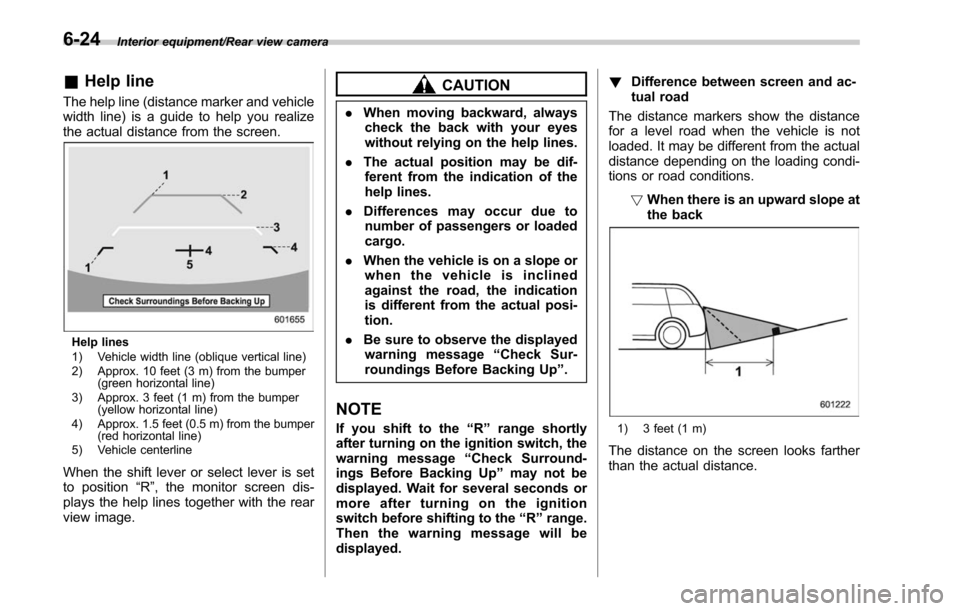
&Help line
The help line (distance marker and vehicle
width line) is a guide to help you realize
the actual distance from the screen.
Help lines
1) Vehicle width line (oblique vertical line)
2) Approx. 10 feet (3 m) from the bumper
(green horizontal line)
3) Approx. 3 feet (1 m) from the bumper (yellow horizontal line)
4) Approx. 1.5 feet (0.5 m) from the bumper (red horizontal line)
5) Vehicle centerline
When the shift lever or select lever is set
to position “R”, the monitor screen dis-
plays the help lines together with the rear
view image.
CAUTION
. When moving backward, always
check the back with your eyes
without relying on the help lines.
. The actual position may be dif-
ferent from the indication of the
help lines.
. Differences may occur due to
number of passengers or loaded
cargo.
. When the vehicle is on a slope or
when the vehicle is inclined
against the road, the indication
is different from the actual posi-
tion.
. Be sure to observe the displayed
warning message “Check Sur-
roundings Before Backing Up ”.
NOTE
If you shift to the “R ” range shortly
after turning on the ignition switch, the
warning message “Check Surround-
ings Before Backing Up” may not be
displayed. Wait for several seconds or
more after turning on the ignition
switch before shifting to the “R ” range.
Then the warning message will be
displayed. !
Difference between screen and ac-
tual road
The distance markers show the distance
for a level road when the vehicle is not
loaded. It may be different from the actual
distance depending on the loading condi-
tions or road conditions.
!When there is an upward slope at
the back1) 3 feet (1 m)
The distance on the screen looks farther
than the actual distance.
6-24
Page 372 of 610
Fuel...................................................................... 7-3
Fuel requirements ............................................... 7-3
Fuel filler lid and cap ........................................... 7-4
State emission testing (U.S. only) ...................... 7-7
Preparing to drive ............................................... 7-8
Starting and stopping the engine (models without push-button ignition switch) .............. 7-9
General precautions when starting/stopping
engine .............................................................. 7-9
Starting engine ................................................... 7-10
Stopping the engine ........................................... 7-11
Steering lock ...................................................... 7-11
Starting and stopping engine (models with
push-button start system) .............................. 7-12
Safety precautions............................................. 7-12
Operating range for push-button start system ............................................................. 7-12
Starting engine ................................................... 7-12
Stopping engine ................................................. 7-14
When access key does not operate properly ....... 7-14
Steering lock ...................................................... 7-14
Remote engine start system (dealer
option) .............................................................. 7-15
Models with “keyless access with push-button
start system ”................................................... 7-16
Models without “keyless access with push-button
start system ”................................................... 7-17
Entering the vehicle while it is running via remote start ................................................................. 7-20
Entering the vehicle following remote engine start shutdown ......................................................... 7-20 Pre-heating or pre-cooling the interior of the
vehicle ............................................................ 7-20
Service mode (models without “keyless access
with push-button start system ”) ....................... 7-20
Remote transmitter program (models without “keyless access with push-button start
system ”).......................................................... 7-20
System maintenance .......................................... 7-21
Manual transmission ......................................... 7-23Selecting reverse gear ....................................... 7-23
Shifting speeds .................................................. 7-24
Driving tips ........................................................ 7-24
Continuously variable transmission ................. 7-25Select lever....................................................... 7-26
Shift lock function ............................................. 7-28
Selection of manual mode .................................. 7-29
Driving tips ........................................................ 7-31
Power steering ................................................... 7-31
Braking ............................................................... 7-32
Braking tips ....................................................... 7-32
Brake system .................................................... 7-32
Disc brake pad wear warning indicators ............. 7-33
ABS (Anti-lock Brake System).......................... 7-33
ABS self-check.................................................. 7-34
ABS warning light .............................................. 7-34
Electronic Brake Force Distribution (EBD)
system ............................................................. 7-34
Steps to take if EBD system malfunctions .......... 7-34
Vehicle Dynamics Control system.................... 7-35Vehicle Dynamics Control system monitor .......... 7-37
Vehicle Dynamics Control OFF switch ................ 7-37
Starting and operating
7
Page 373 of 610
Starting and operating
X-mode (Outback CVT models)......................... 7-38
To activate/deactivate the X-mode ....................... 7-39
Hill descent control function ............................... 7-40
Tire pressure monitoring system (TPMS) (if
equipped) ......................................................... 7-41
Parking your vehicle .......................................... 7-42
Electronic parking brake ..................................... 7-43
Parking tips ....................................................... 7-47
Hill start assist system (MT models) ................ 7-48
To activate/deactivate the Hill start assist
system ............................................................. 7-50
Cruise control ..................................................... 7-50To set cruise control .......................................... 7-50
To temporarily cancel the cruise control ............. 7-51
To turn off the cruise control .............................. 7-52
To change the cruising speed ............................. 7-52
Cruise control indicator ...................................... 7-53
Cruise control set indicator ................................ 7-53
BSD/RCTA (if equipped).................................... 7-54
System features................................................. 7-54 System operation
............................................... 7-56
BSD/RCTA approach indicator light/warning buzzer ............................................................. 7-57
BSD/RCTA warning indicator .............................. 7-59
BSD/RCTA OFF switch ....................................... 7-60
Certification for the BSD/RCTA ........................... 7-61
Handling of radar sensors .................................. 7-61
Reverse Automatic Braking System (if
equipped) ........................................................ 7-63
Reverse Automatic Braking System overview .....7-63
Operating conditions ......................................... 7-64
Reverse Automatic Braking System operation ......................................................... 7-66
Canceling the Reverse Automatic Braking system operation ......................................................... 7-69
RAB warning indicator ....................................... 7-69
Reverse Automatic Braking system ON/OFF setting ............................................................. 7-69
Handling of the sonar sensors ........................... 7-70
Page 374 of 610
Fuel
CAUTION
Use of a fuel which is low in quality
or use of an inappropriate fuel
additive may cause damage to the
engine and/or fuel system.
&Fuel requirements
The engine is designed to operate using
unleaded gasoline with an octane rating
of 87 AKI (90 RON) or higher .
! Fuel octane rating
Using a gasoline with a lower octane
rating can cause persistent and heavy
knocking, which can damage the engine.
Do not be concerned if your vehicle
sometimes knocks lightly when you drive
up a hill or when you accelerate. See your
dealer or a qualified service technician if
you use a fuel with the specified octane
rating and your vehicle knocks heavily or
persistently.
!RON
This octane rating is the Research Octane
Number. !
AKI
This octane rating is the average of the
Research Octane and Motor Octane
numbers and is commonly referred to as
the Anti Knock Index (AKI).
! Unleaded gasoline
The neck of the fuel filler pipe is designed
to accept only an unleaded gasoline filler
nozzle. Under no circumstances should
leaded gasoline be used because it will
damage the emission control system and
may impair driveability and fuel economy.
! California fuel
If your vehicle was certified to California
Emission Standards as indicated on the
underhood tune-up label, it is designed to
optimize engine and emission control
system performance with gasoline that
meets the clean burning low-sulfur Cali-
fornia gasoline specifications. If you live in
any other state than California, your
vehicle will operate on gasoline meeting
Federal specifications. Gasoline sold out-
side California is permitted to have higher
sulfur levels, which may affect the perfor-
mance of your vehicle’ s catalytic converter
and may produce a sulfur exhaust odor or
smell. SUBARU recommends that you try
a different brand of unleaded gasoline
having lower sulfur to determine if the
problem is fuel related before returning your vehicle to an authorized dealer for
service. The CHECK ENGINE warning
light/malfunction indicator light may also
turn on. If this occurs, return to your
authorized SUBARU dealer for diagnosis.
If it is determined that the condition is
caused by the type of fuel used, repairs
may not be covered by your warranty.
!
MMT
Some gasoline contains an octane-en-
hancing additive called MMT (Methylcy-
clopentadienyl Manganese Tricarbonyl). If
you use such fuels, your emission control
system performance may deteriorate and
the CHECK ENGINE warning light/mal-
function indicator light may turn on. If this
happens, return to your authorized
SUBARU Dealer for service. If it is
determined that the condition is caused
by the type of fuel used, repairs may not
be covered by your warranty.
! Gasoline for cleaner air
CAUTION
Do not let fuel spill on the exterior
surfaces of the vehicle. Fuels con-
taining alcohol may cause paint
damage, which is not covered under
the SUBARU Limited Warranty.
Your use of gasoline with detergent
Starting and operating/Fuel
–CONTINUED –7-3
Page 376 of 610
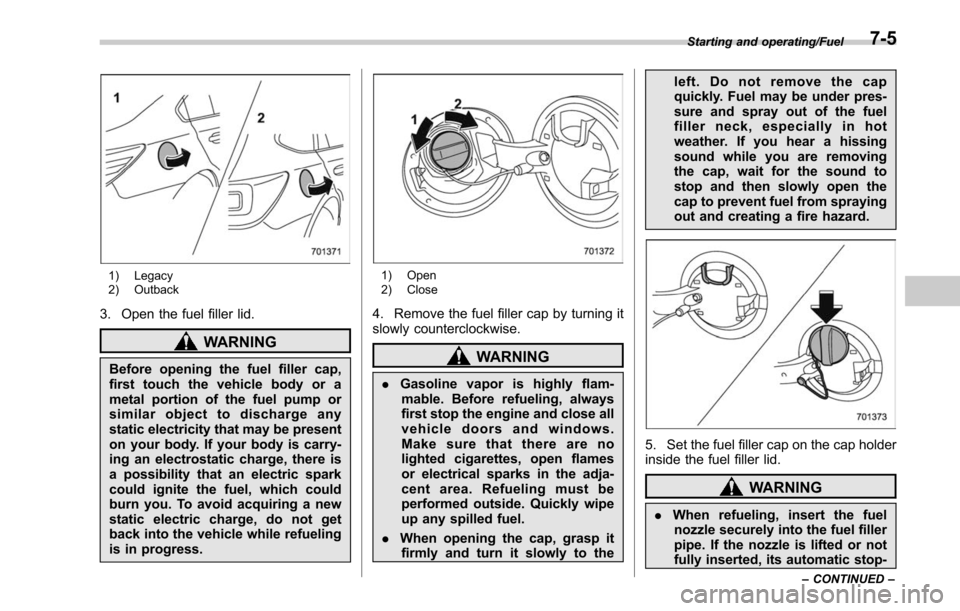
1) Legacy
2) Outback
3. Open the fuel filler lid.
WARNING
Before opening the fuel filler cap,
first touch the vehicle body or a
metal portion of the fuel pump or
similar object to discharge any
static electricity that may be present
on your body. If your body is carry-
ing an electrostatic charge, there is
a possibility that an electric spark
could ignite the fuel, which could
burn you. To avoid acquiring a new
static electric charge, do not get
back into the vehicle while refueling
is in progress.
1) Open
2) Close
4. Remove the fuel filler cap by turning it
slowly counterclockwise.
WARNING
.Gasoline vapor is highly flam-
mable. Before refueling, always
first stop the engine and close all
vehicle doors and windows.
Make sure that there are no
lighted cigarettes, open flames
or electrical sparks in the adja-
cent area. Refueling must be
performed outside. Quickly wipe
up any spilled fuel.
. When opening the cap, grasp it
firmly and turn it slowly to the left. Do not remove the cap
quickly. Fuel may be under pres-
sure and spray out of the fuel
filler neck, especially in hot
weather. If you hear a hissing
sound while you are removing
the cap, wait for the sound to
stop and then slowly open the
cap to prevent fuel from spraying
out and creating a fire hazard.
5. Set the fuel filler cap on the cap holder
inside the fuel filler lid.
WARNING
.
When refueling, insert the fuel
nozzle securely into the fuel filler
pipe. If the nozzle is lifted or not
fully inserted, its automatic stop-
Starting and operating/Fuel
–CONTINUED –7-5