shift lever SUBARU LEGACY 2017 6.G Owner's Manual
[x] Cancel search | Manufacturer: SUBARU, Model Year: 2017, Model line: LEGACY, Model: SUBARU LEGACY 2017 6.GPages: 610
Page 397 of 610
Starting and operating/Continuously variable transmission
.Immediately after transmission fluid
is replaced, you may feel that the
transmission operation is somewhat
unusual. This results from invalidation
of data which the on-board computer
has collected and stored in memory to
allow the transmission to shift at the
most appropriate times for the current
condition of your vehicle. Optimized
shifting will be restored as the vehicle
continues to be driven for a while.
. When driving under continuous hea-
vy load conditions such as towing a
camper or climbing a long, steep hill,
the engine speed, vehicle speed and air
conditioning system cooling perfor-
mance may automatically be reduced.
This is not a malfunction. This phe-
nomenon results from the engine con-
trol function maintaining the cooling
performance of the vehicle. The engine
and vehicle speed will return to a
normal speed when the engine is able
to maintain the optimum cooling per-
formance after the heavy load de-
creases. Driving under a heavy load
must be performed with extreme care.
Do not try to pass a vehicle in front
when driving on an uphill slope while
towing.
. The continuously variable transmis-
sion is a chain type system that
provides superior transmission effi- ciency for maximum fuel economy. At
times, depending on varying driving
conditions, a chain operating noise
may be heard that is characteristic of
this type of system.
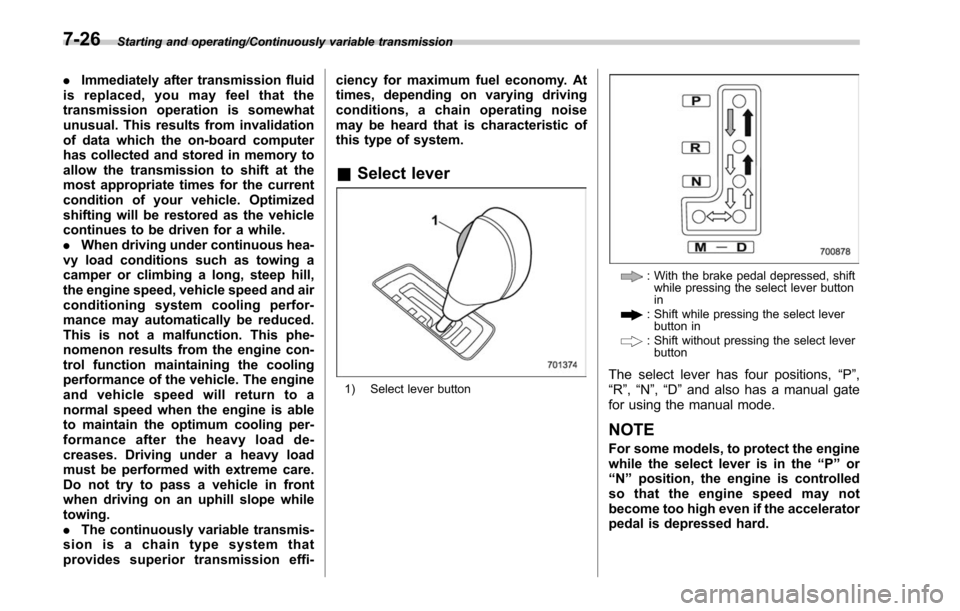
&
Select lever
1) Select lever button
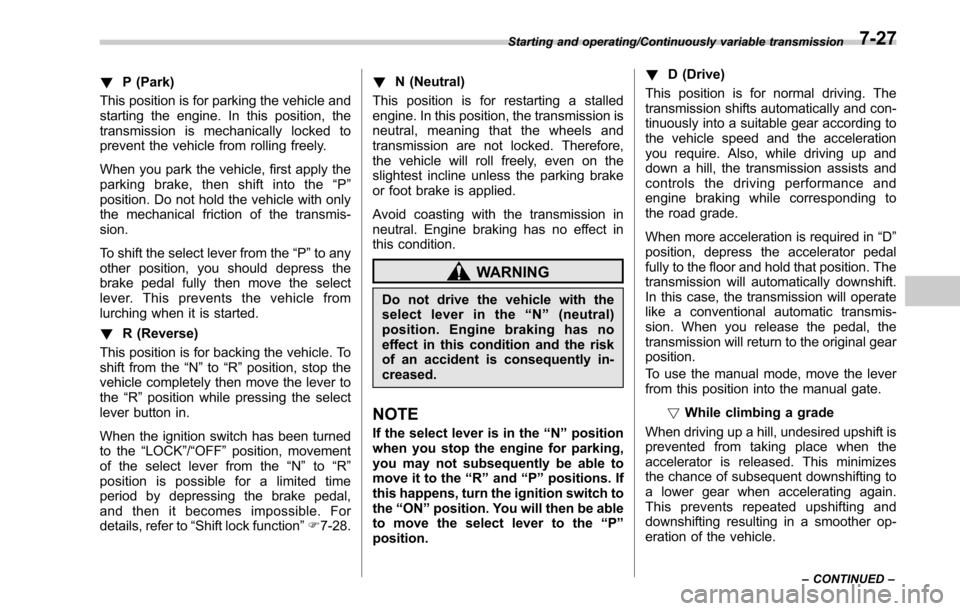
: With the brake pedal depressed, shift
while pressing the select lever button
in
: Shift while pressing the select leverbutton in
: Shift without pressing the select leverbutton
The select lever has four positions, “P”,
“R ”,“N ”,“D ”and also has a manual gate
for using the manual mode.
NOTE
For some models, to protect the engine
while the select lever is in the “P ” or
“ N ” position, the engine is controlled
sothattheenginespeedmaynot
become too high even if the accelerator
pedal is depressed hard.
7-26
Page 398 of 610
!P (Park)
This position is for parking the vehicle and
starting the engine. In this position, the
transmission is mechanically locked to
prevent the vehicle from rolling freely.
When you park the vehicle, first apply the
parking brake, then shift into the “P ”
position. Do not hold the vehicle with only
the mechanical friction of the transmis-
sion.
To shift the select lever from the “P”to any
other position, you should depress the
brake pedal fully then move the select
lever. This prevents the vehicle from
lurching when it is started.
! R (Reverse)
This position is for backing the vehicle. To
shift from the “N”to “R”position, stop the
vehicle completely then move the lever to
the “R”position while pressing the select
lever button in.
When the ignition switch has been turned
to the “LOCK”/ “OFF ”position, movement
of the select lever from the “N”to “R”
position is possible for a limited time
period by depressing the brake pedal,
and then it becomes impossible. For
details, refer to “Shift lock function ”F 7-28. !
N (Neutral)
This position is for restarting a stalled
engine. In this position, the transmission is
neutral, meaning that the wheels and
transmission are not locked. Therefore,
the vehicle will roll freely, even on the
slightest incline unless the parking brake
or foot brake is applied.
Avoid coasting with the transmission in
neutral. Engine braking has no effect in
this condition.
WARNING
Do not drive the vehicle with the
select lever in the “N ” (neutral)
position. Engine braking has no
effect in this condition and the risk
of an accident is consequently in-
creased.
NOTE
If the select lever is in the “N ” position
when you stop the engine for parking,
you may not subsequently be able to
move it to the “R ” and “P ” positions. If
this happens, turn the ignition switch to
the “ON ”position. You will then be able
to move the select lever to the “P ”
position. !
D (Drive)
This position is for normal driving. The
transmission shifts automatically and con-
tinuously into a suitable gear according to
the vehicle speed and the acceleration
you require. Also, while driving up and
down a hill, the transmission assists and
controls the driving performance and
engine braking while corresponding to
the road grade.
When more acceleration is required in “D”
position, depress the accelerator pedal
fully to the floor and hold that position. The
transmission will automatically downshift.
In this case, the transmission will operate
like a conventional automatic transmis-
sion. When you release the pedal, the
transmission will return to the original gear
position.
To use the manual mode, move the lever
from this position into the manual gate.
!While climbing a grade
When driving up a hill, undesired upshift is
prevented from taking place when the
accelerator is released. This minimizes
the chance of subsequent downshifting to
a lower gear when accelerating again.
This prevents repeated upshifting and
downshifting resulting in a smoother op-
eration of the vehicle.
Starting and operating/Continuously variable transmission
–CONTINUED –7-27
Page 399 of 610
Starting and operating/Continuously variable transmission
NOTE
The transmission may downshift, de-
pending on the way the accelerator
pedal is depressed to accelerate the
vehicle again.
&Shift lock function
The shift lock function helps prevent the
improper operation of the select lever.
. The select lever cannot be operated
unless the ignition switch is turned to the
“ ON ”position and the brake pedal is
depressed.
. The select lever cannot be moved from
the “P ” position to any other position
before the brake pedal is depressed.
Depress the brake pedal first, and then
operate the select lever.
. Only the “P”position allows you to turn
the key from the “ACC”position to the
“LOCK” position and remove the key from
the ignition key cylinder (models without
“ keyless access with push-button start
system ”).
. Only the “P”position allows you to turn
the push-button ignition switch to the
“ OFF ”position (models with “keyless
access with push-button start system ”).
. If the ignition switch is turned to the
“LOCK”/ “OFF”position while the select
lever is in the “N”position, the select lever may not be moved to the
“P”position after
a period of time. Therefore, move the
select lever to the “P ” position with the
brake pedal depressed soon after the
ignition switch is turned to the “LOCK”/
“OFF ”position.
! Shift lock release
If the select lever cannot be operated, turn
theignitionswitchbacktothe “ON ”
position then move the select lever to the
“P ”position with the select lever button
pressed and brake pedal depressed.
If the select lever does not move after
performing the above procedure, perform
the following steps.
. Wh
en the select lever cannot be
shifted from “P ” to “N ”:
Refer to “Shift lock release using the shift
lock release portion ”F 7-28.
. When the select lever cannot be
shifted from “N ” to “R ”, “P ”:
Within 60 seconds after placing the igni-
tion switch in the “ACC”position, move the
select lever to the “P”position with the
select lever button pressed and brake
pedal depressed.
If you must perform the above procedure,
the shift lock system (or the vehicle control
system) may be malfunctioning. Contact a SUBARU dealer for an inspection as soon
as possible.
If the select lever does not move after
performing the above procedure, refer to
“Shift lock release using the shift lock
release portion
”F 7-28.
! Shift lock release using the shift
lock release portion
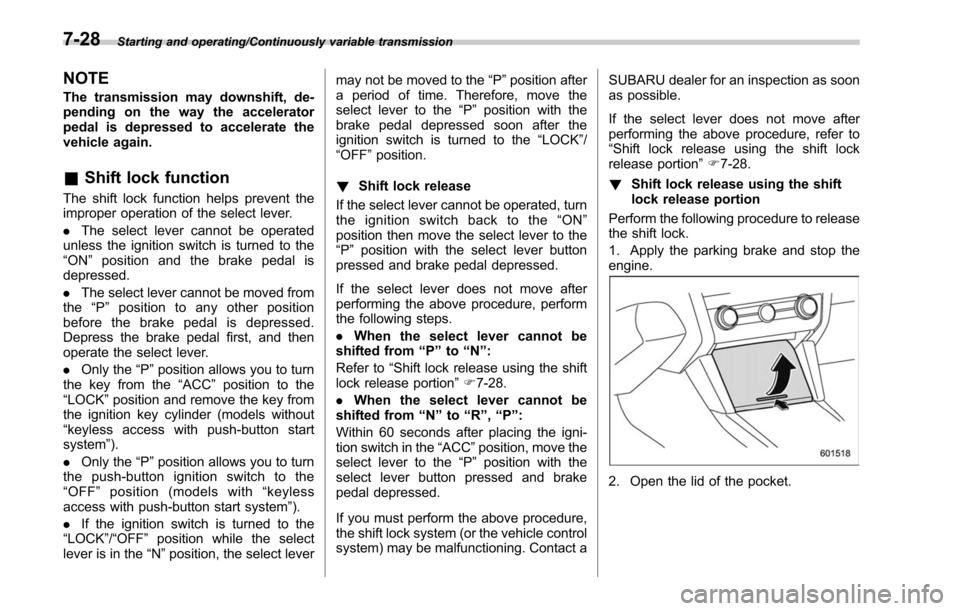
Perform the following procedure to release
the shift lock.
1. Apply the parking brake and stop the
engine.
2. Open the lid of the pocket.
7-28
Page 400 of 610
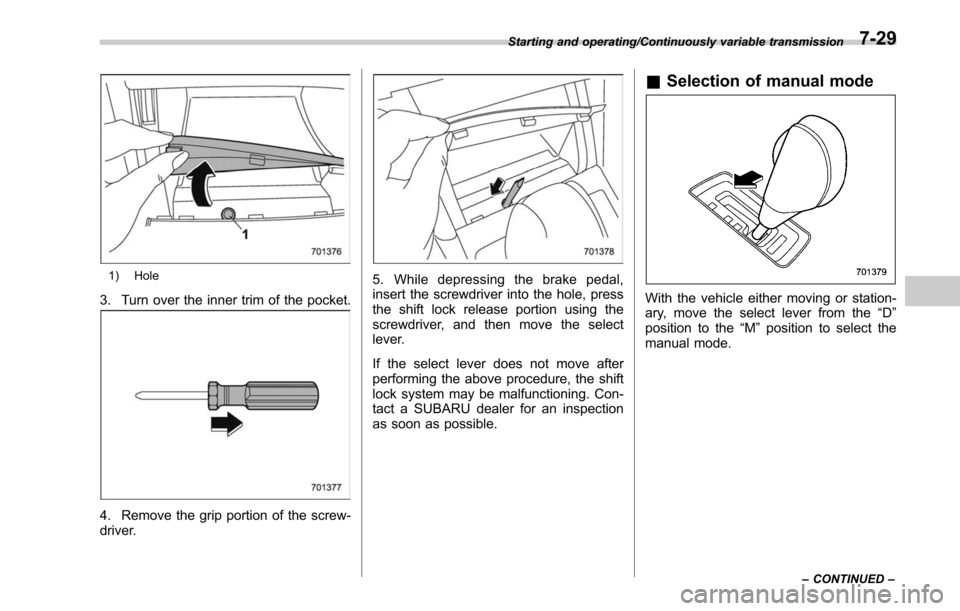
1) Hole
3. Turn over the inner trim of the pocket.
4. Remove the grip portion of the screw-
driver.
5. While depressing the brake pedal,
insert the screwdriver into the hole, press
the shift lock release portion using the
screwdriver, and then move the select
lever.
If the select lever does not move after
performing the above procedure, the shift
lock system may be malfunctioning. Con-
tact a SUBARU dealer for an inspection
as soon as possible.
&Selection of manual mode
With the vehicle either moving or station-
ary, move the select lever from the “D”
position to the “M”position to select the
manual mode.
Starting and operating/Continuously variable transmission
–CONTINUED –7-29
Page 401 of 610
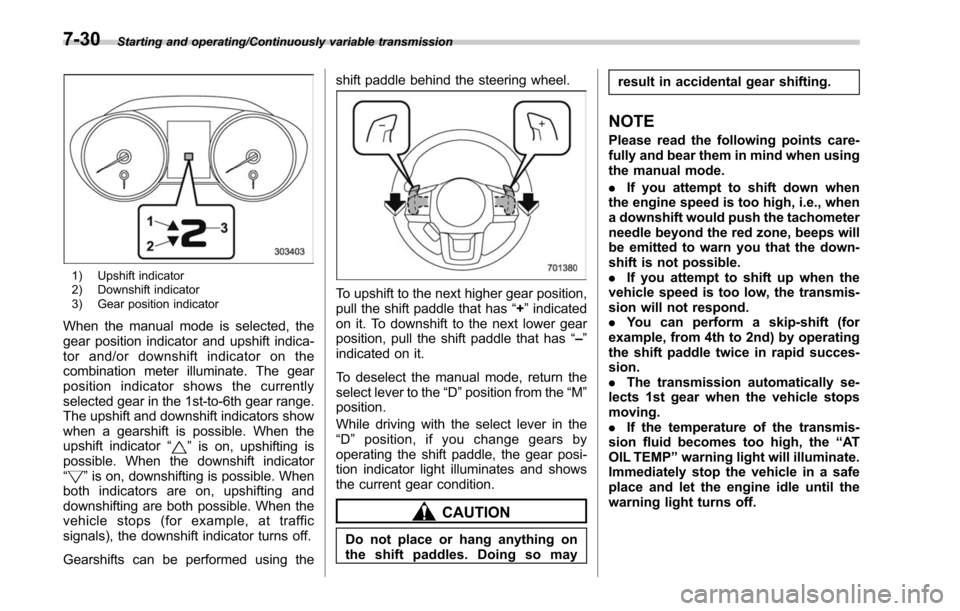
Starting and operating/Continuously variable transmission
1) Upshift indicator
2) Downshift indicator
3) Gear position indicator
When the manual mode is selected, the
gear position indicator and upshift indica-
tor and/or downshift indicator on the
combination meter illuminate. The gear
position indicator shows the currently
selected gear in the 1st-to-6th gear range.
The upshift and downshift indicators show
when a gearshift is possible. When the
upshift indicator“
”is on, upshifting is
possible. When the downshift indicator
“
” is on, downshifting is possible. When
both indicators are on, upshifting and
downshifting are both possible. When the
vehicle stops (for example, at traffic
signals), the downshift indicator turns off.
Gearshifts can be performed using the shift paddle behind the steering wheel.
To upshift to the next higher gear position,
pull the shift paddle that has
“+”indicated
on it. To downshift to the next lower gear
position, pull the shift paddle that has “–”
indicated on it.
To deselect the manual mode, return the
select lever to the “D”position from the “M”
position.
While driving with the select lever in the
“ D ” position, if you change gears by
operating the shift paddle, the gear posi-
tion indicator light illuminates and shows
the current gear condition.
CAUTION
Do not place or hang anything on
the shift paddles. Doing so may result in accidental gear shifting.
NOTE
Please read the following points care-
fully and bear them in mind when using
the manual mode.
.
If you attempt to shift down when
the engine speed is too high, i.e., when
a downshift would push the tachometer
needle beyond the red zone, beeps will
be emitted to warn you that the down-
shift is not possible.
. If you attempt to shift up when the
vehicle speed is too low, the transmis-
sion will not respond.
. You can perform a skip-shift (for
example, from 4th to 2nd) by operating
the shift paddle twice in rapid succes-
sion.
. The transmission automatically se-
lects 1st gear when the vehicle stops
moving.
. If the temperature of the transmis-
sion fluid becomes too high, the “AT
OIL TEMP ”warning light will illuminate.
Immediately stop the vehicle in a safe
place and let the engine idle until the
warning light turns off.
7-30
Page 414 of 610
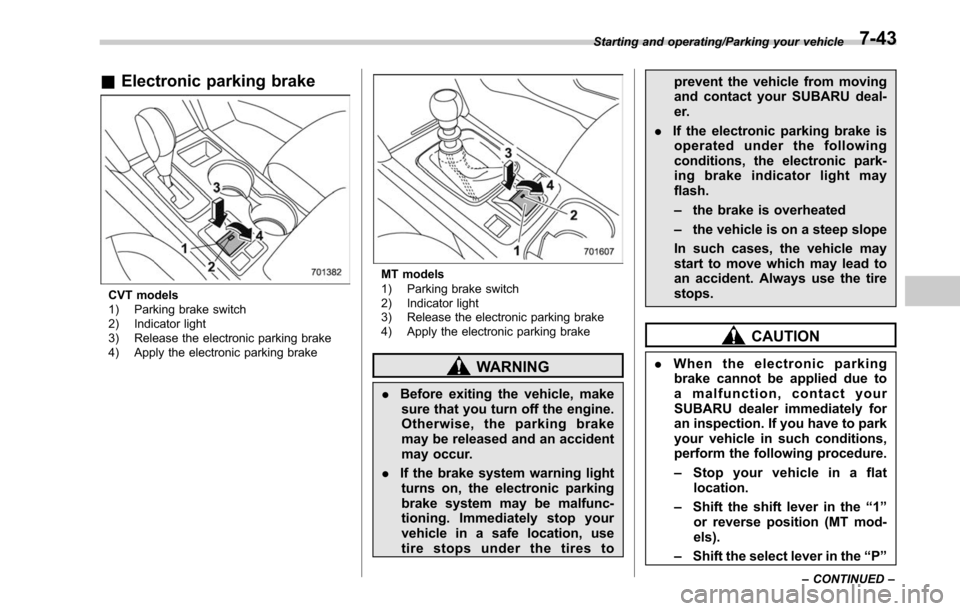
&Electronic parking brake
CVT models
1) Parking brake switch
2) Indicator light
3) Release the electronic parking brake
4) Apply the electronic parking brake
MT models
1) Parking brake switch
2) Indicator light
3) Release the electronic parking brake
4) Apply the electronic parking brake
WARNING
. Before exiting the vehicle, make
sure that you turn off the engine.
Otherwise, the parking brake
may be released and an accident
may occur.
. If the brake system warning light
turns on, the electronic parking
brake system may be malfunc-
tioning. Immediately stop your
vehicle in a safe location, use
tire stops under the tires to prevent the vehicle from moving
and contact your SUBARU deal-
er.
. If the electronic parking brake is
operated under the following
conditions, the electronic park-
ing brake indicator light may
flash.
– the brake is overheated
– the vehicle is on a steep slope
In such cases, the vehicle may
start to move which may lead to
an accident. Always use the tire
stops.
CAUTION
. When the electronic parking
brake cannot be applied due to
a malfunction, contact your
SUBARU dealer immediately for
an inspection. If you have to park
your vehicle in such conditions,
perform the following procedure.
– Stop your vehicle in a flat
location.
– Shift the shift lever in the “1 ”
or reverse position (MT mod-
els).
– Shift the select lever in the “P ”
Starting and operating/Parking your vehicle
–CONTINUED –7-43
Page 415 of 610
Starting and operating/Parking your vehicle
position (CVT models). When
the select lever cannot be
shifted into the“P ” position,
you must release shift lock.
Refer to “Shift lock function ”
F 7-28.
– Use tire stops under the tires
to prevent the vehicle from
moving.
. Never drive with the parking
brake applied in order to avoid
unnecessary wear on the brake
linings. Before starting to drive,
always make sure that the park-
ing brake has been released and
that the electronic parking brake
indicator light has turned off.
. The braking power of the electro-
nic parking brake may not be
sufficient when strong braking
power is needed (e.g., when
parking on a steep slope while
towing a trailer (Outback)).
Your vehicle is equipped with an electronic
parking brake. You can apply/release the
parking brake by operating the parking
brake switch.
To apply: Depress the brake pedal and
pull up the parking brake switch.
To release: Press the parking brake switch firmly while the ignition switch is
in the
“ON”position and the brake pedal is
depressed.
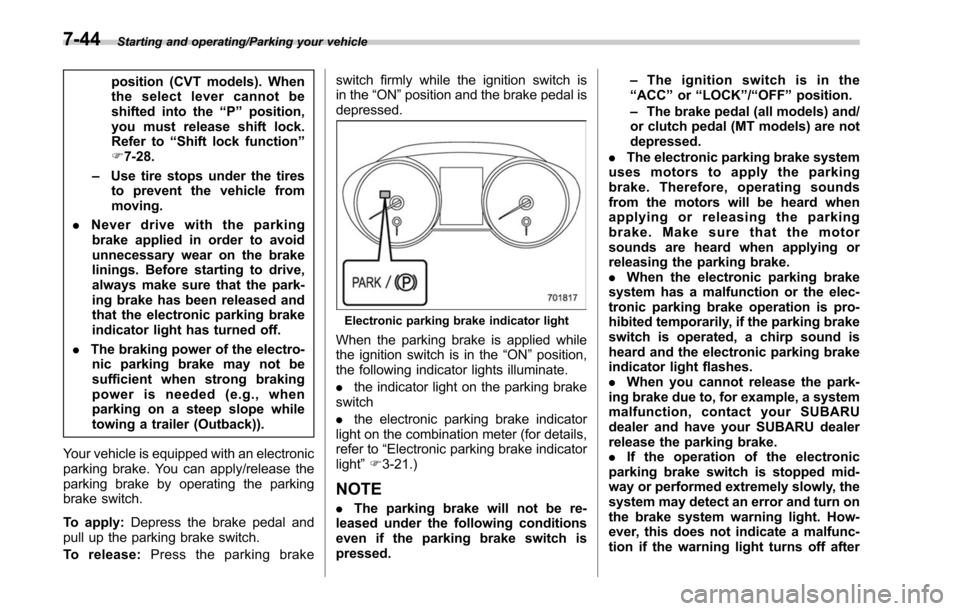
Electronic parking brake indicator light
When the parking brake is applied while
the ignition switch is in the “ON”position,
the following indicator lights illuminate.
. the indicator light on the parking brake
switch
. the electronic parking brake indicator
light on the combination meter (for details,
refer to “Electronic parking brake indicator
light ”F 3-21.)
NOTE
. The parking brake will not be re-
leased under the following conditions
even if the parking brake switch is
pressed. –
Theignitionswitchisinthe
“ ACC ”or “LOCK ”/“ OFF ”position.
– The brake pedal (all models) and/
or clutch pedal (MT models) are not
depressed.
. The electronic parking brake system
uses motors to apply the parking
brake. Therefore, operating sounds
from the motors will be heard when
applying or releasing the parking
brake. Make sure that the motor
sounds are heard when applying or
releasing the parking brake.
. When the electronic parking brake
system has a malfunction or the elec-
tronic parking brake operation is pro-
hibited temporarily, if the parking brake
switch is operated, a chirp sound is
heard and the electronic parking brake
indicator light flashes.
. When you cannot release the park-
ing brake due to, for example, a system
malfunction, contact your SUBARU
dealer and have your SUBARU dealer
release the parking brake.
. If the operation of the electronic
parking brake switch is stopped mid-
way or performed extremely slowly, the
system may detect an error and turn on
the brake system warning light. How-
ever, this does not indicate a malfunc-
tion if the warning light turns off after
7-44
Page 418 of 610
system ignores any further pressing of
the switch. To activate the switch again,
turn the ignition switch to the“LOCK ”/
“ OFF ”position and restart the engine.
. When the Hill Holder function is
deactivated while the Hill Holder func-
tion has a malfunction, if you press the
Hill Holder switch, a chirp sounds.
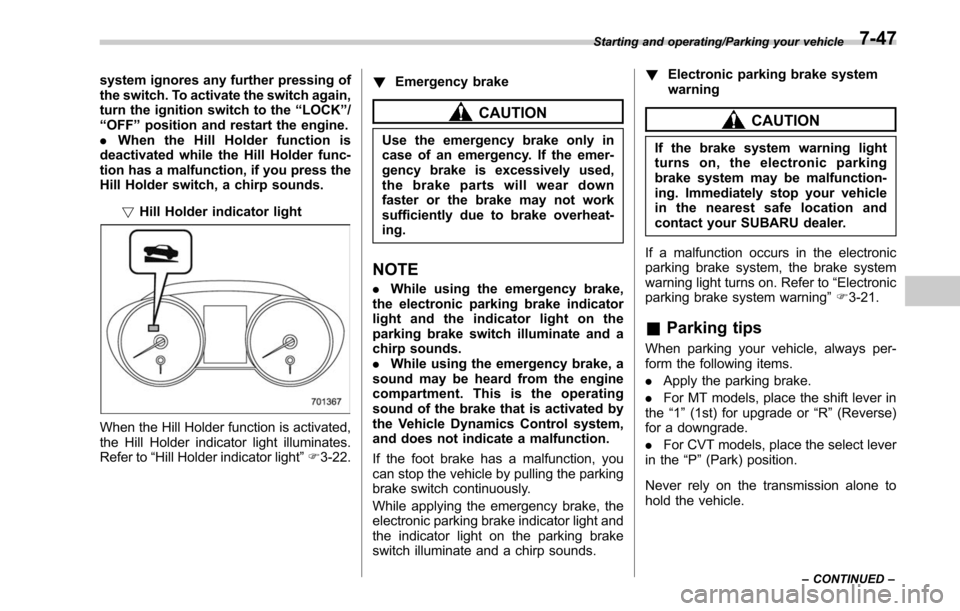
!Hill Holder indicator light
When the Hill Holder function is activated,
the Hill Holder indicator light illuminates.
Refer to “Hill Holder indicator light ”F 3-22. !
Emergency brake
CAUTION
Use the emergency brake only in
case of an emergency. If the emer-
gency brake is excessively used,
the brake parts will wear down
faster or the brake may not work
sufficiently due to brake overheat-
ing.
NOTE
.While using the emergency brake,
the electronic parking brake indicator
light and the indicator light on the
parking brake switch illuminate and a
chirp sounds.
. While using the emergency brake, a
sound may be heard from the engine
compartment. This is the operating
sound of the brake that is activated by
the Vehicle Dynamics Control system,
and does not indicate a malfunction.
If the foot brake has a malfunction, you
can stop the vehicle by pulling the parking
brake switch continuously.
While applying the emergency brake, the
electronic parking brake indicator light and
the indicator light on the parking brake
switch illuminate and a chirp sounds. !
Electronic parking brake system
warning
CAUTION
If the brake system warning light
turns on, the electronic parking
brake system may be malfunction-
ing. Immediately stop your vehicle
in the nearest safe location and
contact your SUBARU dealer.
If a malfunction occurs in the electronic
parking brake system, the brake system
warning light turns on. Refer to “Electronic
parking brake system warning ”F 3-21.
& Parking tips
When parking your vehicle, always per-
form the following items.
. Apply the parking brake.
. For MT models, place the shift lever in
the “1”(1st) for upgrade or “R”(Reverse)
for a downgrade.
. For CVT models, place the select lever
in the “P ”(Park) position.
Never rely on the transmission alone to
hold the vehicle.
Starting and operating/Parking your vehicle
–CONTINUED –7-47
Page 422 of 610
nation meter will appear.
2. Depress the accelerator pedal until the
vehicle reaches the desired speed.
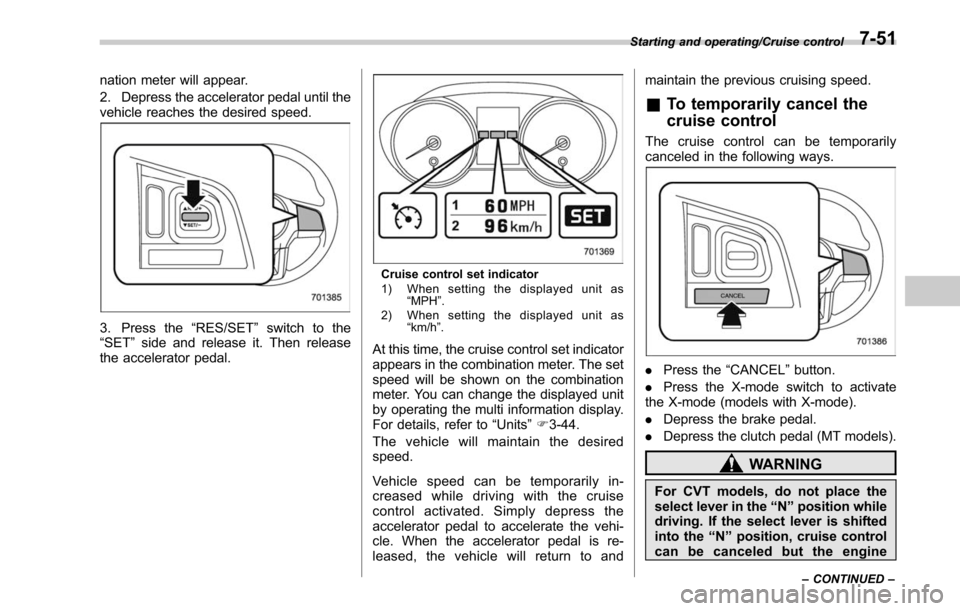
3. Press the“RES/SET”switch to the
“SET ”side and release it. Then release
the accelerator pedal.
Cruise control set indicator
1) When setting the displayed unit as “MPH ”.
2) When setting the displayed unit as “km/h ”.
At this time, the cruise control set indicator
appears in the combination meter. The set
speed will be shown on the combination
meter. You can change the displayed unit
by operating the multi information display.
For details, refer to “Units”F 3-44.
The vehicle will maintain the desired
speed.
Vehicle speed can be temporarily in-
creased while driving with the cruise
control activated. Simply depress the
accelerator pedal to accelerate the vehi-
cle. When the accelerator pedal is re-
leased, the vehicle will return to and maintain the previous cruising speed.
&
To temporarily cancel the
cruise control
The cruise control can be temporarily
canceled in the following ways.
. Press the “CANCEL”button.
. Press the X-mode switch to activate
the X-mode (models with X-mode).
. Depress the brake pedal.
. Depress the clutch pedal (MT models).
WARNING
For CVT models, do not place the
select lever in the “N ” position while
driving. If the select lever is shifted
into the “N ” position, cruise control
can be canceled but the engine
Starting and operating/Cruise control
–CONTINUED –7-51
Page 427 of 610
Starting and operating/BSD/RCTA
the surroundings with your eyes
when reversing the vehicle.
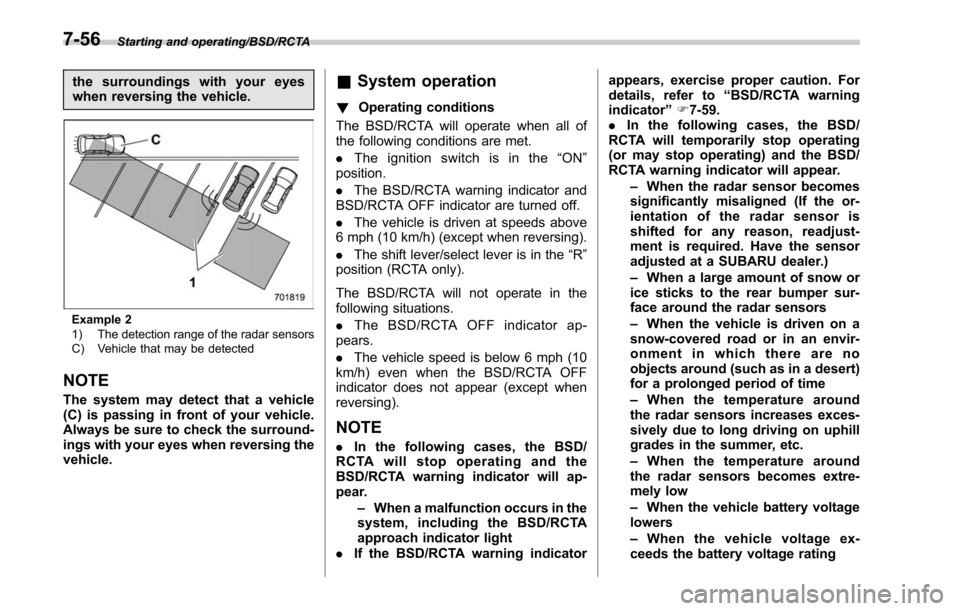
Example 2
1) The detection range of the radar sensors
C) Vehicle that may be detected
NOTE
The system may detect that a vehicle
(C) is passing in front of your vehicle.
Always be sure to check the surround-
ings with your eyes when reversing the
vehicle.
&System operation
! Operating conditions
The BSD/RCTA will operate when all of
the following conditions are met.
. The ignition switch is in the “ON ”
position.
. The BSD/RCTA warning indicator and
BSD/RCTA OFF indicator are turned off.
. The vehicle is driven at speeds above
6 mph (10 km/h) (except when reversing).
. The shift lever/select lever is in the “R”
position (RCTA only).
The BSD/RCTA will not operate in the
following situations.
. The BSD/RCTA OFF indicator ap-
pears.
. The vehicle speed is below 6 mph (10
km/h) even when the BSD/RCTA OFF
indicator does not appear (except when
reversing).
NOTE
. In the following cases, the BSD/
RCTA will stop operating and the
BSD/RCTA warning indicator will ap-
pear.
–When a malfunction occurs in the
system, including the BSD/RCTA
approach indicator light
. If the BSD/RCTA warning indicator appears, exercise proper caution. For
details, refer to
“BSD/RCTA warning
indicator ”F 7-59.
. In the following cases, the BSD/
RCTA will temporarily stop operating
(or may stop operating) and the BSD/
RCTA warning indicator will appear.
–When the radar sensor becomes
significantly misaligned (If the or-
ientation of the radar sensor is
shifted for any reason, readjust-
ment is required. Have the sensor
adjusted at a SUBARU dealer.)
– When a large amount of snow or
ice sticks to the rear bumper sur-
face around the radar sensors
– When the vehicle is driven on a
snow-covered road or in an envir-
onment in which there are no
objects around (such as in a desert)
for a prolonged period of time
– When the temperature around
the radar sensors increases exces-
sively due to long driving on uphill
grades in the summer, etc.
– When the temperature around
the radar sensors becomes extre-
mely low
– When the vehicle battery voltage
lowers
– When the vehicle voltage ex-
ceeds the battery voltage rating
7-56