steering SUBARU LEGACY 2017 6.G Owner's Guide
[x] Cancel search | Manufacturer: SUBARU, Model Year: 2017, Model line: LEGACY, Model: SUBARU LEGACY 2017 6.GPages: 610
Page 196 of 610
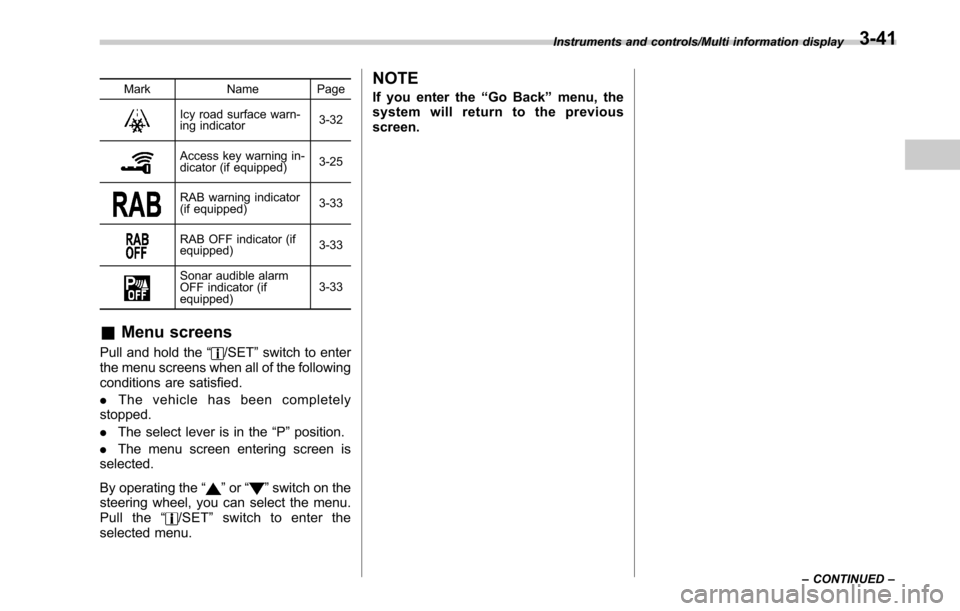
MarkName Page
Icy road surface warn-
ing indicator 3-32
Access key warning in-
dicator (if equipped)3-25
RAB warning indicator
(if equipped)
3-33
RAB OFF indicator (if
equipped)3-33
Sonar audible alarm
OFF indicator (if
equipped)3-33
&
Menu screens
Pull and hold the “/SET”switch to enter
the menu screens when all of the following
conditions are satisfied.
. The vehicle has been completely
stopped.
. The select lever is in the “P”position.
. The menu screen entering screen is
selected.
By operating the “
”or “”switch on the
steering wheel, you can select the menu.
Pull the “
/SET”switch to enter the
selected menu.
NOTE
If you enter the “Go Back ”menu, the
system will return to the previous
screen.
Instruments and controls/Multi information display
–CONTINUED –3-41
Page 199 of 610
Instruments and controls/Multi information display
!Screen Settings
After entering the “Screen Settings”menu,
select one of the following menus.
!Welcome Screen
The welcome screen can be activated or
deactivated. Select “On (with Sound)”to
activate the screen and sound. Select “On
(without Sound) ”to activate the screen
and deactivate the sound. Select “Off”to
deactivate the screen.
!Good-bye Screen
The Good-bye screen can be activated or
deactivated. Select “On”to activate the
screen. Select “Off ”to deactivate the
screen.
!Gauge Initial Movement
The movement of the meter needles and
gauge needles that occurs when the
ignition switch is turned to the “ON ”
position can be activated or deactivated.
Select “On”to activate. Select “Off”to
deactivate.
!Gear Position Indicator Settings
(MT models)
The gear position indicator light can be
activated or deactivated. Select “On”to
activate. Select “Off”to deactivate. !
Units
You can select the displayed units of the
distance, vehicle speed and volume.
Operate the “
”or “”switch on the
steering wheel to display the preferred
units. Then pull the “
/SET”switch to
select the displayed units.
!Languages
Operate the “
”or “”switch on the
steering wheel to display the preferred
language. Then pull the “
/SET”switch to
select the displayed language.
! Combination Meter Illumination (if
equipped)
After entering the “Combination Meter
Illumination ”menu, select the following
menu.
!Meter Ring Illumination
The illumination of the combination meter
rings can be activated or deactivated.
Select “On ”to activate the illumination.
Select “Off”to deactivate the illumination.
! EyeSight (models with EyeSight
system)
NOTE
For models with the EyeSight system,
refer to the Owner ’s Manual supple-
ment for the EyeSight system. After entering the
“EyeSight ”menu, select
one of the following menus.
!Warning Volume
The volume of the warning buzzer that
sounds when the EyeSight system is in
use can be set in 3 stages (“Max ”,“Mid ”
and “Min”).
! Lead Vehicle Acquisition Sound
When adaptive cruise control is used, the
buzzer that sounds under any of the
following conditions can be activated or
deactivated.
. A vehicle is detected in front
. Detection is not possible
Select “On”to activate the buzzer. Select
“Off ”to deactivate the buzzer.
! Lead Vehicle Moving Monitor
Function
When the lead vehicle moving monitor
function is operated, the buzzer that
sounds if a vehicle in front has started
can be activated or deactivated. Select
“On ”to activate the buzzer. Select “Off”to
deactivate the buzzer.
!Vehicle Icon
The vehicle icon indication can be acti-
vated or deactivated. Select “On ”to
activate. Select “Off”to deactivate.
3-44
Page 211 of 610
Instruments and controls/Front fog light switch
Front fog light switch
(if equipped)
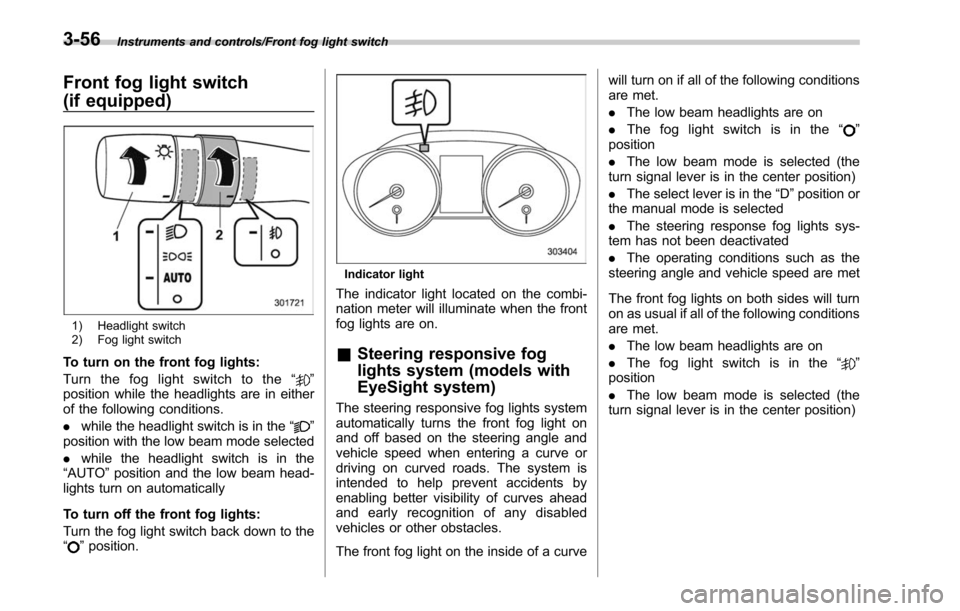
1) Headlight switch
2) Fog light switch
To turn on the front fog lights:
Turn the fog light switch to the“
”
position while the headlights are in either
of the following conditions.
. while the headlight switch is in the “
”
position with the low beam mode selected
. while the headlight switch is in the
“AUTO ”position and the low beam head-
lights turn on automatically
To turn off the front fog lights:
Turn the fog light switch back down to the
“
” position.
Indicator light
The indicator light located on the combi-
nation meter will illuminate when the front
fog lights are on.
& Steering responsive fog
lights system (models with
EyeSight system)
The steering responsive fog lights system
automatically turns the front fog light on
and off based on the steering angle and
vehicle speed when entering a curve or
driving on curved roads. The system is
intended to help prevent accidents by
enabling better visibility of curves ahead
and early recognition of any disabled
vehicles or other obstacles.
The front fog light on the inside of a curve will turn on if all of the following conditions
are met.
.
The low beam headlights are on
. The fog light switch is in the “
”
position
. The low beam mode is selected (the
turn signal lever is in the center position)
. The select lever is in the “D”position or
the manual mode is selected
. The steering response fog lights sys-
tem has not been deactivated
. The operating conditions such as the
steering angle and vehicle speed are met
The front fog lights on both sides will turn
on as usual if all of the following conditions
are met.
. The low beam headlights are on
. The fog light switch is in the “
”
position
. The low beam mode is selected (the
turn signal lever is in the center position)
3-56
Page 212 of 610
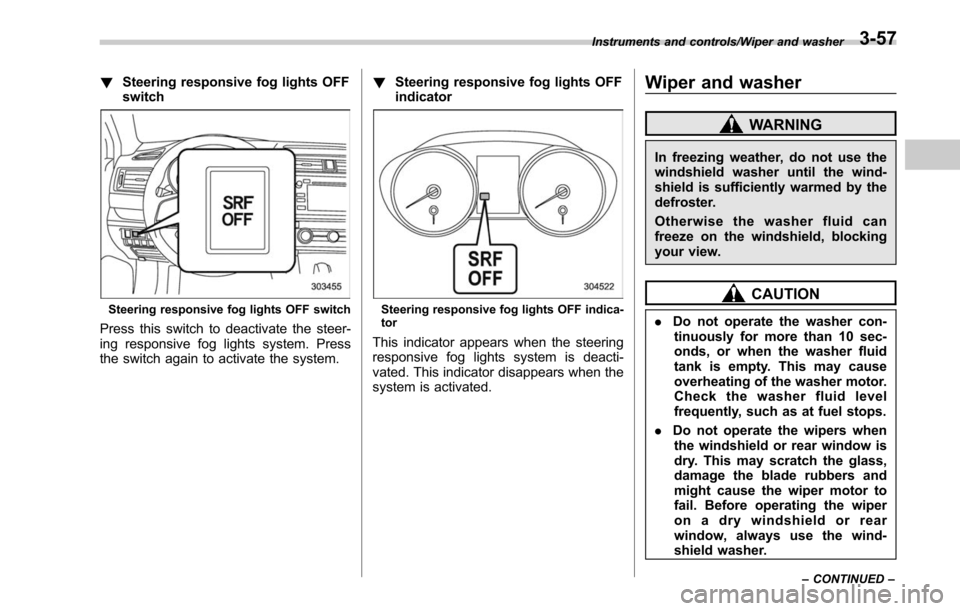
!Steering responsive fog lights OFF
switch
Steering responsive fog lights OFF switch
Press this switch to deactivate the steer-
ing responsive fog lights system. Press
the switch again to activate the system. !
Steering responsive fog lights OFF
indicator
Steering responsive fog lights OFF indica-
tor
This indicator appears when the steering
responsive fog lights system is deacti-
vated. This indicator disappears when the
system is activated.
Wiper and washer
WARNING
In freezing weather, do not use the
windshield washer until the wind-
shield is sufficiently warmed by the
defroster.
Otherwise the washer fluid can
freeze on the windshield, blocking
your view.
CAUTION
.Do not operate the washer con-
tinuously for more than 10 sec-
onds, or when the washer fluid
tank is empty. This may cause
overheating of the washer motor.
Check the washer fluid level
frequently, such as at fuel stops.
. Do not operate the wipers when
the windshield or rear window is
dry. This may scratch the glass,
damage the blade rubbers and
might cause the wiper motor to
fail. Before operating the wiper
on a dry windshield or rear
window, always use the wind-
shield washer.
Instruments and controls/Wiper and washer
–CONTINUED –3-57
Page 237 of 610
Instruments and controls/Tilt/telescopic steering wheel
!Remote control mirror switch
: Select side to adjust
: Direction control
The remote control mirrors operate only
when the ignition switch is in the “ON”or
“ACC ”position.
1. Turn the control switch to the side that
you want to adjust. “L”is for the left mirror,
“R ”is for the right mirror.
2. Move the control switch in the direction
you want to move the mirror.
3. Return the control switch to the neutral
position to prevent unintentional opera-
tion.
The mirrors can also be adjusted manu-
ally.
Tilt/telescopic steering wheel
WARNING
. Do not adjust the steering wheel
tilt/telescopic position while driv-
ing. This may cause loss of
vehicle control and result in
personal injury.
. If the lever cannot be raised to
the fixed position, adjust the
steering wheel again. It is dan-
gerous to drive without locking
the steering wheel. This may
cause loss of vehicle control
and result in personal injury.
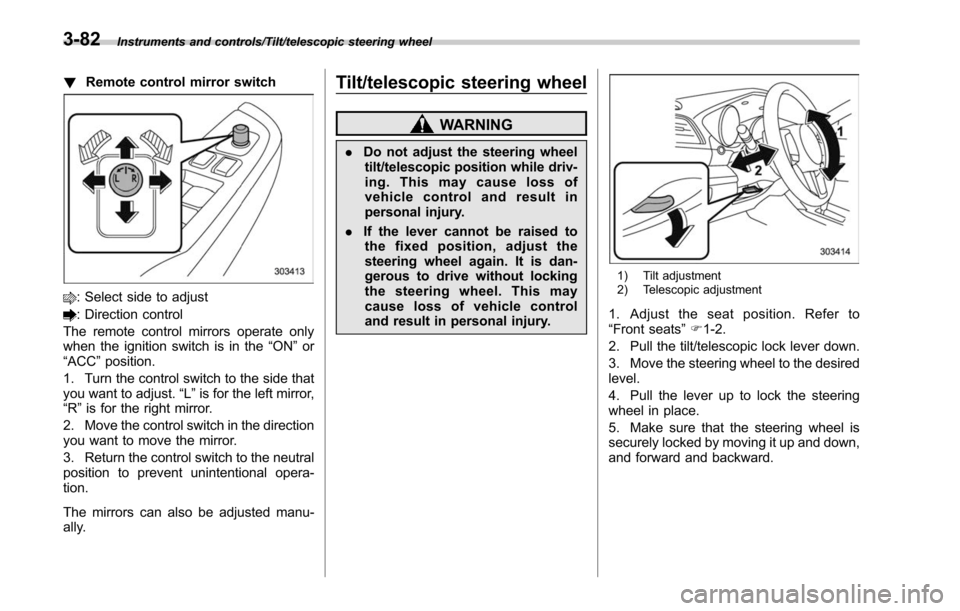
1) Tilt adjustment
2) Telescopic adjustment
1. Adjust the seat position. Refer to
“Front seats ”F 1-2.
2. Pull the tilt/telescopic lock lever down.
3. Move the steering wheel to the desired
level.
4. Pull the lever up to lock the steering
wheel in place.
5. Make sure that the steering wheel is
securely locked by moving it up and down,
and forward and backward.
3-82
Page 238 of 610
Horn
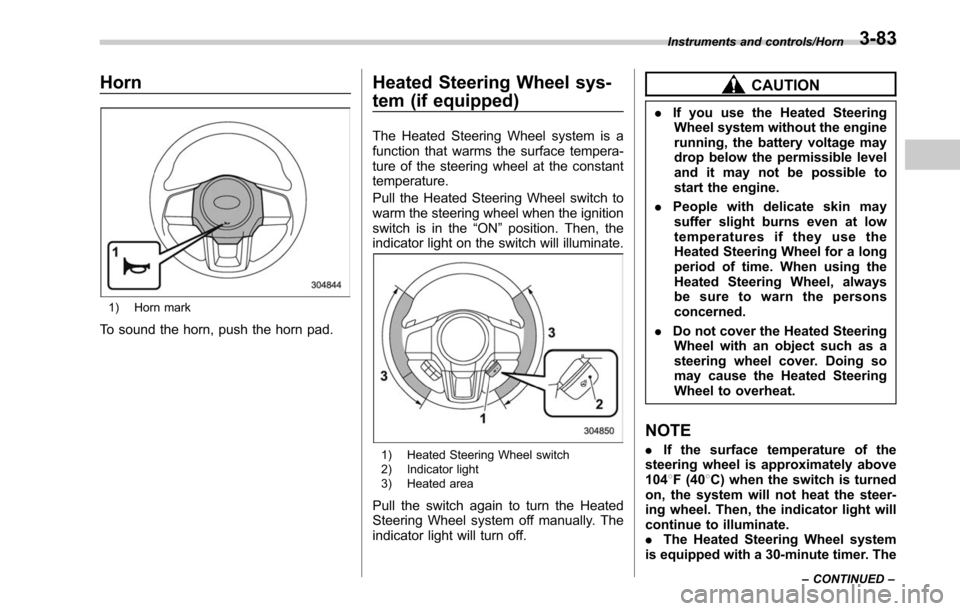
1) Horn mark
To sound the horn, push the horn pad.
Heated Steering Wheel sys-
tem (if equipped)
The Heated Steering Wheel system is a
function that warms the surface tempera-
ture of the steering wheel at the constant
temperature.
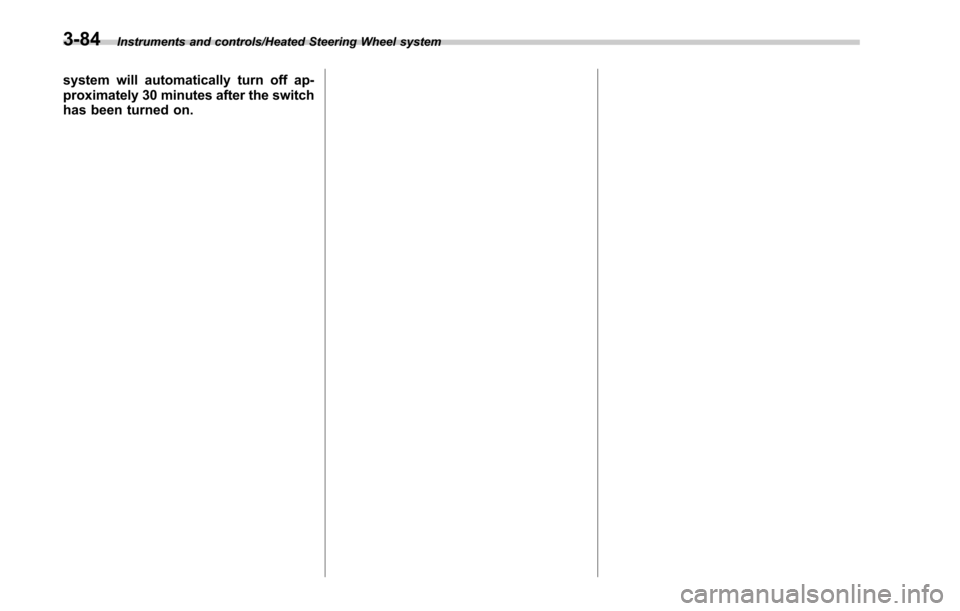
Pull the Heated Steering Wheel switch to
warm the steering wheel when the ignition
switch is in the“ON”position. Then, the
indicator light on the switch will illuminate.
1) Heated Steering Wheel switch
2) Indicator light
3) Heated area
Pull the switch again to turn the Heated
Steering Wheel system off manually. The
indicator light will turn off.
CAUTION
. If you use the Heated Steering
Wheel system without the engine
running, the battery voltage may
drop below the permissible level
and it may not be possible to
start the engine.
. People with delicate skin may
suffer slight burns even at low
temperatures if they use the
Heated Steering Wheel for a long
period of time. When using the
Heated Steering Wheel, always
be sure to warn the persons
concerned.
. Do not cover the Heated Steering
Wheel with an object such as a
steering wheel cover. Doing so
may cause the Heated Steering
Wheel to overheat.
NOTE
. If the surface temperature of the
steering wheel is approximately above
104 8F (40 8C) when the switch is turned
on, the system will not heat the steer-
ing wheel. Then, the indicator light will
continue to illuminate.
. The Heated Steering Wheel system
is equipped with a 30-minute timer. The
Instruments and controls/Horn
–CONTINUED –3-83
Page 239 of 610
Instruments and controls/Heated Steering Wheel system
system will automatically turn off ap-
proximately 30 minutes after the switch
has been turned on.
3-84
Page 252 of 610
Antenna................................................................ 5-2
Printed antenna ................................................... 5-2
Roof antenna (if equipped) .................................. 5-2
Audio set............................................................. 5-2Base display audio set (if equipped) .................... 5-4
SUBARU STARLINKTMMultimedia Plus audio set
(U.S. spec. models only, if equipped) ................. 5-6
Tips for operating the audio/visual system ........... 5-7
Basic information before use .............................. 5-15
Basic operation .................................................. 5-18
Unit settings ...................................................... 5-19
SUBARU STARLINK (if equipped) ....................... 5-26
AM/FM radio ....................................................... 5-28
SiriusXM Satellite Radio (if equipped) ................. 5-37
aha
TMby HARMAN ............................................. 5-44
Pandora®(if equipped) ....................................... 5-50
CD ..................................................................... 5-53
USB memory ...................................................... 5-55
iPod ................................................................... 5-56
Bluetooth audio .................................................. 5-58
AUX ................................................................... 5-61
Steering switches for audio .............................. 5-63
Bluetooth®settings ............................................ 5-66Regulatory information ....................................... 5-66 Registering/connecting Bluetooth
®device
.......... 5-66
Setting Bluetooth details .................................... 5-69
Hands-free phone system ................................. 5-71
Control screen................................................... 5-72
Registering/connecting a Bluetooth phone ......... 5-73
Using the phone switch/microphone ................... 5-73
How to change the hands-free phone system ..... 5-73
Making a call ..................................................... 5-73
Receiving a call ................................................. 5-77
Talking on the phone ......................................... 5-78
Phone settings .................................................. 5-79
Voice command system .................................... 5-81Using the voice command system ...................... 5-81
Voice command system operation ...................... 5-82
Command list .................................................... 5-84
What to do if.... ................................................... 5-88Troubleshooting ................................................. 5-88
Appendix............................................................ 5-92Certification ....................................................... 5-92
Certification for the Hands-free system ............... 5-92
Certification for Mexico models .......................... 5-93
Audio
5
Page 314 of 610
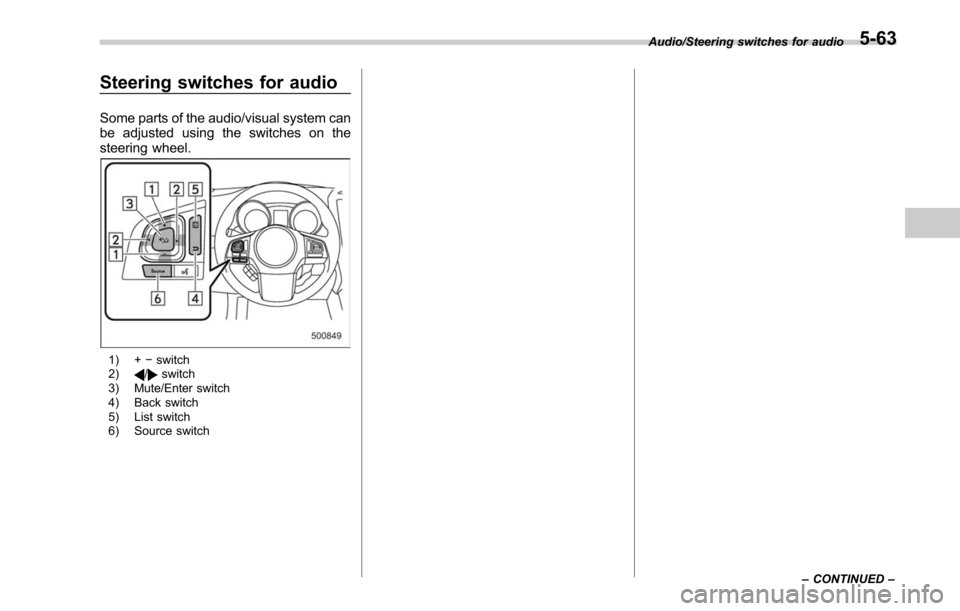
Steering switches for audio
Some parts of the audio/visual system can
be adjusted using the switches on the
steering wheel.
1) +−switch
2)/switch
3) Mute/Enter switch
4) Back switch
5) List switch
6) Source switch Audio/Steering switches for audio
–CONTINUED –
5-63
Page 315 of 610
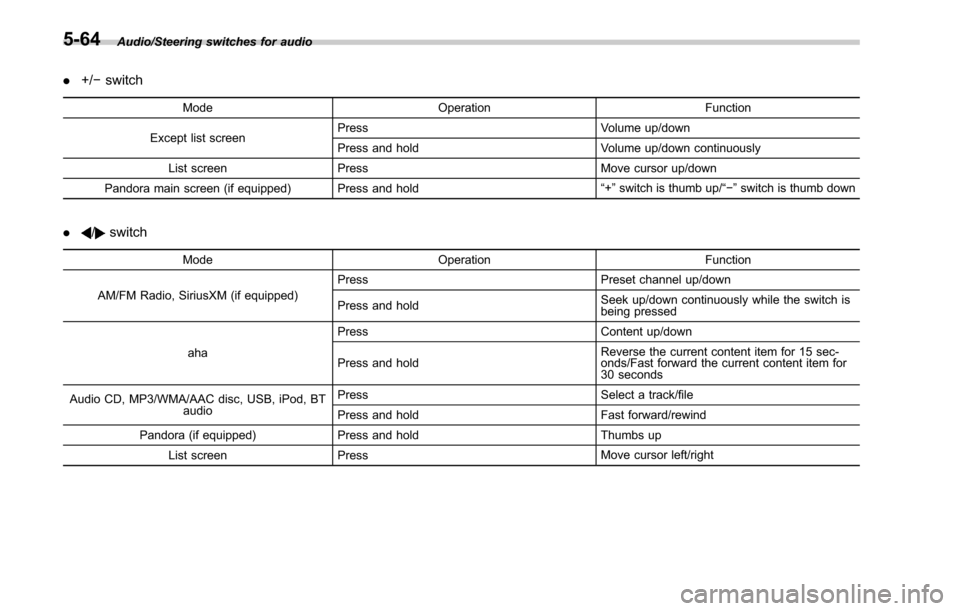
Audio/Steering switches for audio
.+/− switch
Mode Operation Function
Except list screen Press
Volume up/down
Press and hold Volume up/down continuously
List screen Press Move cursor up/down
Pandora main screen (if equipped) Press and hold “
+” switch is thumb up/ “− ” switch is thumb down
./switch
Mode Operation Function
AM/FM Radio, SiriusXM (if equipped) Press
Preset channel up/down
Press and hold Seek up/down continuously while the switch is
being pressed
aha Press
Content up/down
Press and hold Reverse the current content item for 15 sec-
onds/Fast forward the current content item for
30 seconds
Audio CD, MP3/WMA/AAC disc, USB, iPod, BT audio Press
Select a track/file
Press and hold Fast forward/rewind
Pandora (if equipped) Press and hold Thumbs up
List screen Press Move cursor left/right
5-64