key SUBARU LEGACY 2017 6.G Workshop Manual
[x] Cancel search | Manufacturer: SUBARU, Model Year: 2017, Model line: LEGACY, Model: SUBARU LEGACY 2017 6.GPages: 610
Page 147 of 610
Keys and doors/Rear gate (Outback)
pull it down holding the handle.
WARNING
.To prevent dangerous exhaust
gas from entering the vehicle,
always keep the rear gate closed
while driving.
. Do not attempt to shut the rear
gate while holding the recessed
grip. Also do not close the rear
gate by pulling the handle from
inside the cargo space. There is a
danger of your hand being
caught and injured.
CAUTION
. Do not jam a plastic bag in or
place cellophane tape on the rear
gate stays or scratch the stays
while loading or unloading cargo.
That could cause leakage of gas
from the stays, which may result
in their inability to hold the rear
gate open.
. Be careful not to hit your head or
face on the rear gate when open-
ing or closing the rear gate and
when loading or unloading car-
go.
& Power rear gate (if equipped)
WARNING
. When operating the power rear
gate, observe the following pre-
cautions. Ignoring the precau-
tions may result in an injury (e.
g., anyone ’s body is hit against
the rear gate or is caught in the
rear gate, etc.)
– Make sure there are no people
around the rear gate.
– Never let anyone get close to
the rear gate.
. When closing the rear gate, be
extremely careful to prevent any-
one ’s fingers, arms, neck, head
or other objects from being
caught in the rear gate. Other-
wise, serious personal injury
may be caused by entrapment.
. After opening the rear gate on a
slope by using the power rear
gate feature, the rear gate may
close. Make sure that the rear
gate has stopped completely
after opening it.
. When leaving the vehicle, always
carry the key for safety and never
allow an unattended child to remain in the vehicle. Failure to
follow this procedure could re-
sult in injury to a child operating
the power rear gate.
. The driver should be aware of
and pay careful attention to his/
her responsibilities.
. Use the power rear gate only
when the area around the rear
gate is clearly visible and when
you have checked that there is
no danger of people being
caught in the gate.
CAUTION
. When closing the rear gate after
opening it, make sure to use the
power rear gate. If you close the
rear gate manually with extra
force, the power rear gate may
be damaged.
. Do not install any accessories
other than genuine SUBARU
parts on the rear gate. If the
weight of rear gate increases
excessively, the rear gate stay
cannot support the rear gate
sufficiently when opening the
rear gate. Also, the power rear
gate may not function properly or
2-42
Page 148 of 610
may malfunction.
. Do not touch the driving rod.
Doing so may result in injury or
damage.
The power rear gate operates only when
all of the following conditions are satisfied.
. The vehicle is stopped completely.
. The outside temperature is within a
range from −22 8F to 1408 F (from−30 8Cto
60 8C).
. The ignition switch is in the “LOCK”/
“OFF ”or “ACC ”position. Or, the ignition
switch is in the “ON”position and the
parking brake is applied (MT models)/the
select lever is in the “P ” position (CVT
models).
We recommend using the power rear gate
function in most circumstances instead of
manual operation.
NOTE
. Do not press the power rear gate
button repeatedly while the power rear
gate is operating. Otherwise, the sys-
tem may ignore the button operation in
order to avoid being damaged.
. It is not possible to stop the rear
gate temporarily while opening be-
tween the completely closed position
and approximately 2 in (5 cm) open. If you press one of the power rear gate
buttons briefly during this range, the
rear gate will be closed.
.
If the vehicle starts to move while
the power rear gate is operating, the
system sounds a buzzer and closes the
rear gate automatically. At this time, if
the system detects jamming, it will
deactivate the power rear gate and the
rear gate will not be closed. If this
occurs, close the rear gate manually.
For details, refer to “Manual rear gate”
F 2-41.
. If you try to open the rear gate using
the power rear gate function immedi-
ately after closing the rear gate using
the power rear gate function, an elec-
tronic chirp will sound and the rear
gate will not open. Wait for a while
before trying to open the rear gate via
the power rear gate function.
. If either of the operating conditions
has not been satisfied while operating
the power rear gate, an electronic chirp
will sound and the power rear gate will
be deactivated. In this case, the rear
gate may stop opening or closing
suddenly. !
Operation
NOTE
.The rear gate will remain unlocked
even after closing it. Always lock the
rear gate when leaving the vehicle.
. If you cannot open/close the rear
gate by performing the operation de-
scribed here, a short electronic chirp
will sound three times (beep, beep,
beep).
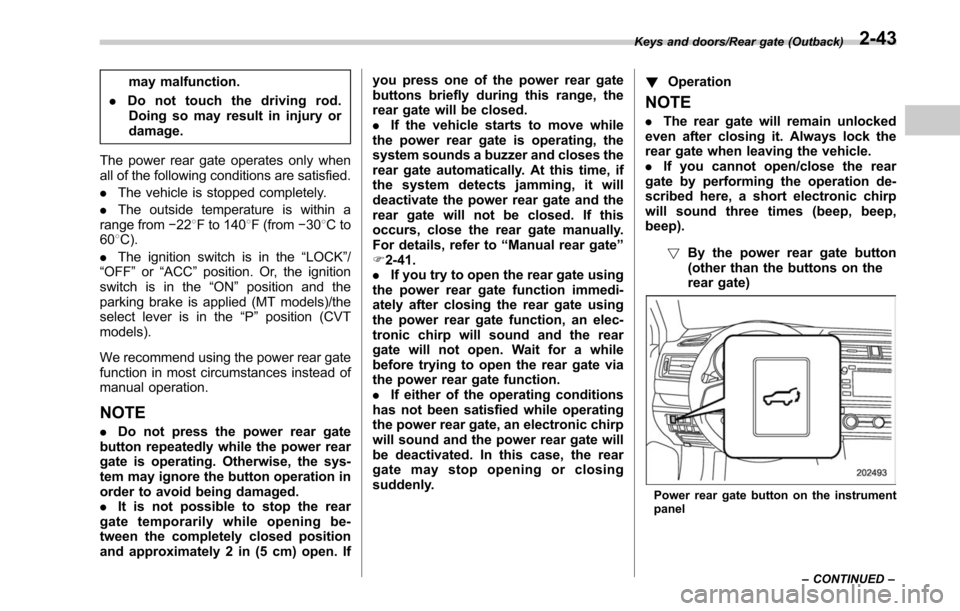
!By the power rear gate button
(other than the buttons on the
rear gate)
Power rear gate button on the instrument
panel
Keys and doors/Rear gate (Outback)
–CONTINUED –
2-43
Page 149 of 610
Keys and doors/Rear gate (Outback)
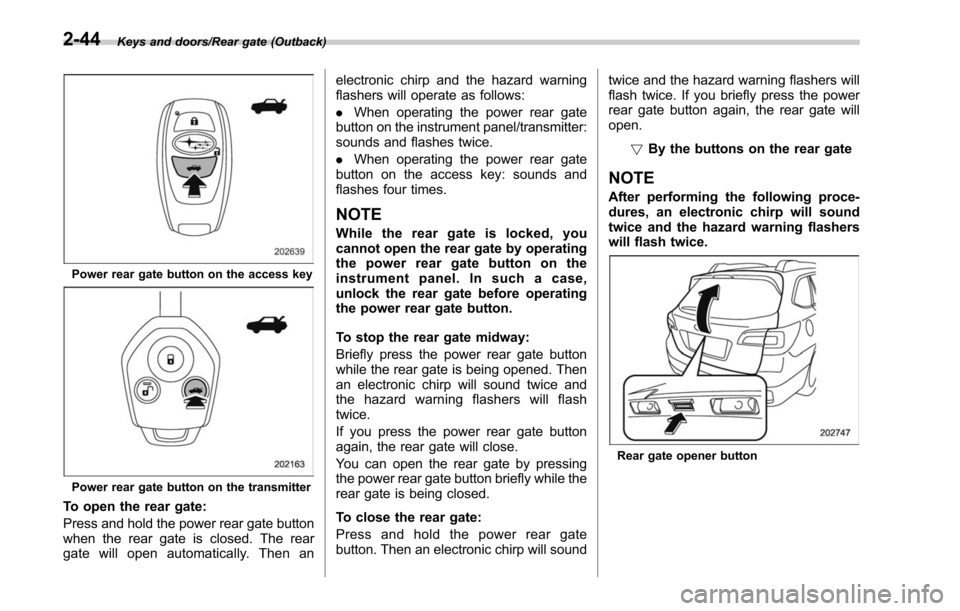
Power rear gate button on the access key
Power rear gate button on the transmitter
To open the rear gate:
Press and hold the power rear gate button
when the rear gate is closed. The rear
gate will open automatically. Then anelectronic chirp and the hazard warning
flashers will operate as follows:
.
When operating the power rear gate
button on the instrument panel/transmitter:
sounds and flashes twice.
. When operating the power rear gate
button on the access key: sounds and
flashes four times.
NOTE
While the rear gate is locked, you
cannot open the rear gate by operating
the power rear gate button on the
instrument panel. In such a case,
unlock the rear gate before operating
the power rear gate button.
To stop the rear gate midway:
Briefly press the power rear gate button
while the rear gate is being opened. Then
an electronic chirp will sound twice and
the hazard warning flashers will flash
twice.
If you press the power rear gate button
again, the rear gate will close.
You can open the rear gate by pressing
the power rear gate button briefly while the
rear gate is being closed.
To close the rear gate:
Press and hold the power rear gate
button. Then an electronic chirp will sound twice and the hazard warning flashers will
flash twice. If you briefly press the power
rear gate button again, the rear gate will
open.
!By the buttons on the rear gate
NOTE
After performing the following proce-
dures, an electronic chirp will sound
twice and the hazard warning flashers
will flash twice.
Rear gate opener button
2-44
Page 150 of 610
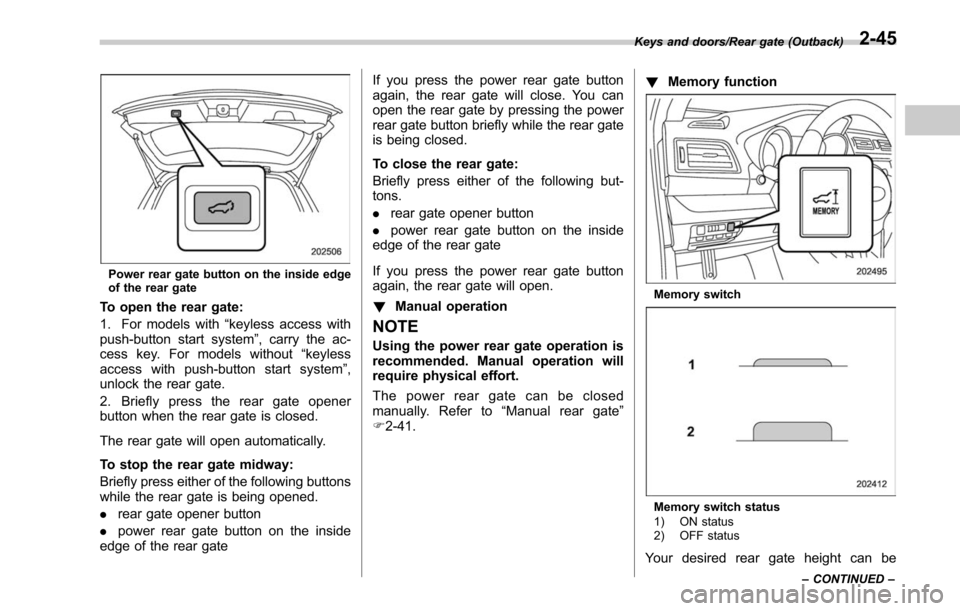
Power rear gate button on the inside edge
of the rear gate
To open the rear gate:
1. For models with“keyless access with
push-button start system ”, carry the ac-
cess key. For models without “keyless
access with push-button start system ”,
unlock the rear gate.
2. Briefly press the rear gate opener
button when the rear gate is closed.
The rear gate will open automatically.
To stop the rear gate midway:
Briefly press either of the following buttons
while the rear gate is being opened.
. rear gate opener button
. power rear gate button on the inside
edge of the rear gate If you press the power rear gate button
again, the rear gate will close. You can
open the rear gate by pressing the power
rear gate button briefly while the rear gate
is being closed.
To close the rear gate:
Briefly press either of the following but-
tons.
.
rear gate opener button
. power rear gate button on the inside
edge of the rear gate
If you press the power rear gate button
again, the rear gate will open.
! Manual operation
NOTE
Using the power rear gate operation is
recommended. Manual operation will
require physical effort.
The power rear gate can be closed
manually. Refer to “Manual rear gate ”
F 2-41. !
Memory function
Memory switch
Memory switch status
1) ON status
2) OFF status
Your desired rear gate height can be
Keys and doors/Rear gate (Outback)
–CONTINUED –2-45
Page 151 of 610
Keys and doors/Rear gate (Outback)
registered.
Registration of the rear gate height:
To register the rear gate height, perform
the following procedures while the ignition
switch is in the“LOCK”/“OFF ”position.
1. Open the rear gate by using the power
rear gate function.
2. With the rear gate at the desired
height, stop it by using the power rear
gate function.
3. Press the memory switch to select the
“ON ”status.
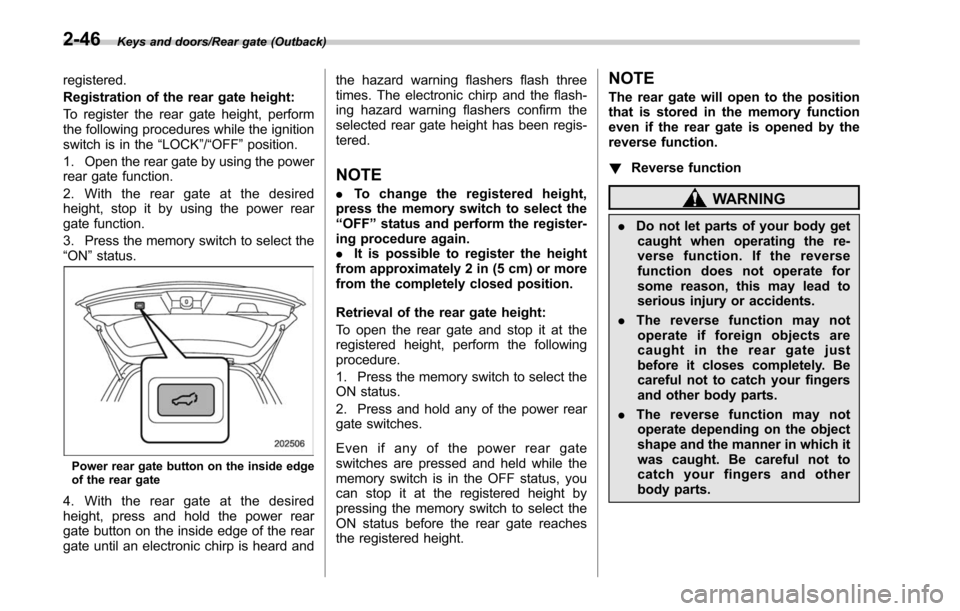
Power rear gate button on the inside edge
of the rear gate
4. With the rear gate at the desired
height, press and hold the power rear
gate button on the inside edge of the rear
gate until an electronic chirp is heard and the hazard warning flashers flash three
times. The electronic chirp and the flash-
ing hazard warning flashers confirm the
selected rear gate height has been regis-
tered.
NOTE
.
To change the registered height,
press the memory switch to select the
“ OFF ”status and perform the register-
ing procedure again.
. It is possible to register the height
from approximately 2 in (5 cm) or more
from the completely closed position.
Retrieval of the rear gate height:
To open the rear gate and stop it at the
registered height, perform the following
procedure.
1. Press the memory switch to select the
ON status.
2. Press and hold any of the power rear
gate switches.
Even if any of the power rear gate
switches are pressed and held while the
memory switch is in the OFF status, you
can stop it at the registered height by
pressing the memory switch to select the
ON status before the rear gate reaches
the registered height.
NOTE
The rear gate will open to the position
that is stored in the memory function
even if the rear gate is opened by the
reverse function.
! Reverse function
WARNING
.Do not let parts of your body get
caught when operating the re-
verse function. If the reverse
function does not operate for
some reason, this may lead to
serious injury or accidents.
. The reverse function may not
operate if foreign objects are
caught in the rear gate just
before it closes completely. Be
careful not to catch your fingers
and other body parts.
. The reverse function may not
operate depending on the object
shape and the manner in which it
was caught. Be careful not to
catch your fingers and other
body parts.
2-46
Page 152 of 610
CAUTION
.If the reverse function is operated
3 times consecutively, automatic
opening and closing of the power
rear gate function will be can-
celed and the rear gate will stop
opening or closing suddenly.
However, the rear gate may open
or close depending on the rear
gate height when automatic op-
eration is ceased. Be careful that
the rear gate does not hit any-
one ’s head or face, etc. and that
fingers and baggage, etc. are not
caught in it.
. Take care not to damage the
touch sensors. Otherwise, the
reverse function may cease to
operate.
If, while opening or closing using power
rear gate, the rear gate catches persons
or baggage or hits an obstacle, an
electronic chirp will sound 3 times and
the rear gate will operate as follows.
When opening the rear gate: The rear
gate will automatically close.
When closing the rear gate: The rear
gate will automatically open.
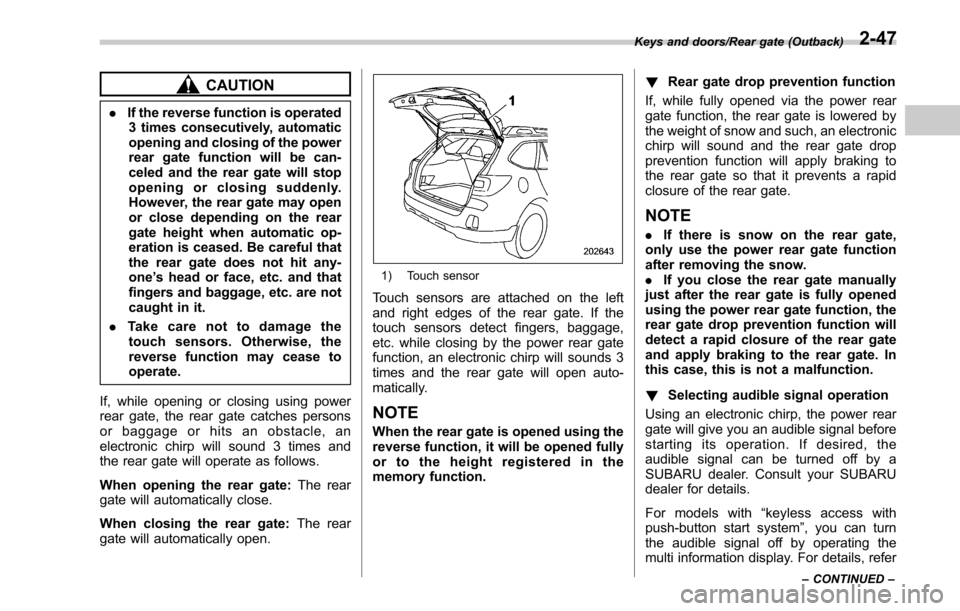
1) Touch sensor
Touch sensors are attached on the left
and right edges of the rear gate. If the
touch sensors detect fingers, baggage,
etc. while closing by the power rear gate
function, an electronic chirp will sounds 3
times and the rear gate will open auto-
matically.
NOTE
When the rear gate is opened using the
reverse function, it will be opened fully
or to the height registered in the
memory function. !
Rear gate drop prevention function
If, while fully opened via the power rear
gate function, the rear gate is lowered by
the weight of snow and such, an electronic
chirp will sound and the rear gate drop
prevention function will apply braking to
the rear gate so that it prevents a rapid
closure of the rear gate.
NOTE
. If there is snow on the rear gate,
only use the power rear gate function
after removing the snow.
. If you close the rear gate manually
just after the rear gate is fully opened
using the power rear gate function, the
rear gate drop prevention function will
detect a rapid closure of the rear gate
and apply braking to the rear gate. In
this case, this is not a malfunction.
! Selecting audible signal operation
Using an electronic chirp, the power rear
gate will give you an audible signal before
starting its operation. If desired, the
audible signal can be turned off by a
SUBARU dealer. Consult your SUBARU
dealer for details.
For models with “keyless access with
push-button start system ”, you can turn
the audible signal off by operating the
multi information display. For details, refer
Keys and doors/Rear gate (Outback)
–CONTINUED –2-47
Page 153 of 610
Keys and doors/Moonroof
to“Keyless Entry System ”F 3-45.
The ON/OFF setting of the audible signal
also works as the audible signal settings
for the “remote keyless entry system ”and
the “keyless access with push-button start
system ”. However, for the warning chime
such as that caused by “Reverse function”
F 2-46 or “Rear gate drop prevention
function ”F 2-47, it cannot be set as non-
operational.Moonroof (if equipped)
WARNING
Never let anyone ’s hands, arms,
head or any objects protrude from
the moonroof. A person could be
seriously injured if the vehicle stops
suddenly or turns sharply or if the
vehicle is involved in an accident.
To avoid serious personal injury
caused by entrapment, you must
conform to the following instruc-
tions without exception.
. Before closing the moonroof,
make sure that no one ’s hands,
arms, head or other objects will
be accidentally caught in the
moonroof.
. Before leaving the vehicle, al-
ways remove the key from the
ignition switch for safety (models
without “keyless access with
push-button start system ”) and
never allow an unattended child
to remain in the vehicle. Failure
to follow this procedure could
result in injury to a child operat-
ing the moonroof. .
Never try to check the anti-en-
trapment function by deliberately
placing part of your body in the
moonroof.CAUTION
. Do not sit on the edge of the open
moonroof.
. Do not operate the moonroof if
falling snow or extremely cold
conditions have caused it to
freeze shut.
. The anti-entrapment function
does not operate when the moon-
roof is being tilted down. Be sure
to confirm that it is safe to do so
before tilting the moonroof down.
. If the moonroof does not close,
we recommend that you have the
system checked by a SUBARU
dealer.
The moonroof has both tilting and sliding
functions.
The moonroof operates only when the
ignition switch is in the “ON”position.
2-48
Page 154 of 610
&Moonroof switches
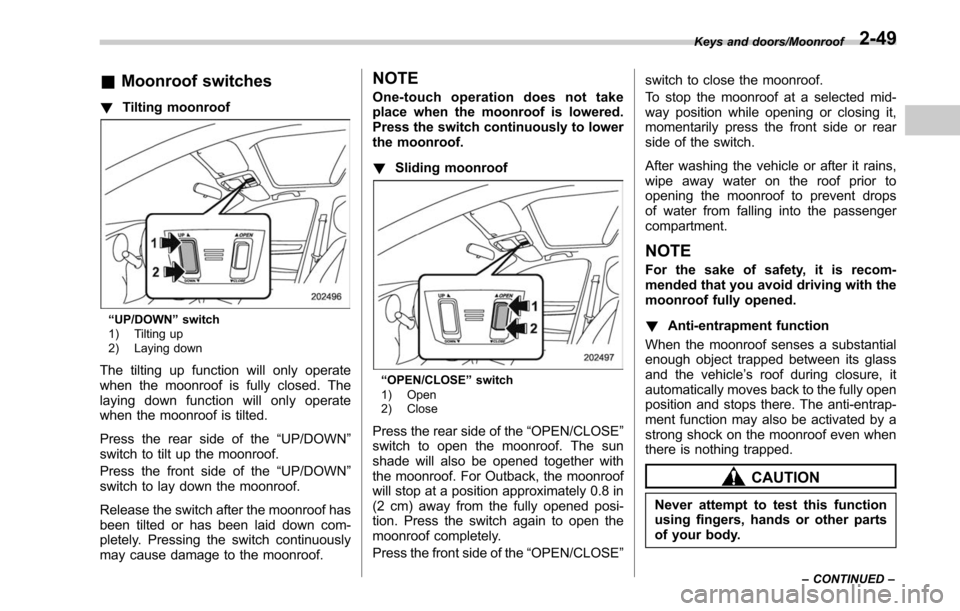
! Tilting moonroof
“UP/DOWN” switch
1) Tilting up
2) Laying down
The tilting up function will only operate
when the moonroof is fully closed. The
laying down function will only operate
when the moonroof is tilted.
Press the rear side of the “UP/DOWN”
switch to tilt up the moonroof.
Press the front side of the “UP/DOWN”
switch to lay down the moonroof.
Release the switch after the moonroof has
been tilted or has been laid down com-
pletely. Pressing the switch continuously
may cause damage to the moonroof.
NOTE
One-touch operation does not take
place when the moonroof is lowered.
Press the switch continuously to lower
the moonroof.
! Sliding moonroof
“OPEN/CLOSE ”switch
1) Open
2) Close
Press the rear side of the “OPEN/CLOSE”
switch to open the moonroof. The sun
shade will also be opened together with
the moonroof. For Outback, the moonroof
will stop at a position approximately 0.8 in
(2 cm) away from the fully opened posi-
tion. Press the switch again to open the
moonroof completely.
Press the front side of the “OPEN/CLOSE”switch to close the moonroof.
To stop the moonroof at a selected mid-
way position while opening or closing it,
momentarily press the front side or rear
side of the switch.
After washing the vehicle or after it rains,
wipe away water on the roof prior to
opening the moonroof to prevent drops
of water from falling into the passenger
compartment.
NOTE
For the sake of safety, it is recom-
mended that you avoid driving with the
moonroof fully opened.
!
Anti-entrapment function
When the moonroof senses a substantial
enough object trapped between its glass
and the vehicle’ s roof during closure, it
automatically moves back to the fully open
position and stops there. The anti-entrap-
ment function may also be activated by a
strong shock on the moonroof even when
there is nothing trapped.
CAUTION
Never attempt to test this function
using fingers, hands or other parts
of your body.
Keys and doors/Moonroof
–CONTINUED –2-49
Page 155 of 610
Keys and doors/Moonroof
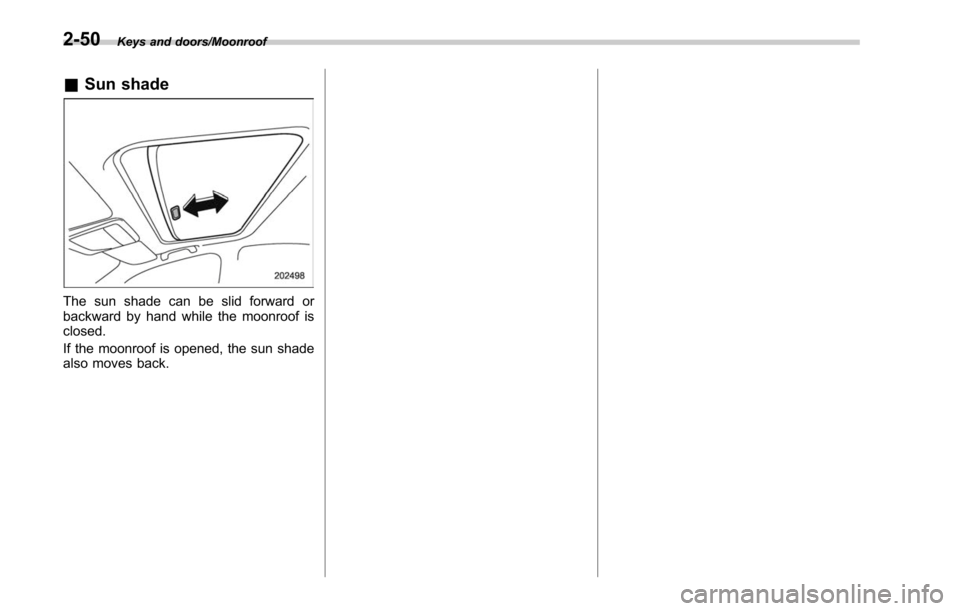
&Sun shade
The sun shade can be slid forward or
backward by hand while the moonroof is
closed.
If the moonroof is opened, the sun shade
also moves back.
2-50
Page 156 of 610
Ignition switch (models without push-button start system) ......................................... 3-4
LOCK.................................................................. 3-4
ACC.................................................................... 3-5
ON...................................................................... 3-5
START ................................................................ 3-5
Key reminder chime ............................................ 3-5
Ignition switch light ............................................. 3-5
Push-button ignition switch (models with
push-button start system) ............................... 3-6
Safety precautions.............................................. 3-6
Operating range for push-button start system ...... 3-6
Switching power status ....................................... 3-7
When access key does not operate properly ........ 3-8
Hazard warning flasher....................................... 3-8
Meters and gauges. ............................................. 3-8
Combination meter illumination ........................... 3-8
Canceling the function for meter/gauge needle movement upon turning on the ignition
switch ............................................................... 3-9
Speedometer ....................................................... 3-9
Odometer ............................................................ 3-9
Double trip meter ............................................... 3-10
Tachometer ........................................................ 3-10
Fuel gauge ......................................................... 3-11
Temperature gauge ............................................ 3-12
ECO gauge ........................................................ 3-12
Warning and indicator lights ............................. 3-13
Seatbelt warning light and chime ........................ 3-13
SRS airbag system warning light ........................ 3-15Front passenger
’s frontal airbag ON and OFF
indicators ........................................................ 3-15
CHECK ENGINE warning light/Malfunction indicator light .................................................. 3-16
Charge warning light .......................................... 3-16
Oil pressure warning light .................................. 3-16
Engine low oil level warning indicator ................ 3-17
AT OIL TEMP warning light (CVT models) ........... 3-17
Low tire pressure warning light (U.S. spec. models) ........................................................... 3-17
ABS warning light .............................................. 3-19
Brake system warning light ................................ 3-19
Electronic parking brake indicator light .............. 3-21
Hill Holder indicator light ................................... 3-22
Low fuel warning light ....................................... 3-22
Door open indicator ........................................... 3-23
Windshield washer fluid warning indicator .......... 3-23
All-Wheel Drive warning light (CVT models) ... ..... 3-23
Power steering warning light .............................. 3-23
Vehicle Dynamics Control warning light/Vehicle Dynamics Control operation indicator light .. ..... 3-24
Vehicle Dynamics Control OFF indicator light ..... 3-25
Warning chimes and warning indicator of the keyless access with push-button start system (if
equipped) ........................................................ 3-25
Security indicator light ....................................... 3-30
Select lever/gear position indicator ..................... 3-31
Turn signal indicator lights ................................. 3-31
High beam indicator light ................................... 3-31
High beam assist indicator (green) (if equipped) ........................................................ 3-31
Instruments and controls
3