audio SUBARU LEGACY 2022 Getting Started Guide
[x] Cancel search | Manufacturer: SUBARU, Model Year: 2022, Model line: LEGACY, Model: SUBARU LEGACY 2022Pages: 164, PDF Size: 51.03 MB
Page 89 of 164
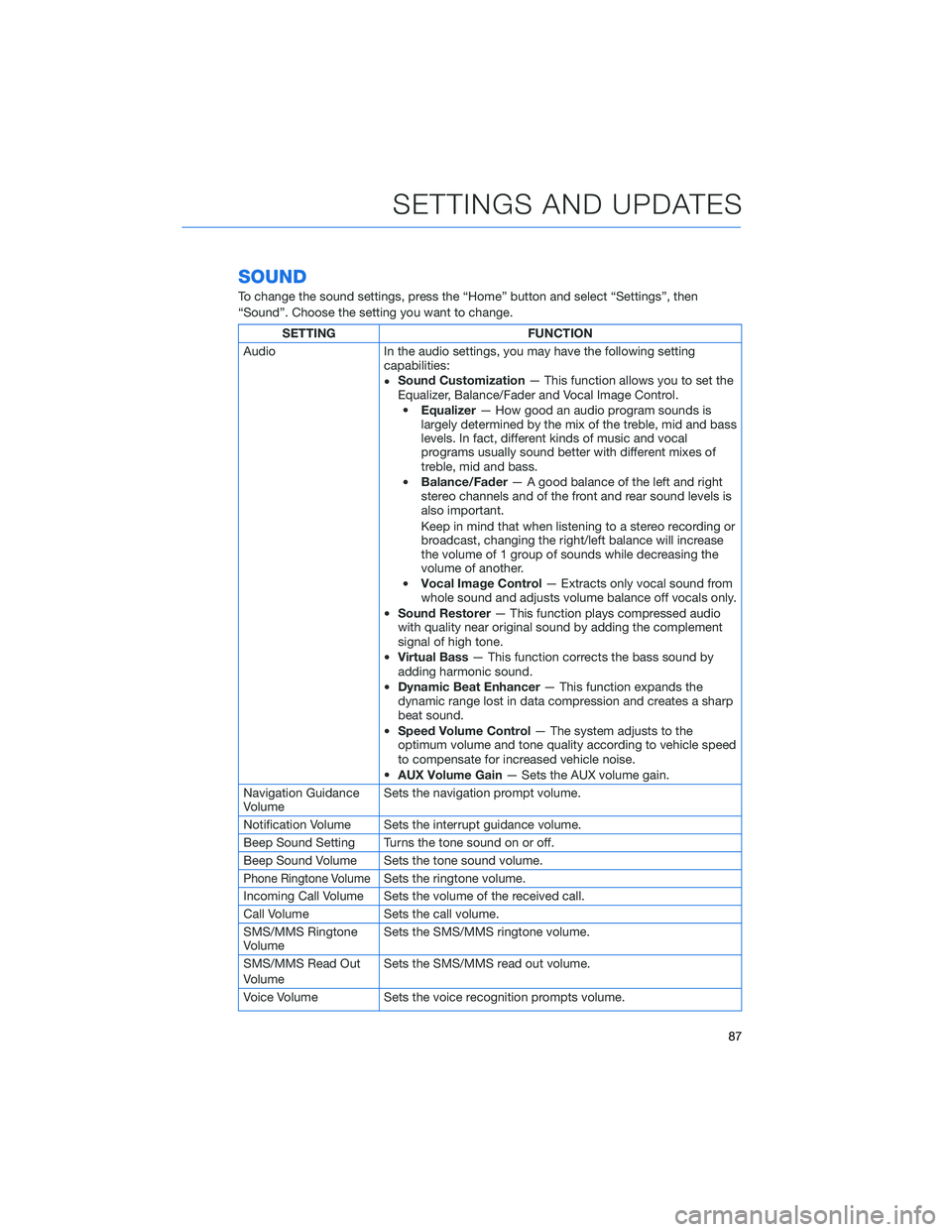
SOUND
To change the sound settings, press the “Home” button and select “Settings”, then
“Sound”. Choose the setting you want to change.
SETTING FUNCTION
Audio In the audio settings, you may have the following setting
capabilities:
•Sound Customization— This function allows you to set the
Equalizer, Balance/Fader and Vocal Image Control.
•Equalizer— How good an audio program sounds is
largely determined by the mix of the treble, mid and bass
levels. In fact, different kinds of music and vocal
programs usually sound better with different mixes of
treble, mid and bass.
•Balance/Fader— A good balance of the left and right
stereo channels and of the front and rear sound levels is
also important.
Keep in mind that when listening to a stereo recording or
broadcast, changing the right/left balance will increase
the volume of 1 group of sounds while decreasing the
volume of another.
•Vocal Image Control— Extracts only vocal sound from
whole sound and adjusts volume balance off vocals only.
•Sound Restorer— This function plays compressed audio
with quality near original sound by adding the complement
signal of high tone.
•Virtual Bass— This function corrects the bass sound by
adding harmonic sound.
•Dynamic Beat Enhancer— This function expands the
dynamic range lost in data compression and creates a sharp
beat sound.
•Speed Volume Control— The system adjusts to the
optimum volume and tone quality according to vehicle speed
to compensate for increased vehicle noise.
•AUX Volume Gain— Sets the AUX volume gain.
Navigation Guidance
VolumeSets the navigation prompt volume.
Notification Volume Sets the interrupt guidance volume.
Beep Sound Setting Turns the tone sound on or off.
Beep Sound Volume Sets the tone sound volume.
Phone Ringtone VolumeSets the ringtone volume.
Incoming Call Volume Sets the volume of the received call.
Call Volume Sets the call volume.
SMS/MMS Ringtone
VolumeSets the SMS/MMS ringtone volume.
SMS/MMS Read Out
VolumeSets the SMS/MMS read out volume.
Voice Volume Sets the voice recognition prompts volume.
SETTINGS AND UPDATES
87
Page 111 of 164
DROWSY/INATTENTIVE WARNINGS
DriverFocus®detects when the driver is possibly not paying
attention or is becoming drowsy while driving. It works whether you
are a registered user or not. The system does not provide alerts
when the turn signals are operating or when the select lever is in the
“R” position.
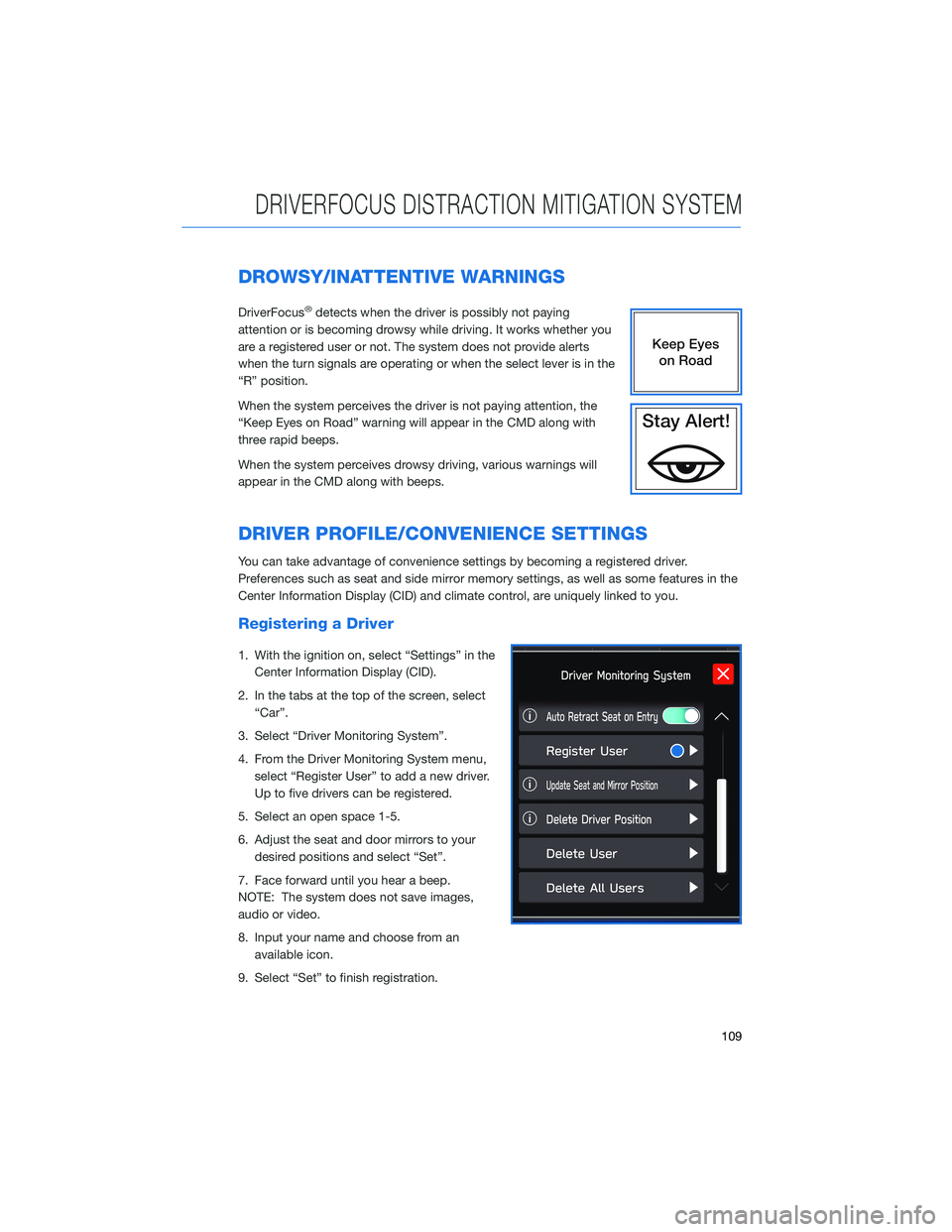
When the system perceives the driver is not paying attention, the
“Keep Eyes on Road” warning will appear in the CMD along with
three rapid beeps.
When the system perceives drowsy driving, various warnings will
appear in the CMD along with beeps.
DRIVER PROFILE/CONVENIENCE SETTINGS
You can take advantage of convenience settings by becoming a registered driver.
Preferences such as seat and side mirror memory settings, as well as some features in the
Center Information Display (CID) and climate control, are uniquely linked to you.
Registering a Driver
1. With the ignition on, select “Settings” in the
Center Information Display (CID).
2. In the tabs at the top of the screen, select
“Car”.
3. Select “Driver Monitoring System”.
4. From the Driver Monitoring System menu,
select “Register User” to add a new driver.
Up to five drivers can be registered.
5. Select an open space 1-5.
6. Adjust the seat and door mirrors to your
desired positions and select “Set”.
7. Face forward until you hear a beep.
NOTE: The system does not save images,
audio or video.
8. Input your name and choose from an
available icon.
9. Select “Set” to finish registration.
DRIVERFOCUS DISTRACTION MITIGATION SYSTEM
109
Page 156 of 164
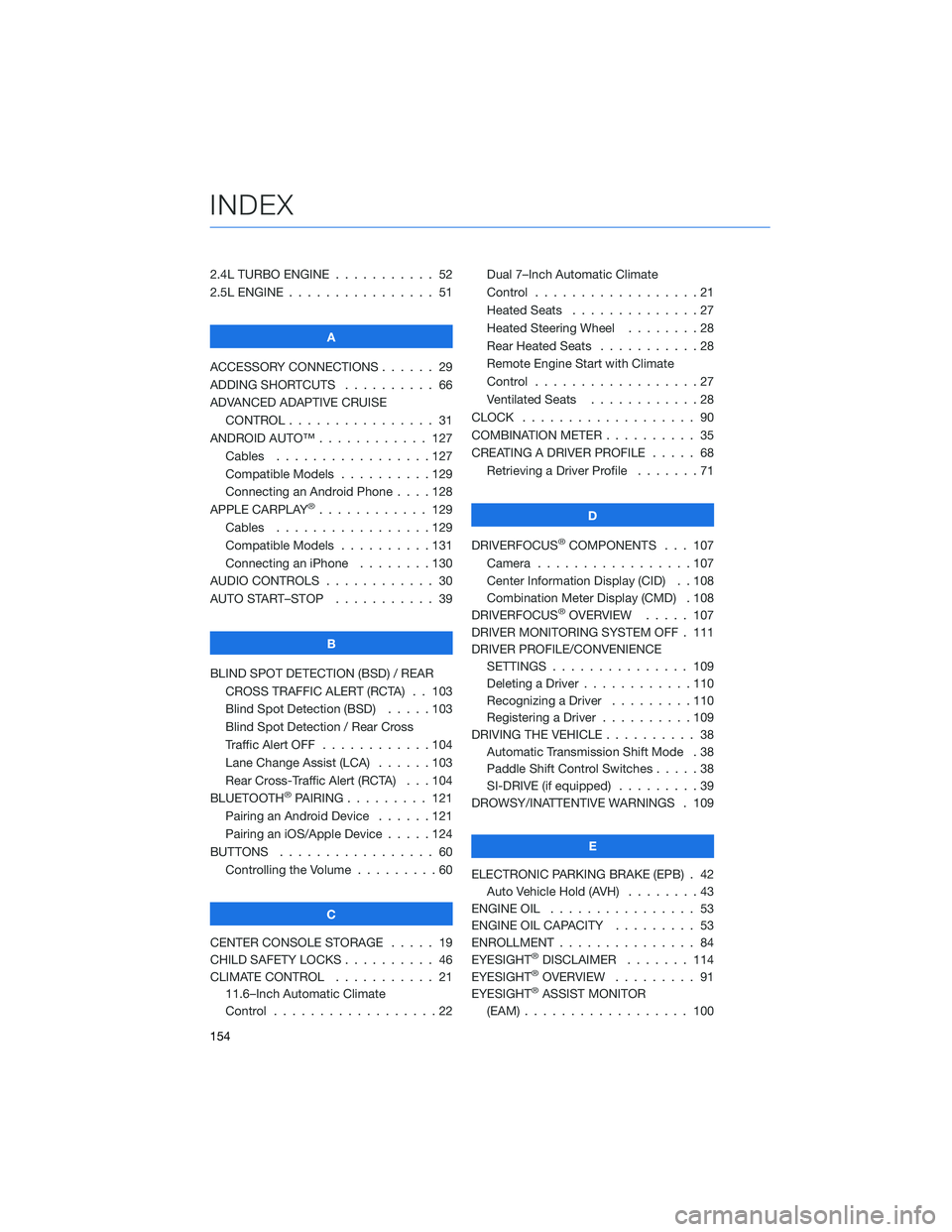
2.4L TURBO ENGINE . . . ........ 52
2.5L ENGINE . . . . . . . . . . . . . . . . 51
A
ACCESSORY CONNECTIONS . . . . . . 29
ADDING SHORTCUTS . ......... 66
ADVANCED ADAPTIVE CRUISE
CONTROL . . . . . . . . ........ 31
ANDROID AUTO™ . . . . . . . . . . . . 127
Cables . . . . . . . . . . . . .....127
Compatible Models . . . . . . . . . . 129
Connecting an Android Phone....128
APPLE CARPLAY
®............ 129
Cables . . . . . . . . . . . . .....129
Compatible Models . . . . . . . . . . 131
Connecting an iPhone . . . . . . . . 130
AUDIO CONTROLS . . . . . . . . . . . . 30
AUTO START–STOP . . . . . . ..... 39
B
BLIND SPOT DETECTION (BSD) / REAR
CROSS TRAFFIC ALERT (RCTA) . . 103
Blind Spot Detection (BSD).....103
Blind Spot Detection / Rear Cross
Traffic Alert OFF . . . . . . . . . . . . 104
Lane Change Assist (LCA) . . . . . . 103
Rear Cross-Traffic Alert (RCTA) . . . 104
BLUETOOTH
®PAIRING . . . ...... 121
Pairing an Android Device......121
Pairing an iOS/Apple Device . . . . . 124
BUTTONS . . . . . . . . . . . . . . . . . 60
Controlling the Volume . ........60
C
CENTER CONSOLE STORAGE ..... 19
CHILD SAFETY LOCKS .......... 46
CLIMATE CONTROL . . . . . . ..... 21
11.6–Inch Automatic Climate
Control . . . . . . . . . .........22Dual 7–Inch Automatic Climate
Control . . . . . . . . . . . . . . . . . . 21
Heated Seats..............27
Heated Steering Wheel . . ......28
Rear Heated Seats . ..........28
Remote Engine Start with Climate
Control . . . . . . . . . . . . . . . . . . 27
Ventilated Seats . ...........28
CLOCK . .................. 90
COMBINATION METER . ......... 35
CREATING A DRIVER PROFILE . . . . . 68
Retrieving a Driver Profile . . . . . . . 71
D
DRIVERFOCUS
®COMPONENTS . . . 107
Camera . ................107
Center Information Display (CID) . . 108
Combination Meter Display (CMD) . 108
DRIVERFOCUS
®OVERVIEW..... 107
DRIVER MONITORING SYSTEM OFF . 111
DRIVER PROFILE/CONVENIENCE
SETTINGS............... 109
Deleting a Driver . . . . . . ......110
Recognizing a Driver . . . . . . . . . 110
Registering a Driver . . . . ......109
DRIVING THE VEHICLE . . . . . . . . . . 38
Automatic Transmission Shift Mode . 38
Paddle Shift Control Switches .....38
SI-DRIVE (if equipped).........39
DROWSY/INATTENTIVE WARNINGS . 109
E
ELECTRONIC PARKING BRAKE (EPB) . 42
Auto Vehicle Hold (AVH)........43
ENGINE OIL................ 53
ENGINE OIL CAPACITY ......... 53
ENROLLMENT............... 84
EYESIGHT
®DISCLAIMER....... 114
EYESIGHT®OVERVIEW . . . . . . . . . 91
EYESIGHT®ASSIST MONITOR
(EAM).................. 100
INDEX
154