display SUBARU LEGACY 2022 Getting Started Guide
[x] Cancel search | Manufacturer: SUBARU, Model Year: 2022, Model line: LEGACY, Model: SUBARU LEGACY 2022Pages: 164, PDF Size: 51.03 MB
Page 121 of 164
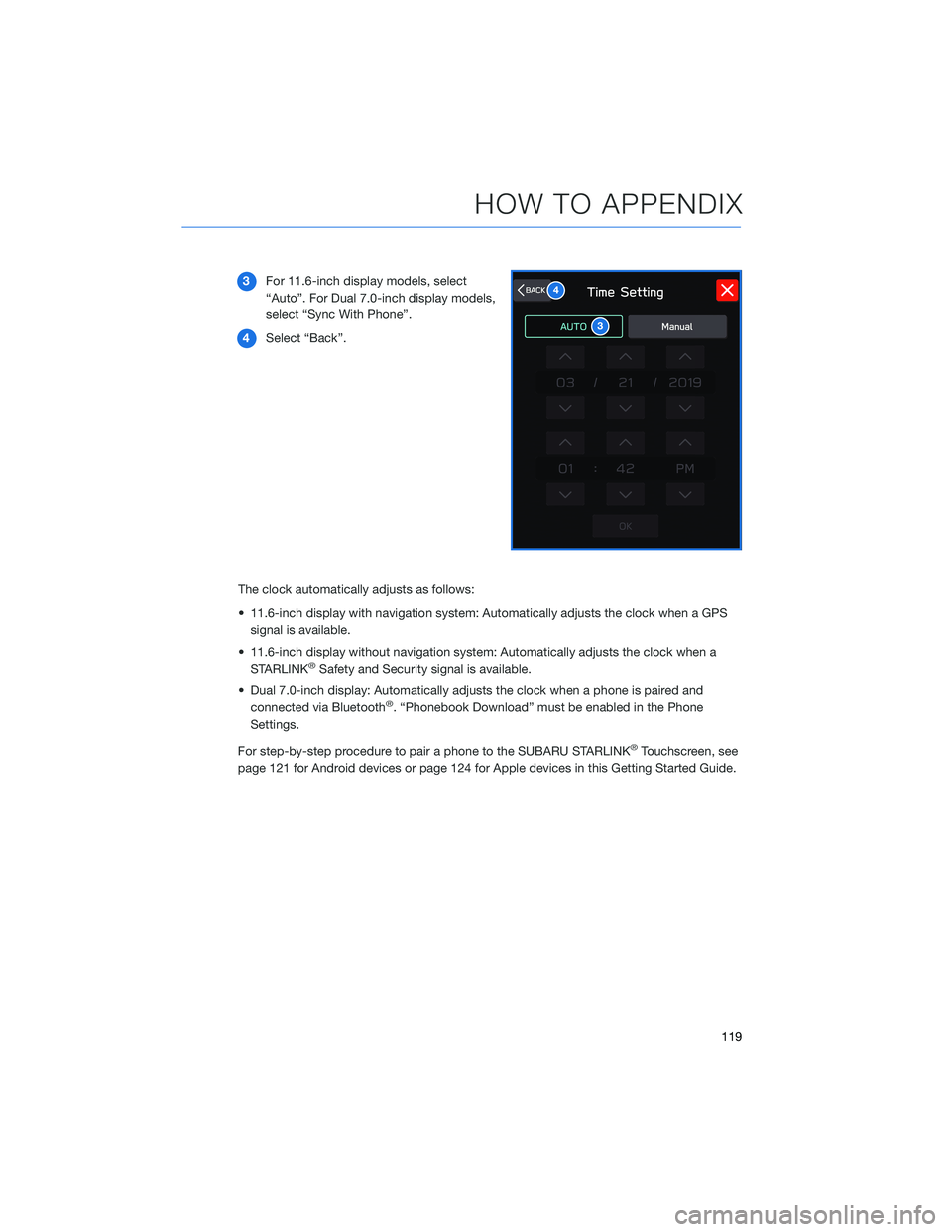
3For 11.6-inch display models, select
“Auto”. For Dual 7.0-inch display models,
select “Sync With Phone”.
4Select “Back”.
The clock automatically adjusts as follows:
• 11.6-inch display with navigation system: Automatically adjusts the clock when a GPS
signal is available.
• 11.6-inch display without navigation system: Automatically adjusts the clock when a
STARLINK
®Safety and Security signal is available.
• Dual 7.0-inch display: Automatically adjusts the clock when a phone is paired and
connected via Bluetooth
®. “Phonebook Download” must be enabled in the Phone
Settings.
For step-by-step procedure to pair a phone to the SUBARU STARLINK
®Touchscreen, see
page 121 for Android devices or page 124 for Apple devices in this Getting Started Guide.
3
4
HOW TO APPENDIX
119
Page 123 of 164
BLUETOOTH®PAIRING
Pairing an Android Device
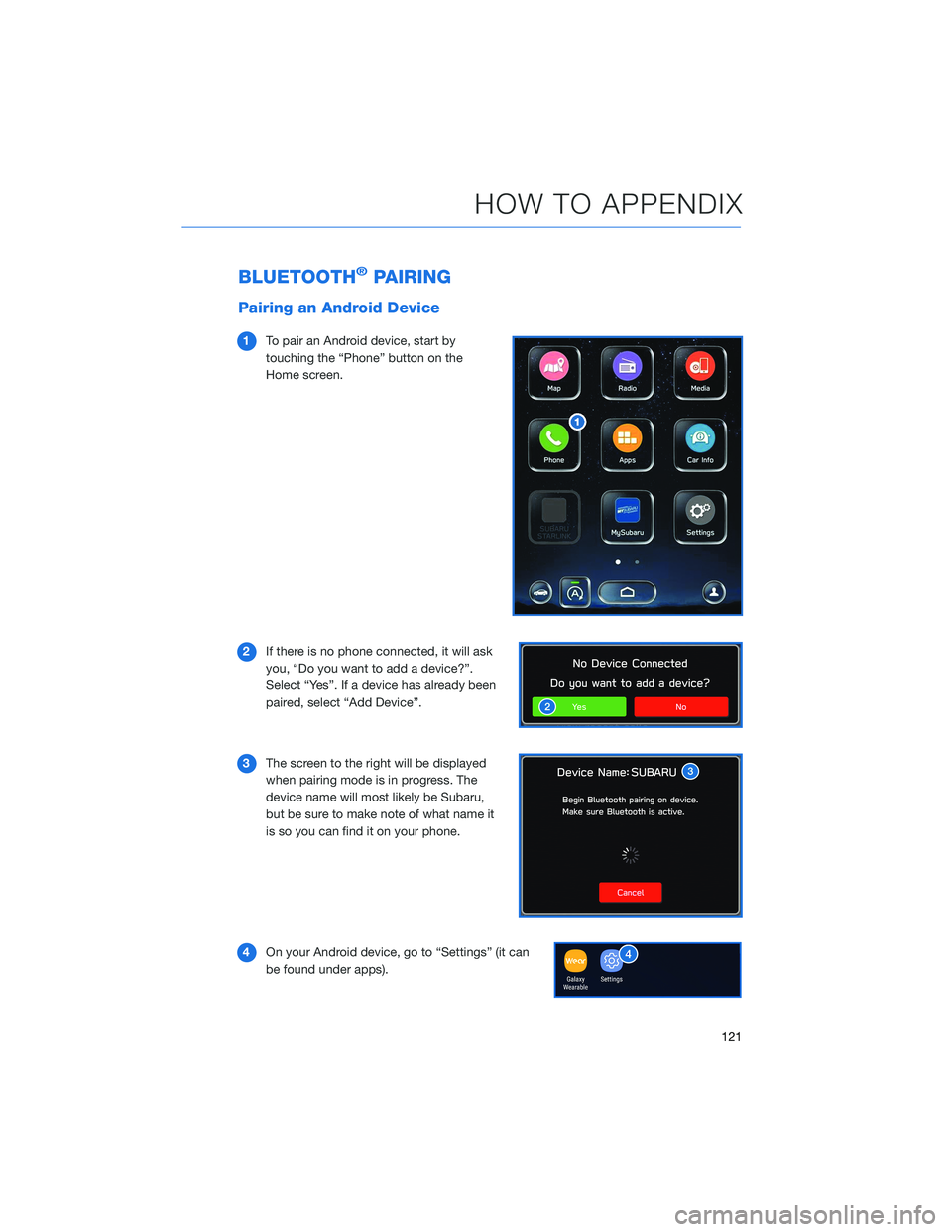
1To pair an Android device, start by
touching the “Phone” button on the
Home screen.
2If there is no phone connected, it will ask
you, “Do you want to add a device?”.
Select “Yes”. If a device has already been
paired, select “Add Device”.
3The screen to the right will be displayed
when pairing mode is in progress. The
device name will most likely be Subaru,
but be sure to make note of what name it
is so you can find it on your phone.
4On your Android device, go to “Settings” (it can
be found under apps).
HOW TO APPENDIX
121
Page 126 of 164
Pairing an iOS/Apple Device
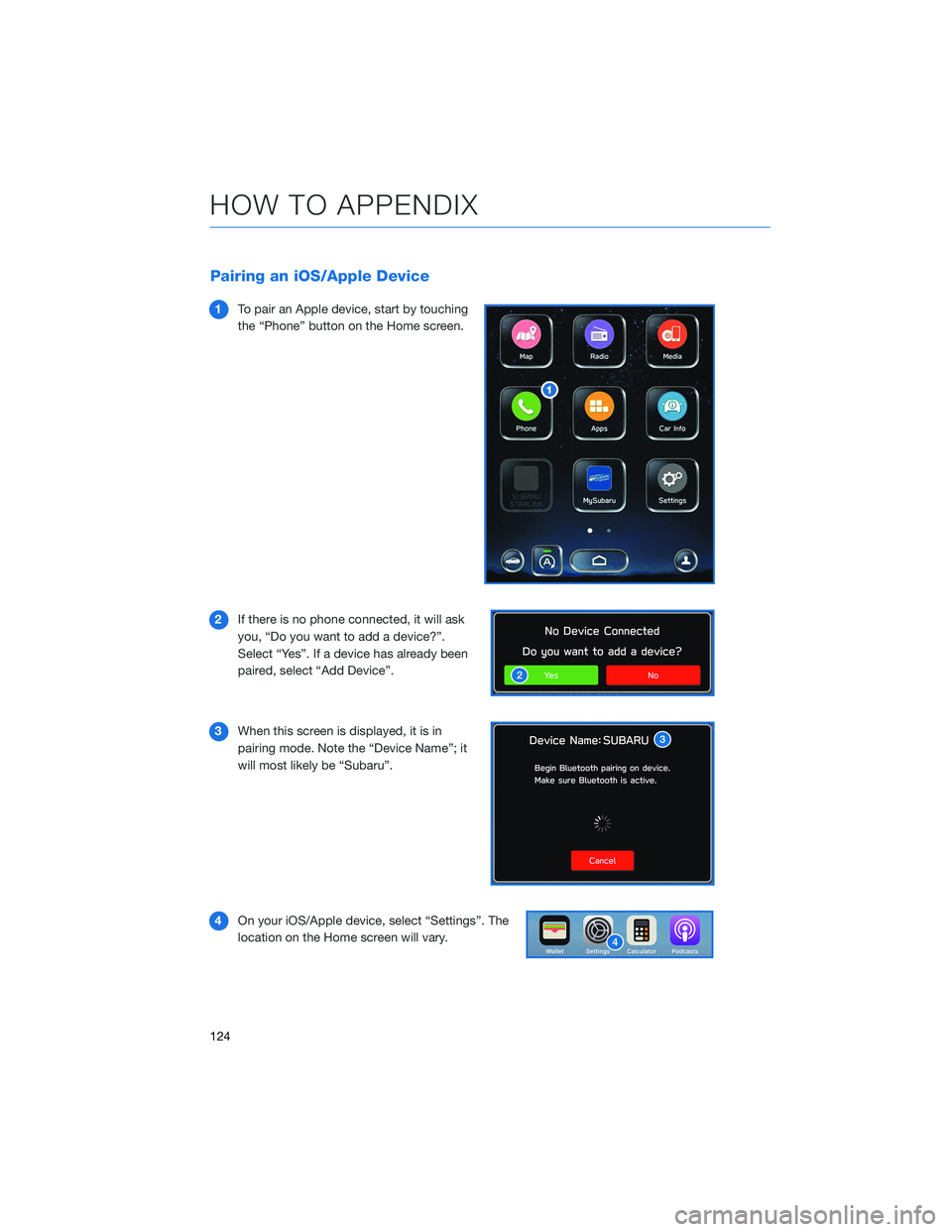
1To pair an Apple device, start by touching
the “Phone” button on the Home screen.
2If there is no phone connected, it will ask
you, “Do you want to add a device?”.
Select “Yes”. If a device has already been
paired, select “Add Device”.
3When this screen is displayed, it is in
pairing mode. Note the “Device Name”; it
will most likely be “Subaru”.
4On your iOS/Apple device, select “Settings”. The
location on the Home screen will vary.
HOW TO APPENDIX
124
Page 130 of 164
Connecting an Android Phone
Your Subaru comes equipped with Android Auto™, and allows you
to safely utilize certain Android features with your vehicle. You can
learn more about connecting your phone and using Android Auto™
from the how-to video linked in the QR code and the steps listed
below.
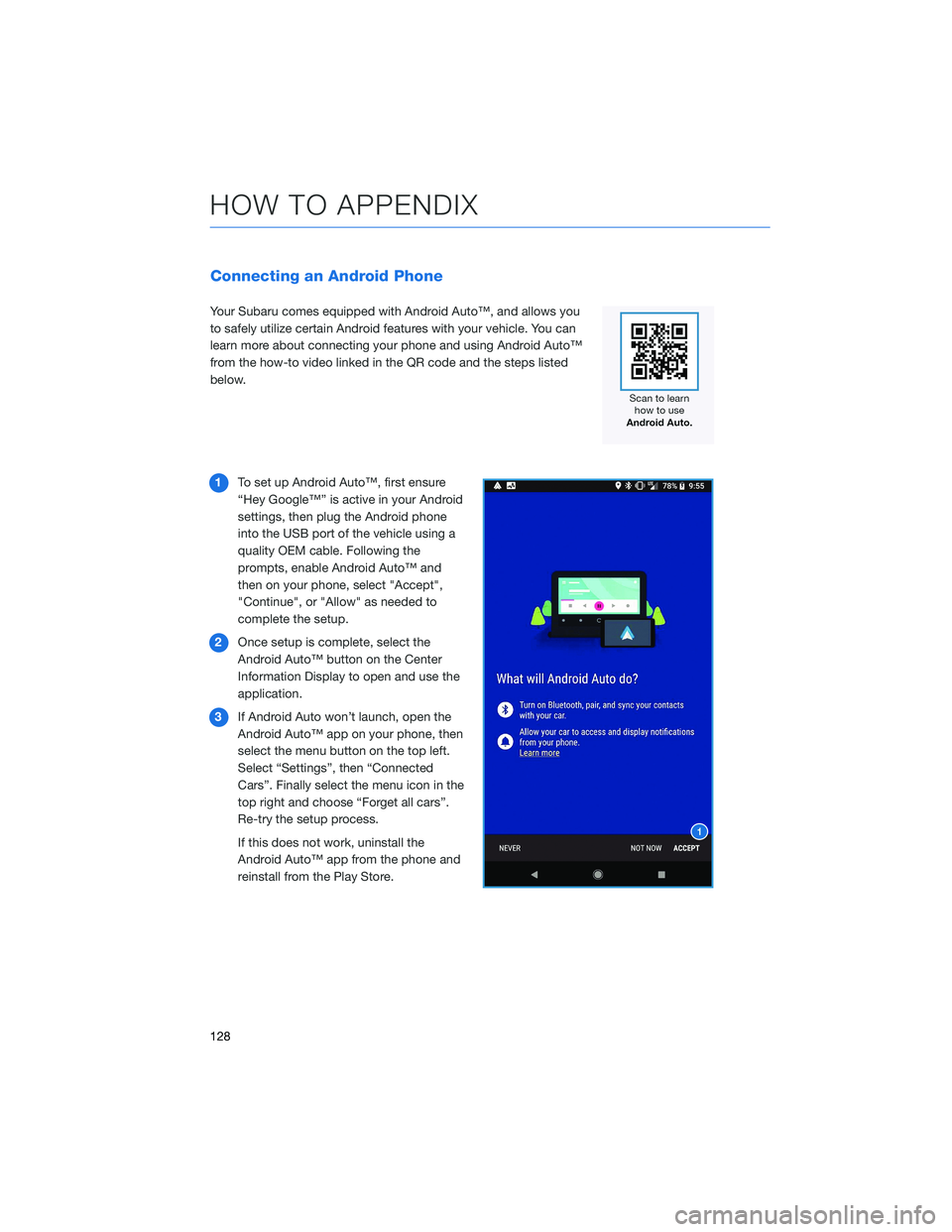
1To set up Android Auto™, first ensure
“Hey Google™” is active in your Android
settings, then plug the Android phone
into the USB port of the vehicle using a
quality OEM cable. Following the
prompts, enable Android Auto™ and
then on your phone, select "Accept",
"Continue", or "Allow" as needed to
complete the setup.
2Once setup is complete, select the
Android Auto™ button on the Center
Information Display to open and use the
application.
3If Android Auto won’t launch, open the
Android Auto™ app on your phone, then
select the menu button on the top left.
Select “Settings”, then “Connected
Cars”. Finally select the menu icon in the
top right and choose “Forget all cars”.
Re-try the setup process.
If this does not work, uninstall the
Android Auto™ app from the phone and
reinstall from the Play Store.
HOW TO APPENDIX
128
Page 132 of 164
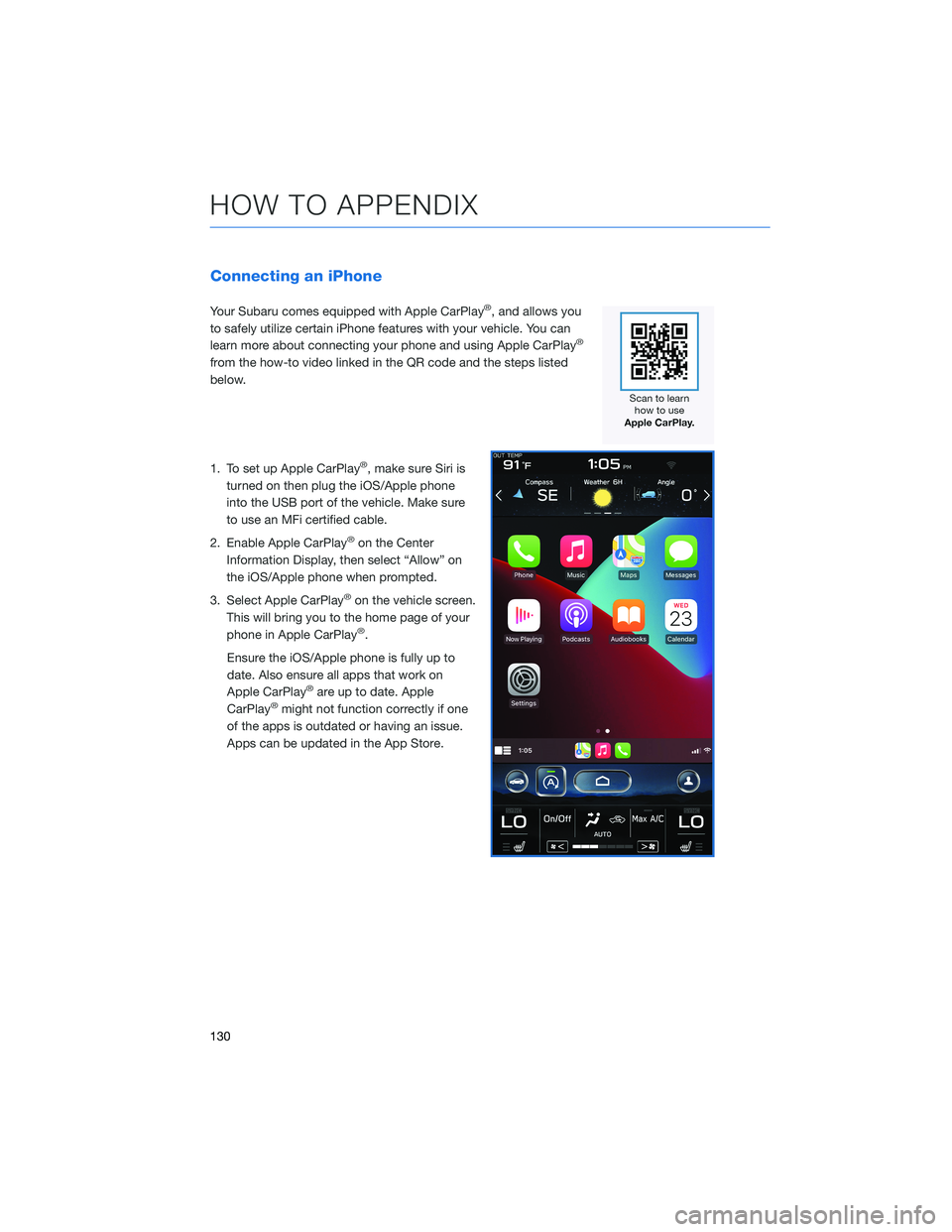
Connecting an iPhone
Your Subaru comes equipped with Apple CarPlay®, and allows you
to safely utilize certain iPhone features with your vehicle. You can
learn more about connecting your phone and using Apple CarPlay
®
from the how-to video linked in the QR code and the steps listed
below.
1. To set up Apple CarPlay
®, make sure Siri is
turned on then plug the iOS/Apple phone
into the USB port of the vehicle. Make sure
to use an MFi certified cable.
2. Enable Apple CarPlay
®on the Center
Information Display, then select “Allow” on
the iOS/Apple phone when prompted.
3. Select Apple CarPlay
®on the vehicle screen.
This will bring you to the home page of your
phone in Apple CarPlay
®.
Ensure the iOS/Apple phone is fully up to
date. Also ensure all apps that work on
Apple CarPlay
®are up to date. Apple
CarPlay®might not function correctly if one
of the apps is outdated or having an issue.
Apps can be updated in the App Store.
HOW TO APPENDIX
130
Page 138 of 164
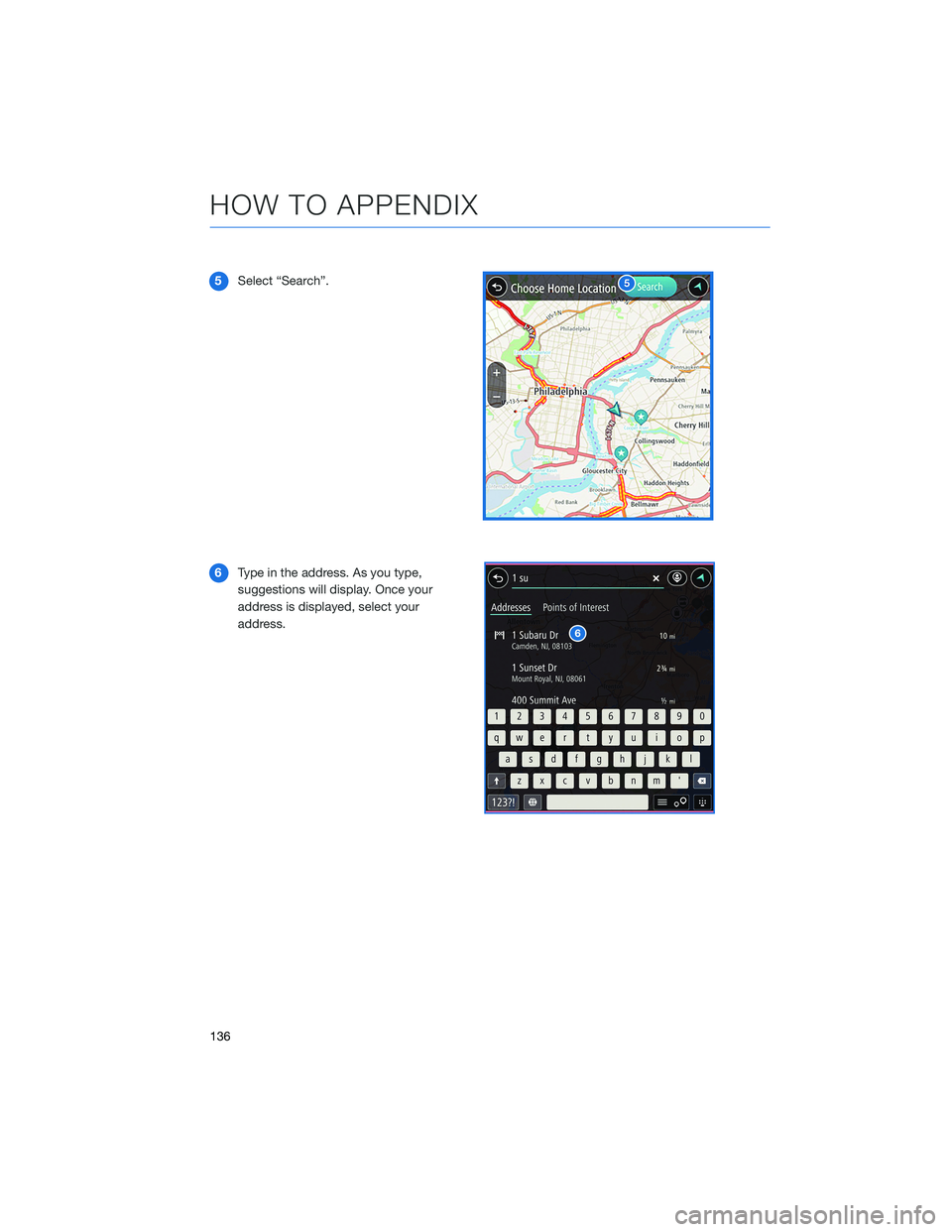
5Select “Search”.
6Type in the address. As you type,
suggestions will display. Once your
address is displayed, select your
address.
HOW TO APPENDIX
136
Page 140 of 164
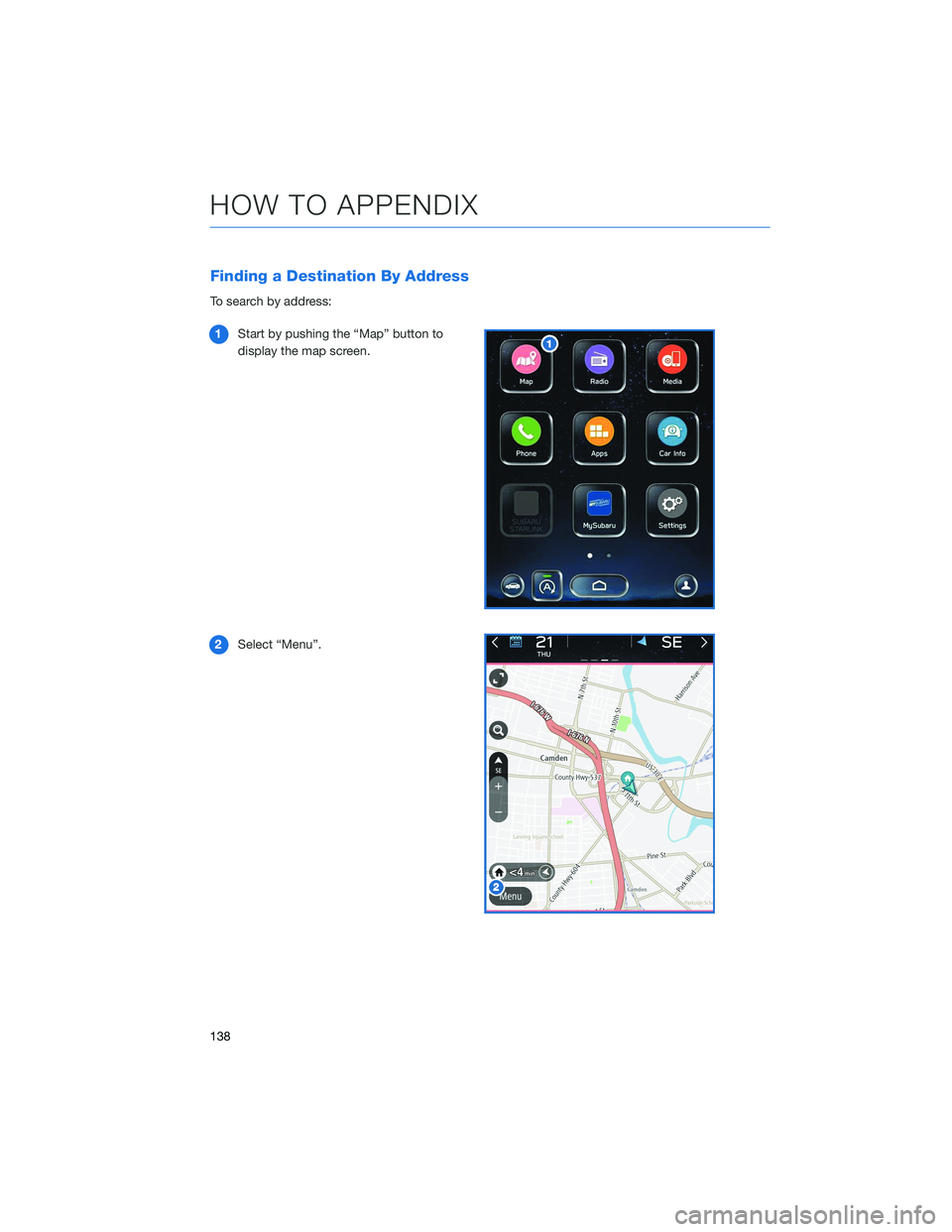
Finding a Destination By Address
To search by address:
1Start by pushing the “Map” button to
display the map screen.
2Select “Menu”.
HOW TO APPENDIX
138
Page 141 of 164
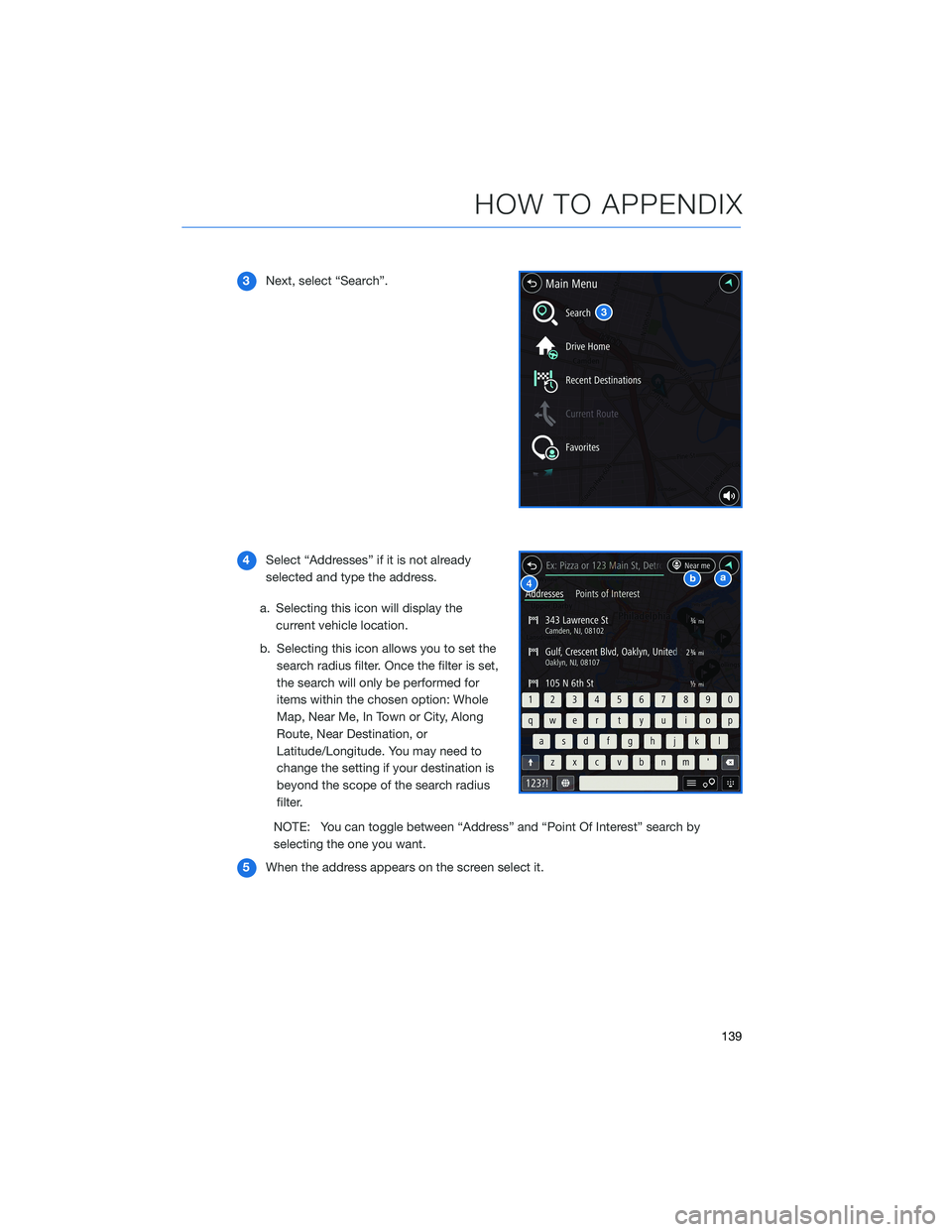
3Next, select “Search”.
4Select “Addresses” if it is not already
selected and type the address.
a. Selecting this icon will display the
current vehicle location.
b. Selecting this icon allows you to set the
search radius filter. Once the filter is set,
the search will only be performed for
items within the chosen option: Whole
Map, Near Me, In Town or City, Along
Route, Near Destination, or
Latitude/Longitude. You may need to
change the setting if your destination is
beyond the scope of the search radius
filter.
NOTE: You can toggle between “Address” and “Point Of Interest” search by
selecting the one you want.
5When the address appears on the screen select it.
HOW TO APPENDIX
139
Page 143 of 164
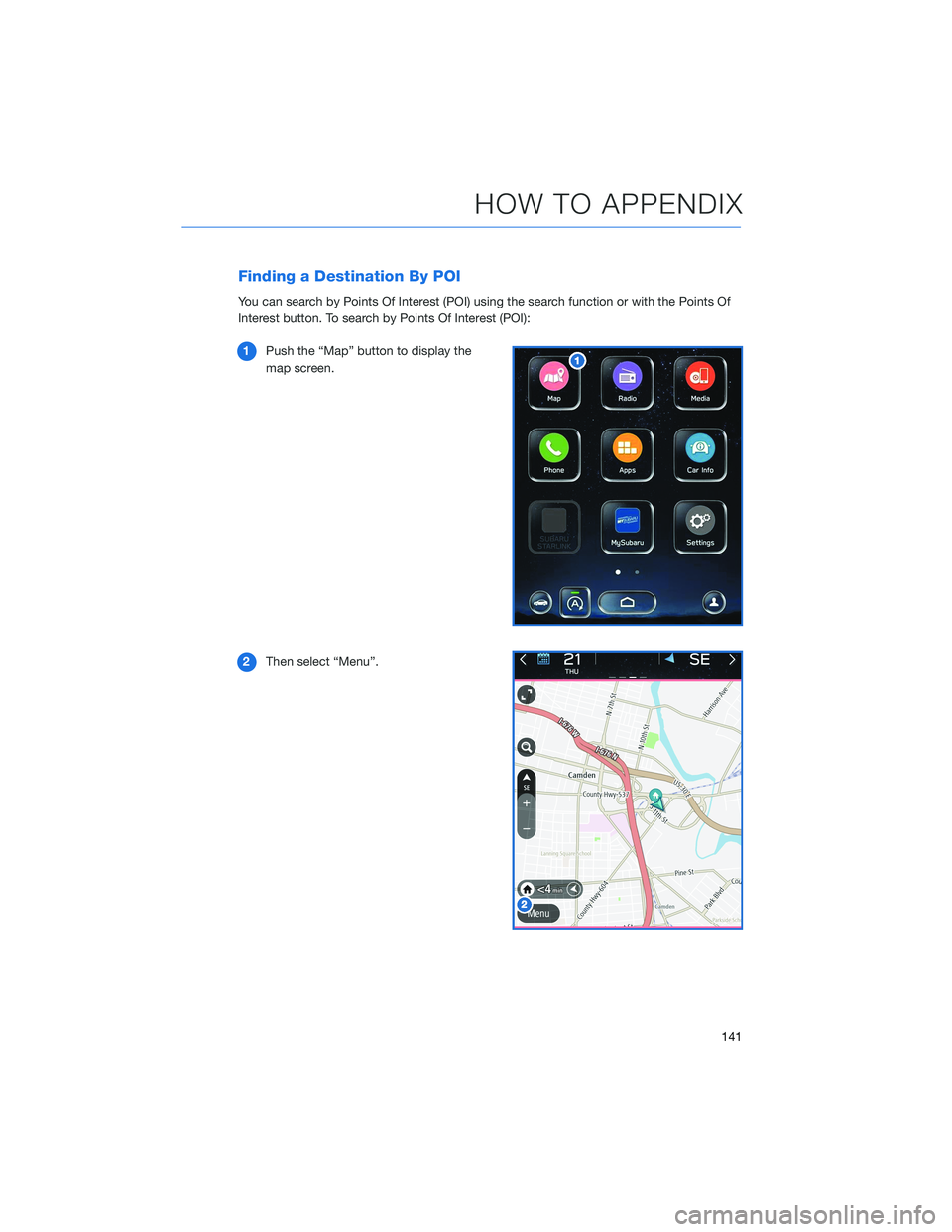
Finding a Destination By POI
You can search by Points Of Interest (POI) using the search function or with the Points Of
Interest button. To search by Points Of Interest (POI):
1Push the “Map” button to display the
map screen.
2Then select “Menu”.
HOW TO APPENDIX
141
Page 152 of 164
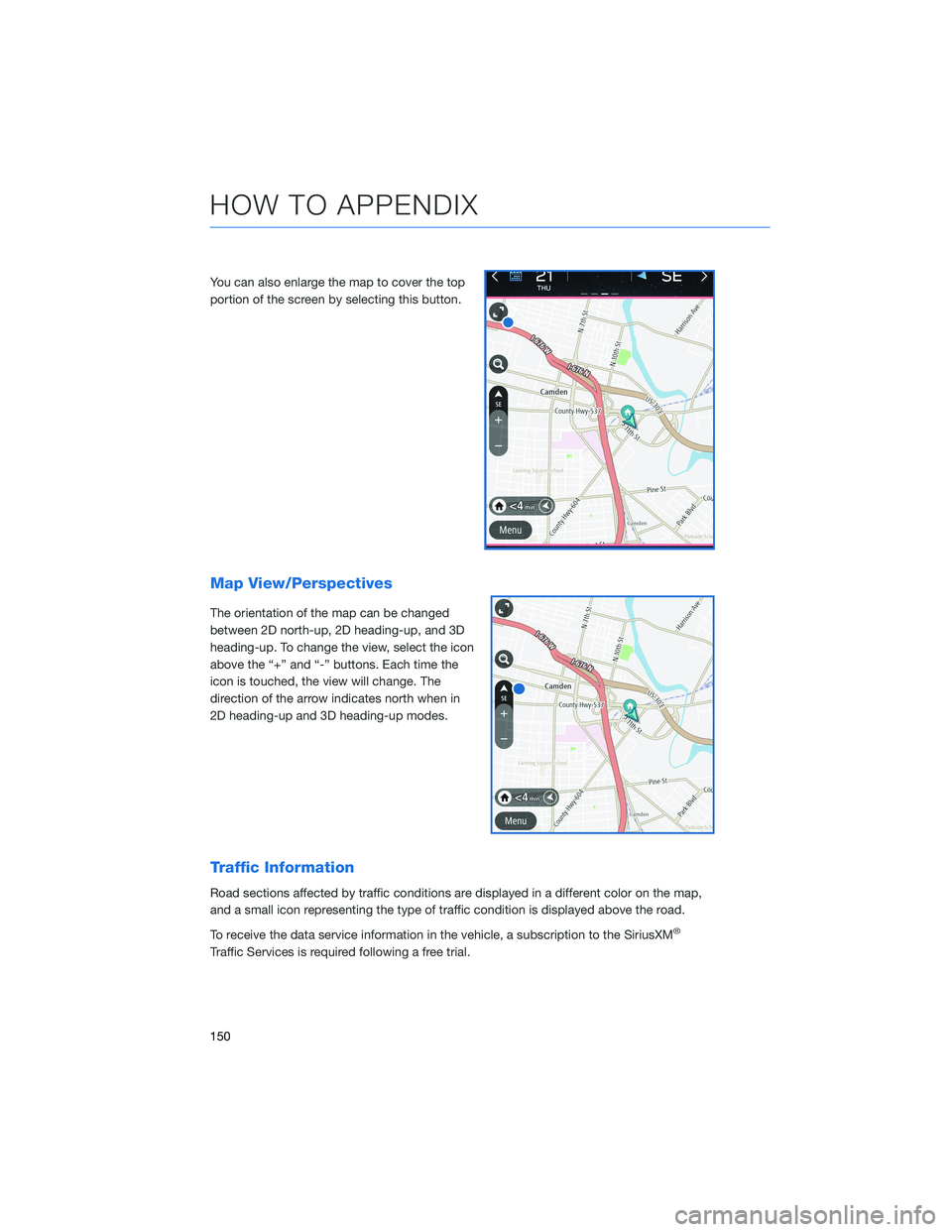
You can also enlarge the map to cover the top
portion of the screen by selecting this button.
Map View/Perspectives
The orientation of the map can be changed
between 2D north-up, 2D heading-up, and 3D
heading-up. To change the view, select the icon
above the “+” and “-” buttons. Each time the
icon is touched, the view will change. The
direction of the arrow indicates north when in
2D heading-up and 3D heading-up modes.
Traffic Information
Road sections affected by traffic conditions are displayed in a different color on the map,
and a small icon representing the type of traffic condition is displayed above the road.
To receive the data service information in the vehicle, a subscription to the SiriusXM
®
Traffic Services is required following a free trial.
HOW TO APPENDIX
150