buttons SUBARU OUTBACK 2002 3.G User Guide
[x] Cancel search | Manufacturer: SUBARU, Model Year: 2002, Model line: OUTBACK, Model: SUBARU OUTBACK 2002 3.GPages: 466
Page 205 of 466
5-34
Type D and E audio set (if equipped)
Type D: Without weather band
Type E: With weather band
The audio set will operate only when the ignition switch is in the “ACC” or
“ON” position.
Radio operation
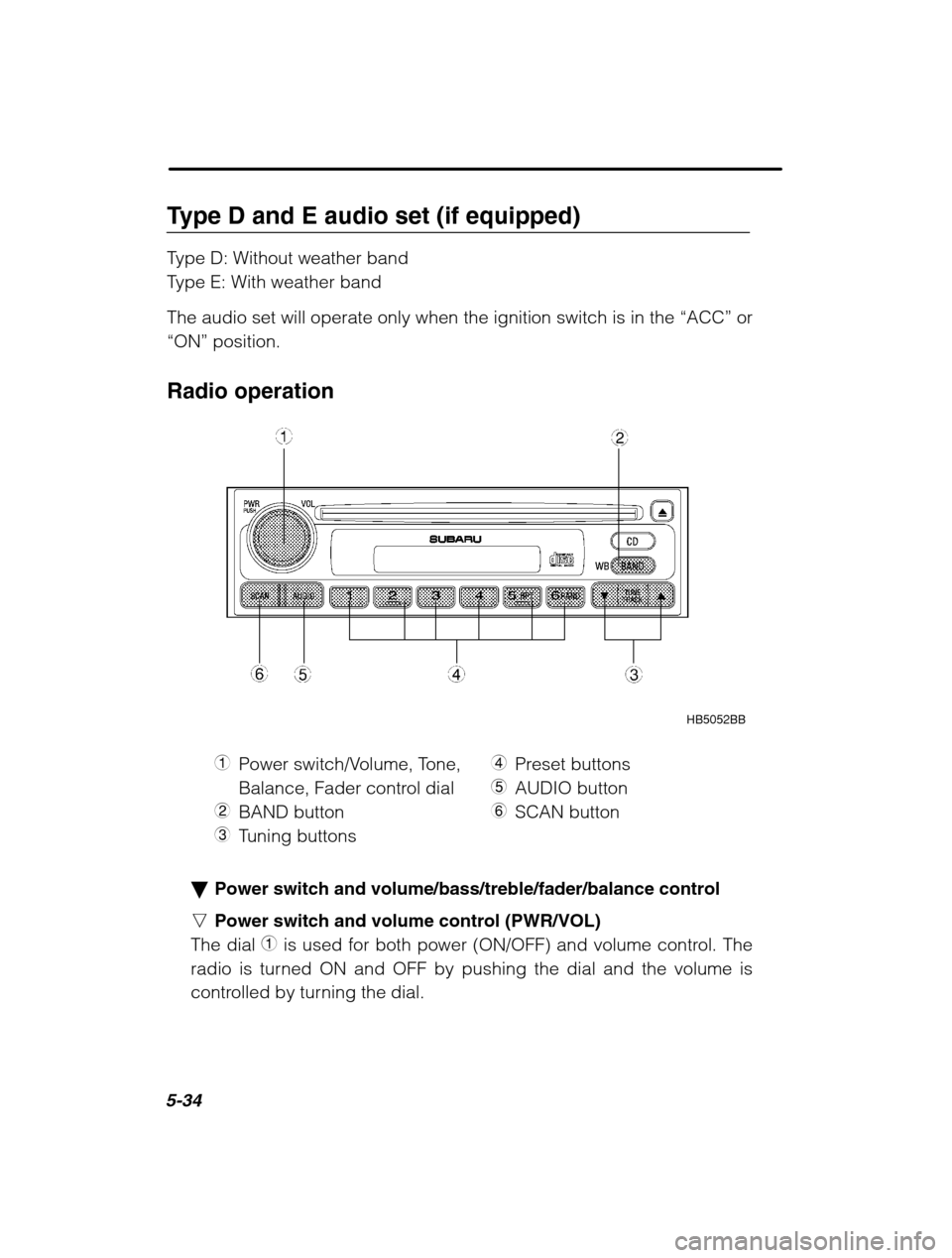
HB5052BB
1 Power switch/Volume, Tone,
Balance, Fader control dial
2 BAND button
3 Tuning buttons 4
Preset buttons
5 AUDIO button
6 SCAN button
Power switch and volume/bass/treble/fader/balance control
n Power switch and volume control (PWR/VOL)
The dial 1 is used for both power (ON/OFF) and volume control. The
radio is turned ON and OFF by pushing the dial and the volume is
controlled by turning the dial.
Page 208 of 466
Audio5-37
–
CONTINUED –
Press the “SCAN” button again to cancel the SCAN mode and to stop
on any displayed frequency.
When the “SCAN” button is pressed for automatic tuning, stations are
scanned in the direction of low frequencies to high frequencies only.
Automatic tuning may not function properly if the station reception is
weakened by distance from the station or proximity to tall buildingsand hills. Selecting preset stations
Presetting a station with a “preset button ”
4 allows you to select that
station in a single operation. Up to six WB (if equipped), AM, FM1 and
FM2 stations each may be preset. How to preset stations
1. Press the “BAND” button 2 to select FM1, FM2, AM or WB (if
equipped) reception.
2. Press the “SCAN” button or tune the radio manually until the
desired station frequency is displayed.
3. Press one of the preset buttons for more than 2 seconds to store
the frequency. At this time, there will momentarily be no sound from
the radio. If the button is pressed for less than 2 seconds, the preced-
ing selection will remain in memory.
NOTE If the connection between the radio and battery is broken for any
reason such as vehicle maintenance or radio removal, all stationsstored in the preset buttons are cleared. If this occurs, it is neces-sary to reset the preset buttons.
Page 212 of 466
Audio5-41
–
CONTINUED –
CD changer control (If optional in dash CD changer is connected) An optional CD changer can be connected to this audio unit. See your
SUBARU dealer for more information. For procedures for loading and un-
loading CDs, refer to “In-dash 6 CD auto changer ” in this chapter.
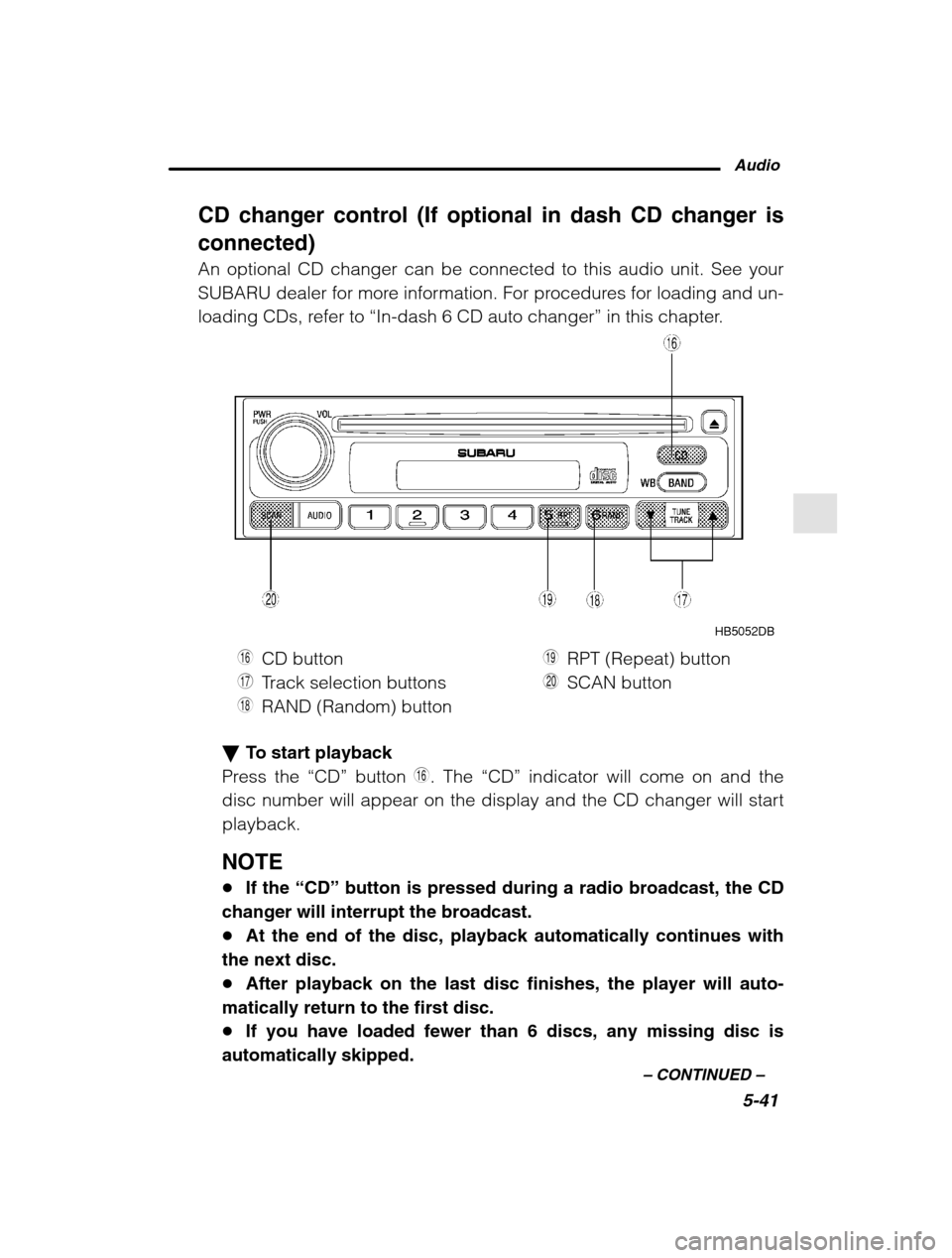
HB5052DB
U CD button
I Track selection buttons
O RAND (Random) button P
RPT (Repeat) button
A SCAN button
To start playback
Press the “CD” button U. The “CD” indicator will come on and the
disc number will appear on the display and the CD changer will start playback.
NOTE If the “CD” button is pressed during a radio broadcast, the CD
changer will interrupt the broadcast. At the end of the disc, playback automatically continues with
the next disc. After playback on the last disc finishes, the player will auto-
matically return to the first disc. If you have loaded fewer than 6 discs, any missing disc is
automatically skipped.
Page 213 of 466
5-42
Selection of a desired disc
Discs cannot be selected using the main audio unit. To select a disc,
press one of the “Disc select ” buttons (these are numbered from 1 to
6) on the CD changer unit. The disc will begin to play. To select a song from its beginning
Briefly press the “ ” button
I to skip to the beginning of the next
track and briefly press the “ ” button to skip to the beginning of the
current track. Fast-forwarding and fast-reverse
Press the “ ” button I continuously for more than a half second to
fast-forward the disc.
Press the “ ” button continuously for more than a half second to fast
reverse the disc.
Release the button to stop fast forwarding or fast reverse. Repeat
Press the “RPT” button
P while a song is playing to play the song
repeatedly. The “RPT” indicator will come on and the song will be
played continuously. To cancel the repeat mode, press the button
again. Then the “RPT” indicator goes out, and normal playback mode
is restored. Random playback
Press the “RAND” button
O while a disc is being played back to play
all songs on the disc in a random order. The “RAND” indicator will
come on and all songs on the disc will be played in a random order.
To cancel the random mode, press the button again. Then the
“RAND” indicator goes out, and normal playback mode is restored.
Scan (a convenient way to become familiar with a disc)
1. Press the “SCAN” button
A.
– The display shows “SCAN” and the track number being
scanned.– You hear the first 10 seconds of each track.
– The operation is automatically cleared after playing all pro-
grams. Then, normal playback starts.
Page 215 of 466
5-44
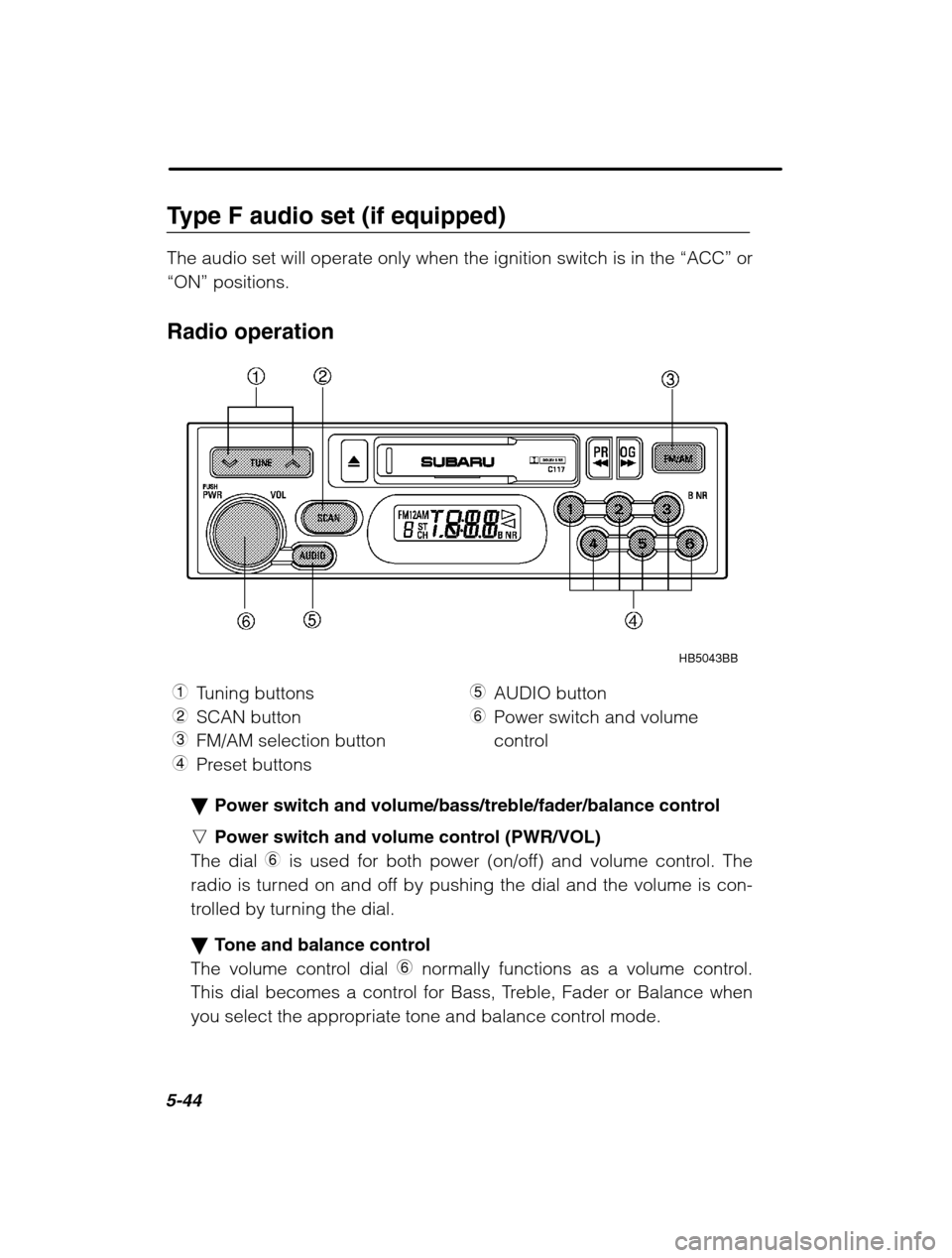
Type F audio set (if equipped) The audio set will operate only when the ignition switch is in the “ACC” or
“ON” positions.
Radio operation
HB5043BB
1 Tuning buttons
2 SCAN button
3 FM/AM selection button
4 Preset buttons 5
AUDIO button
6 Power switch and volume
control
Power switch and volume/bass/treble/fader/balance control
n Power switch and volume control (PWR/VOL)
The dial 6 is used for both power (on/off) and volume control. The
radio is turned on and off by pushing the dial and the volume is con-
trolled by turning the dial. Tone and balance control
The volume control dial 6 normally functions as a volume control.
This dial becomes a control for Bass, Treble, Fader or Balance when
you select the appropriate tone and balance control mode.
Page 218 of 466
Audio5-47
–
CONTINUED –
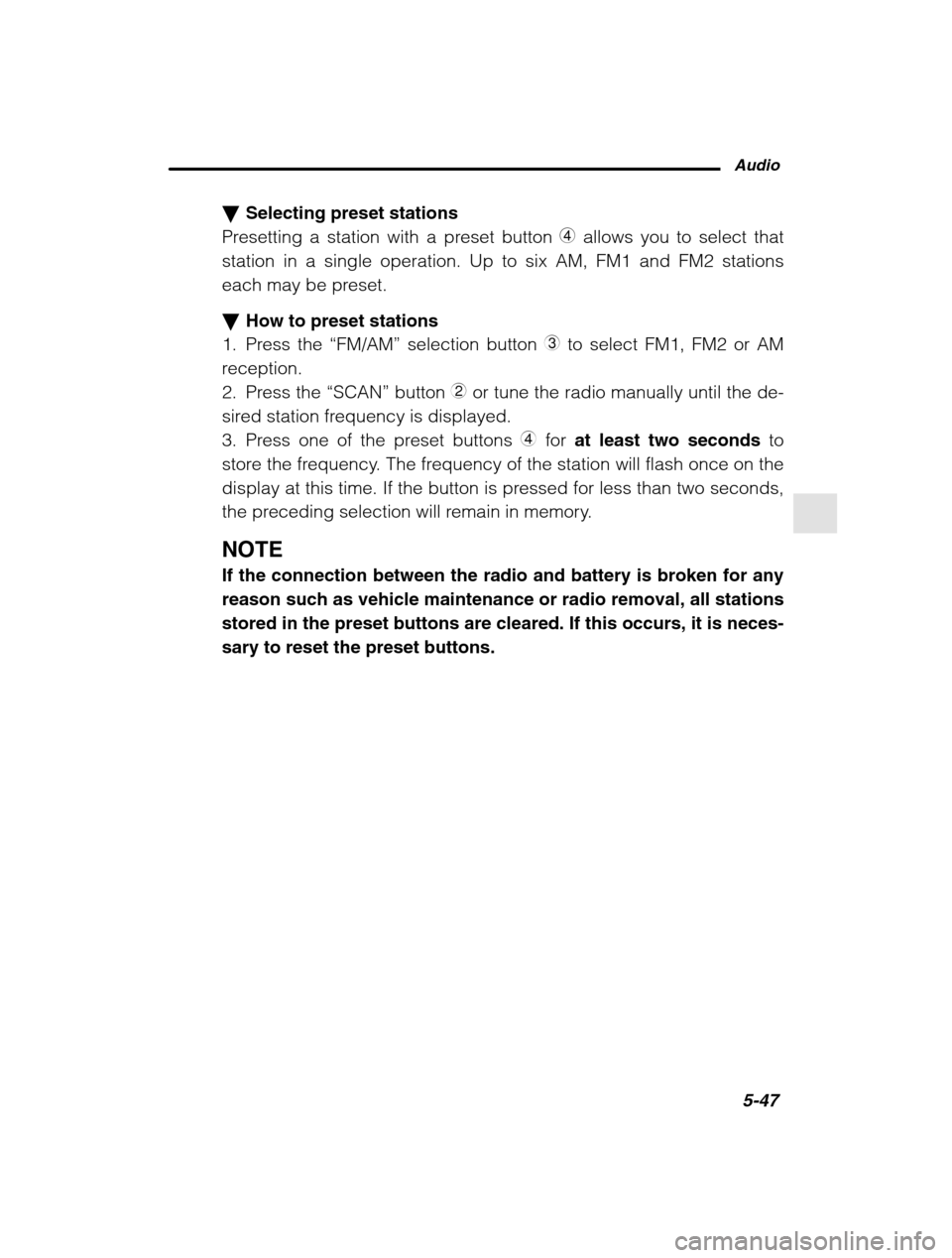
Selecting preset stations
Presetting a station with a preset button 4 allows you to select that
station in a single operation. Up to six AM, FM1 and FM2 stations
each may be preset. How to preset stations
1. Press the “FM/AM” selection button
3 to select FM1, FM2 or AM
reception.
2. Press the “SCAN” button 2 or tune the radio manually until the de-
sired station frequency is displayed.
3. Press one of the preset buttons 4 for at least two seconds to
store the frequency. The frequency of the station will flash once on the
display at this time. If the button is pressed for less than two seconds,
the preceding selection will remain in memory.
NOTE If the connection between the radio and battery is broken for any
reason such as vehicle maintenance or radio removal, all stationsstored in the preset buttons are cleared. If this occurs, it is neces-sary to reset the preset buttons.
Page 219 of 466
5-48
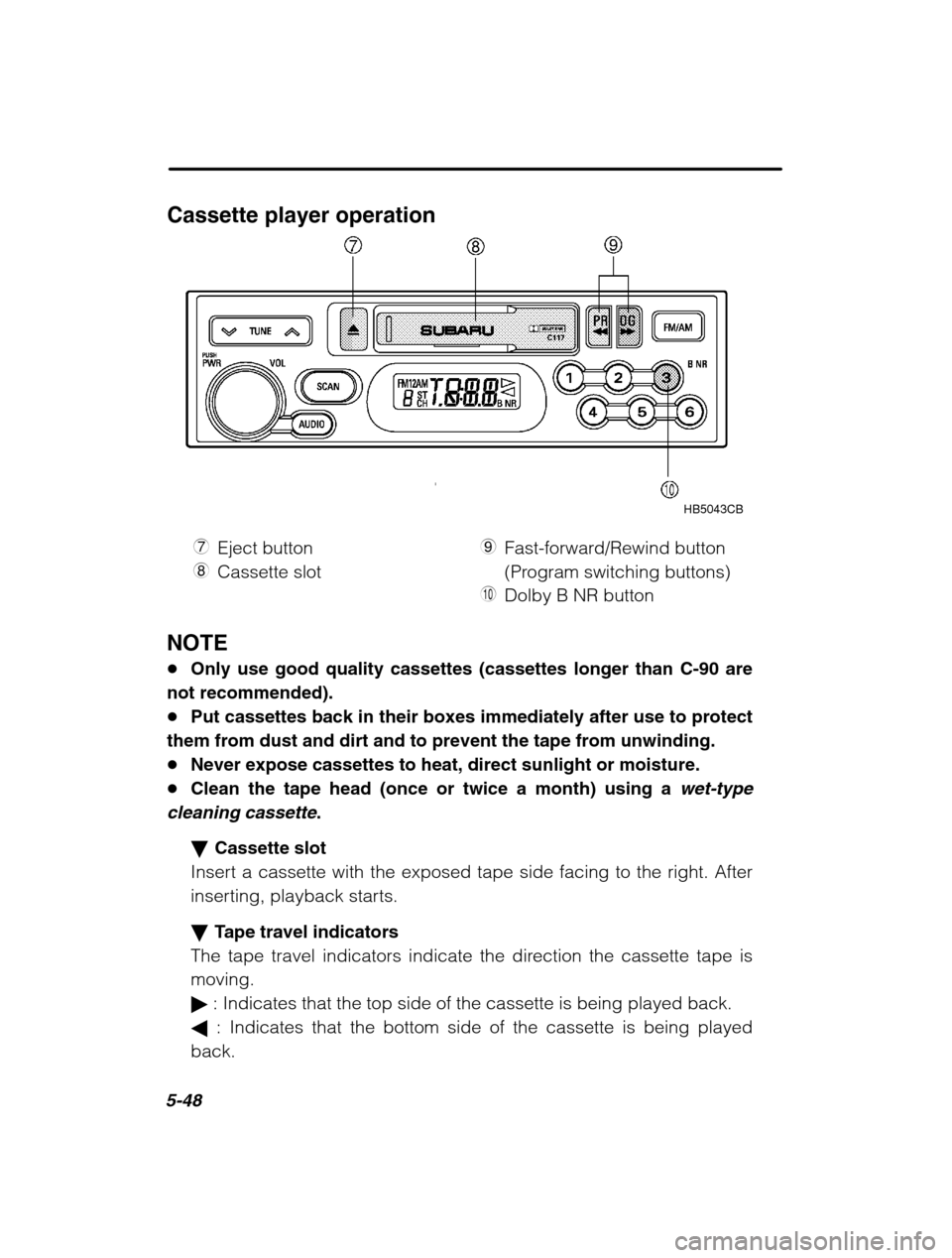
Cassette player operationHB5043CB
7 Eject button
8 Cassette slot 9
Fast-forward/Rewind button
(Program switching buttons)
Q Dolby B NR button
NOTE Only use good quality cassettes (cassettes longer than C-90 are
not recommended). Put cassettes back in their boxes immediately after use to protect
them from dust and dirt and to prevent the tape from unwinding. Never expose cassettes to heat, direct sunlight or moisture.
Clean the tape head (once or twice a month) using a
wet-type
cleaning cassette
.
Cassette slot
Insert a cassette with the exposed tape side facing to the right. After
inserting, playback starts. Tape travel indicators
The tape travel indicators indicate the direction the cassette tape is moving. : Indicates that the top side of the cassette is being played back.
: Indicates that the bottom side of the cassette is being played
back.
Page 220 of 466
Audio5-49
–
CONTINUED –
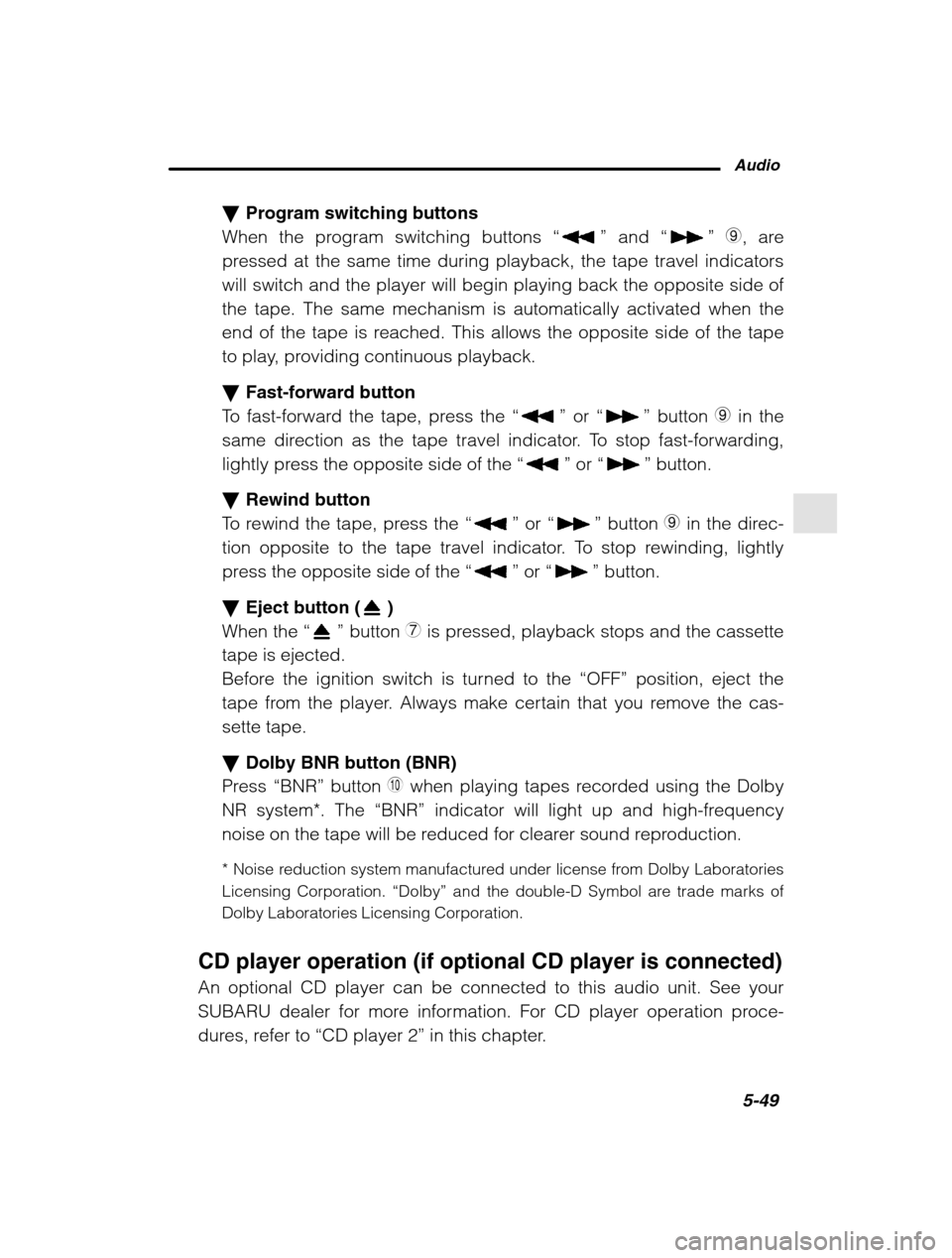
Program switching buttons
When the program switching buttons “
” and “” 9, are
pressed at the same time during playback, the tape travel indicators will switch and the player will begin playing back the opposite side ofthe tape. The same mechanism is automatically activated when the
end of the tape is reached. This allows the opposite side of the tape
to play, providing continuous playback. Fast-forward button
To fast-forward the tape, press the “
” or “” button 9 in the
same direction as the tape travel indicator. To stop fast-forwarding,
lightly press the opposite side of the “
” or “” button.
Rewind button
To rewind the tape, press the “
” or “” button 9 in the direc-
tion opposite to the tape travel indicator. To stop rewinding, lightly
press the opposite side of the “
” or “” button.
Eject button (
)
When the “
” button 7 is pressed, playback stops and the cassette
tape is ejected.
Before the ignition switch is turned to the “OFF” position, eject the
tape from the player. Always make certain that you remove the cas-sette tape. Dolby BNR button (BNR)
Press “BNR” button
Q when playing tapes recorded using the Dolby
NR system*. The “BNR” indicator will light up and high-frequency
noise on the tape will be reduced for clearer sound reproduction.
* Noise reduction system manufactured under license from Dolby Laboratories
Licensing Corporation. “Dolby” and the double-D Symbol are trade marks of
Dolby Laboratories Licensing Corporation.
CD player operation (if optional CD player is connected) An optional CD player can be connected to this audio unit. See your
SUBARU dealer for more information. For CD player operation proce-
dures, refer to “CD player 2 ” in this chapter.
Page 221 of 466
5-50
McIntosh audio set (if equipped) The audio set will operate only when the ignition switch is in the “ACC” or
“ON” positions.
CAUTION
The power amplifier for this audio set is mounted under the front
passenger’ s seat. The amplifier will become hot if the audio con-
tinues to operate.
Never touch the amplifier. Doing so could cause burns.
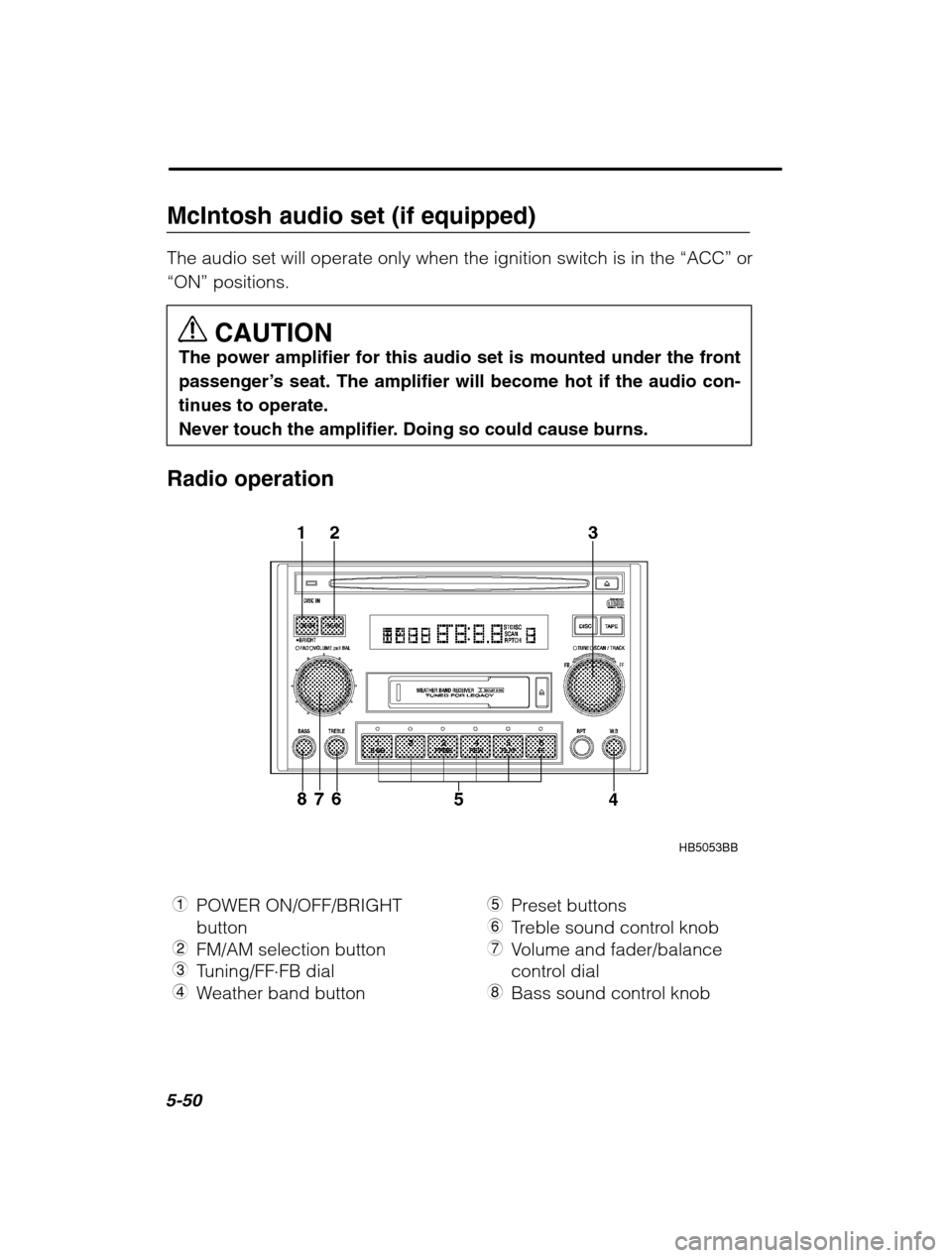
Radio operation
HB5053BB
1 POWER ON/OFF/BRIGHT button
2 FM/AM selection button
3 Tuning/FF FB dial
4 Weather band button 5
Preset buttons
6 Treble sound control knob
7 Volume and fader/balance
control dial
8 Bass sound control knob
Page 225 of 466
5-54
Seek tuning (SEEK)
If the Tuning dial ’s outer tuner is turned for longer than half of a se-
cond, the radio will begin to automatically search for receivable fre-
quencies and will stop at the first one found. This function may not be
available, however, when radio signals are weak. In such a situation,
perform manual tuning to select the desired station. Scan tuning (SCAN)
Turn the tuning dial inner tuner to change the radio to the SCAN
mode. In this mode, the radio scans through the radio band until astation is found. The radio will stop at the station for five seconds
while displaying the frequency, after which scanning will continue until
the entire band has been scanned.
Turn the tuning dial ’s inner tuner again to cancel the SCAN mode and
to stop on any displayed frequency.
Scan tuning may not function properly if the station reception is weak-
ened by distance from the station or proximity to tall buildings andhills. Preset tuning
Press any one of the preset buttons to select the corresponding, pre-
viously-registered radio station. The LED at the top of that button will
turn on. n Manual preset
Use the tuning dial to select the radio station which you wish to
register. Choose the preset button to which you wish to assign that station
and press it continuously for a period of more than 2 seconds. When
the radio station has been successfully registered, the display will
flash the corresponding radio frequency on and off once. NOTE Each preset button can be used to store both an FM station
and an AM station. If the power supply is interrupted by disconnection of the bat-
tery, memory presets will be cleared and will be required to be re-input.