audio SUBARU OUTBACK 2002 3.G Owner's Manual
[x] Cancel search | Manufacturer: SUBARU, Model Year: 2002, Model line: OUTBACK, Model: SUBARU OUTBACK 2002 3.GPages: 466
Page 200 of 466
Audio5-29
–
CONTINUED –
After insertion, the DISC indicator “” will come on and “CD” will
appear on the display and the player will start playback. NOTE Make sure to always insert a disc with the label side up. If a
disc is inserted with the label side down, it might be ejected or the player might shut off. After the last song finishes, the player will automatically return
to track 1 (the first song on the disc). n When CD is in the player
Press the “CD” button
G. The display will show “CD” and the player
will start playback. NOTE After the last song finishes, playback will automatically return to track 1 (the first song on the disc). To select a song from its beginning
n Forward direction
Briefly press the “ ❚” button
F to skip to the beginning of the next
track. Each time the button is pressed, the indicated track number will
increase. n Backward direction
Briefly press the “❚ ” button
F to skip to the beginning of the cur-
rent track. Each time the button is pressed, the indicated truck num-
ber will decrease. Fast forwarding and fast reverse
n Fast forwarding
Press the “ ❚” button F continuously for more than 0.5 second to
fast forward the disc.
Release the button to stop fast forwarding. n Fast reverse
Press the “❚ ” button F continuously for more than 0.5 second to
fast reverse the disc.
Release the button to stop fast reverse.
Page 202 of 466
Audio5-31
–
CONTINUED –
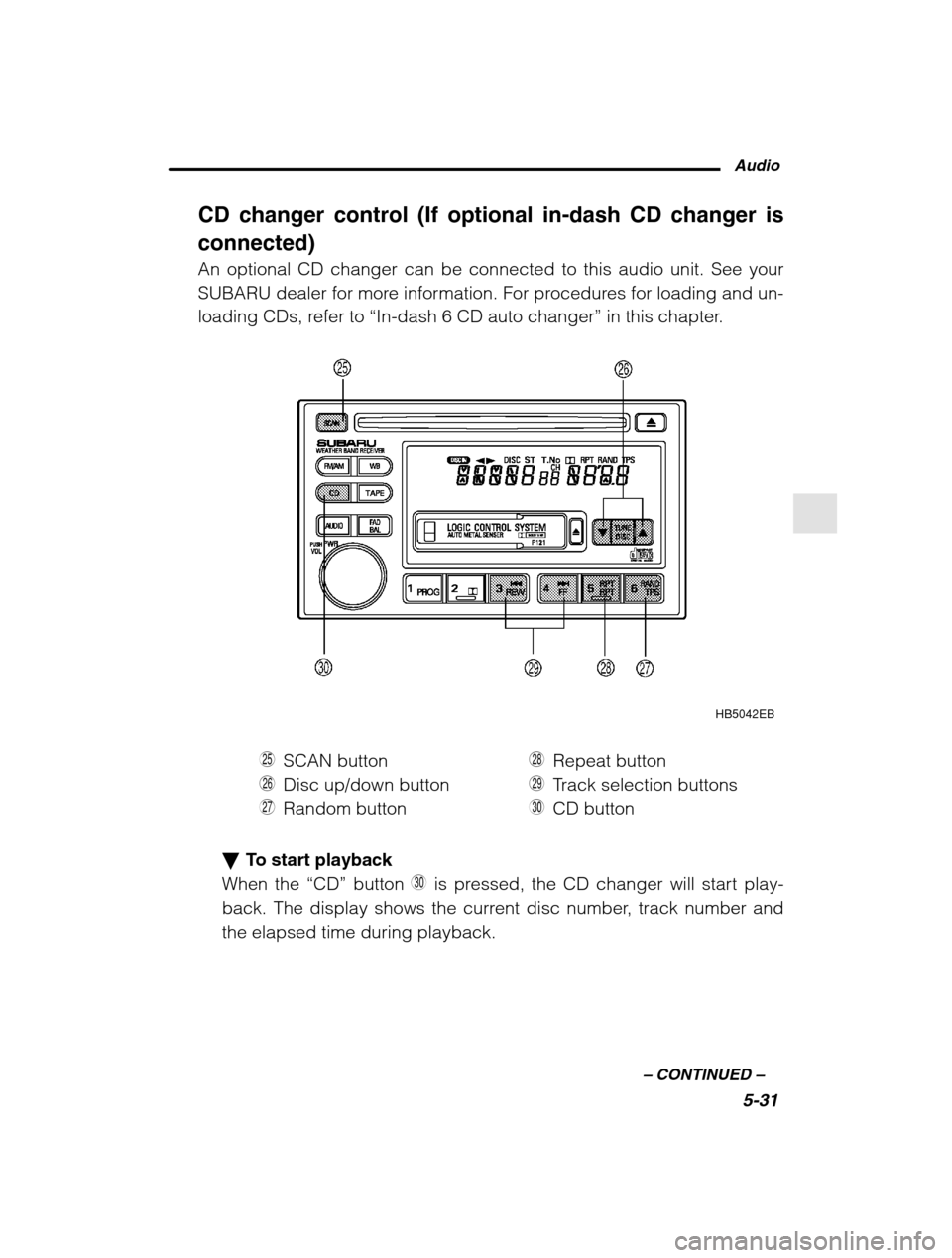
CD changer control (If optional in-dash CD changer is connected) An optional CD changer can be connected to this audio unit. See your
SUBARU dealer for more information. For procedures for loading and un-
loading CDs, refer to “In-dash 6 CD auto changer ” in this chapter.
HB5042EB
H SCAN button
J Disc up/down button
K Random button L
Repeat button
Z Track selection buttons
X CD button
To start playback
When the “CD” button X is pressed, the CD changer will start play-
back. The display shows the current disc number, track number and the elapsed time during playback.
Page 204 of 466
Audio5-33
–
CONTINUED –
Fast forwarding and fast reverse
n Fast forwarding
Press the “ ❚” button Z continuously for more than 0.5 second to
fast forward the disc.
Release the button to stop fast forwarding.
If you continue fast forwarding to the end of the disc, the CD changer
will automatically stop fast forwarding and start playback beginning
with the first track on the current disc. n Fast reverse
Press the “❚ ” button
Z continuously for more than 0.5 second to
fast reverse the disc.
Release the button to stop fast reverse.
If you continue fast reverse to the beginning of the disc, the CD
changer will automatically stop fast reverse and start playback begin-
ning with the first track on the current disc. Repeat playback
Press the “RPT” button
L while a song is playing to play the song
repeatedly. The “RPT” indicator will come on and the song will be
played continuously. To cancel the repeat mode, press the button
again. Then the “RPT” indicator goes out, and normal playback mode
is restored. Random playback
Press the “RAND” button
K while a disc is being played back to play
all songs on the disc in a random order. The “RAND” indicator will
come on and all songs on the disc will be played in a random order.
To cancel the random mode, press the button again. Then the
“RAND” indicator goes out, and normal playback mode is restored.
Scan
When the “SCAN” button
H is pressed while the disc is being played
back, you can hear the first 10 seconds of each track to search for
the desired program. To continue listening to the program, press the
“SCAN” button again. After all tracks on the disc have been scanned,
normal playback mode is restored.
Page 205 of 466
5-34
Type D and E audio set (if equipped)
Type D: Without weather band
Type E: With weather band
The audio set will operate only when the ignition switch is in the “ACC” or
“ON” position.
Radio operation
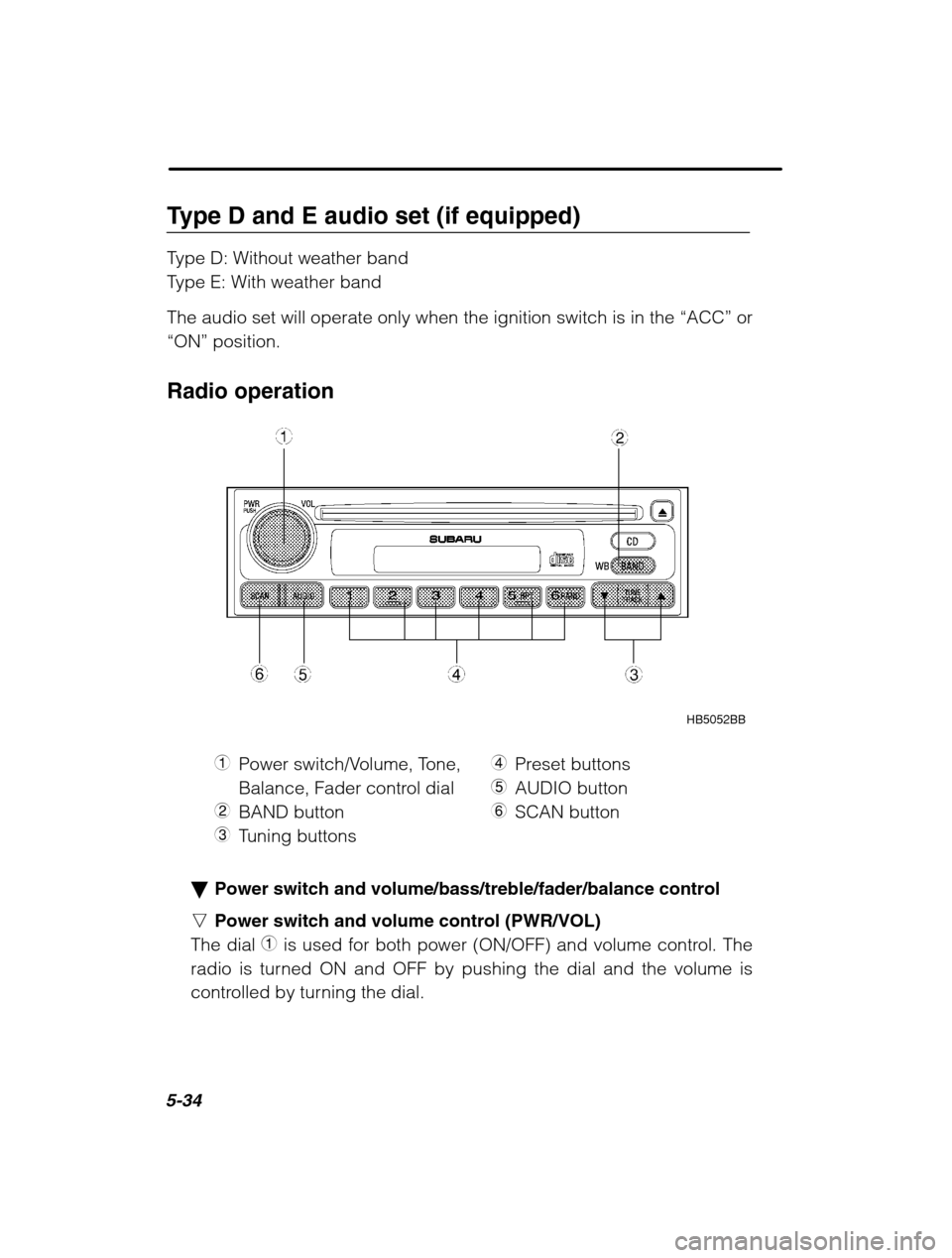
HB5052BB
1 Power switch/Volume, Tone,
Balance, Fader control dial
2 BAND button
3 Tuning buttons 4
Preset buttons
5 AUDIO button
6 SCAN button
Power switch and volume/bass/treble/fader/balance control
n Power switch and volume control (PWR/VOL)
The dial 1 is used for both power (ON/OFF) and volume control. The
radio is turned ON and OFF by pushing the dial and the volume is
controlled by turning the dial.
Page 206 of 466
Audio5-35
–
CONTINUED –
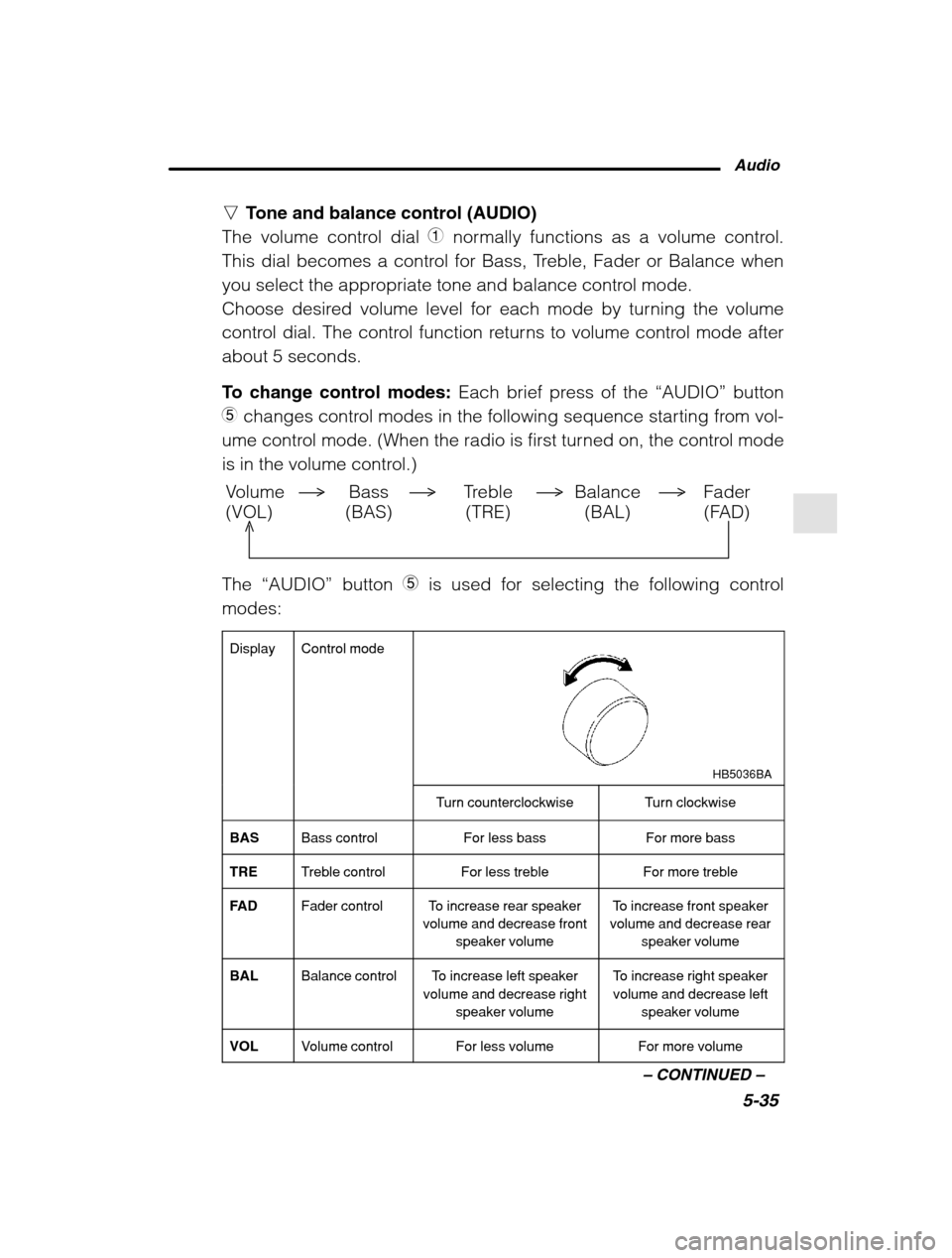
nTone and balance control (AUDIO)
The volume control dial 1 normally functions as a volume control.
This dial becomes a control for Bass, Treble, Fader or Balance when
you select the appropriate tone and balance control mode.
Choose desired volume level for each mode by turning the volume
control dial. The control function returns to volume control mode after
about 5 seconds.
To change control modes: Each brief press of the “AUDIO” button
5 changes control modes in the following sequence starting from vol-
ume control mode. (When the radio is first turned on, the control mode
is in the volume control.)
Volume Bass Treble Balance Fader
(VOL) (BAS) (TRE) (BAL) (FAD)
The “AUDIO” button 5 is used for selecting the following control
modes:
Display
Control mode
HB5036BA
Turn counterclockwiseTurn clockwise
BASBass controlFor less bassFor more bass
TRETreble controlFor less trebleFor more treble
FA DFader controlTo increase rear speaker
volume and decrease front
speaker volumeTo increase front speaker
volume and decrease rear
speaker volume
BALBalance controlTo increase left speaker
volume and decrease right
speaker volumeTo increase right speakervolume and decrease left
speaker volume
VOLVolume controlFor less volumeFor more volume
Page 208 of 466
Audio5-37
–
CONTINUED –
Press the “SCAN” button again to cancel the SCAN mode and to stop
on any displayed frequency.
When the “SCAN” button is pressed for automatic tuning, stations are
scanned in the direction of low frequencies to high frequencies only.
Automatic tuning may not function properly if the station reception is
weakened by distance from the station or proximity to tall buildingsand hills. Selecting preset stations
Presetting a station with a “preset button ”
4 allows you to select that
station in a single operation. Up to six WB (if equipped), AM, FM1 and
FM2 stations each may be preset. How to preset stations
1. Press the “BAND” button 2 to select FM1, FM2, AM or WB (if
equipped) reception.
2. Press the “SCAN” button or tune the radio manually until the
desired station frequency is displayed.
3. Press one of the preset buttons for more than 2 seconds to store
the frequency. At this time, there will momentarily be no sound from
the radio. If the button is pressed for less than 2 seconds, the preced-
ing selection will remain in memory.
NOTE If the connection between the radio and battery is broken for any
reason such as vehicle maintenance or radio removal, all stationsstored in the preset buttons are cleared. If this occurs, it is neces-sary to reset the preset buttons.
Page 210 of 466
Audio5-39
–
CONTINUED –
nWhen CD is in the player
When the “CD” button 8 is pressed, the player will start playback.
NOTE After the last song finishes, the player will automatically return to track 1 (the first song on the disc). To stop playback of a CD
When the “PWR” button Y is pressed during playback of a CD, the
CD stops playing temporarily. To let the CD resume playing, press the
button again. To select a song from its beginning
n Forward direction
Briefly press the “ ” button Q to skip to the beginning of the next
track. Each time the button is pressed, the indicated track number will
increase. n Backward direction
Briefly press the “ ” button W to skip to the beginning of the current
track. Each time the button is pressed, the indicated truck number will
decrease. Fast forwarding and fast reverse
n Fast forward
Press the “ ” button Q continuously for more than 0.5 second to fast
forward the disc.
Release the button to stop fast forwarding. n Fast reverse
Press the “ ” button
W continuously for more than 0.5 second to fast
reverse the disc.
Release the button to stop fast reverse. Repeat playback
Use this to play a certain track repeatedly. During playback, press the
“RPT” button
R and release it in less than 2 seconds. The “RPT” indi-
cator will come on and the song will be played continuously. To can-
Page 212 of 466
Audio5-41
–
CONTINUED –
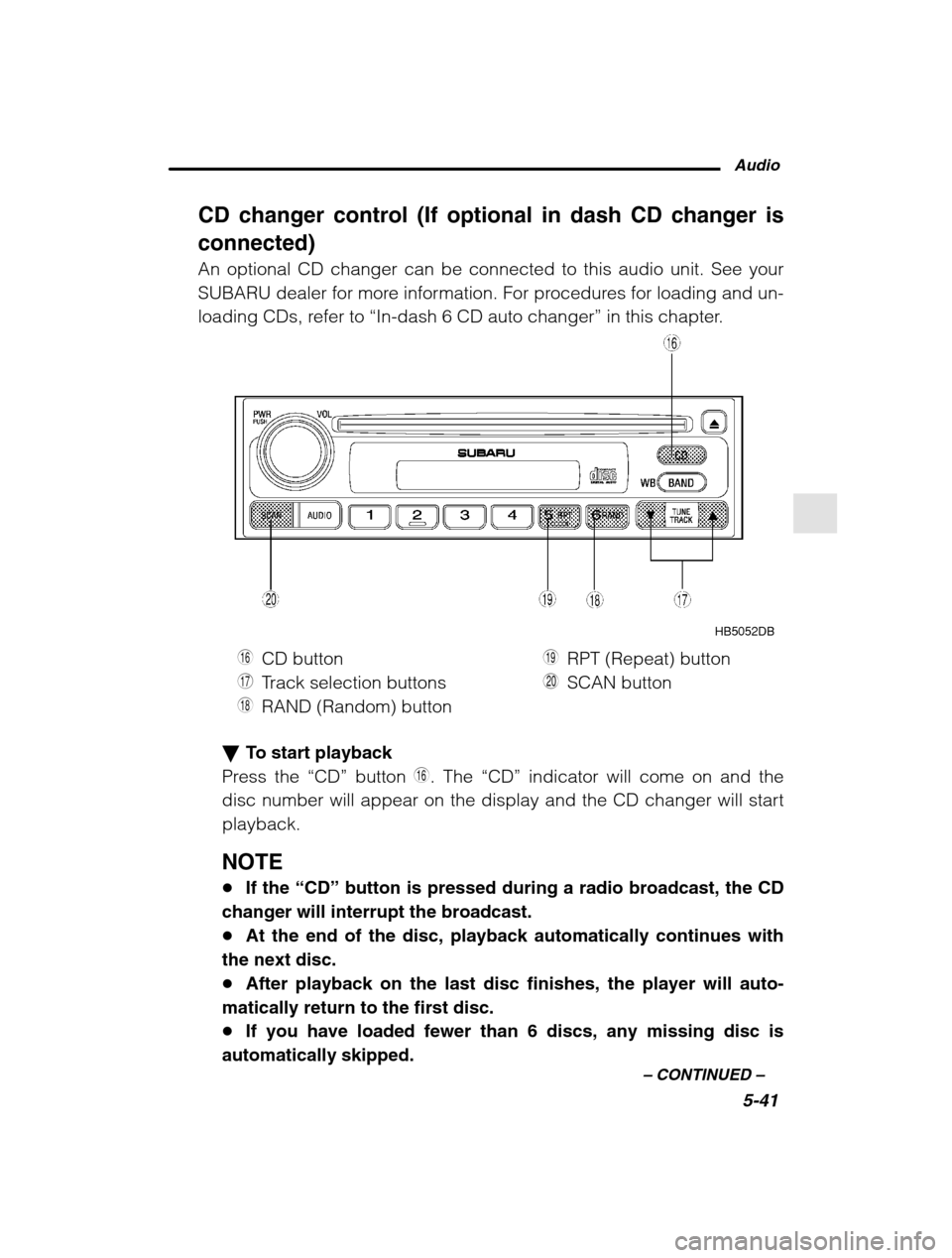
CD changer control (If optional in dash CD changer is connected) An optional CD changer can be connected to this audio unit. See your
SUBARU dealer for more information. For procedures for loading and un-
loading CDs, refer to “In-dash 6 CD auto changer ” in this chapter.
HB5052DB
U CD button
I Track selection buttons
O RAND (Random) button P
RPT (Repeat) button
A SCAN button
To start playback
Press the “CD” button U. The “CD” indicator will come on and the
disc number will appear on the display and the CD changer will start playback.
NOTE If the “CD” button is pressed during a radio broadcast, the CD
changer will interrupt the broadcast. At the end of the disc, playback automatically continues with
the next disc. After playback on the last disc finishes, the player will auto-
matically return to the first disc. If you have loaded fewer than 6 discs, any missing disc is
automatically skipped.
Page 213 of 466
5-42
Selection of a desired disc
Discs cannot be selected using the main audio unit. To select a disc,
press one of the “Disc select ” buttons (these are numbered from 1 to
6) on the CD changer unit. The disc will begin to play. To select a song from its beginning
Briefly press the “ ” button
I to skip to the beginning of the next
track and briefly press the “ ” button to skip to the beginning of the
current track. Fast-forwarding and fast-reverse
Press the “ ” button I continuously for more than a half second to
fast-forward the disc.
Press the “ ” button continuously for more than a half second to fast
reverse the disc.
Release the button to stop fast forwarding or fast reverse. Repeat
Press the “RPT” button
P while a song is playing to play the song
repeatedly. The “RPT” indicator will come on and the song will be
played continuously. To cancel the repeat mode, press the button
again. Then the “RPT” indicator goes out, and normal playback mode
is restored. Random playback
Press the “RAND” button
O while a disc is being played back to play
all songs on the disc in a random order. The “RAND” indicator will
come on and all songs on the disc will be played in a random order.
To cancel the random mode, press the button again. Then the
“RAND” indicator goes out, and normal playback mode is restored.
Scan (a convenient way to become familiar with a disc)
1. Press the “SCAN” button
A.
– The display shows “SCAN” and the track number being
scanned.– You hear the first 10 seconds of each track.
– The operation is automatically cleared after playing all pro-
grams. Then, normal playback starts.
Page 214 of 466
Audio5-43
–
CONTINUED –
2. Press the “SCAN” button again when you hear a track you like.
– Normal playback resumes.
To stop playback
To stop playback and switch over to the radio mode, press the
“BAND” button.