light SUBARU OUTBACK 2002 3.G Owner's Manual
[x] Cancel search | Manufacturer: SUBARU, Model Year: 2002, Model line: OUTBACK, Model: SUBARU OUTBACK 2002 3.GPages: 466
Page 98 of 466
Keys and doors2-19
–
CONTINUED –
In the passive mode, the system can also be armed with the remote
transmitter or with the power door locking switches. If the remote
transmitter or power door lock switch is used to lock the vehicle, arm-
ing will take place immediately regardless of whether or not the pas-sive mode has been selected. Disarming the system
To disarm the system, briefly press the “UNLOCK/DISARM” button on
the transmitter. Tripped sensor identification
If the horn sounds four times and the parking lights flash four times
when you disarm the system, this indicates that the alarm was trig-
gered. The number of times the indicator light flashes indicates what
sensor caused the alarm condition.
To enter identification mode:
1. Open the driver ’s door and leave it open.
2. Turn the ignition switch to the “ON” position two times. ( “LOCK”
“ON” “LOCK” “ON” “LOCK”)
3. The indicator light will start flashing.
The indicator light provides the following indications. Flashing one time: Any door, the rear gate or the trunk lid has been
opened.
Flashing three times: The impact sensor in the system ’s unit has
been activated. This may indicate that your vehicle has been shocked
or tampered with by some outside force and/or unauthorized person.Flashing four times: The ignition switch has been turned on or the
battery has been disconnected.
NOTE The battery must be reconnected before the indicator light will flash.
To exit this mode, close the door and turn the ignition switch to the
“ON” position.
Page 101 of 466
2-22
HB2008DB
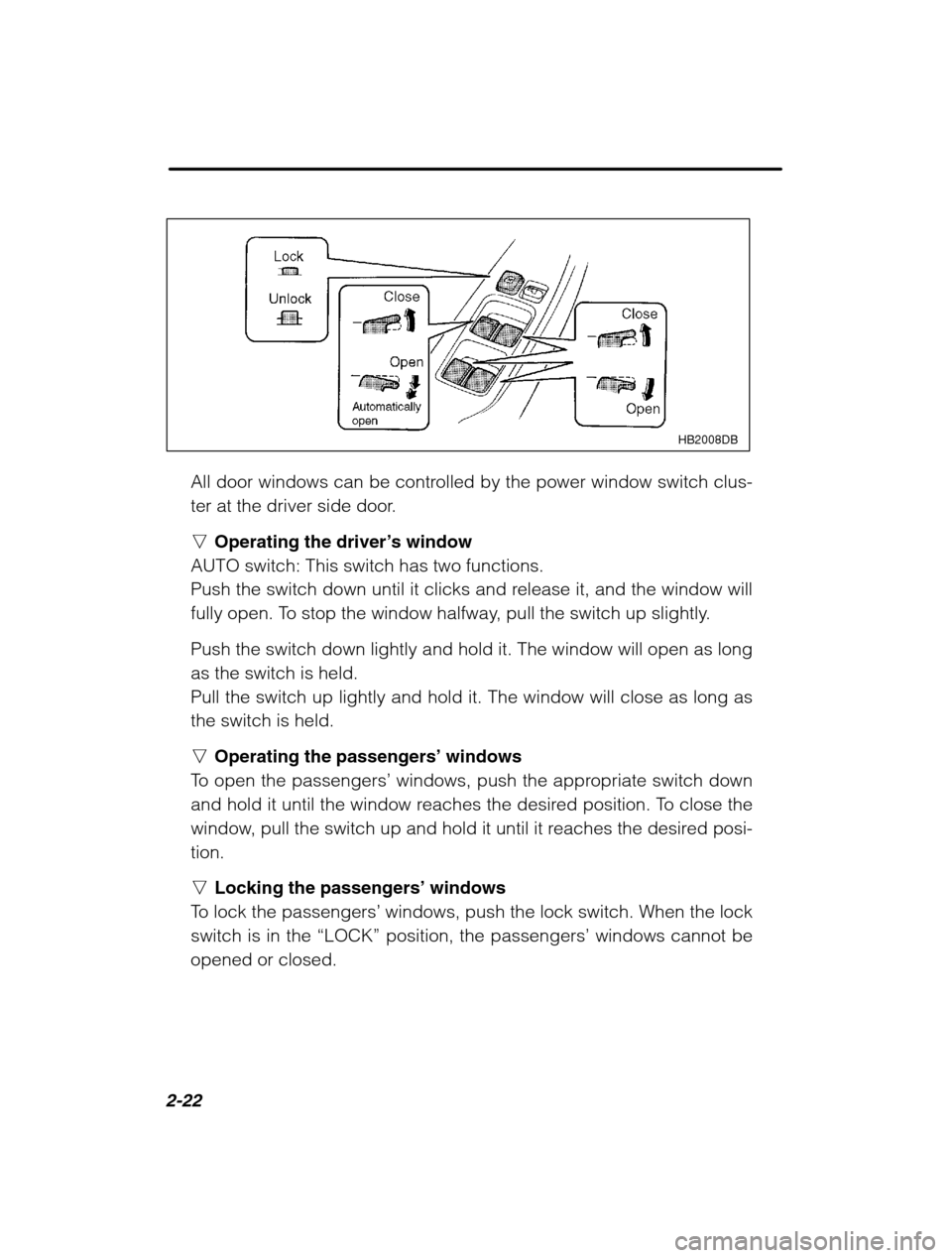
All door windows can be controlled by the power window switch clus-
ter at the driver side door. nOperating the driver ’s window
AUTO switch: This switch has two functions.
Push the switch down until it clicks and release it, and the window will
fully open. To stop the window halfway, pull the switch up slightly. Push the switch down lightly and hold it. The window will open as long as the switch is held.Pull the switch up lightly and hold it. The window will close as long asthe switch is held. n Operating the passengers ’ windows
To open the passengers ’ windows, push the appropriate switch down
and hold it until the window reaches the desired position. To close the
window, pull the switch up and hold it until it reaches the desired posi-tion. n Locking the passengers ’ windows
To lock the passengers ’ windows, push the lock switch. When the lock
switch is in the “LOCK” position, the passengers ’ windows cannot be
opened or closed.
Page 103 of 466
2-24
Trunk lid (Sedan)WARNING
To prevent dangerous exhaust gas from entering the vehicle,
always keep the trunk lid closed while driving. Help prevent young children from locking themselves in the
trunk. When leaving the vehicle, either close all windows and lockall doors or cancel the inside trunk lid release. Also make certainthat the trunk is closed. On hot or sunny days, the temperature inthe trunk could quickly become high enough to cause death orserious heat-related injuries including brain damage, particularlyfor small children.
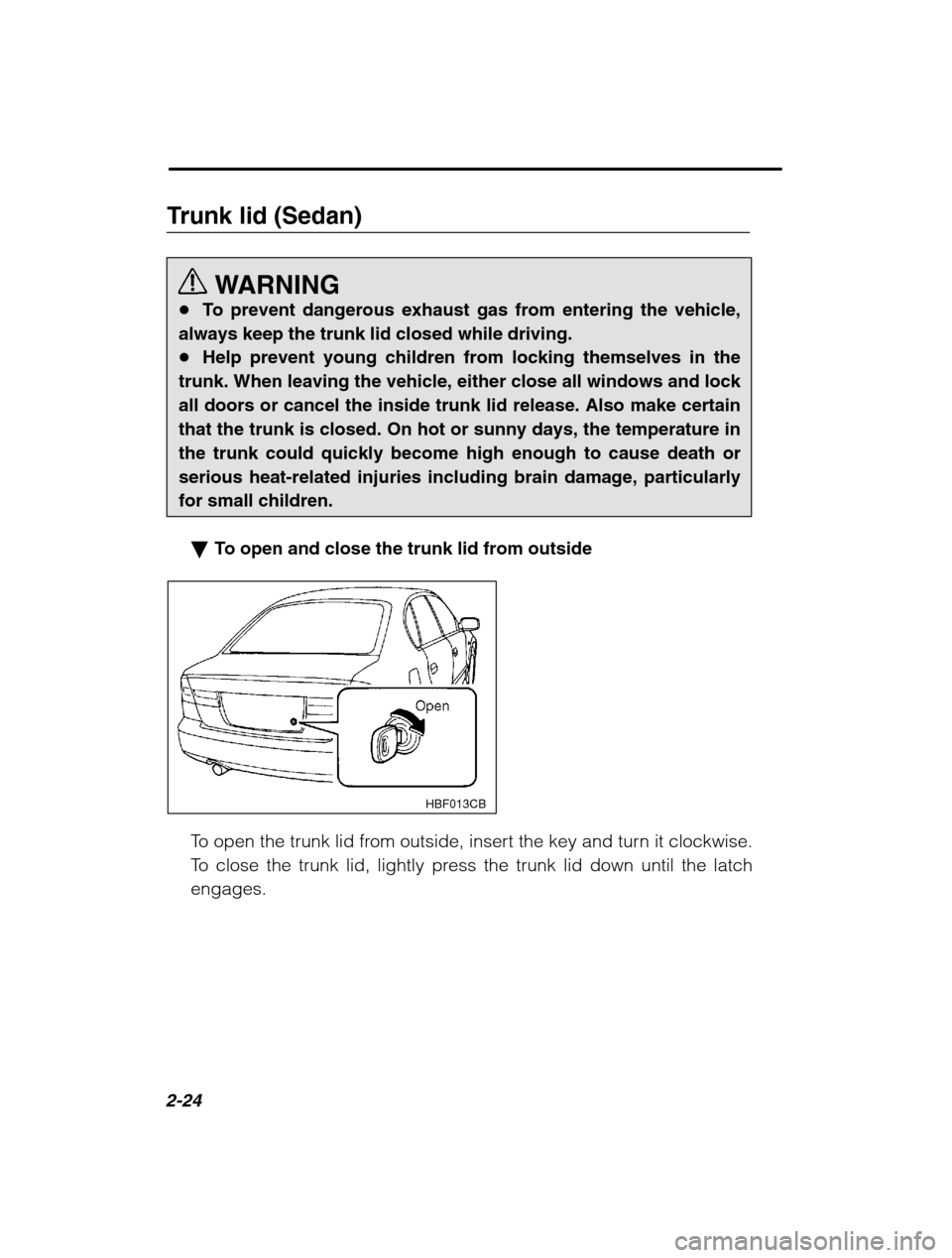
To open and close the trunk lid from outside
HBF013CB
To open the trunk lid from outside, insert the key and turn it clockwise.
To close the trunk lid, lightly press the trunk lid down until the latchengages.
Page 106 of 466
Keys and doors2-27
–
CONTINUED –
HBS070BA
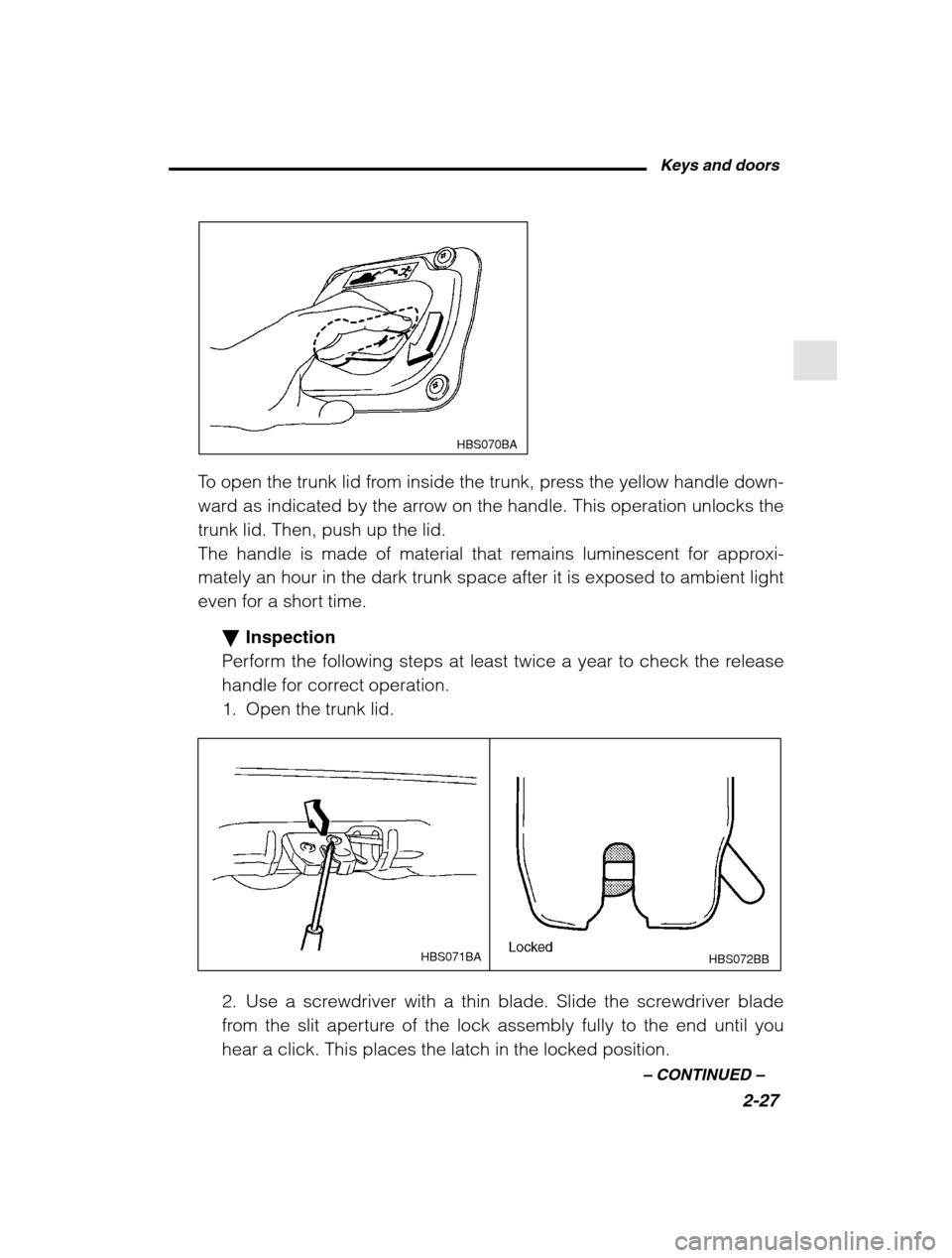
To open the trunk lid from inside the trunk, press the yellow handle down-
ward as indicated by the arrow on the handle. This operation unlocks thetrunk lid. Then, push up the lid.
The handle is made of material that remains luminescent for approxi-mately an hour in the dark trunk space after it is exposed to ambient light
even for a short time.
Inspection
Perform the following steps at least twice a year to check the release
handle for correct operation.
1. Open the trunk lid.
HBS072BB
HBS071BA
2. Use a screwdriver with a thin blade. Slide the screwdriver blade
from the slit aperture of the lock assembly fully to the end until youhear a click. This places the latch in the locked position.
Page 114 of 466
3
Instruments and controls Ignition switch3-3
. . . . . . . . . . . . . . . . . . . . . . . . . . . . . . . . . . . . . . . . . . . . . . . . . . . . . . . . . . . . .
Key reminder chime 3-5
. . . . . . . . . . . . . . . . . . . . . . . . . . . . . . . . . . . . . . . . . . . . . . . . . . . . .
Ignition switch light 3-5
. . . . . . . . . . . . . . . . . . . . . . . . . . . . . . . . . . . . . . . . . . . . . . . . . . . . .
Key interlock release (AT vehicles only) 3-6 . . . . . . . . . . . . . . . . . . . . . . . . . . . .
Hazard warning flasher 3-7
. . . . . . . . . . . . . . . . . . . . . . . . . . . . . . . . . . . . . . . . . . . . . . . . .
Meters and gauges 3-7
. . . . . . . . . . . . . . . . . . . . . . . . . . . . . . . . . . . . . . . . . . . . . . . . . . . . . . .
Speedometer 3-7
. . . . . . . . . . . . . . . . . . . . . . . . . . . . . . . . . . . . . . . . . . . . . . . . . . . . . . . . . . . . .
Odometer/Trip meter 3-7
. . . . . . . . . . . . . . . . . . . . . . . . . . . . . . . . . . . . . . . . . . . . . . . . . . . .
Tachometer 3-9
. . . . . . . . . . . . . . . . . . . . . . . . . . . . . . . . . . . . . . . . . . . . . . . . . . . . . . . . . . . . . . .
Outside temperature indicator (if equipped) 3-9 . . . . . . . . . . . . . . . . . . . . . . .
Fuel gauge 3-9
. . . . . . . . . . . . . . . . . . . . . . . . . . . . . . . . . . . . . . . . . . . . . . . . . . . . . . . . . . . . . . . .
Temperature gauge 3-10
. . . . . . . . . . . . . . . . . . . . . . . . . . . . . . . . . . . . . . . . . . . . . . . . . . . . .
Warning and indicator lights 3-10 . . . . . . . . . . . . . . . . . . . . . . . . . . . . . . . . . . . . . . . . . .
Seatbelt warning light and chime 3-11 . . . . . . . . . . . . . . . . . . . . . . . . . . . . . . . . . . . . .
SRS airbag system warning light 3-11 . . . . . . . . . . . . . . . . . . . . . . . . . . . . . . . . . . . . .
CHECK ENGINE warning light/Malfunction indicator lamp 3-12
. . . . . . . . . . . . . . . . . . . . . . . . . . . . . . . . . . . . . . . . . . . . . . . . . . . . . . . . . .
Charge warning light 3-13
. . . . . . . . . . . . . . . . . . . . . . . . . . . . . . . . . . . . . . . . . . . . . . . . . . . .
Oil pressure warning light 3-13
. . . . . . . . . . . . . . . . . . . . . . . . . . . . . . . . . . . . . . . . . . . . .
AT OIL TEMPerature warning light (for AT vehicles) 3-14 . . . . . . . . . . . . . .
ABS warning light 3-14
. . . . . . . . . . . . . . . . . . . . . . . . . . . . . . . . . . . . . . . . . . . . . . . . . . . . . . .
VDC (Vehicle Dynamics Control) warning light (if equipped) 3-15
. . . . . . . . . . . . . . . . . . . . . . . . . . . . . . . . . . . . . . . . . . . . . . . . . . . . . . . . . . . .
Brake system warning light 3-16
. . . . . . . . . . . . . . . . . . . . . . . . . . . . . . . . . . . . . . . . . . . .
Door open warning lights 3-17
. . . . . . . . . . . . . . . . . . . . . . . . . . . . . . . . . . . . . . . . . . . . . .
Low fuel warning light 3-17
. . . . . . . . . . . . . . . . . . . . . . . . . . . . . . . . . . . . . . . . . . . . . . . . . .
Front-wheel drive warning light (for AT vehicles) 3-17 . . . . . . . . . . . . . . . . .
VDC (Vehicle Dynamics Control) operation indicator light (if equipped) 3-17
. . . . . . . . . . . . . . . . . . . . . . . . . . . . . . . . . . . . . . . . . . . . . . . . . . . . . .
VDC (Vehicle Dynamics Control) OFF indicator light (if equipped) 3-18
. . . . . . . . . . . . . . . . . . . . . . . . . . . . . . . . . . . . . . . . . . . . . . . . . . . . . . . . . . . .
Security system status indicator light (if equipped) 3-18 . . . . . . . . . . . . . .
Shift position indicator (for AT vehicles) 3-18 . . . . . . . . . . . . . . . . . . . . . . . . . . . .
Turn signal indicator lights 3-18
. . . . . . . . . . . . . . . . . . . . . . . . . . . . . . . . . . . . . . . . . . . .
High beam indicator light 3-19
. . . . . . . . . . . . . . . . . . . . . . . . . . . . . . . . . . . . . . . . . . . . . .
Clock 3-19
. . . . . . . . . . . . . . . . . . . . . . . . . . . . . . . . . . . . . . . . . . . . . . . . . . . . . . . . . . . . . . . . . . . . . . . . . .
Light control switch 3-19
. . . . . . . . . . . . . . . . . . . . . . . . . . . . . . . . . . . . . . . . . . . . . . . . . . . . . .
Daytime running light system 3-21
. . . . . . . . . . . . . . . . . . . . . . . . . . . . . . . . . . . . . . . . .
Turn signal lever 3-21
. . . . . . . . . . . . . . . . . . . . . . . . . . . . . . . . . . . . . . . . . . . . . . . . . . . . . . . . . .
Illumination brightness control 3-22 . . . . . . . . . . . . . . . . . . . . . . . . . . . . . . . . . . . . . .
Parking light switch 3-23
. . . . . . . . . . . . . . . . . . . . . . . . . . . . . . . . . . . . . . . . . . . . . . . . . . . . . .
Page 115 of 466
3-2Fog light switch (if equipped) 3-24
. . . . . . . . . . . . . . . . . . . . . . . . . . . . . . . . . . . . . . . .
Wiper and washer 3-24
. . . . . . . . . . . . . . . . . . . . . . . . . . . . . . . . . . . . . . . . . . . . . . . . . . . . . . . .
Windshield wiper and washer switches 3-26 . . . . . . . . . . . . . . . . . . . . . . . . . . . . .
Rear window wiper and washer switch (if equipped) 3-28 . . . . . . . . . . . . .
Rear window defogger switch 3-29 . . . . . . . . . . . . . . . . . . . . . . . . . . . . . . . . . . . . . . . .
Windshield wiper deicer (if equipped) 3-30 . . . . . . . . . . . . . . . . . . . . . . . . . . . . .
Mirrors 3-31
. . . . . . . . . . . . . . . . . . . . . . . . . . . . . . . . . . . . . . . . . . . . . . . . . . . . . . . . . . . . . . . . . . . . . . . .
Inside mirror 3-31
. . . . . . . . . . . . . . . . . . . . . . . . . . . . . . . . . . . . . . . . . . . . . . . . . . . . . . . . . . . . . .
Outside mirrors 3-34
. . . . . . . . . . . . . . . . . . . . . . . . . . . . . . . . . . . . . . . . . . . . . . . . . . . . . . . . . .
Tilt steering wheel 3-36
. . . . . . . . . . . . . . . . . . . . . . . . . . . . . . . . . . . . . . . . . . . . . . . . . . . . . . . .
Horn 3-37
. . . . . . . . . . . . . . . . . . . . . . . . . . . . . . . . . . . . . . . . . . . . . . . . . . . . . . . . . . . . . . . . . . . . . . . . . . .
Page 116 of 466
Instruments and controls3-3
–
CONTINUED –
Ignition switch
WARNING
Never turn the ignition switch to “LOCK” while the vehicle is be-
ing driven or towed because that will lock the steering wheel, pre- venting steering control. And when the engine is turned off, it
takes a much greater effort than usual to steer.
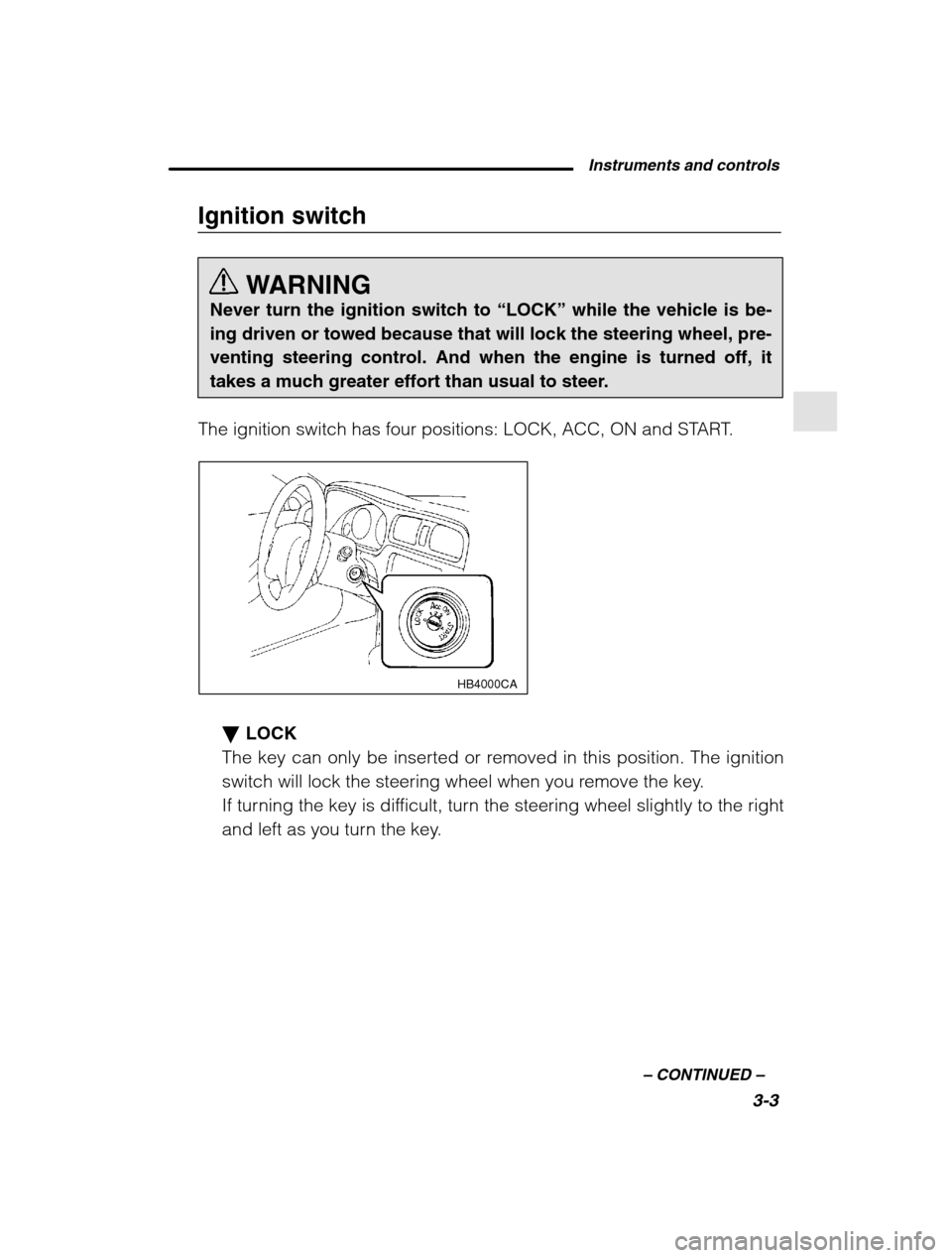
The ignition switch has four positions: LOCK, ACC, ON and START.
HB4000CA
LOCK
The key can only be inserted or removed in this position. The ignition
switch will lock the steering wheel when you remove the key.
If turning the key is difficult, turn the steering wheel slightly to the right
and left as you turn the key.
Page 118 of 466
Instruments and controls3-5
–
CONTINUED –
START CAUTION
Do not turn the ignition switch to the “START” position while the
engine is running.
The engine is started in this position. The starter cranks the engine to
start it. When the key is released (after the engine has started), the
key automatically returns to the “ON” position.
Key reminder chime
The reminder chime sounds when the driver ’s door opens and the key is
in the “LOCK” or “ACC” positions. The chime stops when the key is re-
moved from the ignition switch.
Ignition switch light
For easy access to the ignition switch in the dark, the ignition switch light
comes on when any of the doors (or the rear gate on the wagon) is
opened. The light remains on for a several seconds and gradually goes
out after all doors (and the rear gate on the wagon) are closed or if the
key is inserted in the ignition switch.
The ignition switch light also can be turned on by use of the keyless
entry transmitter. See the “Keyless entry system ” in chapter 2 for detailed
information.
Page 122 of 466
Instruments and controls3-9
–
CONTINUED –
Tachometer
CAUTION
Do not operate the engine with the pointer of the tachometer in
the red zone. In this range, fuel injection will be cut by the enginecontrol module to protect the engine from overrevving. Theengine will resume running normally after the engine speed isreduced below the red zone.
The tachometer shows the engine speed in thousands of revolutions perminute. Outside temperature indicator (if equipped)
The outside temperature indicator shows the outside temperature in a
range from –22°F to 122 °F ( –30 °C to 50 °C).
The indicator can give a false reading under any of the following condi-tions: When there is too much sun.
During idling; while running at low speeds in a traffic jam; when the
engine is restarted immediately following a shutdown. When the actual outside temperature falls outside the specified indi-
cator range. For vehicles with an automatic climate control, outside temperature can be displayed on the climate control display panel. Refer to the“ Automatic climate control system ” in chapter 4.
Fuel gauge
The fuel gauge shows the approximate amount of fuel remaining in thetank.
The gauge does not return to “E” even though the ignition switch is in the
“ACC” or “LOCK” position.
The gauge may move slightly during braking, turning or acceleration dueto fuel level movement in the tank.
Page 123 of 466
3-10
Temperature gauge
CAUTION
If the pointer exceeds the normal operating range, safely stop the
vehicle as soon as possible.
See “ In case of emergency ” in chapter 9.
HB2012BB
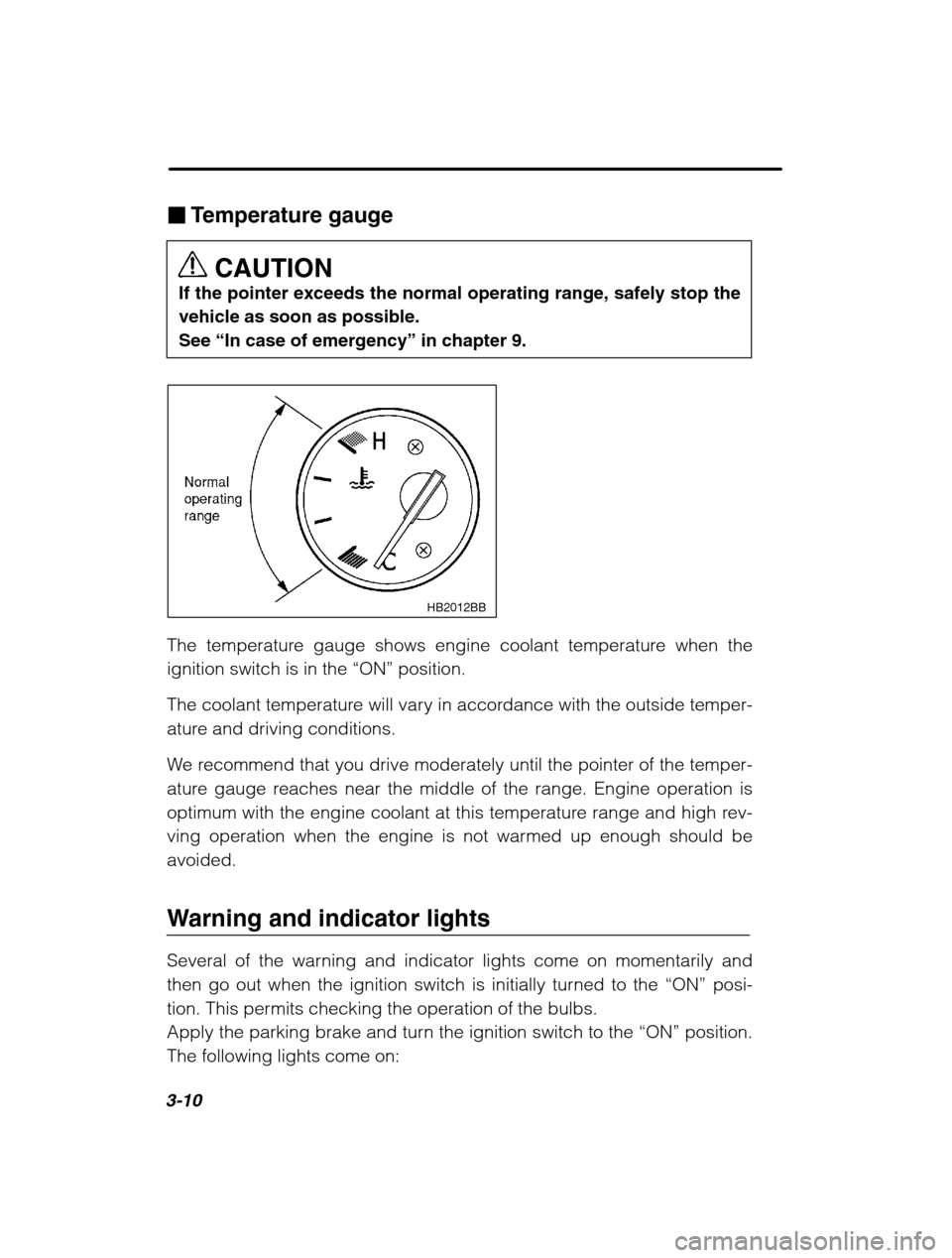
The temperature gauge shows engine coolant temperature when the
ignition switch is in the “ON” position.
The coolant temperature will vary in accordance with the outside temper-
ature and driving conditions.
We recommend that you drive moderately until the pointer of the temper-
ature gauge reaches near the middle of the range. Engine operation is
optimum with the engine coolant at this temperature range and high rev-
ving operation when the engine is not warmed up enough should beavoided.
Warning and indicator lights
Several of the warning and indicator lights come on momentarily and
then go out when the ignition switch is initially turned to the “ON” posi-
tion. This permits checking the operation of the bulbs.
Apply the parking brake and turn the ignition switch to the “ON” position.
The following lights come on: