battery SUBARU OUTBACK 2004 4.G User Guide
[x] Cancel search | Manufacturer: SUBARU, Model Year: 2004, Model line: OUTBACK, Model: SUBARU OUTBACK 2004 4.GPages: 525, PDF Size: 5.68 MB
Page 162 of 525
3-19
Instruments and controls
– CONTINUED –
Light control switch
To prevent battery discharge resulting from ac-
cidentally leaving your lights on when your ve-
hicle is parked, the light switch operates only
when the ignition switch is in the “ON” posi-
tion. In any other position, the vehicle’s lights
will be out.
If you park your vehicle on a roadside at night,
use the hazard warning flasher to alert the other
drivers.
The light switch operates only when the ignition switch
is in the “ON” position. „
Headlights
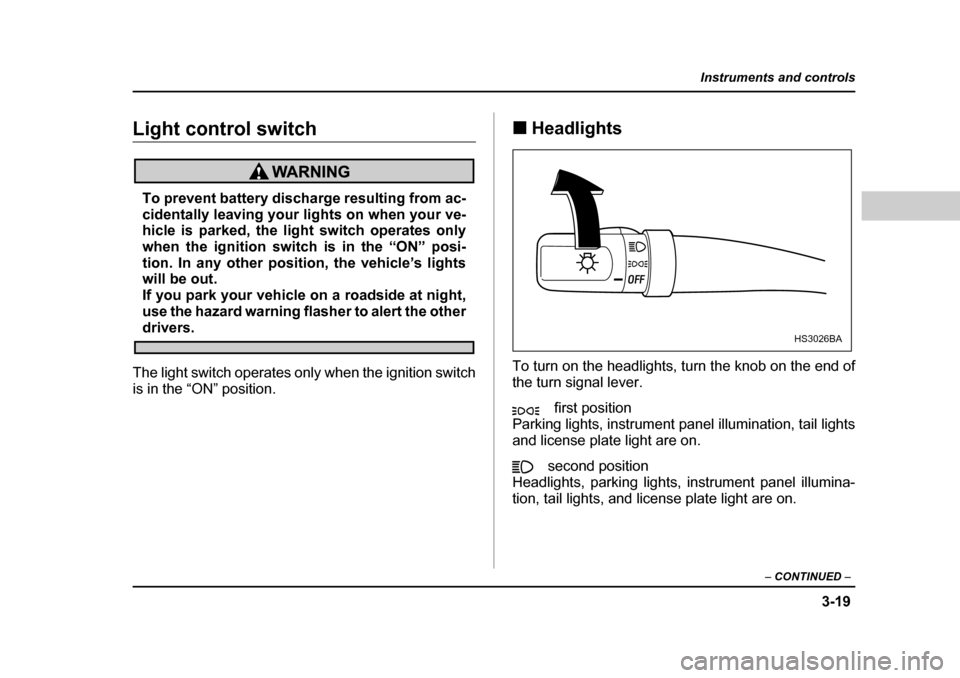
To turn on the headlights, turn the knob on the end of
the turn signal lever. first position
Parking lights, instrument panel illumination, tail lights
and license plate light are on.
second position
Headlights, parking lights, instrument panel illumina-
tion, tail lights, and license plate light are on.HS3026BA
Page 166 of 525
3-23
Instruments and controls
– CONTINUED –
Parking light switch
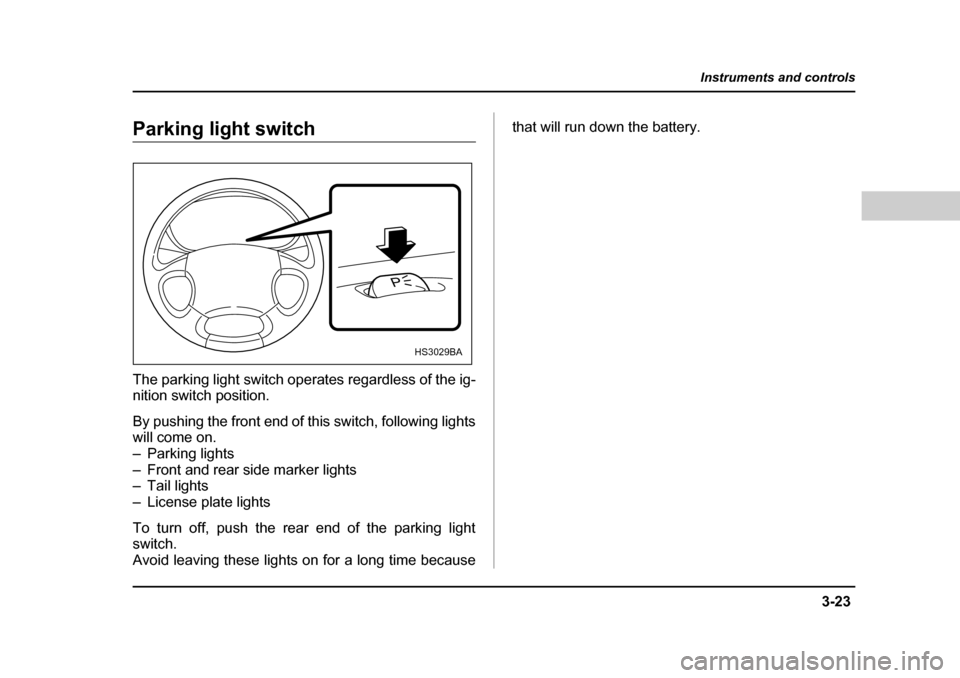
The parking light switch operates regardless of the ig-
nition switch position.
By pushing the front end of this switch, following lights
will come on.
– Parking lights
– Front and rear side marker lights
– Tail lights
– License plate lights
To turn off, push the rear end of the parking light switch.
Avoid leaving these lights on for a long time because that will run down the battery.
P
HS3029BA
Page 171 of 525
3-28
Instruments and controls
ating, turn the knob on the end of the wiper control le-
ver upward to the “ ” position. The washer fluid
sprays until you release the knob.
To wash the rear window when the rear wiper is not in
use, turn the knob on the end of the wiper control lever
downward to the “ ” position. The washer fluid
sprays and the wiper operates until you release the
knob.Rear window defogger switch
y
Do not use sharp instruments or window
cleaner containing abrasives to clean the inner
surface of the rear window. They may damage
the conductors printed on the window. y To prevent the battery from being dis-
charged, do not operate the defogger continu-
ously for any longer than necessary.
The rear window defogger operates only when the ig-
nition switch is in the “ON” position.
The rear window defogger switch is located on the cli-
mate control panel.
The defogger will automatically shut off after about 15
minutes. If the window clears before that time, push
the switch to turn it off. It also turns off when the igni-
tion switch is turned to the “ACC” or “LOCK” position.
If defrosting or defogging is desired when you restart
your vehicle, you have to push the switch to turn it on
again.
Page 173 of 525
3-30
Instruments and controls
Windshield wiper deicer (if equipped)
To prevent the battery from being discharged,
do not operate the windshield wiper deicer con-
tinuously for any longer than necessary.
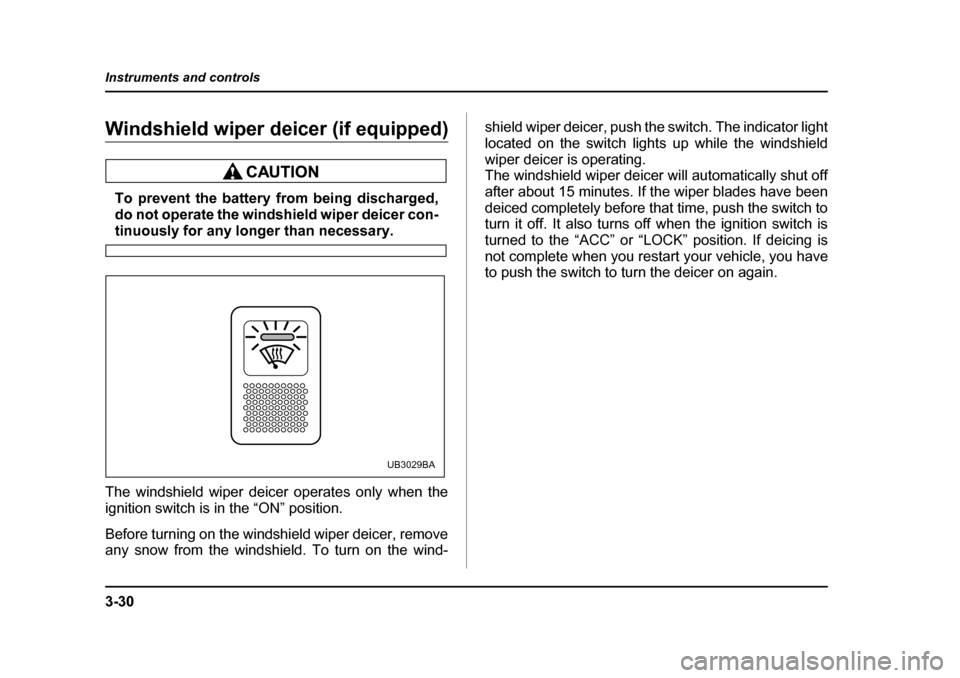
The windshield wiper deicer operates only when the
ignition switch is in the “ON” position.
Before turning on the windshield wiper deicer, remove
any snow from the windshield. To turn on the wind- shield wiper deicer, push the switch. The indicator light
located on the switch lights up while the windshield
wiper deicer is operating.
The windshield wiper deicer will automatically shut off
after about 15 minutes. If the wiper blades have been
deiced completely before that time, push the switch to
turn it off. It also turns off when the ignition switch is
turned to the “ACC” or “LOCK” position. If deicing is
not complete when you restart your vehicle, you have
to push the switch to turn the deicer on again.
UB3029BA
Page 177 of 525
3-34
Instruments and controls
T
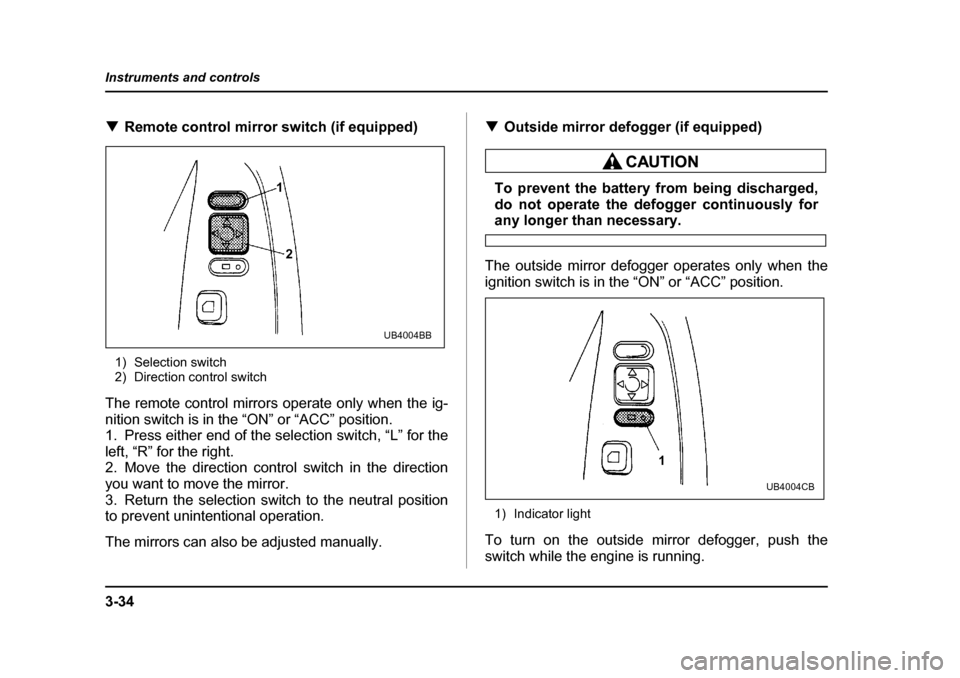
Remote control mirror switch (if equipped)
1) Selection switch
2) Direction control switch
The remote control mirrors operate only when the ig-
nition switch is in the “ON” or “ACC” position.
1. Press either end of the selection switch, “L” for the
left, “R” for the right.
2. Move the direction control switch in the direction
you want to move the mirror.
3. Return the selection switch to the neutral position
to prevent unintentional operation.
The mirrors can also be adjusted manually. T
Outside mirror defogger (if equipped)
To prevent the battery from being discharged,
do not operate the defogger continuously for
any longer than necessary.
The outside mirror defogger operates only when the
ignition switch is in the “ON” or “ACC” position.
1) Indicator light
To turn on the outside mirror defogger, push the
switch while the engine is running.
1
2
UB4004BB
1
UB4004CB
Page 196 of 525
4-17
Climate control
– CONTINUED –
this switch is pushed.
: Outside air is drawn into the passenger com-
partment. When the air conditioning system is operat-
ed in the “AUTO” mode, this position is selected auto-
matically. The indicator light “ ” on the control
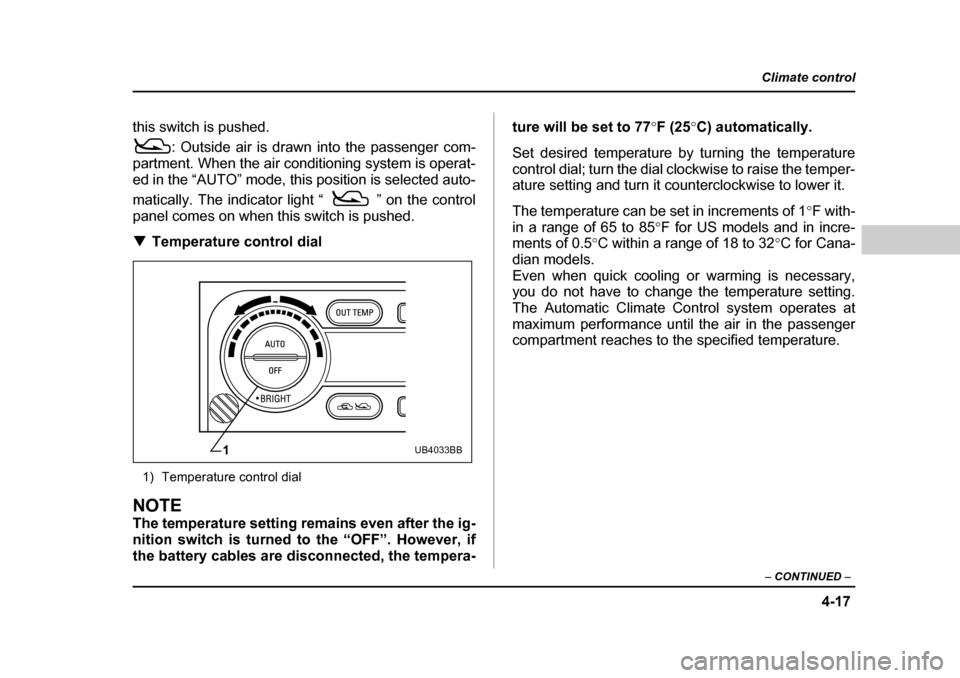
panel comes on when this switch is pushed. T Temperature control dial
1) Temperature control dial
NOTE
The temperature setting remains even after the ig-
nition switch is turned to the “OFF”. However, if
the battery cables are disconnected, the tempera- ture will be set to 77
°F (25 °C) automatically.
Set desired temperature by turning the temperature
control dial; turn the dial clockwise to raise the temper-
ature setting and turn it counterclockwise to lower it.
The temperature can be set in increments of 1 °F with-
in a range of 65 to 85 °F for US models and in incre-
ments of 0.5 °C within a range of 18 to 32 °C for Cana-
dian models.
Even when quick cooling or warming is necessary,
you do not have to change the temperature setting.
The Automatic Climate Control system operates at
maximum performance until the air in the passenger
compartment reaches to the specified temperature.
1UB4033BB
Page 211 of 525
5-10
Audio
tion reception is weakened by distance from the sta-
tion or proximity to tall buildings and hills. T
Selecting preset stations
Presetting a station with a “preset button” (4) allows
you to select that station in a single operation. Up to
six WB (if equipped), AM, FM1 and FM2 stations eachmay be preset. T How to preset stations
1. Press the “BAND” button (2) to select FM1, FM2,
AM or WB (if equipped) reception.
2. Press the “SCAN” button or tune the radio manually
until the desired station frequency is displayed.
3. Press one of the preset buttons for more than 2
seconds to store the frequency. At this time, there will
momentarily be no sound from the radio. If the button
is pressed for less than 2 seconds, the preceding se-
lection will remain in memory.
NOTE y If the connection between the radio and battery
is broken for any reason such as vehicle mainte-
nance or radio removal, all stations stored in the
preset buttons are cleared. If this occurs, it is nec-
essary to reset the preset buttons.y If a mobile telephone is placed near the radio, it
may cause the radio to emit noise when it receives calls. This noise does not indicate a radio fault.
Page 223 of 525
5-22
Audio
ing, stations are scanned in the direction of low fre-
quencies to high frequencies only.
Automatic tuning may not function properly if the sta-
tion reception is weakened by distance from the sta-
tion or proximity to tall buildings and hills. T
Selecting preset stations
Presetting a station with a preset button (6) allows you
to select that station in a single operation. Up to six
AM, FM1, FM2 and WB stations each may be preset. T How to preset stations
1. Press the “FM/AM” selection button to select AM,
FM1 or FM2 reception.
OR
Press the “WB” button (5) to select the weather band.
2. Press the “SCAN” button (8) or tune the radio man-
ually until the desired station frequency is displayed.
3. Press one of the preset buttons (6) for at least 1.5
seconds to store the frequency. The frequency of the
station will flash once on the display at this time. If the
button is pressed for less than 1.5 seconds, the pre-
ceding selection will remain in memory.
NOTE y If the connection between the radio and battery
is broken for any reason such as vehicle mainte- nance or radio removal, all stations stored in the
preset buttons are cleared. If this occurs, it is nec-
essary to reset the preset buttons. y
If a mobile telephone is placed near the radio, it
may cause the radio to emit noise when it receives
calls. This noise does not indicate a radio fault.
Page 233 of 525
5-32
Audio
wish to listen. T
Weather band button (WB)
Press the “WB” button (2) to choose weather band.
The display will show WB.
Use the tuning dial to select the station to which you
wish to listen. T Manual tuning
Turn the tuning dial (3) outer tuner to increase or de-
crease the reception frequency in individual steps.
FM band: 0.2 MHz steps
AM band: 10 kHz steps
Weather band: 1 step (1 channel)
T Seek tuning (SEEK)
If the Tuning dial (3) outer tuner is turned for longer
than half of a second, the radio will begin to automati-
cally search for receivable frequencies and will stop at
the first one found. This function may not be available,
however, when radio signals are weak. In such a situ-
ation, perform manual tuning to select the desired sta- tion. T Scan tuning (SCAN)
Press the “SCAN” button (4) to change the radio to the
SCAN mode. In this mode, the radio scans through the
radio band until a station is found. The radio will stop at the station for five seconds while displaying the fre-
quency, after which scanning will continue until the en-
tire band has been scanned.
Turn the tuning dial (3) inner tuner again to cancel the
SCAN mode and to stop on any displayed frequency.
Scan tuning may not function properly if the station re-
ception is weakened by distance from the station or
proximity to tall buildings and hills. T
Preset tuning
Press any one of the preset buttons (5) to select the
corresponding, previously-registered radio station.
The LED at the top of that button will turn on. V Manual preset
y Use the tuning dial (3) to select the radio station
which you wish to register. y Choose the preset button (5) to which you wish to
assign that station and press it continuously for a peri-
od of more than 2 seconds. When the radio station has
been successfully registered, the display will flash the
corresponding radio frequency on and off once.
NOTE y Each preset button can be used to store both an
FM station and an AM station. y If the power supply is interrupted by disconnec-
tion of the battery, memory presets will be cleared
Page 247 of 525
6-2
Interior equipment
Interior equipmentInterior light „
Dome light
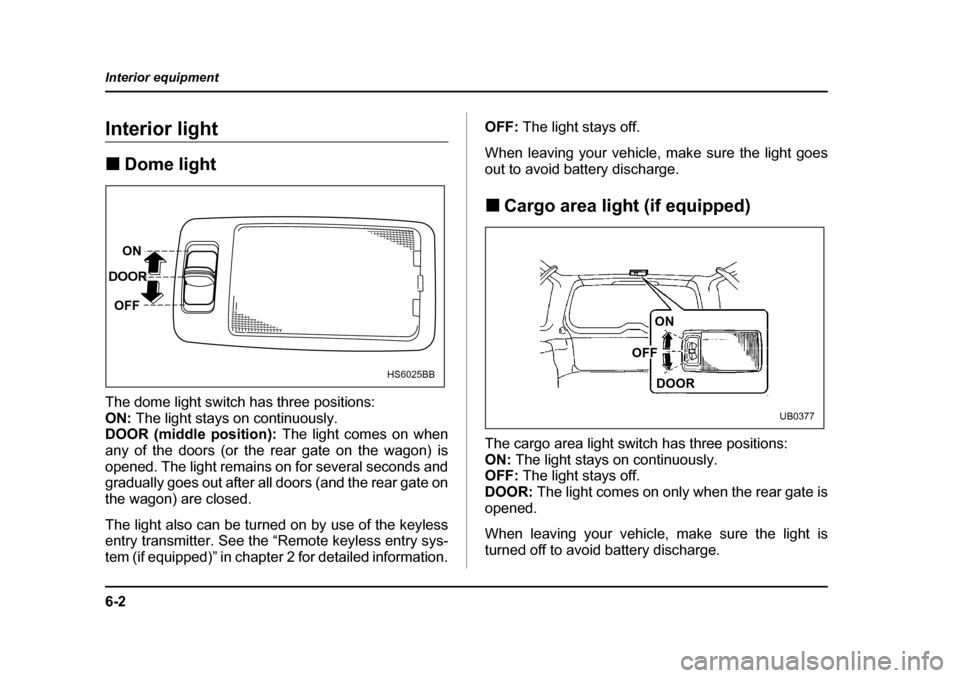
The dome light switch has three positions: ON: The light stays on continuously.
DOOR (middle position): The light comes on when
any of the doors (or the rear gate on the wagon) is
opened. The light remains on for several seconds and
gradually goes out after all doors (and the rear gate on
the wagon) are closed.
The light also can be turned on by use of the keyless
entry transmitter. See the “Remote keyless entry sys-
tem (if equipped)” in chapter 2 for detailed information. OFF:
The light stays off.
When leaving your vehicle, make sure the light goes
out to avoid battery discharge. „ Cargo area light (if equipped)
The cargo area light switch has three positions: ON: The light stays on continuously.
OFF: The light stays off.
DOOR: The light comes on only when the rear gate is
opened.
When leaving your vehicle, make sure the light is
turned off to avoid battery discharge.
ON
DOOR
OFF
HS6025BB
ON
DOOR
OFF
UB0377