Head light switch SUBARU OUTBACK 2007 4.G User Guide
[x] Cancel search | Manufacturer: SUBARU, Model Year: 2007, Model line: OUTBACK, Model: SUBARU OUTBACK 2007 4.GPages: 442, PDF Size: 13.39 MB
Page 163 of 442
3-42Instruments and controls
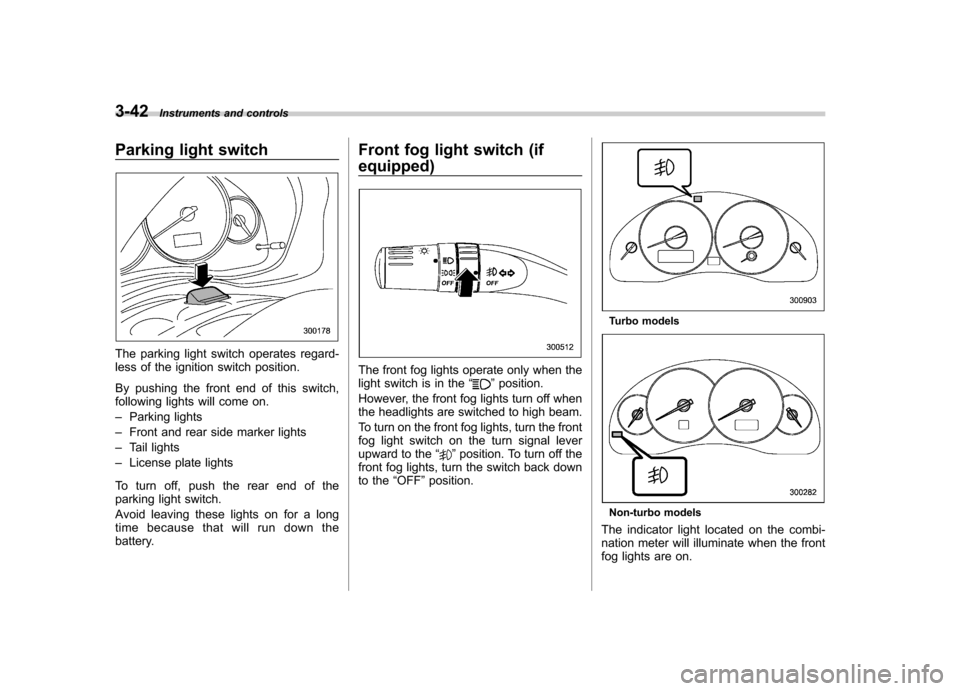
Parking light switch
The parking light switch operates regard-
less of the ignition switch position.
By pushing the front end of this switch,
following lights will come on. –Parking lights
– Front and rear side marker lights
– Tail lights
– License plate lights
To turn off, push the rear end of the
parking light switch.
Avoid leaving these lights on for a long
time because that will run down the
battery. Front fog light switch (if equipped)
The front fog lights operate only when the
light switch is in the
“”position.
However, the front fog lights turn off when
the headlights are switched to high beam.
To turn on the front fog lights, turn the front
fog light switch on the turn signal lever
upward to the “
”position. To turn off the
front fog lights, turn the switch back down
to the “OFF ”position.
Turbo models
Non-turbo models
The indicator light located on the combi-
nation meter will illuminate when the front
fog lights are on.
Page 170 of 442

button, the compass display is toggled on
or off. When the compass is on, an
illuminated compass reading will appear
in the lower part of the mirror.
Even with the mirror in anti-glare mode,
the mirror surface turns bright if the
transmission is shifted into reverse. This
is to ensure good rearward visibility duringreversing. !Photosensors
The mirror has a photosensor attached on
both the front and back sides. If the glare
from the headlights of vehicles behind you
strikes the mirror, these sensors detect it
and make the reflection surface of the
mirror dimmer to help prevent you from
being blinded. For this reason, use care
not to cover the sensors with stickers, or other similar items. Periodically wipe the
sensors clean using a piece of dry soft
cotton cloth or an applicator. !
Compass calibration
1. For optimum calibration, switch off all
nonessential electrical accessories (rear
window defogger, heater/air conditioning
system, spotlight, etc.) and ensure all
doors are shut.
2. Drive to an open, level area away from
large metallic objects or structures and
make certain the ignition switch is in the“ ON ”position.
3. Press and hold the left button for 3
seconds then release, and the compass
will enter the calibration mode. “CAL ”and
direction will be displayed.
4. Drive slowly in a circle until “CAL ”
disappears from the display (approxi-
mately two or three circles). The compass
is now calibrated.
5. Further calibration may be necessary
should outside influences cause the mirror
to read inaccurately. You will know that
this has occurred if your compass begins
to read in only limited directions. Should
you encounter this situation, return to step
one of the above procedure and recali-
brate the mirror. !
Compass zone adjustment
1. The zone setting is factory preset to
Zone 8. Refer to the “Compass calibration
zone ”map attached to the end of this
manual to verify that the compass zone
setting is correct for your geographicallocation.
2. Press and hold the right button for 3
seconds then release, and the word“ ZONE ”will briefly appear and then the
zone number will be displayed.
3. Press the right-hand button repeatedly
to cycle the display through all possible
zone settings. Stop cycling when the
correct zone setting for your location isdisplayed.
4. Releasing the button for 3 seconds will
exit the zone setting mode. Instruments and controls
3-49
– CONTINUED –
Page 342 of 442

Cleaning the interior
Use a soft, damp cloth to clean the climate
control panel, audio equipment, instru-
ment panel, center console, combination
meter panel, and switches. (Do not use
organic solvents.) &Seat fabric
Remove loose dirt, dust or debris with a
vacuum cleaner. If the dirt is caked on the
fabric or hard to remove with a vacuum
cleaner, use a soft blush then vacuum it.
Wipe the fabric surface with a tightly
wrung cloth and dry the seat fabric
thoroughly. If the fabric is still dirty, wipe
using a solution of mild soap and luke-
warm water then dry thoroughly.
If the stain does not come out, try a
commercially-available fabric cleaner. Use
the cleaner on a hidden place and make
sure it does not affect the fabric adversely.
Use the cleaner according to its instruc-tions. NOTE
When cleaning the seat, do not use
benzine, paint thinner, or any similarmaterials. &
Leather seat materials
The leather used by SUBARU is a high
quality natural product which will retain its
distinctive appearance and feel for many
years with proper care.
Allowing dust or road dirt to build up on the
surface can cause the material to become
brittle and to wear prematurely. Regular
cleaning with a soft, moist, natural fiber
cloth should be performed monthly, taking
care not to soak the leather or allow water
to penetrate the stitched seams.
A mild detergent suitable for cleaning
woolen fabrics may be used to remove
difficult dirt spots, rubbing with a soft, dry
cloth afterwards to restore the luster. If
your SUBARU is to be parked for a long
time in bright sunlight, it is recommended
that the seats and headrests be covered,
or the windows shaded, to prevent fading
or shrinkage.
Minor surface blemishes or bald patches
may be treated with a commercial leather
spray lacquer. You will discover that each
leather seat section will develop soft folds
or wrinkles, which is characteristic of
genuine leather. & Synthetic leather upholstery
The synthetic leather material used on the
SUBARU may be cleaned using mild soap or detergent and water, after first vacuum-
ing or brushing away loose dirt. Allow the
soap to soak in for a few minutes and wipe
off with a clean, damp cloth. Commercial
foam-type cleaners suitable for synthetic
leather materials may be used when
necessary. NOTE
Strong cleaning agents such as sol-
vents, paint thinners, window cleaner
or gasoline must never be used on
leather or synthetic interior materials. &
Climate control panel, audio
panel, instrument panel,
console panel, switches,
combination meter, and other
plastic surface
Use a soft, damp cloth to clean the climate
control panel, audio equipment, instru-
ment panel, center console, combination
meter panel, and switches. NOTE
Do not use organic solvents such as
paint thinners or gasoline, or strong
cleaning agents that contain thosesolvents. Appearance care
10-5
Page 378 of 442
![SUBARU OUTBACK 2007 4.G User Guide Outside
temperature Adjusted pressure
[psi (kPa, kgf/cm2)]
front rear
30 8F( 18C) 38 (265, 2.65) 36 (250, 2.5)
10 8F( 12 8C) 40
(280, 2.8) 38
(265, 2.65)
10 8F
( 23 8C) 42 (295, 2.95) 40 (280, 2](/img/17/7299/w960_7299-377.png "SUBARU OUTBACK 2007 4.G User Guide Outside
temperature Adjusted pressure
[psi (kPa, kgf/cm2)]
front rear
30 8F( 18C) 38 (265, 2.65) 36 (250, 2.5)
10 8F( 12 8C) 40
(280, 2.8) 38
(265, 2.65)
10 8F
( 23 8C) 42 (295, 2.95) 40 (280, 2")
Outside
temperature Adjusted pressure
[psi (kPa, kgf/cm2)]
front rear
30 8F( 18C) 38 (265, 2.65) 36 (250, 2.5)
10 8F( 12 8C) 40
(280, 2.8) 38
(265, 2.65)
10 8F
( 23 8C) 42 (295, 2.95) 40 (280, 2.8)
Example:
Tire size: 215/45R18 89Y
Standard tire pressures:
Front: 33 psi (230 kPa, 2.3 kgf/cm
2)
Rear: 32 psi (220 kPa, 2.2 kgf/cm2)
Garage temperature: 60 8F (15.6 8C)
Outside
temperature Adjusted pressure
[psi (kPa, kgf/cm
2)]
front rear
30 8F( 18C) 36 (250, 2.5) 35 (240, 2.4)
10 8F( 12 8C) 38
(265, 2.65) 37
(255, 2.55)
10 8F
( 23 8C) 40 (280, 2.8) 39 (270, 2.7)
If the low tire pressure warning light
comes on when you drive the vehicle in
cold outside air after adjusting the tire
pressures in a warm garage, re-adjust the
tire pressures using the method described
above. Then, increase the vehicle speed to at least 20 mph (32 km/h) and check to
see that the low tire pressure warning light
goes off a few minutes later. If the low tire
pressure warning light does not go off, the
tire pressure monitoring system may not
be functioning normally. In this event, go
to a SUBARU dealer to have the system
inspected as soon as possible.
While the vehicle is driven, friction be-
tween tires and the road surface causes
the tires to warm up. After illumination of
the low tire pressure warning light, any
increase in the tire pressures caused by
an increase in the outside air temperature
or by an increase in the temperature in the
tires can cause the low tire pressure
warning light to go off.
System resetting is necessary when the
wheels are changed (for example, a
switch to snow tires) and new TPMS
valves are installed on the newly fitted
wheels. Have this work performed by a
SUBARU dealer following wheel replace-ment.
It may not be possible to install TPMS
valves on certain wheels that are on the
market. Therefore, if you change the
wheels (for example, a switch to snow
tires), use wheels that have the same part
number as the standard-equipment
wheels. Without four operational TPMS
valve/sensors on the wheels, the TPMS
will not fully function and the warning light
in the instrument panel will flash.
When a tire is replaced, adjustments are
necessary to ensure continued normal
operation of the tire pressure monitoring
system. As with wheel replacement, there-
fore, you should have the work performed
by a SUBARU dealer.
WARNING
If the low tire pressure warning light
does not come on briefly after the
ignition switch is turned ON or the
light is flashing, you should have
your Tire Pressure Monitoring Sys-
tem checked at a SUBARU dealer as
soon as possible.
If this light comes on while driving,
never brake suddenly and keep
driving straight ahead while gradu-
ally reducing speed. Then slowly
pull off the road to a safe place.
Otherwise an accident involving
serious vehicle damage and serious
personal injury could occur.
If this light still comes on while
driving after adjusting the tire pres-
sure, a tire may have significant
damage and a fast leak that causes
the tire to lose air rapidly. If you have Maintenance and service
11-35
– CONTINUED –
Page 411 of 442
12-8Specifications
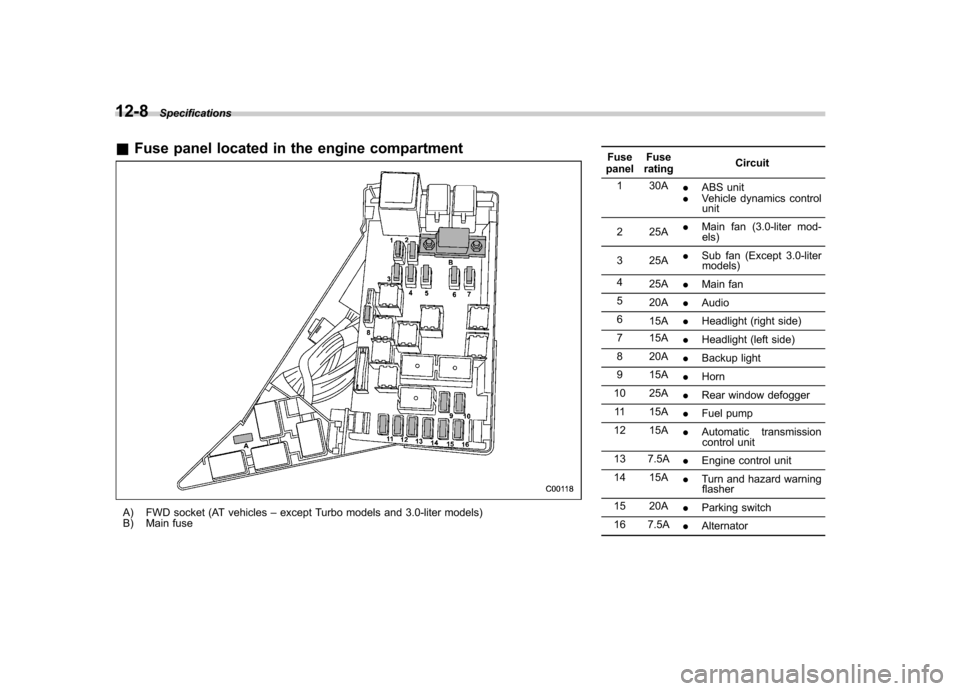
&Fuse panel located in the engine compartment
A) FWD socket (AT vehicles –except Turbo models and 3.0-liter models)
B) Main fuse Fuse
panel Fuse
rating Circuit
1 30A .ABS unit
. Vehicle dynamics control
unit
2 25A .
Main fan (3.0-liter mod-
els)
3 25A .
Sub fan (Except 3.0-liter
models)
4 25A .Main fan
5 20A .Audio
6 15A .Headlight (right side)
7 15A .Headlight (left side)
8 20A .Backup light
9 15A .Horn
10 25A .Rear window defogger
11 15A .Fuel pump
12 15A .Automatic transmission
control unit
13 7.5A .Engine control unit
14 15A .Turn and hazard warning
flasher
15 20A .Parking switch
16 7.5A .Alternator
Page 433 of 442

14-4Index
Driving All-Wheel Drive vehicle ........................................... 3-30
Car phone/cell phone .................................................. 7
Drinking ..................................................................... 6
Drugs ........................................................................ 6
Foreign countries ..................................................... 8-4
Pets .......................................................................... 7
Snowy and icy roads ................................................ 8-9
Tips....................................... 7-16, 7-18, 7-23, 7-29, 8-5
Tired or sleepy. ........................................................... 7
E
ECO gauge ................................................................. 3-8
Electrical system ........................................................ 12-3
Electronic Brake Force Distribution (EBD) system ........................................................... 3-29, 7-36
Emergency Locking Retractor (ELR) ............................. 1-14
Engine Compartment overview ........................................... 11-6
Coolant ................................................................ 11-14
Exhaust gas (Carbon monoxide) ............................ 6, 8-2
Hood .................................................................... 11-4
Oil........................................................................ 11-9Overheating .......................................................... 9-12
Starting ................................................................... 7-9
Stopping ............................................................... 7-11
Exterior care .............................................................. 10-2
F
Flat tires ..................................................................... 9-4
Floor mat .................................................................. 6-12 Fluid level
Automatic transmission ......................................... 11-22
Brake .................................................................. 11-29
Clutch ................................................................. 11-30
Power steering ..................................................... 11-28
Fog light switch .......................................................... 3-42
Front
Differential gear oil ................................................ 11-24
Fog light .............................................................. 11-53
Seatbelt pretensioners ............................................ 1-24
Seats ..................................................................... 1-2
Turn signal light .................................................... 11-53
Fuel ........................................................................... 7-3
Economy hints ........................................................ 8-2
Filler lid and cap ...................................................... 7-5
Gauge ............................................................ 3-6, 3-20
Requirements ......................................................... 7-3
Fuses ..................................................................... 11-47
Fuses and circuits ...................................................... 12-6
G
GAWR (Gross Axle Weight Rating) ............................... 8-15
Gear position indicator ................................................ 3-32
Glove box ................................................................... 6-5
GVWR (Gross Vehicle Weight Rating) ... ........................ 8-15
H
Hazard warning flasher .......................................... 3-5, 9-2
Head restraint adjustment Front ...................................................................... 1-7
Rear ..................................................................... 1-10
Page 434 of 442

HeadlightFlasher ................................................................. 3-40
Indicator light ......................................................... 3-33
Headlights ........................................................ 3-39, 11-51
Heater operation .......................................................... 4-5
High beam indicator light ............................................ 3-33
High mount stop light ................................................. 11-59
High/low beam change (dimmer) .................................. 3-39
Horn ......................................................................... 3-52
Hose and connections ............................................... 11-14
I
Ignition switch .............................................................. 3-3
Light ....................................................................... 3-5
Illuminated entry .......................................................... 2-9
Illumination brightness control ...................................... 3-41
Immobilizer system. ...................................................... 2-3
Indicator light ......................................................... 3-31
Indicator light
Cruise control ........................................................ 3-33
Cruise control set ................................................... 3-33
Front fog ............................................................... 3-33
Headlight .............................................................. 3-33
High beam ............................................................ 3-33
Select lever/Gear position ....................................... 3-33
Selector lever position ............................................ 3-32
Shift-up ................................................................. 3-32
SPORT mode (AT vehicles) .................................... 3-32
S# PREP ................................................................ 3-7
Turn signal ............................................................ 3-33
Vehicle Dynamics Control OFF ................................ 3-31 Vehicle Dynamics Control operation
.......................... 3-30
Indicator lights
Vehicle Dynamics Control ................................ 7-39, 7-40
Information display ...................................................... 3-34
Inside mirror .............................................................. 3-48
Interior light ................................................................. 6-2
Internal trunk lid release handle .................................... 2-23
JJack. ......................................................................... 9-18
Jack handle ............................................................... 9-18
Jump starting ............................................................. 9-10
KKey Keyless entry system ............................................... 2-8
Number .................................................................. 2-2
Reminder chime ...................................................... 3-5
Replacement. .......................................................... 2-4
Keys .......................................................................... 2-2
L
Leather seat materials ................................................. 10-5
Light
Cargo area ............................................................. 6-2
Control switch ........................................................ 3-39
Dome ..................................................................... 6-2
Map ....................................................................... 6-2
Light control switch ..................................................... 3-39
Limited slip differential (LSD). ....................................... 7-33
Loading your vehicle ................................................... 8-13 Index
14-5
Page 435 of 442

14-6Index
Low fuel warning light ................................... 3-7, 3-21, 3-29
LSD (Limited slip differential) ....................................... 7-33
Lumbar support ........................................................... 1-8
M
Main fuse ................................................................. 11-49
Maintenance Precautions ........................................................... 11-3
Schedule .............................................................. 11-3
Seatbelt ................................................................ 1-23
Tools .................................................................... 9-18
Manual Climate control system ............................................. 4-3
Mode ............................................................ 7-21, 7-27
Seat ....................................................................... 1-3
Transmission oil .................................................... 11-21
Transmission-5 speeds ........................................... 7-15
Transmission-6 speeds ........................................... 7-17
Map light ........................................................... 6-2, 11-57
Maximum load limits ................................................... 8-22
Meters and gauges .............................................. 3-5, 3-18
Mirrors ...................................................................... 3-48
Moonroof .................................................................. 2-26
Multi-information display ................................................ 3-8
N
New vehicle break-in driving .......................................... 8-2
O Odometer .................................................................. 3-19
Odometer/Tripmeter ..................................................... 3-9 Off road driving
........................................................... 8-6
Oil filter ................................................................... 11-10
Oil level
Engine .................................................................. 11-9
Front differential gear (AT vehicles) ... ...................... 11-24
Manual transmission ............................................. 11-21
Rear differential .................................................... 11-25
Oil pressure warning light ............................................ 3-26
Outside mirrors .......................................................... 3-50
Outside temperature indicator ...................................... 3-35
Overhead console ....................................................... 6-7
Overheating engine .................................................... 9-12
PParking Brake stroke ........................................................ 11-33
Light switch ........................................................... 3-42
Parking your vehicle ................................................... 7-44
Periodic inspections ..................................................... 8-4
Power
Door locking switches .............................................. 2-7
Seat ....................................................................... 1-4
Steering ................................................................ 7-33
Steering fluid ........................................................ 11-28
Windows ............................................................... 2-20
Precautions against vehicle modification ................ 1-27, 1-64
Preparing to drive ........................................................ 7-9
Printed antenna ........................................................... 5-2
Page 436 of 442

R RearCombination lights ................................................. 11-54
Differential gear oil ................................................ 11-25
Gate ............................................................. 2-25, 9-17
Seats ..................................................................... 1-9
Viscous limited slip differential ................................. 7-33
Rear seat Folding down ........................................................... 1-9
Rear window Defogger button ..................................................... 3-47
Wiper and washer switch ........................................ 3-45
Wiper blades ........................................................ 11-44
Recommended Automatic transmission fluid ................................... 11-23
Brake fluid. ........................................................... 11-29
Clutch fluid ........................................................... 11-30
OIL grade and viscosity ...................... 11-12, 11-13, 11-22, 11-25, 11-27
Power steering fluid ............................................... 11-28
Spark plugs .......................................................... 11-20
Remote engine start system ........................................ 7-11
Remote keyless entry system ........................................ 2-8
Replacement Brake pad and lining ............................................. 11-32
Wiper blades ........................................................ 11-42
Replacing
Air cleaner element ............................................... 11-17
Battery (remote keyless entry system) ........................ 2-8
Lost transmitters (keyless entry system) .................... 2-11Replacing bulbs
....................................................... 11-50
Cargo area light ................................................... 11-58
Dome light ........................................................... 11-56
Door step light ..................................................... 11-57
Front fog light ....................................................... 11-53
Front turn signal light ............................................ 11-53
Headlight ............................................................. 11-51
High mount stop light ............................................ 11-59
License plate light ................................................. 11-56
Map light ............................................................. 11-57
Parking light ......................................................... 11-53
Rear combination light .......................................... 11-54
Trunk light ........................................................... 11-58
Rocking the vehicle .................................................... 8-13
Roof rail and crossbar ................................................. 8-15
S Safety Precautions when driving ............................................. 4
Symbol ...................................................................... 2
Warnings ................................................................... 2
Seat Fabric ................................................................... 10-5
Heater .................................................................... 1-8
Memory function ...................................................... 1-5
Seatbelt. ........................................................................ 4
Maintenance .......................................................... 1-23
Pretensioners ......................................................... 1-24
Safety tips ............................................................. 1-13
Warning light and chime .................................. 1-14, 3-22Index
14-7