ECO mode SUBARU OUTBACK 2008 4.G User Guide
[x] Cancel search | Manufacturer: SUBARU, Model Year: 2008, Model line: OUTBACK, Model: SUBARU OUTBACK 2008 4.GPages: 444, PDF Size: 14.1 MB
Page 107 of 444

2-18Keys and doors
&Disarming the system
Briefly press the “
”button (for less than
2 seconds) on the remote transmitter. The
driver ’s door will unlock, an electronic
chirp will sound twice, the turn signal
lights will flash twice and the indicator
light will go off.
To unlock all other doors and the rear gate
(Station wagon), briefly press the “
”
button a second time within 5 seconds.
NOTE
If the interval between the first and
second presses of the “
”button (for
unlocking of all of the doors and the
rear gate) is extremely short, the sys-
tem may not respond.
Or the system can be disarmed by the
following method, too. . Insert the key in the door lock of the
driver ’s door and turn it to the unlock
position. ! Emergency disarming
If you cannot disarm the system using the
transmitter (i.e. the transmitter is lost,
broken or the transmitter battery is too
weak), you can disarm the system without
using the transmitter.
The system can be disarmed if you turn
the ignition switch from the “LOCK ”to the “
ON ”position with a registered key.
Insert the key in the door lock of thedriver ’s door and turn it to the unlock
position.
& Valet mode
When you choose the valet mode, the
alarm system does not operate. In valet
mode, the remote transmitter is used only
for locking and unlocking the doors and
rear gate (Station wagon) and panicactivation.
To enter the valet mode, change the
setting of your vehicle ’s alarm system for
deactivation mode. (Refer to “Activating
and deactivating the alarm system ”in this
section.) The security indicator light will
continue to flash once every 3 seconds
indicating that the system is in the valetmode.
To exit valet mode, change the setting of
your vehicle ’s alarm system for activation
mode. (Refer to “Activating and deactivat-
ing the alarm system ”in this section.)
& Passive arming
When passive arming mode has been
programmed by the dealer, arming of the
system is automatically accomplished
without using the remote transmitter. Note that in this mode, DOORS MUST BE
MANUALLY LOCKED. !
To enter the passive mode
If you wish to program the passive arming
mode, have it done by your SUBARU
dealer. ! Arming the system
CAUTION
In passive mode, the system will
automatically activate the alarm but
WILL NOT automatically lock the
doors. In order to lock the doors
you must either lock them as in-
dicated in step 4 below or with the
key once they have been closed.
Failure to lock the doors manually
will result in a higher security risk.
1. Turn the ignition switch to the “ON ”
position.
Page 108 of 444
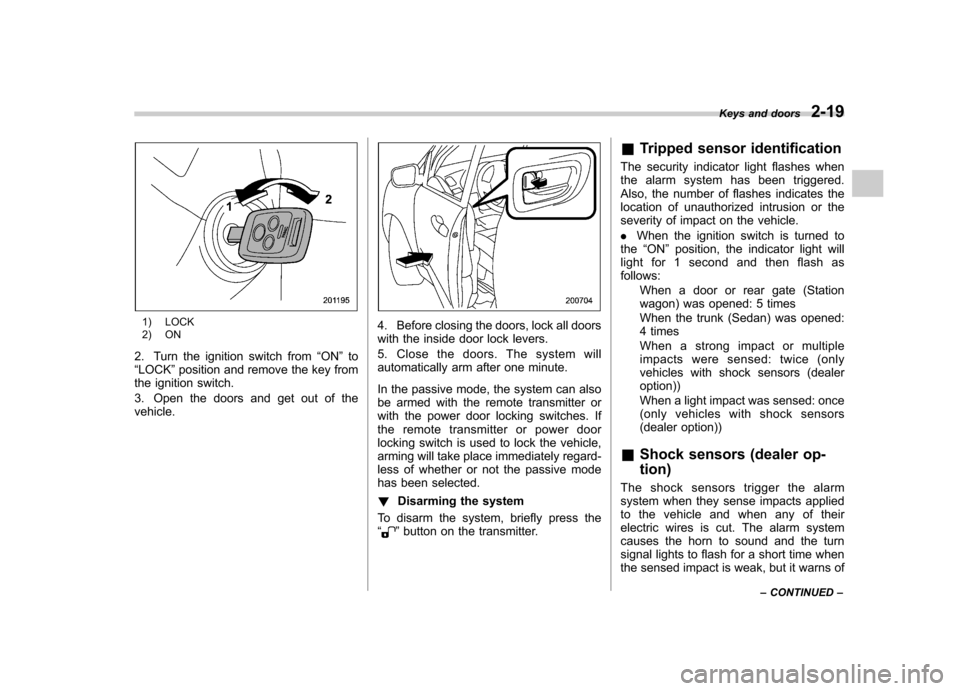
1) LOCK
2) ON
2. Turn the ignition switch from “ON ”to
“ LOCK ”position and remove the key from
the ignition switch.
3. Open the doors and get out of the vehicle.4. Before closing the doors, lock all doors
with the inside door lock levers.
5. Close the doors. The system will
automatically arm after one minute.
In the passive mode, the system can also
be armed with the remote transmitter or
with the power door locking switches. If
the remote transmitter or power door
locking switch is used to lock the vehicle,
arming will take place immediately regard-
less of whether or not the passive mode
has been selected. ! Disarming the system
To disarm the system, briefly press the “
” button on the transmitter. &
Tripped sensor identification
The security indicator light flashes when
the alarm system has been triggered.
Also, the number of flashes indicates the
location of unauthorized intrusion or the
severity of impact on the vehicle. . When the ignition switch is turned to
the “ON ”position, the indicator light will
light for 1 second and then flash as follows:
When a door or rear gate (Station
wagon) was opened: 5 times
When the trunk (Sedan) was opened:
4 times
Whenastrongimpactormultiple
impacts were sensed: twice (only
vehicles with shock sensors (dealeroption))
When a light impact was sensed: once
(only vehicles with shock sensors
(dealer option))
& Shock sensors (dealer op- tion)
The shock sensors trigger the alarm
system when they sense impacts applied
to the vehicle and when any of their
electric wires is cut. The alarm system
causes the horn to sound and the turn
signal lights to flash for a short time when
the sensed impact is weak, but it warns of Keys and doors
2-19
– CONTINUED –
Page 120 of 444

Ignition switch..................................................... 3-3
LOCK .................................................................. 3-3
Acc..................................................................... 3-4
ON...................................................................... 3-4
START ................................................................ 3-4
Key reminder chime ............................................ 3-5
Ignition switch light ............................................. 3-5
Hazard warning flasher ....................................... 3-5
Meters and gauges (Vehicle with SI-DRIVE) ...... 3-5
Combination meter illumination ........................... 3-5
Speedometer ....................................................... 3-6
Tachometer ......................................................... 3-6
Fuel gauge .......................................................... 3-6
Temperature gauge ............................................. 3-7
ECO gauge ......................................................... 3-8
Multi-information display (Vehicle with SI-DRIVE) .................................... 3-9
Display ............................................................... 3-9
Operation switch ................................................. 3-9
Odometer and trip meter .................................... 3-10
Current and average fuel consumption ............... 3-11
Outside temperature and journey time ................ 3-12
Driving range on remaining fuel .......................... 3-14
Clock (Vehicle with Navigation System) ............... 3-15
SI-DRIVE display ................................................ 3-15
Meter settings .................................................... 3-15
Warning messages and driver ’s information ........ 3-20
Meters and gauges (Vehicle without SI-DRIVE) ............................. 3-24
Combination meter illumination .......................... 3-24 Canceling the function for meter/gauge needle
movement upon turning on the ignition switch ............................................................. 3-24
Speedometer ..................................................... 3-24
Odometer .......................................................... 3-25
Double trip meter ............................................... 3-25
Tachometer ....................................................... 3-26
Fuel gauge ........................................................ 3-26
Temperature gauge ............................................ 3-27
Warning and indicator lights ............................. 3-28
Seatbelt warning light and chime ....................... 3-29
SRS airbag system warning light ........................ 3-30
Front passenger ’s frontal airbag ON and OFF
indicators ........................................................ 3-31
CHECK ENGINE warning light/Malfunction indicator lamp ................................................. 3-31
Charge warning light .......................................... 3-32
Oil pressure warning light .................................. 3-32
AT OIL TEMPerature warning light (AT models) ..................................................... 3-32
Low tire pressure warning light (U.S.-spec. models) ........................................................... 3-32
ABS warning light .............................................. 3-34
Brake system warning light ................................ 3-35
Low fuel warning light ....................................... 3-35
Door open warning light .................................... 3-36
All-Wheel Drive warning light (AT models) ..... ..... 3-36
Vehicle Dynamics Control operation indicator light (if equipped). ............................................ 3-36
Vehicle Dynamics Control warning light (if equipped)/Vehicle Dynamics Control OFF
indicator light (if equipped) .............................. 3-37
Instruments and controls
3
Page 125 of 444

3-6Instruments and controls
ignition switch to start the engine. This
is not an indication of a problem. &Speedometer
The speedometer shows the vehicle speed. & Tachometer
The tachometer shows the engine speed
in thousands of revolutions per minute.
CAUTION
Do not operate the engine with the
pointer of the tachometer in the red
zone. In this range, fuel injection will
be cut by the engine control module
to protect the engine from overrev-
ving. The engine will resume run-
ning normally after the engine speed
is reduced below the red zone.
NOTE (3.0-liter models only)
To protect the engine while the “P ” or
“ N ” position is selected, the engine is
controlled such that the engine speed
does not become too high even if the
accelerator pedal is fully depressed. &
Fuel gauge
The fuel gauge shows the approximate
amount of fuel remaining in the tank.
When the ignition switch is in the “LOCK ”
or “Acc ”position, the fuel gauge shows “E ”
even if the fuel tank contains fuel.
The gauge may move slightly during
braking, turning or acceleration due to fuel
level movement in the tank.
If you press the trip knob while the ignition
switch is in the “LOCK ”or “Acc ”position,
the fuel gauge ’s dial and needle will light
up and the needle will indicate the amount
of fuel remaining in the tank.
If, while the fuel gauge needle is indicating
the amount of fuel remaining in the tank,
you (a) do not press the trip knob for 5
seconds or (b) open and close the driver ’s door, the fuel gauge needle will drop to the“
E ”position and the dial and needle will go
off.
The dial of the fuel gauge flashes five
times when the amount of remaining fuel
reaches 2.6 US gal (10 liters, 2.2 lmp gal).
If you turn the ignition switch to the “ LOCK ”position and back to the “ON ”
position, the dial will again flash five times.
Page 127 of 444

3-8Instruments and controls
We recommend that you drive moderately
until the pointer of the temperature gauge
reaches near the middle of the range.
Engine operation is optimum with the
engine coolant at this temperature range.
And high revving operation while the
engine is not warmed up enough should
be avoided.
CAUTION
If the pointer exceeds the normal
operating range, safely stop the
vehicle as soon as possible.
Refer to “In case of emergency ”in
chapter 9. &
ECO gauge
The ECO gauge shows the difference
between the average rate of fuel con-
sumption and the current rate of fuel
consumption. Using the average rate of
fuel consumption since the trip meter was
last reset, if the current rate of fuel
consumption is higher than the average
rate of fuel consumption, the indicator
needle points to the “+ ” or right side, and if
the current rate of fuel consumption is
lower than the average rate of fuel
consumption, the indicator needle points
to the “ ” or left side. When the indicator
needle is pointing to the “+ ” or right side, it
indicates fuel-efficient driving. NOTE .
The ECO gauge shows only an
approximate indication. . After resetting the trip meter, the
average rate of fuel consumption is not
shown until driving 0.6 mile (1 km).
Until that time, the ECO gauge does notoperate.
Page 129 of 444

3-10Instruments and controls
& Odometer and trip meter
! Odometer
U.S.-spec. models
Canada-spec. models
This indication shows the total distance that the vehicle has been driven.
If you press the trip knob when the ignition
switch is in the
“LOCK ”or “Acc ”position,
the odometer/trip meter will light up. If you
donotpressthetripknobwithin5
seconds of illumination of the odometer/
trip meter, the odometer/trip meter will go
off.
The odometer/trip meter will also go off if
you open and close the driver ’sdoor
within 5 seconds of illumination of the
odometer/trip meter. ! Double trip meter
U.S.-spec. models
Canada-spec. models
This indication shows the distance that the
vehicle has been driven since you last set
it to zero.
To set the trip meter to zero, select the A
trip or B trip meter by pushing the trip knob
and keep the knob pushed for more than 2seconds.
If you press the trip knob when the ignition
switch is in the “LOCK ”or “Acc ”position,
the odometer/trip meter will light up. It is
possible to set the trip meter to zero while
the odometer/trip meter is lit up. If you do
not press the trip knob within 5 seconds of
illumination of the odometer/trip meter, the
odometer/trip meter will go off. Also, if you
open and close the driver ’s door within 5
seconds of illumination of the odometer/
trip meter, the odometer/trip meter will go
Page 130 of 444

off. NOTE
If the connection between the combina-
tion meter and battery is broken for any
reason such as vehicle maintenance or
fuse replacement, the data recorded on
the trip meter will be lost. &Current and average fuel consumption
U.S.-spec. models
Canada-spec. models
1) Current fuel consumption
2) Average fuel consumption
Current fuel consumption shows the rate
of fuel consumption at the present mo-
ment. Average fuel consumption shows
the average rate of fuel consumption since
the trip meter was last reset.
When the vehicle speed is less than
approximately 6 mph (9.5 km/h), the
current fuel consumption is not displayed.
The displayed number with “A ” is the
average fuel consumption corresponding
to the A trip meter indication, and the
displayed number with “B ” is the average
fuel consumption corresponding to the B
trip meter indication.
Those A and B indications can be
changed by depressing the trip knob. When either of the trip meter indications is
reset, the corresponding average fuel
consumption value is also reset. NOTE .
The indicated values vary in accor-
dance with changes in the vehicle ’s
running conditions. Also, the indicated
values may differ slightly from the
actual values and should thus be
treated only as a guide.. When either trip meter indication is
reset, the average fuel consumption
corresponding to that trip meter indica-
tion is not shown until the vehicle has
subsequently covered a distance of 1
mile (or 1 km). Instruments and controls
3-11
– CONTINUED –
Page 131 of 444

3-12Instruments and controls
& Outside temperature and
journey time
! Outside temperature
U.S.-spec. models
Canada-spec. models 1) Outside temperature
2) Journey time
The indicator shows the outside tempera-
ture in a range from 22 to 122 8F( 30 to
50 8C).
The indicator can give a false reading
under any of the following conditions: . When there is too much sun.
. During idling; while running at low
speeds in a traffic jam; when the engine
is restarted immediately following a shut-down. . When the actual outside temperature
falls outside the specified indicator range.
U.S.-spec. models
Canada-spec. models
When the outside temperature is 37 8F
(3 8C) or lower, the display flashes “OUT
TEMP 37 8F(3 8C) ”for 3 seconds and
gives a notice to the driver that the road
surface may be frozen. After 3 seconds, it
returns to its original indication of the
outside temperature and journey time.
If the outside temperature drops to 37 8F
(3 8C) or lower while the display is giving
an indication other than the outside
temperature, the display shows “OUT
TEMP 37 8F(3 8C) ”for 3 seconds before
returning to its original indication.
If the display is already indicating an
outside temperature of 37 8F(3 8C) or lower
when the ignition switch is turned to the“ ON ”position, the display does not shows
“ OUT TEMP 37 8F(3 8C) ”.
Page 132 of 444

NOTE
The outside temperature indication
may differ from the actual outside
temperature. The indication“OUT
TEMP 37 8F(3 8C) ” should be treated
only as a guide. Be sure to check the
condition of the road surface beforedriving. ! Journey time
U.S.-spec. models
Canada-spec. models
1) Outside temperature
2) Journey time
The journey time shows the time that has
elapsed since the ignition switch was
turned to the “START ”position.
After 2 hours have passed for the journey
time, the display indication flashes “E/T
2:00 ”at the center of the display for 3
seconds and gives a notice to the driver to
take a rest. After 3 seconds, it returns to its
original indication of the outside tempera-
ture and journey time.
If you continue to drive your vehicle
without stopping the engine, the display
flashes the journey time for 3 seconds at
the center of the display after each
additional hour has elapsed.
If the display shows an indication other
than the journey time, the display switches
to the journey time for 3 seconds for each
additional hour that has elapsed after the
first 2 hours. After 3 seconds, it returns to
its original indication. However, if the
journey time indication overlaps with an-
other indication, the journey time indica-
tion is shortened.
NOTE
The journey time is reset when the
ignition switch is turned to the “LOCK ”
position. It is also reset if the ignition
switch is turned to the “LOCK ”or
“ Acc ”position prior to restarting of
the engine. Instruments and controls
3-13
– CONTINUED –
Page 134 of 444

&Clock (Vehicle with Naviga-
tion System)
The clock receives the correct time from
the navigation system. To adjust the time
shown by the clock, refer to the separate“Operating Instructions for Monitor Sys-
tem ”and adjust the time of the navigation
system.
CAUTION
To ensure safety, do not attempt to
set the time during driving, as an
accident could result. &
SI-DRIVE display
1) Sport Sharp (S#) mode
2) Sport (S) mode
3) Intelligent (I) mode
4) Throttle angle
*: This display means that the Sport Sharp
(S#) mode is in the selected condition.
This display indicates the current SI-
DRIVE mode with its throttle angle.
For details of SI-DRIVE mode, refer to the “ SI-DRIVE (Except 2.5-liter non-Turbo
models) ”section in chapter 7.
& Meter settings
The following items can be set or regis-
tered on the multi-information display asdesired. . Initial movements of the meter/gauge needles.
Present date & time
. Birthday
. Anniversary
Within 12 seconds after turning on the
ignition switch, press the “
/SET”switch
for at least 2 seconds.
The display can be switched as shown
below by pressing the “
”or “”switch.
*: “Present date & time ”, “Birthday ”and
“ Anniversary ”can be registered in the
“ Date/Time ”setting menu.
Refer to the following procedure for further steps. ! Initial movement setting
It is possible to activate or deactivate the
initial movement of the meter needles and
gauge needles that takes place when the
ignition switch is turned to the “ON ”
position. Instruments and controls
3-15
– CONTINUED –