key SUBARU OUTBACK 2008 4.G Owners Manual
[x] Cancel search | Manufacturer: SUBARU, Model Year: 2008, Model line: OUTBACK, Model: SUBARU OUTBACK 2008 4.GPages: 444, PDF Size: 14.1 MB
Page 3 of 444

Warranties &Warranties for U.S.A.
All SUBARU vehicles distributed by
Subaru of America, Inc. and sold at retail
by an authorized SUBARU dealer in the
United States come with the followingwarranties: . SUBARU Limited Warranty
. Emission Control Systems Warranty
. Emissions Performance Warranty
All warranty information, including details
of coverage and exclusions, is in the“ Warranty and Maintenance Booklet ”.
Please read these warranties carefully.
& Warranties for Canada
All SUBARU vehicles distributed by
Subaru Canada, Inc. and sold at retail by
an authorized SUBARU dealer in Canada
come with the following warranties: . SUBARU Limited Warranty
. Anti-Corrosion Warranty
. Emission Control Warranty
All warranty information, including details
of coverage and exclusions, is in the“ Warranty and Service Booklet ”. Please
read these warranties carefully.CAUTION
If your vehicle is equipped with a
navigation system, the display con-
tains mercury. Therefore, the dis-
play of the navigation system must
be removed before vehicle disposal.
Once the display has been removed,
please reuse, recycle or dispose of
them as hazardous waste. How to use this Owner
’s
Manual & Using your Owner ’s Manual
Before you operate your vehicle, carefully
read this manual. To protect yourself and
extend the service life of your vehicle,
follow the instructions in this manual.
Failure to observe these instructions may
result in serious injury and damage to yourvehicle.
This manual is composed of fourteen
chapters. Each chapter begins with a brief
table of contents, so you can usually tell at
a glance if that chapter contains the
information you want.
Chapter 1: Seat, seatbelt and SRS airbags
This chapter informs you how to use the
seat and seatbelt and contains precau-
tions for the SRS airbags.
Chapter 2: Keys and doors
This chapter informs you how to operate
the keys, locks and windows.
Chapter 3: Instruments and controls
This chapter informs you about the opera-
tion of instrument panel indicators and
how to use the instruments and otherswitches. 1
– CONTINUED –
Page 11 of 444

Table of contents
Seat, seatbelt and SRS airbags1
Keys and doors2
Instruments and controls
Climate control4
Audio5
Interior equipment6
Starting and operating7
Driving tips8
In case of emergency9
Appearance care10
Maintenance and service11
Specifications12
Consumer information and Reporting safety defects13
Index14
3
Page 25 of 444

Function settings
A SUBARU dealer can change the settings of the functions shown in the following table to meet your personal requirements. Contact
the nearest SUBARU dealer for details. If your vehicle is equipped with navigation system, the settings for some of these functions can
be changed using the monitor. For details, please refer to the Owner’s Manual supplement for the monitor.
Item Function Possible settings Default setting Page
Alarm system Alarm system Operation / Non-operation Operation 2-15 Monitoring start delay time (after closure
of doors) 0 second / 30 seconds 30 seconds 2-17
Impact sensor operation (only vehicles
with shock sensors (dealer option)) Operation / Non-operation Non-operation 2-19
Passive arming Operation / Non-operation Non-operation 2-18
Remote keyless entry sys- tem Hazard warning flasher Operation / Non-operation Operation 2-8
Audible signal Operation / Non-operation Operation 2-10
Key lock-in prevention Key lock-in prevention Operation / Non-operation Operation 2-7
Remote engine start system
(dealer option) Horn chirp confirmation ON/OFF ON 7-11
Rear window defogger Rear window defogger Operation for 15 minutes / Continuous operationOperation for 15 minutes 3-54
Windshield wiper deicer (if
equipped) Windshield wiper deicer Operation for 15 minutes /
Continuous operationOperation for 15 minutes 3-53
Map light/Dome light Operation in conjunction with remote keyless entry system OFF / Short / Normal / Long Normal 6-2
Map light Operation in conjunction with remote keyless entry system and opening door ON / OFF ON 6-2
Battery drainage prevention function Battery drainage prevention function Operation / Non-operation Operation 2-6 23
Page 35 of 444
1-10Seat, seatbelt and SRS airbags
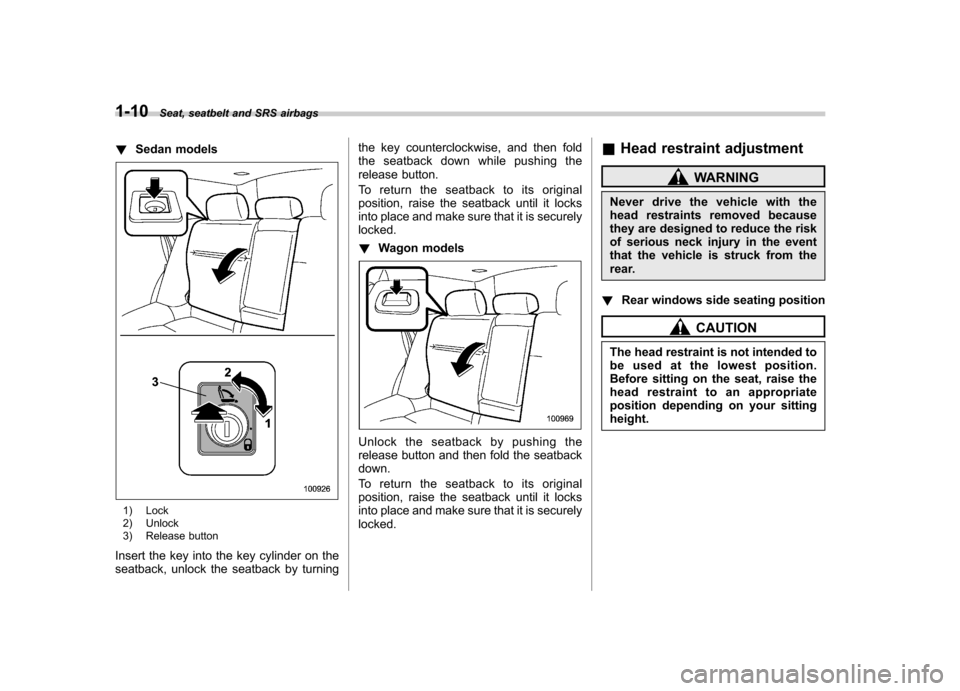
!Sedan models
1) Lock
2) Unlock
3) Release button
Insert the key into the key cylinder on the
seatback, unlock the seatback by turning the key counterclockwise, and then fold
the seatback down while pushing the
release button.
To return the seatback to its original
position, raise the seatback until it locks
into place and make sure that it is securelylocked. !
Wagon models
Unlock the seatback by pushing the
release button and then fold the seatbackdown.
To return the seatback to its original
position, raise the seatback until it locks
into place and make sure that it is securelylocked. &
Head restraint adjustment
WARNING
Never drive the vehicle with the
head restraints removed because
they are designed to reduce the risk
of serious neck injury in the event
that the vehicle is struck from the
rear.
! Rear windows side seating position
CAUTION
The head restraint is not intended to
be used at the lowest position.
Before sitting on the seat, raise the
head restraint to an appropriate
position depending on your sittingheight.
Page 37 of 444
1-12Seat, seatbelt and SRS airbags
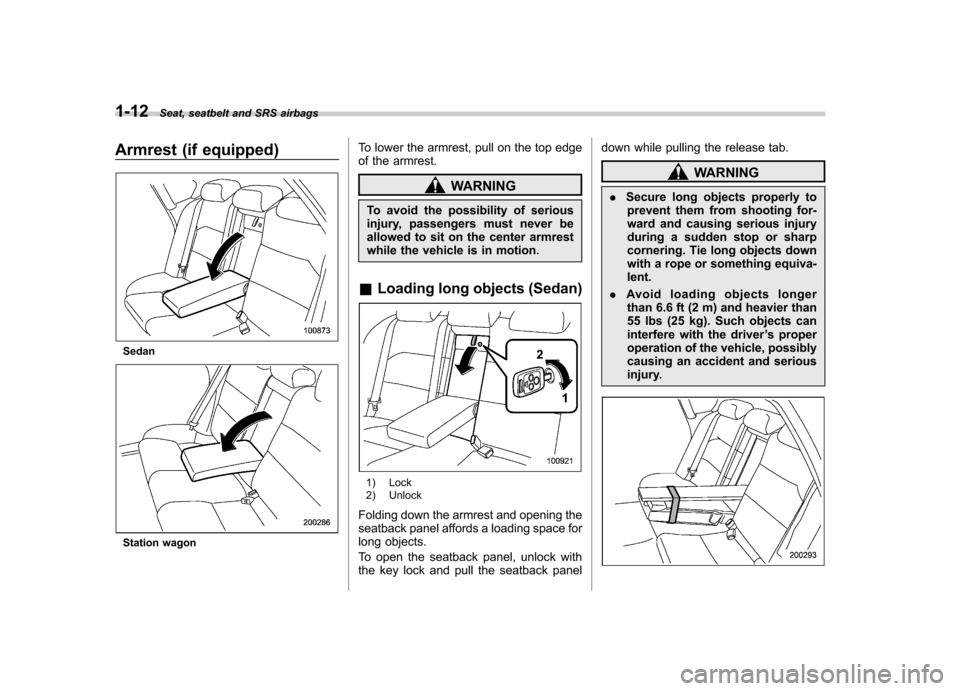
Armrest (if equipped)
Sedan
Station wagon To lower the armrest, pull on the top edge
of the armrest.
WARNING
To avoid the possibility of serious
injury, passengers must never be
allowed to sit on the center armrest
while the vehicle is in motion.
& Loading long objects (Sedan)
1) Lock
2) Unlock
Folding down the armrest and opening the
seatback panel affords a loading space for
long objects.
To open the seatback panel, unlock with
the key lock and pull the seatback panel down while pulling the release tab.
WARNING
. Secure long objects properly to
prevent them from shooting for-
ward and causing serious injury
during a sudden stop or sharp
cornering. Tie long objects down
with a rope or something equiva-lent.
. Avoid loading objects longer
than 6.6 ft (2 m) and heavier than
55 lbs (25 kg). Such objects can
interfere with the driver ’s proper
operation of the vehicle, possibly
causing an accident and serious
injury.
Page 47 of 444
1-22Seat, seatbelt and SRS airbags
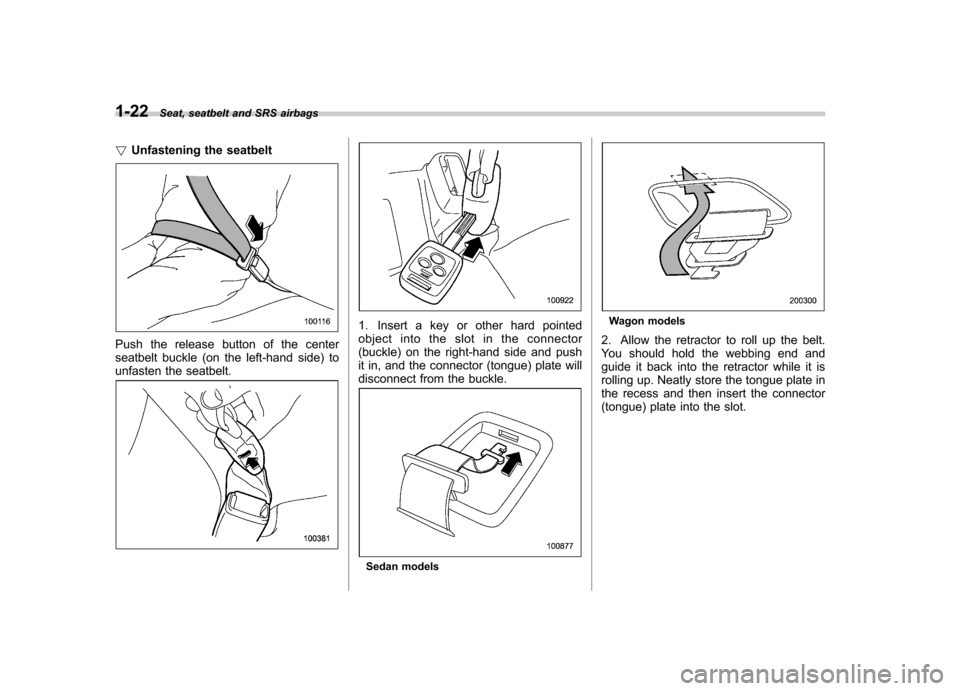
! Unfastening the seatbelt
Push the release button of the center
seatbelt buckle (on the left-hand side) to
unfasten the seatbelt.
1. Insert a key or other hard pointed
object into the slot in the connector
(buckle) on the right-hand side and push
it in, and the connector (tongue) plate will
disconnect from the buckle.
Sedan models
Wagon models
2. Allow the retractor to roll up the belt.
You should hold the webbing end and
guide it back into the retractor while it is
rolling up. Neatly store the tongue plate in
the recess and then insert the connector
(tongue) plate into the slot.
Page 90 of 444

Keys..................................................................... 2-2
Key number ........................................................ 2-2
Immobilizer .......................................................... 2-3
Security ID plate .................................................. 2-3
Security indicator light ........................................ 2-4
Key replacement ................................................. 2-4
Door locks ........................................................... 2-5
Locking and unlocking from the outside .. ............ 2-5
Locking and unlocking from the inside ................ 2-6
Battery drainage prevention function ................... 2-6
Power door locking switches ............................. 2-7
Key lock-in prevention function ........................... 2-7
Remote keyless entry system ............................ 2-8
Locking the doors ............................................... 2-9
Unlocking the doors ............................................ 2-9
Unlocking the trunk lid/rear gate .......................... 2-9
Illuminated entry ................................................. 2-9
Vehicle finder function ........................................ 2-10
Sounding a panic alarm ...................................... 2-10
Selecting audible signal operation ...................... 2-10
Replacing the battery ......................................... 2-10
Replacing lost transmitters ................................. 2-12
Alarm system ..................................................... 2-15
System alarm operation ...................................... 2-15 Activating and deactivating the alarm system
..... 2-15
If you have accidentally triggered the alarm system ............................................................ 2-16
Arming the system ............................................ 2-16
Disarming the system ........................................ 2-18
Valet mode ........................................................ 2-18
Passive arming .................................................. 2-18
Tripped sensor identification .............................. 2-19
Shock sensors (dealer option).. .......................... 2-19
Child safety locks .............................................. 2-20
Windows ............................................................. 2-20
Power windows ................................................. 2-20
Trunk lid (Sedan) ............................................... 2-23
To open and close the trunk lid from outside . ..... 2-23
To open the trunk lid from inside. ....................... 2-23
To lock and unlock the trunk lid release lever ................................................................ 2-24
Internal trunk lid release handle ......................... 2-24
Rear gate (Station wagon) ................................ 2-26
Moonroof (if equipped) ...................................... 2-27
Tilting/sliding moonroof (Sedan) ......................... 2-27
Moonroof (Station wagon) .................................. 2-28
Keys and doors
2
Page 91 of 444
2-2Keys and doors
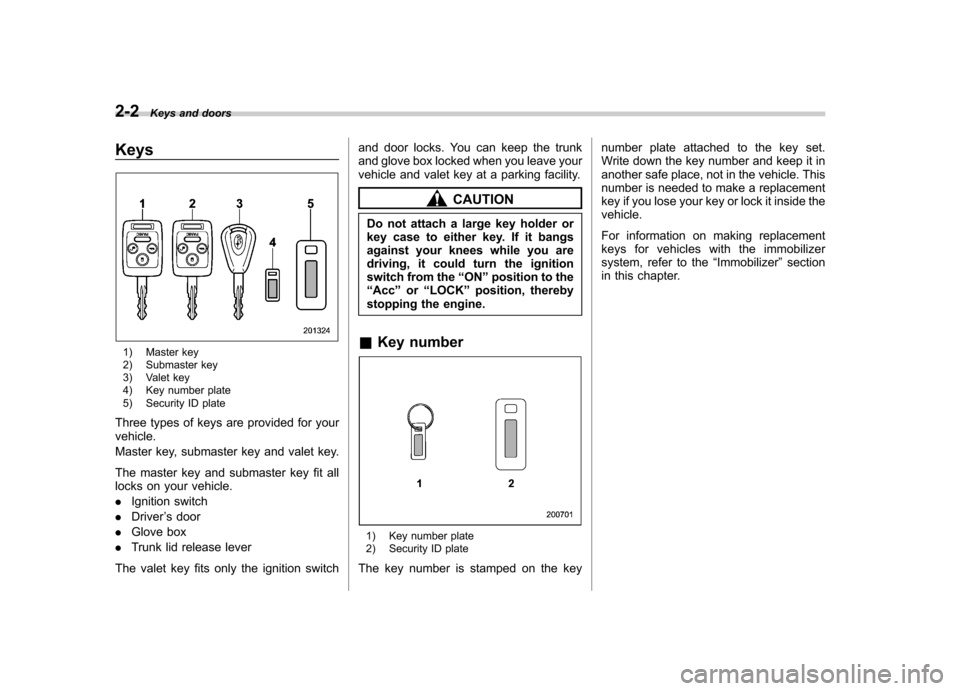
Keys
1) Master key
2) Submaster key
3) Valet key
4) Key number plate
5) Security ID plate
Three types of keys are provided for your vehicle.
Master key, submaster key and valet key.
The master key and submaster key fit all
locks on your vehicle. . Ignition switch
. Driver ’s door
. Glove box
. Trunk lid release lever
The valet key fits only the ignition switch and door locks. You can keep the trunk
and glove box locked when you leave your
vehicle and valet key at a parking facility.
CAUTION
Do not attach a large key holder or
key case to either key. If it bangs
against your knees while you are
driving, it could turn the ignition
switch from the “ON ”position to the
“ Acc ”or “LOCK ”position, thereby
stopping the engine.
& Key number
1) Key number plate
2) Security ID plate
The key number is stamped on the key number plate attached to the key set.
Write down the key number and keep it in
another safe place, not in the vehicle. This
number is needed to make a replacement
key if you lose your key or lock it inside thevehicle.
For information on making replacement
keys for vehicles with the immobilizer
system, refer to the
“Immobilizer ”section
in this chapter.
Page 92 of 444
Immobilizer
The immobilizer system is designed to
prevent an unauthorized person from
starting the engine. Only keys registered
with your vehicle’s immobilizer system can
be used to operate your vehicle. Even if
an unregistered key fits into the ignition
switch and can be turned to the “START ”
position, the engine will automatically stop
after several seconds.
Each immobilizer key contains a trans-
ponder in which the key ’s ID code is
stored. When a key is inserted into the
ignition switch and turned to the “ON ”
position, the transponder transmits thekey ’s ID code to the immobilizer system ’s
receiver. If the transmitted ID code
matches the ID code registered in the
immobilizer system, the system allows the
engine to be started. Since the ID code is
transmitted and acted upon almost in-
stantly, the immobilizer system does not
impede normal starting of the engine.
If the engine fails to start, pull out the key
once before trying again. (Refer to the“ Ignition switch ”section [chapter 3].)
This device complies with Part 15 of
the FCC Rules and with RSS-210 of
Industry Canada. Operation is subject
to the following two conditions: (1) This device may not cause harmful inter-
ference, and (2) this device must
accept any interference received, in-
cluding interference that may cause
undesired operation.
Changes or modifications not ex-
pressly approved by the party respon-
sible for compliance could void theuser
’s authority to operate the equip-
ment.
NOTE
To protect your vehicle from theft,
please pay close attention to the fol-
lowing security precautions: . Never leave your vehicle unattended
with its keys inside. . Before leaving your vehicle, close all
windows and lock the doors and rear
gate (Station wagon).. Do not leave spare keys or any
record of your key number in thevehicle.
CAUTION
. Do not place the key under direct
sunlight or anywhere it may
become hot. .
Do not get the key wet. If the key
gets wet, wipe it dry with a cloth
immediately.
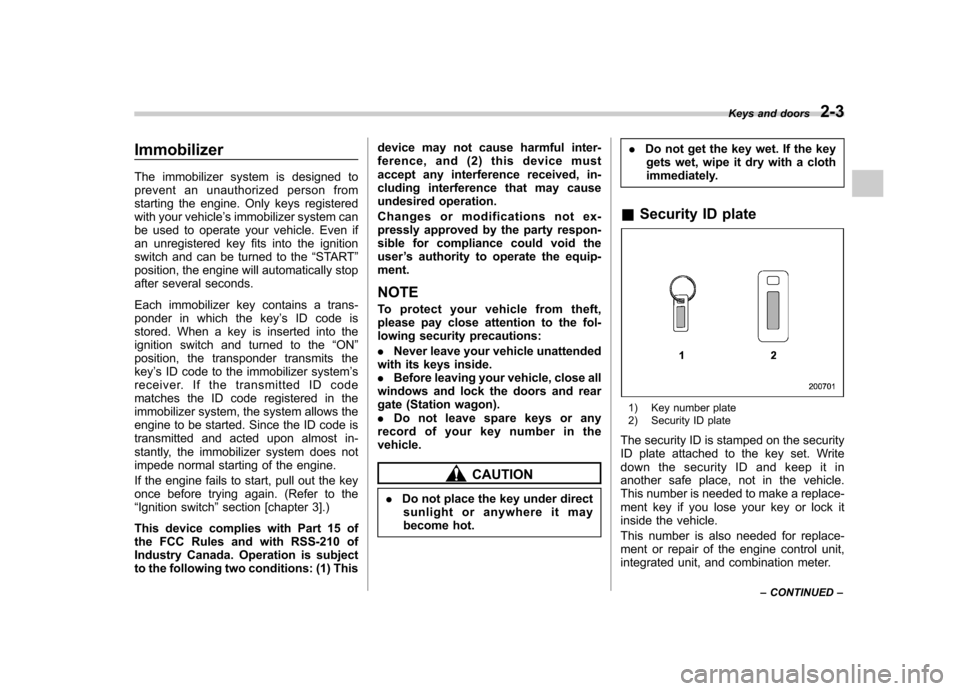
& Security ID plate
1) Key number plate
2) Security ID plate
The security ID is stamped on the security
ID plate attached to the key set. Write
down the security ID and keep it in
another safe place, not in the vehicle.
This number is needed to make a replace-
ment key if you lose your key or lock it
inside the vehicle.
This number is also needed for replace-
ment or repair of the engine control unit,
integrated unit, and combination meter. Keys and doors
2-3
– CONTINUED –
Page 93 of 444
2-4Keys and doors
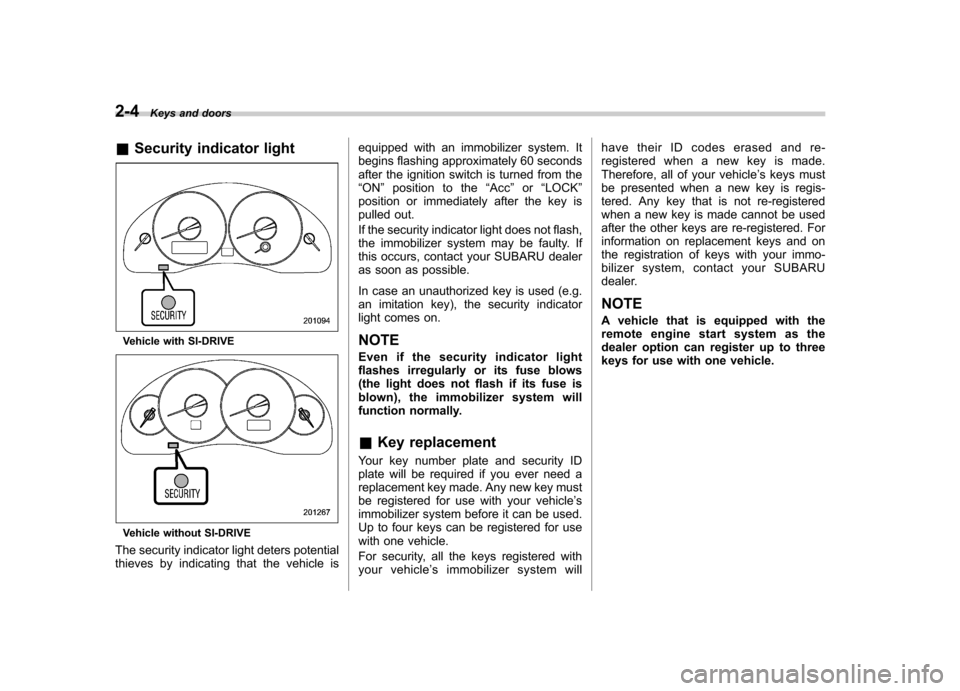
& Security indicator light
Vehicle with SI-DRIVE
Vehicle without SI-DRIVE
The security indicator light deters potential
thieves by indicating that the vehicle is equipped with an immobilizer system. It
begins flashing approximately 60 seconds
after the ignition switch is turned from the“
ON ”position to the “Acc ”or “LOCK ”
position or immediately after the key is
pulled out.
If the security indicator light does not flash,
the immobilizer system may be faulty. If
this occurs, contact your SUBARU dealer
as soon as possible.
In case an unauthorized key is used (e.g.
an imitation key), the security indicator
light comes on.
NOTE
Even if the security indicator light
flashes irregularly or its fuse blows
(the light does not flash if its fuse is
blown), the immobilizer system will
function normally. & Key replacement
Your key number plate and security ID
plate will be required if you ever need a
replacement key made. Any new key must
be registered for use with your vehicle ’s
immobilizer system before it can be used.
Up to four keys can be registered for use
with one vehicle.
For security, all the keys registered with
your vehicle ’s immobilizer system will have their ID codes erased and re-
registered when a new key is made.
Therefore, all of your vehicle
’s keys must
be presented when a new key is regis-
tered. Any key that is not re-registered
when a new key is made cannot be used
after the other keys are re-registered. For
information on replacement keys and on
the registration of keys with your immo-
bilizer system, contact your SUBARU
dealer.
NOTE
A vehicle that is equipped with the
remote engine start system as the
dealer option can register up to three
keys for use with one vehicle.