clock SUBARU OUTBACK 2009 5.G Owners Manual
[x] Cancel search | Manufacturer: SUBARU, Model Year: 2009, Model line: OUTBACK, Model: SUBARU OUTBACK 2009 5.GPages: 447, PDF Size: 14.26 MB
Page 16 of 447

14
1) Parking brake lever (page 7-44)
2) Gear shift lever (MT) (page 7-15/page 7-17)
3) Selector lever (AT) (page 7-19/ page 7-25)
4) Information display (page 3-41)
5) Clock (page 3-41)
6) Dashboard storage compartment (page 6-5)
7) Navigation system (Refer to the Owner ’s
Manual supplement for the navigation system.)
8) Glove box (page 6-5)
9) Hazard warning flasher switch (page 3-5)
10) Audio (page 5-1)
11) Climate control (page 4-1)
12) Pocket (page 6-8)
13) Accessory power outlet (page 6-9)
14) Tilt/telescopic steering wheel (page 3-59)
15) SI-DRIVE selector (page 7-32)
16) Cup holder (page 6-8)
Page 36 of 447
1-10Seat, seatbelt and SRS airbags
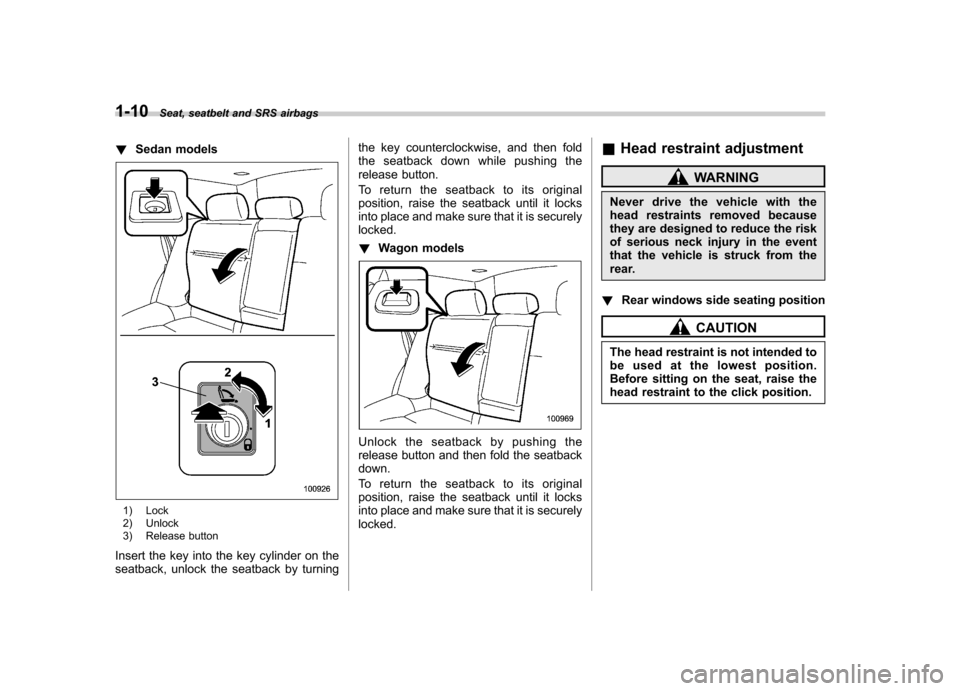
!Sedan models
1) Lock
2) Unlock
3) Release button
Insert the key into the key cylinder on the
seatback, unlock the seatback by turning the key counterclockwise, and then fold
the seatback down while pushing the
release button.
To return the seatback to its original
position, raise the seatback until it locks
into place and make sure that it is securelylocked. !
Wagon models
Unlock the seatback by pushing the
release button and then fold the seatbackdown.
To return the seatback to its original
position, raise the seatback until it locks
into place and make sure that it is securelylocked. &
Head restraint adjustment
WARNING
Never drive the vehicle with the
head restraints removed because
they are designed to reduce the risk
of serious neck injury in the event
that the vehicle is struck from the
rear.
! Rear windows side seating position
CAUTION
The head restraint is not intended to
be used at the lowest position.
Before sitting on the seat, raise the
head restraint to the click position.
Page 117 of 447
&To lock and unlock the trunk
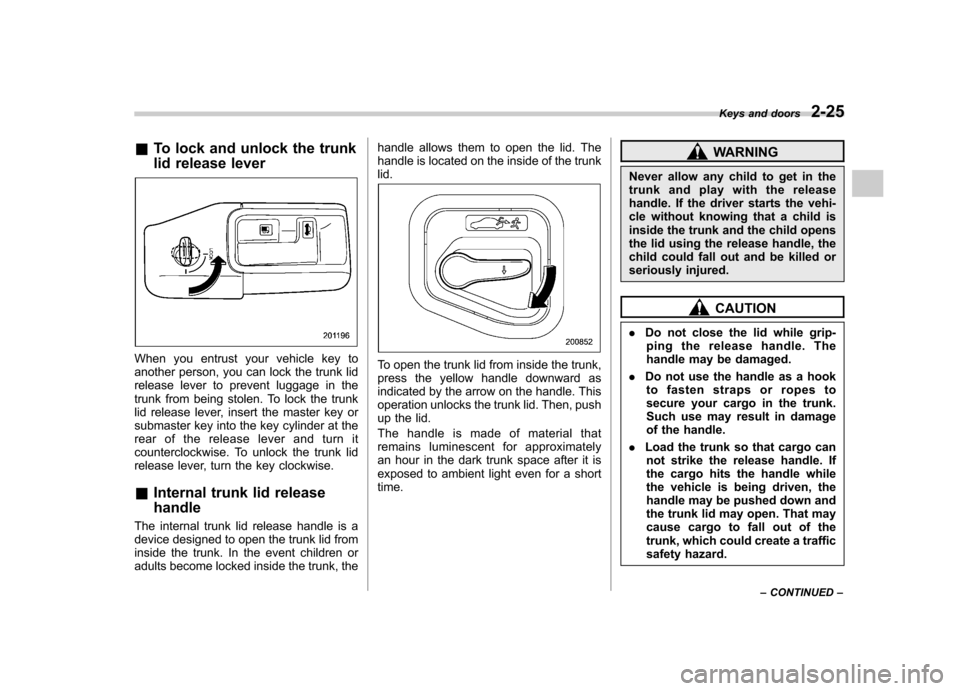
lid release lever
When you entrust your vehicle key to
another person, you can lock the trunk lid
release lever to prevent luggage in the
trunk from being stolen. To lock the trunk
lid release lever, insert the master key or
submaster key into the key cylinder at the
rear of the release lever and turn it
counterclockwise. To unlock the trunk lid
release lever, turn the key clockwise. &Internal trunk lid release handle
The internal trunk lid release handle is a
device designed to open the trunk lid from
inside the trunk. In the event children or
adults become locked inside the trunk, the handle allows them to open the lid. The
handle is located on the inside of the trunklid.To open the trunk lid from inside the trunk,
press the yellow handle downward as
indicated by the arrow on the handle. This
operation unlocks the trunk lid. Then, push
up the lid.
The handle is made of material that
remains luminescent for approximately
an hour in the dark trunk space after it is
exposed to ambient light even for a shorttime.
WARNING
Never allow any child to get in the
trunk and play with the release
handle. If the driver starts the vehi-
cle without knowing that a child is
inside the trunk and the child opens
the lid using the release handle, the
child could fall out and be killed or
seriously injured.
CAUTION
. Do not close the lid while grip-
ping the release handle. The
handle may be damaged.
. Do not use the handle as a hook
to fasten straps or ropes to
secure your cargo in the trunk.
Such use may result in damage
of the handle.
. Load the trunk so that cargo can
not strike the release handle. If
the cargo hits the handle while
the vehicle is being driven, the
handle may be pushed down and
the trunk lid may open. That may
cause cargo to fall out of the
trunk, which could create a traffic
safety hazard. Keys and doors
2-25
– CONTINUED –
Page 124 of 447

Ignition switch..................................................... 3-3
LOCK .................................................................. 3-3
Acc..................................................................... 3-4
ON...................................................................... 3-4
START ................................................................ 3-4
Key reminder chime ............................................ 3-5
Ignition switch light ............................................. 3-5
Hazard warning flasher ....................................... 3-5
Meters and gauges (vehicle with SI-DRIVE) ...... 3-5
Combination meter illumination ........................... 3-5
Speedometer ....................................................... 3-6
Tachometer ......................................................... 3-6
Fuel gauge .......................................................... 3-6
Temperature gauge ............................................. 3-7
ECO gauge ......................................................... 3-8
Multi-information display (vehicle with SI-DRIVE) .................................... 3-9
Display ............................................................... 3-9
Operation switch ................................................. 3-9
Odometer and trip meter .................................... 3-10
Current and average fuel consumption ............... 3-11
Outside temperature and journey time ................ 3-12
Driving range on remaining fuel .......................... 3-14
Clock (vehicle with genuine SUBARU navigation system) ............................................................ 3-15
SI-DRIVE display ................................................ 3-15
Meter settings .................................................... 3-15
Warning messages and driver ’s information ........ 3-20
Meters and gauges (vehicle without SI-DRIVE) .............................. 3-24
Combination meter illumination .......................... 3-24 Canceling the function for meter/gauge needle
movement upon turning on the ignition switch ............................................................. 3-24
Speedometer ..................................................... 3-24
Odometer .......................................................... 3-25
Double trip meter ............................................... 3-25
Tachometer ....................................................... 3-26
Fuel gauge ........................................................ 3-26
Temperature gauge ............................................ 3-27
Warning and indicator lights ............................. 3-28
Seatbelt warning light and chime ....................... 3-29
SRS airbag system warning light ........................ 3-30
Front passenger ’s frontal airbag ON and OFF
indicators ........................................................ 3-31
CHECK ENGINE warning light/Malfunction indicator lamp ................................................. 3-31
Charge warning light .......................................... 3-32
Oil pressure warning light .................................. 3-32
AT OIL TEMP warning light (AT models) .............. 3-33
Low tire pressure warning light (U.S.-spec. models) ........................................................... 3-33
ABS warning light .............................................. 3-34
Brake system warning light ................................ 3-35
Low fuel warning light ....................................... 3-36
Door open warning light .................................... 3-36
All-Wheel Drive warning light (AT models) ..... ..... 3-36
Vehicle Dynamics Control operation indicator light (if equipped). ............................................ 3-37
Vehicle Dynamics Control warning light (if equipped)/Vehicle Dynamics Control OFF
indicator light (if equipped) .............................. 3-37
Security indicator light ....................................... 3-38
Instruments and controls
3
Page 125 of 447

Instruments and controlsSPORT mode indicator light(4-speed AT models) ......................................... 3-38
Shift-up indicator light (MT models with SI-DRIVE) .............................. 3-38
S# PREP indicator light (vehicle with SI-DRIVE) ..................................... 3-39
Selector lever position indicator (AT models) (if equipped) ..................................................... 3-39
Gear position indicator (AT models) (if equipped) ..................................................... 3-39
Selector lever and gear position indicator (AT models) (if equipped) .................................. 3-40
Turn signal indicator lights ................................. 3-40
High beam indicator light ................................... 3-40
Cruise control indicator light .............................. 3-40
Cruise control set indicator light ......................... 3-40
Headlight indicator light ..................................... 3-40
Front fog light indicator light (if equipped) .......... 3-40
Clock (vehicle without genuine SUBARU navigation system) .......................................... 3-41
Information display (2.5 L non-turbo model without genuine SUBARU navigation
system) ............................................................ 3-41
Outside temperature indicator ............................ 3-42
Current fuel consumption ................................... 3-43
Average fuel consumption .................................. 3-43 Driving range on remaining fuel
......................... 3-44
Journey time ..................................................... 3-45
Light control switch ........................................... 3-46
Headlights ......................................................... 3-46
High/low beam change (dimmer) ... ..................... 3-46
Headlight flasher ............................................... 3-47
Daytime running light system ............................. 3-47
Turn signal lever ................................................ 3-47
Illumination brightness control ......................... 3-48
Parking light switch ........................................... 3-48
Front fog light switch (if equipped) .................. 3-49
Wiper and washer .............................................. 3-49
Windshield wiper and washer switches .............. 3-51
Rear window wiper and washer switch (Station wagon) ............................................... 3-53
Windshield wiper deicer (if equipped) .............. 3-53
Rear window defogger button .......................... 3-54
Mirrors ................................................................ 3-56
Inside mirror ...................................................... 3-56
Auto-dimming mirror/compass (if equipped) ....... 3-56
Outside mirrors ................................................. 3-57
Tilt/telescopic steering wheel ........................... 3-59
Horn .................................................................... 3-59
Page 138 of 447

&Clock (vehicle with genuine
SUBARU navigation system)
The clock receives the correct time from
the navigation system. To adjust the time
shown by the clock, refer to the Owner ’s
Manual supplement for the monitor sys-
tem and adjust the time of the navigationsystem.
CAUTION
To ensure safety, do not attempt to
set the time during driving, as an
accident could result. &
SI-DRIVE display
1) Sport Sharp (S#) mode
2) Sport (S) mode
3) Intelligent (I) mode
4) Throttle angle
*: This display means that the Sport Sharp
(S#) mode is in the selected condition.
This display indicates the current SI-
DRIVE mode with its throttle angle.
For details of SI-DRIVE mode, refer to the “ SI-DRIVE (turbo and 3.0 L models) ”
section in chapter 7. & Meter settings
The following items can be set or regis-
tered on the multi-information display asdesired. . Initial movements of the meter/gauge needles.
Present date & time
. Birthday
. Anniversary
Within 12 seconds after turning on the
ignition switch, press the “
/SET”switch
for at least 2 seconds.
The display can be switched as shown
below by pressing the “
”or “”switch.
*: “Present date & time ”, “Birthday ”and
“ Anniversary ”can be registered in the
“ Date/Time ”setting menu.
Refer to the following procedure for further steps. ! Initial movement setting
It is possible to activate or deactivate the
initial movement of the meter needles and
gauge needles that takes place when the
ignition switch is turned to the “ON ”
position. Instruments and controls
3-15
– CONTINUED –
Page 164 of 447

Clock (vehicle without genu-
ine SUBARU navigation sys-tem) NOTE .If your vehicle is a 2.5 L non-turbo
model equipped with the genuine
SUBARU navigation system, refer to
the Owner ’s Manual supplement for the
navigation system.. If your vehicle is a turbo model or a
3.0 L model equipped with the genuine
SUBARU navigation system, refer tothe “Clock (vehicle with genuine
SUBARU navigation system) ”in the
multi-information display (vehicle with
SI-DRIVE) section in this chapter.The clock shows the time while the
ignition switch is in the “Acc ”or “ON ”
position.
To adjust the time shown by the clock,
press the “+ ” button or the “ ” button. The
indicated time will change in one-minute
increments. If you keep the button
pressed, the rate at which the indicated
time changes will speed up.
To reset the minutes to “00 ”with a radio
time signal, push the “SET ”button. Information display (2.5 L
non-turbo model without
genuine SUBARU navigationsystem) NOTE
If your vehicle is a 2.5 L non-turbo
model equipped with the genuine
SUBARU navigation system, refer to
the Owner
’s Manual supplement for the
monitor system.
With the ignition switch in the “ON ”
position, each successive push of the “ DISP ”button toggles the display in the
following sequence: Instruments and controls
3-41
– CONTINUED –
Page 171 of 447
3-48Instruments and controls
Illumination brightness con- trol
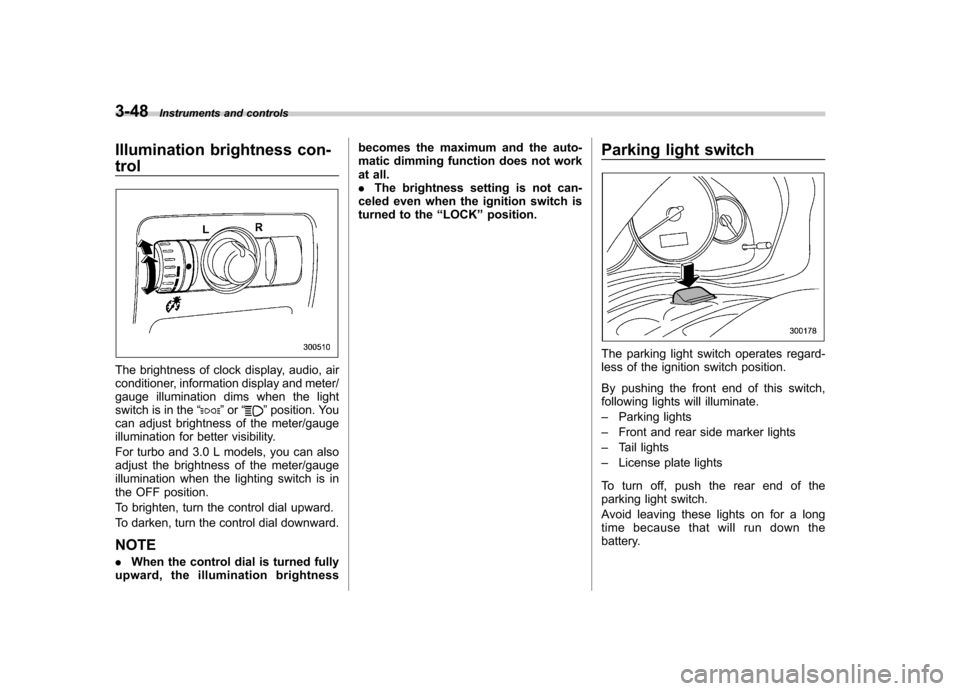
The brightness of clock display, audio, air
conditioner, information display and meter/
gauge illumination dims when the light
switch is in the “
”or “”position. You
can adjust brightness of the meter/gauge
illumination for better visibility.
For turbo and 3.0 L models, you can also
adjust the brightness of the meter/gauge
illumination when the lighting switch is in
the OFF position.
To brighten, turn the control dial upward.
To darken, turn the control dial downward. NOTE . When the control dial is turned fully
upward, the illumination brightness becomes the maximum and the auto-
matic dimming function does not work
at all..
The brightness setting is not can-
celed even when the ignition switch is
turned to the “LOCK ”position. Parking light switch
The parking light switch operates regard-
less of the ignition switch position.
By pushing the front end of this switch,
following lights will illuminate. –
Parking lights
– Front and rear side marker lights
– Tail lights
– License plate lights
To turn off, push the rear end of the
parking light switch.
Avoid leaving these lights on for a long
time because that will run down the
battery.
Page 191 of 447
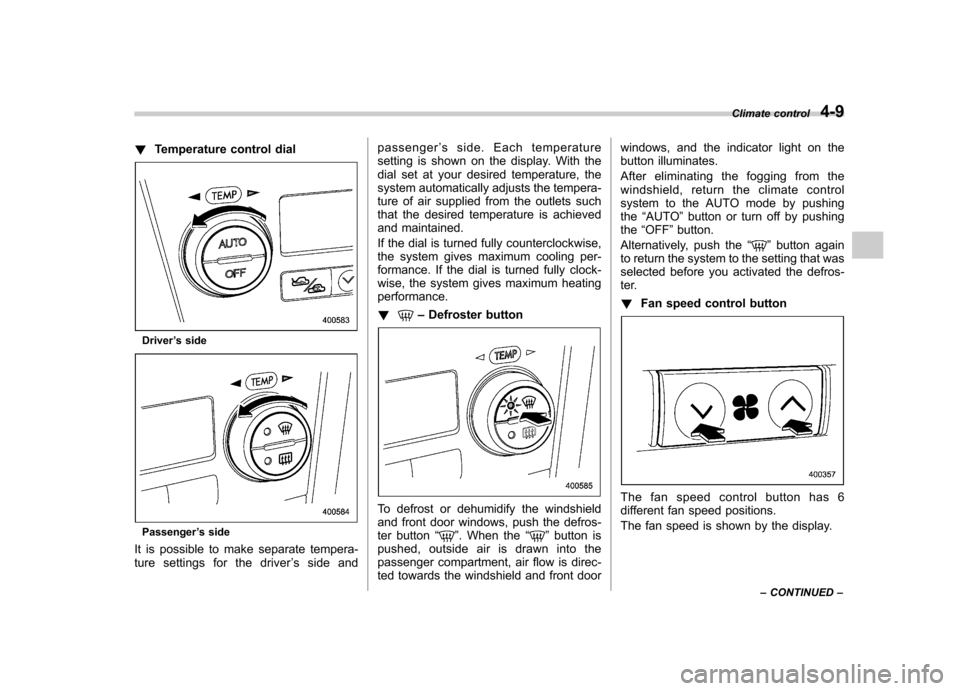
!Temperature control dial
Driver ’s side
Passenger ’s side
It is possible to make separate tempera-
ture settings for the driver ’s side and passenger
’s side. Each temperature
setting is shown on the display. With the
dial set at your desired temperature, the
system automatically adjusts the tempera-
ture of air supplied from the outlets such
that the desired temperature is achieved
and maintained.
If the dial is turned fully counterclockwise,
the system gives maximum cooling per-
formance. If the dial is turned fully clock-
wise, the system gives maximum heatingperformance. !
– Defroster button
To defrost or dehumidify the windshield
and front door windows, push the defros-
ter button “
”. When the “”button is
pushed, outside air is drawn into the
passenger compartment, air flow is direc-
ted towards the windshield and front door windows, and the indicator light on the
button illuminates.
After eliminating the fogging from the
windshield, return the climate control
system to the AUTO mode by pushingthe
“AUTO ”button or turn off by pushing
the “OFF ”button.
Alternatively, push the “
”button again
to return the system to the setting that was
selected before you activated the defros-
ter. ! Fan speed control button
The fan speed control button has 6
different fan speed positions.
The fan speed is shown by the display. Climate control
4-9
– CONTINUED –
Page 193 of 447
When the temperature control dial is
turned fully counterclockwise, the recircu-
lation mode is automatically selected.)
When the outside air mode is selected, a“
”indicator light appears on the dis-
play.
WARNING
Continued operation in the “
”
position may fog up the windows.
Switch to the “
”position as soon
as the outside dusty condition clears.
NOTE
When driving on a dusty road or behind
a vehicle that emits unpleasant exhaust
gases, set the air inlet selection button
to the “
”position.
From time to time, return the air inlet
selection button to the “
”position
to draw outside air into the passenger compartment. &
Temperature sensors
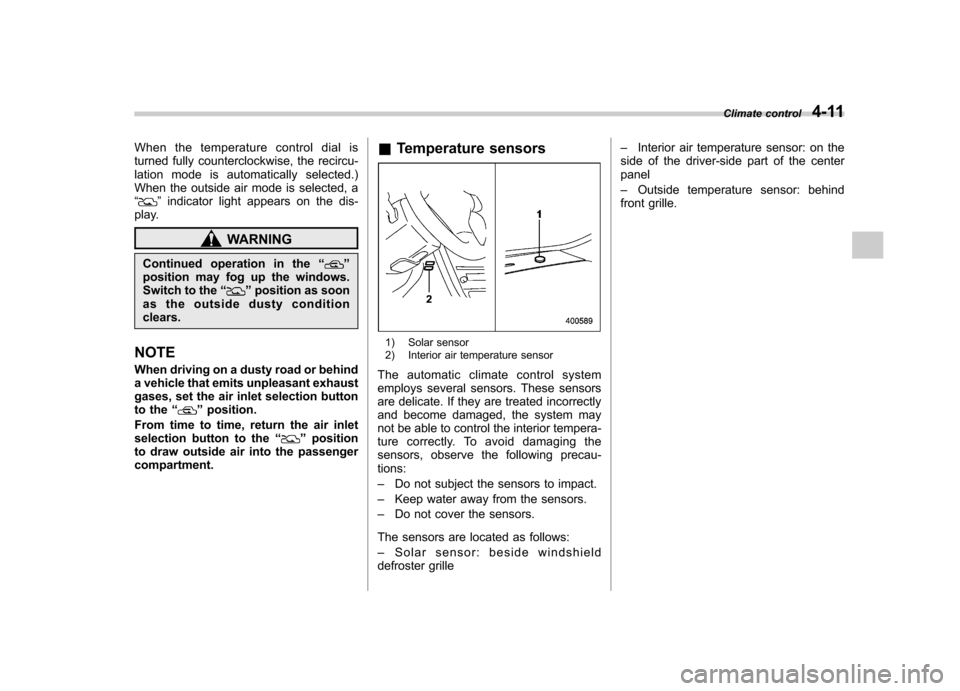
1) Solar sensor
2) Interior air temperature sensor
The automatic climate control system
employs several sensors. These sensors
are delicate. If they are treated incorrectly
and become damaged, the system may
not be able to control the interior tempera-
ture correctly. To avoid damaging the
sensors, observe the following precau-tions: – Do not subject the sensors to impact.
– Keep water away from the sensors.
– Do not cover the sensors.
The sensors are located as follows:– Solar sensor: beside windshield
defroster grille –
Interior air temperature sensor: on the
side of the driver-side part of the center panel – Outside temperature sensor: behind
front grille. Climate control
4-11