display SUBARU OUTBACK 2010 5.G Owner's Guide
[x] Cancel search | Manufacturer: SUBARU, Model Year: 2010, Model line: OUTBACK, Model: SUBARU OUTBACK 2010 5.GPages: 448, PDF Size: 7.36 MB
Page 208 of 448
5-32Audio
side to reduce the volume.
A number indicating the volume will be
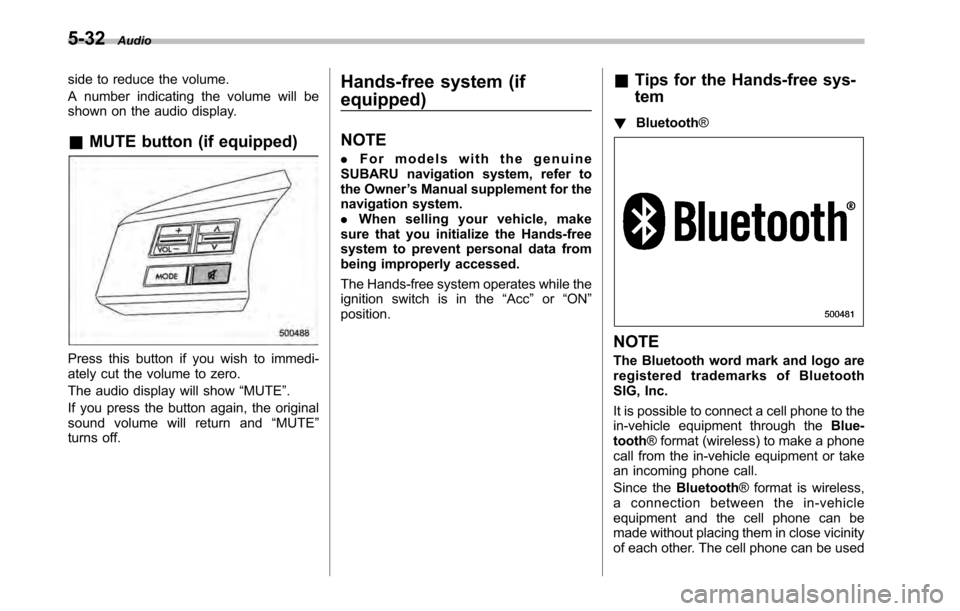
shown on the audio display. &MUTE button (if equipped)
Press this button if you wish to immedi-
ately cut the volume to zero.
The audio display will show “MUTE ”.
If you press the button again, the original
sound volume will return and “MUTE ”
turns off. Hands-free system (if equipped) NOTE .
For models with the genuine
SUBARU navigation system, refer to
the Owner ’s Manual supplement for the
navigation system.. When selling your vehicle, make
sure that you initialize the Hands-free
system to prevent personal data from
being improperly accessed.
The Hands-free system operates while the
ignition switch is in the “Acc ”or “ON ”
position. &
Tips for the Hands-free sys- tem
! Bluetooth ®NOTE
The Bluetooth word mark and logo are
registered trademarks of Bluetooth
SIG, Inc.
It is possible to connect a cell phone to the
in-vehicle equipment through the Blue-
tooth ® format (wireless) to make a phone
call from the in-vehicle equipment or take
an incoming phone call.
Since the Bluetooth® format is wireless,
a connection between the in-vehicle
equipment and the cell phone can be
made without placing them in close vicinity
of each other. The cell phone can be used
Page 211 of 448

“TUNE/TRACK/CH ”dial.
4. Select “Pair phone ”by operating the
“ TUNE/TRACK/CH ”dial.
5. Press the talk switch. Refer to “Voice
command system ”F 5-40.
6. Say the name to be registered.
7. Select “Confirm ”by operating the
“ TUNE/TRACK/CH ”dial or say “Confirm ”.
Then a pass key is displayed.
8. Input the displayed pass key into the
cell phone while “PASS KEY: **** ”is
displayed. If you input the correct pass
key, “Paired ”is displayed and the register-
ing procedure is finished. If you input an
incorrect pass key, “Failed ”is displayed
and the registering procedure was not successful. ! Inputting the phone number
1. Press the OFF hook switch.
2. Select “Phonebook ”by operating the
“ TUNE/TRACK/CH ”dial.
3. Select “Add Entry ”by operating the
“ TUNE/TRACK/CH ”dial.
4. Select “Manual Input ”by operating the
“ TUNE/TRACK/CH ”dial.
5. Input the phone number to be regis- tered. NOTE
While inputting the phone numbers, if “
Go Back ”is chosen using the “TUNE/
TRACK/CH ”dial, the character that was
input last is deleted. ! Registering the phonebook data.
1. Input the phone number to be regis-
tered. Refer to “Inputting the phone
number ”F 5-35.
2. Say the name to be registered. 3. “Confirm ”is displayed.
4. Press the “TUNE/TRACK/CH ”dial.
5. “Stored ”is displayed.
6. Select “Speed Dial ”by operating the
“ TUNE/TRACK/CH ”dial.
7. Select the phone number to be regis- tered.
Preset buttons
8. Press the preset button in which you
want to register the number. The number
is then registered. ! Page scroll
Audio 5-35
– CONTINUED –
Page 237 of 448
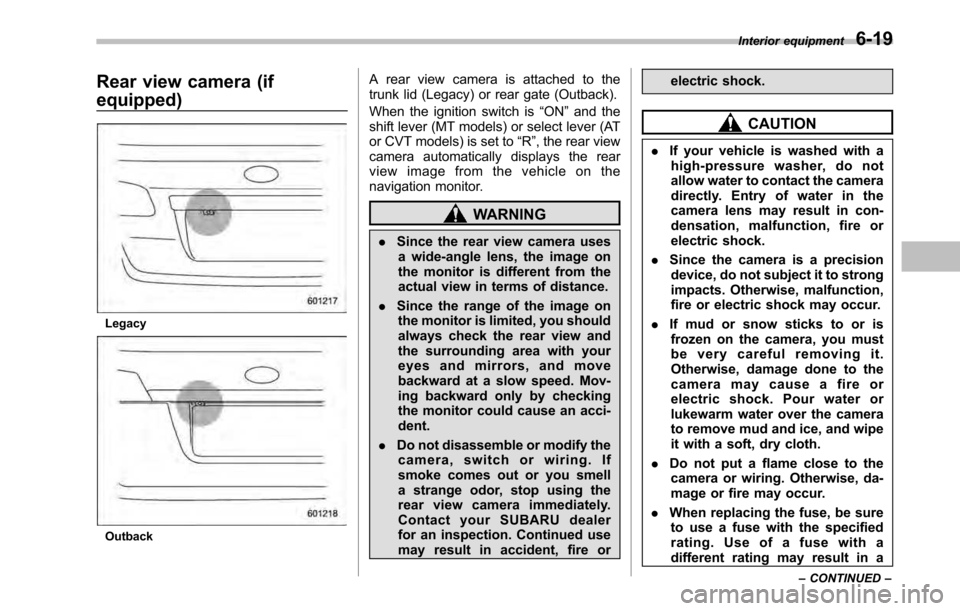
Rear view camera (if equipped)
Legacy
OutbackA rear view camera is attached to the
trunk lid (Legacy) or rear gate (Outback).
When the ignition switch is
“ON ”and the
shift lever (MT models) or select lever (AT
or CVT models) is set to “R ”, the rear view
camera automatically displays the rear
view image from the vehicle on the
navigation monitor.
WARNING
. Since the rear view camera uses
a wide-angle lens, the image on
the monitor is different from the
actual view in terms of distance.
. Since the range of the image on
the monitor is limited, you should
always check the rear view and
the surrounding area with your
eyes and mirrors, and move
backward at a slow speed. Mov-
ing backward only by checking
the monitor could cause an acci-dent.
. Do not disassemble or modify the
camera, switch or wiring. If
smoke comes out or you smell
a strange odor, stop using the
rear view camera immediately.
Contact your SUBARU dealer
for an inspection. Continued use
may result in accident, fire or electric shock.
CAUTION
. If your vehicle is washed with a
high-pressure washer, do not
allow water to contact the camera
directly. Entry of water in the
camera lens may result in con-
densation, malfunction, fire or
electric shock.
. Since the camera is a precision
device, do not subject it to strong
impacts. Otherwise, malfunction,
fire or electric shock may occur.
. If mud or snow sticks to or is
frozen on the camera, you must
be very careful removing it.
Otherwise, damage done to the
camera may cause a fire or
electric shock. Pour water or
lukewarm water over the camera
to remove mud and ice, and wipe
it with a soft, dry cloth.
. Do not put a flame close to the
camera or wiring. Otherwise, da-
mage or fire may occur.
. When replacing the fuse, be sure
to use a fuse with the specified
rating. Use of a fuse with a
different rating may result in a Interior equipment
6-19
– CONTINUED –
Page 238 of 448

6-20Interior equipment
malfunction.
. If the rear view camera is used for
a long time while the engine is
not operated, the battery may
become completely discharged.
NOTE . Do not wipe the camera with alcohol,
benzine or paint thinner. Otherwise,
discoloration may occur. To remove
contamination, wipe the camera with a
cloth moistened with a diluted neutral
detergent and then wipe it with a soft,
dry cloth.. When waxing the vehicle, be careful
not to apply the wax to the camera. If it
comes in contact with the camera,
moisten a clean cloth with a diluted
neutral detergent to remove the wax. . The camera lens has hard coating to
help prevent scratches. However, when
washing the vehicle or cleaning the
camera lens, be careful not to scratch
the camera lens. Do not use a washing
brush directly on the camera lens. The
monitor screen may be adversely af-fected.. Strong light shined on the camera
lens may develop white light stripes
around the light source. This is not amalfunction. .
Under fluorescent light, the display
may flicker. However, this is not amalfunction.. The image of the rear view camera
may be slightly different from the
actual color of the objects.
& How to use the rear view camera
When the shift lever or select lever is set to “R ”, the rear view camera automatically
displays the rear view image from the
vehicle. When the lever is set to other
positions, the image before setting to “R ”
is displayed.
1. Set the ignition switch to “ON ”.
2. Set the shift lever or select lever to “R ”.
NOTE . For models with the genuine
SUBARU navigation system, the image
of the rear view camera has priority
over other screen displays. Therefore,
while the rear view camera is in opera-
tion, the operations of other screens
are disabled. To operate other screens,
set the shift lever or select lever to a
position other than “R ”.
. The image of the rear view camera is
horizontally reversed as is the case
with the vehicle rearview mirror or the side view mirror..
It may be difficult to see the image of
the rearview camera in the following
cases. This is not a malfunction of thecamera.
–The vehicle is in a dark place (at
night, in a tunnel, etc.). – The vehicle is in an extremely hot
or cold place.– An object (such as raindrops,
snow, dirt, etc.) that disturbs the
view of the rear view camera sticks
to the lens of the camera. – Strong light shined directly on
the camera lens (occasionally, there
are vertical lines on the screen).
Page 241 of 448
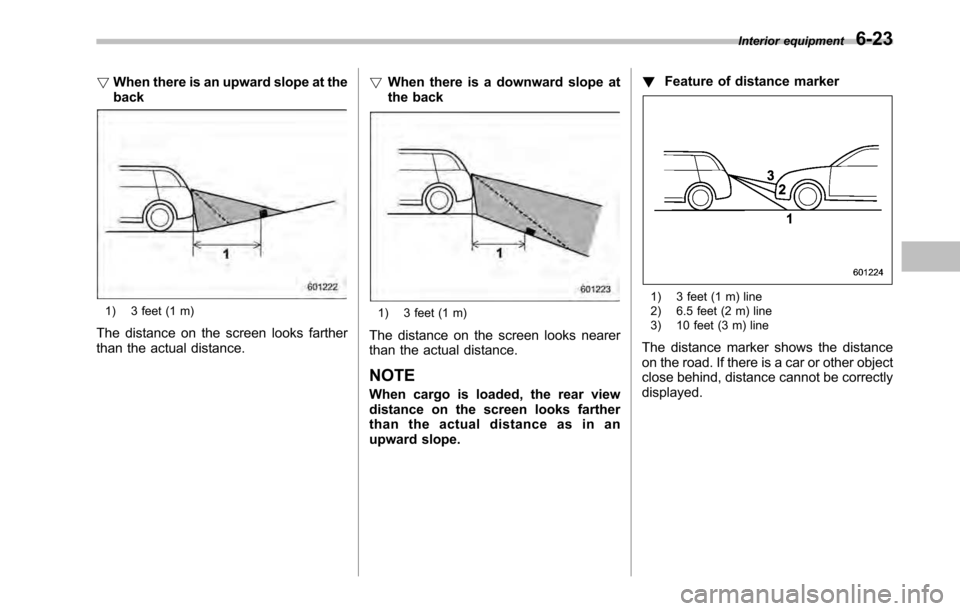
!When there is an upward slope at the back
1) 3 feet (1 m)
The distance on the screen looks farther
than the actual distance. !
When there is a downward slope at
the back1) 3 feet (1 m)
The distance on the screen looks nearer
than the actual distance. NOTE
When cargo is loaded, the rear view
distance on the screen looks farther
thantheactualdistanceasinan
upward slope. !
Feature of distance marker
1) 3 feet (1 m) line
2) 6.5 feet (2 m) line
3) 10 feet (3 m) line
The distance marker shows the distance
on the road. If there is a car or other object
close behind, distance cannot be correctlydisplayed. Interior equipment
6-23
Page 254 of 448

7-12Starting and operating
vehicle ’s engine management system
determines there is a safety risk due to a
vehicle related problem, the vehicle will
shut down and the vehicle ’s horn will honk
three times. NOTE . If the alarm system is armed at the
time of remote engine start activation
(the security indicator light on the
combination meter is flashing), the
alarm system will remain armed
throughout the remote start run cycle.. If the alarm system is disarmed at
the time of remote engine start activa-
tion (the security indicator light on the
combination meter is not flashing), the
alarm system will remain disarmed
throughout the remote start run cycle. & Entering the vehicle while it
is running via remote start
1. Unlock the vehicle doors using the
remote keyless entry system. If the vehi-cle ’s doors are unlocked manually using
the key, the vehicle ’s alarm system will
trigger (if the alarm system is armed prior
to activating the remote engine start
system) and the engine will turn off.
Inserting the key into the ignition switch
and turning it to the “ON ”position or
pressing the unlock button “
”on the remote keyless entry transmitter will dis-
arm the alarm system. Refer to
“Alarm
system ”F 2-16.
2. Enter the vehicle.
3. The engine will shut down when any
door or trunk/rear gate is opened.
4. Insert the key into the ignition switch
and turn to the “START ”position to restart
the engine.
& Remote start confirmation
transmitter feature
Your remote engine start transmitter is
equipped with a unique bidirectional con-
firmation feature. This feature will allow
the transmitter ’s backlit button to display
the status of the system under the condi-
tion that the vehicle and transmitter are
within the operational range of the system.
Typical transmitter button flash sequences
are outlined in the following chart.
Page 352 of 448
11-16Maintenance and service
&Recommended grade and viscosity
CAUTION
Use only engine oil with the recom-
mended grade and viscosity.
Oil grade: –ILSAC GF-4, which can be identified
with the ILSAC certification mark (Star-
burst mark) – or API classification SM with the words
“ ENERGY CONSERVING ”
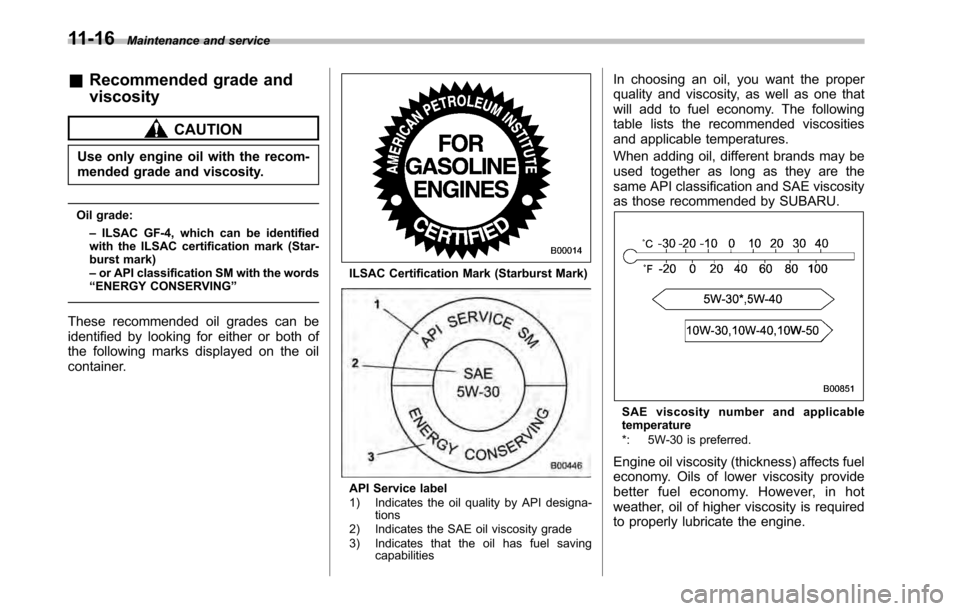
These recommended oil grades can be
identified by looking for either or both of
the following marks displayed on the oil
container.
ILSAC Certification Mark (Starburst Mark)
API Service label
1) Indicates the oil quality by API designa- tions
2) Indicates the SAE oil viscosity grade
3) Indicates that the oil has fuel saving capabilities In choosing an oil, you want the proper
quality and viscosity, as well as one that
will add to fuel economy. The following
table lists the recommended viscosities
and applicable temperatures.
When adding oil, different brands may be
used together as long as they are the
same API classification and SAE viscosity
as those recommended by SUBARU.
SAE viscosity numb
er and applicable
temperature
*: 5W-30 is preferred.
Engine oil viscosity (thickness) affects fuel
economy. Oils of lower viscosity provide
better fuel economy. However, in hot
weather, oil of higher viscosity is required
to properly lubricate the engine.
Page 435 of 448

Dome........................................................... 6-2, 11-58
Door step ............................................................. 11-60
Front fog ...................................................... 3-30, 11-53
Front position ....................................................... 11-53
Ignition switch .......................................................... 3-4
License plate ........................................................ 11-57
Map ............................................................. 6-2, 11-59
Rear combination .................................................. 11-54
Tail and rear side marker (Outback) ......................... 11-55
Tail/Back-up (Outback) ........................................... 11-56
Trunk ................................................................... 11-60
Turn signal ......................................... 3-29, 11-53, 11-54
Vanity mirror .................................................. 6-5, 11-59
Loading your vehicle .................................................. 8-12
Low fuel warning light ........................................... 3-8, 3-19
Low tire pressure warning light .................................... 3-15
Lower and tether anchorage ........................................ 1-33
M
Main fuse ................................................................. 11-50
Maintenance
Precautions ........................................................... 11-3
Schedule .............................................................. 11-3
Seatbelt ................................................................ 1-22
Tips...................................................................... 11-5
Tools ...................................................................... 9-3
Malfunction indicator lamp (check engine warning light) ..................................... 3-12
Manual Climate control system ............................................. 4-4
Mode .................................................................... 7-21 Seat
....................................................................... 1-3
Transmission ......................................................... 7-16
Transmission oil ................................................... 11-23
Map light ........................................................... 6-2, 11-59
Maximum load limits ................................................... 8-19
Meters and gauges ...................................................... 3-5
Mirror defogger .......................................................... 3-34
Mirrors ...................................................................... 3-36
Moonroof ........................................................... 2-28, 9-20
Multi function display ................................................... 3-24
N
New vehicle break-in driving ......................................... 8-2
OOdometer ................................................................... 3-6
Off road driving ........................................................... 8-6
Oil filter ................................................................... 11-14
Oil level
Engine ................................................................ 11-12
Front differential gear ............................................ 11-26
Manual transmission ............................................. 11-23
Rear differential gear ............................................ 11-27
Warning light .......................................................... 3-14
Oil pressure warning light ............................................ 3-14
Outside
Mirror defogger ...................................................... 3-34
Mirrors .................................................................. 3-38
Overhead console ....................................................... 6-8
Overheating engine .................................................... 9-12 Index
14-7