audio SUBARU OUTBACK 2010 5.G Service Manual
[x] Cancel search | Manufacturer: SUBARU, Model Year: 2010, Model line: OUTBACK, Model: SUBARU OUTBACK 2010 5.GPages: 448, PDF Size: 7.36 MB
Page 211 of 448

“TUNE/TRACK/CH ”dial.
4. Select “Pair phone ”by operating the
“ TUNE/TRACK/CH ”dial.
5. Press the talk switch. Refer to “Voice
command system ”F 5-40.
6. Say the name to be registered.
7. Select “Confirm ”by operating the
“ TUNE/TRACK/CH ”dial or say “Confirm ”.
Then a pass key is displayed.
8. Input the displayed pass key into the
cell phone while “PASS KEY: **** ”is
displayed. If you input the correct pass
key, “Paired ”is displayed and the register-
ing procedure is finished. If you input an
incorrect pass key, “Failed ”is displayed
and the registering procedure was not successful. ! Inputting the phone number
1. Press the OFF hook switch.
2. Select “Phonebook ”by operating the
“ TUNE/TRACK/CH ”dial.
3. Select “Add Entry ”by operating the
“ TUNE/TRACK/CH ”dial.
4. Select “Manual Input ”by operating the
“ TUNE/TRACK/CH ”dial.
5. Input the phone number to be regis- tered. NOTE
While inputting the phone numbers, if “
Go Back ”is chosen using the “TUNE/
TRACK/CH ”dial, the character that was
input last is deleted. ! Registering the phonebook data.
1. Input the phone number to be regis-
tered. Refer to “Inputting the phone
number ”F 5-35.
2. Say the name to be registered. 3. “Confirm ”is displayed.
4. Press the “TUNE/TRACK/CH ”dial.
5. “Stored ”is displayed.
6. Select “Speed Dial ”by operating the
“ TUNE/TRACK/CH ”dial.
7. Select the phone number to be regis- tered.
Preset buttons
8. Press the preset button in which you
want to register the number. The number
is then registered. ! Page scroll
Audio 5-35
– CONTINUED –
Page 212 of 448
5-36Audio
If the registered name or phone number
has more than 12 characters, press the“TEXT ”button for more than 1.5 seconds
to scroll the name or phone number. ! Making a phone call
! Making a phone call from the phone book
It is possible to select a phone number
from the phonebook registered with the in-
vehicle equipment to make a phone call.
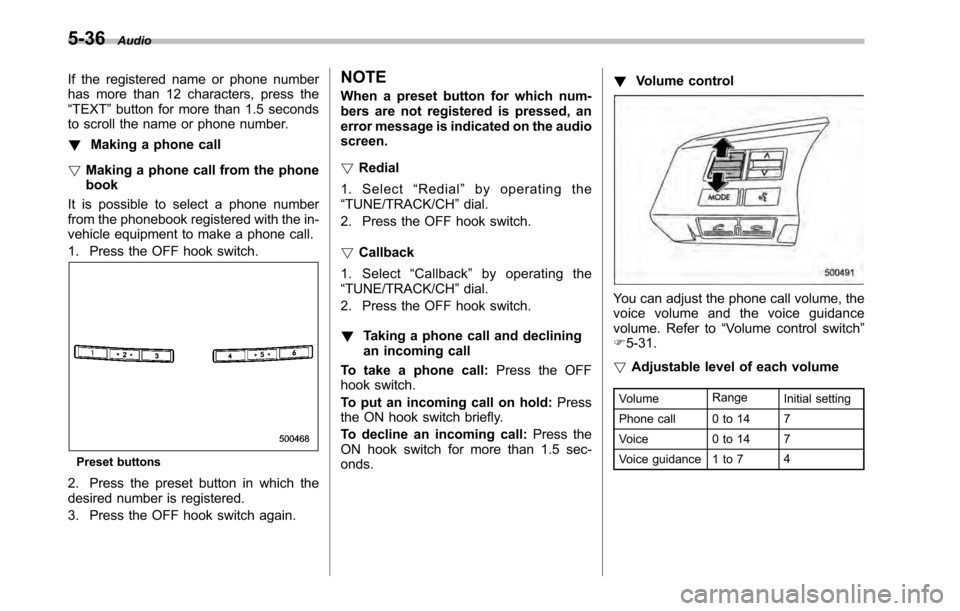
1. Press the OFF hook switch.
Preset buttons
2. Press the preset button in which the
desired number is registered.
3. Press the OFF hook switch again. NOTE
When a preset button for which num-
bers are not registered is pressed, an
error message is indicated on the audioscreen. !
Redial
1. Select “Redial ”by operating the
“ TUNE/TRACK/CH ”dial.
2. Press the OFF hook switch. ! Callback
1. Select “Callback ”by operating the
“ TUNE/TRACK/CH ”dial.
2. Press the OFF hook switch. ! Taking a phone call and declining
an incoming call
To take a phone call: Press the OFF
hook switch.
To put an incoming call on hold: Press
the ON hook switch briefly.
To decline an incoming call: Press the
ON hook switch for more than 1.5 sec- onds. !
Volume control
You can adjust the phone call volume, the
voice volume and the voice guidance
volume. Refer to “Volume control switch ”
F 5-31.
! Adjustable level of each volume
Volume Range
Initial setting
Phone call 0 to 14 7
Voice 0 to 14 7
Voice guidance 1 to 7 4
Page 213 of 448

!Menu list of the Hands-free system
Turn the “TUNE/TRACK/CH ”dial to select
a menu, and then press the dial to enter
the selected menu. NOTE
For details about the operation, follow
the voice guidance. Audio
5-37
– CONTINUED –
Page 214 of 448

5-38Audio
First menu Second menu Third menu Details
Phonebook* Add Entry —Adding a new number
Change Name —Changing a name registered in the phonebook
List Names —Showing the list of the names registered in the phonebook
Speed Dial —Registering a speed dial
Delete Entry —Deleting phonebook data
Del Spd Dial —Deleting a registered speed dial.
Go Back —
Redial —— Redialing
Callback —— Dialing a number stored in the incoming call history memory
*: If a cell phone is not registered, the menu described in the chart is not indicated.
Page 215 of 448

First menu Second menu Third menuDetails
Setup Security Set Pin Setting a PIN code
Phbk Lock Locking the phonebook*
Phbk Unlock Unlocking the phonebook*
Go Back
Phone setup Pair Phone Registering a new cell phone
Select Phone Selecting a cell phone to be used
Change Name Changing the registered name of the cell phone
List Phones Showing the list of the registered cell phones
Set Passkey Changing the pass key
Delete Deleting the registered cell phone
Go Back
System setup Guidance Vol Setting the volume of the voice guidance
Initialize Initialization
Go Back
Go Back —
*: If a PIN code is not registered, the menu described in the chart is not available. Audio
5-39
– CONTINUED –
Page 216 of 448
5-40Audio
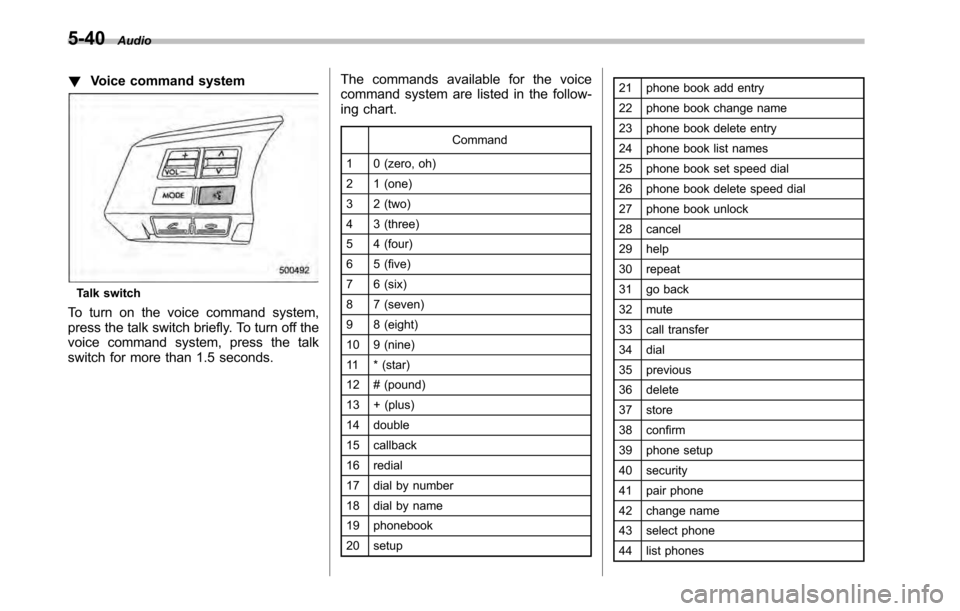
!Voice command system
Talk switch
To turn on the voice command system,
press the talk switch briefly. To turn off the
voice command system, press the talk
switch for more than 1.5 seconds. The commands available for the voice
command system are listed in the follow-
ing chart.
Command
1 0 (zero, oh)
2 1 (one)
3 2 (two)
4 3 (three)
5 4 (four)
6 5 (five)
7 6 (six)
8 7 (seven)
9 8 (eight)
10 9 (nine)
11 * (star)
12 # (pound)
13 + (plus)
14 double
15 callback
16 redial
17 dial by number
18 dial by name
19 phonebook
20 setup 21 phone book add entry
22 phone book change name
23 phone book delete entry
24 phone book list names
25 phone book set speed dial
26 phone book delete speed dial
27 phone book unlock
28 cancel
29 help
30 repeat
31 go back
32 mute
33 call transfer
34 dial
35 previous
36 delete
37 store
38 confirm
39 phone setup
40 security
41 pair phone
42 change name
43 select phone
44 list phones
Page 217 of 448

45 set pass key
46 list phone
47 add entry
48 delete entry
49 delete speed dial
50 by voice
51 voice
52 by phone
53 phone
54 call history
55 by call history
56 set speed dial
57 next
58 incoming
59 outgoing
60 list names
61 set PIN
62 phone book lock
63 PIN setup 64send Audio
5-41
Page 331 of 448

Exterior care....................................................... 10-2
Washing ............................................................. 10-2
Waxing and polishing ......................................... 10-3
Cleaning aluminum wheels ................................. 10-3
Corrosion protection .......................................... 10-4
Most common causes of corrosion ..................... 10-4
To help prevent corrosion ................................... 10-4 Cleaning the interior
.......................................... 10-5
Seat fabric ......................................................... 10-5
Leather seat materials ........................................ 10-5
Synthetic leather upholstery ............................... 10-5
Climate control panel, audio panel, instrument panel, console panel, switches, combination
meter, and other plastic surface ....................... 10-5
Navigation monitor (if equipped) ........................ 10-6
Appearance care
10
Page 335 of 448

Cleaning the interior
Use a soft, damp cloth to clean the climate
control panel, audio equipment, instru-
ment panel, center console, combination
meter panel, and switches. (Do not use
organic solvents.) &Seat fabric
Remove loose dirt, dust or debris with a
vacuum cleaner. If the dirt is caked on the
fabric or hard to remove with a vacuum
cleaner, use a soft brush then vacuum it.
Wipe the fabric surface with a tightly
wrung cloth and dry the seat fabric
thoroughly. If the fabric is still dirty, wipe
using a solution of mild soap and luke-
warm water then dry thoroughly.
If the stain does not come out, try a
commercially-available fabric cleaner. Use
the cleaner on a hidden place and make
sure it does not affect the fabric adversely.
Use the cleaner according to its instruc-tions. NOTE
When cleaning the seat, do not use
benzine, paint thinner, or any similarmaterials. &
Leather seat materials
The leather used by SUBARU is a high
quality natural product which will retain its
distinctive appearance and feel for many
years with proper care.
Allowing dust or road dirt to build up on the
surface can cause the material to become
brittle and to wear prematurely. Regular
cleaning with a soft, moist, natural fiber
cloth should be performed monthly, taking
care not to soak the leather or allow water
to penetrate the stitched seams.
A mild detergent suitable for cleaning
woolen fabrics may be used to remove
difficult dirt spots, rubbing with a soft, dry
cloth afterwards to restore the luster. If
your SUBARU is to be parked for a long
time in bright sunlight, it is recommended
that the seats and headrests be covered,
or the windows shaded, to prevent fading
or shrinkage.
Minor surface blemishes or bald patches
may be treated with a commercial leather
spray lacquer. You will discover that each
leather seat section will develop soft folds
or wrinkles, which is characteristic of
genuine leather. & Synthetic leather upholstery
The synthetic leather material used on the
SUBARU may be cleaned using mild soap or detergent and water, after first vacuum-
ing or brushing away loose dirt. Allow the
soap to soak in for a few minutes and wipe
off with a clean, damp cloth. Commercial
foam-type cleaners suitable for synthetic
leather materials may be used when
necessary.
NOTE
Strong cleaning agents such as sol-
vents, paint thinners, window cleaner
or gasoline must never be used on
leather or synthetic interior materials. & Climate control panel, audio
panel, instrument panel,
console panel, switches,
combination meter, and other
plastic surface
Use a soft, damp cloth to clean the climate
control panel, audio equipment, instru-
ment panel, center console, combination
meter panel, and switches. NOTE
Do not use organic solvents such as
paint thinners or gasoline, or strong
cleaning agents that contain thosesolvents. Appearance care
10-5
– CONTINUED –
Page 403 of 448

Fuse
panel Fuse
rating Circuit
13 20A .Socket
14 Empty
15 20A .Rear power window
(right side)
16 Empty
17 15A .Front wiper deicer
18 7.5A .Back-up light
19 7.5A .Electronic parking
brake unit
. Hill Holder system unit
20 10A .Accessory power outlet
21 7.5A .Starter relay
22 15A .Air conditioner
23 Empty
24 15A .Audio
. Navigation system
25 15A .SRS airbag system
26 7.5A .Main fan
27 30A .Power window relay Fuse
panel Fuse
rating Circuit
28 Empty
29 20A .Power window
(passenger ’s side)
30 Empty
31 7.5A .Automatic air condi-
tioner unit
32 Empty
33 7.5A .ABS/Vehicle dynamics
control unit
. Power steering Specifications
12-7
– CONTINUED –