audio SUBARU OUTBACK 2017 6.G Owners Manual
[x] Cancel search | Manufacturer: SUBARU, Model Year: 2017, Model line: OUTBACK, Model: SUBARU OUTBACK 2017 6.GPages: 610, PDF Size: 10.28 MB
Page 344 of 610
very low levels of RF energy that it
deemed to comply without maximum
permissive exposure evaluation (MPE).
Cet équipement est conforme aux limites
d’exposition aux rayonnements énoncées
pour un environnement non contrôlé et
respecte les lignes directrices d ’exposition
aux fréquences radioélectriques de la
FCC dans le Supplément C à OET65 et
d ’exposition aux fréquences radioélectri-
ques (RF) CNR-102 de l ’IC. Cet équipe-
ment émet une énergie RF très faible qui
est considérée conforme sans évaluation
de l ’exposition maximale autorisée.
FCC CAUTION
Changes or modifications not expressly
approved by the party responsible for
compliance could void the user ’s authority
to operate the equipment.
This transmitter must not be co-located or
operated in conjunction with any other
antenna or transmitter.& Certification for Mexico mod-
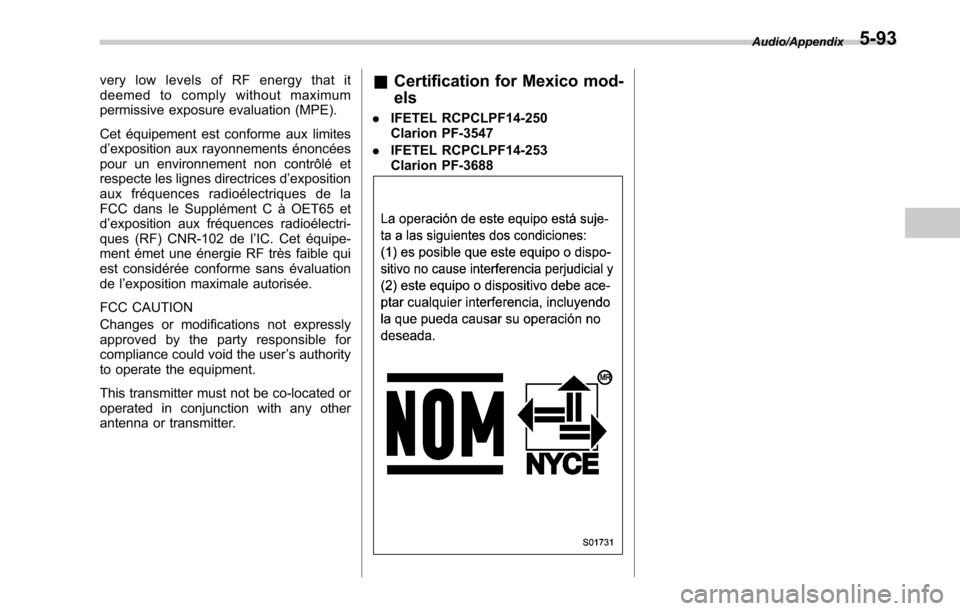
els
. IFETEL RCPCLPF14-250
Clarion PF-3547
. IFETEL RCPCLPF14-253
Clarion PF-3688
Audio/Appendix5-93
Page 353 of 610
Interior equipment/Cup holder
Cup holder
CAUTION
Take care to avoid spills. Beverages,
if hot, might burn you and/or your
passengers. Spilled beverages may
also damage upholstery, carpets or
audio equipment.
&Front passenger ’s cup holder
CAUTION
. Do not pick up a cup from the cup
holder or put a cup in the holder
while you are driving, as this may
distract you and lead to an
accident.
. Take care not to spill a beverage
on the shift lever/select lever or
any switch(es) in the adjacent
area. If the beverage is spilled, it
may cause a malfunction of the
shift lever/select lever and/or
switch(es). !
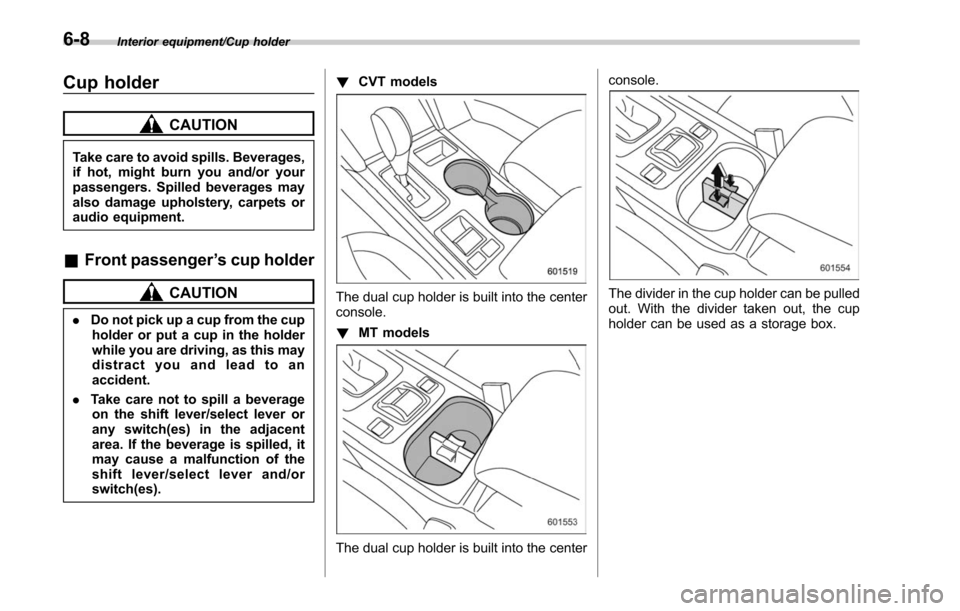
CVT models
The dual cup holder is built into the center
console.
!MT models
The dual cup holder is built into the center console.
The divider in the cup holder can be pulled
out. With the divider taken out, the cup
holder can be used as a storage box.
6-8
Page 366 of 610
A rear view camera is attached to the
trunk lid (Legacy) or rear gate (Outback).
When the ignition switch is“ON ”and the
shift lever (MT models) or select lever
(CVT models) is set to “R”, the rear view
camera automatically displays the rear
view image behind the vehicle on the
audio/navigation monitor.
WARNING
. Since the rear view camera uses
a wide-angle lens, the image on
the monitor is different from the
actual view in terms of distance.
. Since the range of the image on
the monitor is limited, you should
always check the rear view and
the surrounding area with your
eyes and mirrors, and move
backward at a slow speed. Mov-
ing backward only by checking
the rear view image from the
camera could cause an accident.
. Do not disassemble or modify the
camera, switch or wiring. If
smoke comes out or you smell
a strange odor, stop using the
rear view camera immediately.
Contact your SUBARU dealer
for an inspection. Continued use
may result in accident, fire or electric shock.
CAUTION
.
If your vehicle is washed with a
high-pressure washer, do not
allow water to contact the camera
directly. Entry of water in the
camera lens may result in con-
densation, malfunction, fire or
electric shock.
. Since the camera is a precision
device, do not subject it to strong
impacts. Otherwise, malfunction,
fire or electric shock may occur.
. If mud or snow sticks to or is
frozen on the camera, you must
be very careful removing it.
Otherwise, damage done to the
camera may cause a fire or
electric shock. Pour water or
lukewarm water over the camera
to remove mud and ice, and wipe
it with a soft, dry cloth.
. Do not put a flame close to the
camera or wiring. Otherwise, da-
mage or fire may occur.
. When replacing the fuse, be sure
to use a fuse with the specified
rating. Use of a fuse with a
different rating may result in a malfunction.
. If the rear view camera is used for
a long time while the engine is
not operated, the battery may
become completely discharged.
NOTE
. Do not wipe the camera with alcohol,
benzine or paint thinner. Otherwise,
discoloration may occur. To remove
contamination, wipe the camera with a
cloth moistened with a diluted neutral
detergent and then wipe it with a soft,
dry cloth.
. When waxing the vehicle, be careful
not to apply the wax to the camera. If it
comes in contact with the camera,
moisten a clean cloth with a diluted
neutral detergent to remove the wax.
. The camera lens has hard coating to
help prevent scratches. However, when
washing the vehicle or cleaning the
camera lens, be careful not to scratch
the camera lens. Do not use a washing
brush directly on the camera lens. The
monitor screen may be adversely af-
fected.
. Strong light shined on the camera
lens may develop white light stripes
around the light source. This is not a
malfunction.
Interior equipment/Rear view camera
–CONTINUED –6-21
Page 367 of 610
Interior equipment/Rear view camera
.Under fluorescent lighting, the dis-
play may flicker. However, this is not a
malfunction.
. The image of the rear view camera
may be slightly different from the
actual color of the objects.
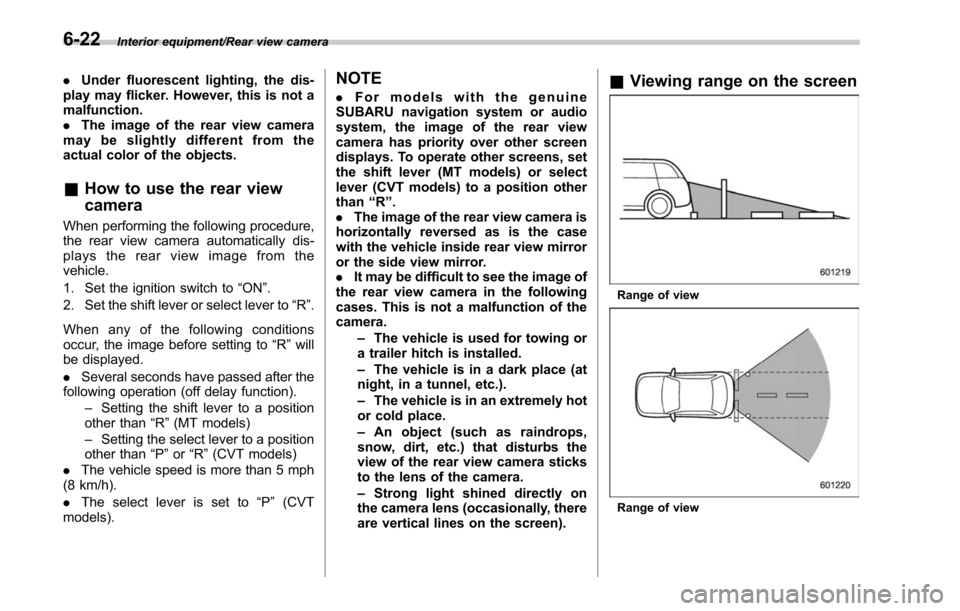
& How to use the rear view
camera
When performing the following procedure,
the rear view camera automatically dis-
plays the rear view image from the
vehicle.
1. Set the ignition switch to “ON”.
2. Set the shift lever or select lever to “R”.
When any of the following conditions
occur, the image before setting to “R”will
be displayed.
. Several seconds have passed after the
following operation (off delay function).
–Setting the shift lever to a position
other than “R”(MT models)
– Setting the select lever to a position
other than “P”or “R”(CVT models)
. The vehicle speed is more than 5 mph
(8 km/h).
. The select lever is set to “P”(CVT
models).
NOTE
. For models with the genuine
SUBARU navigation system or audio
system, the image of the rear view
camera has priority over other screen
displays. To operate other screens, set
the shift lever (MT models) or select
lever (CVT models) to a position other
than “R ”.
. The image of the rear view camera is
horizontally reversed as is the case
with the vehicle inside rear view mirror
or the side view mirror.
. It may be difficult to see the image of
the rear view camera in the following
cases. This is not a malfunction of the
camera.
–The vehicle is used for towing or
a trailer hitch is installed.
– The vehicle is in a dark place (at
night, in a tunnel, etc.).
– The vehicle is in an extremely hot
or cold place.
– An object (such as raindrops,
snow, dirt, etc.) that disturbs the
view of the rear view camera sticks
to the lens of the camera.
– Strong light shined directly on
the camera lens (occasionally, there
are vertical lines on the screen).& Viewing range on the screen
Range of view
Range of view
6-22
Page 434 of 610
Reverse Automatic Braking
System (if equipped)
Reverse Automatic Braking is a system
designed to help avoid collisions or reduce
collision damage when reversing the
vehicle. If a wall or an obstacle is detected
in the reversing direction, the system will
notify the driver with a warning sound and
may activate the vehicle’s brakes auto-
matically.
WARNING
. Reverse Automatic Braking is not
a system intended to replace the
driver ’s responsibility to check
their surroundings for vehicles
or obstacles to avoid a collision.
. The driver is responsible for
driving safely. Always be sure to
check the surroundings visually
when reversing the vehicle.
. Since the system operation has
various limitations, the warning
sound or automatic braking may
be delayed or may not operate at
all even when an obstacle is
present in the reversing direc-
tion.
. The system is not designed to detect people (including chil-
dren), animals or other moving
objects.
. Depending on the vehicle condi-
tion or the surrounding environ-
ment, the sonar sensor ’s ability
to detect objects may become
unstable.
NOTE
The Reverse Automatic Braking Sys-
tem records and stores the following
data when automatic braking operates.
It does not record conversations, per-
sonal information or other audio data.
. Distance from the object
. Vehicle speed
. Accelerator pedal operation status
. Brake pedal operation status
. Select lever position
. Outside temperature
. The sensitivity setting of the sonar
sensors
SUBARU and third parties contracted
by SUBARU may acquire and use the
recorded data for the purpose of vehi-
cle research and development.
SUBARU and third parties contracted
by SUBARU will not disclose or pro-
vide the acquired data to any other third party except under the following
conditions.
.
The vehicle owner has given his/her
consent.
. The disclosure/provision is based
on a court order or other legally
enforceable request.
. Data that has been modified so that
the user and vehicle cannot be identi-
fied is provided to a research institu-
tion for statistical processing or similar
purposes.
& Reverse Automatic Braking
System overview
The system detects objects using sonar
sensors installed in the rear bumper.
. If the system determines a possible
collision with an object in the reversing
direction, automatic deceleration will be
activated. Also, beeping sounds will acti-
vate.
. If the vehicle is further reversed, auto-
matic hard braking will be applied and a
continuous beeping sound will activate.
Starting and operating/Reverse Automatic Braking System
–CONTINUED –7-63
Page 437 of 610
Starting and operating/Reverse Automatic Braking System
near the sonar sensor
–Commercial electronic parts
(fog light, fender pole, radio
antenna) or commercial at-
tachment parts (trailer hitch,
bicycle carrier, bumper guard)
are attached
– Parts that emit high frequency
sound, such as a horn or
speaker, are attached
Vehicle conditions – The vehicle is significantly
inclined
– The ground clearance is sig-
nificantly reduced due to the
vehicle’ s loading condition,
etc.
– When the sonar sensor is
misaligned due to a collision
or an accident
Surrounding environment – A cloth banner, flag, hanging
branch or railroad crossing
bars are present in the rever-
sing direction
– When reversing on a gravel or
grassy area
– When reversing in an area
where objects or walls are
adjacent to the vehicle such as narrow tunnels, narrow
bridges, narrow roads or nar-
row garages
– Wheel track or hole is present
in the ground of the reversing
direction
– When reversing over a drai-
nage cover (grating cover)
– The path of the reversing
direction is inclined such as
on a steep uphill
– A curb is present in the rever-
sing direction
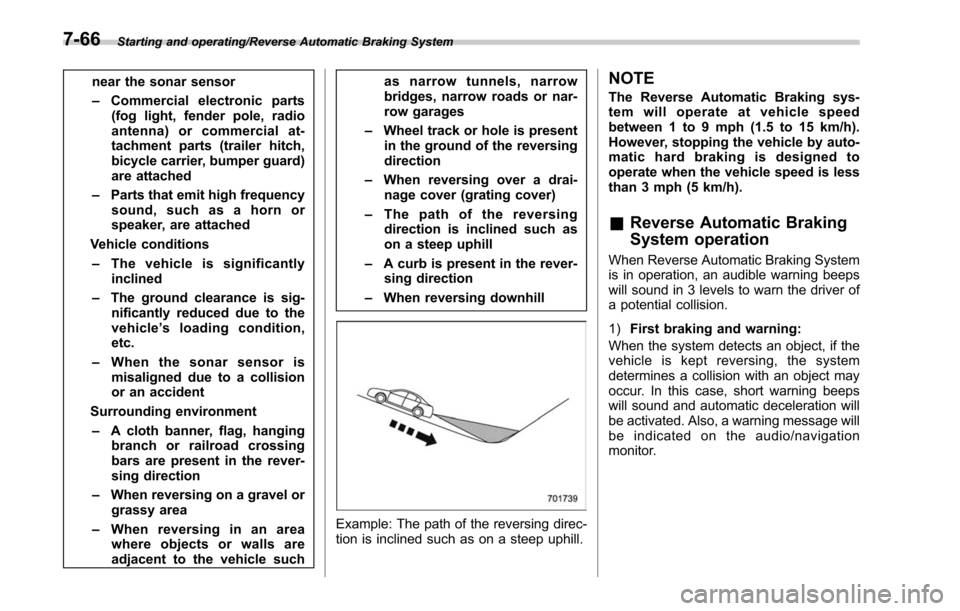
– When reversing downhill
Example: The path of the reversing direc-
tion is inclined such as on a steep uphill.
NOTE
The Reverse Automatic Braking sys-
tem will operate at vehicle speed
between 1 to 9 mph (1.5 to 15 km/h).
However, stopping the vehicle by auto-
matic hard braking is designed to
operate when the vehicle speed is less
than 3 mph (5 km/h).
&Reverse Automatic Braking
System operation
When Reverse Automatic Braking System
is in operation, an audible warning beeps
will sound in 3 levels to warn the driver of
a potential collision.
1) First braking and warning:
When the system detects an object, if the
vehicle is kept reversing, the system
determines a collision with an object may
occur. In this case, short warning beeps
will sound and automatic deceleration will
be activated. Also, a warning message will
be indicated on the audio/navigation
monitor.
7-66
Page 438 of 610
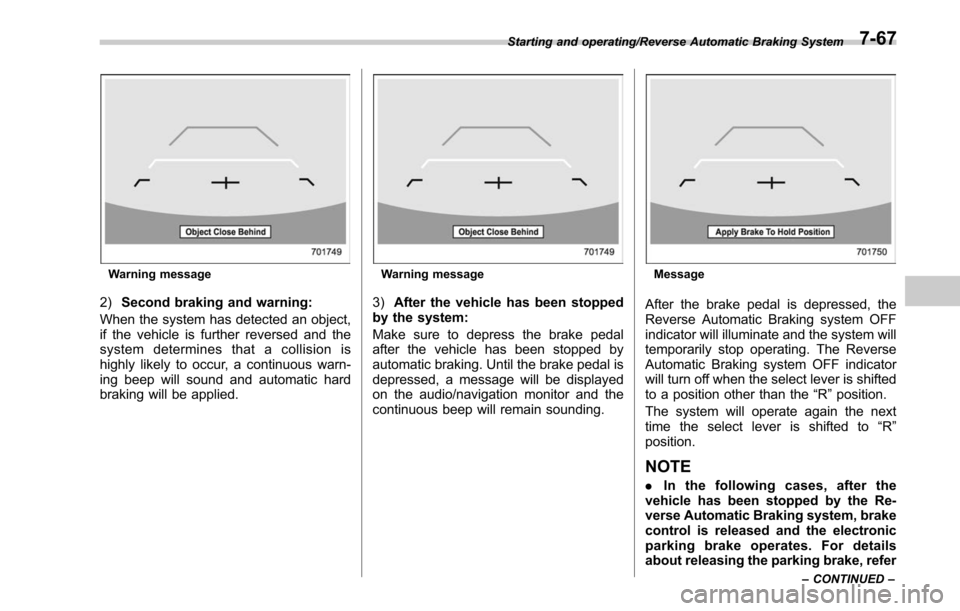
Warning message
2)Second braking and warning:
When the system has detected an object,
if the vehicle is further reversed and the
system determines that a collision is
highly likely to occur, a continuous warn-
ing beep will sound and automatic hard
braking will be applied.
Warning message
3) After the vehicle has been stopped
by the system:
Make sure to depress the brake pedal
after the vehicle has been stopped by
automatic braking. Until the brake pedal is
depressed, a message will be displayed
on the audio/navigation monitor and the
continuous beep will remain sounding.
Message
After the brake pedal is depressed, the
Reverse Automatic Braking system OFF
indicator will illuminate and the system will
temporarily stop operating. The Reverse
Automatic Braking system OFF indicator
will turn off when the select lever is shifted
to a position other than the “R”position.
The system will operate again the next
time the select lever is shifted to “R”
position.
NOTE
. In the following cases, after the
vehicle has been stopped by the Re-
verse Automatic Braking system, brake
control is released and the electronic
parking brake operates. For details
about releasing the parking brake, refer
Starting and operating/Reverse Automatic Braking System
–CONTINUED –7-67
Page 440 of 610
&Canceling the Reverse Auto-
matic Braking system opera-
tion
The Reverse Automatic Braking system
can be temporarily canceled by any of the
following operation.
. While automatic braking is in operation,
the brake pedal is depressed
. While automatic braking is in operation,
the accelerator pedal is depressed
. The accelerator pedal is depressed
hard (in this case, limited acceleration will
be canceled and the vehicle will continue
reversing)
. The select lever is shifted to a position
other than the “R”position
NOTE
Thesystemwillbecanceledifthe
object is no longer detected.
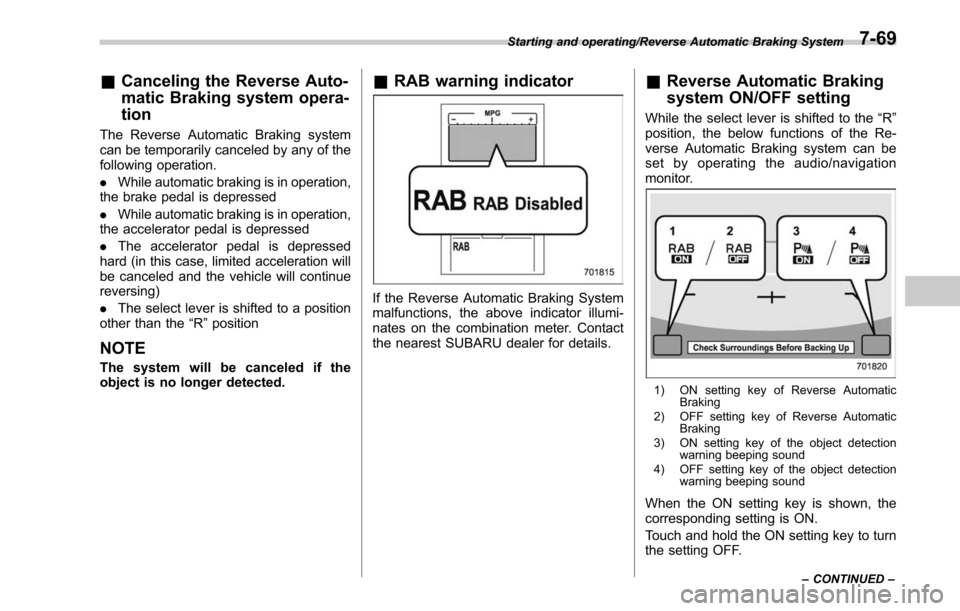
& RAB warning indicator
If the Reverse Automatic Braking System
malfunctions, the above indicator illumi-
nates on the combination meter. Contact
the nearest SUBARU dealer for details.
&Reverse Automatic Braking
system ON/OFF setting
While the select lever is shifted to the “R”
position, the below functions of the Re-
verse Automatic Braking system can be
set by operating the audio/navigation
monitor.
1) ON setting key of Reverse Automatic Braking
2) OFF setting key of Reverse Automatic Braking
3) ON setting key of the object detection warning beeping sound
4) OFF setting key of the object detection warning beeping sound
When the ON setting key is shown, the
corresponding setting is ON.
Touch and hold the ON setting key to turn
the setting OFF.
Starting and operating/Reverse Automatic Braking System
–CONTINUED –7-69
Page 498 of 610
Exterior care....................................................... 10-2
Washing............................................................. 10-2
Waxing and polishing ......................................... 10-3
Cleaning aluminum wheels ................................. 10-3
Corrosion protection.......................................... 10-4
Most common causes of corrosion ..................... 10-4
To help prevent corrosion ................................... 10-4
Cleaning the interior.......................................... 10-5Seat fabric......................................................... 10-5
Leather seat materials ........................................ 10-5
Synthetic leather upholstery ............................... 10-6
Climate control panel, audio panel, instrument panel, console panel, switches, combination
meter, and other plastic surface ....................... 10-6
Monitor (if equipped) .......................................... 10-6
Appearance care
10
Page 502 of 610
assistance.
Repair chips and scratches in the paint as
soon as you find them.
Check the interior of the vehicle for water
and dirt accumulation under the floor mats
because that could cause corrosion.
Occasionally check under the mats to
make sure the area is dry.
Keep your garage dry. Do not park your
vehicle in a damp, poorly ventilated
garage. In such a garage, corrosion can
be caused by dampness. If you wash the
vehicle in the garage or put the vehicle
into the garage when wet or covered with
snow, that can cause dampness.
If your vehicle is operated in cold weather
and/or in areas where road salts and other
corrosive materials are used, the door
hinges and locks, trunk lid lock, and hood
latch should be inspected and lubricated
periodically.Cleaning the interior
Use a soft, damp cloth to clean the climate
control panel, audio equipment, instru-
ment panel, center console, combination
meter panel, and switches. (Do not use
organic solvents.)
&Seat fabric
Remove loose dirt, dust or debris with a
vacuum cleaner. If the dirt is caked on the
fabric or hard to remove with a vacuum
cleaner, use a soft brush then vacuum it.
Wipe the fabric surface with a tightly
wrung cloth and dry the seat fabric
thoroughly. If the fabric is still dirty, wipe
using a solution of mild soap and luke-
warm water then dry thoroughly.
If the stain does not come out, try a
commercially available fabric cleaner. Use
the cleaner on a hidden place and make
sure it does not affect the fabric adversely.
Use the cleaner according to its instruc-
tions.
CAUTION
When cleaning the seat, do not use
benzine, paint thinner, or any similar
materials. Doing so could damage
the surface and cause the color to
deteriorate.
&Leather seat materials
The leather used by SUBARU is a high
quality natural product which will retain its
distinctive appearance and feel for many
years with proper care.
Allowing dust or road dirt to build up on the
surface can cause the material to become
brittle and to wear prematurely. Regular
cleaning with a soft, moist, natural fiber
cloth should be performed monthly, taking
care not to soak the leather or allow water
to penetrate the stitched seams.
A mild detergent suitable for cleaning
woolen fabrics may be used to remove
difficult dirt spots, rubbing with a soft, dry
cloth afterwards to restore the luster. If
your SUBARU is to be parked for a long
time in bright sunlight, it is recommended
that the seats and headrests be covered,
or the windows shaded, to prevent fading
or shrinkage.
Minor surface blemishes or bald patches
may be treated with a commercial leather
Appearance care/Cleaning the interior
–CONTINUED –10-5