height SUBARU OUTBACK 2017 6.G User Guide
[x] Cancel search | Manufacturer: SUBARU, Model Year: 2017, Model line: OUTBACK, Model: SUBARU OUTBACK 2017 6.GPages: 610, PDF Size: 10.28 MB
Page 78 of 610
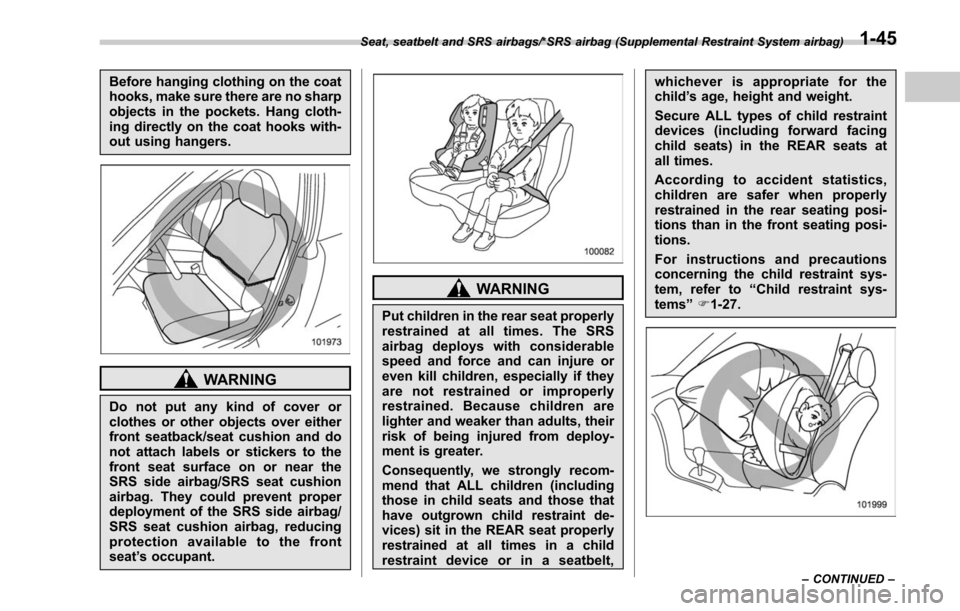
Before hanging clothing on the coat
hooks, make sure there are no sharp
objects in the pockets. Hang cloth-
ing directly on the coat hooks with-
out using hangers.
WARNING
Do not put any kind of cover or
clothes or other objects over either
front seatback/seat cushion and do
not attach labels or stickers to the
front seat surface on or near the
SRS side airbag/SRS seat cushion
airbag. They could prevent proper
deployment of the SRS side airbag/
SRS seat cushion airbag, reducing
protection available to the front
seat’s occupant.
WARNING
Put children in the rear seat properly
restrained at all times. The SRS
airbag deploys with considerable
speed and force and can injure or
even kill children, especially if they
are not restrained or improperly
restrained. Because children are
lighter and weaker than adults, their
risk of being injured from deploy-
ment is greater.
Consequently, we strongly recom-
mend that ALL children (including
those in child seats and those that
have outgrown child restraint de-
vices) sit in the REAR seat properly
restrained at all times in a child
restraint device or in a seatbelt, whichever is appropriate for the
child
’s age, height and weight.
Secure ALL types of child restraint
devices (including forward facing
child seats) in the REAR seats at
all times.
According to accident statistics,
children are safer when properly
restrained in the rear seating posi-
tions than in the front seating posi-
tions.
For instructions and precautions
concerning the child restraint sys-
tem, refer to “Child restraint sys-
tems ”F 1-27.
Seat, seatbelt and SRS airbags/*SRS airbag (Supplemental Restraint System airbag)
–CONTINUED –1-45
Page 150 of 610
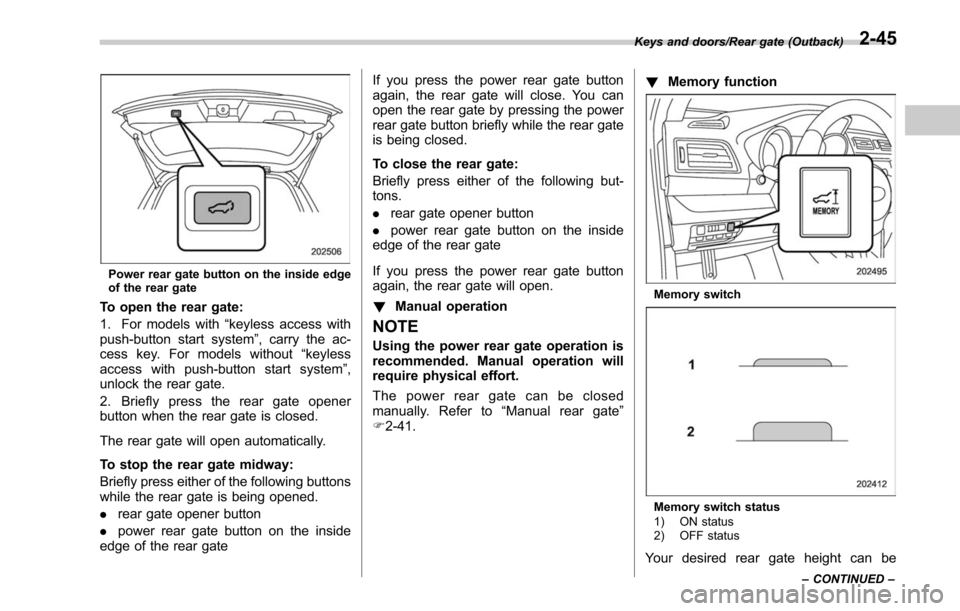
Power rear gate button on the inside edge
of the rear gate
To open the rear gate:
1. For models with“keyless access with
push-button start system ”, carry the ac-
cess key. For models without “keyless
access with push-button start system ”,
unlock the rear gate.
2. Briefly press the rear gate opener
button when the rear gate is closed.
The rear gate will open automatically.
To stop the rear gate midway:
Briefly press either of the following buttons
while the rear gate is being opened.
. rear gate opener button
. power rear gate button on the inside
edge of the rear gate If you press the power rear gate button
again, the rear gate will close. You can
open the rear gate by pressing the power
rear gate button briefly while the rear gate
is being closed.
To close the rear gate:
Briefly press either of the following but-
tons.
.
rear gate opener button
. power rear gate button on the inside
edge of the rear gate
If you press the power rear gate button
again, the rear gate will open.
! Manual operation
NOTE
Using the power rear gate operation is
recommended. Manual operation will
require physical effort.
The power rear gate can be closed
manually. Refer to “Manual rear gate ”
F 2-41. !
Memory function
Memory switch
Memory switch status
1) ON status
2) OFF status
Your desired rear gate height can be
Keys and doors/Rear gate (Outback)
–CONTINUED –2-45
Page 151 of 610
Keys and doors/Rear gate (Outback)
registered.
Registration of the rear gate height:
To register the rear gate height, perform
the following procedures while the ignition
switch is in the“LOCK”/“OFF ”position.
1. Open the rear gate by using the power
rear gate function.
2. With the rear gate at the desired
height, stop it by using the power rear
gate function.
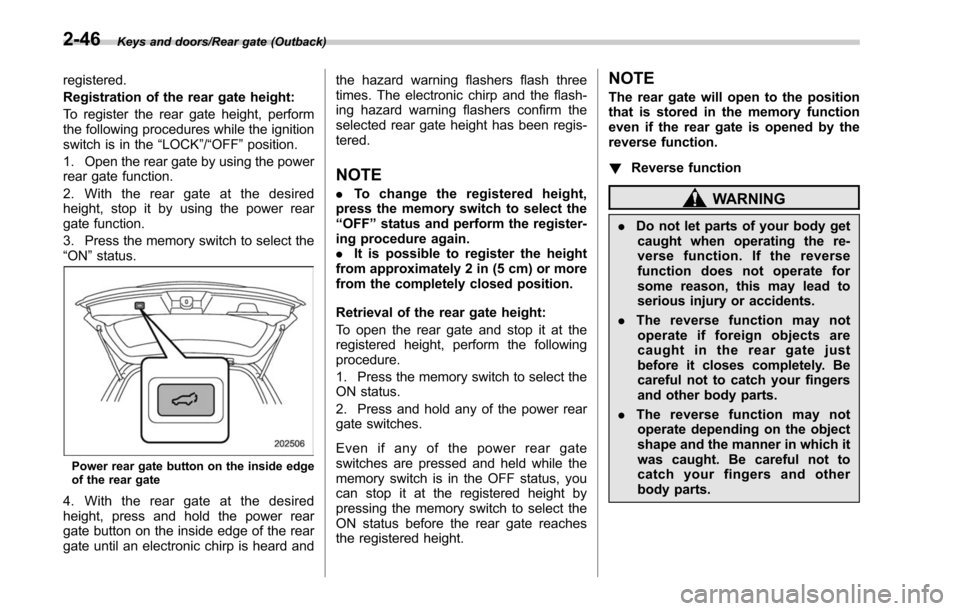
3. Press the memory switch to select the
“ON ”status.
Power rear gate button on the inside edge
of the rear gate
4. With the rear gate at the desired
height, press and hold the power rear
gate button on the inside edge of the rear
gate until an electronic chirp is heard and the hazard warning flashers flash three
times. The electronic chirp and the flash-
ing hazard warning flashers confirm the
selected rear gate height has been regis-
tered.
NOTE
.
To change the registered height,
press the memory switch to select the
“ OFF ”status and perform the register-
ing procedure again.
. It is possible to register the height
from approximately 2 in (5 cm) or more
from the completely closed position.
Retrieval of the rear gate height:
To open the rear gate and stop it at the
registered height, perform the following
procedure.
1. Press the memory switch to select the
ON status.
2. Press and hold any of the power rear
gate switches.
Even if any of the power rear gate
switches are pressed and held while the
memory switch is in the OFF status, you
can stop it at the registered height by
pressing the memory switch to select the
ON status before the rear gate reaches
the registered height.
NOTE
The rear gate will open to the position
that is stored in the memory function
even if the rear gate is opened by the
reverse function.
! Reverse function
WARNING
.Do not let parts of your body get
caught when operating the re-
verse function. If the reverse
function does not operate for
some reason, this may lead to
serious injury or accidents.
. The reverse function may not
operate if foreign objects are
caught in the rear gate just
before it closes completely. Be
careful not to catch your fingers
and other body parts.
. The reverse function may not
operate depending on the object
shape and the manner in which it
was caught. Be careful not to
catch your fingers and other
body parts.
2-46
Page 152 of 610
CAUTION
.If the reverse function is operated
3 times consecutively, automatic
opening and closing of the power
rear gate function will be can-
celed and the rear gate will stop
opening or closing suddenly.
However, the rear gate may open
or close depending on the rear
gate height when automatic op-
eration is ceased. Be careful that
the rear gate does not hit any-
one ’s head or face, etc. and that
fingers and baggage, etc. are not
caught in it.
. Take care not to damage the
touch sensors. Otherwise, the
reverse function may cease to
operate.
If, while opening or closing using power
rear gate, the rear gate catches persons
or baggage or hits an obstacle, an
electronic chirp will sound 3 times and
the rear gate will operate as follows.
When opening the rear gate: The rear
gate will automatically close.
When closing the rear gate: The rear
gate will automatically open.
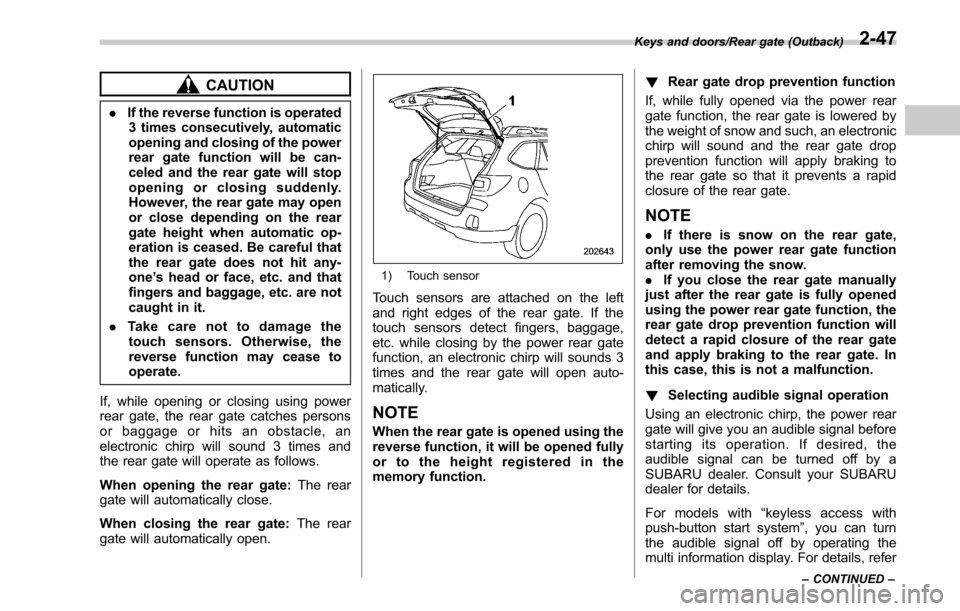
1) Touch sensor
Touch sensors are attached on the left
and right edges of the rear gate. If the
touch sensors detect fingers, baggage,
etc. while closing by the power rear gate
function, an electronic chirp will sounds 3
times and the rear gate will open auto-
matically.
NOTE
When the rear gate is opened using the
reverse function, it will be opened fully
or to the height registered in the
memory function. !
Rear gate drop prevention function
If, while fully opened via the power rear
gate function, the rear gate is lowered by
the weight of snow and such, an electronic
chirp will sound and the rear gate drop
prevention function will apply braking to
the rear gate so that it prevents a rapid
closure of the rear gate.
NOTE
. If there is snow on the rear gate,
only use the power rear gate function
after removing the snow.
. If you close the rear gate manually
just after the rear gate is fully opened
using the power rear gate function, the
rear gate drop prevention function will
detect a rapid closure of the rear gate
and apply braking to the rear gate. In
this case, this is not a malfunction.
! Selecting audible signal operation
Using an electronic chirp, the power rear
gate will give you an audible signal before
starting its operation. If desired, the
audible signal can be turned off by a
SUBARU dealer. Consult your SUBARU
dealer for details.
For models with “keyless access with
push-button start system ”, you can turn
the audible signal off by operating the
multi information display. For details, refer
Keys and doors/Rear gate (Outback)
–CONTINUED –2-47
Page 209 of 610
Instruments and controls/Headlight beam leveler (models with HID headlights)
.While the hazard warning flasher is
on, the high beam headlights turn off.Headlight beam leveler
(models with HID headlights)
The HID headlights generate more light
than conventional halogen headlights.
Therefore a driver of an oncoming vehicle
may experience too much glare when your
headlight beam height adjustment is high
due to the vehicle carrying heavy load.
The automatic headlight beam leveler
adjusts the headlight beam height auto-
matically and optimally according to the
load being carried by the vehicle.
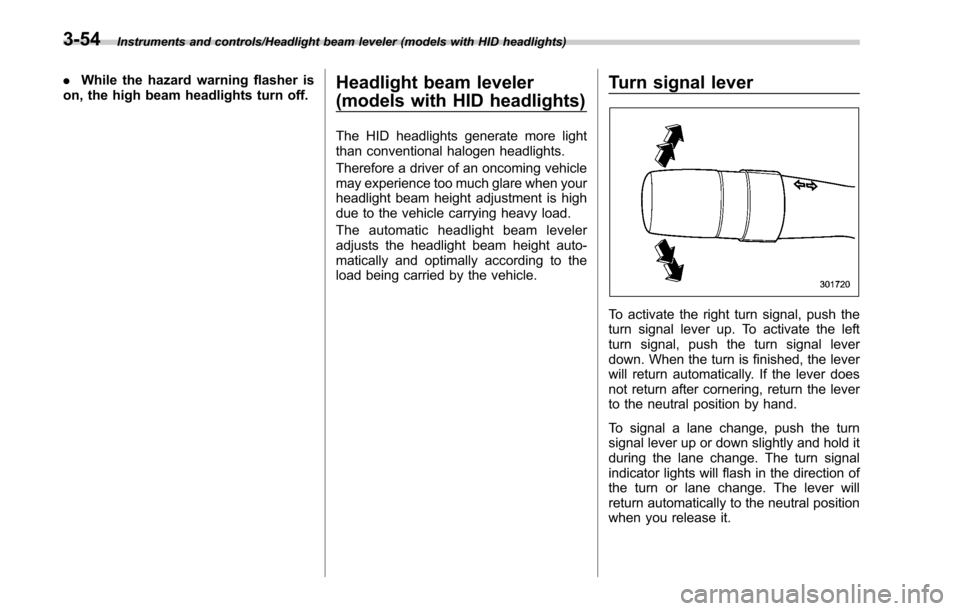
Turn signal lever
To activate the right turn signal, push the
turn signal lever up. To activate the left
turn signal, push the turn signal lever
down. When the turn is finished, the lever
will return automatically. If the lever does
not return after cornering, return the lever
to the neutral position by hand.
To signal a lane change, push the turn
signal lever up or down slightly and hold it
during the lane change. The turn signal
indicator lights will flash in the direction of
the turn or lane change. The lever will
return automatically to the neutral position
when you release it.
3-54
Page 428 of 610
The BSD/RCTA will resume operation
once these conditions are corrected,
and the BSD/RCTA warning indicator
will disappear. However, if the BSD/
RCTA warning indicator appears for a
prolonged period of time, have the
system inspected at a SUBARU dealer
as soon as possible.
.The detectability of the radar sen-
sors is restricted. The BSD/RCTA de-
tection may be impaired and the sys-
tem may not operate properly under the
following conditions.
–When the rear bumper around
the radar sensors is distorted
– When ice, snow or mud adheres
to the rear bumper surface around
the radar sensors
– When stickers, etc. are affixed on
the areas of the radar sensors on
the rear bumper
– During adverse weather condi-
tions such as rain, snow or fog
– When driving on wet roads such
as snow-covered roads and
through puddles
. The radar sensors may not detect or
may have difficulty detecting the fol-
lowing vehicles and objects.
–Small motorcycles, bicycles, pe-
destrians, stationary objects on the
road or road side, etc. –
Vehicles with body shapes that
the radar may not reflect (vehicles
with lower body height such as a
trailer with no cargo and sports
cars)
– Vehicles that are not approach-
ing your vehicle even though they
are in the detection area (either on a
neighboring lane to the rear or
beside your vehicle when rever-
sing) (The system determines the
presence of approaching vehicles
based on data detected by the radar
sensors.)
– Vehicles traveling at significantly
different speeds
– Vehicles driving in parallel at
almost the same speed as your
vehicle for a prolonged time
– Oncoming vehicles
– Vehicles in a lane beyond the
neighboring lane
– Vehicles travelling at a signifi-
cantly lower speed that you are
trying to overtake
. On a road with extremely narrow
lanes, the system may detect vehicles
driving in a lane next to the neighbor-
ing lane.& BSD/RCTA approach indica-
tor light/warning buzzer
While the BSD/RCTA is active, the follow-
ing item(s) will operate to alert the driver:
. The BSD/RCTA approach indicator
light (when there are vehicles in the
neighboring lanes).
. The BSD/RCTA approach indicator
light and warning buzzer (when a vehicle
is approaching from the left or right side
while your vehicle is reversing)
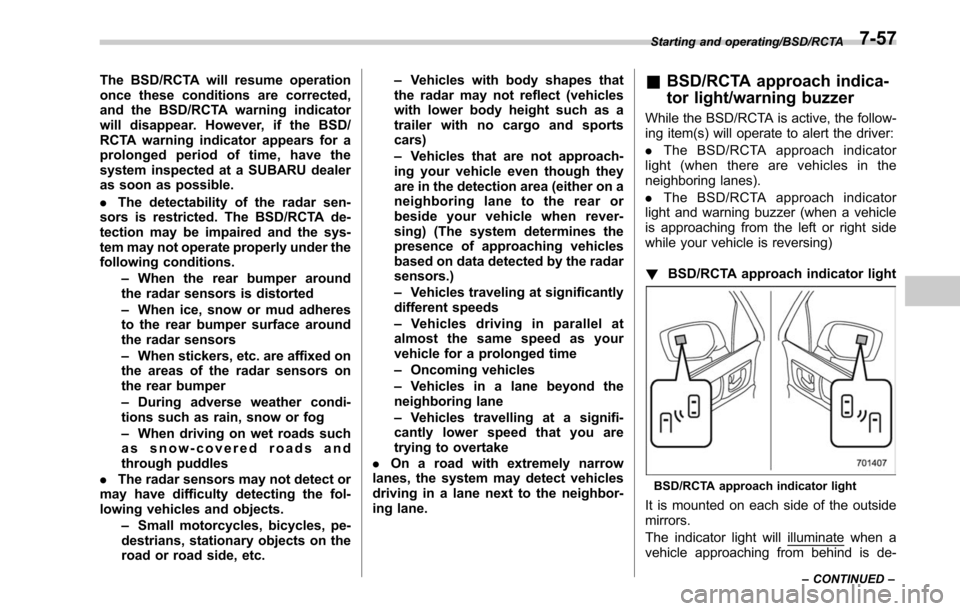
! BSD/RCTA approach indicator light
BSD/RCTA approach indicator light
It is mounted on each side of the outside
mirrors.
The indicator light will
illuminate when a
vehicle approaching from behind is de-
Starting and operating/BSD/RCTA
–CONTINUED –7-57
Page 429 of 610
Starting and operating/BSD/RCTA
tected.
The indicator light will
flash to warn the
driver of dangers under the following
conditions.
. While the indicator light is illuminating,
if the turn signal lever is operated toward
the side in which this light turned on
. When reversing the vehicle while the
system detects a vehicle approaching
from either side
! BSD/RCTA approach indicator
light dimming function
When the headlights are turned on, the
brightness of the BSD/RCTA approach
indicator light will be reduced.
NOTE
. You may have difficulty seeing the
BSD/RCTA approach indicator light
under the following conditions.
–When sunlight shines directly on
it
– When the headlight beams from a
vehicle traveling behind shines di-
rectly on it
. While the illumination brightness
control dial is in the fully upward
position, even if the headlights are
turned on, the brightness of the BSD/
RCTA approach indicator light will not
be reduced. For details about the illumination brightness control dial,
refer to
“Illumination brightness con-
trol” F3-55.
! BSD/RCTA approach warning buz-
zer (only when reversing)
A warning buzzer sounds along with
flashing of the BSD/RCTA approach in-
dicator light to warn the driver of dangers.
The setting of the warning buzzer volume
can be changed by operating the multi
information display of the combination
meter. For details, refer to “BSD/RCTA”
F 3-45.
! Safety tips regarding the BSD/RCTA
approach indicator light/warning
buzzer
. In the following cases, operation of the
BSD/RCTA approach indicator light and
the warning buzzer may be delayed or the
system may fail to issue these warnings.
–Whenavehiclemovestothe
neighboring lane from a lane next to
the neighboring lane
– When driving on a steep incline or
on repeated sharp uphill and downhill
grades
– When going beyond a pass
– When both your vehicle and a
vehicle driving on a neighboring lane
are driving on the far side of each lane. –
When several narrowly-spaced ve-
hicles are approaching in a row
– In low radius bends (tight bends or
when making turns at an intersection)
– When there is a difference in height
between your lane and the neighbor-
ing lane
– Immediately after the BSD/RCTA is
activated by pressing the BSD/RCTA
OFF switch
– Immediately after the shift lever/
select lever is shifted to the “R ”
position
– When extremely heavy cargo is
loaded in the trunk or cargo area
. During reversing, operation of the BSD/
RCTA approach indicator light and the
warning buzzer may be delayed or the
system may fail to issue these warnings
under the following conditions.
–When backing out of an angled
parking space
– When a large-sized vehicle is
parked next to your vehicle (That
vehicle prevents the propagation of
radar waves.)
– When reversing on sloped roads
– When reversing at a high speed
7-58
Page 468 of 610
!Tongue load
Tongue load
WARNING
If the trailer is loaded with more
weight in the back of trailer ’s axle
than in the front, the load is taken off
the rear axle of the towing vehicle.
This may cause the rear wheels to
skid, especially during braking or
when vehicle speed is reduced dur-
ing cornering, resulting in over-
steer, spin out and/or jackknifing.
Ensure that the trailer tongue load is from
8 to 11 percent of the total trailer weight
and does not exceed the maximum value
of 200 lbs (90 kg).
NOTE
For vehicles with trailer brakes, the
trailer tongue load exceeds 200 lbs (90
kg) when calculated at 8% of the
maximum total trailer weight.
Even in this case, the maximum value
is 200 lbs (90 kg).
1) Jack
2) Bathroom scale
The tongue load can be weighed with a
bathroom scale as shown in the following
illustration. When weighing the tongue
load, be sure to position the towing
coupler at the height at which it would be
during actual towing, using a jack as
shown.
F: Front
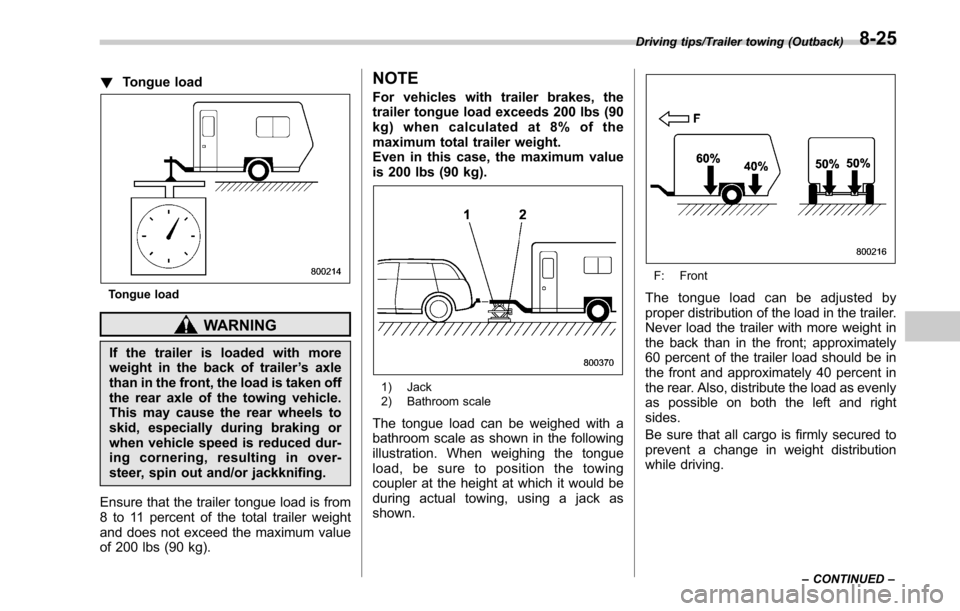
The tongue load can be adjusted by
proper distribution of the load in the trailer.
Never load the trailer with more weight in
the back than in the front; approximately
60 percent of the trailer load should be in
the front and approximately 40 percent in
the rear. Also, distribute the load as evenly
as possible on both the left and right
sides.
Be sure that all cargo is firmly secured to
prevent a change in weight distribution
while driving.
Driving tips/Trailer towing (Outback)
–CONTINUED –8-25
Page 511 of 610
Maintenance and service/Engine hood
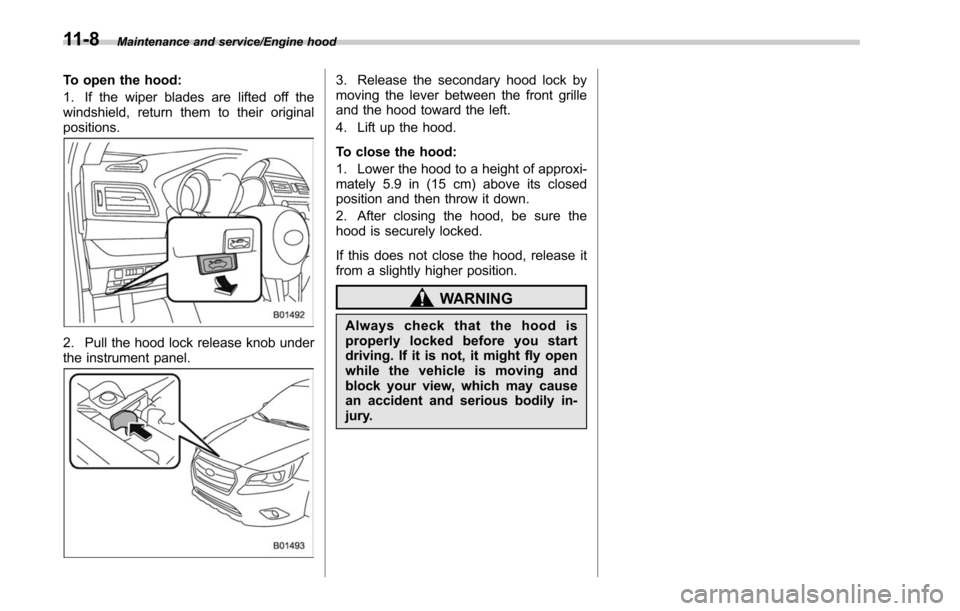
To open the hood:
1. If the wiper blades are lifted off the
windshield, return them to their original
positions.
2. Pull the hood lock release knob under
the instrument panel.
3. Release the secondary hood lock by
moving the lever between the front grille
and the hood toward the left.
4. Lift up the hood.
To close the hood:
1. Lower the hood to a height of approxi-
mately 5.9 in (15 cm) above its closed
position and then throw it down.
2. After closing the hood, be sure the
hood is securely locked.
If this does not close the hood, release it
from a slightly higher position.
WARNING
Always check that the hood is
properly locked before you start
driving. If it is not, it might fly open
while the vehicle is moving and
block your view, which may cause
an accident and serious bodily in-
jury.
11-8
Page 525 of 610
Maintenance and service/Brake booster
Alcohol contained in the clutch
fluid may damage them.
. Be careful not to spill clutch fluid
when adding it. If clutch fluid
touches the exhaust pipe, it may
cause a bad smell, smoke, and/or
a fire. If clutch fluid gets on the
exhaust pipe, be sure to wipe it
off.
. The fluid level for the clutch
system must be checked at the
inboard side of the reservoir. It
cannot be checked at the out-
board side of the reservoir.
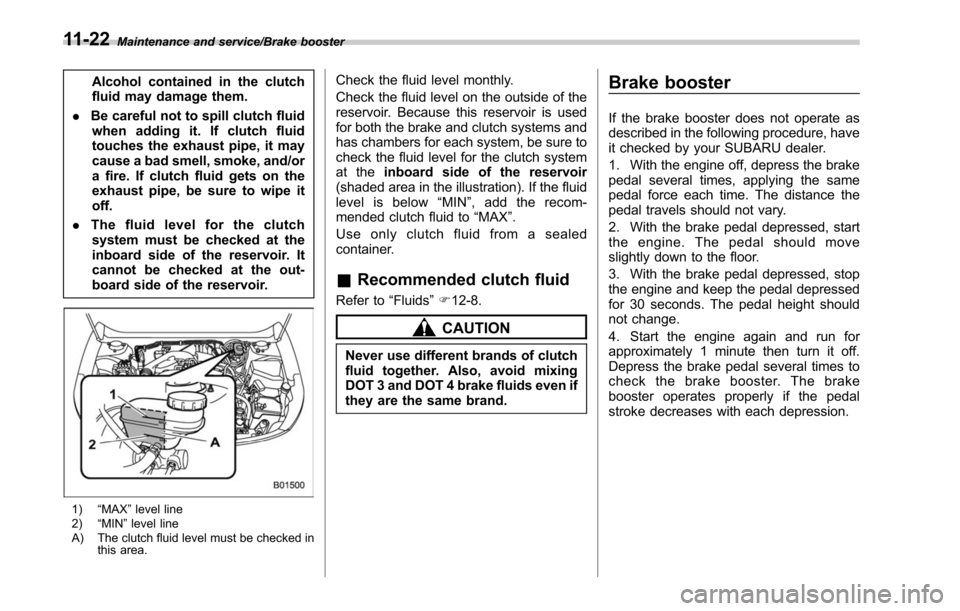
1) “MAX ”level line
2) “MIN ”level line
A) The clutch fluid level must be checked in this area.
Check the fluid level monthly.
Check the fluid level on the outside of the
reservoir. Because this reservoir is used
for both the brake and clutch systems and
has chambers for each system, be sure to
check the fluid level for the clutch system
at the inboard side of the reservoir
(shaded area in the illustration). If the fluid
level is below “MIN ”, add the recom-
mended clutch fluid to “MAX”.
Use only clutch fluid from a sealed
container.
& Recommended clutch fluid
Refer to “Fluids”F 12-8.
CAUTION
Never use different brands of clutch
fluid together. Also, avoid mixing
DOT 3 and DOT 4 brake fluids even if
they are the same brand.
Brake booster
If the brake booster does not operate as
described in the following procedure, have
it checked by your SUBARU dealer.
1. With the engine off, depress the brake
pedal several times, applying the same
pedal force each time. The distance the
pedal travels should not vary.
2. With the brake pedal depressed, start
the engine. The pedal should move
slightly down to the floor.
3. With the brake pedal depressed, stop
the engine and keep the pedal depressed
for 30 seconds. The pedal height should
not change.
4. Start the engine again and run for
approximately 1 minute then turn it off.
Depress the brake pedal several times to
check the brake booster. The brake
booster operates properly if the pedal
stroke decreases with each depression.
11-22