HAzard warning SUBARU OUTBACK 2017 6.G Owner's Manual
[x] Cancel search | Manufacturer: SUBARU, Model Year: 2017, Model line: OUTBACK, Model: SUBARU OUTBACK 2017 6.GPages: 610, PDF Size: 10.28 MB
Page 151 of 610
Keys and doors/Rear gate (Outback)
registered.
Registration of the rear gate height:
To register the rear gate height, perform
the following procedures while the ignition
switch is in the“LOCK”/“OFF ”position.
1. Open the rear gate by using the power
rear gate function.
2. With the rear gate at the desired
height, stop it by using the power rear
gate function.
3. Press the memory switch to select the
“ON ”status.
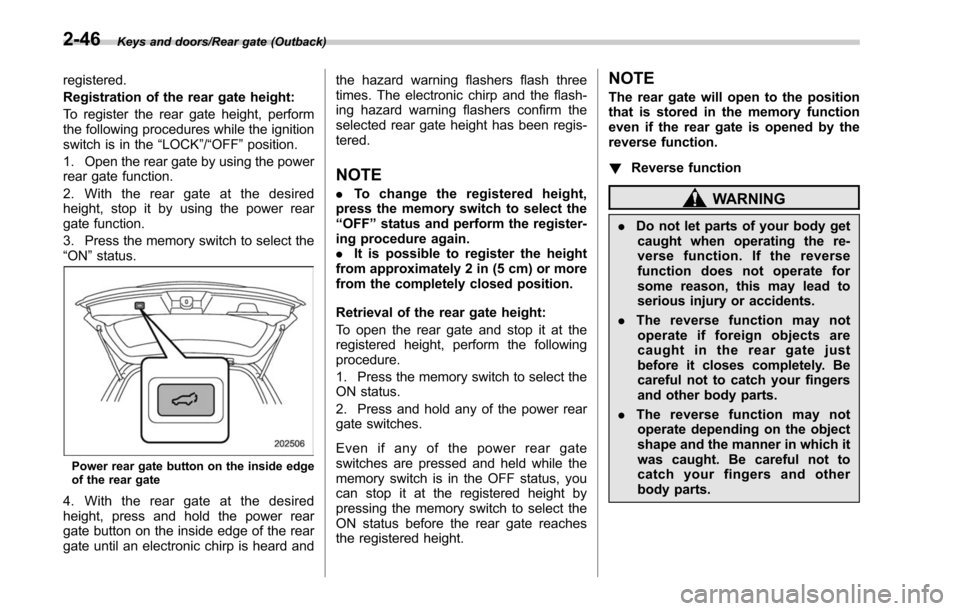
Power rear gate button on the inside edge
of the rear gate
4. With the rear gate at the desired
height, press and hold the power rear
gate button on the inside edge of the rear
gate until an electronic chirp is heard and the hazard warning flashers flash three
times. The electronic chirp and the flash-
ing hazard warning flashers confirm the
selected rear gate height has been regis-
tered.
NOTE
.
To change the registered height,
press the memory switch to select the
“ OFF ”status and perform the register-
ing procedure again.
. It is possible to register the height
from approximately 2 in (5 cm) or more
from the completely closed position.
Retrieval of the rear gate height:
To open the rear gate and stop it at the
registered height, perform the following
procedure.
1. Press the memory switch to select the
ON status.
2. Press and hold any of the power rear
gate switches.
Even if any of the power rear gate
switches are pressed and held while the
memory switch is in the OFF status, you
can stop it at the registered height by
pressing the memory switch to select the
ON status before the rear gate reaches
the registered height.
NOTE
The rear gate will open to the position
that is stored in the memory function
even if the rear gate is opened by the
reverse function.
! Reverse function
WARNING
.Do not let parts of your body get
caught when operating the re-
verse function. If the reverse
function does not operate for
some reason, this may lead to
serious injury or accidents.
. The reverse function may not
operate if foreign objects are
caught in the rear gate just
before it closes completely. Be
careful not to catch your fingers
and other body parts.
. The reverse function may not
operate depending on the object
shape and the manner in which it
was caught. Be careful not to
catch your fingers and other
body parts.
2-46
Page 156 of 610
Ignition switch (models without push-button start system) ......................................... 3-4
LOCK.................................................................. 3-4
ACC.................................................................... 3-5
ON...................................................................... 3-5
START ................................................................ 3-5
Key reminder chime ............................................ 3-5
Ignition switch light ............................................. 3-5
Push-button ignition switch (models with
push-button start system) ............................... 3-6
Safety precautions.............................................. 3-6
Operating range for push-button start system ...... 3-6
Switching power status ....................................... 3-7
When access key does not operate properly ........ 3-8
Hazard warning flasher....................................... 3-8
Meters and gauges. ............................................. 3-8
Combination meter illumination ........................... 3-8
Canceling the function for meter/gauge needle movement upon turning on the ignition
switch ............................................................... 3-9
Speedometer ....................................................... 3-9
Odometer ............................................................ 3-9
Double trip meter ............................................... 3-10
Tachometer ........................................................ 3-10
Fuel gauge ......................................................... 3-11
Temperature gauge ............................................ 3-12
ECO gauge ........................................................ 3-12
Warning and indicator lights ............................. 3-13
Seatbelt warning light and chime ........................ 3-13
SRS airbag system warning light ........................ 3-15Front passenger
’s frontal airbag ON and OFF
indicators ........................................................ 3-15
CHECK ENGINE warning light/Malfunction indicator light .................................................. 3-16
Charge warning light .......................................... 3-16
Oil pressure warning light .................................. 3-16
Engine low oil level warning indicator ................ 3-17
AT OIL TEMP warning light (CVT models) ........... 3-17
Low tire pressure warning light (U.S. spec. models) ........................................................... 3-17
ABS warning light .............................................. 3-19
Brake system warning light ................................ 3-19
Electronic parking brake indicator light .............. 3-21
Hill Holder indicator light ................................... 3-22
Low fuel warning light ....................................... 3-22
Door open indicator ........................................... 3-23
Windshield washer fluid warning indicator .......... 3-23
All-Wheel Drive warning light (CVT models) ... ..... 3-23
Power steering warning light .............................. 3-23
Vehicle Dynamics Control warning light/Vehicle Dynamics Control operation indicator light .. ..... 3-24
Vehicle Dynamics Control OFF indicator light ..... 3-25
Warning chimes and warning indicator of the keyless access with push-button start system (if
equipped) ........................................................ 3-25
Security indicator light ....................................... 3-30
Select lever/gear position indicator ..................... 3-31
Turn signal indicator lights ................................. 3-31
High beam indicator light ................................... 3-31
High beam assist indicator (green) (if equipped) ........................................................ 3-31
Instruments and controls
3
Page 163 of 610
Instruments and controls/Hazard warning flasher
!Battery drainage prevention func-
tion
When the push-button ignition switch is
left in the “ACC”or “ON ”position for
approximately 1 hour, the push-button
ignition switch will be automatically
switched to “OFF”to prevent the battery
from going dead. This function is activated
when the select lever is in the “P”position.
& When access key does not
operate properly
Refer to “Access key –if access key does
not operate properly ”F 9-18.
Hazard warning flasher
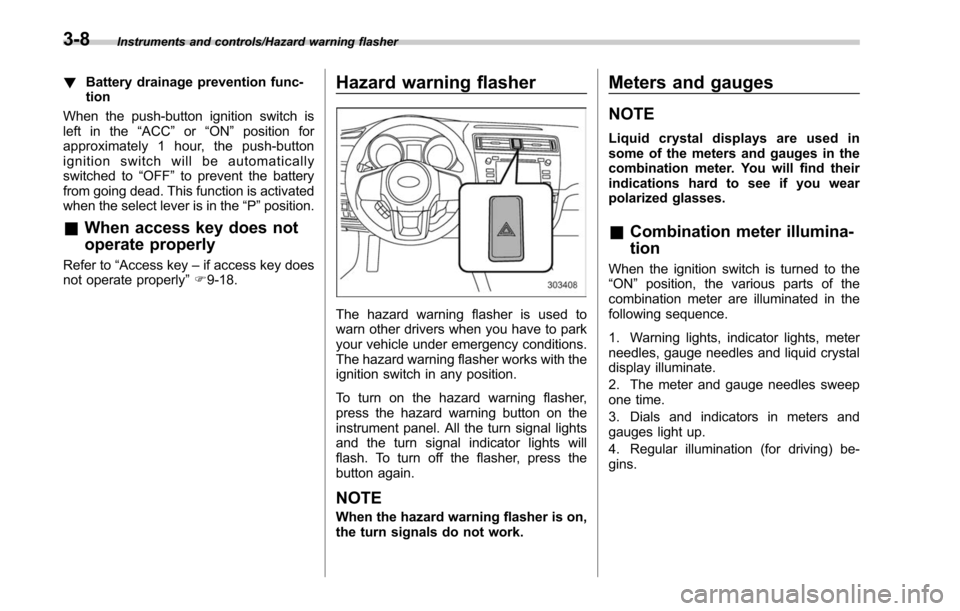
The hazard warning flasher is used to
warn other drivers when you have to park
your vehicle under emergency conditions.
The hazard warning flasher works with the
ignition switch in any position.
To turn on the hazard warning flasher,
press the hazard warning button on the
instrument panel. All the turn signal lights
and the turn signal indicator lights will
flash. To turn off the flasher, press the
button again.
NOTE
When the hazard warning flasher is on,
the turn signals do not work.
Meters and gauges
NOTE
Liquid crystal displays are used in
some of the meters and gauges in the
combination meter. You will find their
indications hard to see if you wear
polarized glasses.
& Combination meter illumina-
tion
When the ignition switch is turned to the
“ON ”position, the various parts of the
combination meter are illuminated in the
following sequence.
1. Warning lights, indicator lights, meter
needles, gauge needles and liquid crystal
display illuminate.
2. The meter and gauge needles sweep
one time.
3. Dials and indicators in meters and
gauges light up.
4. Regular illumination (for driving) be-
gins.
3-8
Page 198 of 610
First menuSecond menu
Third menu Settings
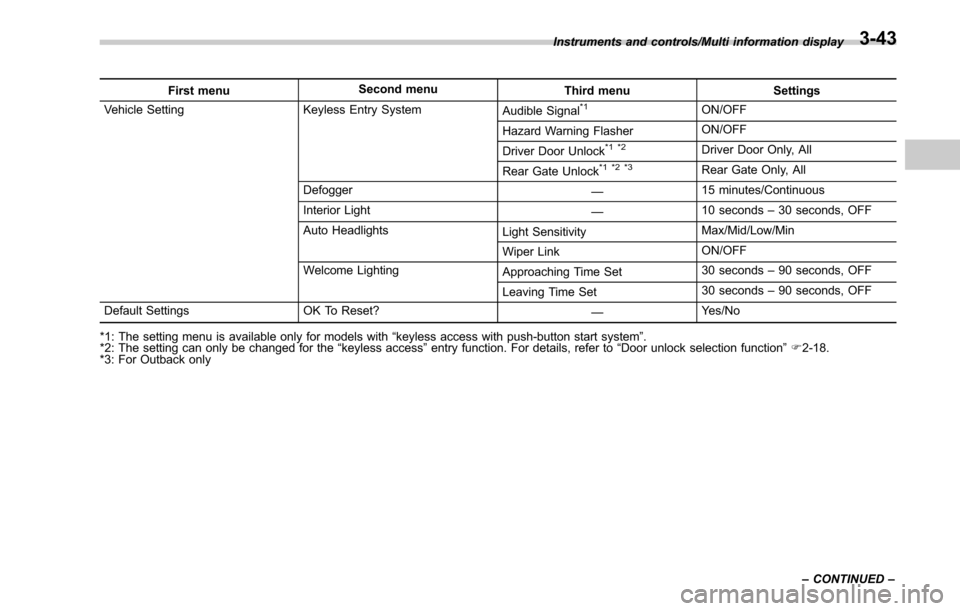
Vehicle Setting Keyless Entry System Audible Signal*1ON/OFF
Hazard Warning Flasher ON/OFF
Driver Door Unlock
*1 *2Driver Door Only, All
Rear Gate Unlock
*1 *2 *3Rear Gate Only, All
Defogger —15 minutes/Continuous
Interior Light —10 seconds
–30 seconds, OFF
Auto Headlights Light SensitivityMax/Mid/Low/Min
Wiper Link ON/OFF
Welcome Lighting Approaching Time Set30 seconds
–90 seconds, OFF
Leaving Time Set 30 seconds
–90 seconds, OFF
Default Settings OK To Reset? —Yes/No
*1: The setting menu is available only for models with “keyless access with push-button start system ”.
*2: The setting can only be changed for the “keyless access ”entry function. For details, refer to “Door unlock selection function ”F 2-18.
*3: For Outback only Instruments and controls/Multi information display
–CONTINUED –
3-43
Page 200 of 610
!BSD/RCTA (if equipped)
After entering the “BSD/RCTA ”menu,
select the “Warning Volume ”menu. You
can set the volume of the warning buzzer
for RCTA (Rear Cross Traffic Alert). You
can select “Max”,“Mid ”or “Min ”.
! RAB (if equipped)
After entering the “RAB”menu, select one
of the following menus.
NOTE
For models with RAB (Reverse Auto-
matic Braking) system, refer to “Re-
verse Automatic Braking System ”F 7-
63.
!Warning Volume
The volume of the warning buzzer that
sounds when the RAB (Reverse Auto-
matic Braking) system is in operation can
be set in 3 stages (“Max ”,“Mid ”and “Min ”).
! Sonar Audible Alarm
When the RAB (Reverse Automatic Brak-
ing) system is in operation, the buzzer that
sounds if an obstacle is detected in the
rear or if detection is not possible can be
activated or deactivated. Select “On”to
activate the buzzer. Select “Off”to deac-
tivate the buzzer. !
Vehicle Setting
After entering the “Vehicle Setting”menu,
select one of the following menus.
!Keyless Entry System
After entering the “Keyless Entry System ”
menu, select one of the following menus.
. Audible Signal (models with “key-
less access with push-button start
system ”):
The audible signal can be activated or
deactivated. Select “On”to activate. Se-
lect “Off”to deactivate.
. Hazard Warning Flasher (all mod-
els):
The hazard warning flasher operation can
be activated or deactivated. Select “On”to
activate. Select “Off ”to deactivate.
. Driver Door Unlock (models with
“ keyless access with push-button start
system ”):
The door unlock selection function is
available for the “keyless access”entry
function. For details, refer to “Door
unlock
selection function ”F 2-18. On this setting
menu, the door unlock selection function
for the driver ’s door can be customized.
Select “Driver Door Only ”to set as
“Operational ”. Select “All”to set as “Non-
operational ”. .
Rear Gate Unlock (Outback with
“ keyless access with push-button start
system ”):
The door unlock selection function is
available for the “keyless access”entry
function. For details, refer to “Door unlock
selection function ”F 2-18. On this setting
menu, the door unlock selection function
for the rear gate can be customized.
Select “Rear Gate Only ”to set as “Opera-
tional ”. Select “All”to set as “Non-opera-
tional ”.
! Defogger
The defogger and deicer system can be
set for the continuous operation mode or
automatic shut-off mode. Select “Contin-
uous” to select the continuous operation
mode. Select “15 minutes”to select the
automatic shut-off mode.
!Interior Light
The setting for the period of time in which
the interior lights remain on (OFF delay
timer) after closing the doors and/or the
rear gate can be set or customized. Select
the preferred seconds to customize the
operation period. Select “Off”to deactivate
the OFF delay timer.
Instruments and controls/Multi information display
–CONTINUED –3-45
Page 209 of 610
Instruments and controls/Headlight beam leveler (models with HID headlights)
.While the hazard warning flasher is
on, the high beam headlights turn off.Headlight beam leveler
(models with HID headlights)
The HID headlights generate more light
than conventional halogen headlights.
Therefore a driver of an oncoming vehicle
may experience too much glare when your
headlight beam height adjustment is high
due to the vehicle carrying heavy load.
The automatic headlight beam leveler
adjusts the headlight beam height auto-
matically and optimally according to the
load being carried by the vehicle.
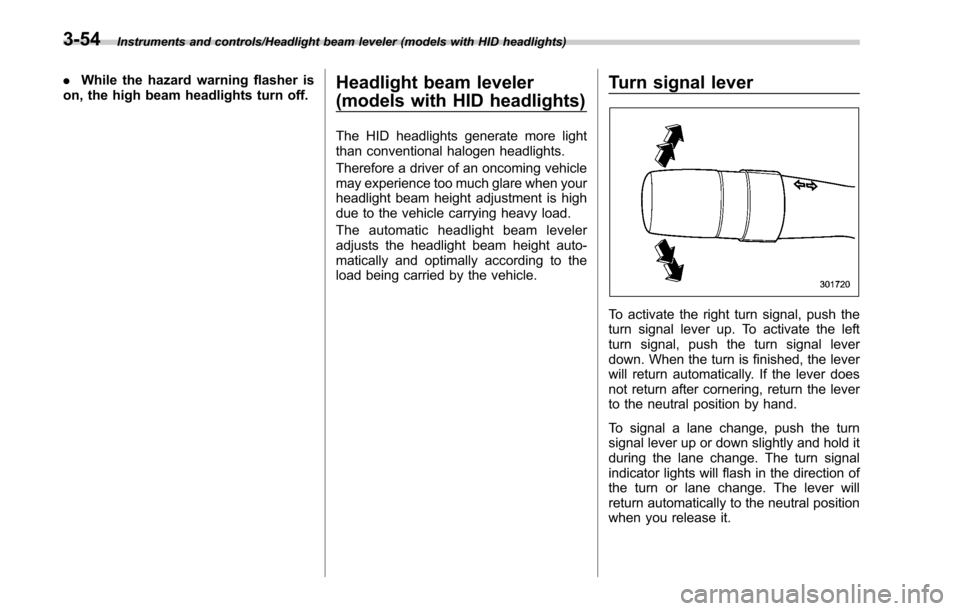
Turn signal lever
To activate the right turn signal, push the
turn signal lever up. To activate the left
turn signal, push the turn signal lever
down. When the turn is finished, the lever
will return automatically. If the lever does
not return after cornering, return the lever
to the neutral position by hand.
To signal a lane change, push the turn
signal lever up or down slightly and hold it
during the lane change. The turn signal
indicator lights will flash in the direction of
the turn or lane change. The lever will
return automatically to the neutral position
when you release it.
3-54
Page 259 of 610
Audio/Audio set
!CD player and disc
. This CD player is intended for use with
4.7 in. (12 cm) discs only.
. Extremely high temperatures can keep
the CD player from working. On hot days,
use the air conditioning system to cool the
inside of the vehicle before using the
player.
. Bumpy roads or other vibrations may
make the CD player skip.
. If moisture gets into the CD player, the
discs may not be able to be played.
Remove the discs from the player and
wait until it dries.
WARNING
CD players use an invisible laser
beam which could cause hazardous
radiation exposure if directed out-
side the unit. Be sure to operate the
player correctly.
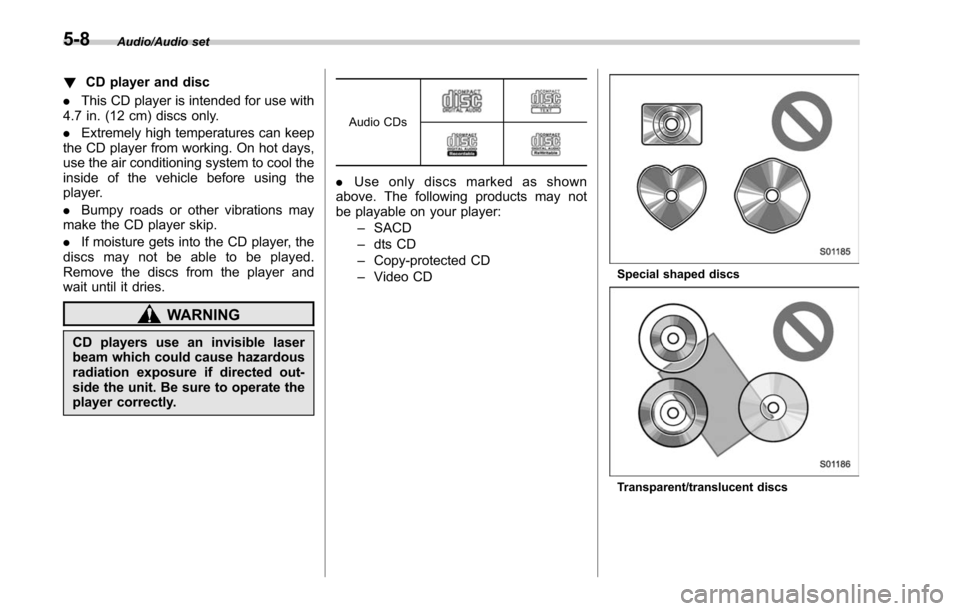
Audio CDs
. Use only discs marked as shown
above. The following products may not
be playable on your player:
–SACD
– dts CD
– Copy-protected CD
– Video CD
Special shaped discs
Transparent/translucent discs
5-8
Page 376 of 610
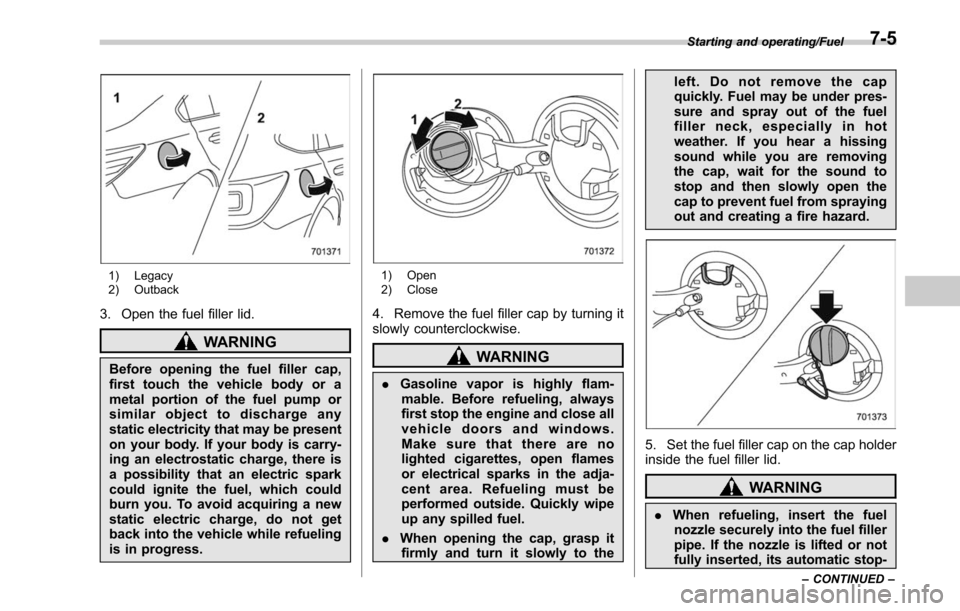
1) Legacy
2) Outback
3. Open the fuel filler lid.
WARNING
Before opening the fuel filler cap,
first touch the vehicle body or a
metal portion of the fuel pump or
similar object to discharge any
static electricity that may be present
on your body. If your body is carry-
ing an electrostatic charge, there is
a possibility that an electric spark
could ignite the fuel, which could
burn you. To avoid acquiring a new
static electric charge, do not get
back into the vehicle while refueling
is in progress.
1) Open
2) Close
4. Remove the fuel filler cap by turning it
slowly counterclockwise.
WARNING
.Gasoline vapor is highly flam-
mable. Before refueling, always
first stop the engine and close all
vehicle doors and windows.
Make sure that there are no
lighted cigarettes, open flames
or electrical sparks in the adja-
cent area. Refueling must be
performed outside. Quickly wipe
up any spilled fuel.
. When opening the cap, grasp it
firmly and turn it slowly to the left. Do not remove the cap
quickly. Fuel may be under pres-
sure and spray out of the fuel
filler neck, especially in hot
weather. If you hear a hissing
sound while you are removing
the cap, wait for the sound to
stop and then slowly open the
cap to prevent fuel from spraying
out and creating a fire hazard.
5. Set the fuel filler cap on the cap holder
inside the fuel filler lid.
WARNING
.
When refueling, insert the fuel
nozzle securely into the fuel filler
pipe. If the nozzle is lifted or not
fully inserted, its automatic stop-
Starting and operating/Fuel
–CONTINUED –7-5
Page 377 of 610
Starting and operating/Fuel
ping mechanism may not func-
tion, causing fuel to overflow the
tank and creating a fire hazard.
. Stop refueling when the auto-
matic stop mechanism on the
fuel nozzle activates. If you con-
tinue to add fuel, temperature
changes or other conditions
may cause fuel to overflow from
the tank and create a fire hazard.
6. Stop filling the tank after the fuel filler
pump automatically stops. Do not add any
more fuel.
7. Put the cap back on, turn it clockwise
until you hear a clicking noise. Be certain
not to catch the tether under the cap while
tightening.
CAUTION
Make sure that the cap is tightened
until it clicks to prevent fuel spillage
in the event of an accident.
8. Close the fuel filler lid completely.
CAUTION
If you spill any fuel on the painted
surface, rinse it off immediately.
Otherwise, the painted surface could be damaged.
NOTE
.
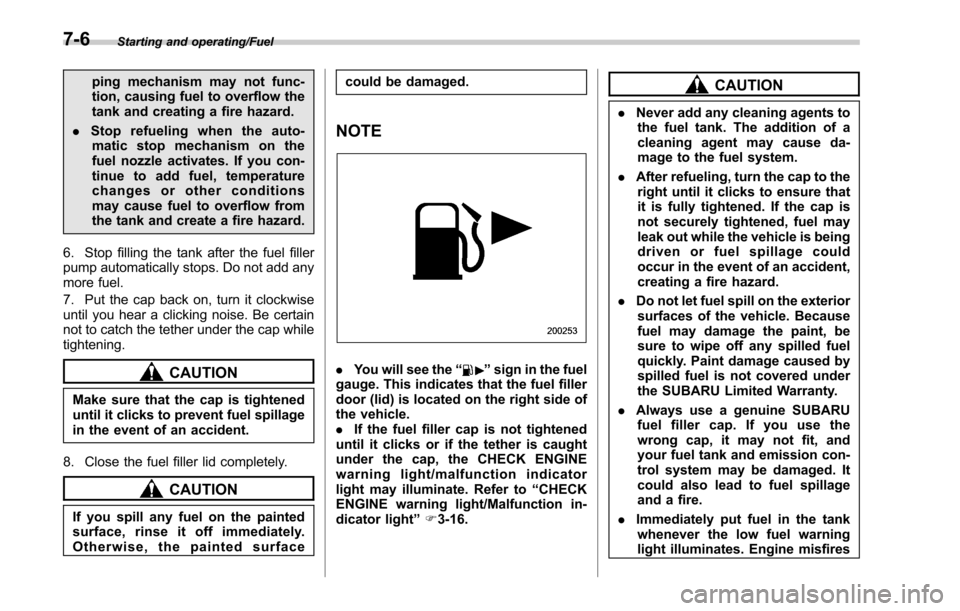
You will see the “”sign in the fuel
gauge. This indicates that the fuel filler
door (lid) is located on the right side of
the vehicle.
. If the fuel filler cap is not tightened
until it clicks or if the tether is caught
under the cap, the CHECK ENGINE
warning light/malfun ction indicator
light may illuminate. Refer to “CHECK
ENGINE warning light/Malfunction in-
dicator light ”F 3-16.
CAUTION
. Never add any cleaning agents to
the fuel tank. The addition of a
cleaning agent may cause da-
mage to the fuel system.
. After refueling, turn the cap to the
right until it clicks to ensure that
it is fully tightened. If the cap is
not securely tightened, fuel may
leak out while the vehicle is being
driven or fuel spillage could
occur in the event of an accident,
creating a fire hazard.
. Do not let fuel spill on the exterior
surfaces of the vehicle. Because
fuel may damage the paint, be
sure to wipe off any spilled fuel
quickly. Paint damage caused by
spilled fuel is not covered under
the SUBARU Limited Warranty.
. Always use a genuine SUBARU
fuel filler cap. If you use the
wrong cap, it may not fit, and
your fuel tank and emission con-
trol system may be damaged. It
could also lead to fuel spillage
and a fire.
. Immediately put fuel in the tank
whenever the low fuel warning
light illuminates. Engine misfires
7-6
Page 380 of 610
CAUTION
Trapping small animals in the cool-
ing fan and belts of the engine may
result in a malfunction. Check that
no small animal enters the engine
compartment and under the vehicle
before starting the engine.
NOTE
.Engine oil, engine coolant, brake
fluid, washer fluid and other fluid levels
should be checked daily, weekly or at
fuel stops.
. When towing a trailer, refer to “Trai-
ler hitch (Outback —if equipped) ”F 8-
19.
Starting and stopping the
engine (models without
push-button ignition switch)
& General precautions when
starting/stopping engine
WARNING
. Never start the engine from out-
side the vehicle (except when
using the remote engine start
system). It may result in an
accident.
. Do not leave the engine running
in locations with poor ventilation,
such as a garage and indoors.
The exhaust gas may enter the
vehicle or indoors, and it may
result in carbon monoxide poi-
soning.
. Do not start the engine near dry
foliage, paper, or other flam-
mable substances. The exhaust
pipe and exhaust emissions can
create a fire hazard at high
temperatures.
CAUTION
. If the engine is stopped during driving, the catalyst may over-
heat and burn.
. When starting the engine, be sure
to sit in the driver ’s seat (except
when using the remote engine
start system).
NOTE
. Avoid rapid racing and rapid accel-
eration immediately after the engine
has started.
. For a short time after the engine has
started, the engine speed is kept high.
When the warm-up is completed, the
engine speed lowers automatically.
. On rare occasions, it may be difficult
to start the engine depending on the
fuel and the usage condition (repeated
driving of a distance in which the
engine has not warmed up sufficiently).
In such a case, it is recommended that
you change to a different brand of fuel.
. On rare occasions, transient knock-
ing may be heard from the engine when
the accelerator is operated rapidly
such as a rapid start-up and a rapid
acceleration. This is not a malfunction.
. The engine starts more easily when
the headlights, air conditioner and rear
window defogger are turned off.
Starting and operating/Starting and stopping the engine (models without push –button ignition switch)
–CONTINUED –7-9