key battery SUBARU OUTBACK 2017 6.G Owner's Manual
[x] Cancel search | Manufacturer: SUBARU, Model Year: 2017, Model line: OUTBACK, Model: SUBARU OUTBACK 2017 6.GPages: 610, PDF Size: 10.28 MB
Page 162 of 610
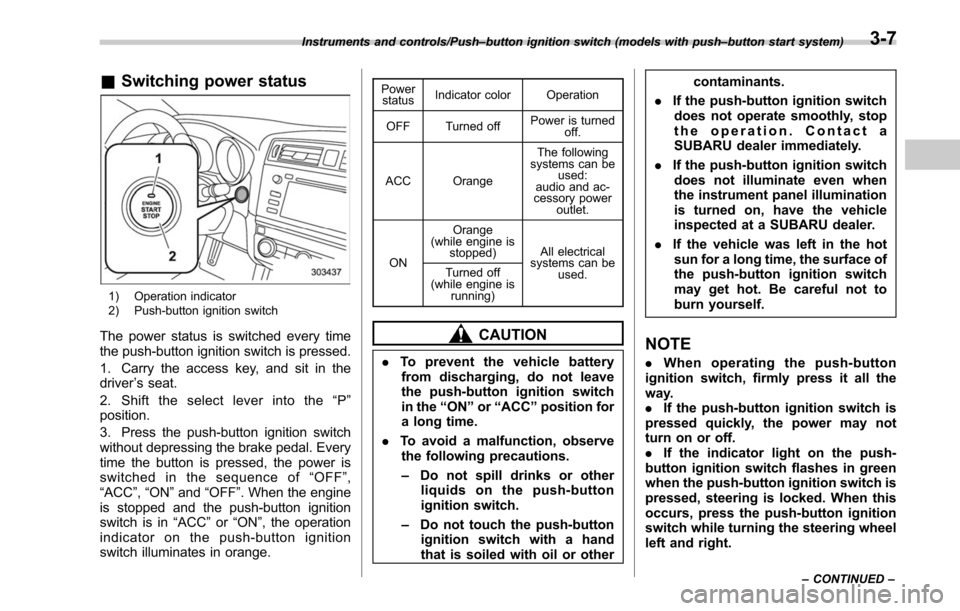
&Switching power status
1) Operation indicator
2) Push-button ignition switch
The power status is switched every time
the push-button ignition switch is pressed.
1. Carry the access key, and sit in the
driver ’s seat.
2. Shift the select lever into the “P ”
position.
3. Press the push-button ignition switch
without depressing the brake pedal. Every
time the button is pressed, the power is
switched in the sequence of “OFF ”,
“ACC ”,“ON ”and “OFF ”. When the engine
is stopped and the push-button ignition
switch is in “ACC”or “ON ”, the operation
indicator on the push-button ignition
switch illuminates in orange.
Power status Indicator color Operation
OFF Turned off Power is turned
off.
ACC Orange The following
systems can be used:
audio and ac-
cessory power
outlet.
ON Orange
(while engine is stopped) All electrical
systems can be
used.
Turned off
(while engine is
running)
CAUTION
.To prevent the vehicle battery
from discharging, do not leave
the push-button ignition switch
in the “ON ”or “ACC ”position for
a long time.
. To avoid a malfunction, observe
the following precautions.
– Do not spill drinks or other
liquids on the push-button
ignition switch.
– Do not touch the push-button
ignition switch with a hand
that is soiled with oil or other contaminants.
. If the push-button ignition switch
does not operate smoothly, stop
the operation. Contact a
SUBARU dealer immediately.
. If the push-button ignition switch
does not illuminate even when
the instrument panel illumination
is turned on, have the vehicle
inspected at a SUBARU dealer.
. If the vehicle was left in the hot
sun for a long time, the surface of
the push-button ignition switch
may get hot. Be careful not to
burn yourself.
NOTE
. When operating the push-button
ignition switch, firmly press it all the
way.
. If the push-button ignition switch is
pressed quickly, the power may not
turn on or off.
. If the indicator light on the push-
button ignition switch flashes in green
when the push-button ignition switch is
pressed, steering is locked. When this
occurs, press the push-button ignition
switch while turning the steering wheel
left and right.
Instruments and controls/Push –button ignition switch (models with push –button start system)
–CONTINUED –3-7
Page 163 of 610
Instruments and controls/Hazard warning flasher
!Battery drainage prevention func-
tion
When the push-button ignition switch is
left in the “ACC”or “ON ”position for
approximately 1 hour, the push-button
ignition switch will be automatically
switched to “OFF”to prevent the battery
from going dead. This function is activated
when the select lever is in the “P”position.
& When access key does not
operate properly
Refer to “Access key –if access key does
not operate properly ”F 9-18.
Hazard warning flasher
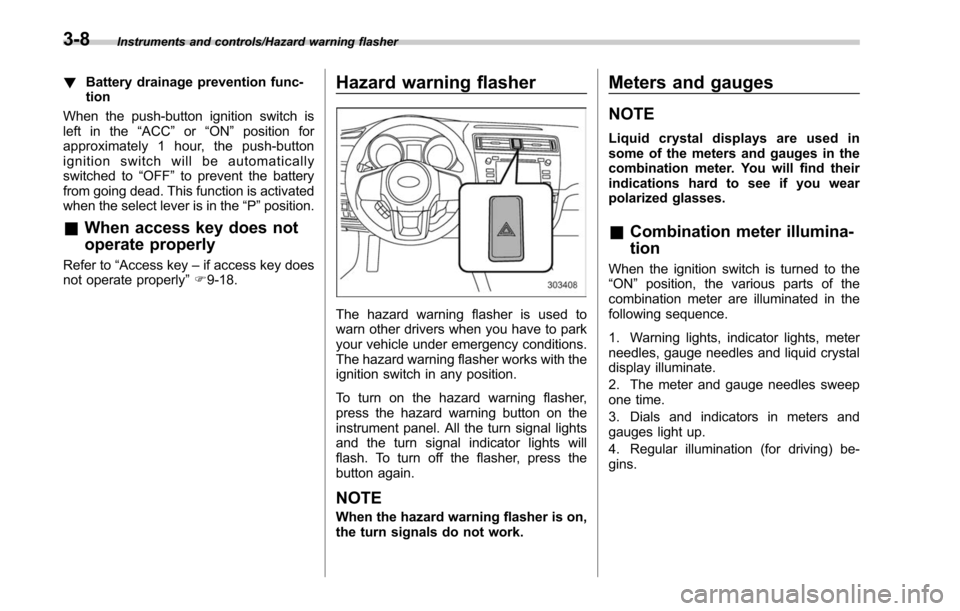
The hazard warning flasher is used to
warn other drivers when you have to park
your vehicle under emergency conditions.
The hazard warning flasher works with the
ignition switch in any position.
To turn on the hazard warning flasher,
press the hazard warning button on the
instrument panel. All the turn signal lights
and the turn signal indicator lights will
flash. To turn off the flasher, press the
button again.
NOTE
When the hazard warning flasher is on,
the turn signals do not work.
Meters and gauges
NOTE
Liquid crystal displays are used in
some of the meters and gauges in the
combination meter. You will find their
indications hard to see if you wear
polarized glasses.
& Combination meter illumina-
tion
When the ignition switch is turned to the
“ON ”position, the various parts of the
combination meter are illuminated in the
following sequence.
1. Warning lights, indicator lights, meter
needles, gauge needles and liquid crystal
display illuminate.
2. The meter and gauge needles sweep
one time.
3. Dials and indicators in meters and
gauges light up.
4. Regular illumination (for driving) be-
gins.
3-8
Page 184 of 610
Inside warningchime Outside warning
chime Operation indicator
on push-button
ignition switch Status Action
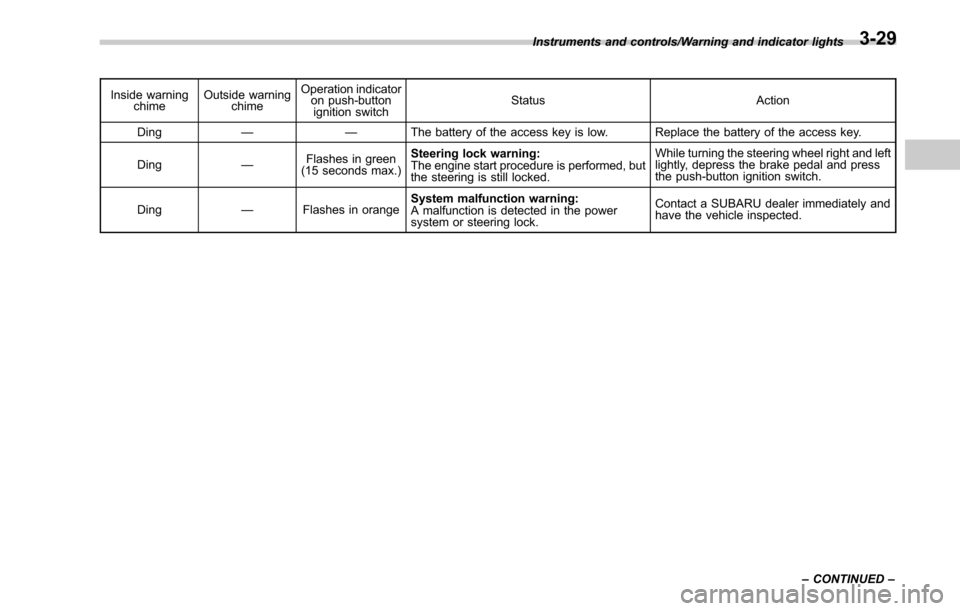
Ding —— The battery of the access key is low. Replace the battery of the access key.
Ding —Flashes in green
(15 seconds max.) Steering lock warning:
The engine start procedure is performed, but
the steering is still locked. While turning the steering wheel right and left
lightly, depress the brake pedal and press
the push-button ignition switch.
Ding —Flashes in orange System malfunction warning:
A malfunction is detected in the power
system or steering lock. Contact a SUBARU dealer immediately and
have the vehicle inspected.
Instruments and controls/Warning and indicator lights
–CONTINUED –
3-29
Page 201 of 610
Instruments and controls/Light control switch
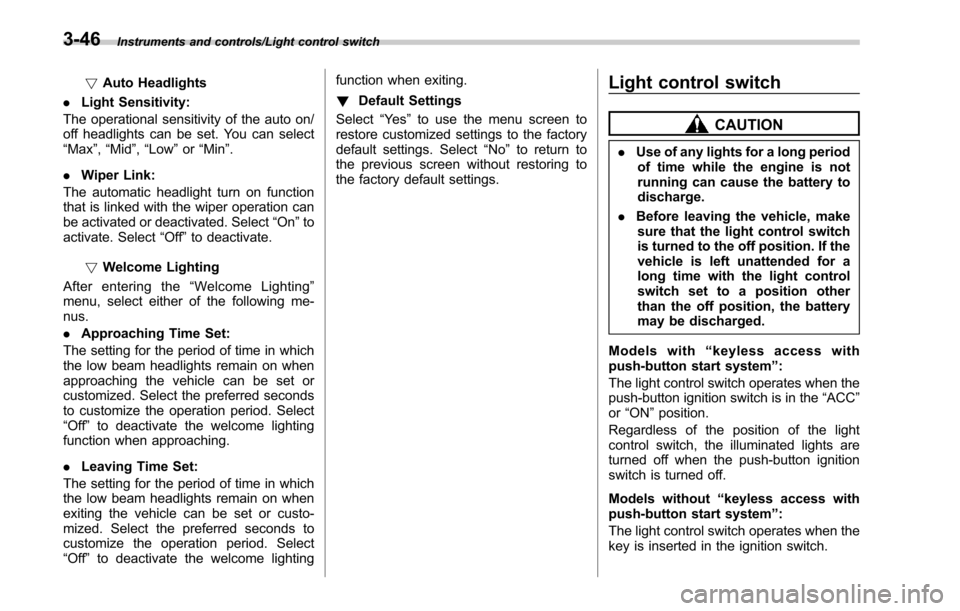
!Auto Headlights
. Light Sensitivity:
The operational sensitivity of the auto on/
off headlights can be set. You can select
“ Max ”,“Mid ”,“Low ”or “Min ”.
. Wiper Link:
The automatic headlight turn on function
that is linked with the wiper operation can
be activated or deactivated. Select “On”to
activate. Select “Off”to deactivate.
! Welcome Lighting
After entering the “Welcome Lighting ”
menu, select either of the following me-
nus.
. Approaching Time Set:
The setting for the period of time in which
the low beam headlights remain on when
approaching the vehicle can be set or
customized. Select the preferred seconds
to customize the operation period. Select
“Off ”to deactivate the welcome lighting
function when approaching.
. Leaving Time Set:
The setting for the period of time in which
the low beam headlights remain on when
exiting the vehicle can be set or custo-
mized. Select the preferred seconds to
customize the operation period. Select
“Off ”to deactivate the welcome lighting function when exiting.
!
Default Settings
Select “Ye s”to use the menu screen to
restore customized settings to the factory
default settings. Select “No”to return to
the previous screen without restoring to
the factory default settings.Light control switch
CAUTION
. Use of any lights for a long period
of time while the engine is not
running can cause the battery to
discharge.
. Before leaving the vehicle, make
sure that the light control switch
is turned to the off position. If the
vehicle is left unattended for a
long time with the light control
switch set to a position other
than the off position, the battery
may be discharged.
Models with “keyless access with
push-button start system ”:
The light control switch operates when the
push-button ignition switch is in the “ACC”
or “ON ”position.
Regardless of the position of the light
control switch, the illuminated lights are
turned off when the push-button ignition
switch is turned off.
Models without “keyless access with
push-button start system ”:
The light control switch operates when the
key is inserted in the ignition switch.
3-46
Page 311 of 610
Audio/Audio set
NOTE
.Depending on the Bluetooth device
that is connected to the system, the
music may start playing when selecting
the
key while it is paused. Con-
versely, the music may pause when
selecting the
key while it is playing.
. In the following conditions, the sys-
tem may not function:
–The Bluetooth device is turned
off.
– The Bluetooth device is not con-
nected.
– The Bluetooth device has a low
battery.
. It may take time to connect the
phone when Bluetooth audio is being
played.
. For operating the portable player,
see the instruction manual that comes
with it.
. If the Bluetooth device is discon-
nected due to poor reception from the
Bluetooth network when the ignition
switch is in the “ACC ”or “ON ”posi-
tion, the system will automatically
reconnect to the portable player.
. If the Bluetooth device is discon-
nected on purpose, such as it was
turned off, this does not happen.
Reconnect the portable player manu-
ally. .
Bluetooth device information is re-
gistered when the Bluetooth device is
connected to the Bluetooth audio sys-
tem. When selling or disposing of the
vehicle, remove the Bluetooth audio
information from the system. Refer to
“ Bluetooth®settings ”F 5-66.
! Connecting a Bluetooth device
To use the Bluetooth audio system, it is
necessary to register a Bluetooth device
with the system.
. Registering an additional device
1. Select the “Select Add”key on the
Bluetooth audio control screen.
2. For more information: Refer to “Regis-
tering/connecting Bluetooth
®device ”F 5-
66.
. Selecting a registered device
1. Select the “Select Device ”key on the
Bluetooth audio control screen.
2. For more information: Refer to “BT
Devices Connection screen” F5-69. !
How to change the source
Select the “BT Audio ”key on the source
select screen. Refer to “Selecting an audio
source” F5-18.
NOTE
Depending on the type of portable
player connected, some functions
may not be available and/or the screen
may look differently than shown in this
manual.
5-60
Page 381 of 610
Starting and operating/Starting and stopping the engine (models without push–button ignition switch)
& Starting engine
CAUTION
Do not operate the starter motor
continuously for more than 10 sec-
onds. If the engine fails to start after
operating the starter for 5 to 10
seconds, wait for 10 seconds or
more before trying again.
NOTE
It may be difficult to start the engine
when the battery has been discon-
nected and reconnected (for mainte-
nance or other purposes). This diffi-
culty is caused by the electronically
controlled throttle ’s self-diagnosis
function. To overcome it, keep the
ignition switch in the “ON ”position
for approximately 10 seconds before
starting the engine.
! MT models
1. Apply the parking brake.
2. Turn off unnecessary lights and ac-
cessories.
3. Depress the clutch pedal to the floor
and shift the shift lever into neutral. Hold
the clutch pedal to the floor while starting
the engine. The starter motor will only operate when the clutch pedal is de-
pressed fully to the floor.
4. Turn the ignition switch to the
“ON”
position and check the operation of the
warning and indicator lights. Refer to
“ Warning and indicator lights ”F 3-13.
5. Turn the ignition switch to the “START”
position without depressing the accelera-
tor pedal. Release the key immediately
after the engine has started.
If the engine does not start, perform the
following procedure.
(1) Turn the ignition switch to the
“LOCK” position and wait for at least
10 seconds. After checking that the
parking brake is applied, turn the
ignition switch to the “START”position
while depressing the accelerator pedal
slightly (approximately a quarter of the
full stroke). Release the accelerator
pedal as soon as the engine starts.
(2) If this fails to start the engine, turn
the ignition switch back to the “LOCK”
position and wait for at least 10
seconds. Then fully depress the accel-
erator pedal and turn the ignition
switch to the “START”position. If the
engine starts, quickly release the
accelerator pedal.
(3) If this does not start the engine,
turn the ignition switch again to the
“ LOCK” position. After waiting for 10 seconds or longer, turn the ignition
switch to the
“START”position without
depressing the accelerator pedal.
(4) If the engine still refuses to start,
contact your nearest SUBARU dealer
for assistance.
6. Confirm that all warning and indicator
lights have turned off after the engine has
started. The fuel injection system auto-
matically lowers the idle speed as the
engine warms up.
! CVT models
CAUTION
If you restart the engine while the
vehicle is moving, shift the select
lever into the “N ” position. Do not
attempt to place the select lever of a
moving vehicle into the “P ” posi-
tion.
1. Apply the parking brake.
2. Turn off unnecessary lights and ac-
cessories.
3. Shift the select lever to the “P”or “N”
position (preferably “P ” position). The
starter will only operate when the select
lever is at the “P”or “N”position.
4. Turn the ignition switch to the “ON”
position and check the operation of the
7-10
Page 384 of 610
NOTE
.When pressing the push-button igni-
tion switch while depressing the brake
pedal:
–The engine starter operates for a
maximum of 10 seconds and after
starting the engine, the starter
stops automatically.
– The engine can be started re-
gardless of the power status.
. If the engine does not start, check
the security indicator light. Then press
the push-button ignition switch without
depressing the brake pedal to switch
the power to “OFF ”.
– If the light had illuminated, try to
start the engine again.
– If the light had been off, press the
push-button ignition switch while
depressing the brake pedal more
forcefully.
. The engine start procedures may
not function depending on the radio
wave conditions around the vehicle. In
such a case, refer to “Starting engine ”
F 9-19.
. If the vehicle battery is discharged,
the steering cannot be unlocked.
Charge the battery.
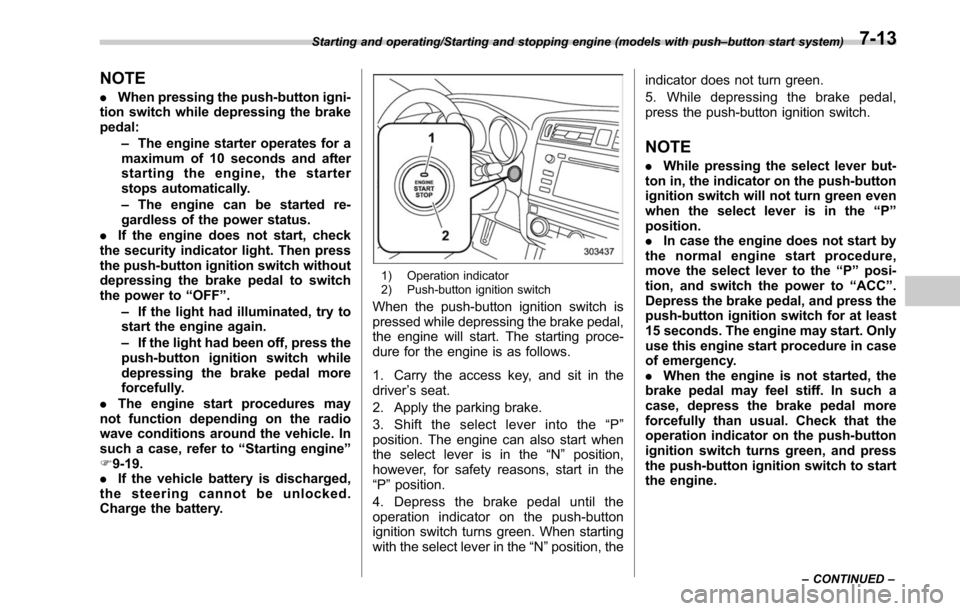
1) Operation indicator
2) Push-button ignition switch
When the push-button ignition switch is
pressed while depressing the brake pedal,
the engine will start. The starting proce-
dure for the engine is as follows.
1. Carry the access key, and sit in the
driver ’s seat.
2. Apply the parking brake.
3. Shift the select lever into the “P ”
position. The engine can also start when
the select lever is in the “N ” position,
however, for safety reasons, start in the
“ P ”position.
4. Depress the brake pedal until the
operation indicator on the push-button
ignition switch turns green. When starting
with the select lever in the “N”position, the indicator does not turn green.
5. While depressing the brake pedal,
press the push-button ignition switch.
NOTE
.
While pressing the select lever but-
ton in, the indicator on the push-button
ignition switch will not turn green even
when the select lever is in the “P ”
position.
. In case the engine does not start by
the normal engine start procedure,
move the select lever to the “P ” posi-
tion, and switch the power to “ACC ”.
Depress the brake pedal, and press the
push-button ignition switch for at least
15 seconds. The engine may start. Only
use this engine start procedure in case
of emergency.
. When the engine is not started, the
brake pedal may feel stiff. In such a
case, depress the brake pedal more
forcefully than usual. Check that the
operation indicator on the push-button
ignition switch turns green, and press
the push-button ignition switch to start
the engine.
Starting and operating/Starting and stopping engine (models with push –button start system)
–CONTINUED –7-13
Page 385 of 610
Starting and operating/Starting and stopping engine (models with push–button start system)
& Stopping engine
1. Stop the vehicle completely.
2. Move the select lever to the “P ”
position.
3. Press the push-button ignition switch.
The engine will stop, and the power will be
switched off.
WARNING
. Do not touch the push-button
ignition switch during driving.
When the push-button ignition
switch is operated as follows,
the engine will stop.
– The switch is pressed and held
for 3 seconds or longer.
– The switch is pressed briefly 3
times or more in succession.
When the engine stops, the brake
booster will not function. A great-
er foot pressure will be required
on the brake pedal.
The power steering system will
not operate either. A greater
force will be required to steer,
and it may result in an accident.
. If the engine stops during driving,
do not operate the push-button
ignition switch or open any of the doors until the vehicle is stopped
in a safe location. It is dangerous
because the steering lock may be
activated. Stop the vehicle in a
safe place, and contact a
SUBARU dealer immediately.
CAUTION
.
Do not stop the engine while the
select lever is in a position other
than the “P ” position.
. If the engine is stopped while the
select lever is in a position other
than the “P ” position, the power
will be in “ACC ”. If the vehicle is
left in this condition, the battery
may be discharged.
NOTE
Although you can stop the engine by
operating the push-button ignition
switch, do not stop the engine during
driving except in an emergency.
& When access key does not
operate properly
Refer to “Access key –if access key does
not operate properly ”F 9-18.
& Steering lock
After stopping the engine and the driver ’s
door is open, the steering wheel will be
locked due to the steering lock function.
When the engine is restarted, the steering
lock will be automatically canceled.
! When the steering lock cannot be
released
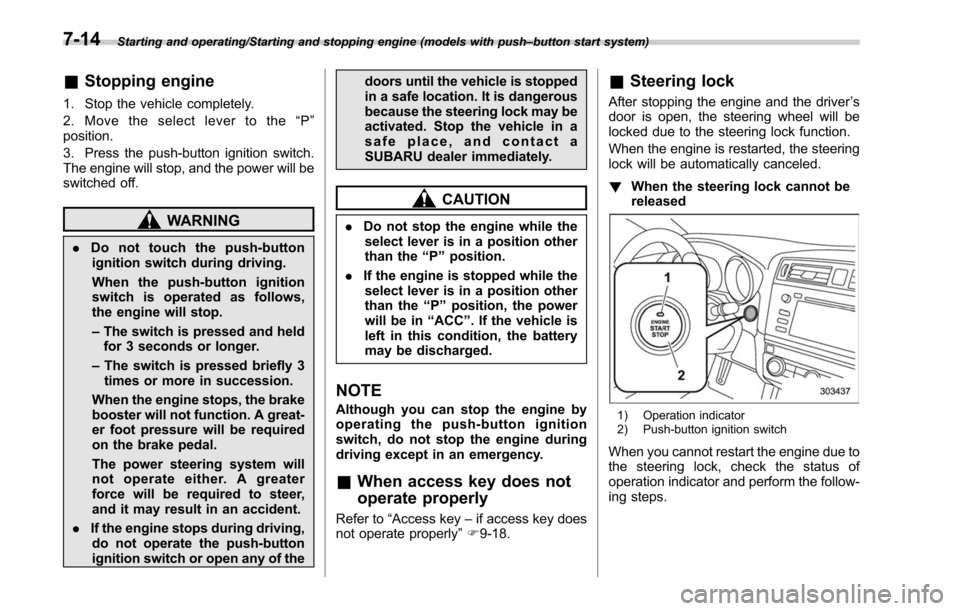
1) Operation indicator
2) Push-button ignition switch
When you cannot restart the engine due to
the steering lock, check the status of
operation indicator and perform the follow-
ing steps.
7-14
Page 392 of 610
event that a transmitter is lost, stolen,
damaged or additional transmitters are
desired (the system will accept up to eight
transmitters). New remote engine start
transmitters can be programmed accord-
ing to the following procedure.
1. Open the driver’s door (the driver ’s
door must remain opened throughout the
entire process).
2. Depress and hold the brake pedal.
3. Turn the ignition switch to “ON”then
“ LOCK”, back to “ON”then “LOCK ”, back
to “ON ”then “LOCK”, then back to “ON”
again and leave the ignition “ON”through-
out the programming process.
4. The system will flash the side marker
lights, tail lights and parking lights and
honk the horn three times, indicating that
the system has entered the transmitter
learn mode.
5. Press and release the “
”button on
the transmitter that you want to program.
6. The system will flash the side marker
lights, tail lights and parking lights and
honk the horn one time, indicating that the
system has learned the transmitter. Upon
successful programming, the remote start
confirmation transmitter button will flash
one time.
7. Repeat step 5 for any additional
transmitters (the system will accept up to eight transmitters).
8. The system will exit the transmitter
learn mode if the key is turned to the
“LOCK”
position, the door is closed or
after 2 minutes.
& System maintenance
NOTE
For models without “keyless access
with push-button start system ”:
In the event that the vehicle ’s battery is
replaced, discharged or disconnected,
it will be necessary to start the vehicle
a minimum of one time using the key
prior to activating the remote engine
start system. This is required to allow
the vehicle electronic systems to re-
synchronize.
! Changing the batteries
CAUTION
.Do not let dust, oil or water get on
or in the remote engine start
transmitter when replacing the
battery.
. Be careful not to damage the
printed circuit board in the re-
mote engine start transmitter
when replacing the battery. .
Be careful not to allow children to
touch the battery and any re-
moved parts; children could
swallow them.
. There is a danger of explosion if
an incorrect replacement battery
is used. Replace only with the
same or equivalent type of bat-
tery.
. Batteries should not be exposed
to excessive heat such as sun-
shine, fire or the like.
For models with “keyless access with
push-button start system:
Perform the procedure described in “Re-
placing battery of access key ”F 11-50.
For models without “keyless access
with push-button start system ”:
The 3-volt lithium battery (model CR-
2032) supplied in your remote engine start
transmitter should last approximately one
year, depending on usage. When the
battery begins to weaken, you will notice
a decrease in range (distance from the
vehicle that your remote control operates).
Follow the instructions below to change
the remote engine start transmitter battery.
Starting and operating/Remote engine start system (dealer option)
–CONTINUED –7-21
Page 491 of 610
In case of emergency/Access key–if access key does not operate properly
Access key –if access key
does not operate properly
CAUTION
Keep metallic objects, magnetic
sources and signal transmitters
away from the area between the
access key and the push-button
ignition switch. They may interfere
with the communication between
the access key and the push-button
ignition switch.
The following functions may be inoperable
because of strong radio signals in the
surrounding area or a low battery condi-
tion of the access key.
. Locking/unlocking doors including rear
gate
. Switching power status
. Starting engine
In such cases, perform the following
procedure. When the battery of the access
key is discharged, replace it with a new
one. Refer to “Replacing battery of access
key ”F 11-50.
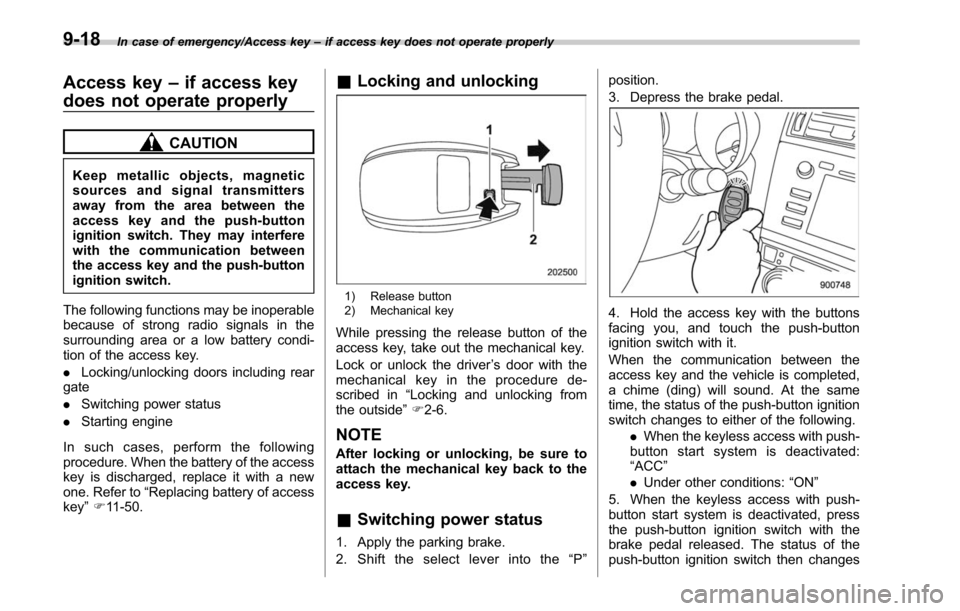
& Locking and unlocking
1) Release button
2) Mechanical key
While pressing the release button of the
access key, take out the mechanical key.
Lock or unlock the driver ’s door with the
mechanical key in the procedure de-
scribed in “Locking and unlocking from
the outside ”F 2-6.
NOTE
After locking or unlocking, be sure to
attach the mechanical key back to the
access key.
& Switching power status
1. Apply the parking brake.
2. Shift the select lever into the “P ” position.
3. Depress the brake pedal.
4. Hold the access key with the buttons
facing you, and touch the push-button
ignition switch with it.
When the communication between the
access key and the vehicle is completed,
a chime (ding) will sound. At the same
time, the status of the push-button ignition
switch changes to either of the following.
.When the keyless access with push-
button start system is deactivated:
“ACC ”
. Under other conditions: “ON ”
5. When the keyless access with push-
button start system is deactivated, press
the push-button ignition switch with the
brake pedal released. The status of the
push-button ignition switch then changes
9-18