buttons SUBARU OUTBACK 2017 6.G Owners Manual
[x] Cancel search | Manufacturer: SUBARU, Model Year: 2017, Model line: OUTBACK, Model: SUBARU OUTBACK 2017 6.GPages: 610, PDF Size: 10.28 MB
Page 22 of 610
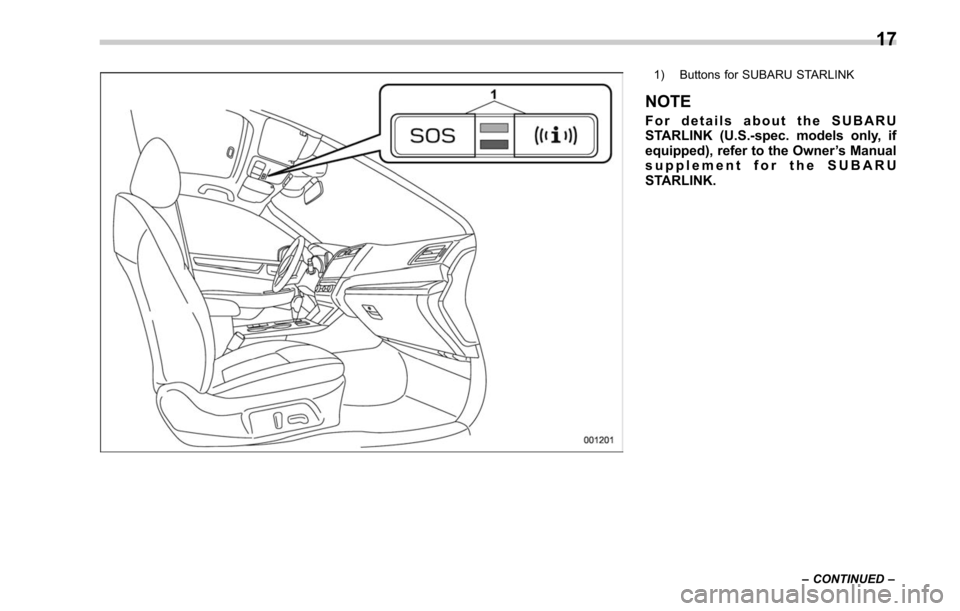
1) Buttons for SUBARU STARLINK
NOTE
For details about the SUBARU
STARLINK (U.S.-spec. models only, if
equipped), refer to the Owner’s Manual
supplement for the SUBARU
STARLINK.
– CONTINUED –
17
Page 115 of 610
Keys and doors/Keyless access with push–button start system
Keyless access with push-
button start system (if
equipped)
The keyless access with push-button start
system allows you to perform the following
functions when you are carrying the
access key.
. Locking and unlocking of the doors and
rear gate (Outback)
. Opening the trunk (Legacy)
. Starting and stopping the engine. For
detailed information, refer to “Starting and
stopping engine (models with push-button
start system) ”F 7-12.
. Arming and disarming the alarm sys-
tem. For detailed information, refer to
“Alarm system ”F 2-28.
Locking and unlocking by the remote
keyless entry system can also be con-
trolled with the buttons on the access key.
For detailed information, refer to “Remote
keyless entry system ”F 2-24.
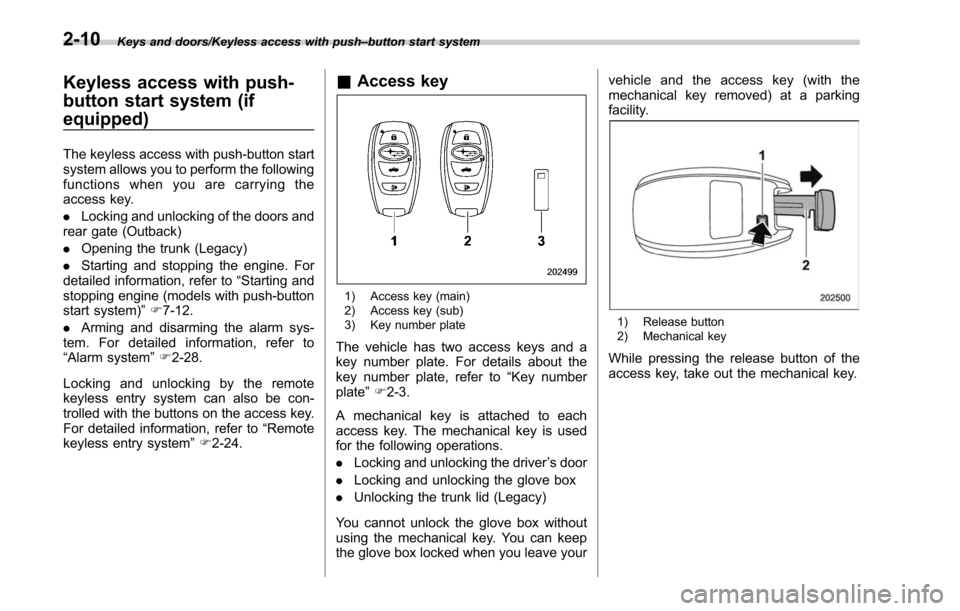
& Access key
1) Access key (main)
2) Access key (sub)
3) Key number plate
The vehicle has two access keys and a
key number plate. For details about the
key number plate, refer to “Key number
plate ”F 2-3.
A mechanical key is attached to each
access key. The mechanical key is used
for the following operations.
. Locking and unlocking the driver ’s door
. Locking and unlocking the glove box
. Unlocking the trunk lid (Legacy)
You cannot unlock the glove box without
using the mechanical key. You can keep
the glove box locked when you leave your vehicle and the access key (with the
mechanical key removed) at a parking
facility.
1) Release button
2) Mechanical key
While pressing the release button of the
access key, take out the mechanical key.
2-10
Page 116 of 610
&Safety precautions
! Regarding radio wave
WARNING
If you wear an implanted pacemaker
or an implanted defibrillator, stay at
least 8.7 in (22 cm) away from the
transmitting antennas installed on
the vehicle.
The radio waves from the transmit-
ting antennas on the vehicle could
adversely affect the operation of
implanted pacemakers and im-
planted defibrillators.
If you wear electric medical equip-
ment other than an implanted pace-
maker or an implanted defibrillator,
before using the keyless access
with push-button start system, refer
to“Radio waves used for the key-
less access with push-button start
system ”F2-13, and contact the
electric medical equipment manu-
facturer for more information. The
radio waves from the transmitting
antennas on the vehicle could ad-
versely affect the operation of the
electric medical equipment.
CAUTION
When you carry the access key on
an airplane, do not press the button
of the access key while in the
airplane. When any button of the
access key is pressed, radio waves
are sent and may affect the opera-
tion of the airplane. When you carry
the access key in a bag on an
airplane, take measures to prevent
the buttons of the access key from
being pressed.
NOTE
The status of the access key and
environmental conditions may interfere
with the communication between the
access key and the vehicle under the
following conditions.
. When operating near a source of
strong radio waves or other interfer-
ence, such as a broadcast station or
power transmission lines
. When products that transmit radio
waves are used, such as an access key
or a remote transmitter key of another
vehicle
. When carrying the access key of
your vehicle together with an access
key or a remote transmitter of another vehicle
.
When the access key is placed near
wireless communication equipment
such as a cell phone, or near a metallic
object
. When metallic accessories are at-
tached to the access key
. When carrying the access key with
electronic appliances such as a laptop
computer
. When the battery of the access key
is discharged
In such cases, it may not be possible to
lock or unlock the doors or start the
engine.
! Regarding malfunction
CAUTION
.Never leave or store the access
key inside the vehicle or within
6.6 ft (2 m) around the vehicle (e.
g., in the garage). The access key
may be locked inside the vehicle,
or the battery may discharge
rapidly. Note that the push-button
ignition switch may not turn on in
some cases depending on the
location of the access key.
. The access key contains electro-
nic components. Observe the
Keys and doors/Keyless access with push –button start system
–CONTINUED –2-11
Page 129 of 610
Keys and doors/Remote keyless entry system
buzzer will sound if incorrect PIN codes
are entered five times continuously. If
this occurs, you cannot unlock the
doors by PIN Code Access for 5
minutes.Remote keyless entry system
CAUTION
.Do not expose the remote trans-
mitter to severe shocks, such as
those experienced as a result of
dropping or throwing.
. Do not take the remote transmit-
ter apart except when replacing
the battery.
. Do not get the remote transmitter
wet. If it gets wet, wipe it dry with
a cloth immediately.
. When you carry the remote trans-
mitteronanairplane,donot
press the button of the remote
transmitter while in the airplane.
When any button of the remote
transmitter is pressed, radio
waves are sent and may affect
the operation of the airplane.
When you carry the remote trans-
mitter in a bag on an airplane,
take measures to prevent the
buttons of the remote transmitter
from being pressed.
For models with “keyless access with
push-button start system ”, the access key is used as the transmitter for the
remote keyless entry system. For models
without
“keyless access with push-button
start system ”, the transmitter for the
remote keyless entry system is located
inside the key head.
The remote keyless entry system has the
following functions.
. Locking and unlocking the doors (and
rear gate for Outback) without a key
. Opening the trunk lid (Legacy) without
key
. Sounding a panic alarm
. Arming and disarming the alarm sys-
tem. For detailed information, refer to
“Alarm system ”F 2-28.
The operable distance of the remote
keyless entry system is approximately 30
feet (10 meters). However, this distance
will vary depending on environmental
conditions. The system ’s operable dis-
tance will be shorter in areas near a
facility or electronic equipment emitting
strong radio waves such as a power plant,
broadcast station, TV tower, or remote
controller of home electronic appliances.
2-24
Page 148 of 610
may malfunction.
. Do not touch the driving rod.
Doing so may result in injury or
damage.
The power rear gate operates only when
all of the following conditions are satisfied.
. The vehicle is stopped completely.
. The outside temperature is within a
range from −22 8F to 1408 F (from−30 8Cto
60 8C).
. The ignition switch is in the “LOCK”/
“OFF ”or “ACC ”position. Or, the ignition
switch is in the “ON”position and the
parking brake is applied (MT models)/the
select lever is in the “P ” position (CVT
models).
We recommend using the power rear gate
function in most circumstances instead of
manual operation.
NOTE
. Do not press the power rear gate
button repeatedly while the power rear
gate is operating. Otherwise, the sys-
tem may ignore the button operation in
order to avoid being damaged.
. It is not possible to stop the rear
gate temporarily while opening be-
tween the completely closed position
and approximately 2 in (5 cm) open. If you press one of the power rear gate
buttons briefly during this range, the
rear gate will be closed.
.
If the vehicle starts to move while
the power rear gate is operating, the
system sounds a buzzer and closes the
rear gate automatically. At this time, if
the system detects jamming, it will
deactivate the power rear gate and the
rear gate will not be closed. If this
occurs, close the rear gate manually.
For details, refer to “Manual rear gate”
F 2-41.
. If you try to open the rear gate using
the power rear gate function immedi-
ately after closing the rear gate using
the power rear gate function, an elec-
tronic chirp will sound and the rear
gate will not open. Wait for a while
before trying to open the rear gate via
the power rear gate function.
. If either of the operating conditions
has not been satisfied while operating
the power rear gate, an electronic chirp
will sound and the power rear gate will
be deactivated. In this case, the rear
gate may stop opening or closing
suddenly. !
Operation
NOTE
.The rear gate will remain unlocked
even after closing it. Always lock the
rear gate when leaving the vehicle.
. If you cannot open/close the rear
gate by performing the operation de-
scribed here, a short electronic chirp
will sound three times (beep, beep,
beep).
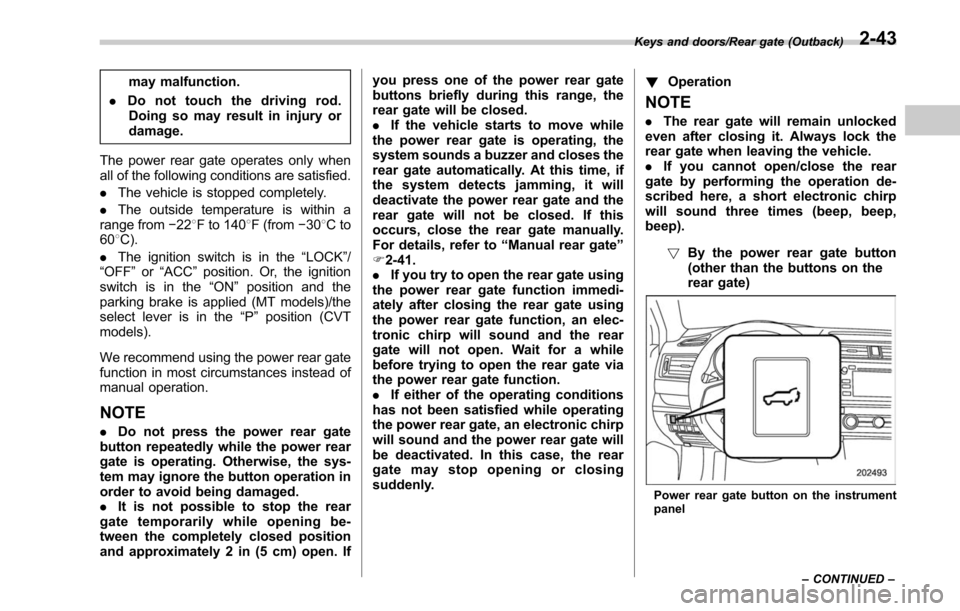
!By the power rear gate button
(other than the buttons on the
rear gate)
Power rear gate button on the instrument
panel
Keys and doors/Rear gate (Outback)
–CONTINUED –
2-43
Page 149 of 610
Keys and doors/Rear gate (Outback)
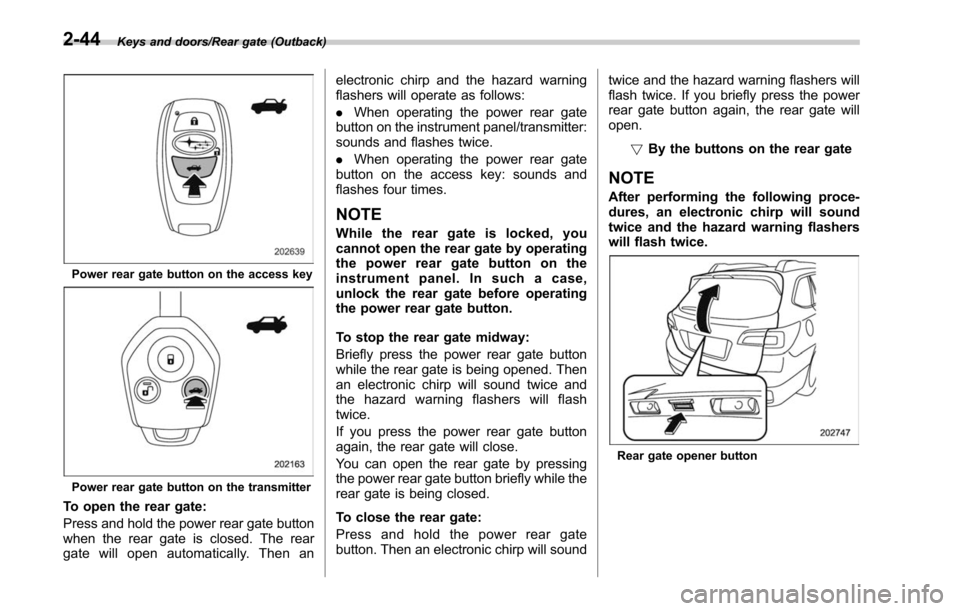
Power rear gate button on the access key
Power rear gate button on the transmitter
To open the rear gate:
Press and hold the power rear gate button
when the rear gate is closed. The rear
gate will open automatically. Then anelectronic chirp and the hazard warning
flashers will operate as follows:
.
When operating the power rear gate
button on the instrument panel/transmitter:
sounds and flashes twice.
. When operating the power rear gate
button on the access key: sounds and
flashes four times.
NOTE
While the rear gate is locked, you
cannot open the rear gate by operating
the power rear gate button on the
instrument panel. In such a case,
unlock the rear gate before operating
the power rear gate button.
To stop the rear gate midway:
Briefly press the power rear gate button
while the rear gate is being opened. Then
an electronic chirp will sound twice and
the hazard warning flashers will flash
twice.
If you press the power rear gate button
again, the rear gate will close.
You can open the rear gate by pressing
the power rear gate button briefly while the
rear gate is being closed.
To close the rear gate:
Press and hold the power rear gate
button. Then an electronic chirp will sound twice and the hazard warning flashers will
flash twice. If you briefly press the power
rear gate button again, the rear gate will
open.
!By the buttons on the rear gate
NOTE
After performing the following proce-
dures, an electronic chirp will sound
twice and the hazard warning flashers
will flash twice.
Rear gate opener button
2-44
Page 150 of 610
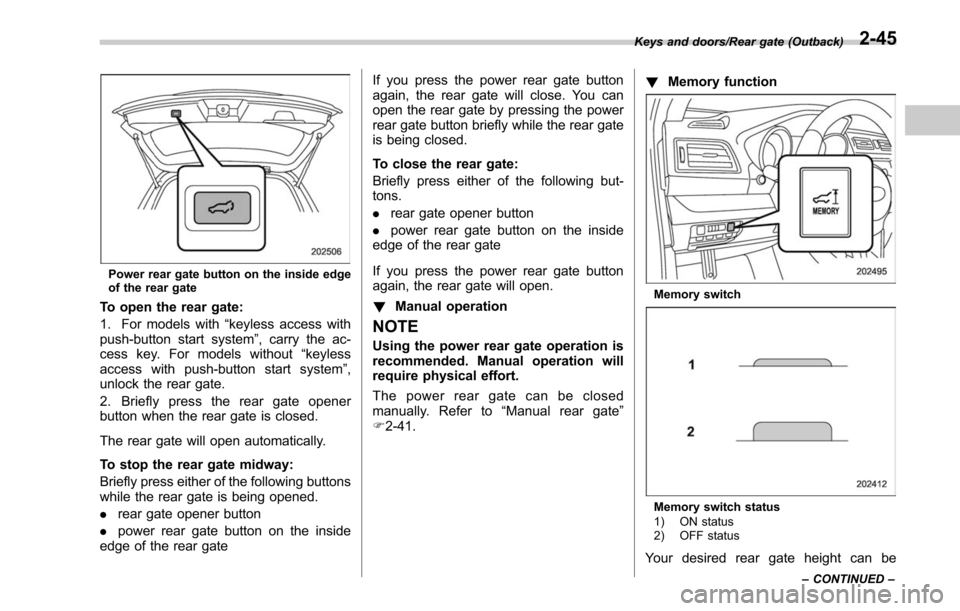
Power rear gate button on the inside edge
of the rear gate
To open the rear gate:
1. For models with“keyless access with
push-button start system ”, carry the ac-
cess key. For models without “keyless
access with push-button start system ”,
unlock the rear gate.
2. Briefly press the rear gate opener
button when the rear gate is closed.
The rear gate will open automatically.
To stop the rear gate midway:
Briefly press either of the following buttons
while the rear gate is being opened.
. rear gate opener button
. power rear gate button on the inside
edge of the rear gate If you press the power rear gate button
again, the rear gate will close. You can
open the rear gate by pressing the power
rear gate button briefly while the rear gate
is being closed.
To close the rear gate:
Briefly press either of the following but-
tons.
.
rear gate opener button
. power rear gate button on the inside
edge of the rear gate
If you press the power rear gate button
again, the rear gate will open.
! Manual operation
NOTE
Using the power rear gate operation is
recommended. Manual operation will
require physical effort.
The power rear gate can be closed
manually. Refer to “Manual rear gate ”
F 2-41. !
Memory function
Memory switch
Memory switch status
1) ON status
2) OFF status
Your desired rear gate height can be
Keys and doors/Rear gate (Outback)
–CONTINUED –2-45
Page 219 of 610
Instruments and controls/Mirrors
!Photosensors
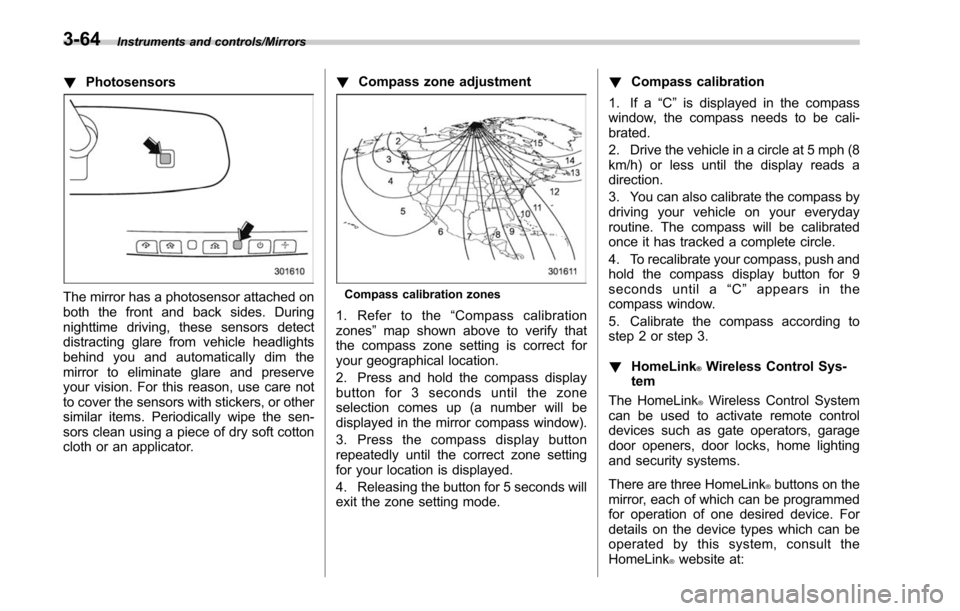
The mirror has a photosensor attached on
both the front and back sides. During
nighttime driving, these sensors detect
distracting glare from vehicle headlights
behind you and automatically dim the
mirror to eliminate glare and preserve
your vision. For this reason, use care not
to cover the sensors with stickers, or other
similar items. Periodically wipe the sen-
sors clean using a piece of dry soft cotton
cloth or an applicator. !
Compass zone adjustmentCompass calibration zones
1. Refer to the “Compass calibration
zones” map shown above to verify that
the compass zone setting is correct for
your geographical location.
2. Press and hold the compass display
button for 3 seconds until the zone
selection comes up (a number will be
displayed in the mirror compass window).
3. Press the compass display button
repeatedly until the correct zone setting
for your location is displayed.
4. Releasing the button for 5 seconds will
exit the zone setting mode. !
Compass calibration
1. If a “C”is displayed in the compass
window, the compass needs to be cali-
brated.
2. Drive the vehicle in a circle at 5 mph (8
km/h) or less until the display reads a
direction.
3. You can also calibrate the compass by
driving your vehicle on your everyday
routine. The compass will be calibrated
once it has tracked a complete circle.
4. To recalibrate your compass, push and
hold the compass display button for 9
seconds until a “C ” appears in the
compass window.
5. Calibrate the compass according to
step 2 or step 3.
! HomeLink
®Wireless Control Sys-
tem
The HomeLink
®Wireless Control System
can be used to activate remote control
devices such as gate operators, garage
door openers, door locks, home lighting
and security systems.
There are three HomeLink
®buttons on the
mirror, each of which can be programmed
for operation of one desired device. For
details on the device types which can be
operated by this system, consult the
HomeLink
®website at:
3-64
Page 221 of 610
Instruments and controls/Mirrors
CAUTION
When programming the HomeLink®Wireless Control System to operate
a garage door opener or an entrance
gate, unplug the device’s motor
from the outlet during programming
to prevent motor burnout.
NOTE
. After programming your HomeLink®Wireless Control System for the de-
sired devices, retain the hand-held
transmitters for further programming
or device testing in the event of a
problem.
.It is recommended that you insert a
new battery in the hand-held transmit-
ter of a device to ensure correct
programming.
! Garage door opener program-
ming in the U.S.A.
NOTE
When programming the HomeLink®Wireless Control System for a garage
door opener, it is suggested that you
park the vehicle outside the garage.
1. Unplug the motor of the garage door
opener from the outlet.
NOTE
If any of the HomeLink®buttons are
already programmed for other devices,
skip step 2 because it clears the
memory of all three buttons.
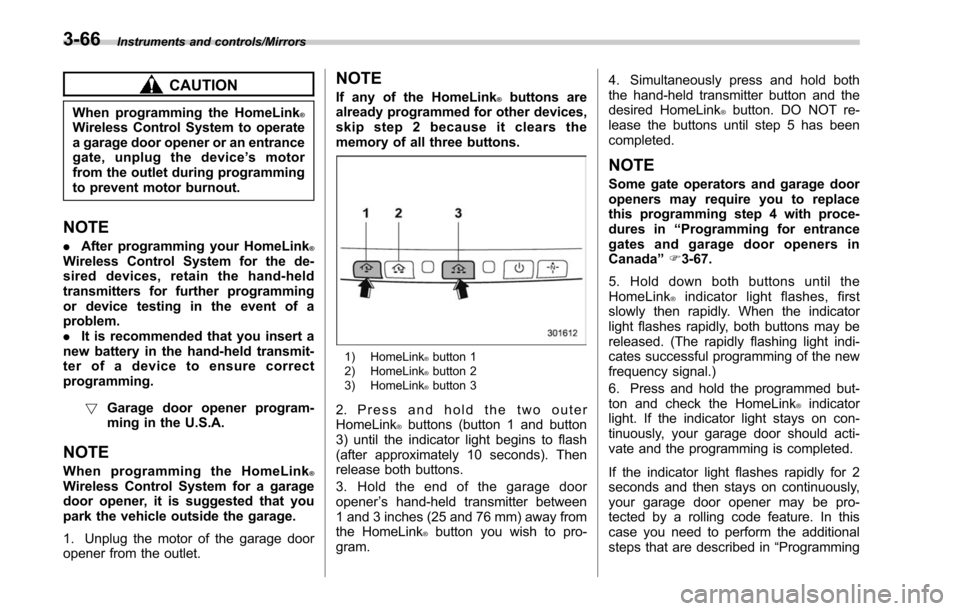
1) HomeLink®button 1
2) HomeLink®button 2
3) HomeLink®button 3
2. Press and hold the two outer
HomeLink®buttons (button 1 and button
3) until the indicator light begins to flash
(after approximately 10 seconds). Then
release both buttons.
3. Hold the end of the garage door
opener ’s hand-held transmitter between
1 and 3 inches (25 and 76 mm) away from
the HomeLink
®button you wish to pro-
gram. 4. Simultaneously press and hold both
the hand-held transmitter button and the
desired HomeLink
®button. DO NOT re-
lease the buttons until step 5 has been
completed.
NOTE
Some gate operators and garage door
openers may require you to replace
this programming step 4 with proce-
dures in “Programming for entrance
gates and garage door openers in
Canada ”F 3-67.
5. Hold down both buttons until the
HomeLink
®indicator light flashes, first
slowly then rapidly. When the indicator
light flashes rapidly, both buttons may be
released. (The rapidly flashing light indi-
cates successful programming of the new
frequency signal.)
6. Press and hold the programmed but-
ton and check the HomeLink
®indicator
light. If the indicator light stays on con-
tinuously, your garage door should acti-
vate and the programming is completed.
If the indicator light flashes rapidly for 2
seconds and then stays on continuously,
your garage door opener may be pro-
tected by a rolling code feature. In this
case you need to perform the additional
steps that are described in “Programming
3-66
Page 222 of 610
rolling-code-protected garage door open-
ers in the U.S.A.”F 3-67.
! Programming rolling-code-pro-
tected garage door openers in
the U.S.A.
If your garage door opener has a rolling
code feature, program the HomeLink
®Wireless Control System for it by following
steps 1 through 5 in “Garage door opener
programming in the U.S.A. ”F 3-66. Then
continue with the following steps.
NOTE
The assistance of a second person
may make the programming quicker
and easier.
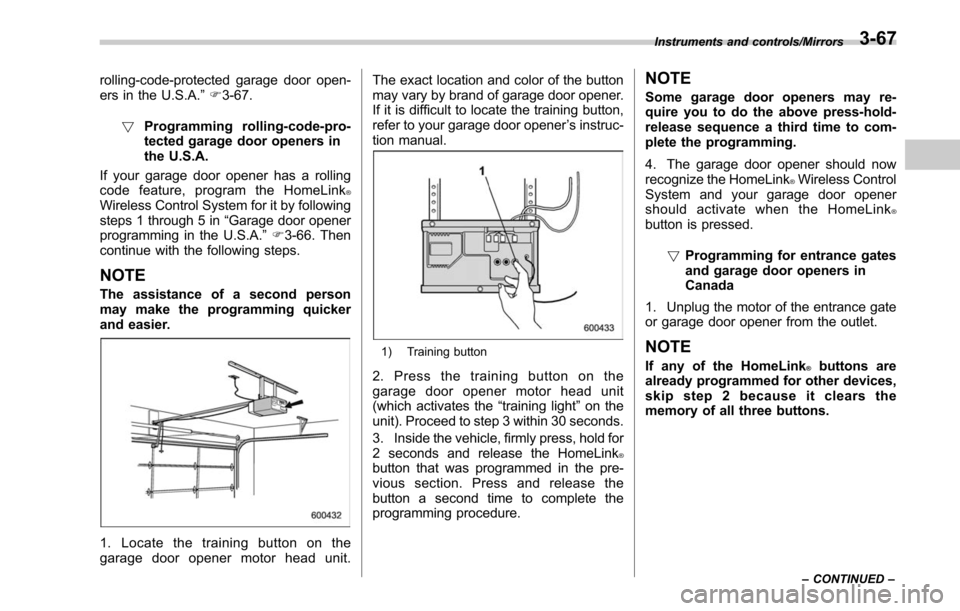
1. Locate the training button on the
garage door opener motor head unit. The exact location and color of the button
may vary by brand of garage door opener.
If it is difficult to locate the training button,
refer to your garage door opener
’s instruc-
tion manual.
1) Training button
2. Press the training button on the
garage door opener motor head unit
(which activates the “training light”on the
unit). Proceed to step 3 within 30 seconds.
3. Inside the vehicle, firmly press, hold for
2 seconds and release the HomeLink
®button that was programmed in the pre-
vious section. Press and release the
button a second time to complete the
programming procedure.
NOTE
Some garage door openers may re-
quire you to do the above press-hold-
release sequence a third time to com-
plete the programming.
4. The garage door opener should now
recognize the HomeLink
®Wireless Control
System and your garage door opener
should activate when the HomeLink
®button is pressed.
!Programming for entrance gates
and garage door openers in
Canada
1. Unplug the motor of the entrance gate
or garage door opener from the outlet.
NOTE
If any of the HomeLink®buttons are
already programmed for other devices,
skip step 2 because it clears the
memory of all three buttons.
Instruments and controls/Mirrors
–CONTINUED –3-67