AVH SUBARU OUTBACK 2022 Getting Started Guide
[x] Cancel search | Manufacturer: SUBARU, Model Year: 2022, Model line: OUTBACK, Model: SUBARU OUTBACK 2022Pages: 172, PDF Size: 58.6 MB
Page 47 of 172
System Operation
So that it can be used safely and comfortably, in addition to driver operations, the Auto
Start-Stop system is designed to constantly monitor the vehicle conditions as well as the
environment inside and outside the vehicle, in order to control stopping and restarting of
the engine.
After the vehicle has been completely stopped by depressing the brake pedal with the select
lever in the “D” position, the engine will be automatically stopped. When you release the brake
pedal with the select lever kept in the “D” position, the engine will be automatically restarted.
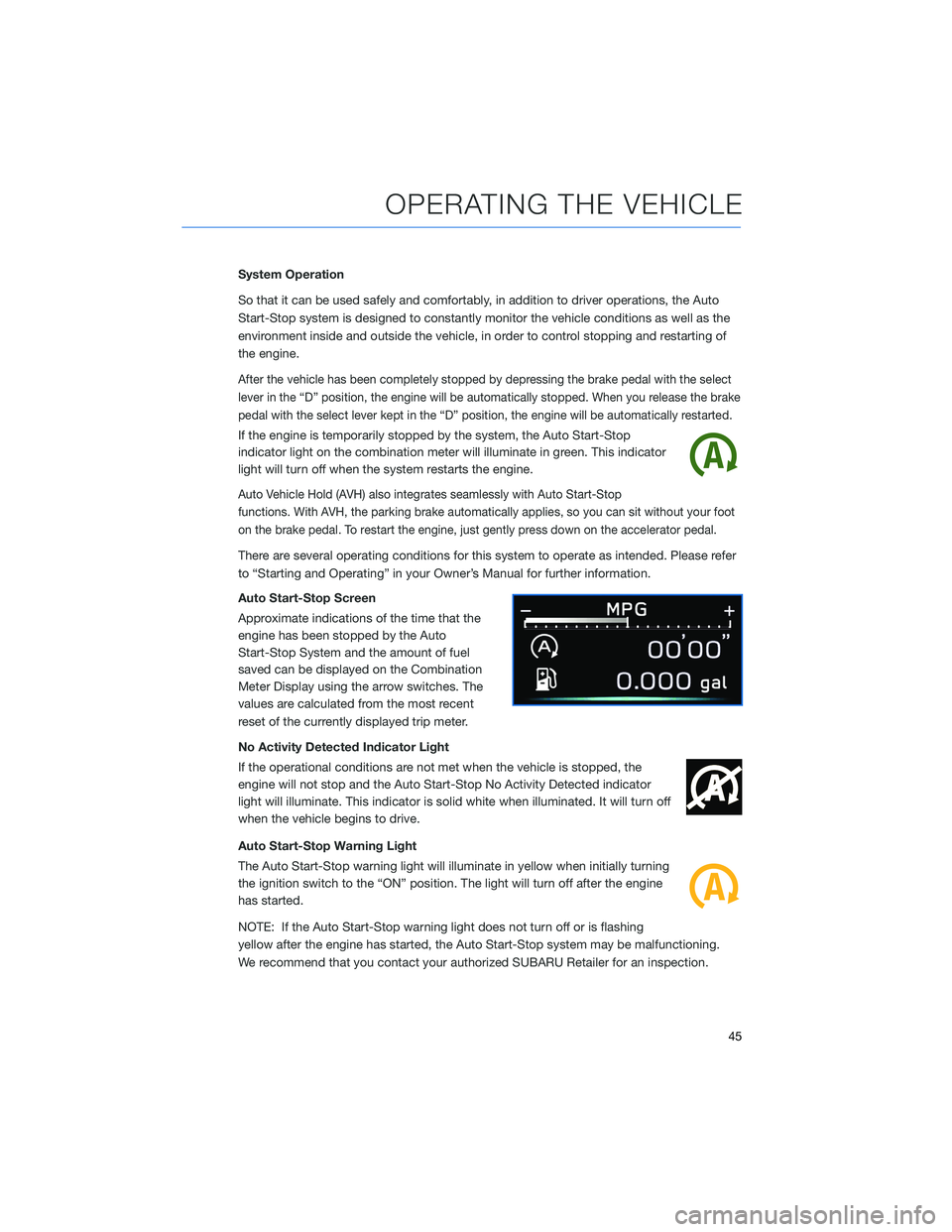
If the engine is temporarily stopped by the system, the Auto Start-Stop
indicator light on the combination meter will illuminate in green. This indicator
light will turn off when the system restarts the engine.
Auto Vehicle Hold (AVH) also integrates seamlessly with Auto Start-Stop
functions. With AVH, the parking brake automatically applies, so you can sit without your foot
on the brake pedal. To restart the engine, just gently press down on the accelerator pedal.
There are several operating conditions for this system to operate as intended. Please refer
to “Starting and Operating” in your Owner’s Manual for further information.
Auto Start-Stop Screen
Approximate indications of the time that the
engine has been stopped by the Auto
Start-Stop System and the amount of fuel
saved can be displayed on the Combination
Meter Display using the arrow switches. The
values are calculated from the most recent
reset of the currently displayed trip meter.
No Activity Detected Indicator Light
If the operational conditions are not met when the vehicle is stopped, the
engine will not stop and the Auto Start-Stop No Activity Detected indicator
light will illuminate. This indicator is solid white when illuminated. It will turn off
when the vehicle begins to drive.
Auto Start-Stop Warning Light
The Auto Start-Stop warning light will illuminate in yellow when initially turning
the ignition switch to the “ON” position. The light will turn off after the engine
has started.
NOTE: If the Auto Start-Stop warning light does not turn off or is flashing
yellow after the engine has started, the Auto Start-Stop system may be malfunctioning.
We recommend that you contact your authorized SUBARU Retailer for an inspection.
OPERATING THE VEHICLE
45
Page 49 of 172
Auto Vehicle Hold (AVH)
Auto Vehicle Hold gives your feet a break by
automatically holding your Subaru in place
when at a complete stop, such as at a traffic
signal, even after you release the brake pedal.
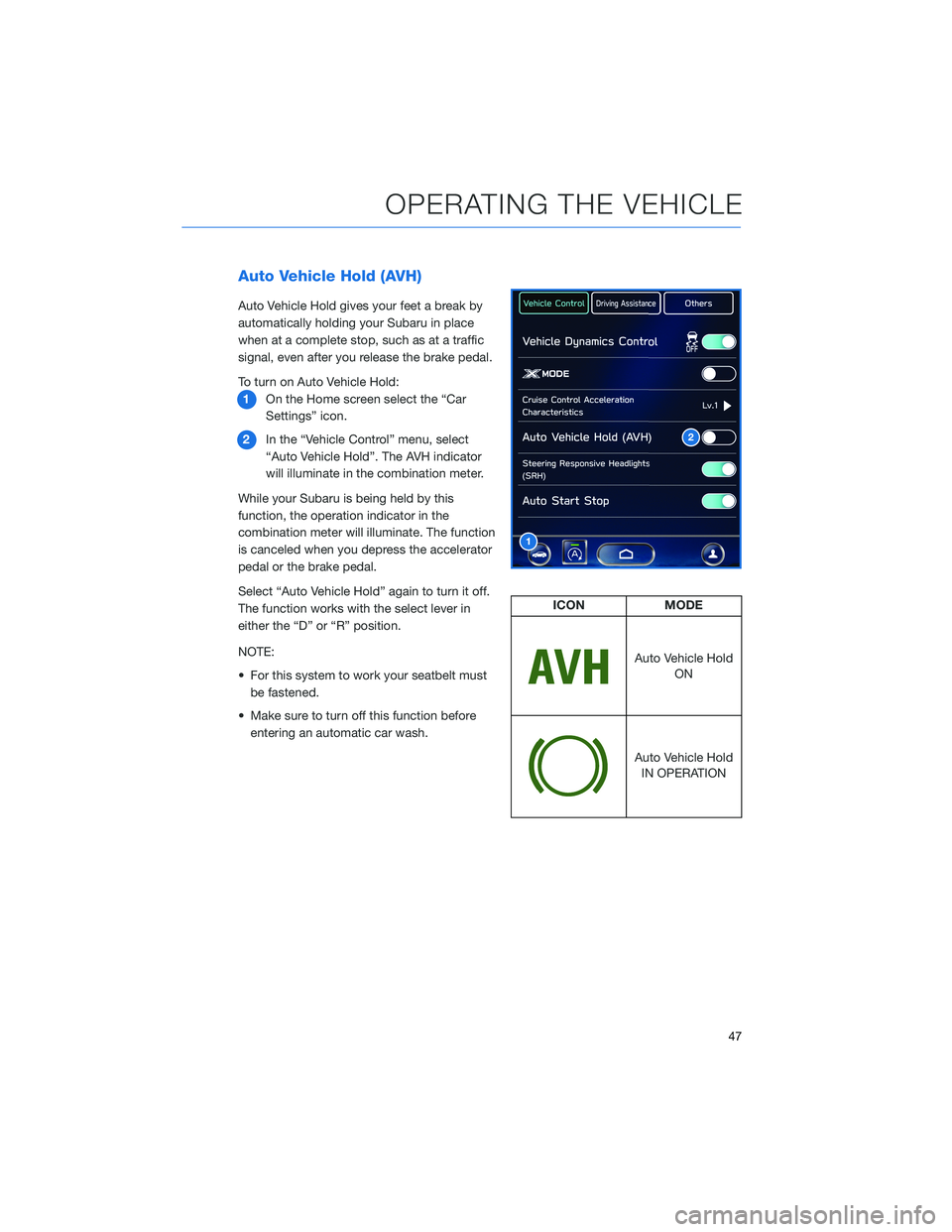
To turn on Auto Vehicle Hold:
1On the Home screen select the “Car
Settings” icon.
2In the “Vehicle Control” menu, select
“Auto Vehicle Hold”. The AVH indicator
will illuminate in the combination meter.
While your Subaru is being held by this
function, the operation indicator in the
combination meter will illuminate. The function
is canceled when you depress the accelerator
pedal or the brake pedal.
Select “Auto Vehicle Hold” again to turn it off.
The function works with the select lever in
either the “D” or “R” position.
NOTE:
• For this system to work your seatbelt must
be fastened.
• Make sure to turn off this function before
entering an automatic car wash.
2
1
ICON MODE
Auto Vehicle Hold
ON
Auto Vehicle Hold
IN OPERATION
OPERATING THE VEHICLE
47
Page 167 of 172
2.4L TURBO ENGINE ........... 60
2.5L ENGINE . . . . . . .......... 59
A
ACCESSORY CONNECTIONS . . . . . . 33
ADDING SHORTCUTS . . . . ...... 75
ADVANCED ADAPTIVE CRUISE
CONTROL . . . . . ........... 35
ANDROID AUTO™ . . . . . ....... 137
Cables . . . . . . . ..........137
Compatible Models ..........139
Connecting an Android Phone....138
APPLE CARPLAY
®............ 139
Cables . . . . . . . ..........139
Compatible Models ..........141
Connecting an iPhone . . . .....140
AUDIO CONTROLS ............ 34
AUTO START–STOP . . . . . . . . . . . 44
B
BLIND SPOT DETECTION (BSD) / REAR
CROSS TRAFFIC ALERT (RCTA) . . 113
Blind Spot Detection (BSD) . . . . . 113
Blind Spot Detection / Rear Cross
Traffic Alert OFF . . . . ........114
Lane Change Assist (LCA)......113
Rear Cross-Traffic Alert (RCTA) . . . 113
BLUETOOTH
®PAIRING . . ....... 131
Pairing an Android Device . . . . . . 131
Pairing an iOS/Apple Device . . . . . 134
BUTTONS . . . . ............. 68
Controlling the Volume . . . . . . . . . 68
C
CARGO COVER . . . . . . . . ...... 56
CENTER CONSOLE STORAGE ..... 23
CHILD SAFETY LOCKS.......... 53
CLIMATE CONTROL........... 25
11.6–Inch Automatic Climate
Control . . . . . . . . . . . . . . . . . . 26Dual 7–Inch Automatic Climate
Control . . . . . . . . . . . . . . . . . . 25
Heated Seats . .............31
Heated Steering Wheel . .......32
Rear Heated Seats...........32
Remote Engine Start with Climate
Control . . . . . . . . . . . . . . . . . . 31
Ventilated Seats . . . . . . . . . . . . 32
CLOCK . . ................. 99
COMBINATION METER .......... 40
CREATING A DRIVER PROFILE ..... 77
Retrieving a Driver Profile.......80
D
DRIVERFOCUS
®COMPONENTS . . . 116
Camera . ................116
Center Information Display (CID) . . 117
Combination Meter Display (CMD). . 117
DRIVERFOCUS®OVERVIEW..... 116
DRIVER MONITORING SYSTEM OFF . . 120
DRIVER PROFILE/CONVENIENCE
SETTINGS ............... 118
Deleting a Driver . . ..........119
Recognizing a Driver.........119
Registering a Driver . . . . . . . . . . 118
DRIVING THE VEHICLE . . . ....... 43
Automatic Transmission Shift Mode..43
Paddle Shift Control Switches.....43
DROWSY/INATTENTIVE WARNINGS . . 118
E
ELECTRONIC PARKING BRAKE (EPB) . . 46
Auto Vehicle Hold (AVH) . . ......47
ENGINE OIL . . .............. 61
ENGINE OIL CAPACITY......... 61
ENROLLMENT . . . . . . ......... 93
EYESIGHT
®DISCLAIMER . . ..... 123
EYESIGHT®OVERVIEW . . . . . . . . . 100
EYESIGHT®ASSIST MONITOR
(EAM) . . . . . . . ........... 109
INDEX
165