light SUBARU SOLTERRA 2023 Owners Manual
[x] Cancel search | Manufacturer: SUBARU, Model Year: 2023, Model line: SOLTERRA, Model: SUBARU SOLTERRA 2023Pages: 628, PDF Size: 11.91 MB
Page 272 of 628
2725-4. Using the driving support systems
Owners Manual_USA_M42C01_en• The steering wheel is ope
rated heavily or suddenly
• The brake pedal is depressed
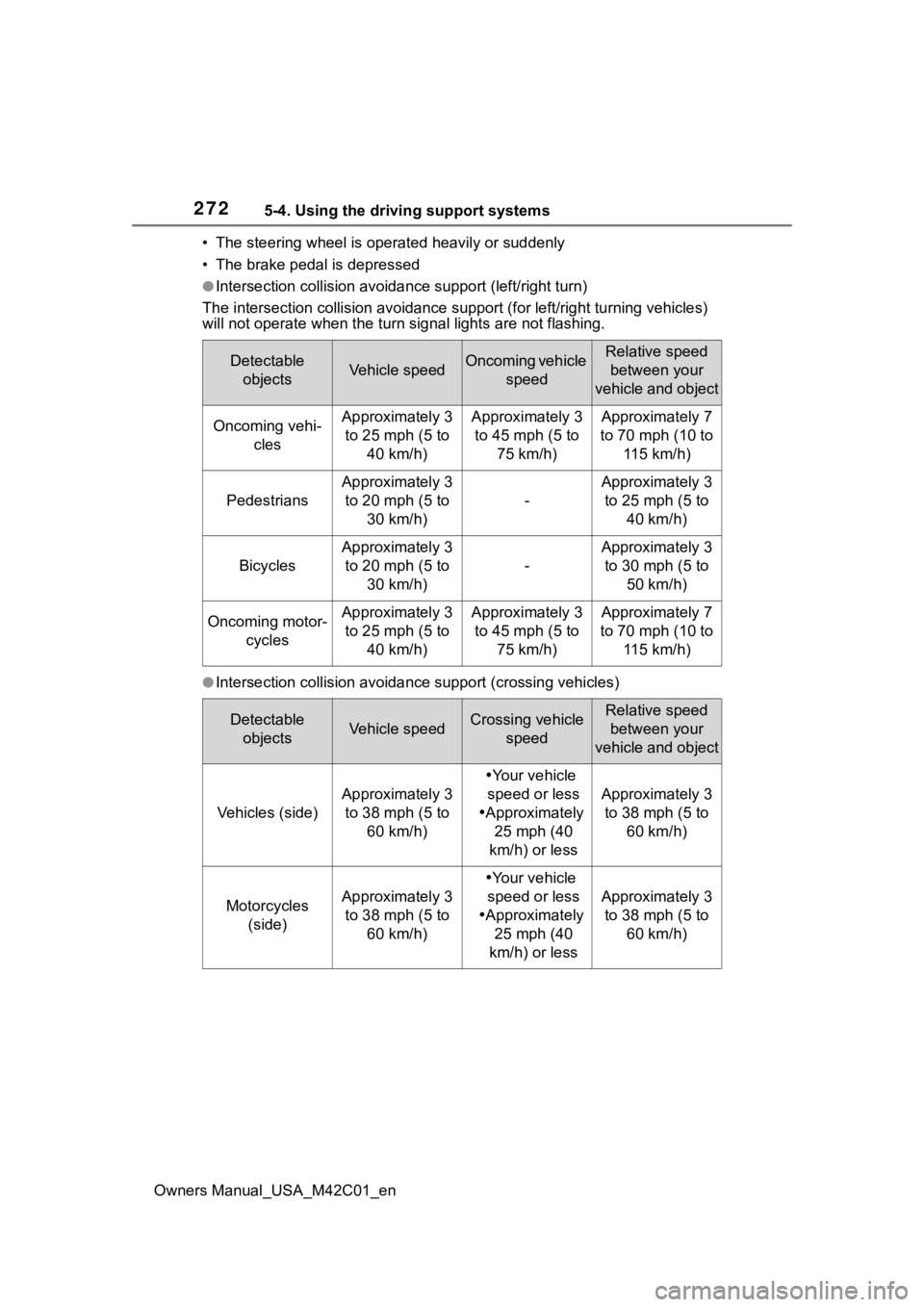
●Intersection collisio n avoidance support (left/right turn)
The intersection collision avoida nce support (for left/right turning vehicles)
will not operate when the turn signal light s are not flashing.
●Intersection collision avoidance support (crossing vehicles)
Detectable
objectsVehicle speedOncoming vehicle speedRelative speed between your
vehicle and object
Oncoming vehi- clesApproximately 3 to 25 mph (5 to 40 km/h)Approximately 3 to 45 mph (5 to 75 km/h)Approximately 7
to 70 mph (10 to 115 km/h)
Pedestrians
Approximately 3 to 20 mph (5 to 30 km/h)
-
Approximately 3 to 25 mph (5 to 40 km/h)
Bicycles
Approximately 3 to 20 mph (5 to 30 km/h)
-
Approximately 3 to 30 mph (5 to 50 km/h)
Oncoming motor- cyclesApproximately 3 to 25 mph (5 to 40 km/h)Approximately 3 to 45 mph (5 to 75 km/h)Approximately 7
to 70 mph (10 to 115 km/h)
Detectable objectsVehicle speedCrossing vehicle speedRelative speed between your
vehicle and object
Vehicles (side)
Approximately 3 to 38 mph (5 to 60 km/h)
Your vehicle
speed or less
Approximately
25 mph (40
km/h) or less
Approximately 3 to 38 mph (5 to 60 km/h)
Motorcycles (side)Approximately 3 to 38 mph (5 to 60 km/h)
Your vehicle
speed or less
Approximately
25 mph (40
km/h) or less
Approximately 3 to 38 mph (5 to 60 km/h)
Page 274 of 628
2745-4. Using the driving support systems
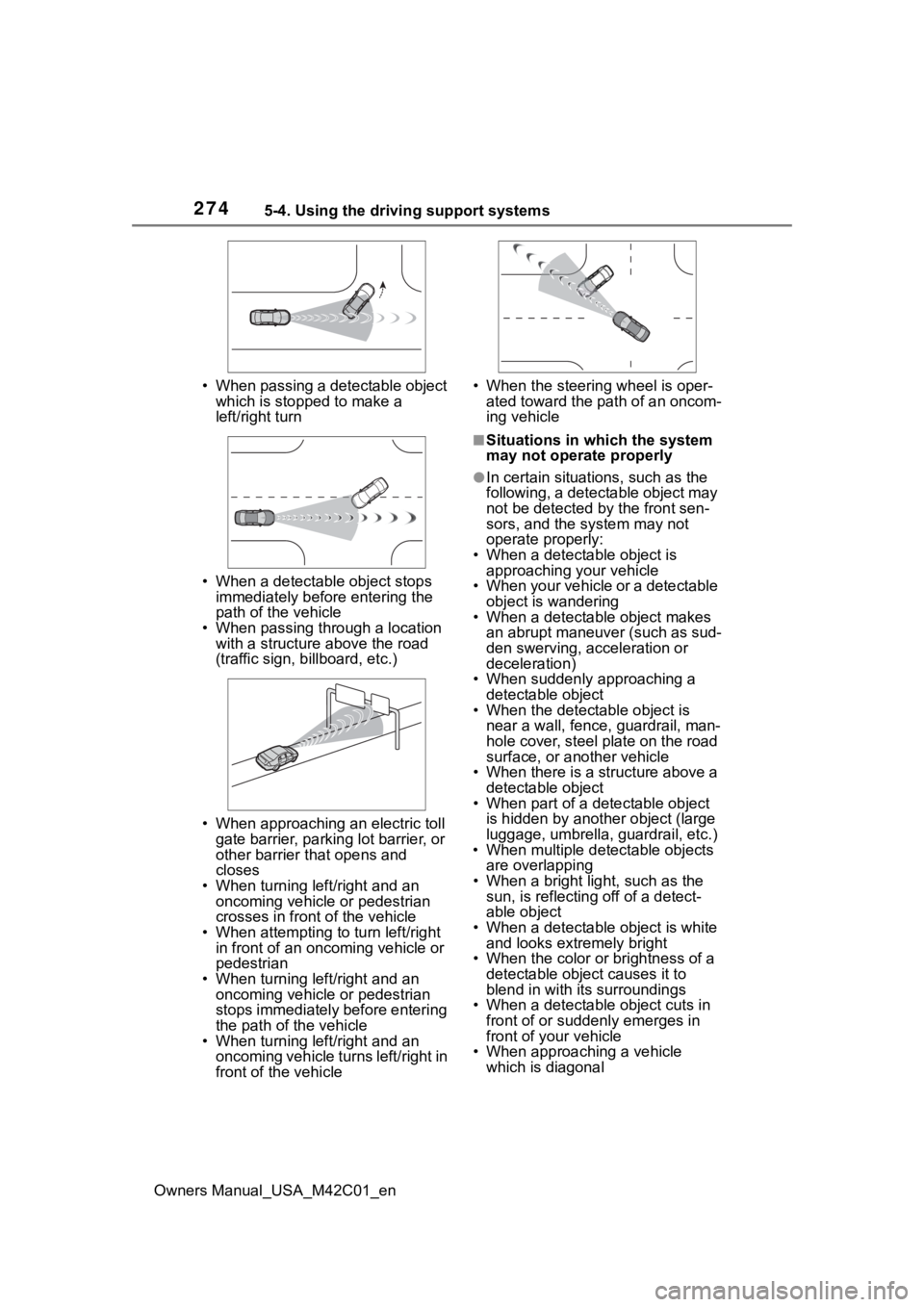
Owners Manual_USA_M42C01_en• When passing a detectable object
which is stopped to make a
left/right turn
• When a detectable object stops immediately before entering the
path of the vehicle
• When passing through a location with a structure above the road
(traffic sign, b illboard, etc.)
• When approaching an electric toll gate barrier, parking lot barrier, or
other barrier that opens and
closes
• When turning left/right and an oncoming vehicle or pedestrian
crosses in front of the vehicle
• When attempting to turn left/right in front of an oncoming vehicle or
pedestrian
• When turning left/right and an oncoming vehicle or pedestrian
stops immediately before entering
the path of the vehicle
• When turning left/right and an oncoming vehicle turns left/right in
front of the vehicle • When the steering wheel is oper-
ated toward the path of an oncom-
ing vehicle
■Situations in which the system
may not operate properly
●In certain situations, such as the
following, a detectable object may
not be detected by the front sen-
sors, and the system may not
operate properly:
• When a detectable object is approaching your vehicle
• When your vehicle or a detectable object is wandering
• When a detectable object makes
an abrupt maneuver (such as sud-
den swerving, acceleration or
deceleration)
• When suddenly approaching a detectable object
• When the detectable object is
near a wall, fence, guardrail, man-
hole cover, steel plate on the road
surface, or another vehicle
• When there is a structure above a detectable object
• When part of a detectable object
is hidden by another object (large
luggage, umbrella, guardrail, etc.)
• When multiple det ectable objects
are overlapping
• When a bright light, such as the sun, is reflecting off of a detect-
able object
• When a detectable object is white and looks extremely bright
• When the color or brightness of a detectable object causes it to
blend in with its surroundings
• When a detectable object cuts in
front of or suddenly emerges in
front of your vehicle
• When approaching a vehicle
which is diagonal
Page 275 of 628
2755-4. Using the driving support systems
Owners Manual_USA_M42C01_en
5
Driving
• If a vehicle ahead is a child sized bicycle, is carrying a large load, is
carrying an extra passenger, or
has an unusual shape (bicycles
equipped with a child seat, tan-
dem bicycles, etc.)
• If a pedestrian or bicycle is shorter than approximately 3.2 ft. (1 m) or
taller than approximately 6.5 ft. (2
m).
• When the silhouette of a pedes- trian or bicycle is unclear (such as
when they are wearing a raincoat,
long skirt, etc.)
• When a pedestrian or bicycle is
bending forward or squatting
• When a pedestrian or bicycle is moving at high speed
• When a pedestrian is pushing a stroller, wheelchair, bicycle or
other vehicle
• When a detectable object blends in with the surrounding area, such
a s w h e n i t i s d i m ( a t d a w n o r d u s k )
or dark (at night or in a tunnel)
• When the vehicle has not been driven for a certain amount of time
after the EV syst em was started
• While turning left /right or a few
seconds after turning left/right
• While driving around a curve and a few seconds after driving around
a curve
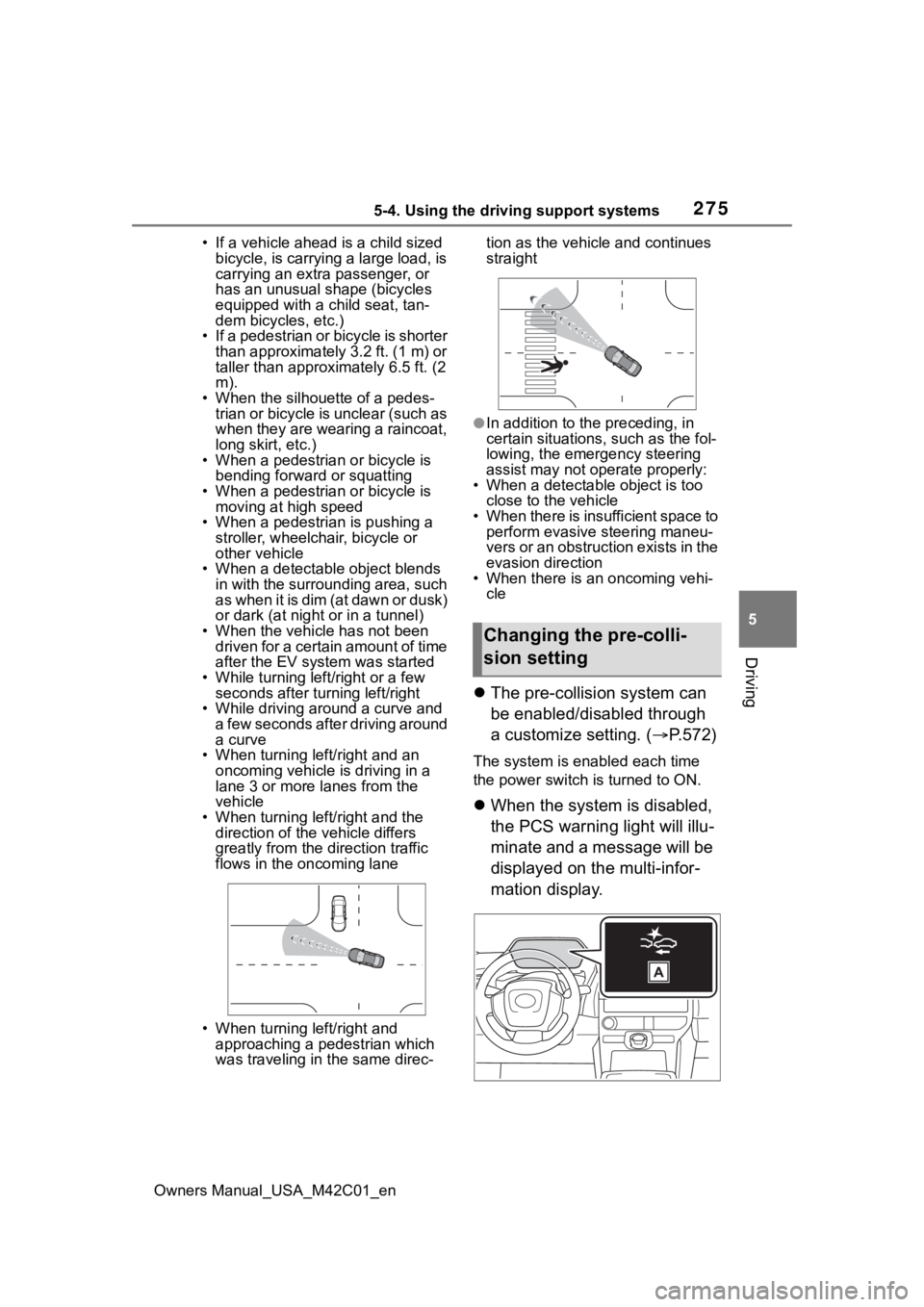
• When turning left/right and an oncoming vehicle i s driving in a
lane 3 or more l anes from the
vehicle
• When turning left/right and the direction of the vehicle differs
greatly from the direction traffic
flows in the oncoming lane
• When turning left/right and approaching a pedestrian which
was traveling in the same direc- tion as the vehicle and continues
straight
●In addition to the preceding, in
certain situations, such as the fol-
lowing, the emergency steering
assist may not operate properly:
• When a detectable object is too close to the vehicle
• When there is insufficient space to perform evasive steering maneu-
vers or an obstruction exists in the
evasion direction
• When there is an oncoming vehi- cle
The pre-collision system can
be enabled/disabled through
a customize setting. ( P.572)
The system is enabled each time
the power switch is turned to ON.
When the system is disabled,
the PCS warning light will illu-
minate and a message will be
displayed on the multi-infor-
mation display.
Changing the pre-colli-
sion setting
Page 281 of 628
2815-4. Using the driving support systems
Owners Manual_USA_M42C01_en
5
Driving
The LDA system warns the
driver if the vehicle may deviate
from the current lane or course
*,
and also can slightly operate the
steering wheel to help avoid
deviation from the lane or
course
*.
The front camera is used to
detect lane lines or a course
*.
*: Boundary between the asphalt and grass, soil, etc., or structures,
such as a curb, guardrail, etc.
■Lane departure alert func-
tion
When the system determines
that the vehicle might depart
from its lane or course
*, a warn-
ing is displayed on a display,
and either a warning buzzer will
sound or the steering wheel will
vibrate to alert the driver.
Check the area around your vehicle
and carefully operate the steering
wheel to move the vehicle back to
the center of the lane or course
*.
Vehicles with BSM: If the system
determines that the vehicle may
collide with a vehicle in an adjacent
lane, the lane de parture alert will
operate even if the turn signals are
operating.
*: Boundary between the asphalt and grass, soil, etc., or structures, such as a curb,
guardrail, etc.
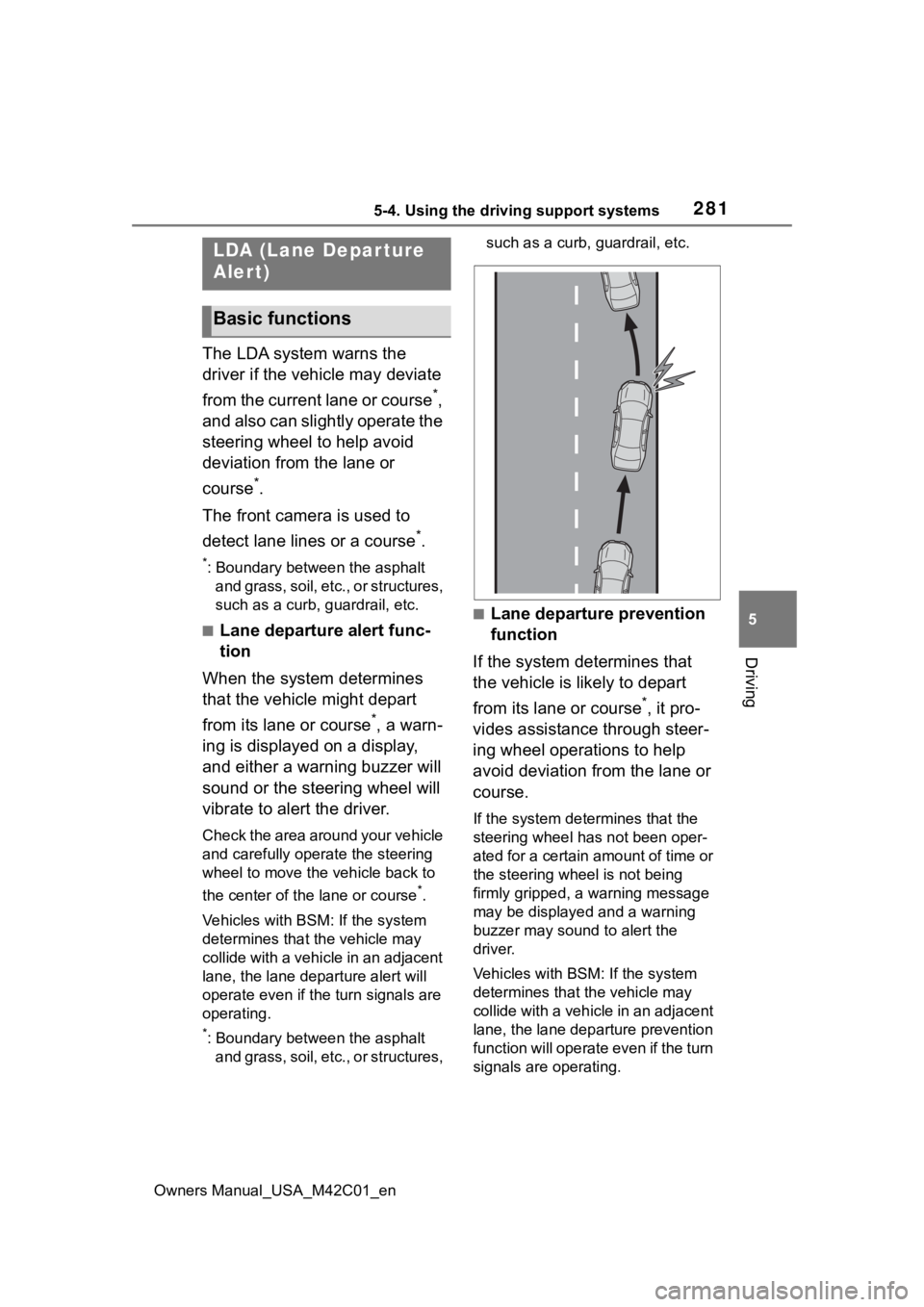
■Lane departure prevention
function
If the system determines that
the vehicle is likely to depart
from its lane or course
*, it pro-
vides assistance through steer-
ing wheel operations to help
avoid deviation from the lane or
course.
If the system determines that the
steering wheel has not been oper-
ated for a certain amount of time or
the steering wheel is not being
firmly gripped, a warning message
may be displayed and a warning
buzzer may sound to alert the
driver.
Vehicles with BSM: If the system
determines that the vehicle may
collide with a vehicl e in an adjacent
lane, the lane departure prevention
function will operate even if the turn
signals are operating.
LDA (Lane Depar ture
Alert)
Basic functions
Page 290 of 628
2905-4. Using the driving support systems
Owners Manual_USA_M42C01_en
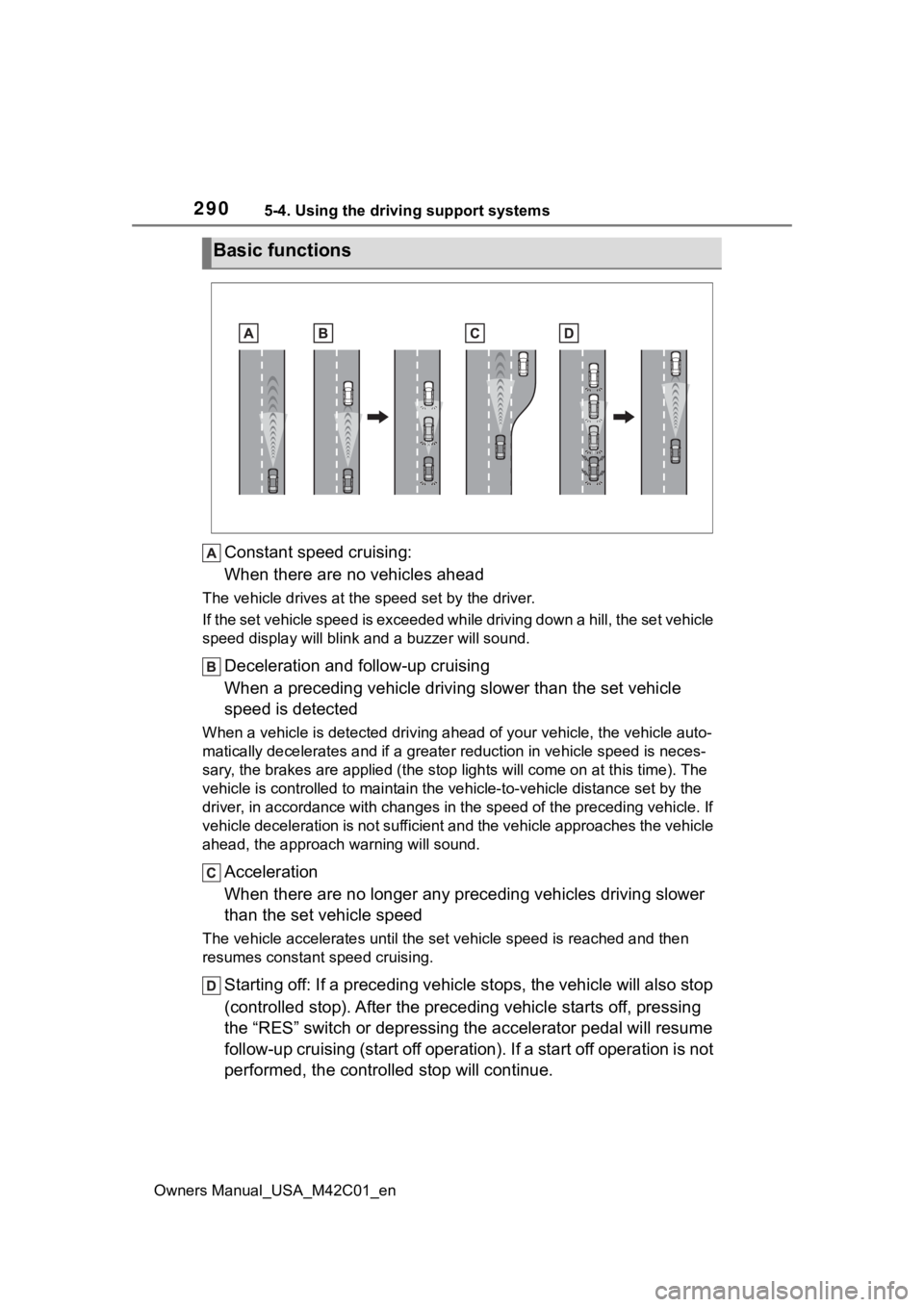
Constant speed cruising:
When there are no vehicles ahead
The vehicle drives at the speed set by the driver.
If the set vehicle speed is exceeded while driving down a hill, the set vehicle
speed display will blin k and a buzzer will sound.
Deceleration and follow-up cruising
When a preceding vehicle driving slower than the set vehicle
speed is detected
When a vehicle is detected driving ahead of your vehicle, the v ehicle auto-
matically decelerates and if a greater reduction in vehicle spe ed is neces-
sary, the brakes are applied (the stop lights will come on at t his time). The
vehicle is controlled to maintai n the vehicle-to-vehicle distance set by the
driver, in accordance with changes in the speed of the precedin g vehicle. If
vehicle deceleration is not sufficient and the vehicle approaches the vehicle
ahead, the approach wa rning will sound.
Acceleration
When there are no longer any preceding vehicles driving slower
than the set vehicle speed
The vehicle accelerates until th e set vehicle speed is reached and then
resumes constant speed cruising.
Starting off: If a preceding vehi cle stops, the vehicle will also stop
(controlled stop). After the preceding vehicle starts off, pressing
the “RES” switch or depressing the accelerator pedal will resum e
follow-up cruising (start off operation). If a start off operat ion is not
performed, the controlled stop will continue.
Basic functions
Page 300 of 628
3005-4. Using the driving support systems
Owners Manual_USA_M42C01_en
Operation of this system is sep-
arated into 4 control states.
Through control state “warning
phase 1” and “warning phase 2”,
the system determines if the
driver is aware and responsive
while outputting a warning and
controlling the vehicle speed. If
the system determines the
driver is not responsive, it will
operate in control state “deceler-
ation stop phase” and “stop hold
phase” and decelerate and stop
the vehicle. It will then operate
continuously in “stop hold
phase”.
■Operating conditions
This system operates when all of
the following conditions are met:
●When the LTA is on
●When the vehicle speed is
approximately 30 mph (50 km/h)
or more
■Operation cancelation condi-
tions
In the following si tuations, system
operation will be canceled:
●When LTA control has been can-
celed (the LTA switch has been
pressed, etc.)
●When the dynamic radar cruise
control has been canceled
●When driver operations are
detected (the steering wheel is
held, the brake pedal, accelerator
pedal, parking brake, hazard light
switch, or turn signal lever is oper-
ated)
●When the driving assist switch is
pressed while in the stop and hold
phase
●When the power switch has been
turned from ON to OFF
●Situations in which some or all of
the functions of the system cannot
operate: P. 2 6 4
■LTA control when operation is
canceled
When emergency driving stop sys-
tem operation is canceled, LTA con-
trol may also be canceled.
If driving operations are not
detected after the hands off
steering wheel warning oper-
ates, a buzzer will sound inter-
mittently and a message will be
displayed to warn the driver, and
the system will judge if the driver
is responsive or not. If driving
operations, such as holding the
steering wheel, are not per-
WARNING
●After this system operates, pas-
sengers should attend to the
driver as necessary and take
appropriate hazard prevention
measures, such as moving to a
place where safety can be
ensured, such as the shoulder
of the road or b ehind a guard-
rail.
●This system detects the condi-
tion of the driver through the
operation of the steering wheel.
This system may operate if the
driver is aware but intentionally
and continuously does not oper-
ate the vehicle. Also, the system
may not operate if it cannot
determine that the driver is not
responsive, such as if they are
leaning on the steering wheel.
Summary of the system
Warning phase 1
Page 301 of 628
3015-4. Using the driving support systems
Owners Manual_USA_M42C01_en
5
Driving
formed within a certain amount
of time, the system will enter
warning phase 2.
After entering warning phase 2,
a buzzer will sound in short
intervals and a message will be
displayed to warn the driver, and
the vehicle will slowly deceler-
ate. If driving operations, such
as holding the steering wheel,
are not performed within a cer-
tain amount of time, the system
will determine that the driver is
not responsive and enter the
deceleration stop phase.
The audio system will be muted
until the driver becomes respon-
sive.
When the vehicle is decelerating,
the brake lights may illuminate,
depending on the road conditions,
etc.
After entering the deceleration
stop phase, a buzzer will sound
continuously and a message will
be displayed to warn the driver,
and the vehicle will slowly decel-
erate and stop. After the vehicle
stops, the system will enter the
stop and hold phase.
After the vehicle is stopped, the
parking brake will be applied automatically. After entering the
stop and hold phase, the buzzer
will continue sounding continu-
ously and the emergency flash-
ers (hazard lights) will flash to
warn other drivers of the emer-
gency.
Warning phase 2
Deceleration stop phase
Stop hold phase
Page 302 of 628
3025-4. Using the driving support systems
Owners Manual_USA_M42C01_en
*: If equipped
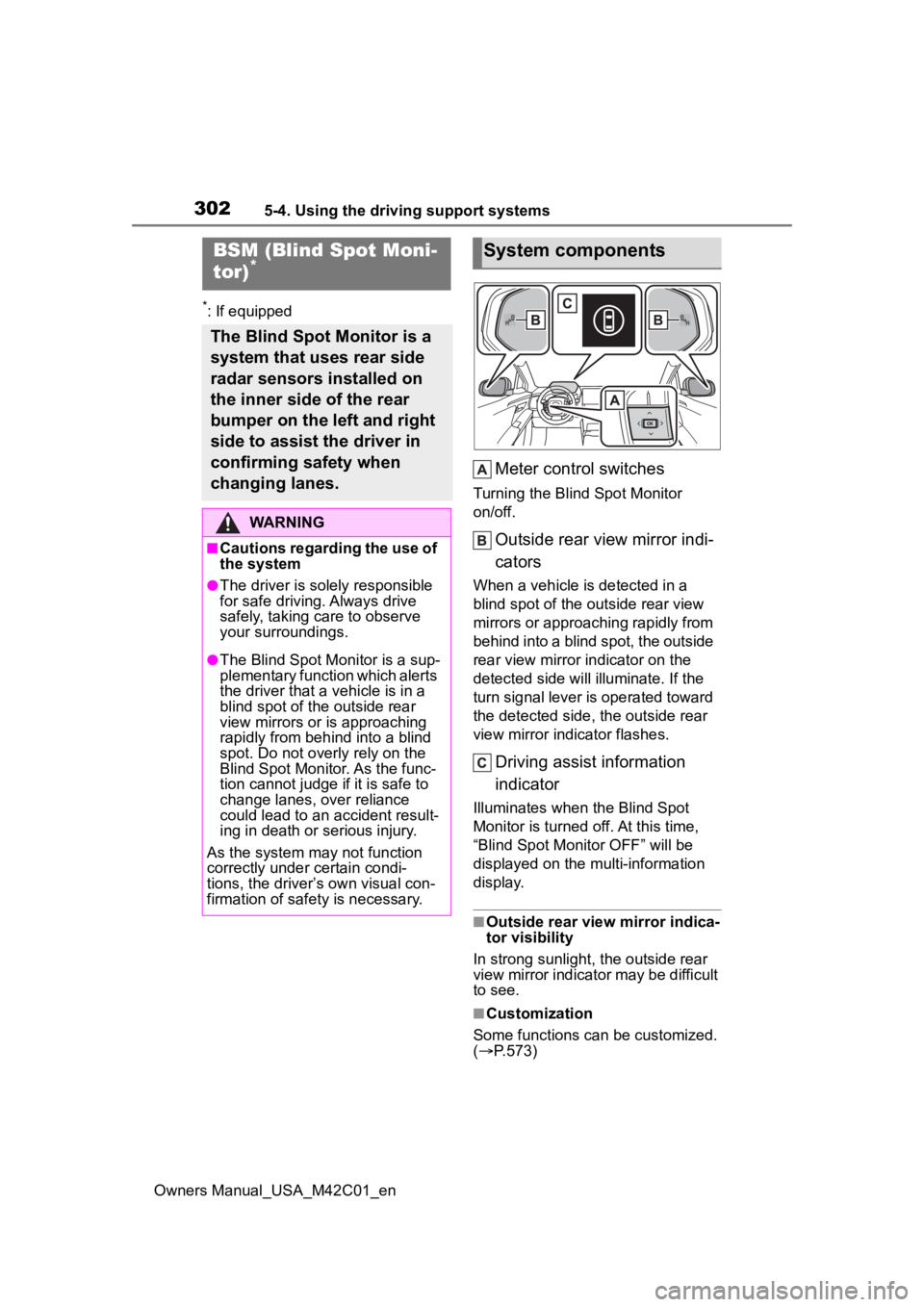
Meter control switches
Turning the Blind Spot Monitor
on/off.
Outside rear view mirror indi-
cators
When a vehicle is detected in a
blind spot of the outside rear view
mirrors or approaching rapidly from
behind into a blind spot, the outside
rear view mirror indicator on the
detected side will illuminate. If the
turn signal lever is operated toward
the detected side, the outside rear
view mirror indicator flashes.
Driving assist information
indicator
Illuminates when the Blind Spot
Monitor is turned off. At this time,
“Blind Spot Monitor OFF” will be
displayed on the multi-information
display.
■Outside rear view mirror indica-
tor visibility
In strong sunlight, the outside rear
view mirror indicator may be difficult
to see.
■Customization
Some functions can be customized.
( P.573)
BSM (Blind Spot Moni-
tor)*
The Blind Spot Monitor is a
system that uses rear side
radar sensors installed on
the inner side of the rear
bumper on the left and right
side to assist the driver in
confirming safety when
changing lanes.
WARNING
■Cautions regarding the use of
the system
●The driver is solely responsible
for safe driving. Always drive
safely, taking care to observe
your surroundings.
●The Blind Spot Monitor is a sup-
plementary function which alerts
the driver that a vehicle is in a
blind spot of the outside rear
view mirrors or is approaching
rapidly from behind into a blind
spot. Do not overly rely on the
Blind Spot Monitor. As the func-
tion cannot judge if it is safe to
change lanes, over reliance
could lead to an accident result-
ing in death or serious injury.
As the system may not function
correctly under certain condi-
tions, the driver’s own visual con-
firmation of safety is necessary.
System components
Page 303 of 628
3035-4. Using the driving support systems
Owners Manual_USA_M42C01_en
5
Driving
■Certification
P. 6 2 1
The blind spot monitor can be
enabled/disabled on of the
multi-information display.
( P.156)
When the Blind Spot Monitor is
off, the driving assist information
indicator ( P.149) will illumi-
nate. At this time, “Blind Spot
Monitor OFF” will be displayed
on the multi-information display.
WARNING
■To ensure the system can
operate properly
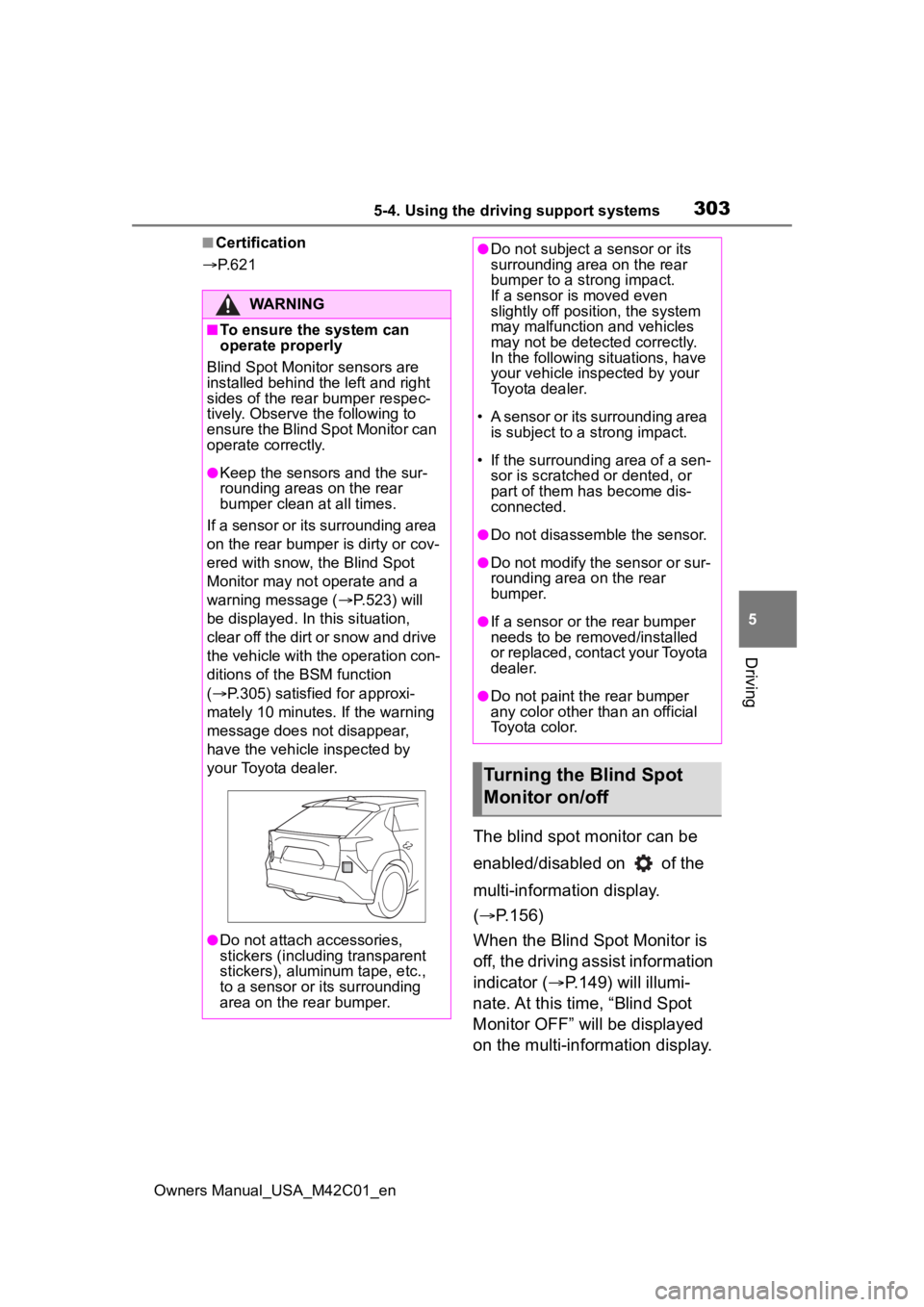
Blind Spot Monitor sensors are
installed behind the left and right
sides of the rear bumper respec-
tively. Observe the following to
ensure the Blind Spot Monitor can
operate correctly.
●Keep the sensors and the sur-
rounding areas on the rear
bumper clean at all times.
If a sensor or its surrounding area
on the rear bumper is dirty or cov-
ered with snow, the Blind Spot
Monitor may not operate and a
warning message ( P.523) will
be displayed. In this situation,
clear off the dirt or snow and drive
the vehicle with the operation con-
ditions of the BSM function
( P.305) satisfied for approxi-
mately 10 minutes. If the warning
message does not disappear,
have the vehicle inspected by
your Toyota dealer.
●Do not attach accessories,
stickers (including transparent
stickers), aluminum tape, etc.,
to a sensor or its surrounding
area on the rear bumper.
●Do not subject a sensor or its
surrounding area on the rear
bumper to a strong impact.
If a sensor is moved even
slightly off position, the system
may malfunction and vehicles
may not be detected correctly.
In the following si tuations, have
your vehicle inspected by your
Toyota dealer.
• A sensor or its surrounding area is subject to a strong impact.
• If the surrounding area of a sen- sor is scratched or dented, or
part of them h as become dis-
connected.
●Do not disassemble the sensor.
●Do not modify the sensor or sur-
rounding area on the rear
bumper.
●If a sensor or the rear bumper
needs to be removed/installed
or replaced, contact your Toyota
dealer.
●Do not paint the rear bumper
any color other t han an official
Toyota color.
Turning the Blind Spot
Monitor on/off
Page 307 of 628
3075-4. Using the driving support systems
Owners Manual_USA_M42C01_en
5
Driving
*: If equipped
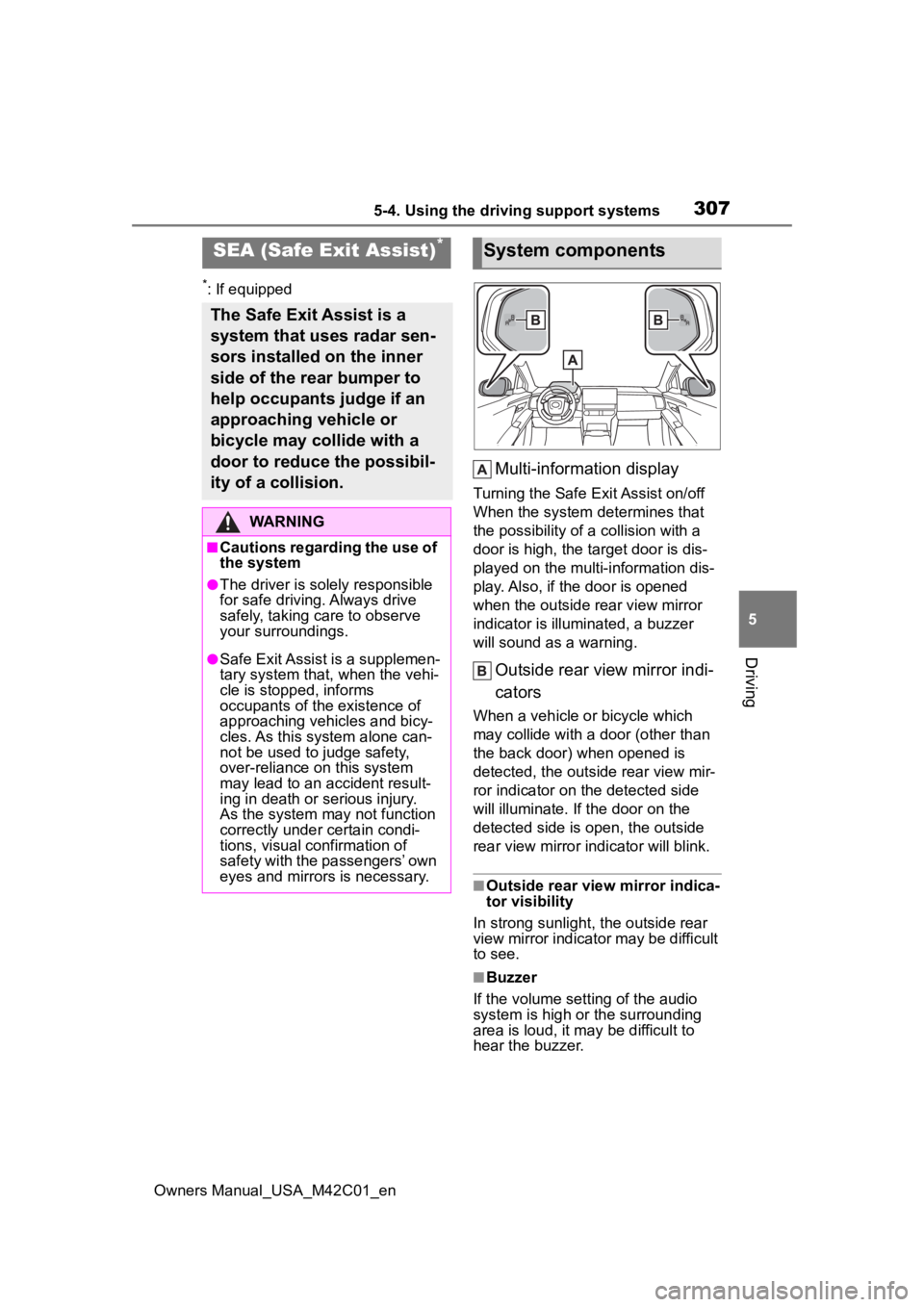
Multi-information display
Turning the Safe Exit Assist on/off
When the system determines that
the possibility of a collision with a
door is high, the target door is dis-
played on the multi-information dis-
play. Also, if the door is opened
when the outside r ear view mirror
indicator is illuminated, a buzzer
will sound as a warning.
Outside rear view mirror indi-
cators
When a vehicle or bicycle which
may collide with a door (other than
the back door) when opened is
detected, the outside rear view mir-
ror indicator on the detected side
will illuminate. If the door on the
detected side is open, the outside
rear view mirror indicator will blink.
■Outside rear vie w mirror indica-
tor visibility
In strong sunlight, the outside rear
view mirror indicator may be difficult
to see.
■Buzzer
If the volume setting of the audio
system is high or the surrounding
area is loud, it may be difficult to
hear the buzzer.
SEA (Safe Exit Assist)*
The Safe Exit Assist is a
system that uses radar sen-
sors installed on the inner
side of the rear bumper to
help occupants judge if an
approaching vehicle or
bicycle may collide with a
door to reduce the possibil-
ity of a collision.
WARNING
■Cautions regarding the use of
the system
●The driver is solely responsible
for safe driving. Always drive
safely, taking care to observe
your surroundings.
●Safe Exit Assist is a supplemen-
tary system that, when the vehi-
cle is stopped, informs
occupants of the existence of
approaching vehicles and bicy-
cles. As this system alone can-
not be used to judge safety,
over-reliance on this system
may lead to an accident result-
ing in death or serious injury.
As the system may not function
correctly under certain condi-
tions, visual confirmation of
safety with the passengers’ own
eyes and mirrors is necessary.
System components