warning SUBARU SOLTERRA 2023 Owners Manual
[x] Cancel search | Manufacturer: SUBARU, Model Year: 2023, Model line: SOLTERRA, Model: SUBARU SOLTERRA 2023Pages: 628, PDF Size: 11.91 MB
Page 282 of 628
2825-4. Using the driving support systems
Owners Manual_USA_M42C01_en
*: Boundary between the asphalt and grass, soil, etc., or structures,
such as a curb, guardrail, etc.
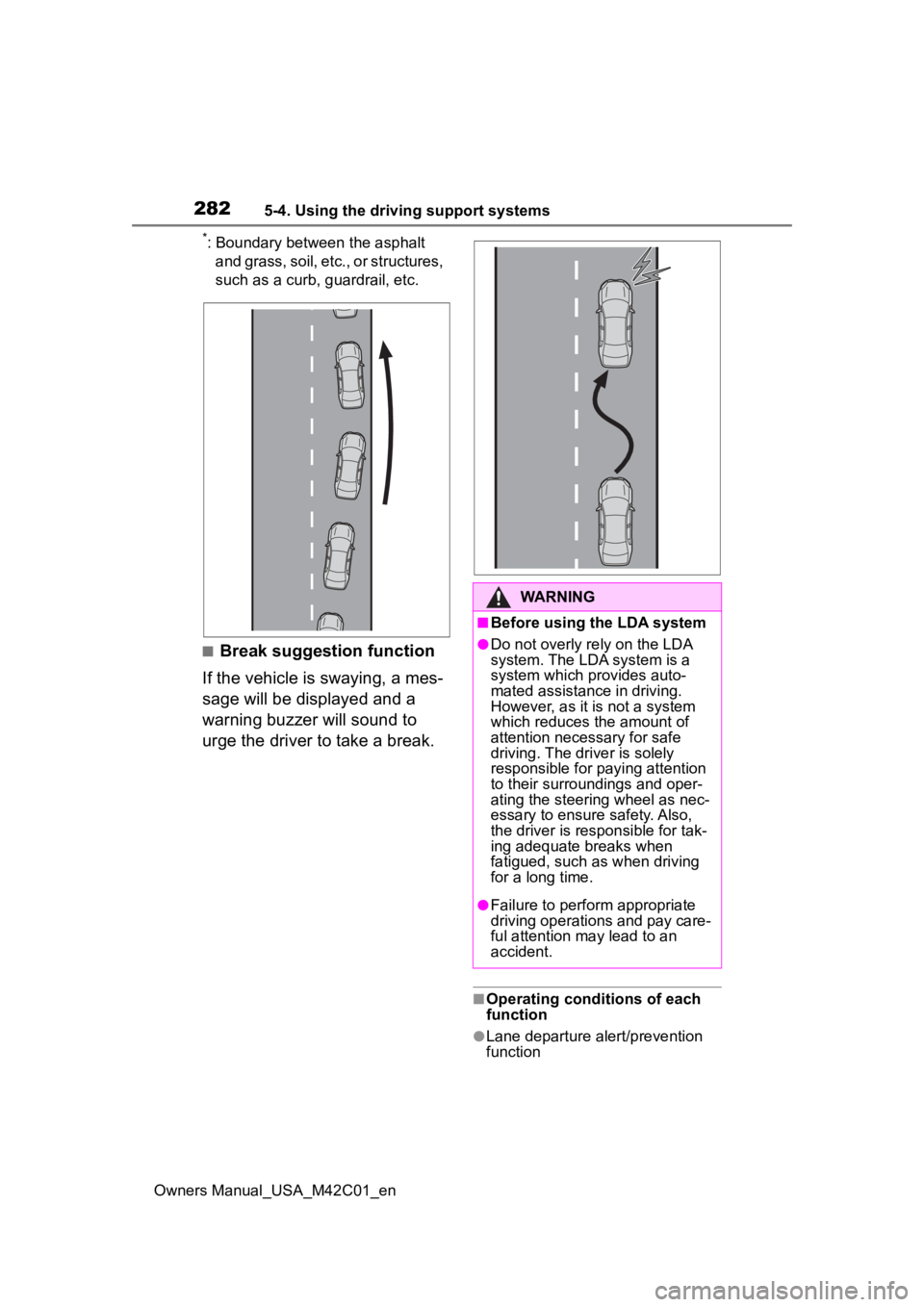
■Break suggestion function
If the vehicle is swaying, a mes-
sage will be displayed and a
warning buzzer will sound to
urge the driver to take a break.
■Operating conditions of each
function
●Lane departure alert/prevention
function
WARNING
■Before using the LDA system
●Do not overly re ly on the LDA
system. The LDA system is a
system which provides auto-
mated assistance in driving.
However, as it is not a system
which reduces the amount of
attention necessary for safe
driving. The driver is solely
responsible for paying attention
to their surroundings and oper-
ating the steering wheel as nec-
essary to ensure safety. Also,
the driver is responsible for tak-
ing adequate breaks when
fatigued, such as when driving
for a long time.
●Failure to perform appropriate
driving operations and pay care-
ful attention may lead to an
accident.
Page 283 of 628
2835-4. Using the driving support systems
Owners Manual_USA_M42C01_en
5
Driving
This function is operable when all of
the following cond itions are met:
• The vehicle speed is approxi- mately 30 mph (50 km/h) or more.
Operation may be possible when
the vehicle speed is approximately
25 mph (40 km/h) o r more if vehi-
cles, motorcycles, bicycles, or
pedestrians are detected near the
lane.
• The system reco gnizes a lane or
course
*. (When recognized on
only one side, the system will
operate only for the recognized
side.)
• The lane width is approximately 9.8 ft. (3 m) or more.
• The turn signal l ever is not being
operated. (Vehicles with BSM:
Except when a vehicle is detected
in the direction that the turn signal
lever is operated.)
• The vehicle is not being driven around a sharp curve.
• The vehicle is not accelerating or decelerating more than a certain
amount.
• The steering wheel is not being turned sufficiently to perform a
lane change.
*: Boundary between the asphalt
and grass, soil, etc., or structures,
such as a curb, guardrail, etc.
●Break suggestion function
This function is operable when all of
the following cond itions are met:
• The vehicle speed is approxi- mately 32 mph (50 km/h) or more.
• The lane width is approximately
9.8 ft. (3 m) or more.
■Temporary cancelation of func-
tions
When the operating conditions are
no longer met, a function may be
temporarily canceled. However,
when the operation conditions are
met again, operation of the function
will automatically be restored.
( P.282)
■Operation of the lane departure
alert function/lane departure
prevention function
●Depending on the vehicle speed,
road conditions, lane departure
angle, etc., operation of the lane
departure prevention function may
not be felt or the function may not
operate.
●Depending on the conditions, the
warning buzzer may operate even
if vibration is selected through a
customize setting.
●If a course* is not clear or straight,
the lane departure alert function or
lane departure prevention function
may not operate.
●The lane departure alert function
or lane departure prevention func-
tion may not operate if the system
judges that the vehicle is inten-
tionally being ste ered to avoid a
pedestrian or parked vehicle.
●Vehicles with BSM: It may not be
possible for the sys tem to judge if
there is danger of a collision with a
vehicle in an adjacent lane.
●The steering assist operation of
the lane departure prevention
function can be overridden by the
steering wheel operation of the
driver.
*: Boundary between the asphalt
and grass, soil, etc., or structures,
such as a curb, guardrail, etc.
■Hands off steering wheel warn-
ing operation
In the following si tuations, a mes-
sage urging the driver to operate the
steering wheel and an icon will be
displayed and a buzzer will sound to
warn the driver. When using the sys-
tem, make sure to grip the steering
wheel firmly, rega rdless of whether
the warning is operating or not.
Page 284 of 628
2845-4. Using the driving support systems
Owners Manual_USA_M42C01_en
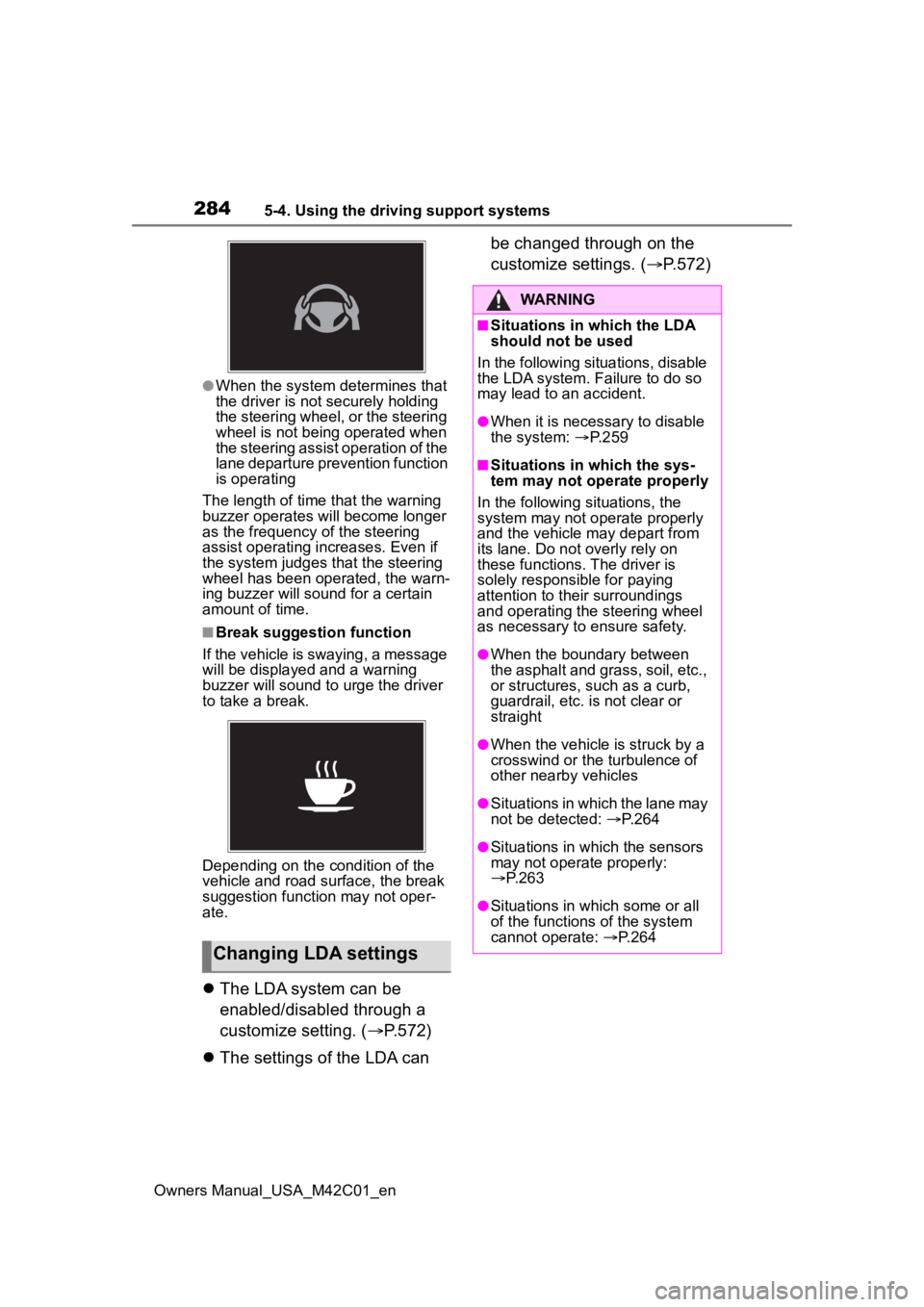
●When the system determines that
the driver is not securely holding
the steering wheel, or the steering
wheel is not being operated when
the steering assist operation of the
lane departure prevention function
is operating
The length of time that the warning
buzzer operates will become longer
as the frequency o f the steering
assist operating i ncreases. Even if
the system judges that the steering
wheel has been operated, the warn-
ing buzzer will sound for a certain
amount of time.
■Break suggestion function
If the vehicle is swaying, a message
will be displayed and a warning
buzzer will sound to u rge the driver
to take a break.
Depending on the condition of the
vehicle and road surface, the break
suggestion functi on may not oper-
ate.
The LDA system can be
enabled/disabled through a
customize setting. ( P.572)
The settings of the LDA can be changed through on the
customize settings. (
P.572)
Changing LDA settings
WARNING
■Situations in which the LDA
should not be used
In the following situations, disable
the LDA system. Failure to do so
may lead to an accident.
●When it is necessary to disable
the system: P.259
■Situations in which the sys-
tem may not ope rate properly
In the following situations, the
system may not operate properly
and the vehicle may depart from
its lane. Do not overly rely on
these functions. The driver is
solely responsible for paying
attention to their surroundings
and operating the steering wheel
as necessary to ensure safety.
●When the boundary between
the asphalt and grass, soil, etc.,
or structures, such as a curb,
guardrail, etc. is not clear or
straight
●When the vehicle is struck by a
crosswind or the turbulence of
other nearby vehicles
●Situations in which the lane may
not be detected: P.264
●Situations in which the sensors
may not operate properly:
P.263
●Situations in which some or all
of the functions of the system
cannot operate: P.264
Page 286 of 628
2865-4. Using the driving support systems
Owners Manual_USA_M42C01_en
When the front camera
detects a sign or information of a sign is available from the
navigation system (if
equipped), the sign will be
displayed on the display.
Multiple signs can be dis-
played.
Depending on the specifications of
the vehicle, the number of dis-
played signs may be limited.
■Operating conditions of sign
display
Signs will be displayed when the fol-
lowing conditions are met:
●The system has detected a sign
In the following si tuations, a dis-
played sign may stop being dis-
played:
●When a new sign has not been
detected for a certain distance
●When the system determines that
the road being driven on has
changed, such as after a left or
right turn
■Situations in which the display
function may not operate prop-
erly
In the following situ ations, the RSA
system may not operate properly
and may not detect signs or may
display the incorrect sign. However,
this does not indicate a malfunction.
●When a sign is dirty, faded, tilted
or bent
●When the contrast of an electronic
sign is low
●When all or part of a sign is hidden
by a tree, utility pole, etc.
●When a sign is d etected by the
front camera for a short amount of
time
●When the driving state (turning,
changing lanes, etc.) is judged
incorrectly
●When a sign is immediately after a
RSA (Road Sign
Assist)
The RSA system detects
specific road signs using
the front camera and/or
navigation system (if
equipped) (when speed limit
information is available)
and warns the driver via dis-
plays and buzzers.
WARNING
■For safe use
●Driving safely is solely the
responsibility of the driver. Pay
careful attention to the sur-
rounding conditions in order to
ensure safe driving.
●Do not rely solely upon the
RSA. The RSA assists the
driver by providing road sign
information, but it is not a
replacement for the driver’s own
vision and awareness. Driving
safely is solely the responsibility
of the driver. Pay careful atten-
tion to the surrounding condi-
tions in order to ensure safe
driving.
■Situations in which the RSA
should not be used
When it is necessary to disable
the system: P. 2 5 9
■Situations in which the sys-
tem may not operate properly
Situations in which the sensors
may not operate properly: P. 2 6 3
Display Function
Page 287 of 628
2875-4. Using the driving support systems
Owners Manual_USA_M42C01_en
5
Driving
freeway junction or in an adjacent
lane just before merging
●When stickers are attached to the
rear of a preceding vehicle
●When a sign similar to a system
compatible sign is detected as a
system compatible sign
●When a speed limit sign for a
frontage road is within detection
range of the front camera
●When driving around a round-
about
●When a sign intended for trucks,
etc. is detected
●Vehicles with navigation system:
When the navigation system map
data is out of date
●Vehicles with navigation system:
When the navigation system can-
not be used
In this case, the speed limit signs
displayed on the multi-information
display and navigat ion system dis-
play may differ.
In the following situations, the
RSA system will output a warn-
ing to notify the driver.
If the vehicle speed exceeds
the speed warning threshold
of the speed limit sign dis-
played on the display, the sign
display will be emphasized
and a buzzer will sound.
When the RSA system
detects a do not enter sign
and determines that the vehi-
cle has entered a no-entry
area, the do not enter sign
displayed on the display will
flash and a buzzer will sound.
■Operating conditions of the
notification functions
●Excess speed notification function
This function will operate when the
following condition is met:
• A speed limit road sign is recog- nized by the system.
●No entry notification function
This function will operate when all of
the following conditions are met:
• More than one no entry road signs are recognized by the system
simultaneously.
• The vehicle is passing between no
entry road signs recognized by the
system.
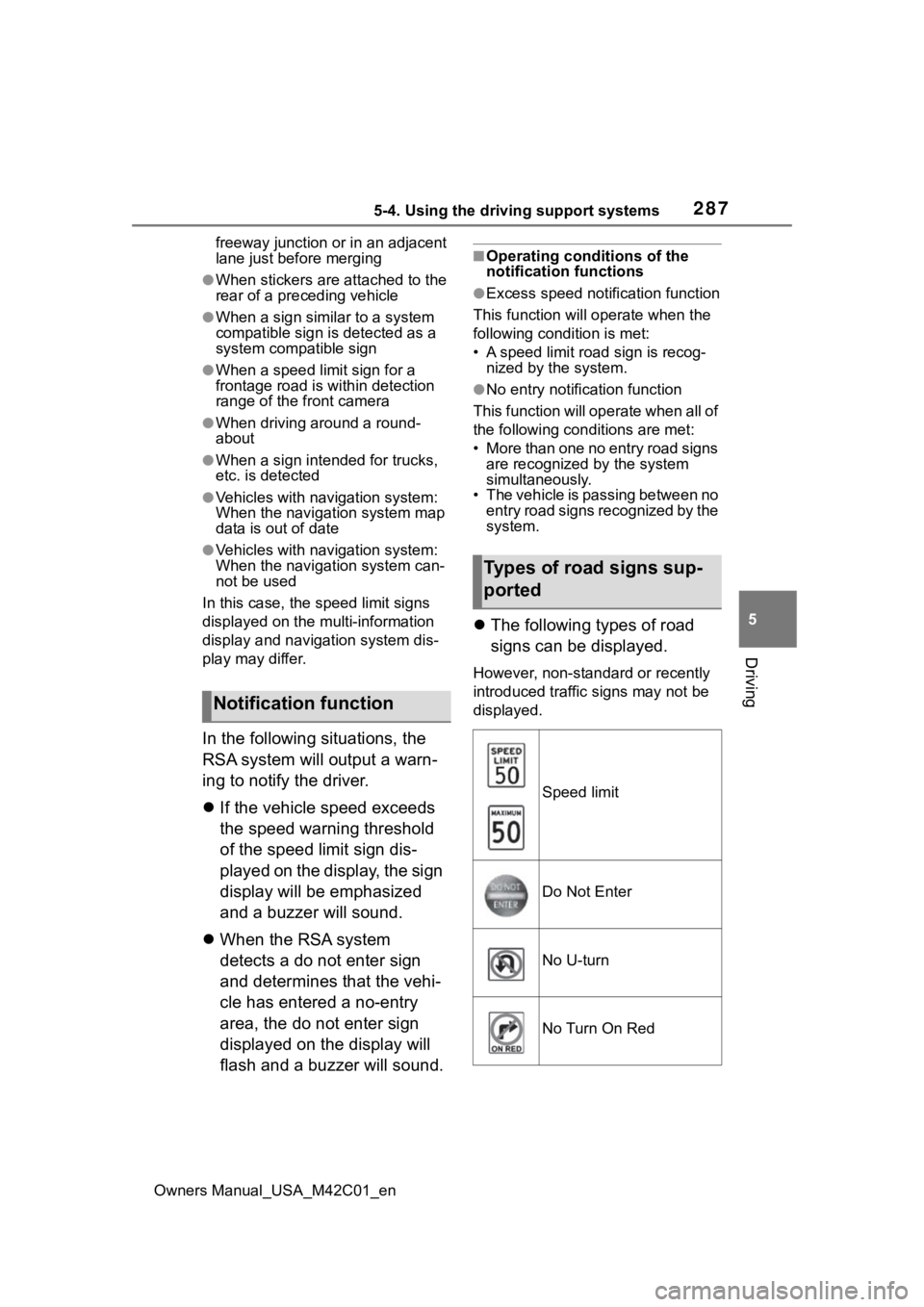
The following types of road
signs can be displayed.
However, non-standard or recently
introduced traffic signs may not be
displayed.
Notification function
Types of road signs sup-
ported
Speed limit
Do Not Enter
No U-turn
No Turn On Red
Page 288 of 628
2885-4. Using the driving support systems
Owners Manual_USA_M42C01_en
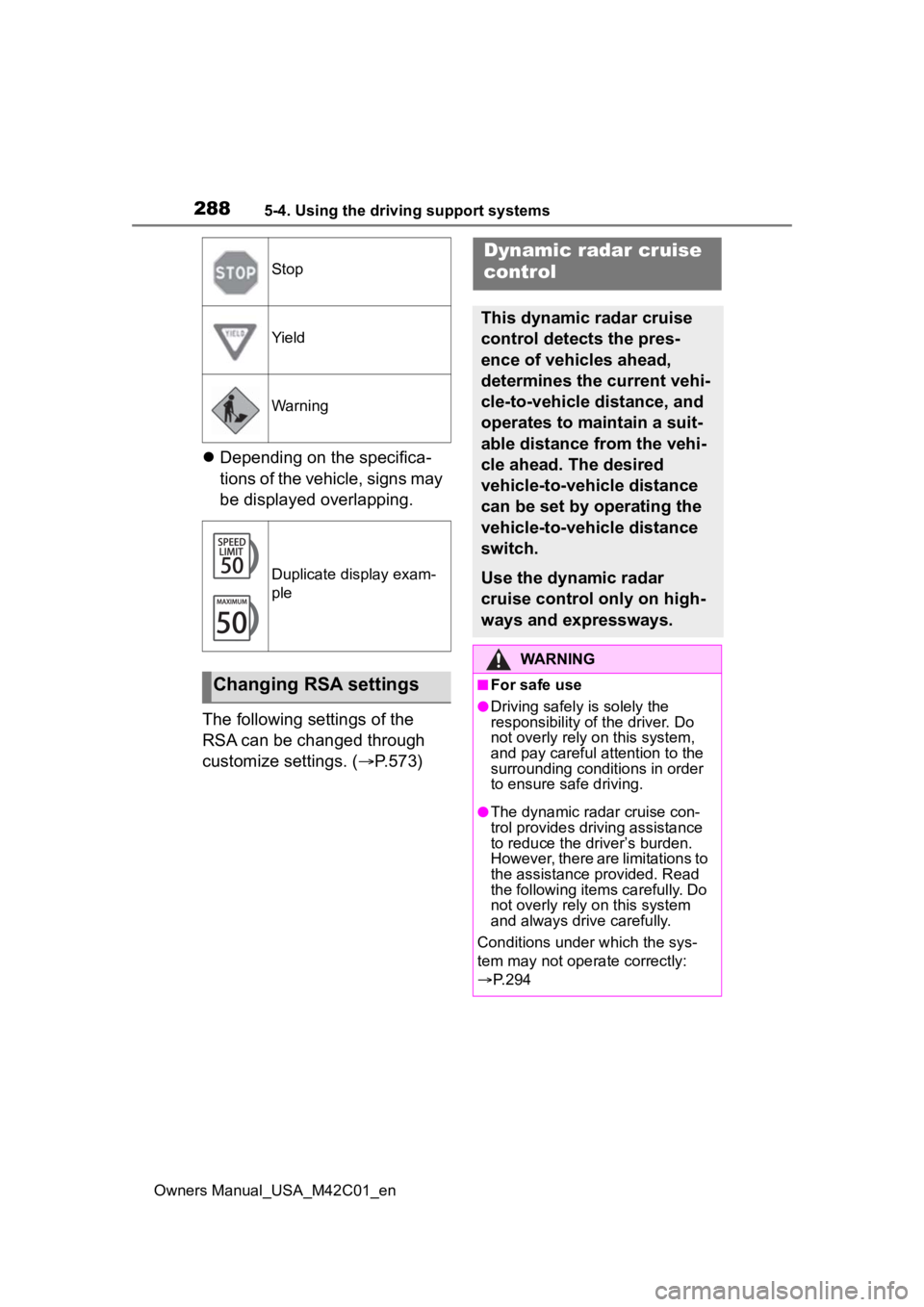
Depending on the specifica-
tions of the vehicle, signs may
be displayed overlapping.
The following settings of the
RSA can be changed through
customize settings. ( P.573)
Stop
Yield
Warning
Duplicate display exam-
ple
Changing RSA settings
Dynamic radar cruise
control
This dynamic radar cruise
control detects the pres-
ence of vehicles ahead,
determines the current vehi-
cle-to-vehicle distance, and
operates to maintain a suit-
able distance from the vehi-
cle ahead. The desired
vehicle-to-vehicle distance
can be set by operating the
vehicle-to-vehicle distance
switch.
Use the dynamic radar
cruise control only on high-
ways and expressways.
WARNING
■For safe use
●Driving safely is solely the
responsibility of the driver. Do
not overly rely on this system,
and pay careful attention to the
surrounding conditions in order
to ensure safe driving.
●The dynamic radar cruise con-
trol provides driving assistance
to reduce the driver’s burden.
However, there are limitations to
the assistance provided. Read
the following items carefully. Do
not overly rely on this system
and always drive carefully.
Conditions under which the sys-
tem may not opera te correctly:
P. 2 9 4
Page 289 of 628
2895-4. Using the driving support systems
Owners Manual_USA_M42C01_en
5
Driving
WARNING
●Set the speed appropriately
according to the speed limit,
traffic flow, road conditions,
weather conditions, etc. The
driver is responsible for confirm-
ing the set speed.
●Even if the system is operating
correctly, the condition of a pre-
ceding vehicle as recognized by
the driver and detected by the
system may differ. Therefore, it
is necessary for the driver to
pay attention, assess risks, and
ensure safety. Over-reliance on
this system to drive the vehicle
safely may lead to an accident
resulting in death or serious
injury.
■Precautions for the driving
assist systems
Observe the following precau-
tions, as there are limitations to
the assistance provided by the
system. Over-reliance on this sys-
tem may lead to an accident
resulting in death or serious injury.
●Details of support provided for
the driver’s vision The dynamic
radar cruise control is only
intended to help the driver in
determining the distance
between the driver’s own vehi-
cle and a designated preceding
vehicle. It is not a system which
allows for careless or inattentive
driving, and is not a system
which assists in poor visibility
conditions. The driver must pay
attention to their surroundings,
even when the vehicle stops.
●Details of suppor t provided for
the driver’s judgement The
dynamic radar cruise control
determines whether the dis-
tance between the driver’s own
vehicle and a designated pre-
ceding vehicle is within a set
range. It is not capable of mak-
ing any other type of judgement.
Therefore, it is absolutely nec-
essary for the driver to remain
vigilant and to determine
whether or not t here is a possi-
bility of danger.
●Details of suppor t provided for
the driver’s operation The
dynamic radar cruise control
does not include functions
which will prevent or avoid colli-
sions with vehicles ahead of
your vehicle. Ther efore, if there
is ever any possibility of danger,
the driver must take immediate
and direct control of the vehicle
and act appropriately in order to
ensure safety.
■Situations in which the
dynamic radar cruise control
should not be used
Do not use the d ynamic radar
cruise control in the following situ-
ations. As the system will not be
able to provide appropriate con-
trol, using it may lead to an acci-
dent resulting in death or serious
injury.
●Roads where there are pedes-
trians, cyclists, etc.
●When driving on a highway or
expressway entrance or exit
●When the approach warning
sounds frequently
●Situations in which the sensors
may not operate properly:
P.263
●Situations in which the lane may
not be detected: P.264
Page 294 of 628
2945-4. Using the driving support systems
Owners Manual_USA_M42C01_enoperated
●When the vehicle is stopped by
system control on a steep incline
●When any of the following are
detected while the vehicle is
stopped by system control:
• The driver’s seat belt is unfas-
tened
• The driver’s door is opened
• Approximately 3 minutes have elapsed since the vehicle was
stopped
The parking brake may be actived
automatically.
The shift position may automatically
change to P. ( P.238)
●Situations in whic h some or all of
the functions of the system cannot
operate: P. 2 6 4
■Dynamic radar cruise control
system warning messages and
buzzers
For safe use: P.259
■Preceding vehicles that the sen-
sor may not detect correctly
In the following situations, depend-
ing on the conditions, if the system
cannot provide sufficient decelera-
tion or accelerati on is necessary,
operate the brake pedal or accelera-
tor pedal.
As the sensor may not be able to
correctly detect these types of vehi-
cles, the approach warning
( P.294) may not operate.
●When a vehicle cuts in front of
your vehicle or changes lanes
away from your vehicle extremely
slowly or quickly
●When changing lanes
●When a preceding vehicle is driv-
ing at a low speed
●When a vehicle i s stopped in the
same lane as the vehicle
●When a motorcycle is traveling in
the same lane as the vehicle
■Conditions under which the
system may not operate cor-
rectly
In the following situations, operate
the brake pedal (or accelerator
pedal, depending on the situation)
as necessary.
As the sensor may not be able to
correctly detect a vehicle, the sys-
tem may not operate properly.
●When a preceding vehicle brakes
suddenly
●When changing lanes at low
speeds, such as in a traffic jam
In situations where the vehicle
approaches a preceding vehicle
and the system cannot provide
sufficient deceleration, such as
if a vehicle cuts in front of the
vehicle, a warning display will
flash and a buzzer will sound to
alert the driver. Depress the
brake pedal to ensure appropri-
ate vehicle-to-vehicle distance.
■Warnings may not occur
when
In the following situations, the
warning may not operate even
though the vehicle-to-vehicle
distance is short.
When the preceding vehicle is
traveling at the same speed
or faster than your vehicle
When the preceding vehicle is
traveling at an extremely low
speed
Immediately after the vehicle
speed has been set
Approach warning
Page 296 of 628
2965-4. Using the driving support systems
Owners Manual_USA_M42C01_en
through customize settings.
(P.572)Cruise control
The vehicle can be driven at
a set speed even if the
accelerator pedal is not
depressed.
Use the cruise control only
on highways and express-
ways.
WARNING
■For safe use
●Driving safely is solely the
responsibility of the driver.
Therefore, do not overly rely on
this system. The driver is solely
responsible for paying attention
to the vehicle’s surroundings
and driving safely.
●Set the speed appropriately
according to the speed limit,
traffic flow, road conditions,
weather conditions, etc. The
driver is responsible for confirm-
ing the set speed.
■Situations in which cruise
control should not be used
Do not use the cruise control in
the following situ ations. As the
system will not be able to provide
appropriate control, using it may
lead to an acciden t resulting in
death or serious injury.
●On roads with sharp bends
●On winding roads
●On slippery roads, such as
those covered with rain, ice or
snow
Page 297 of 628
2975-4. Using the driving support systems
Owners Manual_USA_M42C01_en
5
Driving
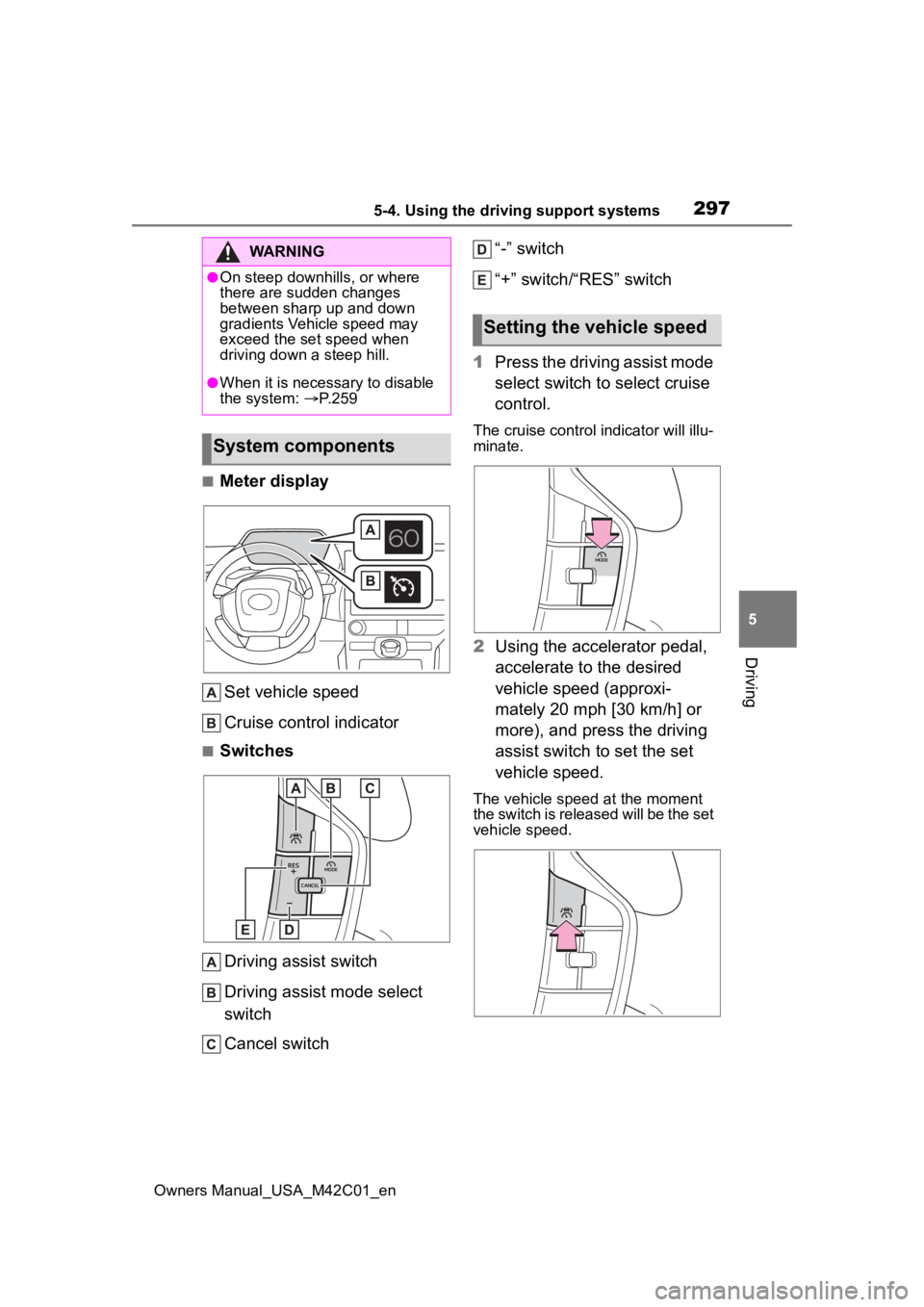
■Meter display Set vehicle speed
Cruise control indicator
■SwitchesDriving assist switch
Driving assist mode select
switch
Cancel switch “-” switch
“+” switch/“RES” switch
1 Press the driving assist mode
select switch to select cruise
control.
The cruise control indicator will illu-
minate.
2Using the accelerator pedal,
accelerate to the desired
vehicle speed (approxi-
mately 20 mph [30 km/h] or
more), and press the driving
assist switch to set the set
vehicle speed.
The vehicle speed at the moment
the switch is released will be the set
vehicle speed.
WARNING
●On steep downhills, or where
there are sudden changes
between sharp up and down
gradients Vehicle speed may
exceed the set speed when
driving down a steep hill.
●When it is necessary to disable
the system: P. 2 5 9
System components
Setting the vehicle speed