height SUBARU SOLTERRA 2023 User Guide
[x] Cancel search | Manufacturer: SUBARU, Model Year: 2023, Model line: SOLTERRA, Model: SUBARU SOLTERRA 2023Pages: 628, PDF Size: 11.91 MB
Page 326 of 628
3265-4. Using the driving support systems
Owners Manual_USA_M42C01_en
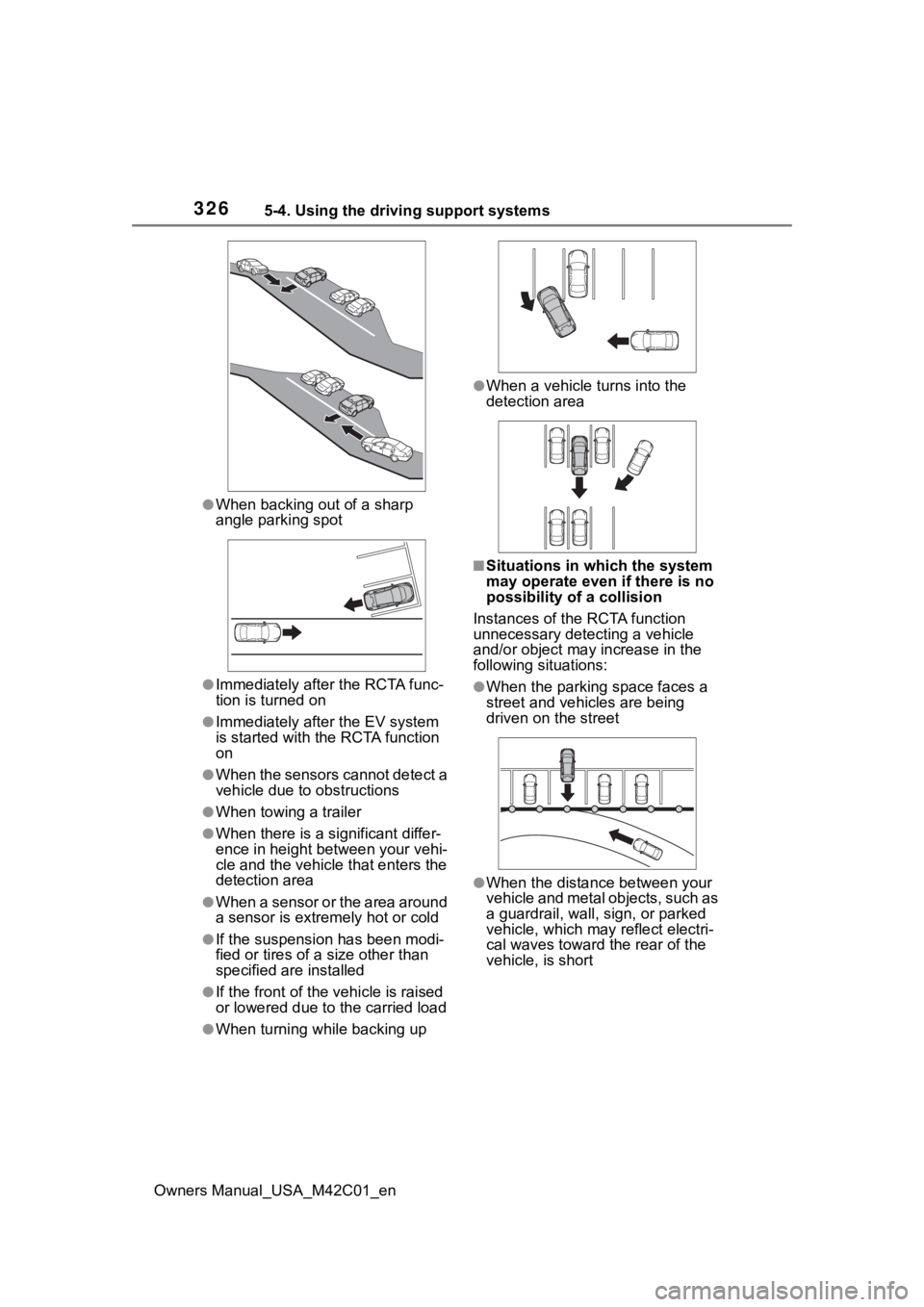
●When backing out of a sharp
angle parking spot
●Immediately after the RCTA func-
tion is turned on
●Immediately afte r the EV system
is started with the RCTA function
on
●When the sensors cannot detect a
vehicle due to obstructions
●When towing a trailer
●When there is a significant differ-
ence in height between your vehi-
cle and the vehicle that enters the
detection area
●When a sensor or the area around
a sensor is extremely hot or cold
●If the suspension has been modi-
fied or tires of a size other than
specified are installed
●If the front of the vehicle is raised
or lowered due to the carried load
●When turning while backing up
●When a vehicle tu rns into the
detection area
■Situations in which the system
may operate even if there is no
possibility of a collision
Instances of the RCTA function
unnecessary detec ting a vehicle
and/or object may increase in the
following situations:
●When the parking space faces a
street and vehicles are being
driven on the street
●When the distance between your
vehicle and metal objects, such as
a guardrail, wall, sign, or parked
vehicle, which may reflect electri-
cal waves toward the rear of the
vehicle, is short
Page 330 of 628
3305-4. Using the driving support systems
Owners Manual_USA_M42C01_enintuitive parking assist-sensor,
RCTA, and RCD all together.
Mute will be canceled automatically
in the followin
g situations:
●When the shift position is
changed.
●When the vehicle speed exceeds
a certain speed.
●When there is a malfunction in a
sensor or the system is temporar-
ily unavailable.
●When the operating function is
disabled manually.
●When the power switch is turned
off.
■Situations in which the system
may not operate properly
●Some pedestrians, such as the
following, may not be detected by
the rear camera detection func-
tion, preventing the function from
operating properly:
• Pedestrians who are bending for- ward or squatting
• Pedestrians who are lying down
• Pedestrians who are running
• Pedestrians who suddenly enter the detection area
• People riding a bicycle, skate- board, or other light vehicle
• Pedestrians wearing oversized clothing such as a rain coat, long
skirt, etc., making their silhouette
obscure
• Pedestrians whose body is par- tially hidden by an object, such as
a cart or umbrella
• Pedestrians which are obscured by darkness, such as at night
●In some situations, such as the
following, pedestrians may not be
detected by the rear camera
detection function, preventing the
function from operating properly:
• When backing up in inclement weather (rain, snow, fog, etc.)
• When the rear camera is
obscured (dirt, snow, ice, etc., are
attached) or scratched
• When a very bright light, such as the sun, or the headlights of
another vehicle, shines directly
into the rear camera
• When backing up in a place where the surrounding brightness
changes suddenly, such as at the
entrance or exi t of a garage or
underground parking lot
• When backing up in a dim envi-
ronment such as during dusk or in
an underground parking lot
• When the camera position and
direction are deviated
• When a towing hook is attached
• When water droplets are flowing on the camera lens
• When the vehicle height is extremely changed (nose up,
nose down).
• When tire chains or an emergency tire puncture repair kit is used
• When the rear washer is operating
• If the suspension has been modi- fied or tires of a size other than
specified are installed.
• If an electronic component, such as a backlit license plate or rear
fog light, is insta lled near the rear
camera
• If a bumper protector, such as an
additional trim strip, is installed to
the rear bumper
■Situations in which the system
may operate unexpectedly
●Even though there are no pedes-
trians in the detection area, some
objects, such as the following,
may be detected, possibly caus-
ing the rear cam era detection
function to operate.
• Three dimensional objects, such as a pole, traffic cone, fence, or
parked vehicle
• Moving objects, such as a car or motorcycle
• Objects moving to ward your vehi-
cle when backing up, such as
flags or puddles (or airborne mat-
ter, such as smoke, steam, rain, or
snow)
• Cobblestone or gravel roads, tram rails, road repai rs, white lines,
pedestrian crossings or fallen
Page 333 of 628
3335-4. Using the driving support systems
Owners Manual_USA_M42C01_en
5
Driving
The Parking Support Brake can
be enabled/disabled on the
multi-information display. All of
the Parking Support Brake func-
tions (static objects front and
rear of the vehicle, moving vehi-
cles rear of the vehicle, pedestri-
ans rear of the vehicle and static
objects around the vehicle) are
enabled/disabled simultane-
ously.
Use the meter control switches
to enable/disable the parking
support brake. ( P.156)
1 Press or to select .
2 Press or to select
“ PKSB” and then press
.
When the Parking Support Brake is
disabled, the driving assist informa-
tion indicator ( P.149) illuminates.
To re-enable the system when it was disabled, select on the
multi-information display, select
“ PKSB” and then On. If dis-
abled using this method, the sys-
tem will not be re-enabled by
turning the power
switch off and
then to ON.
If the EV system output restriction
control or brake control operates, a
buzzer will sound and a message
will be displayed on the multi-infor-
mation display and multimedia sys-
tem screen, to alert the driver.
Depending on the situation, EV
system output restriction control will
operate to either limit acceleration
or restrict output as much as possi-
ble.
EV system output restriction
control is operating (accelera-
tion restriction)
Acceleration greater than a certain
amount is restric ted by the system.
Multimedia display: No warning dis-
played
Multi-information display: “Object
Detected Acceleration Reduced”
Driving assist information indicator:
Not illuminated
Buzzer: Does not sound
EV system output restriction
control is operating (output
restricted as much as possi-
ble)
The system has determined that
WARNING
●When a tire chains, compact
spare tire or an emergency tire
puncture repair kit is used
■Precautions for the suspen-
sion
Do not modify the suspension of
the vehicle. If the height or tilt of
the vehicle is changed, the sen-
sors may not be able to detect
detectable objects and the system
may not operate correctly, possi-
bly leading to an accident.
Enabling/Disabling the
Parking Support Brake
Display and buzzer for EV
system output restriction
control and brake control
Page 358 of 628
3585-4. Using the driving support systems
Owners Manual_USA_M42C01_en
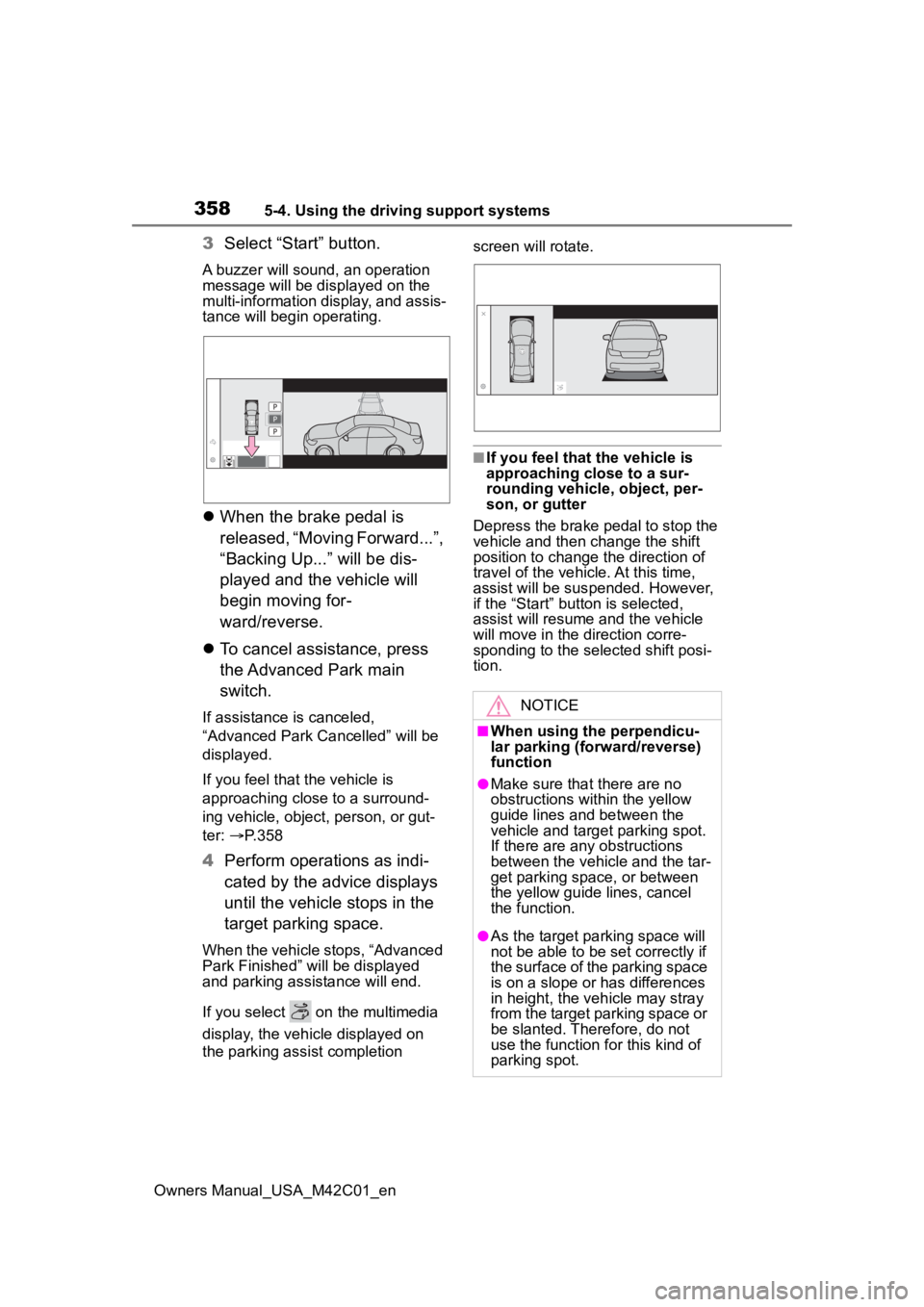
3Select “Start” button.
A buzzer will sound, an operation
message will be dis played on the
multi-information display, and assis-
tance will begin operating.
When the brake pedal is
released, “Moving Forward...”,
“Backing Up...” will be dis-
played and the vehicle will
begin moving for-
ward/reverse.
To cancel assistance, press
the Advanced Park main
switch.
If assistance is canceled,
“Advanced Park Cancelled” will be
displayed.
If you feel that the vehicle is
approaching close to a surround-
ing vehicle, object, person, or gut-
ter: P. 3 5 8
4Perform operations as indi-
cated by the advice displays
until the vehicle stops in the
target parking space.
When the vehicle stops, “Advanced
Park Finished” will be displayed
and parking assistance will end.
If you select on the multimedia
display, the vehicle displayed on
the parking assist completion screen will rotate.
■If you feel that
the vehicle is
approaching close to a sur-
rounding vehicle, object, per-
son, or gutter
Depress the brake pedal to stop the
vehicle and then change the shift
position to change the direction of
travel of the vehicle. At this time,
assist will be sus pended. However,
if the “Start” button is selected,
assist will resume and the vehicle
will move in the di rection corre-
sponding to the selected shift posi-
tion.
NOTICE
■When using the perpendicu-
lar parking (forward/reverse)
function
●Make sure that there are no
obstructions within the yellow
guide lines and between the
vehicle and target parking spot.
If there are any obstructions
between the vehicle and the tar-
get parking space, or between
the yellow guide lines, cancel
the function.
●As the tar get parking space will
not be able to be set correctly if
the surface of the parking space
is on a slope or has differences
in height, the veh icle may stray
from the target parking space or
be slanted. Therefore, do not
use the function f or this kind of
parking spot.
Page 363 of 628
3635-4. Using the driving support systems
Owners Manual_USA_M42C01_en
5
Driving
screen will rotate.
■If you feel that the vehicle is
approaching close to a sur-
rounding vehicle, object, per-
son, or gutter
Depress the brake pedal to stop the
vehicle and then ch ange the shift
position to change the direction of
travel of the vehicle.
At this time, assist will be sus-
pended. However, if the “Start” but-
ton is selected, assist will resume
and the vehicle will move in the
direction corresponding to the
selected shift position.
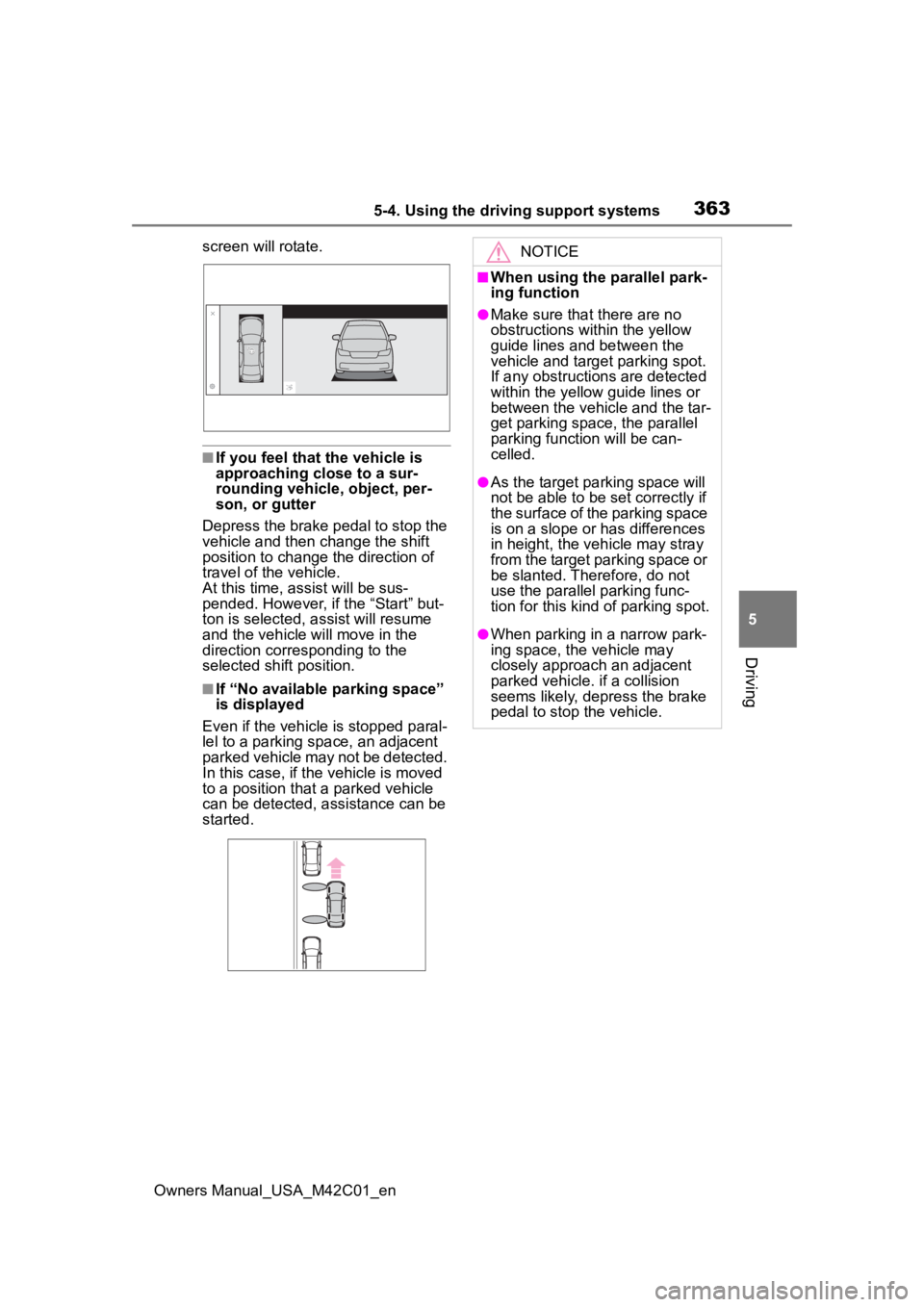
■If “No available parking space”
is displayed
Even if the vehicle is stopped paral-
lel to a parking space, an adjacent
parked vehicle may not be detected.
In this case, if the vehicle is moved
to a position that a parked vehicle
can be detected, assistance can be
started.
NOTICE
■When using the parallel park-
ing function
●Make sure that there are no
obstructions within the yellow
guide lines and between the
vehicle and target parking spot.
If any obstructions are detected
within the yellow guide lines or
between the vehicle and the tar-
get parking space, the parallel
parking function will be can-
celled.
●As the tar get parking space will
not be able to be set correctly if
the surface of the parking space
is on a slope or has differences
in height, the veh icle may stray
from the target parking space or
be slanted. Therefore, do not
use the parallel parking func-
tion for this kind of parking spot.
●When parking in a narrow park-
ing space, the vehicle may
closely approach an adjacent
parked vehicle. if a collision
seems likely, depress the brake
pedal to stop the vehicle.
Page 396 of 628
3965-5. Driving tips
Owners Manual_USA_M42C01_en
Specific design characteris-
tics give it a higher center of
gravity than ordinary passen-
ger cars. This vehicle design
feature causes this type of
vehicle to be more likely to
rollover. And, utility vehicles
have a significantly higher
rollover rate than other types
of vehicles.
An advantage of the higher
ground clearance is a better
view of the road allowing you
to anticipate problems.
It is not designed for corner-
ing at the same speeds as
ordinary passenger cars any
more than low-slung sports
cars are designed to perform
satisfactorily under off-road
conditions. Therefore, sharp
turns at excessive speeds
may cause the vehicle to roll-
over.
When driving your vehicle off-
Utility vehicle precau-
tions
This vehicle belongs to the
utility vehicle class, which
has higher ground clear-
ance and narrower tread in
relation to the height of its
center of gravity to make it
capable of performing in a
wide variety of off-road
applications.
Utility vehicle feature
WARNING
■Utility vehicle precautions
Always observe t he following pre-
cautions to minim ize the risk of
death, serious injury or damage to
your vehicle:
●In a rollover crash, an unbelted
person is significantly more
likely to die than a person wear-
ing a seat belt. Therefore, the
driver and all passengers
should always fasten their seat
belts.
●Avoid sharp turns or abrupt
maneuvers, if at all possible.
Failure to operat e this vehicle
correctly may result in loss of
control or vehicle rollover caus-
ing death or serious injury.
●Loading cargo on the roof lug-
gage carrier (if equipped) will
make the center of the vehicle
gravity higher. Avoid high
speeds, sudden starts, sharp
turns, sudden braking or abrupt
maneuvers, otherwise it may
result in loss of control or vehi-
cle rollover du e to failure to
operate this vehicle correctly.
●Always slow down in gusty
crosswinds. Because of its pro-
file and higher ce nter of gravity,
your vehicle is more sensitive to
side winds than an ordinary
passenger car. Slowing down
will allow you to have better
control.
●Do not drive horizontally across
steep slopes. Driving straight up
or straight down is preferred.
Your vehicle (or any similar off-
road vehicle) can tip over side-
ways much more easily than
forward or backward.
Off-road driving
Page 422 of 628
4226-3. Using the storage features
Owners Manual_USA_M42C01_en
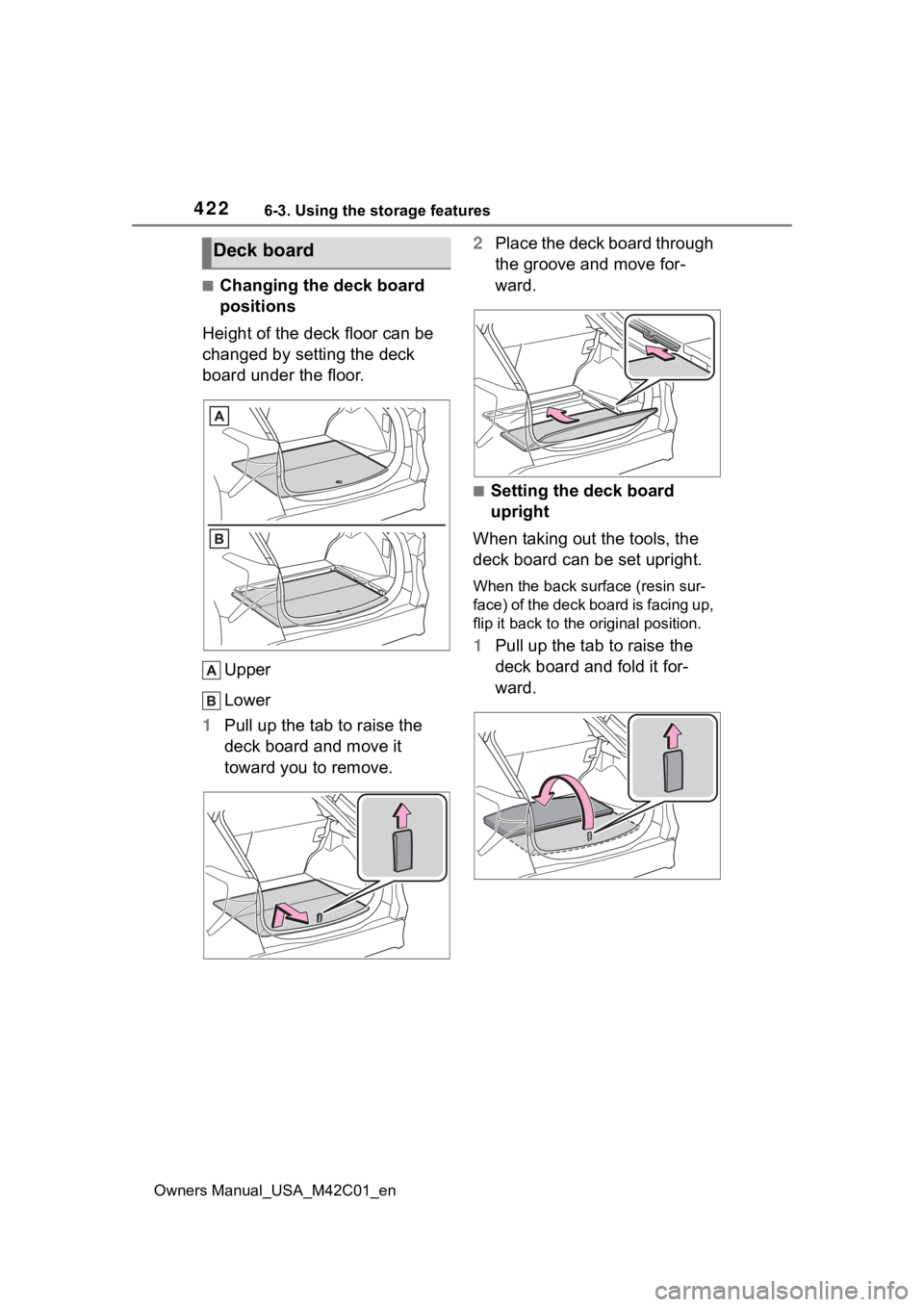
■Changing the deck board
positions
Height of the deck floor can be
changed by setting the deck
board under the floor.
Upper
Lower
1 Pull up the tab to raise the
deck board and move it
toward you to remove. 2
Place the deck board through
the groove and move for-
ward.
■Setting the deck board
upright
When taking out the tools, the
deck board can be set upright.
When the back surf ace (resin sur-
face) of the deck board is facing up,
flip it back to the original position.
1 Pull up the tab to raise the
deck board and fold it for-
ward.
Deck board
Page 487 of 628
4877-3. Do-it-yourself maintenance
Owners Manual_USA_M42C01_en
7
Maintenance and care
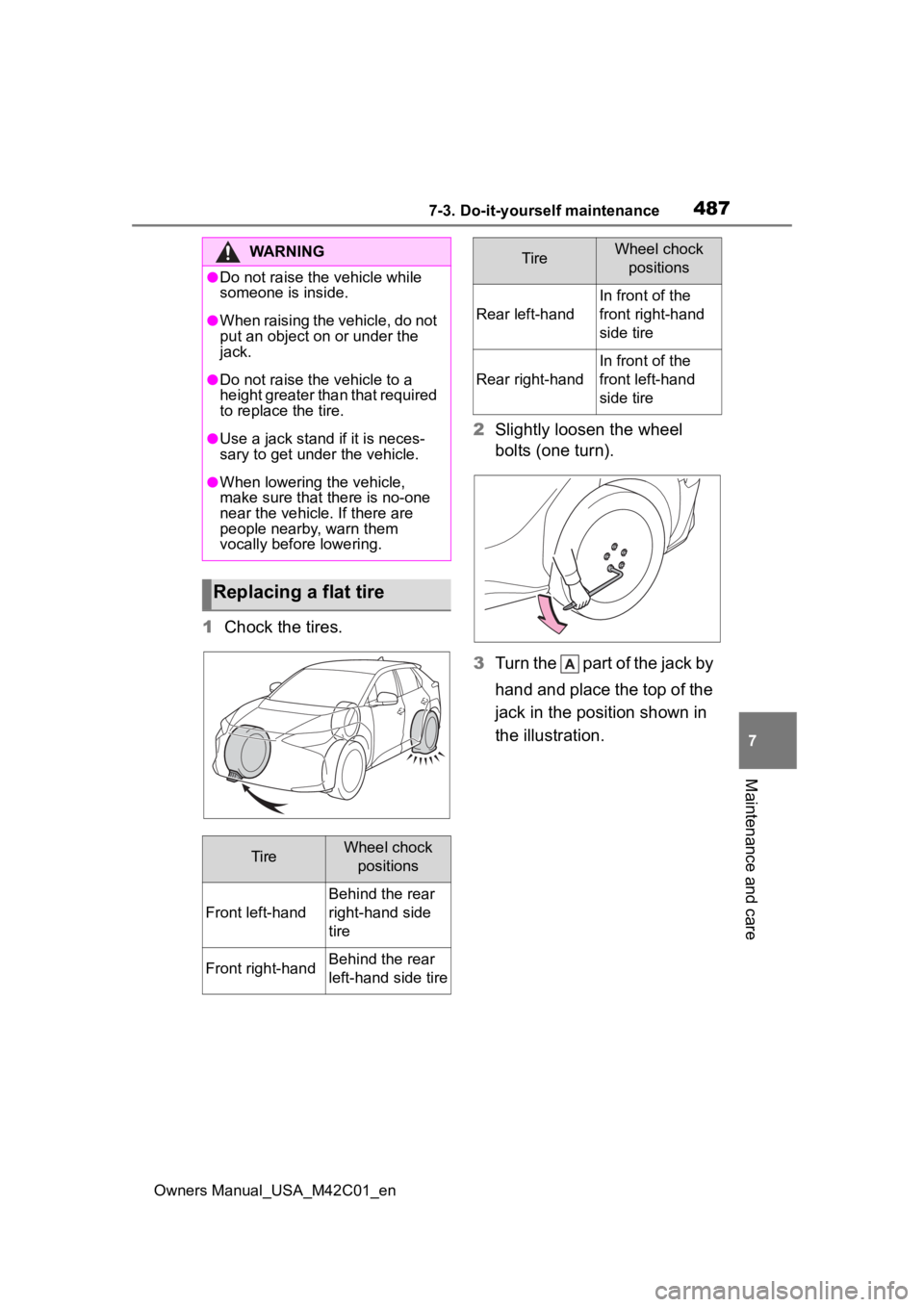
1 Chock the tires. 2
Slightly loosen the wheel
bolts (one turn).
3 Turn the part of the jack by
hand and place the top of the
jack in the position shown in
the illustration.
WARNING
●Do not raise the vehicle while
someone is inside.
●When raising the vehicle, do not
put an object on or under the
jack.
●Do not raise the vehicle to a
height greater than that required
to replace the tire.
●Use a jack stand if it is neces-
sary to get under the vehicle.
●When lowering the vehicle,
make sure that there is no-one
near the vehicle. If there are
people nearby, warn them
vocally before lowering.
Replacing a flat tire
TireWheel chock
positions
Front left-hand
Behind the rear
right-hand side
tire
Front right-handBehind the rear
left-hand side tire
Rear left-hand
In front of the
front right-hand
side tire
Rear right-hand
In front of the
front left-hand
side tire
TireWheel chock positions
Page 506 of 628
5068-1. Essential information
Owners Manual_USA_M42C01_en
If the door can be opened,
open the door and exit the
vehicle.
If the door can not be opened,
open the window using the
power window switch and
ensure an escape route.
If the window can be opened,
exit the vehicle through the
window.
If the door and window cannot
be opened due to the rising
water, remain calm, wait until
the water level inside the
vehicle rises to the point that
the water pressure inside of
the vehicle equals the water
pressure outside of the vehi-
cle and then open the door
after waiting for the rising
water to enter the vehicle, and
exit the vehicle. When the outside water level exceeds
half the height of the door, the
door cannot be opened from
the inside due to water pres-
sure.
■Water level exceeds the floor
When the water level exceeds the
floor and time has passed, the elec-
trical equipment will get damaged,
the power windows will not operate,
the motor stop, and the vehicle may
not be able to get moving.
■Using an emergency escape
hammer*
Laminated glass is used in the wind-
shield on this vehicle.
Laminated glass cannot be shat-
tered with an emergency hammer
*.
Tempered glass is used in the win-
dows on this vehicle.
*: Contact your Toyota dealer or
aftermarket accessory manufac-
turer for further information about
an emergency hammer.
If the vehicle is sub-
merged or water on
the road is rising
This vehicle is not designed
to be able to drive on roads
that are deeply flooded with
water. Do not drive on roads
where the roads may be
submerged or the water
may be rising. It is danger-
ous to remain in the vehicle,
if it anticipated that the
vehicle will be flooded or
set a drift. Remain calm and
follow the following.
WARNING
■Caution while driving
Do not drive on roads where the
roads may be submerged or the
water may be rising. Otherwise
the vehicle may be damaged and
cannot move, as well as become
flooded and set a drift, which may
lead to death.
Page 550 of 628
5509-1. Specifications
Owners Manual_USA_M42C01_en
9-1.Specifications
*: Unladen vehicle
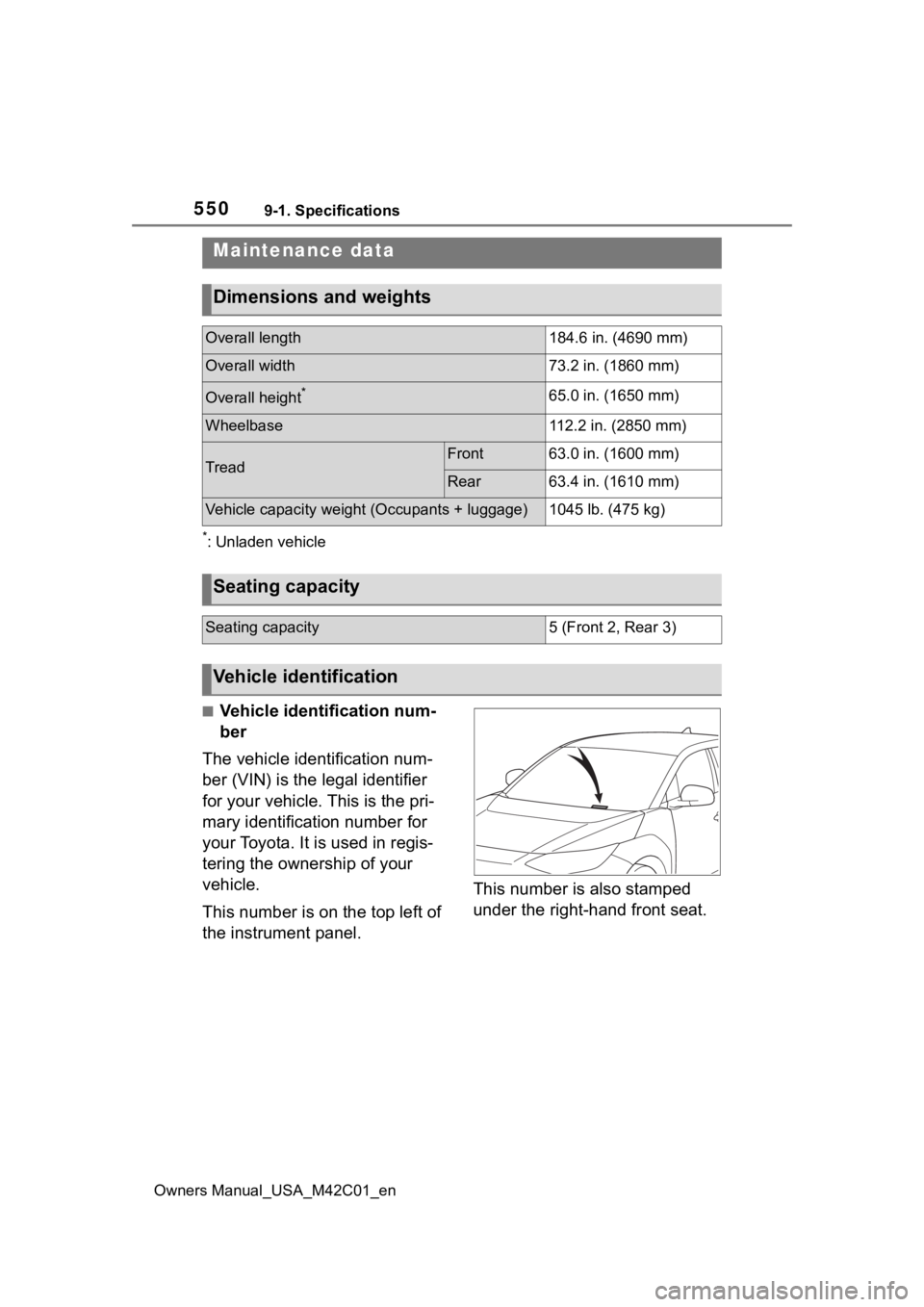
■Vehicle identification num-
ber
The vehicle identification num-
ber (VIN) is the legal identifier
for your vehicle. This is the pri-
mary identification number for
your Toyota. It is used in regis-
tering the ownership of your
vehicle.
This number is on the top left of
the instrument panel. This number is also stamped
under the right-hand front seat.
Maintenance data
Dimensions and weights
Overall length184.6 in. (4690 mm)
Overall width73.2 in. (1860 mm)
Overall height*65.0 in. (1650 mm)
Wheelbase112.2 in. (2850 mm)
TreadFront63.0 in. (1600 mm)
Rear63.4 in. (1610 mm)
Vehicle capacity weigh
t (Occupants + luggage)1045 lb. (475 kg)
Seating capacity
Seating capacity5 (Front 2, Rear 3)
Vehicle identification