instrument panel SUBARU SOLTERRA 2023 User Guide
[x] Cancel search | Manufacturer: SUBARU, Model Year: 2023, Model line: SOLTERRA, Model: SUBARU SOLTERRA 2023Pages: 628, PDF Size: 11.91 MB
Page 408 of 628
4086-1. Using the air conditioning system and defogger
Owners Manual_USA_M42C01_en
This function automatically con-
trols the air conditioning airflow
so that priority is given to the
front seats. Unnecessary air
conditioning is suppressed, con-
tributing to increased electricity
consumption efficiency.
Front seat concentrated airflow
mode operates in the following
situations.
No passengers are detected
in the rear seats
The windshield defogger is
not operating
While operating, illuminates.
■Manually turning front seat
concentrated airflow mode
on/off
In front seat concentrated air-
flow mode, directing airflow to
the front seats only and to all
seats can be switched via switch
operation. When the mode has
been switched manually, auto-
matic airflow control stops oper-
ating.
Press on the air conditioning
operation panel and switch the
airflow.
Indicator illuminated: Airflow
to the front seats only
Indicator off: Airflow to all the
seats
■Operation of automatic airflow
control
●In order to maintain a comfortable
interior, airflow may be directed to
seats without passengers immedi-
ately after the EV system is
started and at other times depend-
ing on the outside temperature.
●After the EV system is started, if
passengers move around inside
or enter/exit the vehicle, the sys-
tem cannot accura tely detect the
presence of passengers and auto-
matic airflow control will not oper-
ate.
■Operation of manual airflow
control
Even if the function is manually
switched to directing airflow to only
the front seats, w hen a rear seat is
occupied, it may automatically direct
airflow to all seats.
WARNING
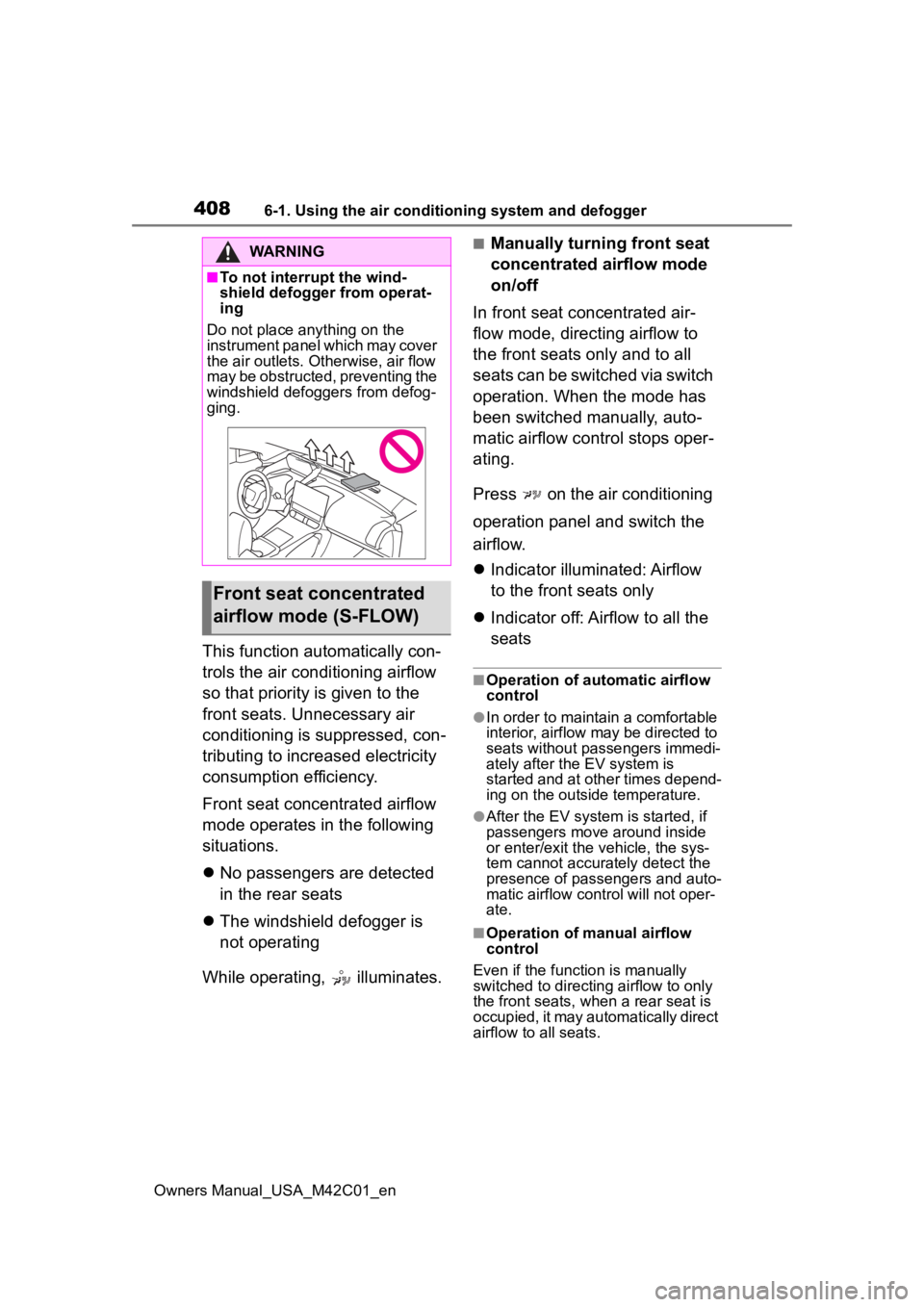
■To not interrupt the wind-
shield defogger from operat-
ing
Do not place anything on the
instrument panel which may cover
the air outlets. Otherwise, air flow
may be obstructed, preventing the
windshield defoggers from defog-
ging.
Front seat concentrated
airflow mode (S-FLOW)
Page 429 of 628
4296-4. Using the other interior features
Owners Manual_USA_M42C01_en
6
Interior features
The USB Type-C charging ports
are used to supply 3 A of elec-
tricity at 5 V to external devices.
The USB Type-C charging ports
are for charging only. They are
not designed for data transfer or
other purposes. Depending on the external
device, it may not charge prop-
erly. Refer to the manual
included with the device before
using a USB charging port.
Refer to “MULTIMEDIA
OWNER’S MANUAL” for USB
Type-A information.
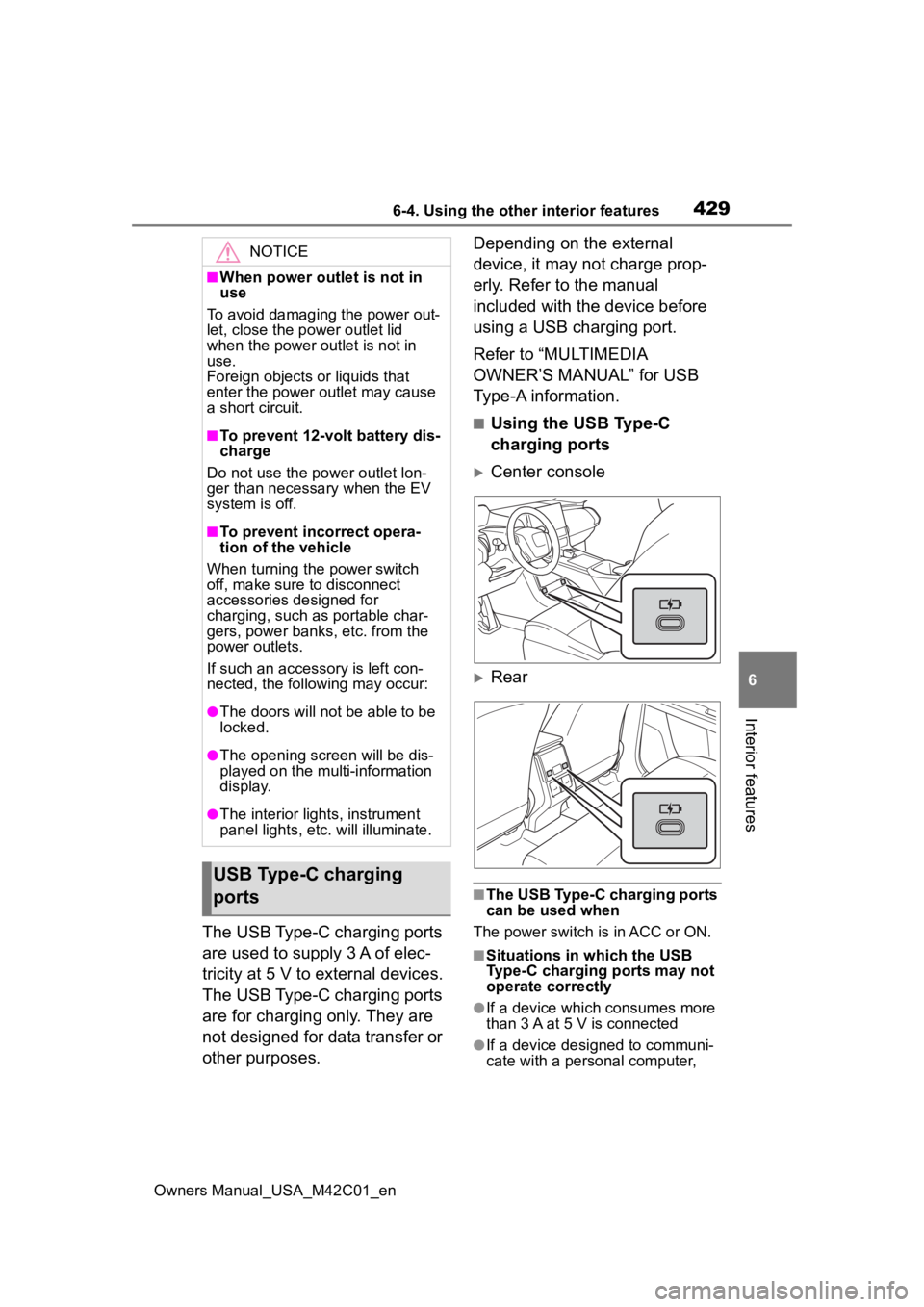
■Using the USB Type-C
charging ports
Center console
Rear
■The USB Type-C charging ports
can be used when
The power switch is in ACC or ON.
■Situations in which the USB
Type-C charging ports may not
operate correctly
●If a device which consumes more
than 3 A at 5 V is connected
●If a device designed to communi-
cate with a personal computer,
NOTICE
■When power outlet is not in
use
To avoid damaging the power out-
let, close the p ower outlet lid
when the power outlet is not in
use.
Foreign objects or liquids that
enter the power outlet may cause
a short circuit.
■To prevent 12-volt battery dis-
charge
Do not use the power outlet lon-
ger than necessary when the EV
system is off.
■To prevent incorrect opera-
tion of the vehicle
When turning the power switch
off, make sure to disconnect
accessories designed for
charging, such as portable char-
gers, power banks, etc. from the
power outlets.
If such an accessory is left con-
nected, the following may occur:
●The doors will not be able to be
locked.
●The opening scr een will be dis-
played on the multi-information
display.
●The interior lights, instrument
panel lights, etc. will illuminate.
USB Type-C charging
ports
Page 452 of 628
4527-1. Maintenance and care
Owners Manual_USA_M42C01_enage to the IR prote
ctive coating,
observe the following:
●If the windows are dirty, gently
wipe them with a cloth soaked in
water or lukewarm water as soon
as possible.
●If the windows are very dirty, do
not open and close them repeat-
edly.
WARNING
■Water in the vehicle
●Do not splash or spill liquid in
the vehicle.
Doing so may cause the electri-
cal components, etc., to mal-
function or catch fire.
●Do not get any of the SRS com-
ponents or wiring in the vehicle
interior wet.
( P.35)
An electrical malfunction may
cause the airbags to deploy or
not function properly, resulting
in death or serious injury.
●Vehicles with wireless charger:
Do not let the wireless charger
( P.430) get wet. Failure to do
so may cause the charger to
become hot and cause burns or
could cause electric shock
resulting in death or serious
injury.
■Cleaning the interior (espe-
cially instrument panel)
Do not use a polis h wax or polish
cleaner. The instrument panel
may reflect off the windshield,
obstructing the dr iver’s view and
leading to an accident, resulting in
death or serious injury.
NOTICE
■Cleaning detergents
●Do not use the following types
of detergent, as they may dis-
color the vehicle interior or
cause streaks or damage to
painted surfaces:
• Non-seat portions: Organic sub- stances such as benzene or
gasoline, alkaline or acidic solu-
tions, dye, and bleach
• Seats: Alkaline or acidic solu- tions, such as th inner, benzene,
and alcohol
●Do not use a polish wax or pol-
ish cleaner. The instrument
panel’s or other interior part’s
painted surface may be dam-
aged.
■Water on the floor
Do not wash the v ehicle floor with
water.
Vehicle systems such as the
audio system may be damaged if
water comes into contact with
electrical components such as the
audio system above or under the
floor of the vehicle. Water may
also cause the body to rust.
■When cleaning the inside of
the windshield
Do not allow glass cleaner to con-
tact the lens. Also, do not touch
the lens. ( P.259)
■Cleaning the inside of the rear
window
●Do not use a gla ss cleaner to
clean the rear window, as this
may cause damage to the rear
window defogger heater wires.
Use a cloth dampened with
lukewarm water to gently wipe
the window clean. Wipe the win-
dow in strokes running parallel
to the heater wires.
Page 499 of 628
4997-3. Do-it-yourself maintenance
Owners Manual_USA_M42C01_en
7
Maintenance and care
1 Turn the power switch off.
Confirm that the charging connec-
tor is not connect ed. Also, do not
use the Remote Air Conditioning
System during the procedure.
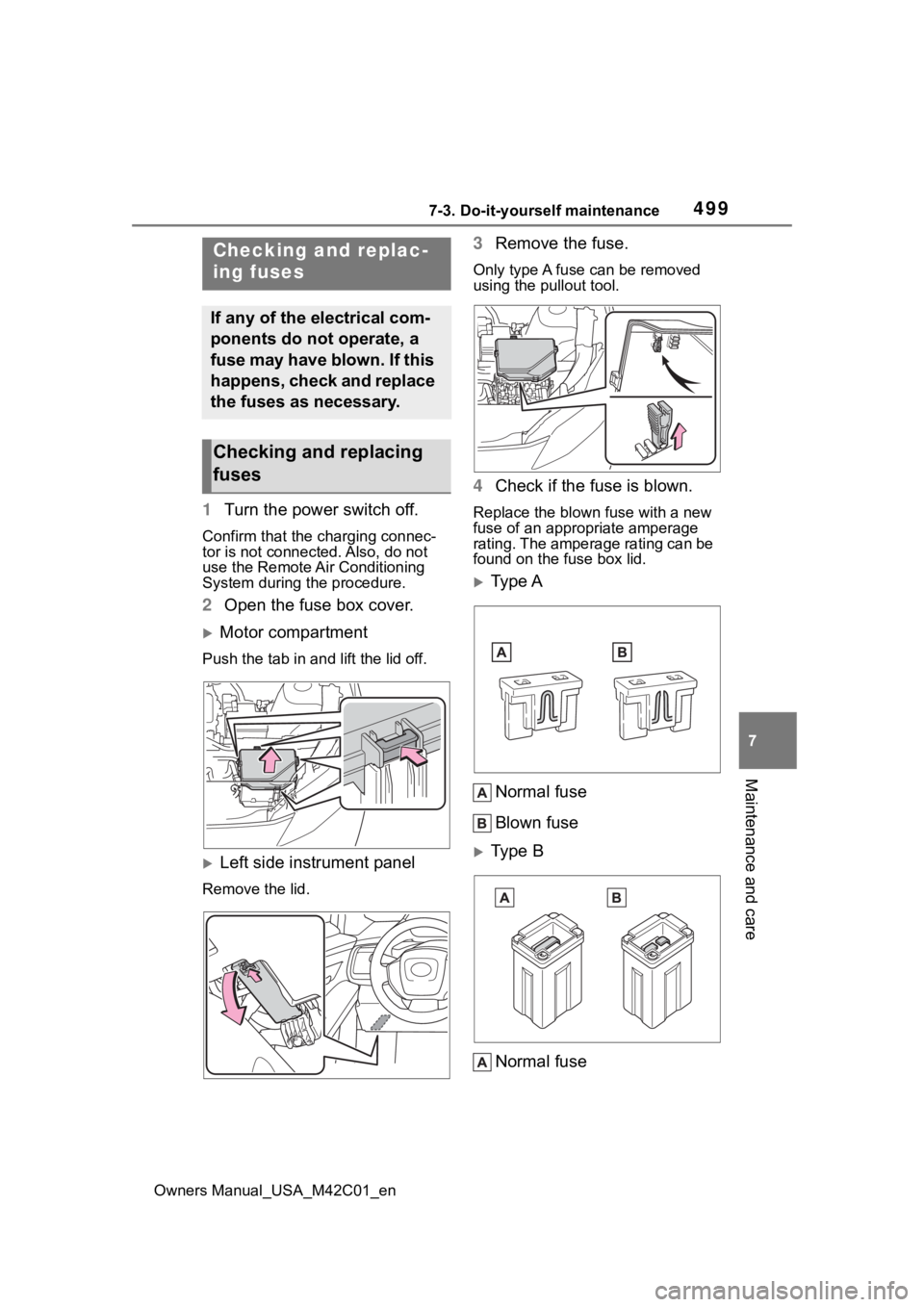
2 Open the fuse box cover.
Motor compartment
Push the tab in and lift the lid off.
Left side instrument panel
Remove the lid.
3Remove the fuse.
Only type A fuse can be removed
using the pullout tool.
4Check if the fuse is blown.
Replace the blown fuse with a new
fuse of an appropriate amperage
rating. The amperage rating can be
found on the fuse box lid.
Type A
Normal fuse
Blown fuse
Type B
Normal fuse
Checking and replac-
ing fuses
If any of the electrical com-
ponents do not operate, a
fuse may have blown. If this
happens, check and replace
the fuses as necessary.
Checking and replacing
fuses
Page 550 of 628
5509-1. Specifications
Owners Manual_USA_M42C01_en
9-1.Specifications
*: Unladen vehicle
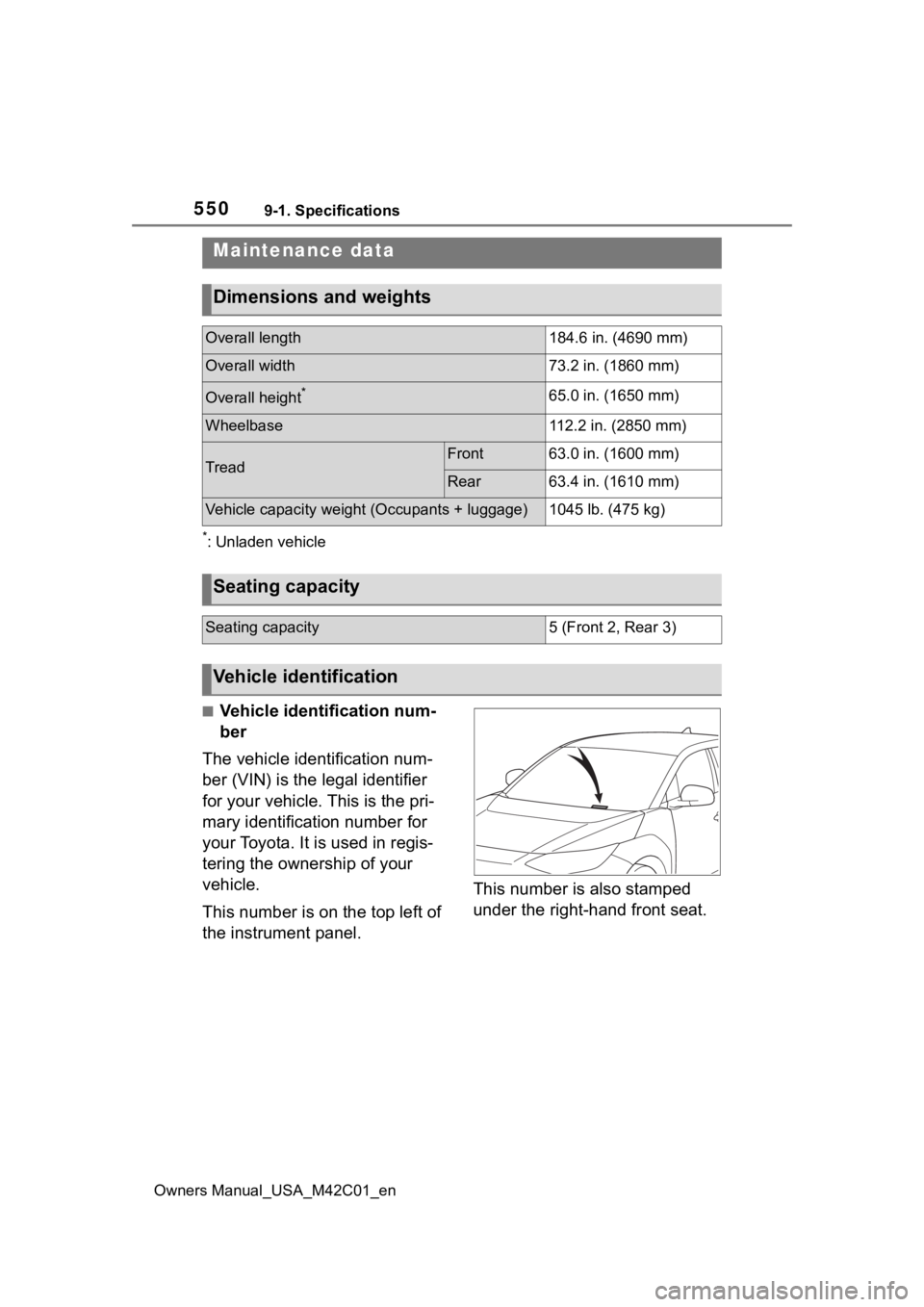
■Vehicle identification num-
ber
The vehicle identification num-
ber (VIN) is the legal identifier
for your vehicle. This is the pri-
mary identification number for
your Toyota. It is used in regis-
tering the ownership of your
vehicle.
This number is on the top left of
the instrument panel. This number is also stamped
under the right-hand front seat.
Maintenance data
Dimensions and weights
Overall length184.6 in. (4690 mm)
Overall width73.2 in. (1860 mm)
Overall height*65.0 in. (1650 mm)
Wheelbase112.2 in. (2850 mm)
TreadFront63.0 in. (1600 mm)
Rear63.4 in. (1610 mm)
Vehicle capacity weigh
t (Occupants + luggage)1045 lb. (475 kg)
Seating capacity
Seating capacity5 (Front 2, Rear 3)
Vehicle identification
Page 598 of 628
598Alphabetical Index
Owners Manual_USA_M42C01_en
Front seat concentrated airflow mode (S-FLOW) ................. 408
Remote Air Conditioning System ........................................... 409
“SYNC” mode ....................... 406
Automatic door locking and unlocking systems ............... 171
Automatic High Beam (AHB) . 250
Automatic light control system ............................................... 248
Auxiliary box lights ................ 415
Auxiliary boxes ....................... 420
Average power consumption 157
Average vehicle speed........... 158
B
Back door ................................ 172 Hands Free Power Back Door........................................... 177
Power back door .................. 175
Wireless remote control 164, 175
Back-up lights Replacing light bulbs ............ 502
Battery (12-volt battery) If the 12-volt battery is dis-charged .............................. 541
Preparing and c hecking before
winter.................................. 393
Replacing ............................. 544
Warning light ........................ 513
Battery (traction battery) ......... 72 Charging....................... 105, 113
Location.................................. 72
Specification ......................... 552
Traction battery cooler............ 99
Traction battery heater ........... 99
Warning messages............... 140
Battery Electric Vehicle driving tips ........................................... 81
Blind Spot Monitor (BSM) ...... 302 Enabling/disabling the system........................................... 303 Bottle holders .........................420
Brake
Brake Hold ............................246
Fluid......................................554
Parking brake .......................243
Regenerative braking .............73
Warning light.........................513
Brake assist ............................387 Brake Hold ............................246
Brake Override System ..........220
Break-in tips ............................220
Brightness control Instrument panel light control155
BSM (Blind Spot Monitor) ......302 Enabling/disabling the system...........................................303C
Camera Digital Rear-view Mirror ........206
Front camera ........................260
Toyota Teammate Advanced Park ....................................352
Card holders ...........................420
Care Aluminum wheels .................449
Brake calipers.......................449
Exterior .................................448
Interior ..................................451
Seat belts .............................451
Cargo and luggage .................225
Cargo capacity ................225, 228
Cargo hooks............................421
CCID (Charging Circuit Interrupt- ing Device) ..............................89Indicator..................................90
Operation................................90
Ceintures de sécurité Comment porter votre ceinture de sécurité ..........................581
Center console light ...............415
Chains......................................395
Page 604 of 628
604Alphabetical Index
Owners Manual_USA_M42C01_en
L
Lane Departure A lert (LDA) ... 281
Operation ............................. 281
Warning lights....................... 516
Lane Tracing Assist (LTA)...... 276 Operation ............................. 276
Warning lights....................... 516
Language (multi-information dis- play) ............................... 158, 567
LATCH anchors ........................ 59
LDA (Lane Departure Alert) ... 281 Operation ............................. 281
Warning lights....................... 516
Lever Auxiliary catch lever ............. 462
Hood lock release lever........ 462
Turn signal lever ................... 242
Wiper lever ........................... 253
License plate lights Light switch .......................... 248
Replacing light bulbs ............ 502
Light bulbs Replacing ............................. 502
Lights Automatic High Beam (AHB) 250
Emergency flasher switch .... 504
Headlight switch ................... 248
Interior light list ..................... 415
Interior lights......................... 416
Luggage compartment light 174, 178
Personal lights...................... 417
Replacing light bulbs ............ 502
Turn signal lever ................... 242
Vanity lights .......................... 428
Load capacity ......................... 228
Locking and unlocking the AC charging c onnector................ 93
LTA (Lane Tracing Assist) ...... 276 Operation ............................. 276
Warning lights....................... 516 Luggage compartment light 174,
178
Luggage cover ........................423
M
Maintenance AC charging cable ..................92
Do-it-yourself maintenance ..460
General maintenance ...........456
Maintenance data .................550
Maintenance requirements ...455
Menu icons ..............................156
Meter Clock ....................................152
Indicators ..............................149
Instrument panel light control155
Meter control switches..........156
Meters ..................................152
Multi-information display.......155
Settings ........................158, 566
Units .....................................567
Warning lights .......................513
Warning message.................522
Mirrors Digital Rear-view Mirror ........201
Inside rear view mirror ..........200
Outside rear view mirror defog-gers ....................................404
Outside rear view mirrors .....210
Vanity mirrors........................428
Motor Compartment........................465
Multi-information display .......155
Audio system-linked display .157
Charging101, 121, 129, 131, 140
Clock ....................................154
Convenience Services (Sugges- tion function) .......................567
Cruise control .......................297
Driving information display ...157
Driving support system informa- tion display .........................157