Bumper SUBARU SOLTERRA 2023 Owner's Manual
[x] Cancel search | Manufacturer: SUBARU, Model Year: 2023, Model line: SOLTERRA, Model: SUBARU SOLTERRA 2023Pages: 628, PDF Size: 11.91 MB
Page 328 of 628
3285-4. Using the driving support systems
Owners Manual_USA_M42C01_en
*: If equipped
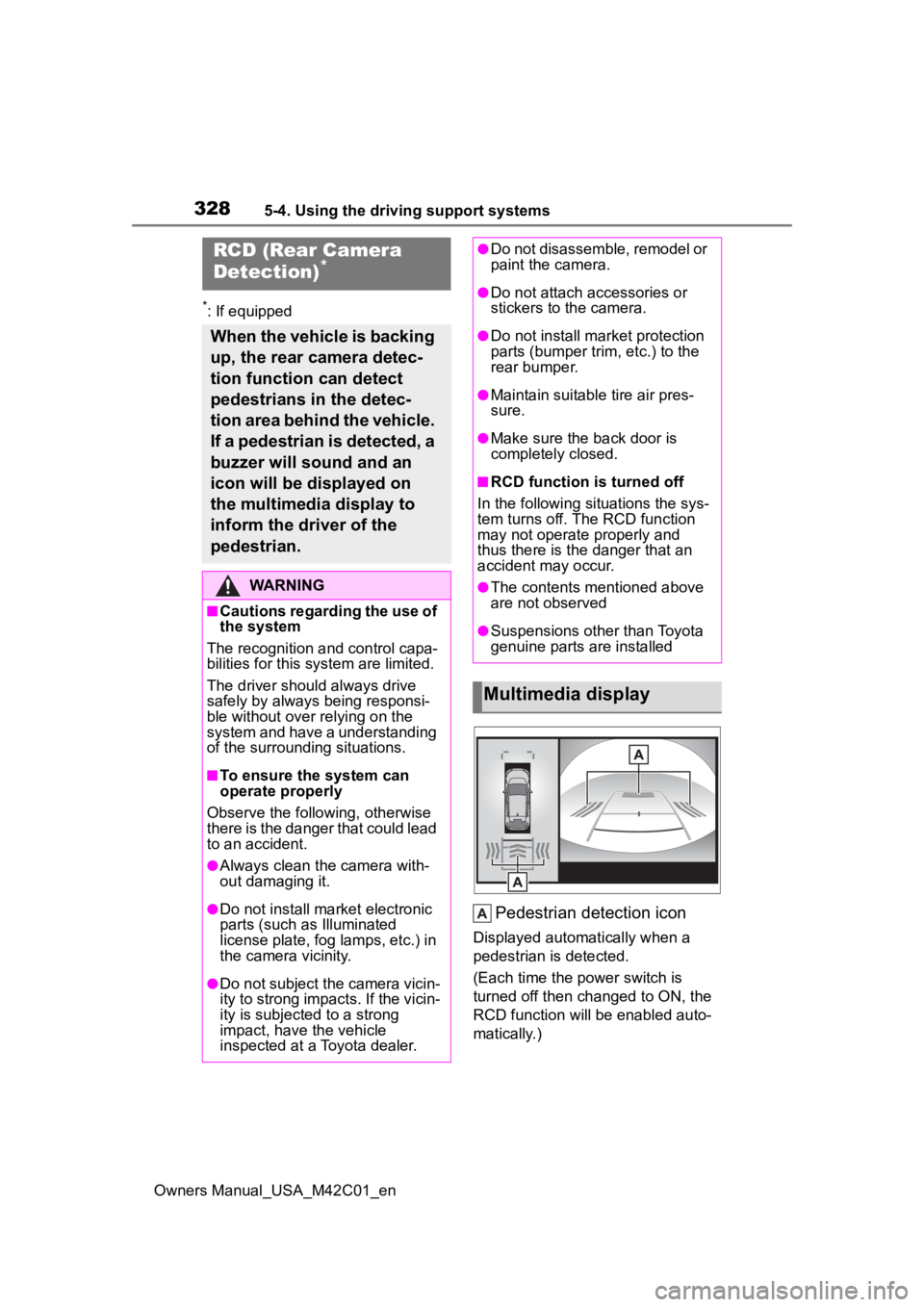
Pedestrian detection icon
Displayed automatically when a
pedestrian is detected.
(Each time the power switch is
turned off then changed to ON, the
RCD function will be enabled auto-
matically.)
RCD (Rear Camera
Detection)*
When the vehicle is backing
up, the rear camera detec-
tion function can detect
pedestrians in the detec-
tion area behind the vehicle.
If a pedestrian is detected, a
buzzer will sound and an
icon will be displayed on
the multimedia display to
inform the driver of the
pedestrian.
WARNING
■Cautions regarding the use of
the system
The recognition and control capa-
bilities for this system are limited.
The driver shoul d always drive
safely by always being responsi-
ble without over relying on the
system and have a understanding
of the surrounding situations.
■To ensure the system can
operate properly
Observe the follo wing, otherwise
there is the danger that could lead
to an accident.
●Always clean the camera with-
out damaging it.
●Do not install market electronic
parts (such as Illuminated
license plate, fog lamps, etc.) in
the camera vicinity.
●Do not subject the camera vicin-
ity to strong impacts. If the vicin-
ity is subjected to a strong
impact, have the vehicle
inspected at a Toyota dealer.
●Do not disassemble, remodel or
paint the camera.
●Do not attach accessories or
stickers to the camera.
●Do not install market protection
parts (bumper tr im, etc.) to the
rear bumper.
●Maintain suitable tire air pres-
sure.
●Make sure the back door is
completely closed.
■RCD function i s turned off
In the following situations the sys-
tem turns off. The RCD function
may not operate properly and
thus there is the danger that an
accident may occur.
●The contents mentioned above
are not observed
●Suspensions other than Toyota
genuine parts are installed
Multimedia display
Page 330 of 628
3305-4. Using the driving support systems
Owners Manual_USA_M42C01_enintuitive parking assist-sensor,
RCTA, and RCD all together.
Mute will be canceled automatically
in the followin
g situations:
●When the shift position is
changed.
●When the vehicle speed exceeds
a certain speed.
●When there is a malfunction in a
sensor or the system is temporar-
ily unavailable.
●When the operating function is
disabled manually.
●When the power switch is turned
off.
■Situations in which the system
may not operate properly
●Some pedestrians, such as the
following, may not be detected by
the rear camera detection func-
tion, preventing the function from
operating properly:
• Pedestrians who are bending for- ward or squatting
• Pedestrians who are lying down
• Pedestrians who are running
• Pedestrians who suddenly enter the detection area
• People riding a bicycle, skate- board, or other light vehicle
• Pedestrians wearing oversized clothing such as a rain coat, long
skirt, etc., making their silhouette
obscure
• Pedestrians whose body is par- tially hidden by an object, such as
a cart or umbrella
• Pedestrians which are obscured by darkness, such as at night
●In some situations, such as the
following, pedestrians may not be
detected by the rear camera
detection function, preventing the
function from operating properly:
• When backing up in inclement weather (rain, snow, fog, etc.)
• When the rear camera is
obscured (dirt, snow, ice, etc., are
attached) or scratched
• When a very bright light, such as the sun, or the headlights of
another vehicle, shines directly
into the rear camera
• When backing up in a place where the surrounding brightness
changes suddenly, such as at the
entrance or exi t of a garage or
underground parking lot
• When backing up in a dim envi-
ronment such as during dusk or in
an underground parking lot
• When the camera position and
direction are deviated
• When a towing hook is attached
• When water droplets are flowing on the camera lens
• When the vehicle height is extremely changed (nose up,
nose down).
• When tire chains or an emergency tire puncture repair kit is used
• When the rear washer is operating
• If the suspension has been modi- fied or tires of a size other than
specified are installed.
• If an electronic component, such as a backlit license plate or rear
fog light, is insta lled near the rear
camera
• If a bumper protector, such as an
additional trim strip, is installed to
the rear bumper
■Situations in which the system
may operate unexpectedly
●Even though there are no pedes-
trians in the detection area, some
objects, such as the following,
may be detected, possibly caus-
ing the rear cam era detection
function to operate.
• Three dimensional objects, such as a pole, traffic cone, fence, or
parked vehicle
• Moving objects, such as a car or motorcycle
• Objects moving to ward your vehi-
cle when backing up, such as
flags or puddles (or airborne mat-
ter, such as smoke, steam, rain, or
snow)
• Cobblestone or gravel roads, tram rails, road repai rs, white lines,
pedestrian crossings or fallen
Page 331 of 628
3315-4. Using the driving support systems
Owners Manual_USA_M42C01_en
5
Driving
leaves on the road
• Metal covers (gratings), such as those used for drainage ditches
• Objects reflected in a puddle or on a wet road surface
• Shadows on the road
●In some situations, such as the
following, the rear camera detec-
tion function may operate even
though there are no pedestrians in
the detection area.
• When backing up toward the road- side or a bump on the road
• When backing up toward an
incline/decline
• If the rear of the vehicle is raised or lowered due to the carried load
• If a bumper protector, such as an additional trim strip, is installed to
the rear bumper
• If the orientation of the rear cam- era has been changed
• If a towing eyelet is installed to the
rear of the vehicle
• When water is flowing over the rear camera lens
• When the rear camera is obscured (dirt, snow, ice, etc., are
attached) or scratched
• If there is a flashing light in the detection area, such as the emer-
gency flashers of another vehicle
• When a tire chains or an emer- gency tire puncture repair kit is
used
●Situations in which the rear cam-
era detection function may be diffi-
cult to notice
• The buzzer may be difficult to hear if the surrounding area is noisy,
the volume of the audio system
volume is high, the air condition-
ing system is being used, etc.
• If the temperature in the cabin is extremely high or low, the audio
system screen may not operate
correctly.
*: If equipped
■Static Objects Front and
Rear of the Vehicle (if
equipped)
P.336
■Moving Vehicles Rear of the
Vehicle (if equipped)
P.339
PKSB (Parking Sup-
port Brake)*
The Parking Support Brake
system consists of the fol-
lowing functions that oper-
ate when driving at a low
speed or backing up, such
as when parking. When the
system determines that the
probability of a collision
with a detected object or
pedestrian is high, a warn-
ing operates to urge the
driver to take evasive
action. If the system deter-
mines that the possibility of
a collision with a detected
object or pedestrian is
extremely high, the brakes
are automatically applied to
help avoid the collision or
help reduce the impact of
the collision.
PKSB (Parking Support
Brake) system
Page 332 of 628
3325-4. Using the driving support systems
Owners Manual_USA_M42C01_en
■Pedestrians Rear of the
Vehicle (if equipped)
P.342
■Static Objects Around the
Vehicle (vehicles with
Advanced Park)
P.340
WARNING
■Cautions regarding the use of
the system
Do not overly rely on the system,
as doing so may lead to an acci-
dent.
Always drive while checking the
safety of the surroundings of the
vehicle.
Depending on the vehicle and
road conditions, weather, etc., the
system may not operate.
The detection capa bilities of sen-
sors and radars are limited.
Always drive while checking the
safety of the surroundings of the
vehicle.
●The driver is solely responsible
for safe driving. Always drive
carefully, taking care to observe
your surroundings. The Parking
Support Brake system is
designed to provide support to
lessen the severity of collisions.
However, it may not operate in
some situations.
●The Parking Support Brake sys-
tem is not designed to stop the
vehicle completely. Additionally,
even if the system has stopped
the vehicle, it is necessary to
depress the brake pedal imme-
diately as brake control will be
canceled after approximately 2
seconds.
●It is extremely dangerous to
check the system operations by
intentionally driving the vehicle
into the direction of a wall, etc.
Never attempt such actions.
■When to disable the Parking
Support Brake
In the following situations, disable
the Parking Suppor t Brake as the
system may opera te even though
there is no possibility of a colli-
sion.
●When inspecting the vehicle
using a chassis roller, chassis
dynamo or free roller
●When loading the vehicle onto a
boat, truck or other transport
vessel
●If the suspension has been
modified or tires of a size other
than specified are installed
●If the front of the vehicle is
raised or lowered due to the
carried load
●When equipment that may
obstruct a sensor is installed,
such as a towing eyelet, bumper
protector (an additional trim
strip, etc.), bicycle carrier, or
snow plow
●When using automatic car
washing devices
●If the vehicle cannot be driven in
a stable manner, such as when
the vehicle has been in an acci-
dent or is malfunctioning
●When the vehicle is driven in a
sporty manner or off-road
●When the tires are not properly
inflated
●When the tires are very worn
Page 355 of 628
3555-4. Using the driving support systems
Owners Manual_USA_M42C01_en
5
Driving
allel parking function : Change the perpendicular
parking (forward/reverse) function
“MODE” button
Select to change between the
memory function and the perpen-
dicular parking (forward/reverse)
function and parallel parking func-
tion. ( P.368)
“Start” button
Select to start par king assistance.
Perpendicular parking direc-
tion change button
Select to change b etween the park-
ing (forward) function and parking
(reverse) function
: Change the perpendicular
parking (forward) function
: Change the perpendicular
parking (reverse) function
Customize setting button
Select to display the Advanced
Park setting screen. ( P.379)
Registration button
Select to begin registering a park-
ing space.
Remote control function start
button
Select to start parking assistance
operation on the smartphone dis-
play.
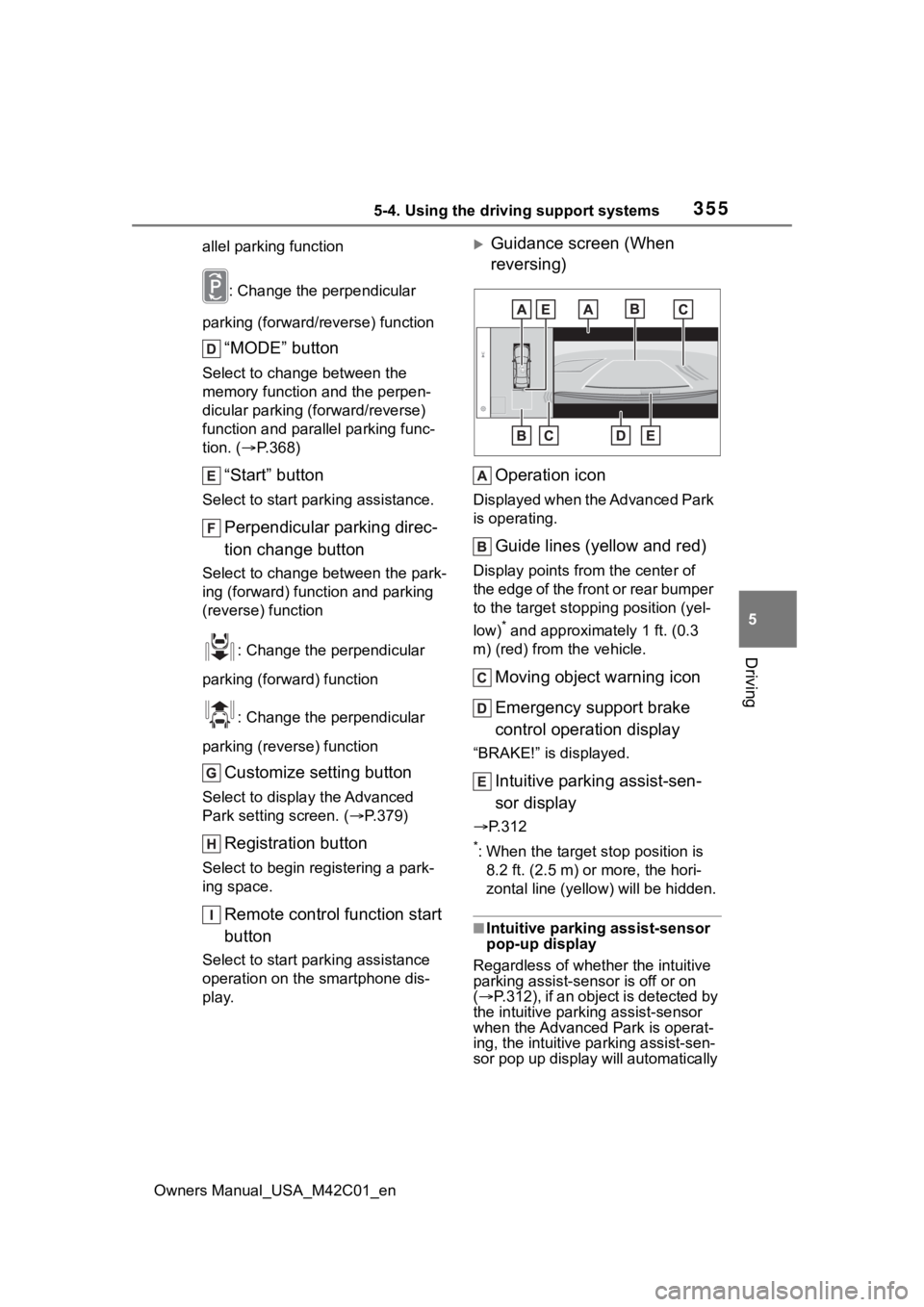
Guidance screen (When
reversing)
Operation icon
Displayed when the Advanced Park
is operating.
Guide lines (yellow and red)
Display points from the center of
the edge of the front or rear bumper
to the target stopp ing position (yel-
low)
* and approximately 1 ft. (0.3
m) (red) from the vehicle.
Moving object warning icon
Emergency support brake
control operation display
“BRAKE!” is displayed.
Intuitive parking assist-sen-
sor display
P.312
*: When the target stop position is
8.2 ft. (2.5 m) or more, the hori-
zontal line (yello w) will be hidden.
■Intuitive parking assist-sensor
pop-up display
Regardless of whethe r the intuitive
parking assist-sensor is off or on
( P.312), if an object is detected by
the intuitive park ing assist-sensor
when the Advanced Park is operat-
ing, the intuit ive parking assist-sen-
sor pop up display will automatically
Page 449 of 628
4497-1. Maintenance and care
Owners Manual_USA_M42C01_en
7
Maintenance and care
●If the electronic key is inside the
vehicle and a door handle
becomes wet during a car wash, a
buzzer may sound outside the
vehicle and “Key Detected In
Vehicle” may be shown on the
multi-information display. To turn
off the alarm, lock all the doors.
■Wheels and wheel ornaments
●Remove any dirt immediately by
using a neutral detergent.
●Wash detergent off with water
immediately after use.
●To protect the paint from damage,
make sure to obs erve the follow-
ing precautions.
• Do not use acidi c, alkaline or
abrasive detergent
• Do not use hard brushes
• Do not use det ergent on the
wheels when they are hot, such
as after driving or parking in hot
weather
■Painted brake calipers (if
equipped)
●When using detergent, use neu-
tral detergent. Do not use hard
brushes or abrasive cleaners, as
they will damage the paint.
●Do not use detergent on the brake
calipers when th ey are hot.
●Wash detergent off immediately
after use.
■Brake pads and calipers
Rust may form if the vehicle is
parked with wet brake pads or disc
rotors, causing them to stick. Before
parking the vehicle after it is
washed, drive slow ly and apply the
brakes several times to dry the
parts.
■Bumpers
Do not scrub with abrasive cleaners.
■Plated portions
If dirt cannot be removed, clean the
parts as follows:
●Use a soft cloth dampened with an approximately 5% solution of neu-
tral detergent and water to clean
the dirt off.
●Wipe the surface with a dry, soft
cloth to remove any remaining
moisture.
●To remove oily deposits, use alco-
hol wet wipes or a similar product.
WARNING
■When washing the vehicle
Do not apply water to the inside of
the motor compartment. Doing so
may cause the electrical compo-
nents, etc. to catch fire.
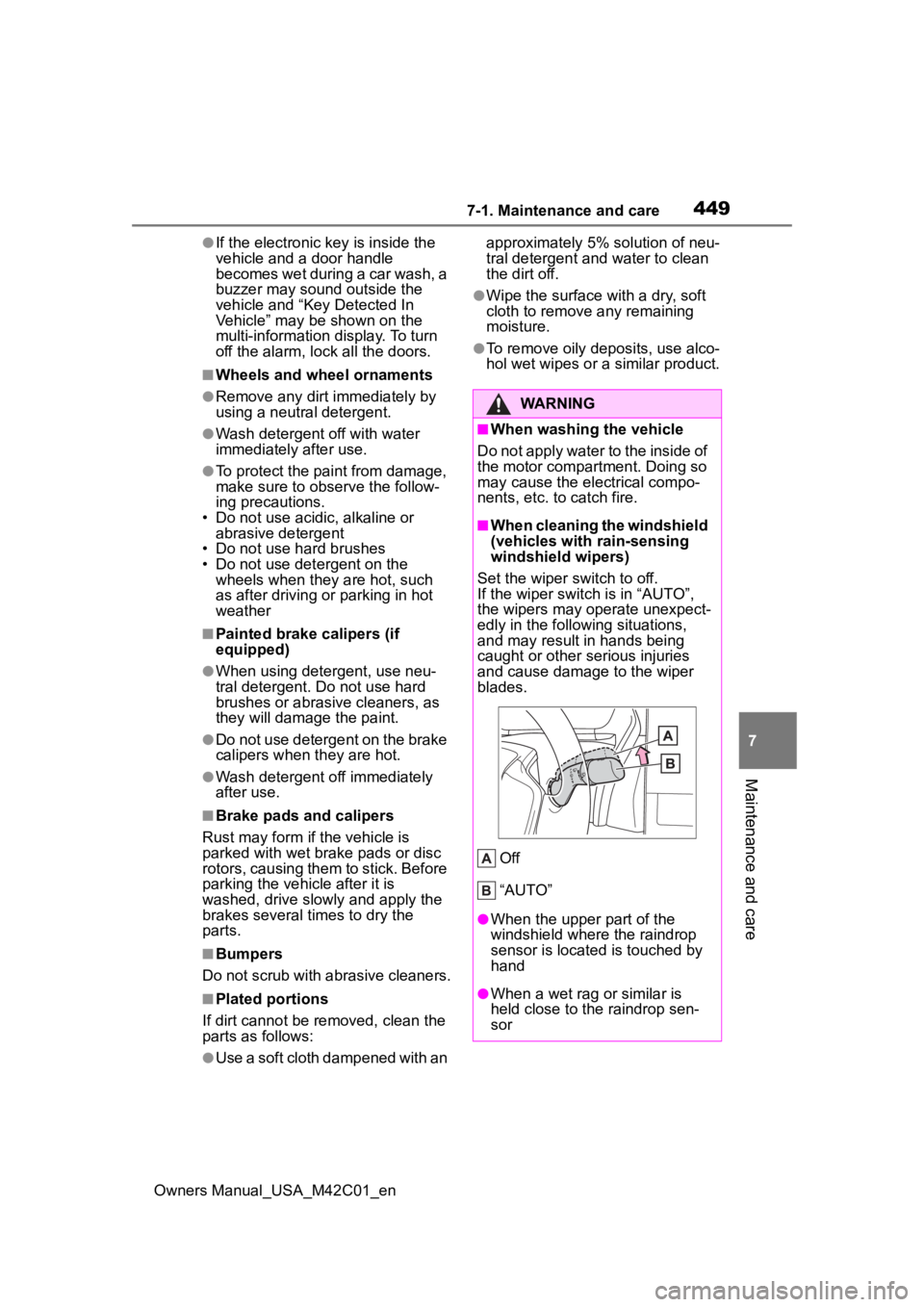
■When cleaning the windshield
(vehicles with rain-sensing
windshield wipers)
Set the wiper switch to off.
If the wiper switch is in “AUTO”,
the wipers may operate unexpect-
edly in the following situations,
and may result in hands being
caught or other serious injuries
and cause damage to the wiper
blades.
Off
“AUTO”
●When the upper part of the
windshield where the raindrop
sensor is located is touched by
hand
●When a wet rag or similar is
held close to the raindrop sen-
sor
Page 450 of 628
4507-1. Maintenance and care
Owners Manual_USA_M42C01_en
WARNING
●If something bumps against the
windshield
●If you directly touch the raindrop
sensor body or if something
bumps into the raindrop sensor
■Precaution regarding the rear
bumper
If the paint of the rear bumper is
chipped or scratched, the system
may malfunction. If this occurs,
consult your Toyota dealer.
●Toyota Safety Sense 3.0
●BSM (if equipped)
●RCTA (if equipped)
●PKSB (if equipped)
NOTICE
■To prevent paint deteriora-
tion and corrosion on the
body and components (alumi-
num wheels, etc.)
●Wash the vehicle immediately in
the following cases:
• After driving near the sea coast
• After driving on salted roads
• If coal tar or tre e sap is present
on the paint surface
• If dead insects, insect droppings or bird droppings are present on
the paint surface
• After driving in an area contami- nated with soot, oily smoke,
mine dust, iron powder or chem-
ical substances
• If the vehicle becomes heavily soiled with dust or mud
• If liquids such as benzene and gasoline are spilled on the paint
surface
●If the paint is chipped or
scratched, have it repaired
immediately.
●To prevent the wheels from cor-
roding, remove any dirt and
store in a place with low humid-
ity when storing the wheels.
■Cleaning the exterior lights
●Wash carefully. Do not use
organic substances or scrub
with a hard brush.
This may damage the surfaces
of the lights.
●Do not apply wax to the sur-
faces of the lights.
Wax may cause damage to the
lenses.
■When using an automatic car
wash (vehicles with rain-
sensing windshield wipers)
Set the wiper switch to off posi-
tion.
If the wiper switch is in “AUTO”,
the wipers may operate and the
wiper blades may be damaged.
■When using a high pressure
car wash
●When washing the vehicle, do
not spray the camera or its sur-
rounding area directly with a
high pressure washer. Shock
applied from high pressure
water may cause the device to
not operate normally.
●Do not spray water directly on
the radar which is equipped
behind the radar sensor cover.
Otherwise it may cause the
device to be damaged.
●Do not bring the nozzle tip close
to boots (rubber or resin manu-
factured cover), or connectors
or the following parts.
The parts may be damaged if
they come into contact with
high-pressure water.
Page 451 of 628
4517-1. Maintenance and care
Owners Manual_USA_M42C01_en
7
Maintenance and care
Remove dirt and dust using a
vacuum cleaner. Wipe dirty
surfaces with a cloth damp-
ened with lukewarm water.
If dirt cannot be removed,
wipe it off with a soft cloth
dampened with neutral deter-
gent diluted to approximately
1%.
Wring out any excess water
from the cloth and thoroughly
wipe off remaining traces of
detergent and water.
■Shampooing the carpets
There are several commercial foam-
ing-type cleaners available. Use a
sponge or brush to apply the foam.
Rub in overlapping circles. Do not
use water. Wipe dirty surfaces and
let them dry. Excellent results are
obtained by keeping the carpet as
dry as possible.
■Handling the seat belts
Clean with mild soap and lukewarm
water using a cloth or sponge. Also
check the belts periodically for
excessive wear, fraying or cuts.
■Front side window s with IR pro-
tective coating
The front side windows have IR pro-
tective coating. To prevent any dam-
NOTICE
• Traction related parts
• Steering parts
• Suspension parts
• Brake parts
●Keep the cleaning nozzle at
least 11.9 in. (30 cm) away from
the vehicle body. Otherwise
resin section, such as moldings
and bumpers, may be deformed
and damaged. Also, do not con-
tinuously hold the nozzle in the
same place.
●Do not spray the lower part of
the windshield continuously. If
water enters the air conditioning
system intake located near the
lower part of the windshield, the
air conditioning system may not
operate correctly.
●Do not wash the underside of
the vehicle usin g a high pres-
sure car washer. If water enters
the traction battery, the EV sys-
tem may malfunction.
●Do not use the washer on the
area around the charging port
lid. Water could get into the
charging inlet and could dam-
age the vehicle.
■Cleaning aluminum parts
When cleaning the hood, do not
push hard or put weight on it.
The aluminum part may be
dented.
Cleaning and protect-
ing the vehicle interior
Perform cleaning in a man-
ner appropriate to each
component and its material.
Protecting the vehicle
interior