lock SUBARU SOLTERRA 2023 Owner's Manual
[x] Cancel search | Manufacturer: SUBARU, Model Year: 2023, Model line: SOLTERRA, Model: SUBARU SOLTERRA 2023Pages: 628, PDF Size: 11.91 MB
Page 71 of 628
71
Owners Manual_USA_M42C01_en
2
2
Electric Vehicle system
Electric Vehicle system
2-1. Electric vehicle systemElectric Vehicle system fea-tures ............................. 72
Electric Vehicle system pre- cautions ........................ 76
Battery Electric Vehicle driv- ing tips .......................... 81
Driving range.................. 83
2-2. Charging Charging equipment....... 85
AC charging cable.......... 87
Locking and unlocking AC charging connector....... 93
Power sources that can be used ............................. 96
Charging methods.......... 98
Charging tips ............... 100
Things to know before charging .................... 102
How to use AC charging .................................. 105
How to use DC charging .................................. 113
Using the charging schedule function...................... 118
Using My Room Mode 129
When charging cannot be carried out ................. 133
Page 80 of 628
802-1. Electric vehicle system
Owners Manual_USA_M42C01_en
When a certain level of impact is
detected by the impact sensors,
the emergency shut off system turns off the EV system and
blocks the high voltage current.
If the emergency shut off system
activates, your vehicle will not
restart. To restart the EV sys-
tem, contact your Toyota dealer.
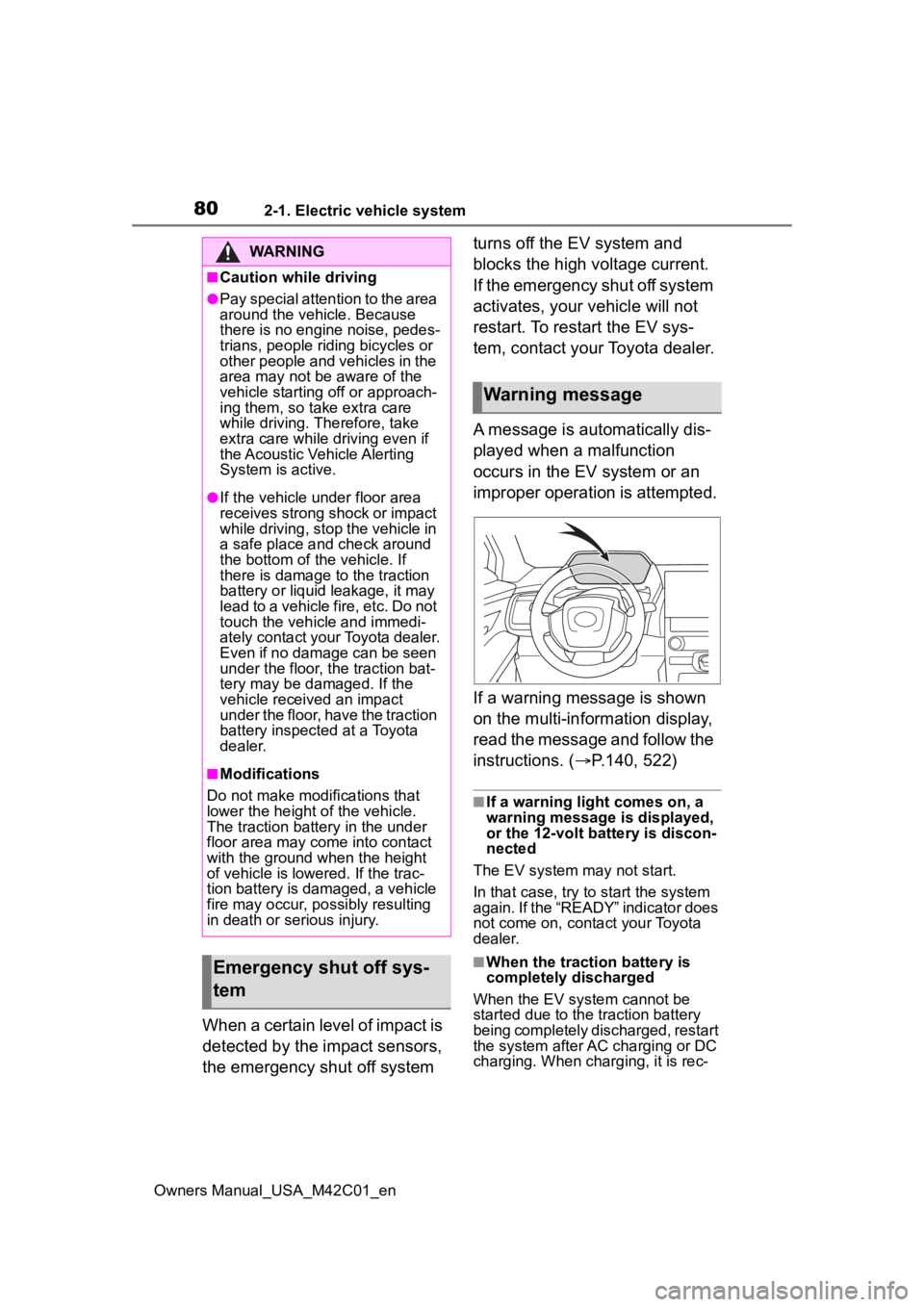
A message is automatically dis-
played when a malfunction
occurs in the EV system or an
improper operation is attempted.
If a warning message is shown
on the multi-information display,
read the message and follow the
instructions. (
P.140, 522)
■If a warning light comes on, a
warning message is displayed,
or the 12-volt battery is discon-
nected
The EV system may not start.
In that case, try to start the system
again. If the “READY” indicator does
not come on, contact your Toyota
dealer.
■When the traction battery is
completely discharged
When the EV system cannot be
started due to the traction battery
being completely discharged, restart
the system after AC charging or DC
charging. When charging, it is rec-
WARNING
■Caution while driving
●Pay special attention to the area
around the vehicle. Because
there is no engine noise, pedes-
trians, people riding bicycles or
other people and vehicles in the
area may not be aware of the
vehicle starting off or approach-
ing them, so take extra care
while driving. Therefore, take
extra care while driving even if
the Acoustic Vehicle Alerting
System is active.
●If the vehicle under floor area
receives strong shock or impact
while driving, stop the vehicle in
a safe place and check around
the bottom of the vehicle. If
there is damage to the traction
battery or liquid leakage, it may
lead to a vehicle fire, etc. Do not
touch the vehicle and immedi-
ately contact your Toyota dealer.
Even if no damage can be seen
under the floor, the traction bat-
tery may be damaged. If the
vehicle received an impact
under the floor, have the traction
battery inspected at a Toyota
dealer.
■Modifications
Do not make modifications that
lower the height of the vehicle.
The traction battery in the under
floor area may come into contact
with the ground when the height
of vehicle is lowered. If the trac-
tion battery is damaged, a vehicle
fire may occur, possibly resulting
in death or serious injury.
Emergency shut off sys-
tem
Warning message
Page 86 of 628
862-2. Charging
Owners Manual_USA_M42C01_en
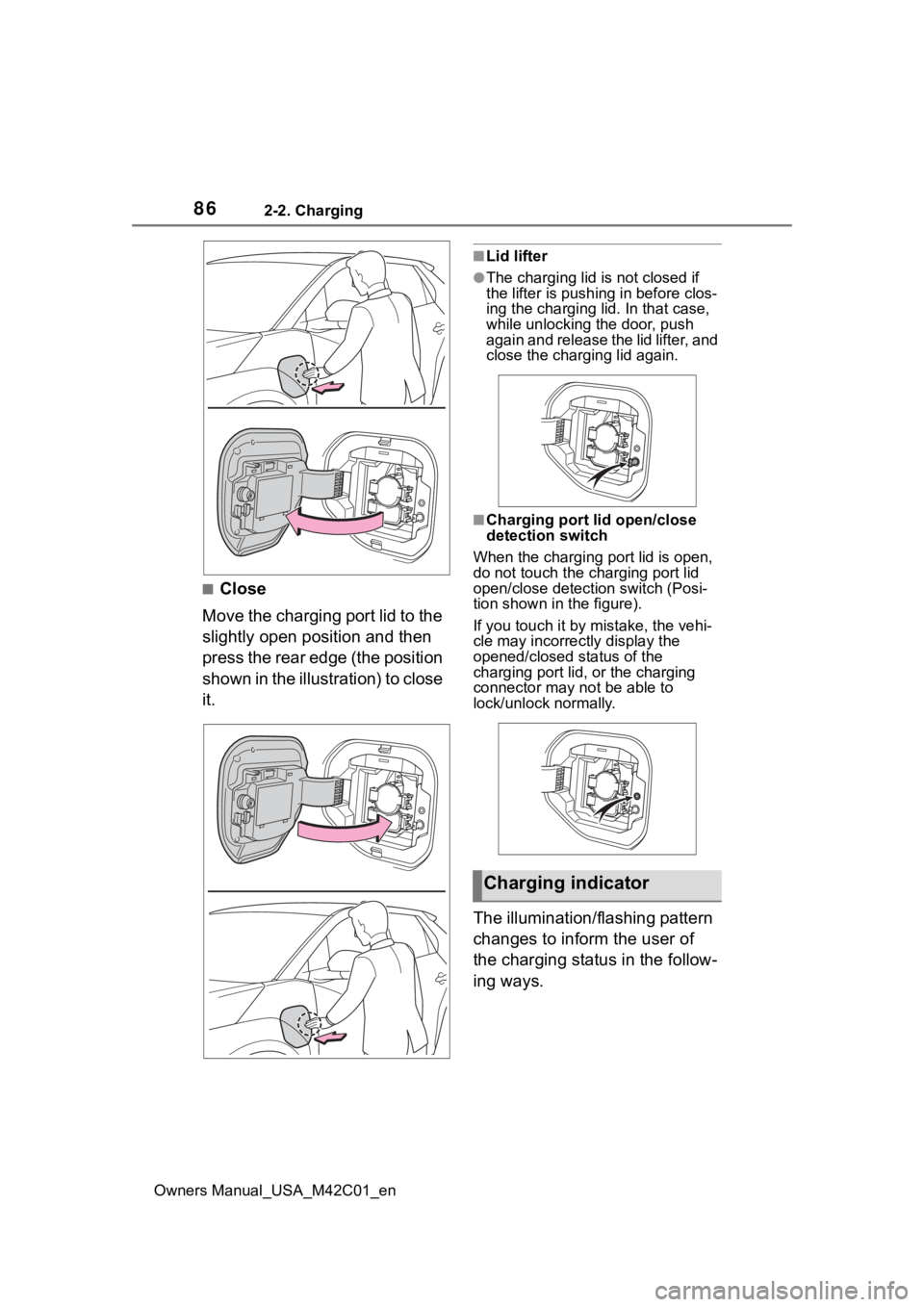
■Close
Move the charging port lid to the
slightly open position and then
press the rear edge (the position
shown in the illustration) to close
it.
■Lid lifter
●The charging lid is not closed if
the lifter is pushing in before clos-
ing the charging lid. In that case,
while unlocking the door, push
again and release the lid lifter, and
close the charging lid again.
■Charging port lid open/close
detection switch
When the charging port lid is open,
do not touch the charging port lid
open/close detection switch (Posi-
tion shown in the figure).
If you touch it by mistake, the vehi-
cle may incorrectly display the
opened/closed status of the
charging port lid, or the charging
connector may not be able to
lock/unlock normally.
The illumination/flashing pattern
changes to inform the user of
the charging status in the follow-
ing ways.
Charging indicator
Page 88 of 628
882-2. Charging
Owners Manual_USA_M42C01_en
WARNING
●Do not bring the AC charging
cable to a high-temperature
item such as a heating device.
●Do not apply a load to the AC
charging cable and plug-cord
(such as wrapping the AC
charging cable around the CCID
(Charging Circuit Interrupting
Device) and the charging con-
nector).
●Do not use or leave the AC
charging cable in situations
where a load is applied to the
outlet and the plug (such as
when the CCID (Charging Cir-
cuit Interrupting Device) is
hanging in the air without con-
tacting the ground).
NOTICE
■Precautions when handling
AC charging cable
Make sure to observe the follow-
ing precautions. Failure to
observe these precautions may
result in damage to the AC
charging cable and AC charging
inlet.
●Insert the charging connector
straight into the AC charging
inlet.
●After inserting the charging con-
nector, do not apply excessive
force to or twist the connector.
Also, do not lean on the connec-
tor or hang any objects from it.
●Do not step on or trip over the
AC charging cable.
●Before removing the charging
connector, make sure that it is
unlocked. ( P. 9 3 )
●After removing the AC charging
cable, promptly return it to its
proper location.
●After removing the charging
connector, securely install the
AC charging inlet cap.
■When using the AC charging
cable and related parts
P. 1 0 5
■Precautions for low tempera-
tures
In low temperatures, the AC
charging cable and plug-cord may
become hard. Therefore, make
sure to not apply excessive force
when they are hard. If excessive
force is applied to the hardened
AC charging cable and plug-cord,
they may be damaged.
Page 93 of 628
932-2. Charging
Owners Manual_USA_M42C01_en
2
Electric Vehicle system
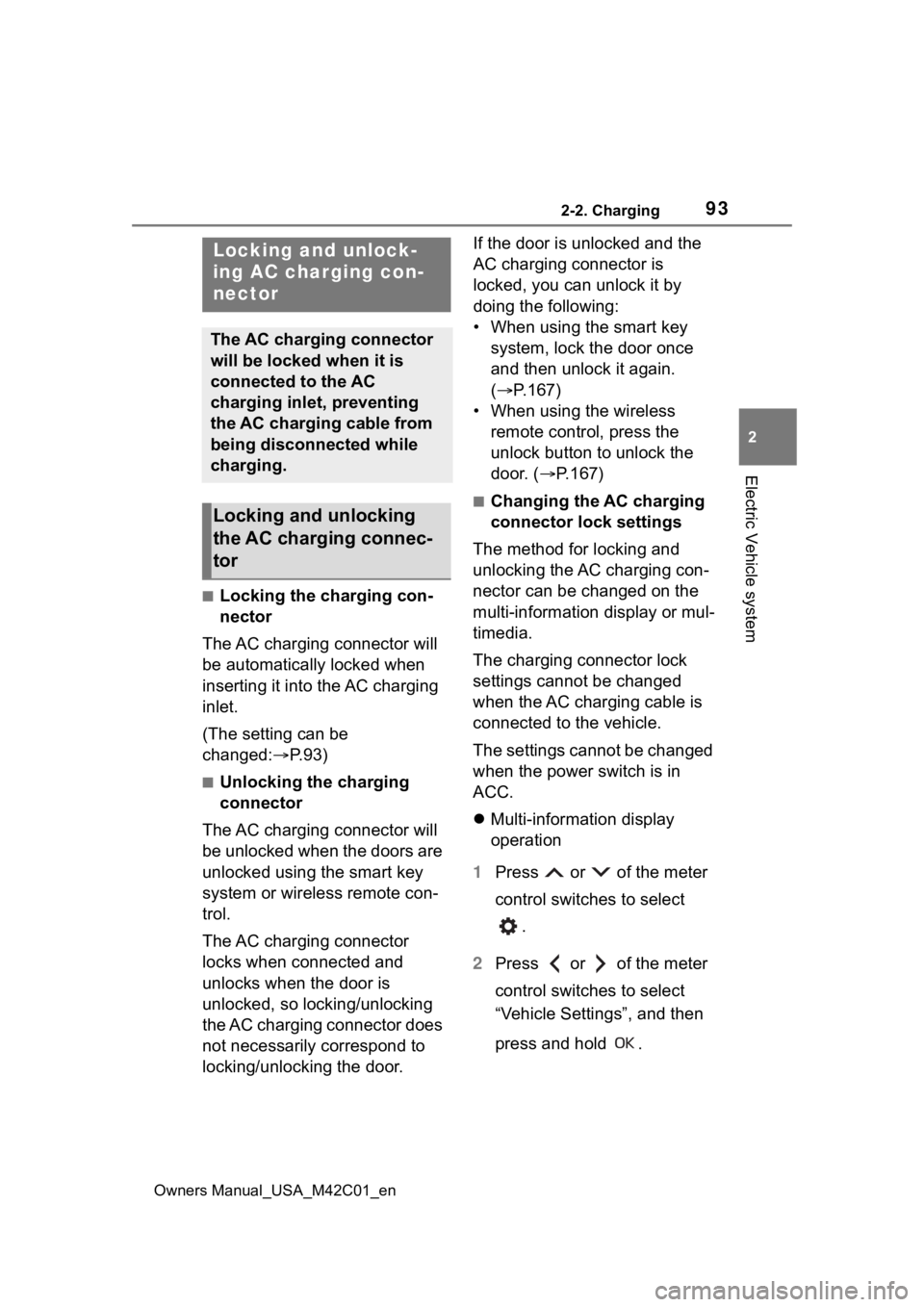
■Locking the charging con-
nector
The AC charging connector will
be automatically locked when
inserting it into the AC charging
inlet.
(The setting can be
changed: P.93)
■Unlocking the charging
connector
The AC charging connector will
be unlocked when the doors are
unlocked using the smart key
system or wireless remote con-
trol.
The AC charging connector
locks when connected and
unlocks when the door is
unlocked, so locking/unlocking
the AC charging connector does
not necessarily correspond to
locking/unlocking the door. If the door is unlocked and the
AC charging connector is
locked, you can unlock it by
doing the following:
• When using the smart key
system, lock the door once
and then unlock it again.
( P.167)
• When using the wireless remote control, press the
unlock button to unlock the
door. ( P.167)
■Changing the AC charging
connector lock settings
The method for locking and
unlocking the AC charging con-
nector can be changed on the
multi-information display or mul-
timedia.
The charging connector lock
settings cannot be changed
when the AC charging cable is
connected to the vehicle.
The settings cannot be changed
when the power switch is in
ACC.
Multi-information display
operation
1 Press or of the meter
control switches to select
.
2 Press or of the meter
control switches to select
“Vehicle Settings”, and then
press and hold .
Locking and unlock-
ing AC charging con-
nector
The AC charging connector
will be locked when it is
connected to the AC
charging inlet, preventing
the AC charging cable from
being disconnected while
charging.
Locking and unlocking
the AC charging connec-
tor
Page 94 of 628
942-2. Charging
Owners Manual_USA_M42C01_en
3Press or of the meter
control switches to select
“Charging Settings”, and then
press .
The “Charging Settings” screen will
be displayed.
4Press or of the meter
control switches to select
“Connector Lock”, and then
press .
The “Connector L ock” screen will
be displayed.
Multimedia operation
1 Select on the main menu.
2 Select “Vehicle customize”.
3 Select “Charging”.
4 Select “Connector lock”.
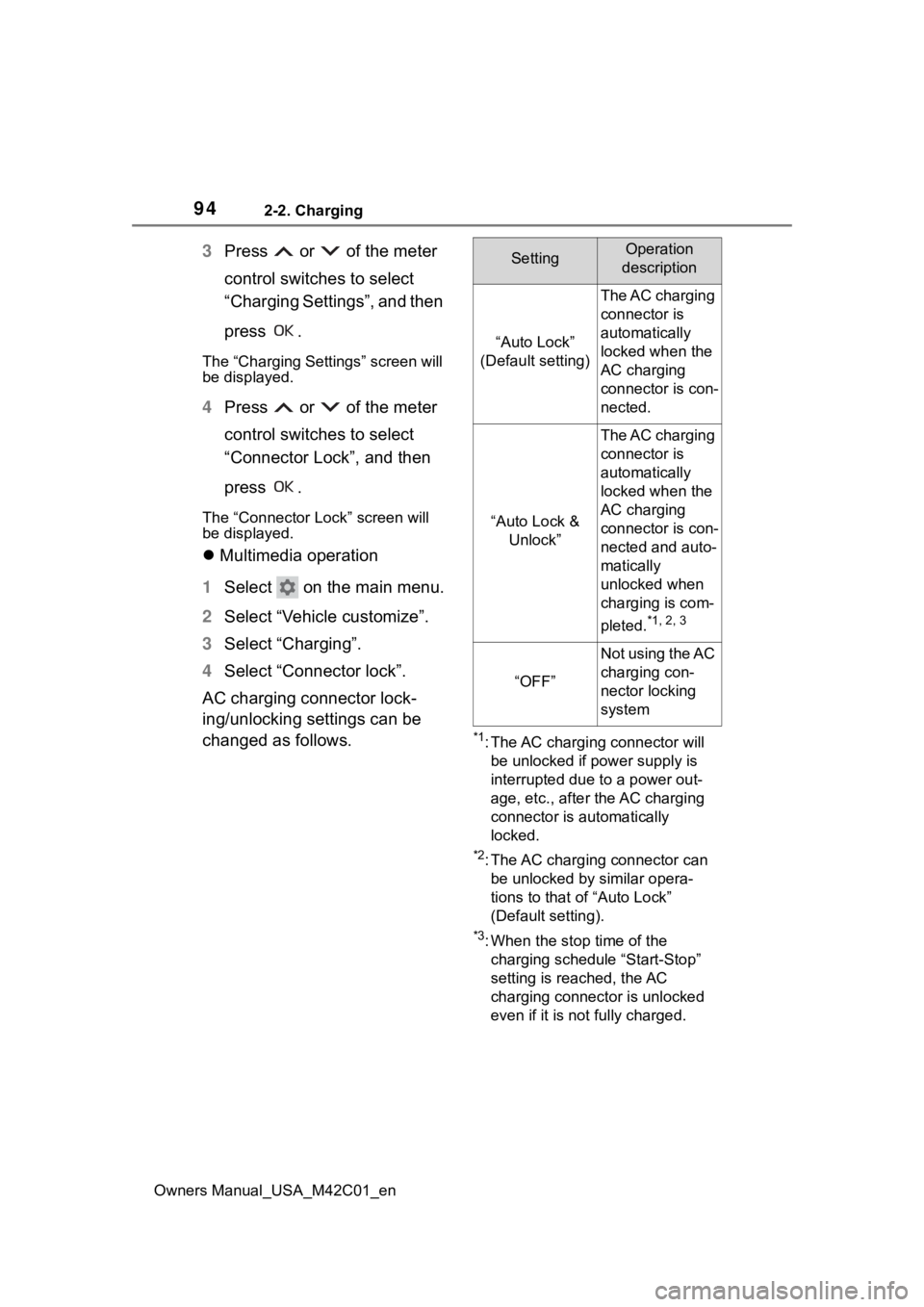
AC charging connector lock-
ing/unlocking settings can be
changed as follows.
*1: The AC charging connector will be unlocked if power supply is
interrupted due to a power out-
age, etc., after the AC charging
connector is automatically
locked.
*2: The AC charging connector can be unlocked by similar opera-
tions to that of “Auto Lock”
(Default setting).
*3: When the stop time of the charging schedule “Start-Stop”
setting is reached, the AC
charging connector is unlocked
even if it is not fully charged.
SettingOperation
description
“Auto Lock”
(Default setting)
The AC charging
connector is
automatically
locked when the
AC charging
connector is con-
nected.
“Auto Lock & Unlock”
The AC charging
connector is
automatically
locked when the
AC charging
connector is con-
nected and auto-
matically
unlocked when
charging is com-
pleted.
*1, 2, 3
“OFF”
Not using the AC
charging con-
nector locking
system
Page 95 of 628
952-2. Charging
Owners Manual_USA_M42C01_en
2
Electric Vehicle system
■AC charging connector lock
function
If the AC charging connector is
locked/unlocked repeatedly, it may
not work temporarily due to protect
the system by AC charging system.
In this case, wait for a while before
connecting the AC charging connec-
tor to AC charging inlet again.
The AC charging connector lock
function does not guarantee that
theft of the AC charging cable will be
prevented, and is not necessarily
effective for all mischiefs.
■Security function for unlocking
If the AC charging connector is not
removed within approximately 30
seconds after the vehicle is
unlocked, the secur ity function auto-
matically locks the connector again.
■When the AC charging connec-
tor cannot be inserted into the
AC charging inlet
If the connector lock pin is
extended, the connector lock is
operating.
Unlock the doors using the smart
key system or wireless remote con-
trol and unlock the AC charging con-
nector lock and check that the
connector lock pin is not extended.
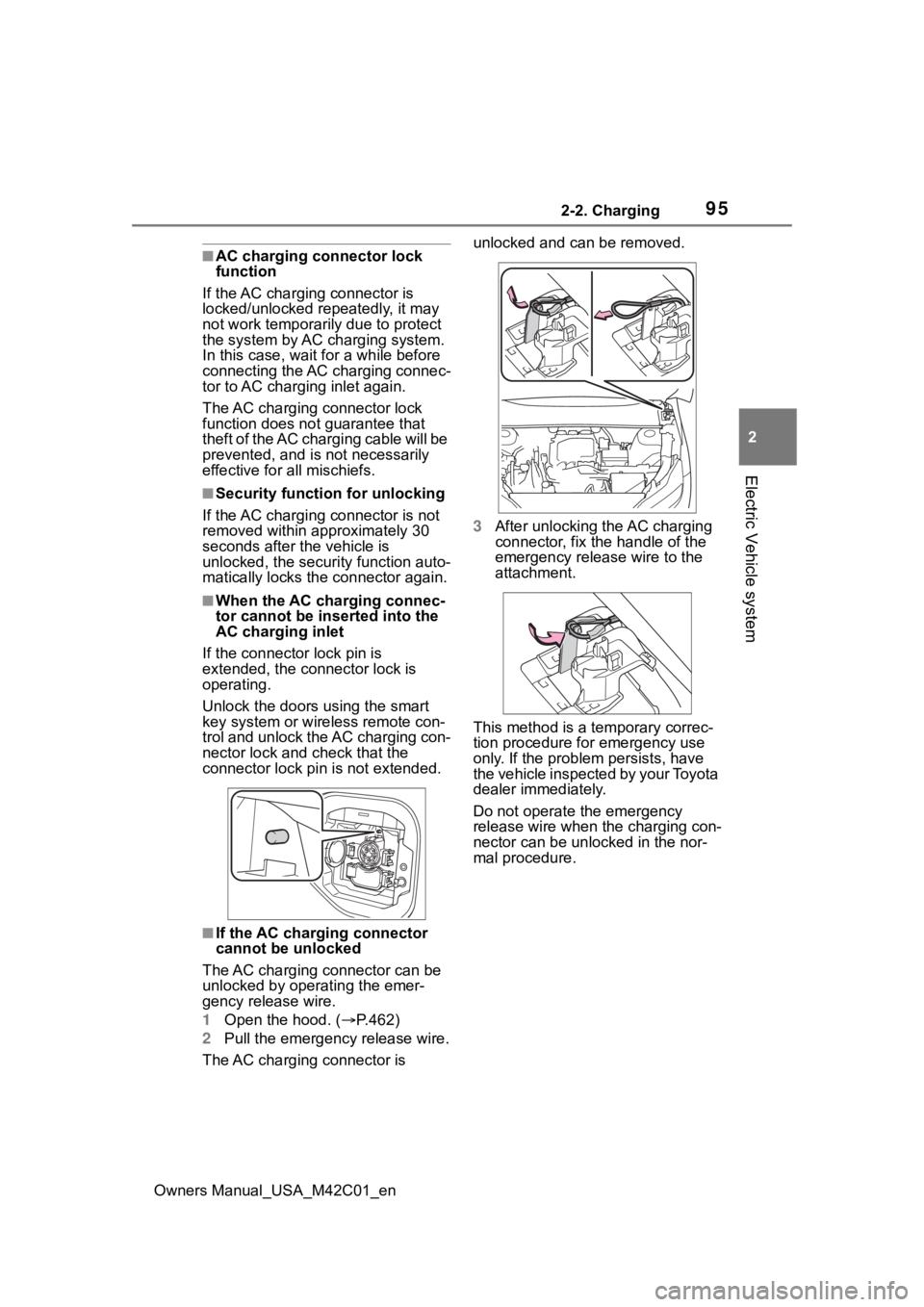
■If the AC charging connector
cannot be unlocked
The AC charging connector can be
unlocked by operating the emer-
gency release wire.
1 Open the hood. ( P.462)
2 Pull the emergency release wire.
The AC charging connector is unlocked and can be removed.
3
After unlocking the AC charging
connector, fix the handle of the
emergency release wire to the
attachment.
This method is a temporary correc-
tion procedure for emergency use
only. If the problem persists, have
the vehicle inspected by your Toyota
dealer immediately.
Do not operate the emergency
release wire when the charging con-
nector can be unlocked in the nor-
mal procedure.
Page 96 of 628
962-2. Charging
Owners Manual_USA_M42C01_en
Connect to an AC 120 V out-
let (NEMA 5-15R) with a
Ground-Fault Circuit-Inter-
rupter (GFCI) and a circuit
breaker. Use of a 15A individ-
ual circuit is strongly recom-
mended to ensure AC
charging cable will operate
properly.
When charging outdoors,
make sure to connect to a
weatherproof outlet that is
certified for outdoor use.
Checking Ground-Fault Cir-
cuit-Interrupter (GFCI) opera-
tion before its use is
recommended.
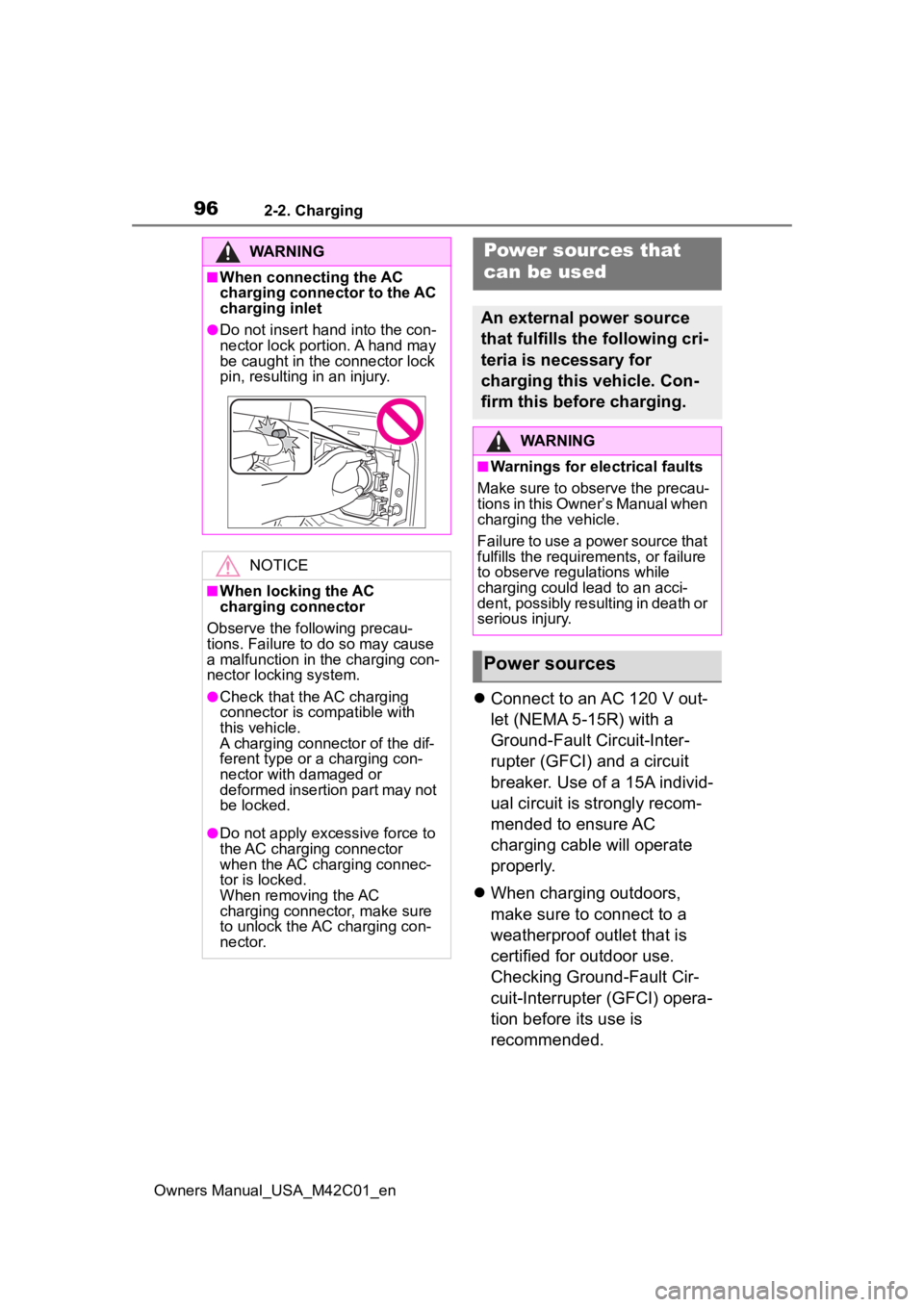
WARNING
■When connecting the AC
charging connector to the AC
charging inlet
●Do not insert hand into the con-
nector lock portion. A hand may
be caught in the connector lock
pin, resulting in an injury.
NOTICE
■When locking the AC
charging connector
Observe the following precau-
tions. Failure to do so may cause
a malfunction in the charging con-
nector locking system.
●Check that the AC charging
connector is compatible with
this vehicle.
A charging connector of the dif-
ferent type or a charging con-
nector with damaged or
deformed insertion part may not
be locked.
●Do not apply excessive force to
the AC charging connector
when the AC charging connec-
tor is locked.
When removing the AC
charging connector, make sure
to unlock the AC charging con-
nector.
Power sources that
can be used
An external power source
that fulfills the following cri-
teria is necessary for
charging this vehicle. Con-
firm this before charging.
WARNING
■Warnings for electrical faults
Make sure to observe the precau-
tions in this Owner’s Manual when
charging the vehicle.
Failure to use a power source that
fulfills the requirements, or failure
to observe regulations while
charging could lead to an acci-
dent, possibly resulting in death or
serious injury.
Power sources
Page 98 of 628
982-2. Charging
Owners Manual_USA_M42C01_en
■AC charging (P.105)
This is a charging method used
when charging from an AC out-
let with the AC charging cable or
charging that uses AC charger.
By setting charging schedule, it is
also possible to charge at the
desired date and time. ( P. 1 1 8 )
■DC charging ( P.113)
This is a charging method that
uses a DC charger that com-
plies with SAE J 1772. The trac-
tion battery can be charged in a
shorter time than AC charging.
SAE is an abbreviation for an
industrial standard issued by the
Society of Automotive Engi-
neers.
This vehicle is equipped with
several functions that are linked
with charging.
■My Room Mode ( P.129)
When the charging cable is con-
nected to the vehicle, electrical
components such as the air con-
ditioning system and audio sys-
WARNING
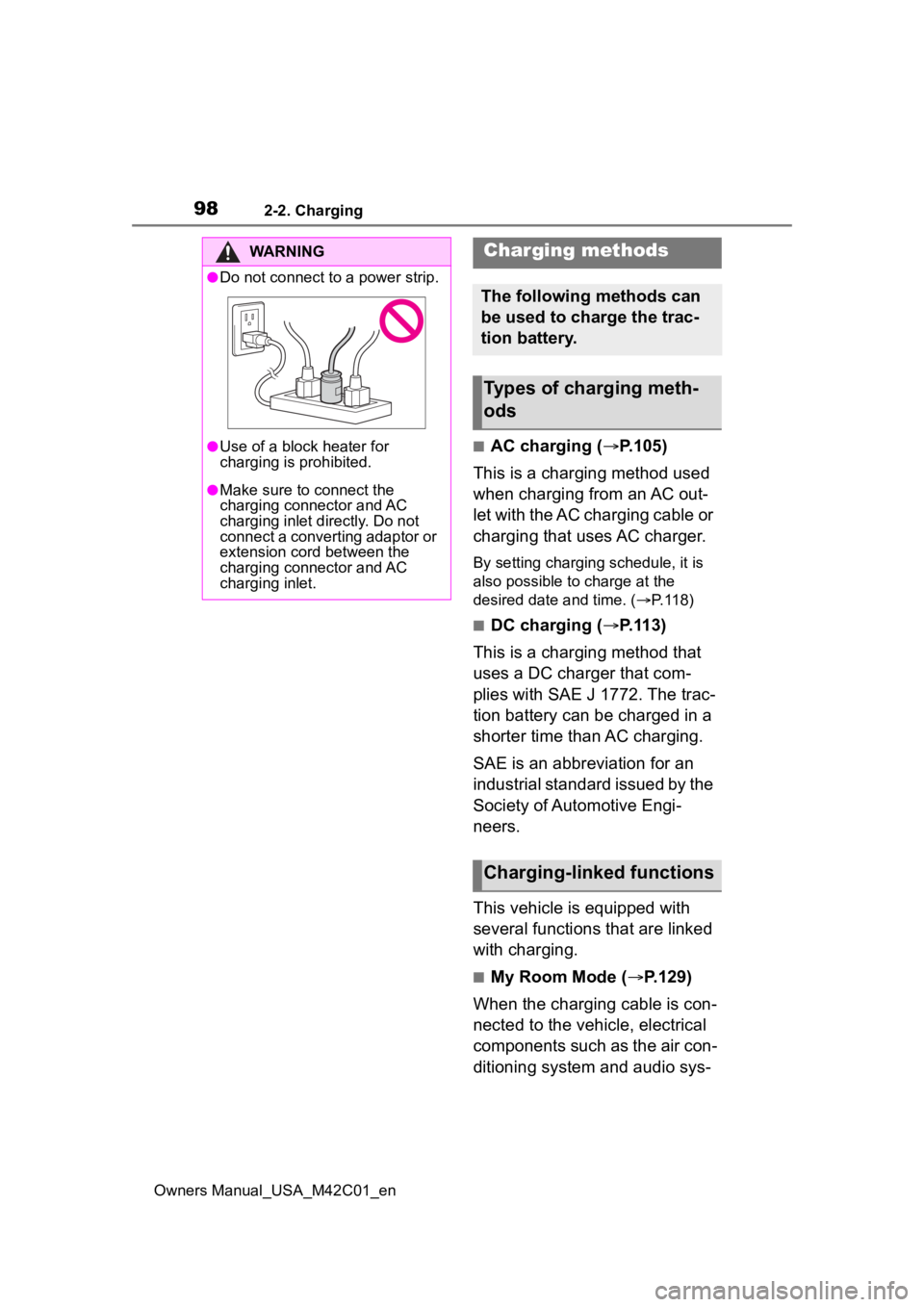
●Do not connect to a power strip.
●Use of a block heater for
charging is prohibited.
●Make sure to connect the
charging connector and AC
charging inlet directly. Do not
connect a converting adaptor or
extension cord between the
charging connector and AC
charging inlet.
Charging methods
The following methods can
be used to charge the trac-
tion battery.
Types of charging meth-
ods
Charging-linked functions
Page 105 of 628
1052-2. Charging
Owners Manual_USA_M42C01_en
2
Electric Vehicle system
■Charging electricity
This vehicle can be charged up to
approximately 7 kW.
However, depending on the used
charger or AC charging cable,
charging electrici ty may be limited.How to use AC
charging
This section explains the
procedure for charging the
traction battery with an AC
charging cable.
When using an AC charger,
make sure to check the
operation instructions of
the AC charger.
When the charging sched-
ule is registered, make sure
“Charge Now” is turned on
before charging. ( P.124,
128)
NOTICE
■When using the AC charging
cable and related parts
To prevent damage to the AC
charging cable and related parts,
observe the following precautions.
●When interrupting or canceling
charging, remove the charging
connector before removing the
plug.
●When removing the AC
charging cable, check that the
charging connector is unlocked.
●Do not forcefully pull the
charging connector cap and AC
charging inlet cap.
●Do not apply a vibration to the
charging connector while
charging. Charging may be
stopped.
●Do not insert anything but the
charging connector into the AC
charging inlet.