warning lights SUBARU SOLTERRA 2023 Owner's Manual
[x] Cancel search | Manufacturer: SUBARU, Model Year: 2023, Model line: SOLTERRA, Model: SUBARU SOLTERRA 2023Pages: 628, PDF Size: 11.91 MB
Page 313 of 628
3135-4. Using the driving support systems
Owners Manual_USA_M42C01_en
5
Driving
■The system can be operated
when
●The power switch is in ON.
●Intuitive parking assist function is
on.
●The vehicle speed is less than
about 6 mph (10 km/h).
●A shift position other than P is
selected.
■Sensor detection information
●The sensor’s detection areas are
limited to the areas around the
vehicle’s front and rear bumpers.
●The following situations may occur
during use.
• Depending on the shape of the object and other factors, the
detection distance may shorten, or
detection may be impossible.
• Detection may be impossible if static objects draw too close to the
sensor.
• There will be a short delay between static object detection
and display (warning buzzer
sounds). Even at low speeds,
there is a possibility that the object
will come within 11.9 in. (30 cm)
before the display is shown and
the warning buzzer sounds.
• It might be diffic ult to hear the
buzzer due to the volume of the
audio system or air flow noise of
the air conditioning system.
• It may be diffi cult to hear the
sound of this sys tem due to the
buzzers of other systems.
WARNING
●Do not damage the sensors,
and always keep them clean.
●Do not attach a sticker or install
an electronic component, such
as a backlit license plate (espe-
cially fluorescent type), fog
lights, fender pole or wireless
antenna near a radar sensor.
●Do not subject the surrounding
area of the sensor to a strong
impact. If subjected to an
impact, have the vehicle
inspected by your Toyota
dealer. If the fr ont or rear
bumper needs to be
removed/installed or replaced,
contact your Toyota dealer.
●Do not modify, disassemble or
paint the sensors.
●Do not attach a license plate
cover.
●Keep your tires properly
inflated.
■When to disable the function
In the following situations, disable
the function as it may operate
even though there is no possibility
of a collision.
●Failing to observe the warnings
above.
●A non-genuine Toyota suspen-
sion (lowered suspension, etc.)
is installed.
■Notes when washing the vehi-
cle
Do not apply intensive bursts of
water or steam to the sensor
area.
Doing so may result in the sensor
malfunctioning.
●When using a high pressure
washer to wash the vehicle, do
not spray the sensors directly,
as doing so may cause a sensor
to malfunction.
●When using steam to clean the
vehicle, do not direct steam too
close to the sensors as doing so
may cause a sensor to malfunc-
tion.
Page 350 of 628
3505-4. Using the driving support systems
Owners Manual_USA_M42C01_en
WARNING
●Only use Remote control func-
tion on level road surfaces
which are not slick. Do not use
Remote control function for
parking spaces on a downward
or upward incline.
●While Remote control function
is operating, if a malfunction or
system limitation is detected,
the following will occur automat-
ically:
• Remote control function will be canceled
• The vehicle will stop
• The shift position will change to P and the parking brake will be
engaged
• The power switch will turn off
(for some malfunctions, the
power switch will not turn off or
cannot be turned off. Enter the
vehicle and take corrective
action accordin g to the mes-
sage displayed on the smart-
phone.)
• The doors will remain locked
●When starting Remote control
function, unlock the doors with
wireless remote control by elec-
tronic key.
●When Remote control function
is operating, the driver should
remain within approximately 9.8
ft. (3 m) of the vehicle. If the
driver becomes more than
approximately 9.8 ft. (3 m)
away, Remote control function
will be suspend ed and a mes-
sage will be displayed on the
smartphone. Re mote control
function operation can be
resumed by approaching the
vehicle.
●The headlights will be turned on
if the surrounding area is dark.
●If system operation is canceled
due to a malfunction, the emer-
gency flashers will flash.
The emergency flashers will
turn off if any of the following
conditions are met:
• A door is opened
• 3 minutes have elapsed since the emergency flashers began
flashing
●Remote control function can
only be started when the follow-
ing conditions are met:
• When the EV system is starting, after assist mode is selected
• When the power switch is off
• When the remote air condition- ing is operating
●After unlocking the doors using
the wireless remote control, if
the doors are lo cked using the
smart entry function, the lock
operation may be delayed.
NOTICE
■Precautions for use
Advanced Park
If the 12-volt battery was dis-
charged or has been removed
and installed, fold and extend the
outside rear view mirrors.
■When using Remote control
function
Page 383 of 628
3835-4. Using the driving support systems
Owners Manual_USA_M42C01_en
5
Driving
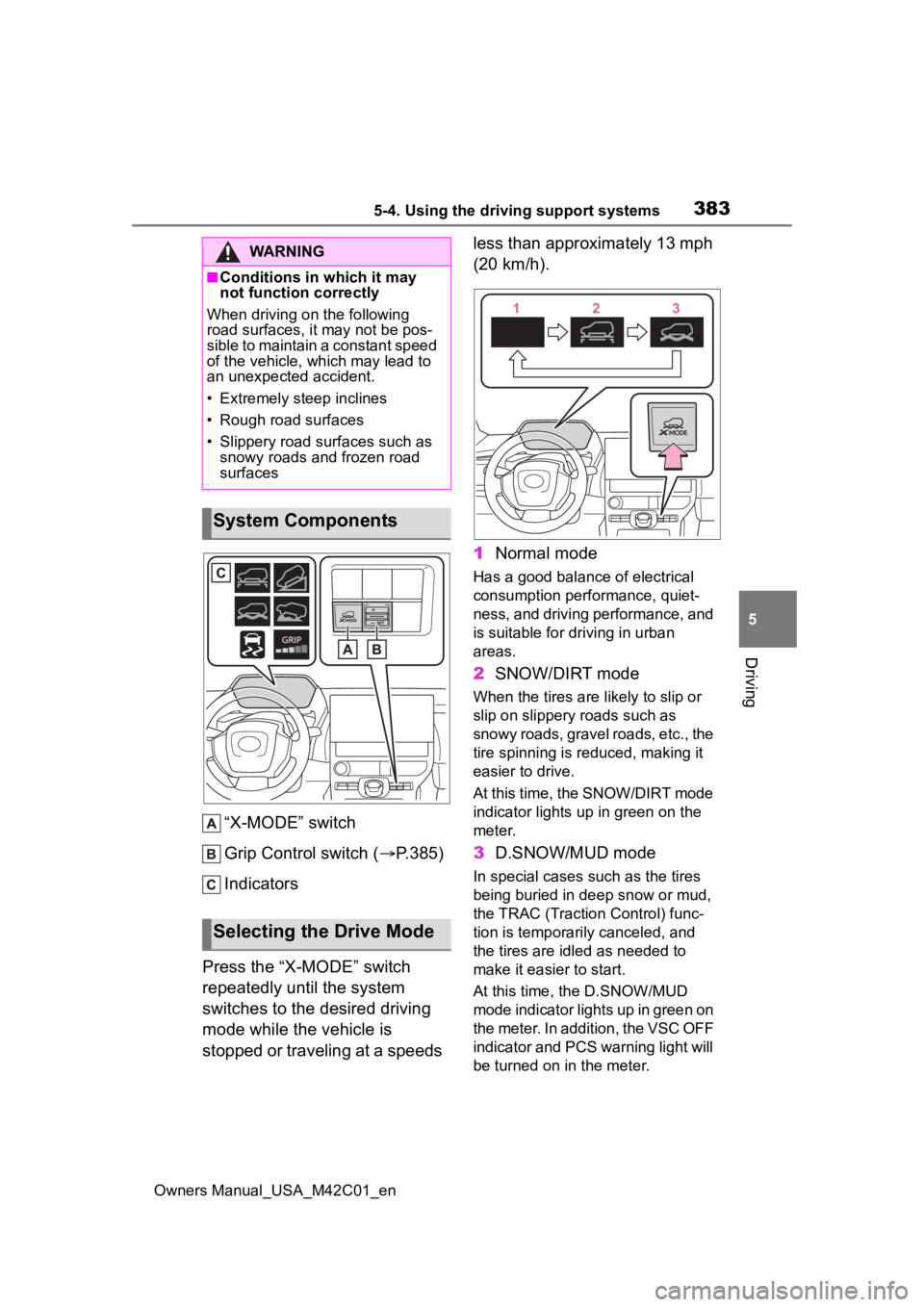
“X-MODE” switch
Grip Control switch ( P.385)
Indicators
Press the “X-MODE” switch
repeatedly until the system
switches to the desired driving
mode while the vehicle is
stopped or traveling at a speeds less than approximately 13 mph
(20 km/h).
1
Normal mode
Has a good balance of electrical
consumption performance, quiet-
ness, and driving performance, and
is suitable for driving in urban
areas.
2SNOW/DIRT mode
When the tires are likely to slip or
slip on slippery roads such as
snowy roads, gravel roads, etc., the
tire spinning is reduced, making it
easier to drive.
At this time, the SNOW/DIRT mode
indicator lights up in green on the
meter.
3 D.SNOW/MUD mode
In special cases such as the tires
being buried in de ep snow or mud,
the TRAC (Traction Control) func-
tion is temporarily canceled, and
the tires are idle d as needed to
make it easier to start.
At this time, the D.SNOW/MUD
mode indicator lights up in green on
the meter. In addition, the VSC OFF
indicator and PCS warning light will
be turned on in the meter.
WARNING
■Conditions in wh ich it may
not function correctly
When driving on the following
road surfaces, it may not be pos-
sible to maintain a constant speed
of the vehicle, whi ch may lead to
an unexpected accident.
• Extremely steep inclines
• Rough road surfaces
• Slippery road surfaces such as snowy roads and frozen road
surfaces
System Components
Selecting the Drive Mode
Page 388 of 628
3885-4. Using the driving support systems
Owners Manual_USA_M42C01_en
■The Secondary Collision
Brake
When the SRS airbag sensor
detects a collision and the sys-
tem operates, the brakes and
brake lights are automatically
controlled to reduce the vehicle
speed and help reduce the pos-
sibility of further damage due to
a secondary collision.
■When the
TRAC/VSC/ABS/Trailer Sway
Control systems are operating
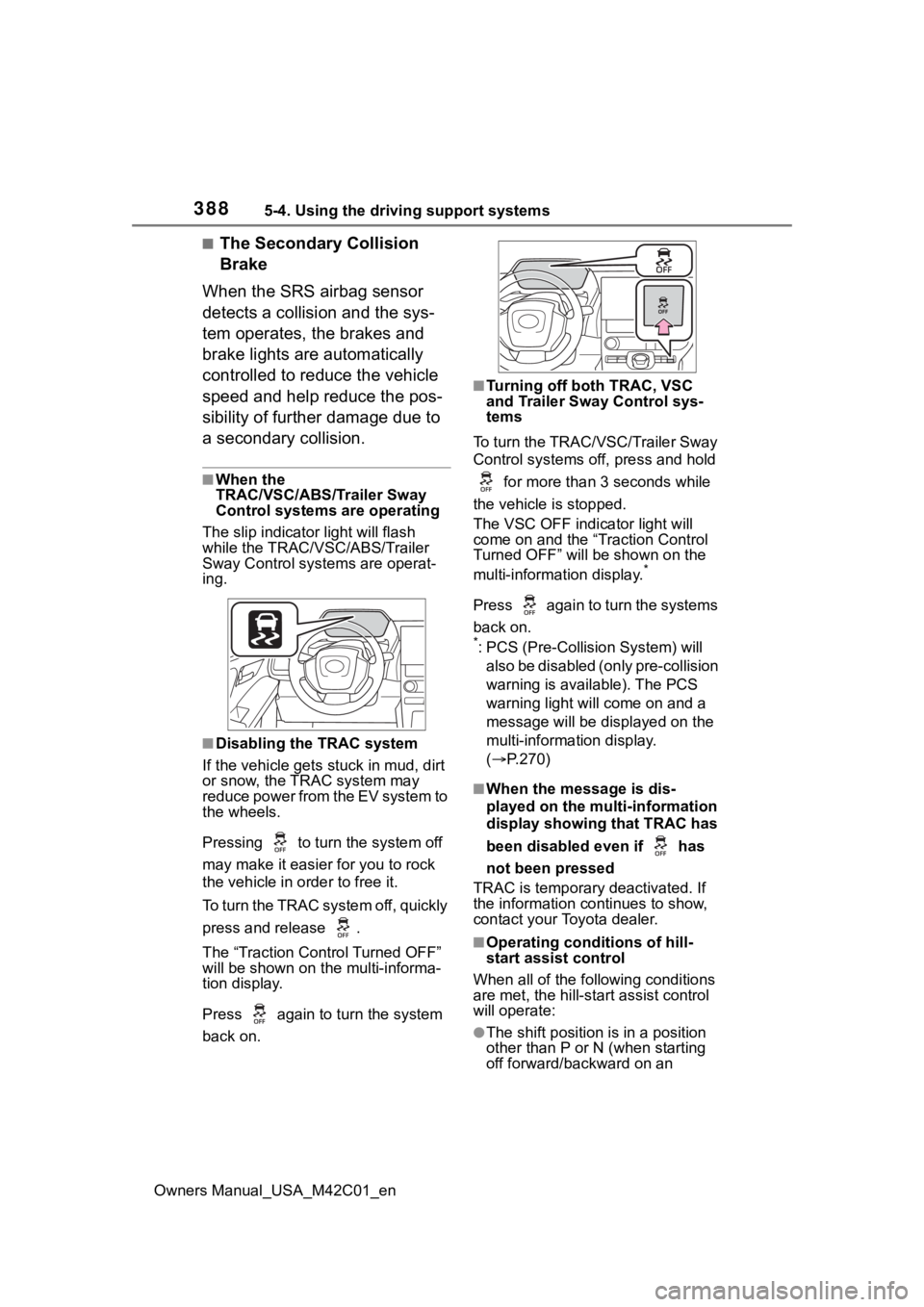
The slip indicator light will flash
while the TRAC/VSC/ABS/Trailer
Sway Control systems are operat-
ing.
■Disabling the TRAC system
If the vehicle gets stuck in mud, dirt
or snow, the TRAC system may
reduce power from the EV system to
the wheels.
Pressing to turn the system off
may make it easier for you to rock
the vehicle in order to free it.
To turn the TRAC system off, quickly
press and release .
The “Traction Control Turned OFF”
will be shown on the multi-informa-
tion display.
Press again to t urn the system
back on.
■Turning off both TRAC, VSC
and Trailer Sway Control sys-
tems
To turn the TRAC/VSC/Trailer Sway
Control systems off, press and hold for more than 3 seconds while
the vehicle is stopped.
The VSC OFF indicator light will
come on and the “Traction Control
Turned OFF” will be shown on the
multi-information display.
*
Press again to turn the systems
back on.
*: PCS (Pre-Collision System) will also be disabled (only pre-collision
warning is available). The PCS
warning light will come on and a
message will be disp layed on the
multi-information display.
( P.270)
■When the message is dis-
played on the multi-information
display showing that TRAC has
been disabled even if has
not been pressed
TRAC is temporary deactivated. If
the information continues to show,
contact your Toyota dealer.
■Operating conditions of hill-
start assist control
When all of the fo llowing conditions
are met, the hill-star t assist control
will operate:
●The shift position is in a position
other than P or N (when starting
off forward/backward on an
Page 450 of 628
4507-1. Maintenance and care
Owners Manual_USA_M42C01_en
WARNING
●If something bumps against the
windshield
●If you directly touch the raindrop
sensor body or if something
bumps into the raindrop sensor
■Precaution regarding the rear
bumper
If the paint of the rear bumper is
chipped or scratched, the system
may malfunction. If this occurs,
consult your Toyota dealer.
●Toyota Safety Sense 3.0
●BSM (if equipped)
●RCTA (if equipped)
●PKSB (if equipped)
NOTICE
■To prevent paint deteriora-
tion and corrosion on the
body and components (alumi-
num wheels, etc.)
●Wash the vehicle immediately in
the following cases:
• After driving near the sea coast
• After driving on salted roads
• If coal tar or tre e sap is present
on the paint surface
• If dead insects, insect droppings or bird droppings are present on
the paint surface
• After driving in an area contami- nated with soot, oily smoke,
mine dust, iron powder or chem-
ical substances
• If the vehicle becomes heavily soiled with dust or mud
• If liquids such as benzene and gasoline are spilled on the paint
surface
●If the paint is chipped or
scratched, have it repaired
immediately.
●To prevent the wheels from cor-
roding, remove any dirt and
store in a place with low humid-
ity when storing the wheels.
■Cleaning the exterior lights
●Wash carefully. Do not use
organic substances or scrub
with a hard brush.
This may damage the surfaces
of the lights.
●Do not apply wax to the sur-
faces of the lights.
Wax may cause damage to the
lenses.
■When using an automatic car
wash (vehicles with rain-
sensing windshield wipers)
Set the wiper switch to off posi-
tion.
If the wiper switch is in “AUTO”,
the wipers may operate and the
wiper blades may be damaged.
■When using a high pressure
car wash
●When washing the vehicle, do
not spray the camera or its sur-
rounding area directly with a
high pressure washer. Shock
applied from high pressure
water may cause the device to
not operate normally.
●Do not spray water directly on
the radar which is equipped
behind the radar sensor cover.
Otherwise it may cause the
device to be damaged.
●Do not bring the nozzle tip close
to boots (rubber or resin manu-
factured cover), or connectors
or the following parts.
The parts may be damaged if
they come into contact with
high-pressure water.
Page 500 of 628
5007-3. Do-it-yourself maintenance
Owners Manual_USA_M42C01_en
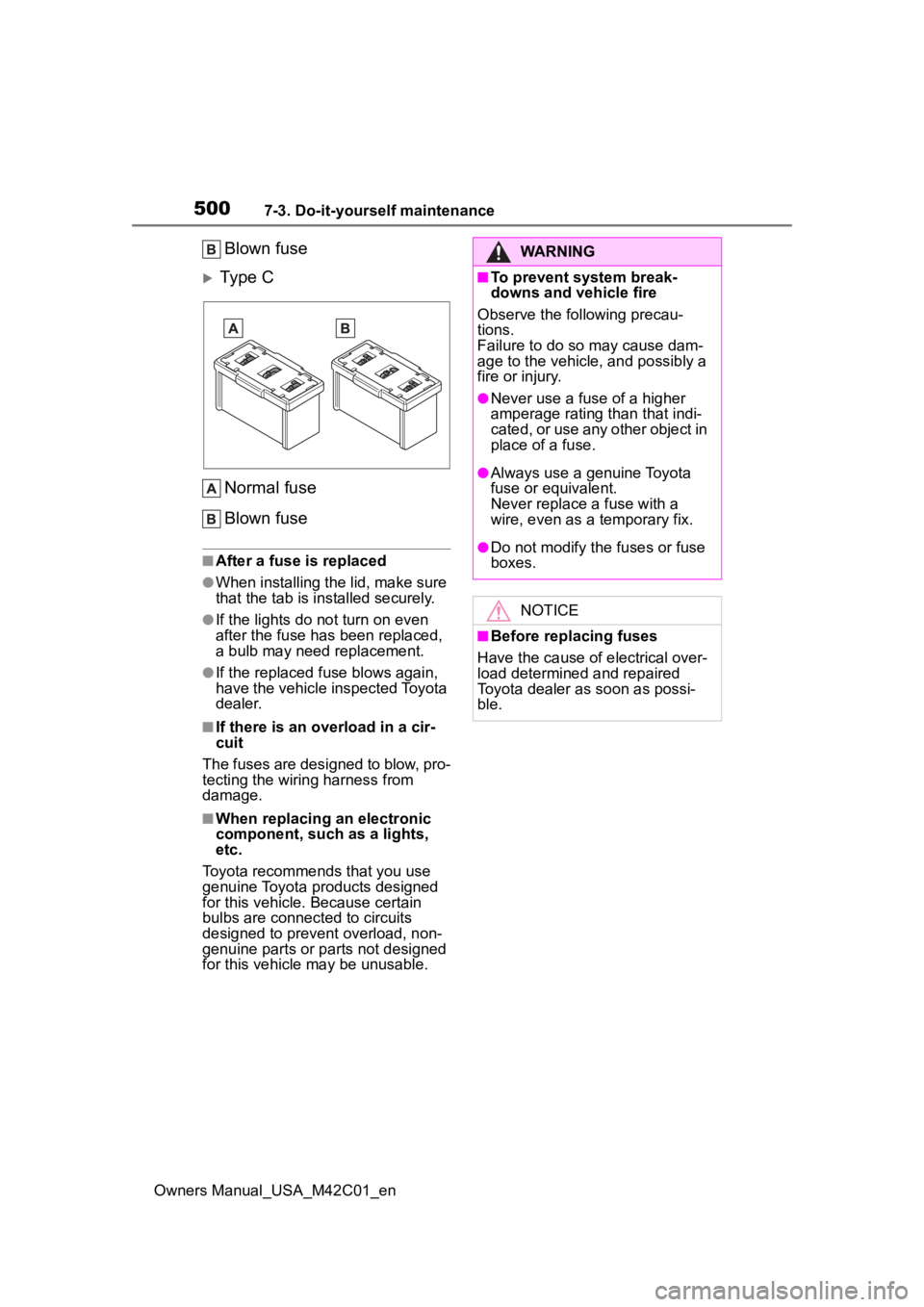
Blown fuse
Type C
Normal fuse
Blown fuse
■After a fuse is replaced
●When installing the lid, make sure
that the tab is installed securely.
●If the lights do n ot turn on even
after the fuse has been replaced,
a bulb may need replacement.
●If the replaced fuse blows again,
have the vehicle inspected Toyota
dealer.
■If there is an overload in a cir-
cuit
The fuses are designed to blow, pro-
tecting the wiring harness from
damage.
■When replacing an electronic
component, such as a lights,
etc.
Toyota recommends that you use
genuine Toyota products designed
for this vehicle. Because certain
bulbs are connected to circuits
designed to prevent overload, non-
genuine parts or parts not designed
for this vehicle may be unusable.
WARNING
■To prevent system break-
downs and vehicle fire
Observe the following precau-
tions.
Failure to do so may cause dam-
age to the vehicle, and possibly a
fire or injury.
●Never use a fuse of a higher
amperage rating than that indi-
cated, or use any other object in
place of a fuse.
●Always use a genuine Toyota
fuse or equivalent.
Never replace a fuse with a
wire, even as a temporary fix.
●Do not modify the fuses or fuse
boxes.
NOTICE
■Before replacing fuses
Have the cause of electrical over-
load determined and repaired
Toyota dealer as soon as possi-
ble.
Page 513 of 628
5138-2. Steps to take in an emergency
Owners Manual_USA_M42C01_en
8
When trouble arises
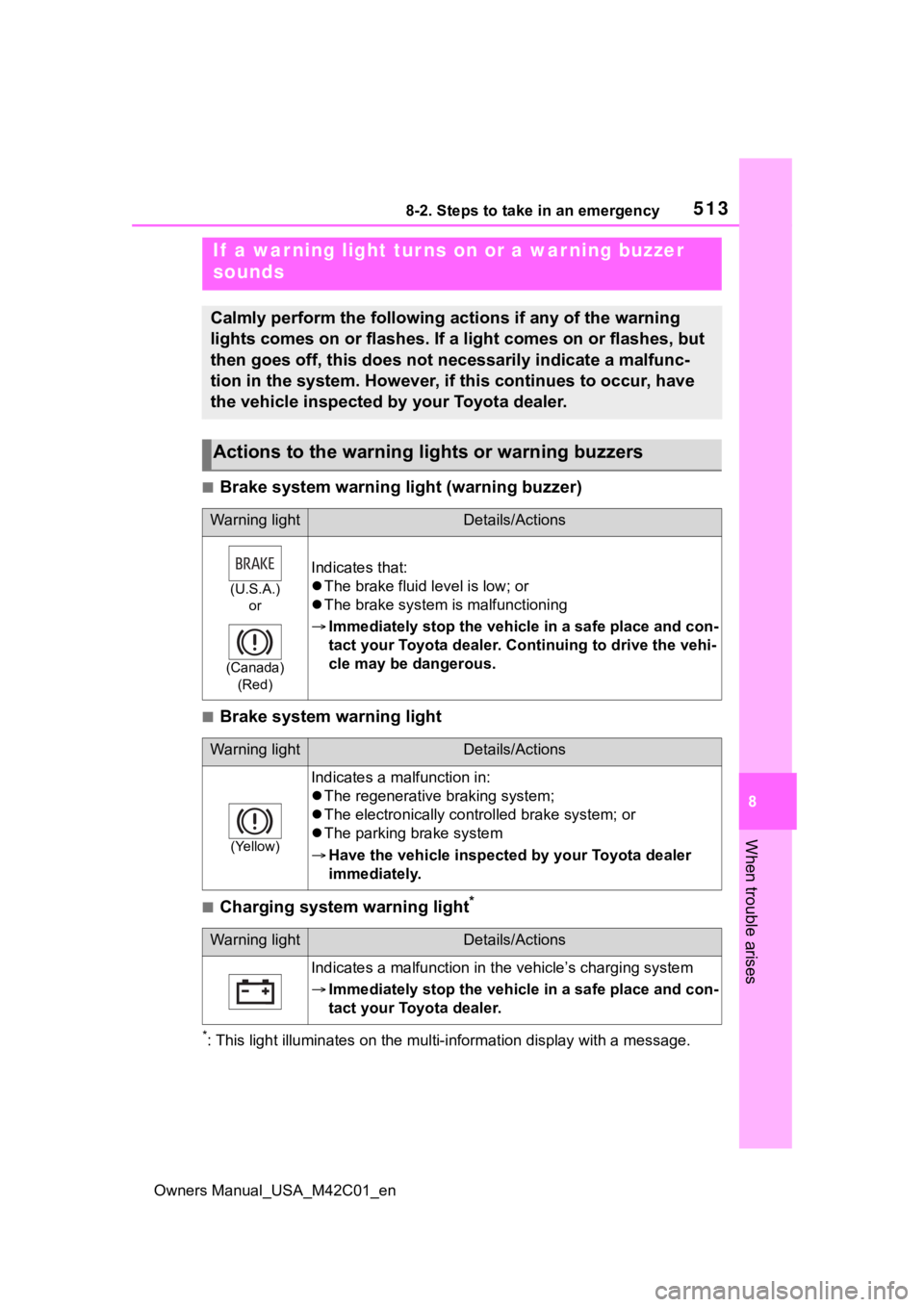
■Brake system warning light (warning buzzer)
■Brake system warning light
■Charging system warning light*
*: This light illuminates on the mu lti-information display with a message.
If a war ning light tur ns on or a war ning buzzer
sounds
Calmly perform the following actions if any of the warning
lights comes on or flashes. If a light comes on or flashes, but
then goes off, this does not necessarily indicate a malfunc-
tion in the system. However, if this continues to occur, have
the vehicle inspected by your Toyota dealer.
Actions to the warning lights or warning buzzers
Warning lightDetails/Actions
(U.S.A.) or
(Canada) (Red)
Indicates that:
The brake fluid level is low; or
The brake system is malfunctioning
Immediately stop the vehicle in a safe place and con-
tact your Toyota dealer. C ontinuing to drive the vehi-
cle may be dangerous.
Warning lightDetails/Actions
(Yellow)
Indicates a malfunction in:
The regenerative braking system;
The electronically contr olled brake system; or
The parking brake system
Have the vehicle inspecte d by your Toyota dealer
immediately.
Warning lightDetails/Actions
Indicates a malfunction in t he vehicle’s charging system
Immediately stop the vehicle in a safe place and con-
tact your Toyota dealer.
Page 516 of 628
5168-2. Steps to take in an emergency
Owners Manual_USA_M42C01_en
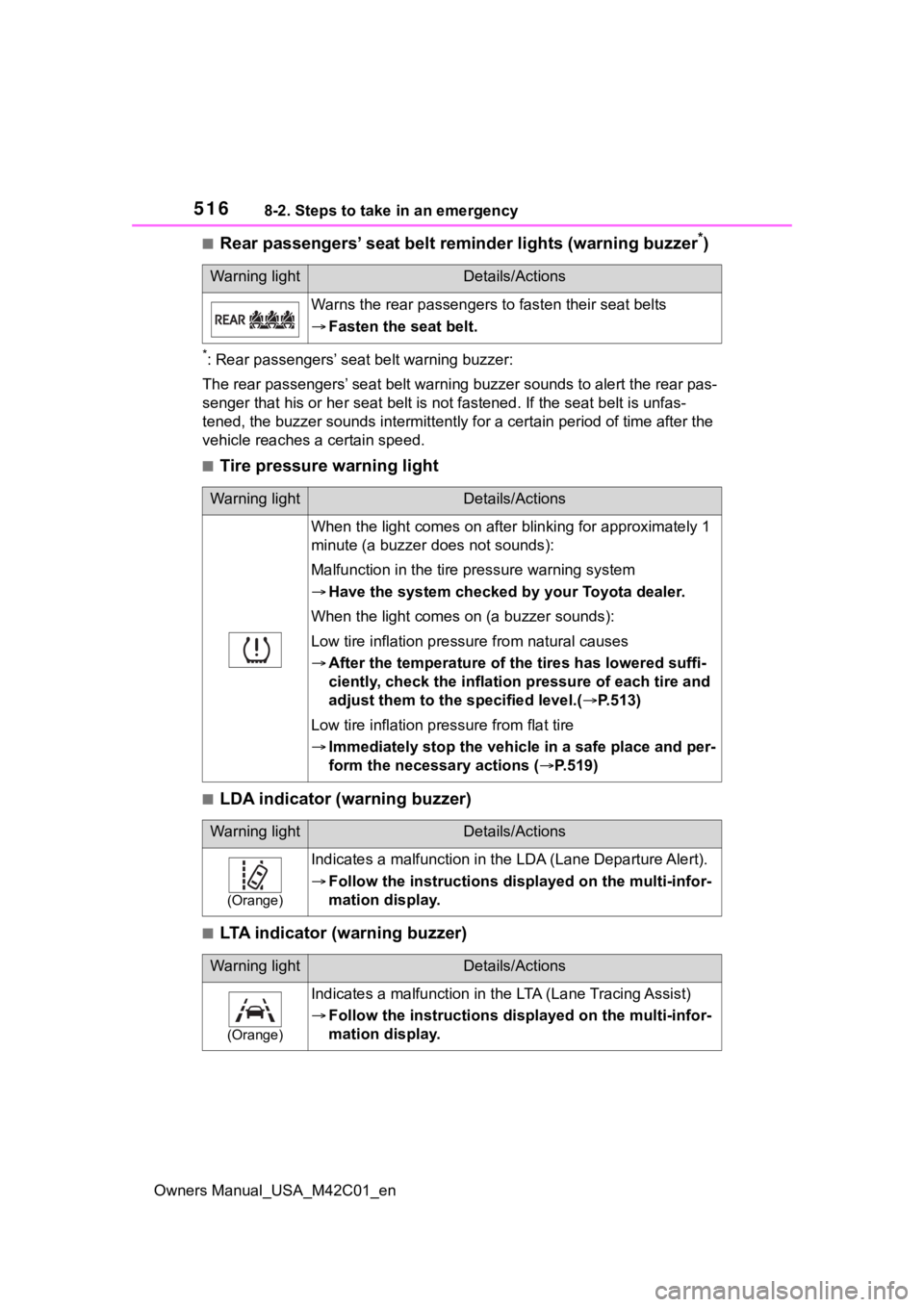
■Rear passengers’ seat belt reminder lights (warning buzzer*)
*: Rear passengers’ seat belt warning buzzer:
The rear passengers’ seat belt warning buzzer sounds to alert t he rear pas-
senger that his or he r seat belt is not fastened. If the seat b elt is unfas-
tened, the buzzer sounds intermittently for a certain period of time after the
vehicle reaches a certain speed.
■Tire pressure warning light
■LDA indicator (warning buzzer)
■LTA indicator (warning buzzer)
Warning lightDetails/Actions
Warns the rear passengers to fasten their seat belts
Fasten the seat belt.
Warning lightDetails/Actions
When the light comes on after b linking for approximately 1
minute (a buzzer does not sounds):
Malfunction in the tire pressure warning system
Have the system checked by your Toyota dealer.
When the light comes on (a buzzer sounds):
Low tire inflation pressu re from natural causes
After the temperature of the tires has lowered suffi-
ciently, check the inflation pressure of each tire and
adjust them to the specified level.( P.513)
Low tire inflation pres sure from flat tire
Immediately stop the vehic le in a safe place and per-
form the necessary actions ( P.519)
Warning lightDetails/Actions
(Orange)
Indicates a malfunction in the LDA (Lane Departure Alert).
Follow the instructions dis played on the multi-infor-
mation display.
Warning lightDetails/Actions
(Orange)
Indicates a malfunction in t he LTA (Lane Tracing Assist)
Follow the instructions dis played on the multi-infor-
mation display.
Page 520 of 628
5208-2. Steps to take in an emergency
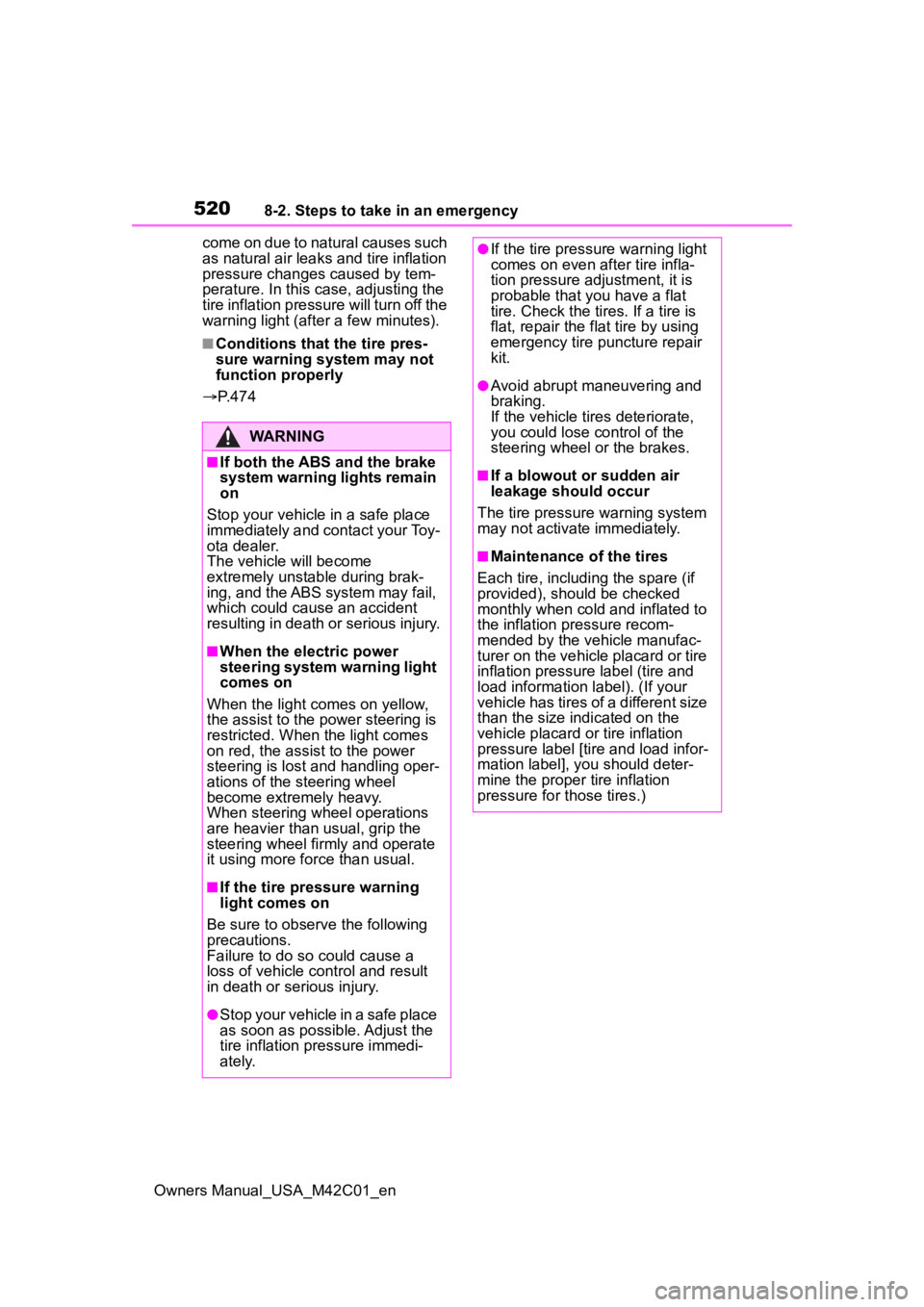
Owners Manual_USA_M42C01_encome on due to natural causes such
as natural air leaks and tire inflation
pressure changes caused by tem-
perature. In this case, adjusting the
tire inflation pressure will turn off the
warning light (after a few minutes).
■Conditions that the tire pres-
sure warning system may not
function properly
P. 4 7 4
WARNING
■If both the ABS and the brake
system warning lights remain
on
Stop your vehicle in a safe place
immediately and contact your Toy-
ota dealer.
The vehicle will become
extremely unstable during brak-
ing, and the ABS system may fail,
which could cause an accident
resulting in death or serious injury.
■When the electric power
steering system warning light
comes on
When the light comes on yellow,
the assist to the power steering is
restricted. When the light comes
on red, the assist to the power
steering is lost and handling oper-
ations of the steering wheel
become extremely heavy.
When steering wheel operations
are heavier than usual, grip the
steering wheel firmly and operate
it using more force than usual.
■If the tire pressure warning
light comes on
Be sure to observe the following
precautions.
Failure to do so could cause a
loss of vehicle control and result
in death or serious injury.
●Stop your vehicle in a safe place
as soon as possible. Adjust the
tire inflation pressure immedi-
ately.
●If the tire pressure warning light
comes on even after tire infla-
tion pressure adjustment, it is
probable that you have a flat
tire. Check the tires. If a tire is
flat, repair the flat tire by using
emergency tire puncture repair
kit.
●Avoid abrupt maneuvering and
braking.
If the vehicle tires deteriorate,
you could lose control of the
steering wheel or the brakes.
■If a blowout or sudden air
leakage should occur
The tire pressure warning system
may not activate immediately.
■Maintenance of the tires
Each tire, includi ng the spare (if
provided), should be checked
monthly when cold and inflated to
the inflation pressure recom-
mended by the vehicle manufac-
turer on the vehicle placard or tire
inflation pressure label (tire and
load information label). (If your
vehicle has tires of a different size
than the size indicated on the
vehicle placard or tire inflation
pressure label [tire and load infor-
mation label], you should deter-
mine the proper tire inflation
pressure for those tires.)
Page 572 of 628
5729-2. Customization
Owners Manual_USA_M42C01_en
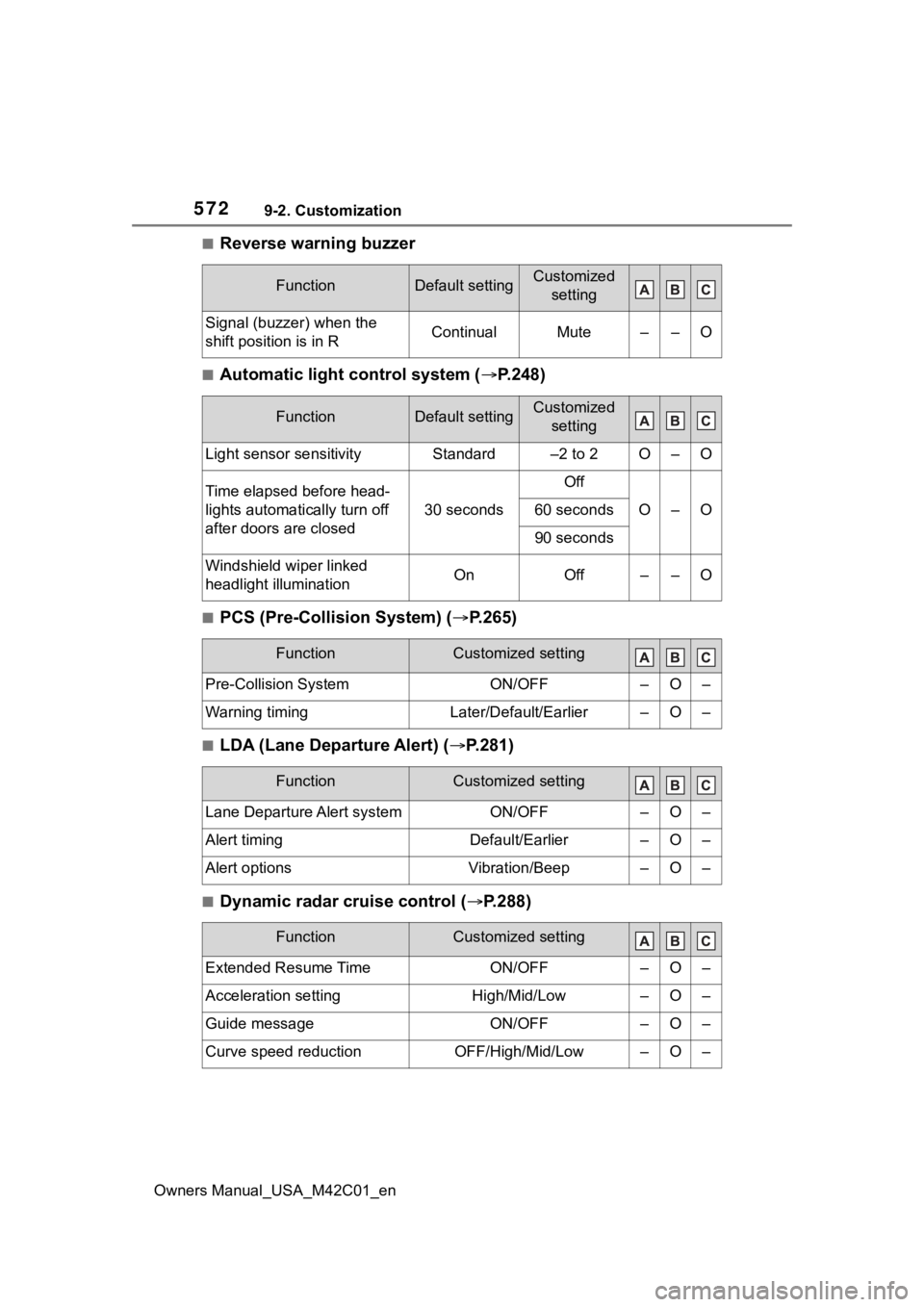
■Reverse warning buzzer
■Automatic light control system (P.248)
■PCS (Pre-Collision System) ( P.265)
■LDA (Lane Departure Alert) (P.281)
■Dynamic radar cruise control ( P.288)
FunctionDefault settingCustomized
setting
Signal (buzzer) when the
shift position is in RContinualMute––O
FunctionDefault settingCustomized setting
Light sensor sensitivityStandard–2 to 2O–O
Time elapsed before head-
lights automatically turn off
after doors are closed
30 seconds
Off
O–O60 seconds
90 seconds
Windshield wiper linked
headlight illuminationOnOff––O
FunctionCustomized setting
Pre-Collision SystemON/OFF–O–
Warning timingLater/Default/Earlier–O–
FunctionCustomized setting
Lane Departure Alert systemON/OFF–O–
Alert timingDefault/Earlier–O–
Alert optionsVibration/Beep–O–
FunctionCustomized setting
Extended Resume TimeON/OFF–O–
Acceleration settingHigh/Mid/Low–O–
Guide messageON/OFF–O–
Curve speed reductionOFF/High/Mid/Low–O–