Emergency brake SUBARU SOLTERRA 2023 Owners Manual
[x] Cancel search | Manufacturer: SUBARU, Model Year: 2023, Model line: SOLTERRA, Model: SUBARU SOLTERRA 2023Pages: 628, PDF Size: 11.91 MB
Page 4 of 628
4TABLE OF CONTENTS
Owners Manual_USA_M42C01_en
5-4. Using the driving support
systems
Software update ............ 257
Toyota Safety Sense 3.0 259
PCS (Pre-Collision System) .................................... 265
LTA (Lane Tracing Assist) .................................... 276
LDA (Lane Departure Alert) .................................... 281
RSA (Road Sign Assist) 286
Dynamic radar cruise control .................................... 288
Cruise control ................ 296
Emergency Driving Stop Sys- tem .............................. 299
BSM (Blind Spot Monitor) .................................... 302
SEA (Safe Exit Assist) ... 307
Intuitive parking assist... 311
RCTA (Rear Cross Traffic Alert)............................ 322
RCD (Rear Camera Detec- tion) ............................. 328
PKSB (Parking Support Brake).......................... 331
Static Objects Front and Rear of the Vehicle............... 336
Moving Vehicle Rear of the Vehicle......................... 339
Pedestrians Rear of the Vehi- cle................................ 340
Static Objects Around the Vehicle (vehicles with
Advanced Park)........... 342
Toyota Teammate Advanced Park ............................. 344
Snow mode ................... 382X-MODE ........................
382
Driving assist systems ... 387
5-5. Driving tips Winter driving tips .......... 393
Utility vehicle precautions .................................... 396
6-1. Using the ai r conditioning
system and defogger
ALL AUTO (“ECO”) control .................................... 400
Automatic air conditioning system ......................... 402
Remote Air Conditioning Sys- tem .............................. 409
Heated steering wheel/seat heaters/seat ventila-
tors/radiant heater ....... 411
6-2. Using the interior lights Interior lights list ............ 415
6-3. Using the storage features List of storage features .. 418
Luggage compartment fea- tures ............................ 421
6-4. Using the other interior fea- tures
Electronic sunshade ...... 426
Other interior features ... 428
Garage door opener ...... 439
6Interior features
Page 36 of 628

361-1. For safe use
Owners Manual_USA_M42C01_en
Front passenger occupant classification sensors
SRS warning light
Airbag sensor assembly
Your vehicle is equipped with ADVANCED AIRBAGS designed
based on the US motor vehicle safety standards (FMVSS208). The
airbag sensor assembly (ECU) cont rols airbag deployment based on
information obtained from the sensors etc. shown in the system
components diagram above. This in formation includes crash sever-
ity and occupant information. As the airbags deploy, a chemical
reaction in the inflators quickly fills the airbags with non-toxic gas to
help restrain the motion of the occupants.
■If the SRS airbags deploy
(inflate)
●Slight abrasions, burns, bruising
etc., may be sustained from SRS
airbags, due to the extremely high
speed deployment (inflation) by
hot gases.
●A loud noise and white powder will
be emitted.
●Parts of the airbag module (steer-
ing wheel hub, airbag cover and
inflator) as well as the front seats,
parts of the front and rear pillars,
and roof side rails, may be hot for
several minutes. T he airbag itself
may also be hot.
●The windshield may crack.
●The EV system will be stopped.
( P. 8 0 )
●All of the doors will be unlocked.
( P.168)
●The brakes and st op lights will be
controlled automatically. ( P.388)
●The interior lights will turn on auto-
matically. ( P.416)
●The emergency flashers will turn
on automatically. ( P.504)
●For Safety Connect subscribers, if
any of the following situations
occur, the system is designed to
send an emergency call to the
response center, notifying them of the vehicle’s location (without
needing to push the “SOS” button)
and an agent will attempt to speak
with the occupants to ascertain
the level of emergency and assis-
tance required. If the occupants
are unable to communicate, the
agent automatically treats the call
as an emergency and helps to dis-
patch the necessary emergency
services. (
P. 6 4 )
• An SRS airbag is deployed.
• A seat belt pretensioner is acti- vated.
• The vehicle is involved in a severe rear-end collision.
■SRS airbag deployment condi-
tions (SRS front airbags)
●The SRS front airbags will deploy
in the event of an impact that
exceeds the set threshold level
(the level of forc e corresponding
to an approximately 12 - 18 mph
[20 - 30 km/h] frontal collision with
a fixed wall that does not move or
deform).
However, this threshold velocity will
be considerably higher in the follow-
ing situations:
• If the vehicle strikes an object, such as a parked vehicle or sign
pole, which can move or deform
on impact
• If the vehicle is involved in an underride collision, such as a colli-
Page 103 of 628
1032-2. Charging
Owners Manual_USA_M42C01_en
2
Electric Vehicle system
Before charging, always check
the following items.
The parking brake is applied.
( P.243)
The power switch is turned to
OFF. ( P.231)
Lights such as the headlights,
emergency flashers and inte-
rior lights, etc. are turned off.
If these light switches are turned
on, then these features will con-
sume electricity, and charging time
will increase.
Before charging, make sure that
each part of the AC charging
cable is in good condition.
( P.92)
■During charging
●The charging starting time may
differ depending on the state of
the vehicle, but this does not indi-
cate a malfunction.
●During charging, sounds may be
heard from near the traction bat-
tery in accordance with the opera-
tion of the air conditioning system
or “Battery Cooler” ( P.99).
●During and after charging, the motor compartment and its sur-
rounding area in which the
onboard traction battery charger is
installed may get warm.
●The surface of the CCID
(Charging Circuit Interrupting
Device) may become hot, but this
does not indicate a malfunction.
●Depending on radio wave condi-
tions, interference may be heard
on the radio.
■When charging using a public
charging facility
●When charging using a public
charging facility, check the setting
of the charging schedule function.
• When the charging schedule is registered, temporarily turn off the
function or turn “ Charge Now” on.
( P. 1 1 9 )
• When the charging schedule is set to on, charging will not start even
if the AC charging cable is con-
nected. Also, charging fee may
occur due to connection of the AC
charging cable.
■Capacity reduction of the trac-
tion battery
The capacity of the traction battery
will decline gradually when the trac-
tion battery is in use. The rate at
which it declines will differ in accor-
dance with environmental conditions
and the way in which the vehicle is
used. Observing the following can
help suppress the decline in the
traction battery capacity.
●Avoid parking the vehicle in high
temperature areas, under direct
sunlight when the traction battery
is fully charged.
●Avoid accelerating and decelerat-
ing frequently and suddenly.
●Avoid frequent d riving at high
speed.
●Use the charging schedule func-
tion as much as possible in order
to fully charged the traction bat-
tery before starting off. ( P. 1 1 8 )
NOTICE
●When charging with a charger,
follow the procedures for using
each charger.
Confirm the following
before charging
Inspecting the AC
charging cable
Page 217 of 628
217
Owners Manual_USA_M42C01_en
5
5
Driving
Driving
5-1. Before drivingDriving the vehicle....... 219
Cargo and luggage ..... 225
Vehicle load limits ....... 228
Trailer towing............... 229
Dinghy towing ............. 230
5-2. Driving procedures Power (ignition) switch 231
Transmission ............... 236
Turn signal lever.......... 242
Parking brake .............. 243
Brake Hold .................. 246
5-3. Operating the lights and wipers
Headlight switch .......... 248
AHB (Automatic High Beam)........................ 250
Windshield wipers and washer....................... 2535-4. Using the dr
iving support
systems
Software update .......... 257
Toyota Safety Sense 3.0 .................................. 259
PCS (Pre-Collision System) .................................. 265
LTA (Lane Tracing Assist) .................................. 276
LDA (Lane Departure Alert) .................................. 281
RSA (Road Sign Assist) .................................. 286
Dynamic radar cruise con- trol ............................. 288
Cruise control .............. 296
Emergency Driving Stop System ...................... 299
BSM (Blind Spot Monitor) .................................. 302
SEA (Safe Exit Assist) . 307
Intuitive parking assist . 311
RCTA (Rear Cross Traffic Alert) .......................... 322
RCD (Rear Camera Detec- tion) ........................... 328
PKSB (Parking Support Brake) ........................ 331
Static Objects Front and Rear of the Vehicle .... 336
Moving Vehicle Rear of the Vehicle ....................... 339
Page 221 of 628
2215-1. Before driving
Owners Manual_USA_M42C01_en
5
Driving
WARNING
●During normal driving, do not
turn off the EV system. Turning
the EV system off while driving
will not cause loss of steering or
braking control, however, power
assist to the steering will be lost.
This will make it more difficult to
steer smoothly, so you should
pull over and stop the vehicle as
soon as it is safe to do so.
In the event of an emergency,
such as if it becomes impossible
to stop the vehicle in the normal
way: P. 5 0 5
●Use regenerative braking to
maintain a safe speed when
driving down a steep hill.
Using the brakes continuously
may cause the brakes to over-
heat and lose effectiveness.
( P.240)
●If “Regenerative braking lim-
ited. Press brake to decelerate.”
appears on the multi-informa-
tion display, firmly depress the
brake pedal to decelerate the
vehicle. ( P.522)
●Do not adjust the position of the
steering wheel, the seat, or the
inside or outside rear view mir-
rors while driving.
Doing so may result in a loss of
vehicle control.
●Always check that all passen-
gers’ arms, heads or other parts
of their body are not outside the
vehicle.
●AWD models: Do not drive the
vehicle off-road.
This is not a AWD vehicle
designed for off-road driving.
Proceed with all due caution if it
becomes unavoidable to drive
off-road.
●Do not drive across a river or
through other bodies of water.
This may cause electric/elec-
tronic components to short cir-
cuit, damage the EV system or
cause other serious damage to
the vehicle.
●Do not drive in excess of the
speed limit. Even if the legal
speed limit permits it, do not
drive over 85 mph (140 km/h)
unless your vehicle has high-
speed capability tires. Driving
over 85 mph (140 km/h) may
result in tire fa ilure, loss of con-
trol and possible injury. Be sure
to consult a tire dealer to deter-
mine whether the tires on your
vehicle are high-speed capabil-
ity tires or not before driving at
such speeds.
■When driving on slippery
road surfaces
●Sudden braking, acceleration
and steering may cause tire
slippage and reduce your ability
to control the vehicle.
●Sudden acceleration or regen-
erative braking due to shift
changing could cause the vehi-
cle to skid, resulting in an acci-
dent.
●After driving through a puddle,
lightly depress the brake pedal
to make sure that the brakes
are functioning properly. Wet
brake pads may prevent the
brakes from functioning prop-
erly. If the brakes on only one
side are wet and not functioning
properly, steering control may
be affected.
Page 234 of 628
2345-2. Driving procedures
Owners Manual_USA_M42C01_en
Modes can be changed by
pressing the power switch with
the brake pedal released. (The
mode changes each time the
switch is pressed.)
WARNING
■Stopping the EV system in an
emergency
●If you want to stop the EV sys-
tem in an emergency while driv-
ing the vehicle, press and hold
the power switch for more than
2 seconds, or press it briefly 3
times or more in succession.
( P.505)
However, do not touch the
power switch while driving
except in an emergency. Turn-
ing the EV system off while driv-
ing will not cause a loss of
steering or braking control.
However, power assist for the
steering wheel may be lost mak-
ing it difficult to steer smoothly
before stopping the vehicle
depending on the remaining
charge in the 12-volt battery or
usage conditions. In this situa-
tion, you should pull over and
stop the vehicle as soon as it is
safe to do so.
●If the power switch is operated
while the vehicle is running, a
warning message will be shown
on the multi-info rmation display
and a buzzer sounds.
●When restarting the EV system
after an emergency shutdown,
press the power switch shortly
and firmly.
■When parking
Exhaust gases include harmful
carbon monoxide (CO), which is
colorless and odorless. Observe
the following precautions.
Failure to do so may cause
exhaust gases to enter the vehicle
and may lead to an accident
caused by light-headedness, or
may lead to death or a serious
health hazard.
●If the vehicle is in a poorly venti-
lated area or a closed area,
such as a garage, stop the EV
system.
●Do not leave the vehicle with
the EV system operating for a
long time. If such a situation
cannot be avoided, park the
vehicle in an open space and
ensure that exhaust fumes do
not enter the vehicle interior.
●Do not leave the EV system
operating in an area with snow
build-up, or where it is snowing.
If snowbanks build up around
the vehicle while the EV system
is operating, exhaust gases
may collect and enter the vehi-
cle.
Changing power switch
modes
Page 238 of 628

2385-2. Driving procedures
Owners Manual_USA_M42C01_enshifting operation will be disabled.
●When selecting the shift position,
make sure that the shift position
has been changed to the desired
position by checking the shift posi-
tion indicator provided on the
instrument cluster.
■The shift position cannot be
changed when
In the following situations, a buzzer
will sound to inform you that the shift
position cannot be changed. Use
the appropriate operation to attempt
to change the shif t position again.
●When attempting to change the
shift position from P with the brake
pedal not depressed
●When attempting to change the
shift position from P with the
accelerator pedal depressed
●When attempting to change the
shift position from N while stopped
or driving at an extremely low
speed with the b rake pedal not
depressed
●When attempting to change the
shift position fro m N while stopped
or driving at an extremely low
speed with the accelerator pedal
depressed
●When the P position switch is
pressed while driving
When driving at an extremely low
speed, the shift position may
change to P.
■The shift position automatically
changes to N when
In the following situations, a buzzer
will sound to inform you that the shift
position has been changed to N.
Use the appropriate operation to
attempt to change the shift position
again.
●When attempting to change the
shift position to R while the vehicle
is moving forward
When driving at a low speed, the
shift position may change to R.
●When attempting to change the
shift position to D while the vehicle
is moving backward
When driving at a low speed, the
shift position may change to D.
■When N is selected while driv-
ing
When selecting N while traveling at
a speed above a ce rtain level, hold
the rotary shifter at the N position.
■Automatic P position selection
function
In the following situ ations, the shift
position is automatically changed to
P.
●When pressing t he power switch
with the vehicle stopped while the
power switch is in ON and the shift
position is in a position other than
P (after the shift position has been
changed to P, the power switch
will turn off)
*
●If the driver’s door is opened and
all of the following conditions are
met, while the shift position is in a
position other than P:
• The power switch is in ON.
• The driver is not wearing the seat belt.
• The brake pedal is not depressed.
To start off the vehicle after the shift
position is changed to P, operate the
rotary shifter again.
●When the vehicle is stopped after
the EV system has been stopped
in an emergency while driving
●When voltage of the 12-volt bat-
tery drops while the shift position
is in a position other than P
*: When the power switch is pressed
while driving at extremely slow
speeds, such as immediately
before stopping th e vehicle, the
shift position may automatically
change to P. Make sure that the
vehicle is completely stopped
before pressing the power switch.
Page 243 of 628
2435-2. Driving procedures
Owners Manual_USA_M42C01_en
5
Driving
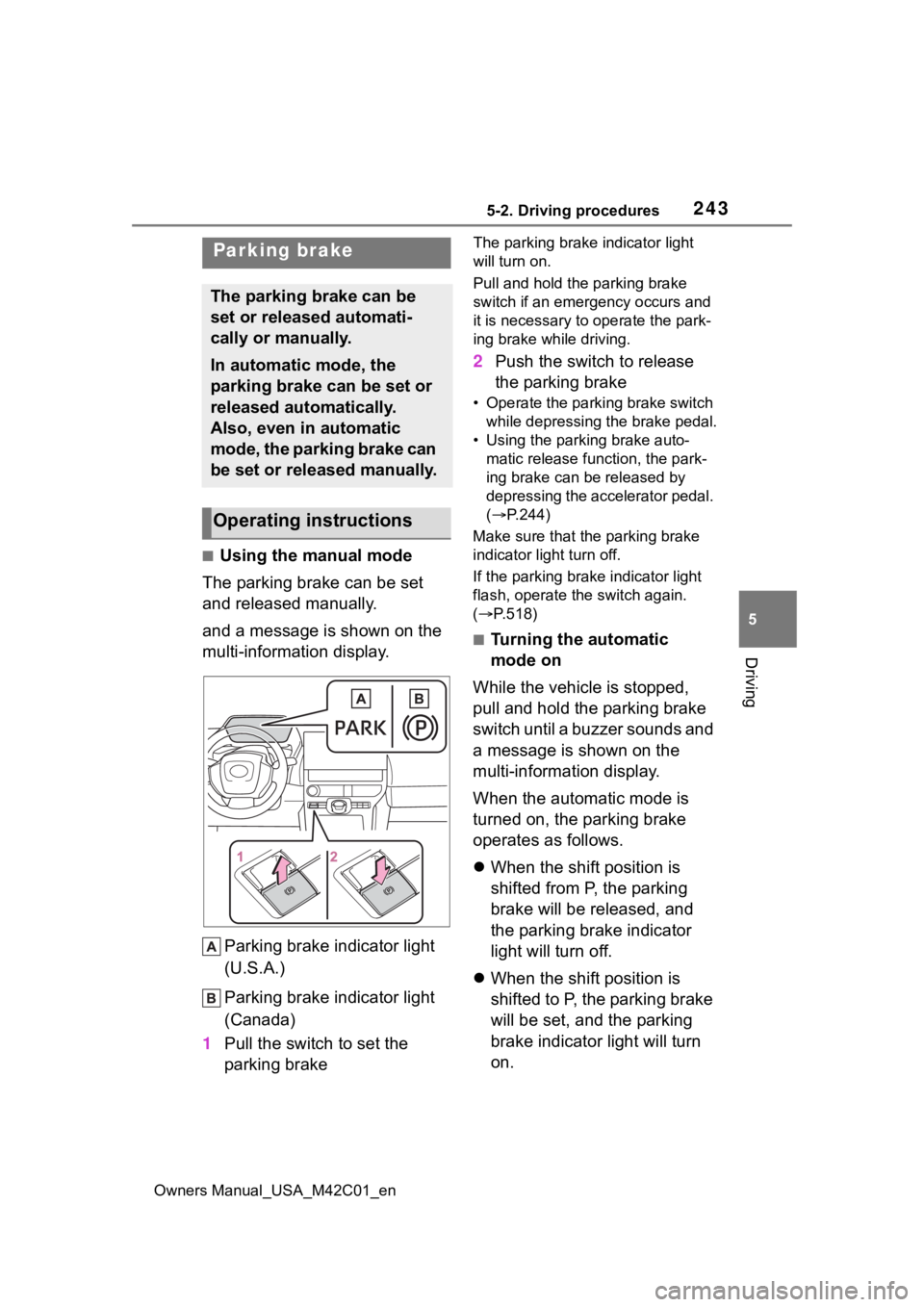
■Using the manual mode
The parking brake can be set
and released manually.
and a message is shown on the
multi-information display.
Parking brake indicator light
(U.S.A.)
Parking brake indicator light
(Canada)
1 Pull the switch to set the
parking brake
The parking brake indicator light
will turn on.
Pull and hold the parking brake
switch if an emergency occurs and
it is necessary to operate the park-
ing brake while driving.
2 Push the switch to release
the parking brake
• Operate the parking brake switch
while depressing the brake pedal.
• Using the parking brake auto- matic release function, the park-
ing brake can be released by
depressing the accelerator pedal.
( P.244)
Make sure that the parking brake
indicator light turn off.
If the parking brak e indicator light
flash, operate t he switch again.
( P.518)
■Turning the automatic
mode on
While the vehicle is stopped,
pull and hold the parking brake
switch until a buzzer sounds and
a message is shown on the
multi-information display.
When the automatic mode is
turned on, the parking brake
operates as follows.
When the shift position is
shifted from P, the parking
brake will be released, and
the parking brake indicator
light will turn off.
When the shift position is
shifted to P, the parking brake
will be set, and the parking
brake indicator light will turn
on.
Parking brake
The parking brake can be
set or released automati-
cally or manually.
In automatic mode, the
parking brake can be set or
released automatically.
Also, even in automatic
mode, the parking brake can
be set or released manually.
Operating instructions
Page 267 of 628
2675-4. Using the driving support systems
Owners Manual_USA_M42C01_en
5
Driving
“Accelerator Pedal is
Pressed”
■Pre-collision brake assist
If the system determines that
the possibility of a collision is
high and the brake operation by
the driver is insufficient, the
braking power will be increased.
■Pre-collision brake control
If the system determines that
the possibility of a collision is
extremely high, the brakes are
automatically applied to help
avoid the collision or reduce the
impact of the collision.
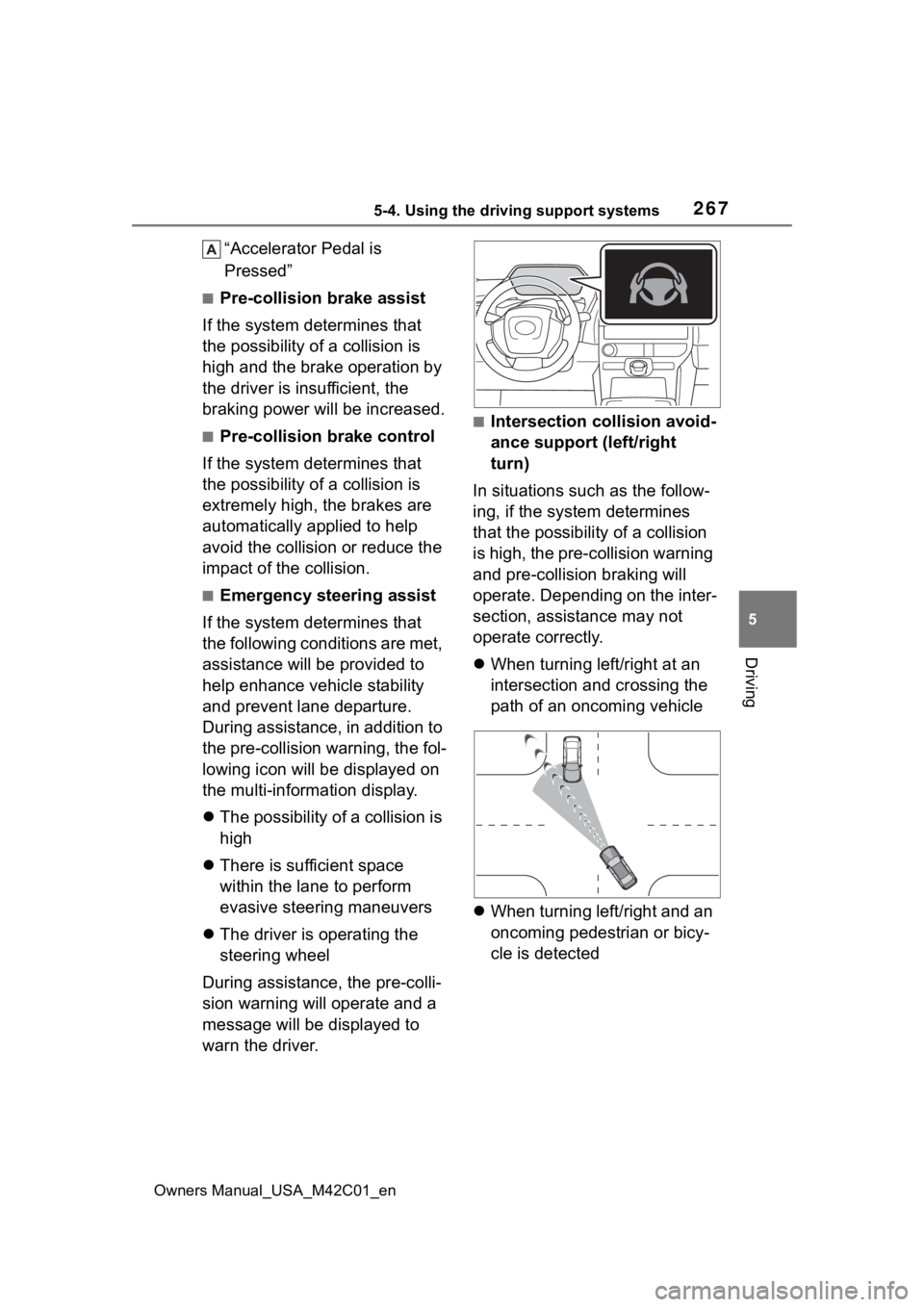
■Emergency steering assist
If the system determines that
the following conditions are met,
assistance will be provided to
help enhance vehicle stability
and prevent lane departure.
During assistance, in addition to
the pre-collision warning, the fol-
lowing icon will be displayed on
the multi-information display.
The possibility of a collision is
high
There is sufficient space
within the lane to perform
evasive steering maneuvers
The driver is operating the
steering wheel
During assistance, the pre-colli-
sion warning will operate and a
message will be displayed to
warn the driver.
■Intersection collision avoid-
ance support (left/right
turn)
In situations such as the follow-
ing, if the system determines
that the possibility of a collision
is high, the pre-collision warning
and pre-collision braking will
operate. Depending on the inter-
section, assistance may not
operate correctly.
When turning left/right at an
intersection and crossing the
path of an oncoming vehicle
When turning left/right and an
oncoming pedestrian or bicy-
cle is detected
Page 269 of 628
2695-4. Using the driving support systems
Owners Manual_USA_M42C01_en
5
Driving
WARNING
●If the brake pedal is being
depressed, the system may
determine that the driver is tak-
ing evasive action and possibly
delay the operation timing of the
pre-collision brake control.
■Acceleration Suppression at
Low Speed
If the steering wheel is being
turned, the syste m may determine
that the driver is taking evasive
action and possibly prevent the
Acceleration Suppression at Low
Speed function from operating.
■Emergency steering assist
●The emergency steering assist
will be canceled when the sys-
tem determines that lane depar-
ture prevention control has
completed.
●Depending on operations per-
formed by the driver, emer-
gency steering assist may not
operate or operation may be
canceled.
• If the accelerator pedal is depressed strongly, the steering
wheel is turned heavily, the
brake pedal is depressed, or the
turn signal lever is operated, the
system may determine that the
driver is taking evasive action
and the emergency steering
assist may not operate.
• While the emergency steering assist is operating, if the accel-
erator pedal is depressed
strongly, the st eering wheel is
turned heavily, or the brake
pedal is depressed, the system
may determine that the driver is
taking evasive action and emer-
gency steering assist operation
may be canceled.
• While the emergency steering assist is operating, if the steer-
ing wheel is held or turned in the
opposite direction of system
operation, emergency steering
assist operation will be can-
celed.