READY mode SUBARU SOLTERRA 2023 Owners Manual
[x] Cancel search | Manufacturer: SUBARU, Model Year: 2023, Model line: SOLTERRA, Model: SUBARU SOLTERRA 2023Pages: 628, PDF Size: 11.91 MB
Page 150 of 628
1503-1. Instrument cluster
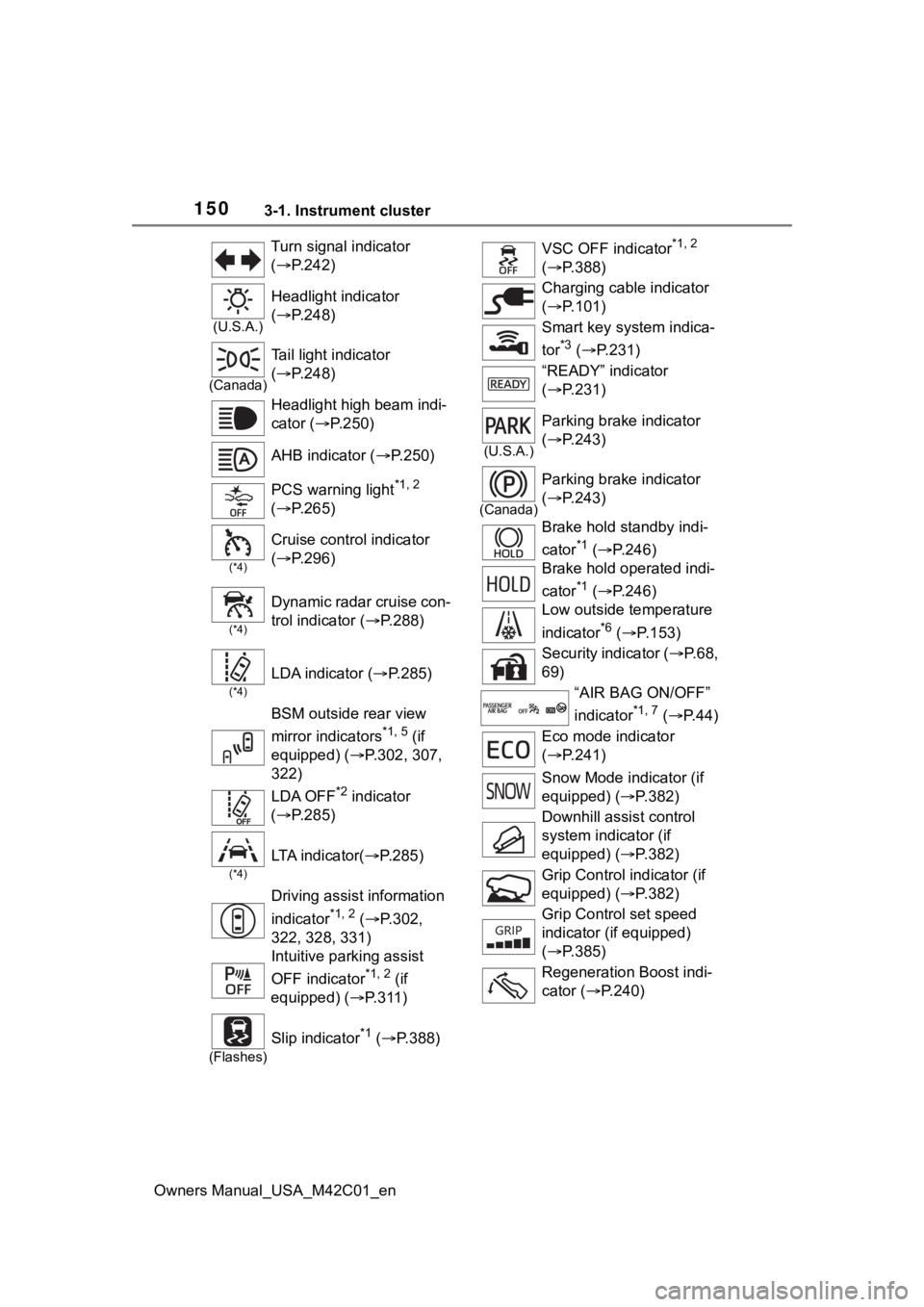
Owners Manual_USA_M42C01_enTurn signal indicator
(
P.242)
(U.S.A.)
Headlight indicator
( P.248)
(Canada)
Tail light indicator
( P.248)
Headlight high beam indi-
cator ( P.250)
AHB indicator ( P.250)
PCS warning light
*1, 2
( P.265)
(*4)
Cruise control indicator
( P.296)
(*4)
Dynamic radar cruise con-
trol indicator ( P.288)
(*4)
LDA indicator ( P.285)
BSM outside rear view
mirror indicators
*1, 5 (if
equipped) ( P.302, 307,
322)
LDA OFF
*2 indicator
( P.285)
(*4)
LTA i n d i c a t o r ( P.285)
Driving assist information
indicator
*1, 2 ( P.302,
322, 328, 331)
Intuitive parking assist
OFF indicator
*1, 2 (if
equipped) ( P.311)
(Flashes)
Slip indicator*1 ( P.388)
VSC OFF indicator*1, 2
( P.388)
Charging cable indicator
( P.101)
Smart key system indica-
tor
*3 ( P.231)
“READY” indicator
( P.231)
(U.S.A.)
Parking brake indicator
( P.243)
(Canada)
Parking brake indicator
( P.243)
Brake hold standby indi-
cator
*1 ( P.246)
Brake hold operated indi-
cator
*1 ( P.246)
Low outside temperature
indicator
*6 ( P.153)
Security indicator ( P. 6 8 ,
69)
“AIR BAG ON/OFF”
indicator
*1, 7 ( P. 4 4 )
Eco mode indicator
( P.241)
Snow Mode indicator (if
equipped) ( P.382)
Downhill assist control
system indicator (if
equipped) ( P.382)
Grip Control indicator (if
equipped) ( P.382)
Grip Control set speed
indicator (if equipped)
( P.385)
Regeneration Boost indi-
cator ( P.240)
Page 163 of 628
1634-1. Key information
Owners Manual_USA_M42C01_en
4
Before driving
key inside the vehicle, leaving the
vehicle carrying the electronic key
on your person without turning the
power switch to O FF or other pas-
sengers from unintentionally taking
the key out of the vehicle, etc., a
message that prompts the user to
confirm the state of the electronic
key or power switch mode may be
shown on the multi -information dis-
play. In those cases, follow the
instructions on the display immedi-
ately.
■If “Key Battery Low Replace
Key Battery” is displayed on
the multi-information display
The electronic key has a low battery.
Replace the electronic key battery.
( P.497)
■Replacing the battery
P. 4 9 7
■Confirmation of the registered
key number
The number of keys already regis-
tered to the vehicle can be con-
firmed. Ask your Toyota dealer for
details.
■If “A New Key has been Regis-
tered Contact Your Dealer for
Details” is displayed on the
multi-information display
This message will be displayed
each time the driver’s door is
opened when the doors are
unlocked from the outside for
approximately 10 days after a new
electronic key has been registered.
If this message is displayed but you
have not had a new electronic key
registered, ask your Toyota dealer to
check if an unknow n electronic key
(other than those in your posses-
sion) has been registered.
NOTICE
■To prevent key damage
●Do not drop the keys, subject
them to strong shocks, or bend
them.
●Do not expose the keys to high
temperatures for long periods of
time.
●Do not get the keys wet or wash
them in an ultrasonic washer,
etc.
●Do not attach m etallic or mag-
netic materials to the keys or
place the keys close to such
materials.
●Do not disassemble the keys.
●Do not attach a s ticker or any-
thing else to the surface of the
electronic key.
●Do not place the keys near
objects that produce magnetic
fields, such as TVs, audio sys-
tems and induction cookers.
●Do not place the keys near
medical electrical equipment
such as low-frequency therapy
equipment or microwave ther-
apy equipment, and do not
receive medical attention with
the keys on your person.
■Carrying the electronic key
on your person
Carry the electronic key 3.9 in.
(10 cm) or more away from elec-
tric appliances that are turned on.
Radio waves emitte d from electric
appliances within 3.9 in. (10 cm)
of the electronic key may interfere
with the key, causing the key to
not function properly.
Page 231 of 628
2315-2. Driving procedures
Owners Manual_USA_M42C01_en
5
Driving
5-2.Driving procedures
1 Check that the charging
cable is disconnected.
( P.105, 113)
2 Pull the parking brake switch
to check that the parking
brake is set. ( P.243)
The parking brake indicator will
come on.
3Firmly depress the brake
pedal.
and a message will be dis-
played on the multi-information dis-
play.
If it is not displayed, the EV system
cannot be started.
When the shift position is in N, the
EV system cannot start. Shift the
shift position to P when starting the
EV system. ( P.237)
4 Press the power switch
shortly and firmly.
When operating the power switch,
one short, firm press is enough. It is
not necessary to press and hold the
switch.
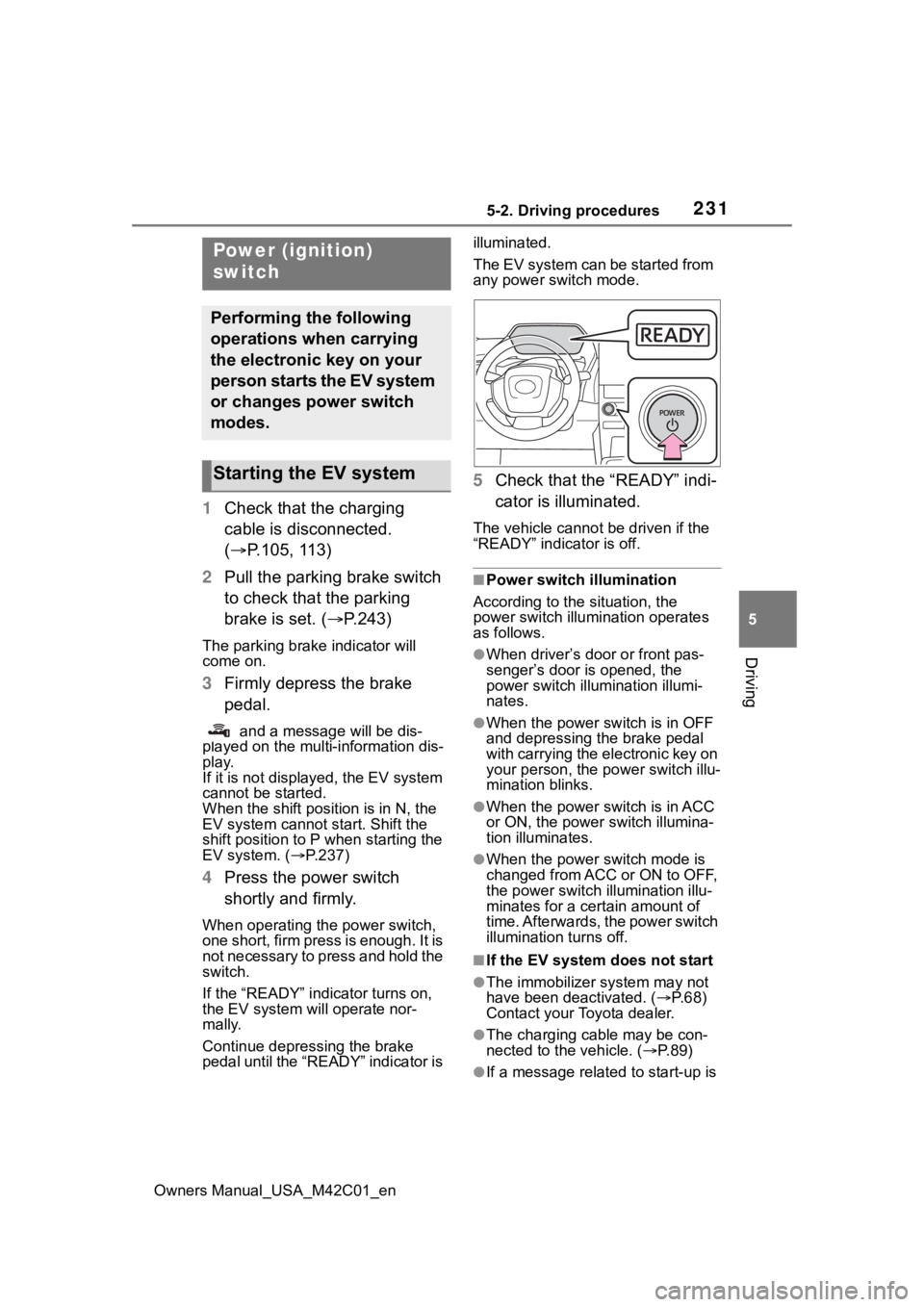
If the “READY” indicator turns on,
the EV system will operate nor-
mally.
Continue depressing the brake
pedal until the “READY” indicator is illuminated.
The EV system can be started from
any power switch mode.
5
Check that the “READY” indi-
cator is illuminated.
The vehicle cannot be driven if the
“READY” indicator is off.
■Power switch illumination
According to the situation, the
power switch illu mination operates
as follows.
●When driver’s door or front pas-
senger’s door is opened, the
power switch illu mination illumi-
nates.
●When the power switch is in OFF
and depressing t he brake pedal
with carrying the electronic key on
your person, the power switch illu-
mination blinks.
●When the power switch is in ACC
or ON, the power switch illumina-
tion illuminates.
●When the power switch mode is
changed from ACC or ON to OFF,
the power switch illumination illu-
minates for a certain amount of
time. Afterwards, the power switch
illumination turns off.
■If the EV system does not start
●The immobilizer system may not
have been deactivated. ( P. 6 8 )
Contact your Toyota dealer.
●The charging cable may be con-
nected to the vehicle. ( P. 8 9 )
●If a message related to start-up is
Power (ignition)
switch
Performing the following
operations when carrying
the electronic key on your
person starts the EV system
or changes power switch
modes.
Starting the EV system
Page 232 of 628
2325-2. Driving procedures
Owners Manual_USA_M42C01_enshown on the multi-information
display, read the message and fol-
low the instructions.
●If the door is unlocked with the
mechanical key, the EV system
cannot be started using the smart
key system. Refer to P.540 to start
the EV system. However, if the
electronic key is carried inside the
vehicle and the do
ors are locked
( P.170), the EV system can be
started.
■When the ambient temperature
is low, such as during winter
driving conditions
●When starting the EV system, the
flashing time of the “READY” indi-
cator may be long. Leave the
vehicle as it is until the “READY”
indicator is steady on, as steady
means the vehicle is able to move.
●When the traction battery is
extremely cold (below approxi-
mately -22°F [-30°C]) under the
influence of the outside tempera-
ture, it may not be possible to start
the EV system. In this case, try to
start the EV system again after the
temperature of the traction battery
increases due to the outside tem-
perature increase, etc.
■Sounds and vibrations specific
to an battery electric vehicle
P. 7 4
■If the 12-volt battery is dis-
charged
The EV system cannot be started
using the smart key system. Refer
to P.541 to restart the EV system.
■Electronic key battery depletion
P. 1 6 2
■Conditions affecting operation
P. 1 8 8
■Note for the entry function
P. 1 8 9
■If there is a malfunction in the
smart key system
If “Smart Key System Malfunction”
is displayed on the multi-information
display, the system may be malfunc-
tioning. Have the vehicle inspected
by your Toyota dealer immediately.
■If the “READY” indicator does
not come on
In the event that the “READY” indi-
cator does not come on even after
performing the proper procedures
for starting the vehicle, contact your
Toyota dealer immediately.
■If the EV system is malfunction-
ing
P. 8 0
■Electronic key battery
P.497
■Operation of the power switch
●If the switch is not pressed shortly
and firmly, the power switch mode
may not change or the EV system
may not start.
●If attempting to restart the EV sys-
tem immediately after turning the
power switch to OFF, the EV sys-
tem may not start in some cases.
After turning the power switch to
OFF, please wait a few seconds
before restarti ng the EV system.
■Customization
If the smart key system has been
deactivated in a customized setting,
refer to P.540.
WARNING
■When starting the EV system
Always start the EV system while
sitting in the driver’s seat. Do not
depress the accelerator pedal
while starting the EV system
under any circumstances.
Doing so may cause an accident
resulting in death o r serious injury.
Page 237 of 628
2375-2. Driving procedures
Owners Manual_USA_M42C01_en
5
Driving
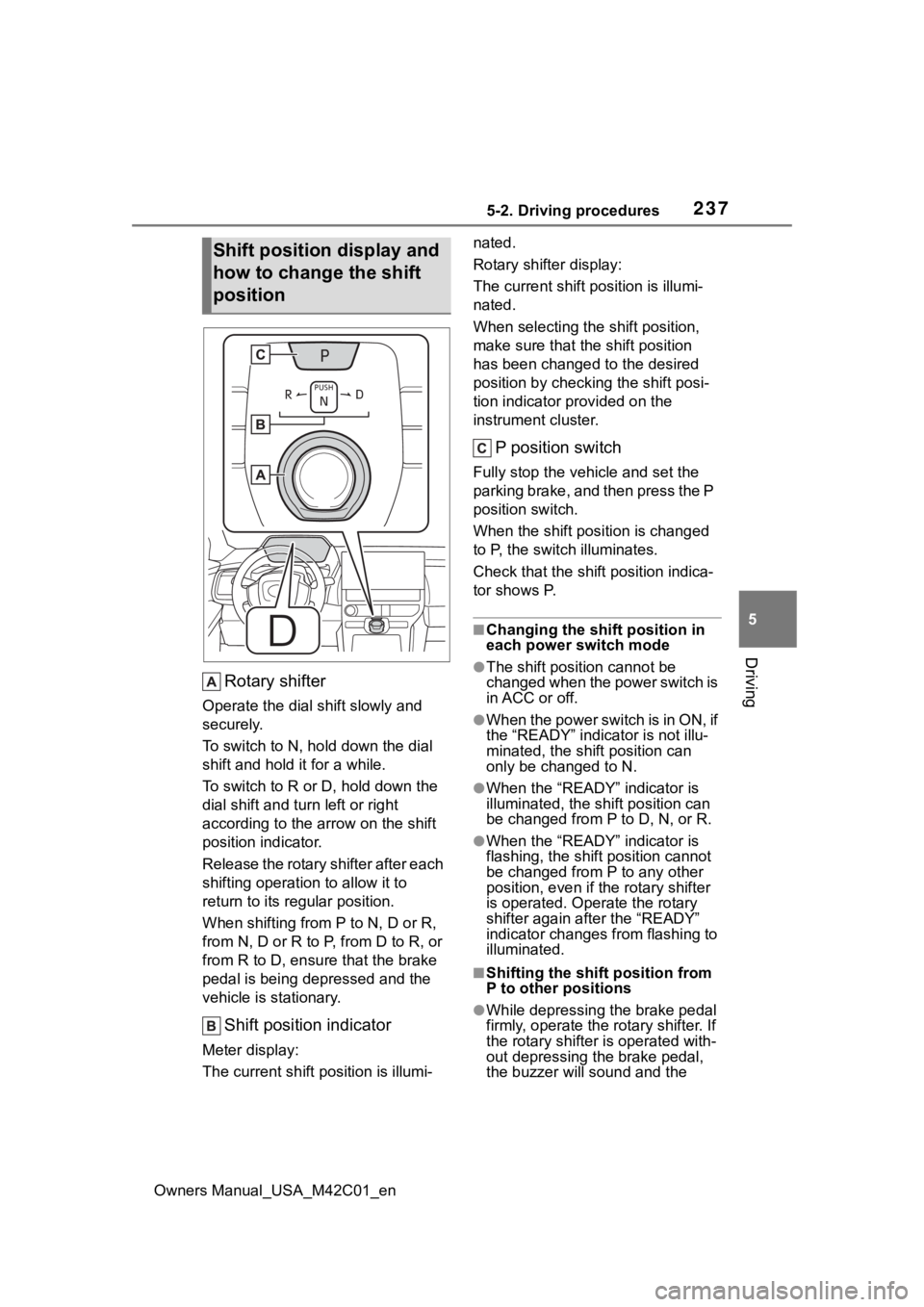
Rotary shifter
Operate the dial shift slowly and
securely.
To switch to N, hol d down the dial
shift and hold it for a while.
To switch to R or D, hold down the
dial shift and turn left or right
according to the arrow on the shift
position indicator.
Release the rotary shifter after each
shifting operation to allow it to
return to its regular position.
When shifting from P to N, D or R,
from N, D or R to P, from D to R, or
from R to D, ensure that the brake
pedal is being depressed and the
vehicle is stationary.
Shift position indicator
Meter display:
The current shift position is illumi- nated.
Rotary shifter display:
The current shift p
osition is illumi-
nated.
When selecting the shift position,
make sure that the shift position
has been changed to the desired
position by checking the shift posi-
tion indicator provided on the
instrument cluster.
P position switch
Fully stop the vehicle and set the
parking brake, and then press the P
position switch.
When the shift position is changed
to P, the switch illuminates.
Check that the shif t position indica-
tor shows P.
■Changing the shift position in
each power switch mode
●The shift position cannot be
changed when the power switch is
in ACC or off.
●When the power switch is in ON, if
the “READY” indica tor is not illu-
minated, the shift position can
only be changed to N.
●When the “READY” indicator is
illuminated, the shift position can
be changed from P to D, N, or R.
●When the “READY” indicator is
flashing, the shift position cannot
be changed from P to any other
position, even if the rotary shifter
is operated. Ope rate the rotary
shifter again after the “READY”
indicator changes from flashing to
illuminated.
■Shifting the shift position from
P to other positions
●While depressing the brake pedal
firmly, operate the rotary shifter. If
the rotary shifter is operated with-
out depressing the brake pedal,
the buzzer will sound and the
Shift position display and
how to change the shift
position
Page 406 of 628
4066-1. Using the air conditioning system and defogger
Owners Manual_USA_M42C01_en
1Press the automatic mode
switch.
The dehumidification function begins to operate. Air outlets and
fan speed are automatically
adjusted according to the tempera-
ture setting and humidity.
2
Adjust the temperature set-
ting.
3 To stop the operation, press
the “OFF” switch.
If the fan speed setting or air
flow modes are operated, the
automatic mode indicator goes
off. However, automatic mode
for functions other than that
operated is maintained.
■Using automatic mode
Fan speed is adjusted automati-
cally according to the temperature
setting and the ambient conditions.
Therefore, the fan may stop for a
while until warm or cool air is ready
to flow immediately after the auto-
matic mode switch is pressed.
To turn on the “SYNC” mode,
perform any of the following pro-
cedures:
Press the “SYNC” mode
switch.
Adjust the front passenger’s
side temperature setting.
The indicator comes on when the
“SYNC” mode is on.
WARNING
■To prevent the windshield
from fogging up
Do not use the windshield defog-
ger switch during cool air opera-
tion in extremely humid weather.
The difference between the tem-
perature of the outside air and
that of the windshield can cause
the outer surface of the wind-
shield to fog up, blocking your
vision.
■To prevent burns
●Do not touch the rear view mir-
ror surfaces when the outside
rear view mirror defoggers are
on.
●Vehicles with windshield wiper
de-icer: Do not touch the glass
at lower part of the windshield
or to the side of the front pillars
when the windshield wiper de-
icer is on.
NOTICE
■To prevent 12-volt battery dis-
charge
Do not leave the air conditioning
system on longer than necessary
when the EV system is off.
■When repairing/replacing
parts of the air conditioning
system
Have repair/replacement per-
formed by your Toyota dealer.
When a part of the air conditioning
system, such as the evaporator, is
to be replaced, it must be
replaced with a new one.
Using automatic mode
Adjusting the temperature
for driver and front pas-
senger seats separately
(“SYNC” mode)
Page 543 of 628
5438-2. Steps to take in an emergency
Owners Manual_USA_M42C01_en
8
When trouble arises
6 Open and close any of the
doors of your vehicle with the
power switch OFF.
7 Maintain the engine speed of
the second vehicle and start
the EV system of your vehi-
cle by turning the power
switch to ON.
8 Make sure the “READY” indi-
cator comes on. If the indica-
tor light does not come on,
contact your Toyota dealer.
9 Once the EV system has
started, remove the jumper
cables in the exact reverse
order from which they were
connected.
10 Close the positive (+) battery
terminal cover.
Once the EV system starts,
have the vehicle inspected at
your Toyota dealer as soon as
possible.
■Starting the EV system when
the 12-volt battery is dis-
charged
The EV system cannot be started by
push-starting.
■To prevent 12-volt battery dis-
charge
●Turn off the headlights, the air
conditioning system, the audio
system, etc. while the EV system
is off.
●Turn off any unnecessary electri-
cal components when the vehicle
is running at a low speed for an
extended period, such as in heavy
traffic.
■Charging the 12-volt battery
The electricity stored in the 12-volt
battery will discha rge gradually even
when the vehicle i s not in use, due
to natural dischar ge and the drain-
ing effects of certain electrical appli-
ances. If the vehicle is left for a long
time, the 12-volt battery may dis-
charge, and the EV system may be
unable to start. (The 12-volt battery
recharges automatically while the
EV system is operating.)
■When the 12-volt battery is
removed or discharged
●Information stored in the ECU is
cleared. When the 12-volt battery
is depleted, have the vehicle
inspected at your Toyota dealer.
●In some cases, it may not be pos-
sible to unlock the doors using the
smart key system when the 12-
volt battery is discharged. Use the
wireless remote c ontrol or the
mechanical key to lock or unlock
the doors.
●The EV system may not start on
the first attempt a fter the 12-volt
battery has recharged but will start
normally after the second attempt.
This is not a malfunction.
●The power switch mode is memo-
rized by the vehicle. When the 12-
volt battery is reconnected, the
system will return to the mode it
was in before the 12-volt battery
was discharged. Before discon-
necting the 12-volt battery, turn
the power switch off.
If you are unsure what mode the
power switch was in before the
12-volt battery discharged, be
especially careful when recon-
necting the 12-volt battery.
●If the 12-volt battery discharges, it
may not be possible to shift the
shift position to o ther positions. In
this case, the vehicle cannot be
towed without lifting both front
wheels because the front wheels
will be locked.
●The power back door (if equipped)