audio SUBARU TRIBECA 2007 1.G User Guide
[x] Cancel search | Manufacturer: SUBARU, Model Year: 2007, Model line: TRIBECA, Model: SUBARU TRIBECA 2007 1.GPages: 377, PDF Size: 5.65 MB
Page 176 of 377
Audio 5-5
– CONTINUED –
V
To change tone and balance control
modes
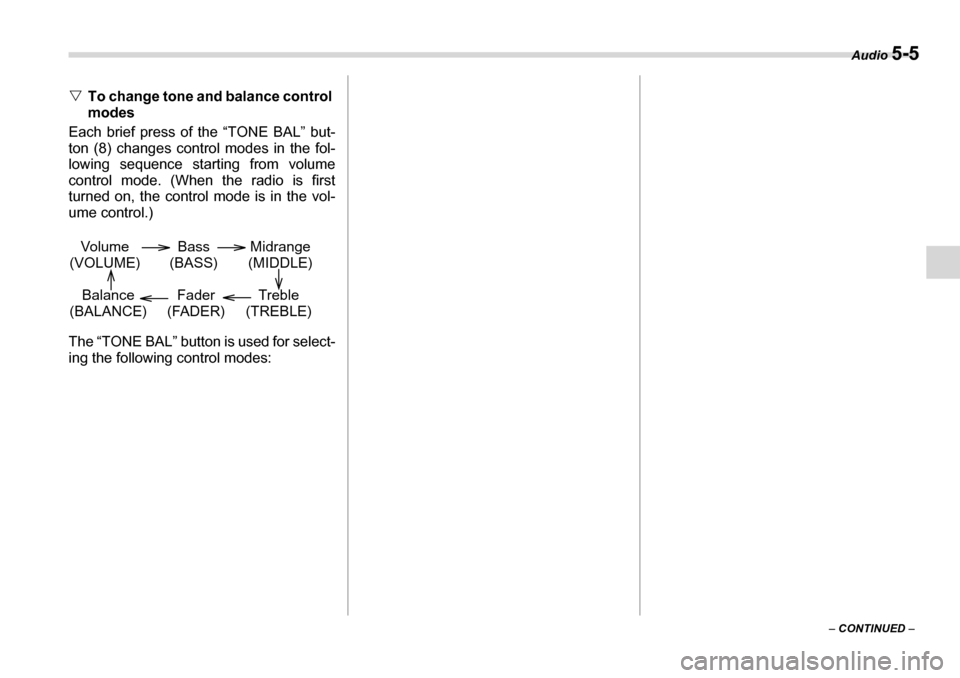
Each brief press of the “TONE BAL” but-
ton (8) changes control modes in the fol-
lowing sequence starting from volume
control mode. (When the radio is first
turned on, the control mode is in the vol-
ume control.)
The “TONE BAL” button is used for select-
ing the following control modes:
Volume
(VOLUME) Bass
(BASS) Midrange
(MIDDLE)
Treble
(TREBLE)
Fader
(FADER)
Balance
(BALANCE)
Page 177 of 377
5-6 Audio
TFM/AM selection button
Push the “FM” (2) or “AM” (1) button when the radio is off to turn on the radio.
Push the “FM” or “AM” button when the radio is on to select FM1, FM2 or AM reception. Control mode (Range of
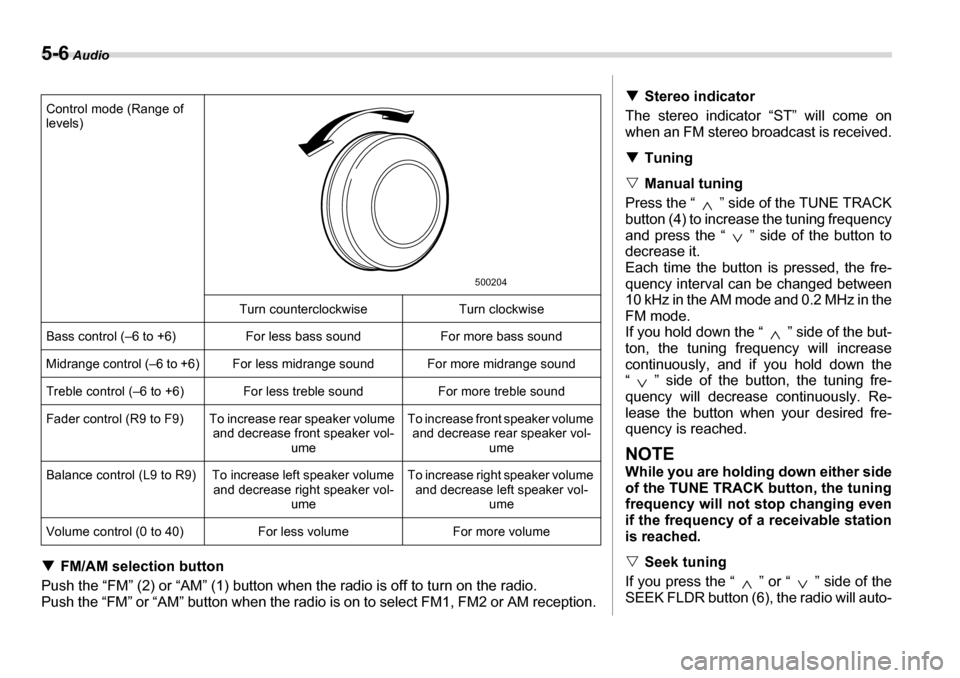
levels)
Turn counterclockwise Turn clockwise
Bass control (–6 to +6) For less bass sound For more bass sound
Midrange control (–6 to +6) For less midrange sound For more midrange sound
Treble control (–6 to +6) For less treble sound For more treble sound
Fader control (R9 to F9) To increase rear speaker volume and decrease front speaker vol-ume To increase front speaker volume
and decrease rear speaker vol- ume
Balance control (L9 to R9) To increase left speaker volume and decrease right speaker vol-ume To increase right speaker volume
and decrease left speaker vol- ume
Volume control (0 to 40) For less volume For more volume
500204
T Stereo indicator
The stereo indicator “ST” will come on
when an FM stereo broadcast is received. T Tuning
V Manual tuning
Press the “ ” side of the TUNE TRACK
button (4) to increase the tuning frequency
and press the “ ” side of the button to
decrease it.
Each time the button is pressed, the fre-
quency interval can be changed between
10 kHz in the AM mode and 0.2 MHz in the
FM mode.
If you hold down the “ ” side of the but-
ton, the tuning frequency will increase
continuously, and if you hold down the
“ ” side of the button, the tuning fre-
quency will decrease continuously. Re-
lease the button when your desired fre-
quency is reached.
NOTE
While you are holding down either side
of the TUNE TRACK button, the tuning
frequency will not stop changing even
if the frequency of a receivable station
is reached. V Seek tuning
If you press the “ ” or “ ” side of the SEEK FLDR button (6), the radio will auto-
Page 178 of 377
Audio 5-7
– CONTINUED –
matically search for a receivable station
and stop at the first one it finds. This func-
tion may not be available, however, when
radio signals are weak. In such a situation,
perform manual tuning to select the de-
sired station. V
Automatic tuning (SCAN)
Press the “SCAN” button (7) to change the
radio to the SCAN mode. In this mode, the
radio scans through the radio band until a
station is found. The radio will stop at the
station for five seconds while displaying
the frequency, after which scanning will
continue until the entire band has been
scanned from the low end to the high end.
Press the “SCAN” button again to cancel
the SCAN mode and to stop on any dis-
played frequency.
Press the “ ” or “ ” side of the SEEK
FLDR (6) button again to cancel the scan
mode and to stop on any displayed fre-
quency.
When the “SCAN” button is pressed for
automatic tuning, stations are scanned in
the direction of low frequencies to high fre-
quencies only.
Automatic tuning may not function proper-
ly if the station reception is weakened by
distance from the station or proximity to
tall buildings and hills. T
Selecting preset stations
Presetting a station with a preset button
(9) allows you to select that station in a
single operation. Up to six, AM, FM1 and
FM2 stations each may be preset. T How to preset stations
1. Press the “FM” (2) or “AM” (1) button to
select FM1, FM2, or AM reception.
2. Press the “SCAN” button (7) or tune
the radio manually until the desired station
frequency is displayed.
3. Press one of the preset buttons (9) for
more than 1.5 seconds to store the fre-
quency. If the button is pressed for less
than 1.5 seconds, the preceding selection
will remain in memory.
NOTE y If the connection between the radio
and battery is broken for any reason
such as vehicle maintenance or radio
removal, all stations stored in the pre-
set buttons are cleared. If this occurs,
it is necessary to reset the preset but- tons.y If a cell phone is placed near the ra-
dio, it may cause the radio to emit
noise when it receives calls. This noise
does not indicate a radio fault. T Rear seat entertainment
If your vehicle is equipped with a Rear Seat Entertainment System, you can en-
joy audio outputs from the system through
the vehicle’s speakers by pressing the
“RSE AUX” button. Press the button again
to return to the audio set sound.
Page 179 of 377
5-8 Audio
„Compact disc player operation
(1) (2) (5) (6) (7) (3) (4)
(8)
500205
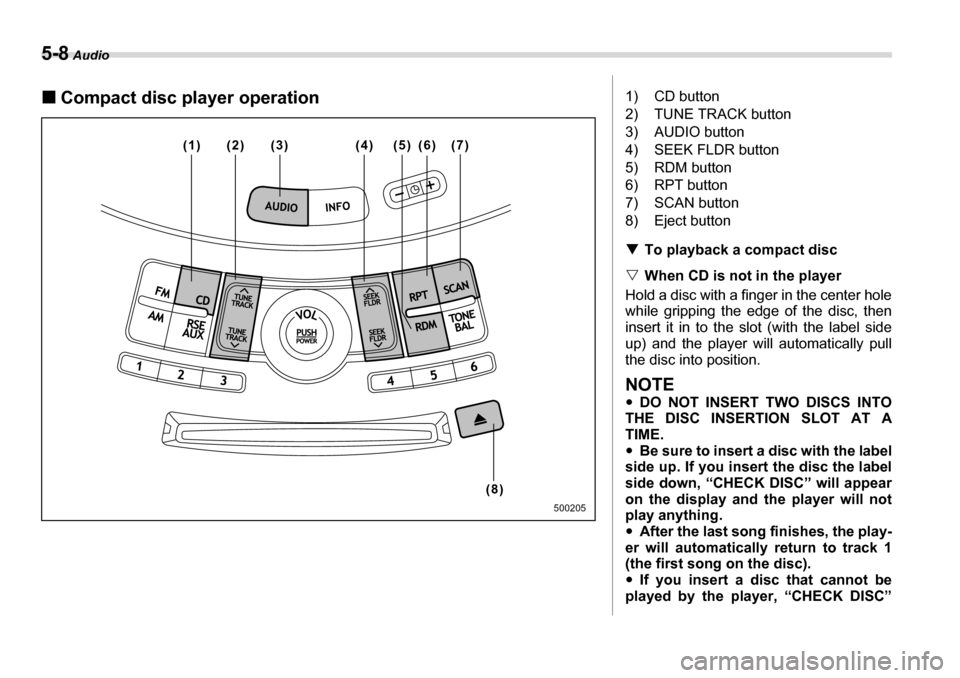
1) CD button
2) TUNE TRACK button
3) AUDIO button
4) SEEK FLDR button
5) RDM button
6) RPT button
7) SCAN button
8) Eject button TTo playback a compact disc
V When CD is not in the player
Hold a disc with a finger in the center hole
while gripping the edge of the disc, then
insert it in to the slot (with the label side
up) and the player will automatically pull
the disc into position.
NOTE y DO NOT INSERT TWO DISCS INTO
THE DISC INSERTION SLOT AT A
TIME.y Be sure to insert a disc with the label
side up. If you insert the disc the label
side down, “CHECK DISC” will appear
on the display and the player will not
play anything. y After the last song finishes, the play-
er will automatically return to track 1
(the first song on the disc). y If you insert a disc that cannot be
played by the player, “CHECK DISC”
Page 180 of 377
Audio 5-9
– CONTINUED –
will appear on the display and the play-
er will revert to the previously selected
mode.y
The player is designed to be able to
play music CD-Rs and music CD-RWs,
but it may not be able to play certain
ones. y Single CDs (i.e., 8 cm/3 inch CDs) are
not supported, and if inserted, they will
be immediately ejected. V When CD is in the player
When the “CD” button (1) is pressed, the
player will start playback.
NOTE
After the last song finishes, the player
will automatically return to track 1 (the
first song on the disc). T To stop playback of a CD
When the “POWER-VOL” button is
pressed during playback of a CD, the CD
stops playing temporarily. To let the CD
resume playing, press the button again. T To select a song from its beginning
V Forward direction
Briefly press the “ ” side of the TUNE
TRACK button (2) to skip to the beginning
of the next track/file (track). Each time this
side of the button is pressed, the indicated
track/file (track) number will increase.
NOTE
In an MP3 folder, skipping past the last
track/file (track) will take you back to
the first track/file (track) in the folder. V Backward direction
Briefly press the “ ” side of the TUNE
TRACK button (2) to skip to the beginning
of the current track/file (track). Each time
this side of the button is pressed, the indi-
cated track/file (track) number will de- crease.
NOTE
In an MP3 folder, skipping past the last
track/file (track) will take you back to
the first track/file (track) in the folder. T Fast-forwarding and fast-reversing
V Fast-forwarding
Press the “ ” side of the TUNE TRACK
button (2) continuously to fast-forward the track/file.
Release the button to stop fast-forward-
ing.
NOTE
If you fast-forward past the last track/
file (track) on the disc, the player will select the first track/file (track) on the
disc and start playing it. V
Fast-reversing
Press the “ ” side of the TUNE TRACK
button (2) continuously to fast-reverse the
track/file (track).
Release the button to stop fast-reversing.
NOTE
If you fast-reverse to the beginning of
the first track/file (track) on the disc,
the fast-reversing will stop and the
player will start playing the first track/
file (track) on the disc. T Folder selection (MP3 disc)
Press the “ ” side of the SEEK FLDR
button (2) briefly to select the next folder.
Pressing the “ ” side of the same button
the first time makes the player go back to
the beginning of the currently selected file;
pressing it a second time makes it go back
to the previously selected file.
NOTE
Only MP3 folders are recognized when
an attempt to select the next or previ-
ous folder is made. If no appropriate
folder exists on the disc, pressing the
“ ” or “ ” side of the SEEK FLDR
button has no effect.
Page 181 of 377
5-10 Audio
TRepeating
V To repeat the currently playing
track/file (track)
To repeat a track/file (track), briefly press
the “RPT” button (6) while the track/file
(track) is playing. The display will show
“RPT”, and the track/file (track) will be re-
peated.
To cancel the track/file (track) repeat-play
mode:
Press the “RPT” button once (non-MP3
disc)
Press the “RPT” button twice (MP3 disc)
The “RPT” indication will go off, and the
normal playback mode will be resumed.
NOTE y With an MP3 disc inserted, each time
you briefly press the button, the mode
will change to the next one in the fol-
lowing sequence.
If you accidentally press the button
and cancel the track/file (track) repeat-
play mode, press it again to reselect
the repeat-play mode. y The repeat-play mode will be can-
celled if you perform any of the follow-
ing steps: y
Press the “RDM” button
y Press the “SCAN” button
y Press the “ ” button
y Select the radio mode
y Press the “RSE AUX” button
y Press the “ ” or “ ” side of
the SEEK FLDR button (MP3 disc)y Turn off the power of the audio
equipment. y Turn the ignition switch to the
“OFF” position.
V To repeat the currently playing fold-er (MP3 disc)
To repeat the currently playing folder,
press the “RPT” (6) button twice while a
file (track) is playing. The display will show
“D-RPT”, and the folder will be played re-
peatedly.
To cancel the folder repeat-play mode,
press the “RPT” button once more. The
“D-RPT” indication will go off, and the nor-
mal playback mode will be resumed.
NOTE y Each time you briefly press the but-
ton, the mode will change to the next
one in the following sequence.
If you accidentally press the button and cancel the folder repeat-play
mode, press it again to reselect the folder repeat-play mode.y
The folder repeat-play mode will be
cancelled if you perform any of the fol-
lowing steps:
yPress the “RDM” button
y Press the “SCAN” button
y Press the “ ” button
y Select the radio mode
y Press the “RSE AUX” button
y Press the “ ” or “ ” side of
the SEEK FLDR button (MP3 disc) y Turn off the power of the audio
equipment. y Turn the ignition switch to the
“OFF” position.
T Random playback
V Non-MP3 disc
Press the “RDM” button (5) briefly during
disc playback to play all of the tracks on
the disc in a random order. The display will
show “RDM”, and all of the tracks on the
disc will be played in a random order.
To cancel random mode, press the button
again. The “RDM” indication will go off,
and the normal playback mode will be re- sumed.
NOTE
Random playback will be cancelled if
RPT D-RPT CANCEL
RPT D-RPT CANCEL
Page 182 of 377
Audio 5-11
– CONTINUED –
you perform any of the following steps: y
Press the “RPT” button
y Press the “SCAN” button
y Press the “ ” button
y Select the radio mode
y Press the “RSE AUX” button
y Press the “ ” or “ ” side of the
SEEK FLDR button y Turn off the power of the audio
equipment. y Turn the ignition switch to the “OFF”
position. V MP3 disc
Press the “RDM” button (5) during disc
playback to play all of the tracks in the
folder currently being played in random or-
der. Press the “RDM” button again to play
all of the tracks on the disc in random or-
der. The display will show “RDM” during
the random mode.
To cancel the random mode, press the
“RDM” button during “in-disc” random
playback. The “RDM” indication will go off,
and the normal playback mode will be re-
sumed.
NOTE y Each time you briefly press the but-
ton, the mode will change to the next
one in the following sequence. If you accidentally press the button
and cancel the random mode, press it
again to reselect the random mode. y
Random playback will be cancelled if
you perform any of the following steps: yPress the “RPT” button
y Press the “SCAN” button
y Press the “ ” button
y Select the radio mode
y Press the “RSE AUX” button
y Press the “ ” or “ ” side of
the SEEK FLDR button y Turn off the power of the audio
equipment. y Turn the ignition switch to the
“OFF” position.
T Scan
The scan mode lets you listen to the first
10 seconds of each track/file (track) on the
disc/folder in succession. Press the
“SCAN” button (7) to start scanning
through all tracks upward beginning with
the track/file (track) following the currently
selected one. After all tracks/files (tracks)
on the disc/folder has been scanned, nor-
mal playback mode is restored. To cancel a scan, press the button again.
NOTE
The scan mode will be cancelled if you
perform any of the following opera- tions: y
Press the “RPT” button
y Press the “RDM” button
y Press the “ ” button
y Press the “ ” or “ ” side of the
TUNE TRACK button y Press the “ ” or “ ” side of the
SEEK FLDR button (MP3 disc) y Select the radio mode
y Press the “RSE AUX” button
y Turn off the power of the audio
equipment. y Turn the ignition switch to the “OFF”
position. T To eject a disc from the player
When a disc is being played back or when
a disc is in the player, press the eject but-
ton “ ” (8). The disc will be ejected.
NOTE y Avoid driving the vehicle with a CD
sticking out, because vibration might
make it fall out. y If the disc is left ejected for more
than approximately 15 seconds after
the ignition switch is turned to the
“OFF” position, a disc protection func-
CANCEL
Page 183 of 377
5-12 Audio
tion will operate, automatically reload-
ing the disc. In this case, the disc is not
played. TDisplay selection (MP3 disc)
If you press the “AUDIO” button (3) for 0.5
second or longer during playback, the in-
dication will change to the next one in the
following sequence. T Page (track/folder title) scroll (MP3
disc)
If, having pressed the “AUDIO” button (3)
to select track title or folder title display,
you press the “AUDIO” button again for
less than 0.5 second, the title will be
scrolled so you can see all of it. You will
see eight characters at a time.
NOTE
The display is designed to show titles
for up to three pages (64 characters intotal).
File title Time
Folder title
Page 184 of 377
Audio 5-13
– CONTINUED –
Type B audio set (if equipped)
The audio set will operate only when the ignition switch is in the “ACC” or “ON” positions. „Radio operation
(2)
(1) (4) (5) (7) (8) (3) (6)
(9)
(9)
500207
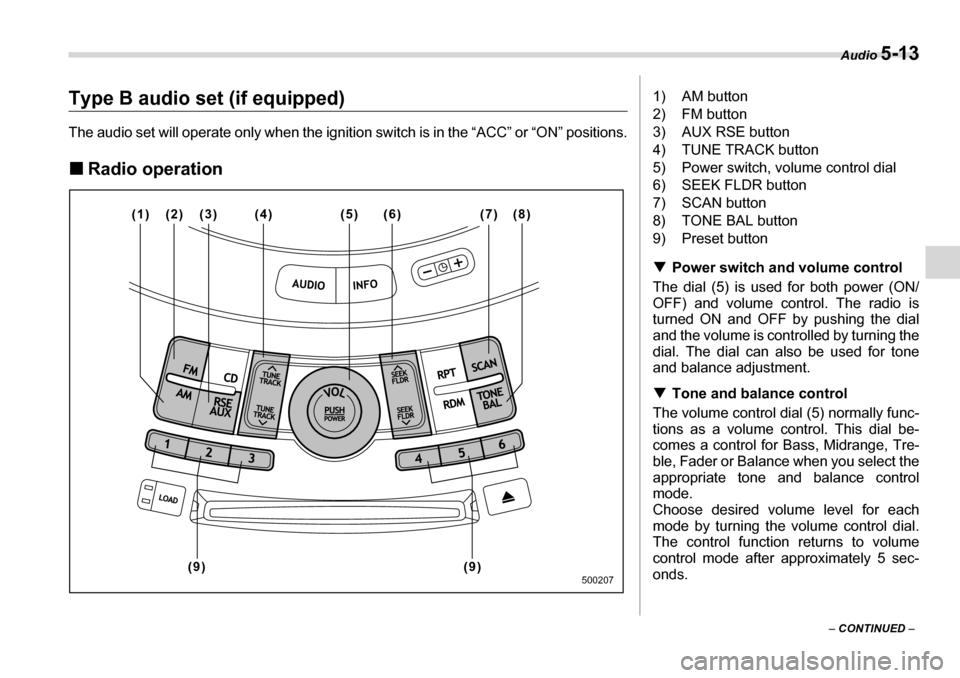
1) AM button
2) FM button
3) AUX RSE button
4) TUNE TRACK button
5) Power switch, volume control dial
6) SEEK FLDR button
7) SCAN button
8) TONE BAL button
9) Preset button T Power switch and volume control
The dial (5) is used for both power (ON/
OFF) and volume control. The radio is
turned ON and OFF by pushing the dial
and the volume is controlled by turning the
dial. The dial can also be used for tone
and balance adjustment. T Tone and balance control
The volume control dial (5) normally func-
tions as a volume control. This dial be-
comes a control for Bass, Midrange, Tre-
ble, Fader or Balance when you select the
appropriate tone and balance control mode.
Choose desired volume level for each
mode by turning the volume control dial.
The control function returns to volume
control mode after approximately 5 sec-
onds.
Page 185 of 377
5-14 Audio
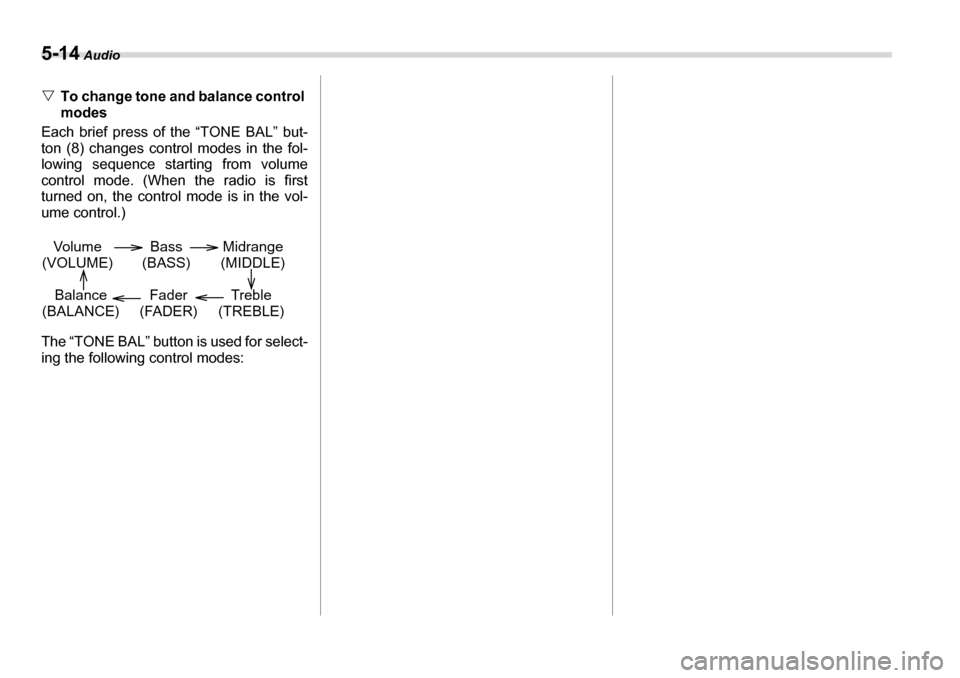
VTo change tone and balance control modes
Each brief press of the “TONE BAL” but-
ton (8) changes control modes in the fol-
lowing sequence starting from volume
control mode. (When the radio is first
turned on, the control mode is in the vol-
ume control.)
The “TONE BAL” button is used for select-
ing the following control modes:
Volume
(VOLUME) Bass
(BASS) Midrange
(MIDDLE)
Treble
(TREBLE)
Fader
(FADER)
Balance
(BALANCE)