display SUBARU TRIBECA 2007 1.G User Guide
[x] Cancel search | Manufacturer: SUBARU, Model Year: 2007, Model line: TRIBECA, Model: SUBARU TRIBECA 2007 1.GPages: 377, PDF Size: 5.65 MB
Page 146 of 377
Instruments and controls 3-25
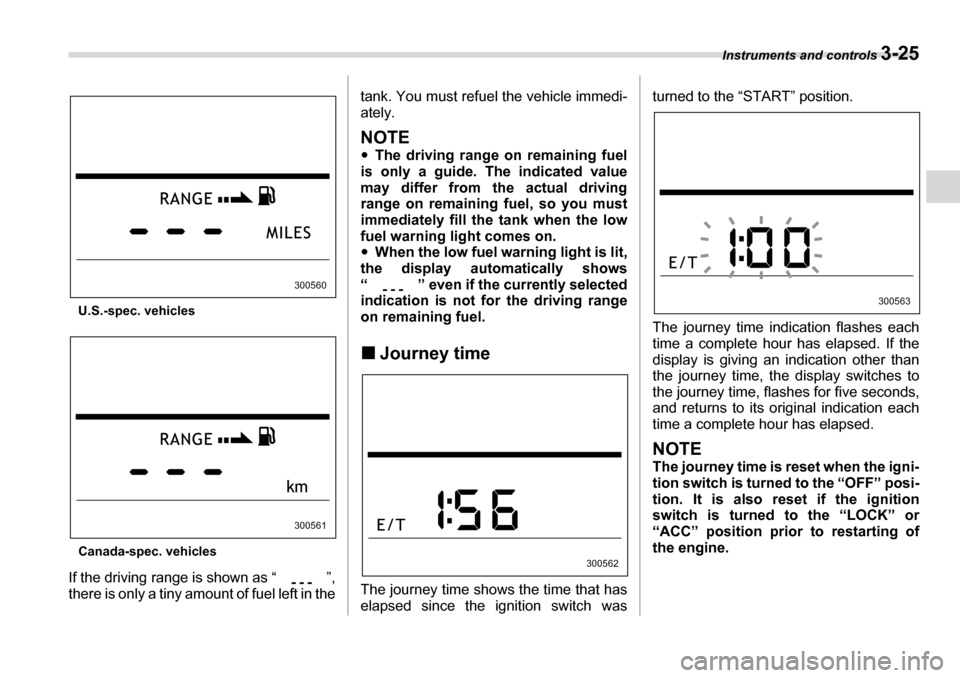
U.S.-spec. vehicles
Canada-spec. vehicles
If the driving range is shown as “ ”,
there is only a tiny amount of fuel left in the tank. You must refuel the vehicle immedi-
ately.
NOTE y
The driving range on remaining fuel
is only a guide. The indicated value
may differ from the actual driving
range on remaining fuel, so you must
immediately fill the tank when the low
fuel warning light comes on.y When the low fuel warning light is lit,
the display automatically shows
“ ” even if the currently selected
indication is not for the driving range
on remaining fuel. „ Journey time
The journey time shows the time that has
elapsed since the ignition switch was turned to the “START” position.
The journey time indication flashes each
time a complete hour has elapsed. If the
display is giving an indication other than
the journey time, the display switches to
the journey time, flashes for five seconds,
and returns to its original indication each
time a complete hour has elapsed.
NOTE
The journey time is reset when the igni-
tion switch is turned to the “OFF” posi-
tion. It is also reset if the ignition
switch is turned to the “LOCK” or
“ACC” position prior to restarting of
the engine.
300560
300561
300562
300563
Page 148 of 377
Instruments and controls 3-27
– CONTINUED –
the high beam indicator light “ ” on
the instrument panel also comes on. „
Daytime running light system
The low beam headlights will automatical-
ly come on at reduced brightness when
the engine has started, under the follow-
ing conditions:yThe parking brake is fully released.
y The light switch is in the “OFF” or
“ ” position.
Turn signal lever
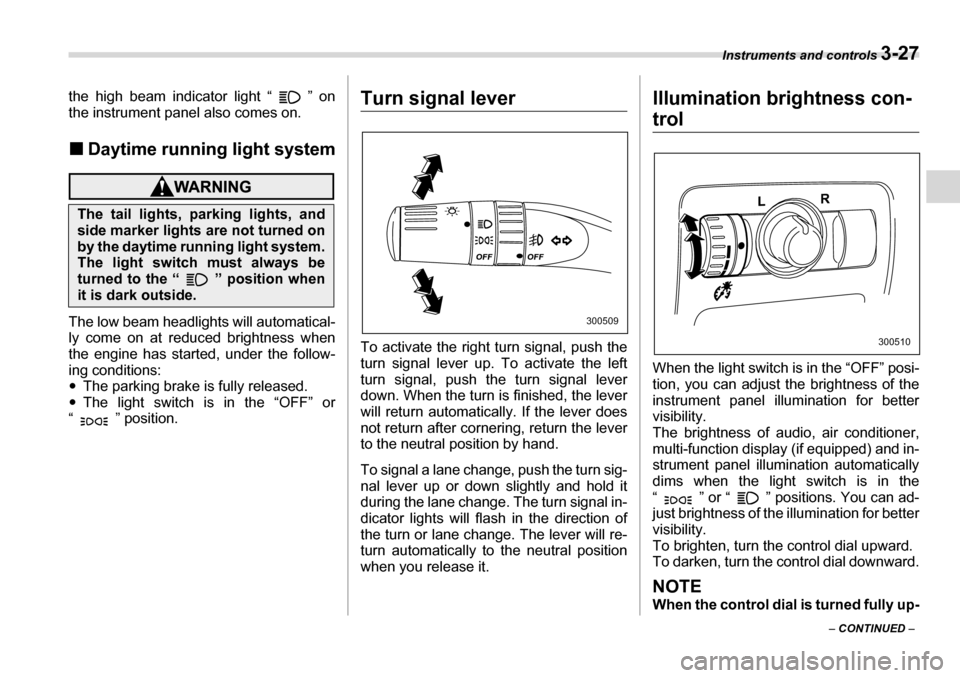
To activate the right turn signal, push the
turn signal lever up. To activate the left
turn signal, push the turn signal lever
down. When the turn is finished, the lever
will return automatically. If the lever does
not return after cornering, return the lever
to the neutral position by hand.
To signal a lane change, push the turn sig-
nal lever up or down slightly and hold it
during the lane change. The turn signal in-
dicator lights will flash in the direction of
the turn or lane change. The lever will re-
turn automatically to the neutral position
when you release it. Illumination brightness con-
trol
When the light switch is in the “OFF” posi-
tion, you can adjust the brightness of the
instrument panel illumination for better visibility.
The brightness of audio, air conditioner,
multi-function display (if equipped) and in-
strument panel illumination automatically
dims when the light switch is in the
“ ” or “ ” positions. You can ad-
just brightness of the illumination for better visibility.
To brighten, turn the control dial upward.
To darken, turn the control dial downward.
NOTE
When the control dial is turned fully up-
The tail lights, parking lights, and
side marker lights are not turned on
by the daytime running light system.
The light switch must always be
turned to the “ ” position when
it is dark outside.
300509
300510
Page 156 of 377
Instruments and controls 3-35
– CONTINUED –
ton, the compass display is toggled on or
off. When the compass is on, an illuminat-
ed compass reading will appear in the
lower part of the mirror.
Even with the mirror in anti-glare mode,
the mirror surface turns bright if the trans-
mission is shifted into reverse. This is to
ensure good rearward visibility during re-
versing. T
Photosensors
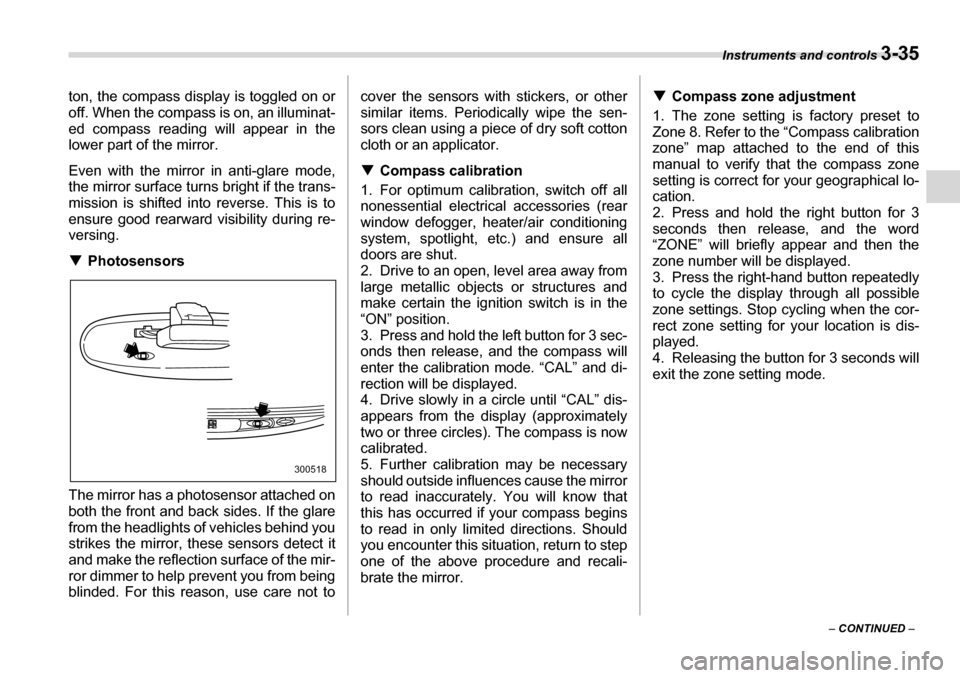
The mirror has a photosensor attached on
both the front and back sides. If the glare
from the headlights of vehicles behind you
strikes the mirror, these sensors detect it
and make the reflection surface of the mir-
ror dimmer to help prevent you from being
blinded. For this reason, use care not to cover the sensors with stickers, or other
similar items. Periodically wipe the sen-
sors clean using a piece of dry soft cotton
cloth or an applicator. T
Compass calibration
1. For optimum calibration, switch off all
nonessential electrical accessories (rear
window defogger, heater/air conditioning
system, spotlight, etc.) and ensure all
doors are shut.
2. Drive to an open, level area away from
large metallic objects or structures and
make certain the ignition switch is in the“ON” position.
3. Press and hold the left button for 3 sec-
onds then release, and the compass will
enter the calibration mode. “CAL” and di-
rection will be displayed.
4. Drive slowly in a circle until “CAL” dis-
appears from the display (approximately
two or three circles). The compass is now
calibrated.
5. Further calibration may be necessary
should outside influences cause the mirror
to read inaccurately. You will know that
this has occurred if your compass begins
to read in only limited directions. Should
you encounter this situation, return to step
one of the above procedure and recali-
brate the mirror. T
Compass zone adjustment
1. The zone setting is factory preset to
Zone 8. Refer to the “Compass calibration
zone” map attached to the end of this
manual to verify that the compass zone
setting is correct for your geographical lo- cation.
2. Press and hold the right button for 3
seconds then release, and the word
“ZONE” will briefly appear and then the
zone number will be displayed.
3. Press the right-hand button repeatedly to cycle the display through all possible
zone settings. Stop cycling when the cor-
rect zone setting for your location is dis-
played.
4. Releasing the button for 3 seconds will
exit the zone setting mode.
300518
Page 165 of 377
4-6 Climate control
To change the system back to the AUTO
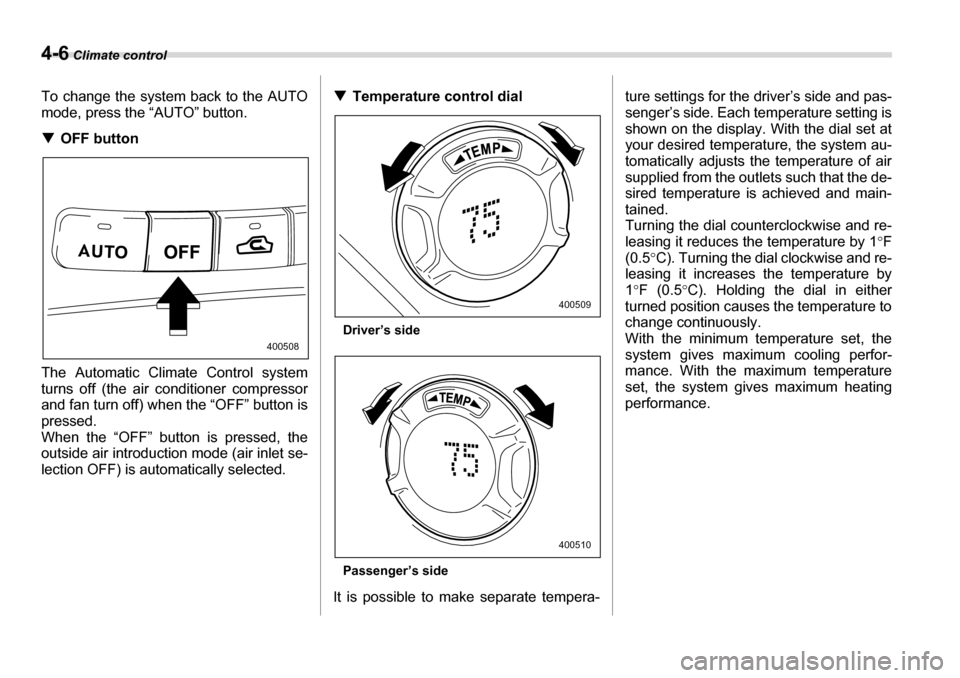
mode, press the “AUTO” button. TOFF button
The Automatic Climate Control system
turns off (the air conditioner compressor
and fan turn off) when the “OFF” button is
pressed.
When the “OFF” button is pressed, the
outside air introduction mode (air inlet se-
lection OFF) is automatically selected. T
Temperature control dial
Driver’s side
Passenger’s side
It is possible to make separate tempera- ture settings for the driver’s side and pas-
senger’s side. Each temperature setting is
shown on the display. With the dial set at
your desired temperature, the system au-
tomatically adjusts the temperature of air
supplied from the outlets such that the de-
sired temperature is achieved and main-
tained.
Turning the dial counterclockwise and re-
leasing it reduces the temperature by 1
°F
(0.5 °C). Turning the dial clockwise and re-
leasing it increases the temperature by1 °F (0.5 °C). Holding the dial in either
turned position causes the temperature to
change continuously.
With the minimum temperature set, the
system gives maximum cooling perfor-
mance. With the maximum temperature
set, the system gives maximum heating
performance.
400508
400509
400510
Page 178 of 377
Audio 5-7
– CONTINUED –
matically search for a receivable station
and stop at the first one it finds. This func-
tion may not be available, however, when
radio signals are weak. In such a situation,
perform manual tuning to select the de-
sired station. V
Automatic tuning (SCAN)
Press the “SCAN” button (7) to change the
radio to the SCAN mode. In this mode, the
radio scans through the radio band until a
station is found. The radio will stop at the
station for five seconds while displaying
the frequency, after which scanning will
continue until the entire band has been
scanned from the low end to the high end.
Press the “SCAN” button again to cancel
the SCAN mode and to stop on any dis-
played frequency.
Press the “ ” or “ ” side of the SEEK
FLDR (6) button again to cancel the scan
mode and to stop on any displayed fre-
quency.
When the “SCAN” button is pressed for
automatic tuning, stations are scanned in
the direction of low frequencies to high fre-
quencies only.
Automatic tuning may not function proper-
ly if the station reception is weakened by
distance from the station or proximity to
tall buildings and hills. T
Selecting preset stations
Presetting a station with a preset button
(9) allows you to select that station in a
single operation. Up to six, AM, FM1 and
FM2 stations each may be preset. T How to preset stations
1. Press the “FM” (2) or “AM” (1) button to
select FM1, FM2, or AM reception.
2. Press the “SCAN” button (7) or tune
the radio manually until the desired station
frequency is displayed.
3. Press one of the preset buttons (9) for
more than 1.5 seconds to store the fre-
quency. If the button is pressed for less
than 1.5 seconds, the preceding selection
will remain in memory.
NOTE y If the connection between the radio
and battery is broken for any reason
such as vehicle maintenance or radio
removal, all stations stored in the pre-
set buttons are cleared. If this occurs,
it is necessary to reset the preset but- tons.y If a cell phone is placed near the ra-
dio, it may cause the radio to emit
noise when it receives calls. This noise
does not indicate a radio fault. T Rear seat entertainment
If your vehicle is equipped with a Rear Seat Entertainment System, you can en-
joy audio outputs from the system through
the vehicle’s speakers by pressing the
“RSE AUX” button. Press the button again
to return to the audio set sound.
Page 179 of 377
5-8 Audio
„Compact disc player operation
(1) (2) (5) (6) (7) (3) (4)
(8)
500205
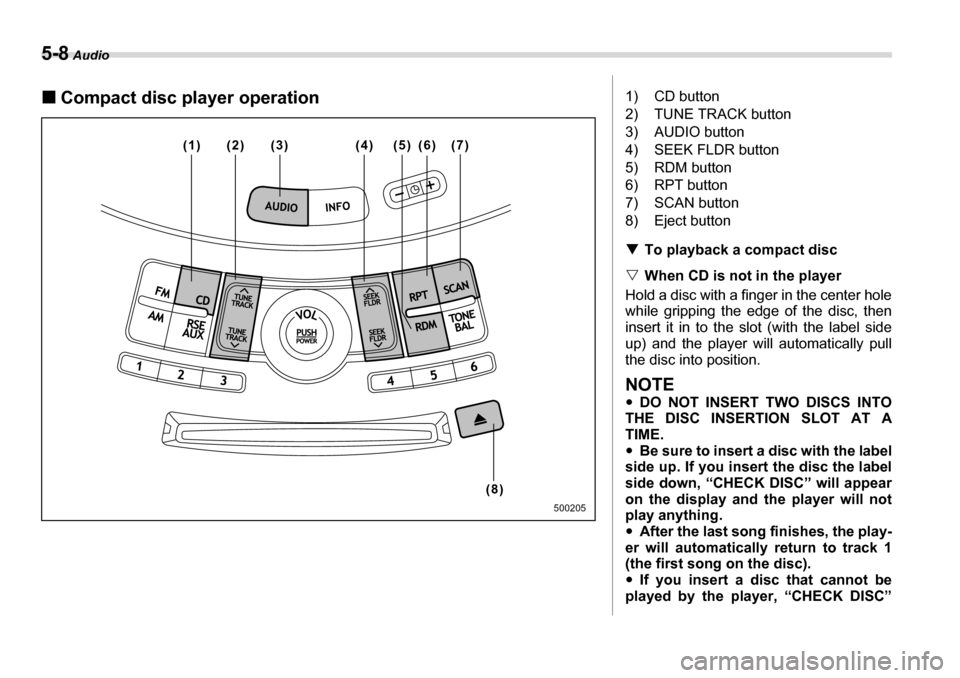
1) CD button
2) TUNE TRACK button
3) AUDIO button
4) SEEK FLDR button
5) RDM button
6) RPT button
7) SCAN button
8) Eject button TTo playback a compact disc
V When CD is not in the player
Hold a disc with a finger in the center hole
while gripping the edge of the disc, then
insert it in to the slot (with the label side
up) and the player will automatically pull
the disc into position.
NOTE y DO NOT INSERT TWO DISCS INTO
THE DISC INSERTION SLOT AT A
TIME.y Be sure to insert a disc with the label
side up. If you insert the disc the label
side down, “CHECK DISC” will appear
on the display and the player will not
play anything. y After the last song finishes, the play-
er will automatically return to track 1
(the first song on the disc). y If you insert a disc that cannot be
played by the player, “CHECK DISC”
Page 180 of 377
Audio 5-9
– CONTINUED –
will appear on the display and the play-
er will revert to the previously selected
mode.y
The player is designed to be able to
play music CD-Rs and music CD-RWs,
but it may not be able to play certain
ones. y Single CDs (i.e., 8 cm/3 inch CDs) are
not supported, and if inserted, they will
be immediately ejected. V When CD is in the player
When the “CD” button (1) is pressed, the
player will start playback.
NOTE
After the last song finishes, the player
will automatically return to track 1 (the
first song on the disc). T To stop playback of a CD
When the “POWER-VOL” button is
pressed during playback of a CD, the CD
stops playing temporarily. To let the CD
resume playing, press the button again. T To select a song from its beginning
V Forward direction
Briefly press the “ ” side of the TUNE
TRACK button (2) to skip to the beginning
of the next track/file (track). Each time this
side of the button is pressed, the indicated
track/file (track) number will increase.
NOTE
In an MP3 folder, skipping past the last
track/file (track) will take you back to
the first track/file (track) in the folder. V Backward direction
Briefly press the “ ” side of the TUNE
TRACK button (2) to skip to the beginning
of the current track/file (track). Each time
this side of the button is pressed, the indi-
cated track/file (track) number will de- crease.
NOTE
In an MP3 folder, skipping past the last
track/file (track) will take you back to
the first track/file (track) in the folder. T Fast-forwarding and fast-reversing
V Fast-forwarding
Press the “ ” side of the TUNE TRACK
button (2) continuously to fast-forward the track/file.
Release the button to stop fast-forward-
ing.
NOTE
If you fast-forward past the last track/
file (track) on the disc, the player will select the first track/file (track) on the
disc and start playing it. V
Fast-reversing
Press the “ ” side of the TUNE TRACK
button (2) continuously to fast-reverse the
track/file (track).
Release the button to stop fast-reversing.
NOTE
If you fast-reverse to the beginning of
the first track/file (track) on the disc,
the fast-reversing will stop and the
player will start playing the first track/
file (track) on the disc. T Folder selection (MP3 disc)
Press the “ ” side of the SEEK FLDR
button (2) briefly to select the next folder.
Pressing the “ ” side of the same button
the first time makes the player go back to
the beginning of the currently selected file;
pressing it a second time makes it go back
to the previously selected file.
NOTE
Only MP3 folders are recognized when
an attempt to select the next or previ-
ous folder is made. If no appropriate
folder exists on the disc, pressing the
“ ” or “ ” side of the SEEK FLDR
button has no effect.
Page 181 of 377
5-10 Audio
TRepeating
V To repeat the currently playing
track/file (track)
To repeat a track/file (track), briefly press
the “RPT” button (6) while the track/file
(track) is playing. The display will show
“RPT”, and the track/file (track) will be re-
peated.
To cancel the track/file (track) repeat-play
mode:
Press the “RPT” button once (non-MP3
disc)
Press the “RPT” button twice (MP3 disc)
The “RPT” indication will go off, and the
normal playback mode will be resumed.
NOTE y With an MP3 disc inserted, each time
you briefly press the button, the mode
will change to the next one in the fol-
lowing sequence.
If you accidentally press the button
and cancel the track/file (track) repeat-
play mode, press it again to reselect
the repeat-play mode. y The repeat-play mode will be can-
celled if you perform any of the follow-
ing steps: y
Press the “RDM” button
y Press the “SCAN” button
y Press the “ ” button
y Select the radio mode
y Press the “RSE AUX” button
y Press the “ ” or “ ” side of
the SEEK FLDR button (MP3 disc)y Turn off the power of the audio
equipment. y Turn the ignition switch to the
“OFF” position.
V To repeat the currently playing fold-er (MP3 disc)
To repeat the currently playing folder,
press the “RPT” (6) button twice while a
file (track) is playing. The display will show
“D-RPT”, and the folder will be played re-
peatedly.
To cancel the folder repeat-play mode,
press the “RPT” button once more. The
“D-RPT” indication will go off, and the nor-
mal playback mode will be resumed.
NOTE y Each time you briefly press the but-
ton, the mode will change to the next
one in the following sequence.
If you accidentally press the button and cancel the folder repeat-play
mode, press it again to reselect the folder repeat-play mode.y
The folder repeat-play mode will be
cancelled if you perform any of the fol-
lowing steps:
yPress the “RDM” button
y Press the “SCAN” button
y Press the “ ” button
y Select the radio mode
y Press the “RSE AUX” button
y Press the “ ” or “ ” side of
the SEEK FLDR button (MP3 disc) y Turn off the power of the audio
equipment. y Turn the ignition switch to the
“OFF” position.
T Random playback
V Non-MP3 disc
Press the “RDM” button (5) briefly during
disc playback to play all of the tracks on
the disc in a random order. The display will
show “RDM”, and all of the tracks on the
disc will be played in a random order.
To cancel random mode, press the button
again. The “RDM” indication will go off,
and the normal playback mode will be re- sumed.
NOTE
Random playback will be cancelled if
RPT D-RPT CANCEL
RPT D-RPT CANCEL
Page 182 of 377
Audio 5-11
– CONTINUED –
you perform any of the following steps: y
Press the “RPT” button
y Press the “SCAN” button
y Press the “ ” button
y Select the radio mode
y Press the “RSE AUX” button
y Press the “ ” or “ ” side of the
SEEK FLDR button y Turn off the power of the audio
equipment. y Turn the ignition switch to the “OFF”
position. V MP3 disc
Press the “RDM” button (5) during disc
playback to play all of the tracks in the
folder currently being played in random or-
der. Press the “RDM” button again to play
all of the tracks on the disc in random or-
der. The display will show “RDM” during
the random mode.
To cancel the random mode, press the
“RDM” button during “in-disc” random
playback. The “RDM” indication will go off,
and the normal playback mode will be re-
sumed.
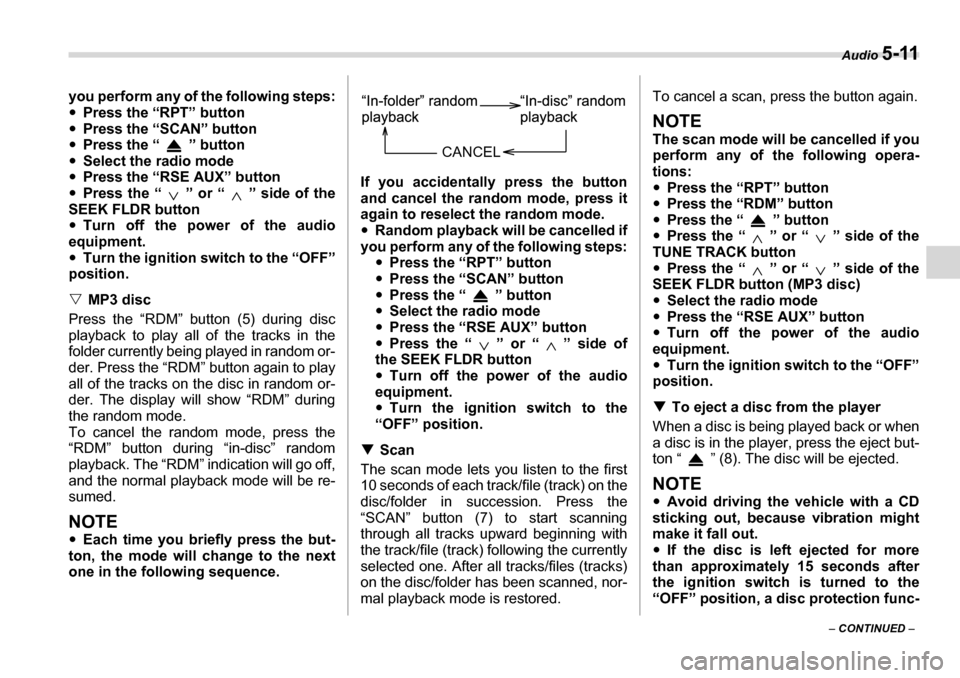
NOTE y Each time you briefly press the but-
ton, the mode will change to the next
one in the following sequence. If you accidentally press the button
and cancel the random mode, press it
again to reselect the random mode. y
Random playback will be cancelled if
you perform any of the following steps: yPress the “RPT” button
y Press the “SCAN” button
y Press the “ ” button
y Select the radio mode
y Press the “RSE AUX” button
y Press the “ ” or “ ” side of
the SEEK FLDR button y Turn off the power of the audio
equipment. y Turn the ignition switch to the
“OFF” position.
T Scan
The scan mode lets you listen to the first
10 seconds of each track/file (track) on the
disc/folder in succession. Press the
“SCAN” button (7) to start scanning
through all tracks upward beginning with
the track/file (track) following the currently
selected one. After all tracks/files (tracks)
on the disc/folder has been scanned, nor-
mal playback mode is restored. To cancel a scan, press the button again.
NOTE
The scan mode will be cancelled if you
perform any of the following opera- tions: y
Press the “RPT” button
y Press the “RDM” button
y Press the “ ” button
y Press the “ ” or “ ” side of the
TUNE TRACK button y Press the “ ” or “ ” side of the
SEEK FLDR button (MP3 disc) y Select the radio mode
y Press the “RSE AUX” button
y Turn off the power of the audio
equipment. y Turn the ignition switch to the “OFF”
position. T To eject a disc from the player
When a disc is being played back or when
a disc is in the player, press the eject but-
ton “ ” (8). The disc will be ejected.
NOTE y Avoid driving the vehicle with a CD
sticking out, because vibration might
make it fall out. y If the disc is left ejected for more
than approximately 15 seconds after
the ignition switch is turned to the
“OFF” position, a disc protection func-
CANCEL
Page 183 of 377
5-12 Audio
tion will operate, automatically reload-
ing the disc. In this case, the disc is not
played. TDisplay selection (MP3 disc)
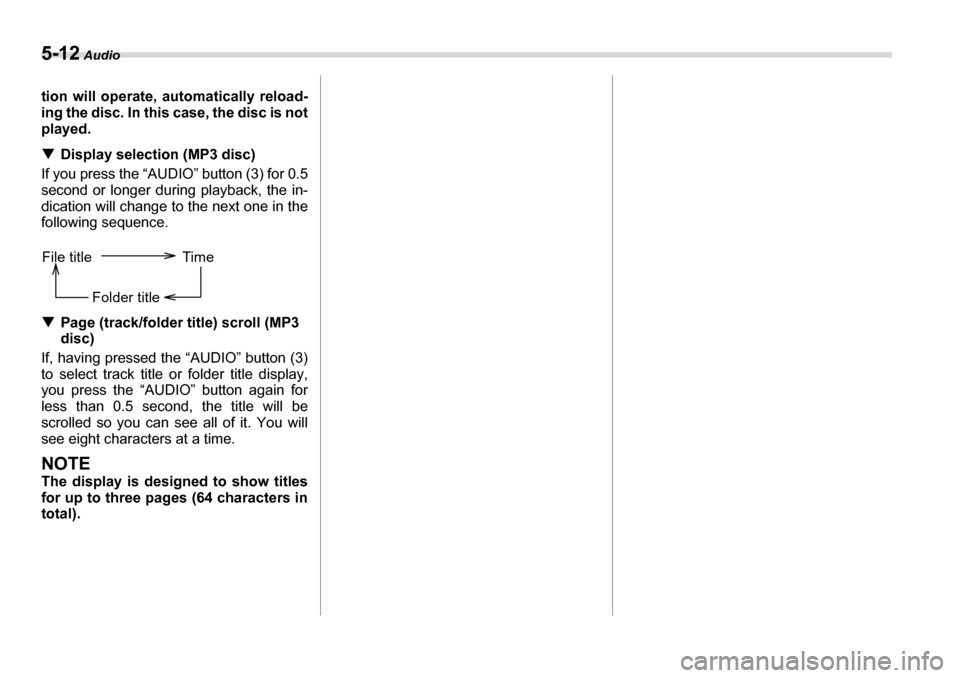
If you press the “AUDIO” button (3) for 0.5
second or longer during playback, the in-
dication will change to the next one in the
following sequence. T Page (track/folder title) scroll (MP3
disc)
If, having pressed the “AUDIO” button (3)
to select track title or folder title display,
you press the “AUDIO” button again for
less than 0.5 second, the title will be
scrolled so you can see all of it. You will
see eight characters at a time.
NOTE
The display is designed to show titles
for up to three pages (64 characters intotal).
File title Time
Folder title