headlight SUBARU TRIBECA 2007 1.G User Guide
[x] Cancel search | Manufacturer: SUBARU, Model Year: 2007, Model line: TRIBECA, Model: SUBARU TRIBECA 2007 1.GPages: 377, PDF Size: 5.65 MB
Page 156 of 377
Instruments and controls 3-35
– CONTINUED –
ton, the compass display is toggled on or
off. When the compass is on, an illuminat-
ed compass reading will appear in the
lower part of the mirror.
Even with the mirror in anti-glare mode,
the mirror surface turns bright if the trans-
mission is shifted into reverse. This is to
ensure good rearward visibility during re-
versing. T
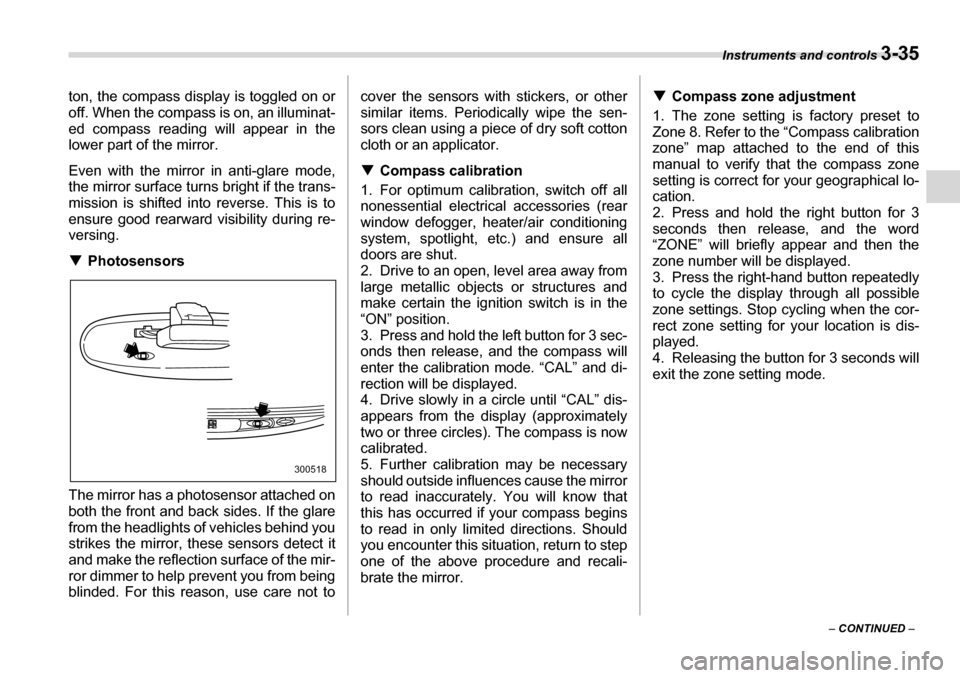
Photosensors
The mirror has a photosensor attached on
both the front and back sides. If the glare
from the headlights of vehicles behind you
strikes the mirror, these sensors detect it
and make the reflection surface of the mir-
ror dimmer to help prevent you from being
blinded. For this reason, use care not to cover the sensors with stickers, or other
similar items. Periodically wipe the sen-
sors clean using a piece of dry soft cotton
cloth or an applicator. T
Compass calibration
1. For optimum calibration, switch off all
nonessential electrical accessories (rear
window defogger, heater/air conditioning
system, spotlight, etc.) and ensure all
doors are shut.
2. Drive to an open, level area away from
large metallic objects or structures and
make certain the ignition switch is in the“ON” position.
3. Press and hold the left button for 3 sec-
onds then release, and the compass will
enter the calibration mode. “CAL” and di-
rection will be displayed.
4. Drive slowly in a circle until “CAL” dis-
appears from the display (approximately
two or three circles). The compass is now
calibrated.
5. Further calibration may be necessary
should outside influences cause the mirror
to read inaccurately. You will know that
this has occurred if your compass begins
to read in only limited directions. Should
you encounter this situation, return to step
one of the above procedure and recali-
brate the mirror. T
Compass zone adjustment
1. The zone setting is factory preset to
Zone 8. Refer to the “Compass calibration
zone” map attached to the end of this
manual to verify that the compass zone
setting is correct for your geographical lo- cation.
2. Press and hold the right button for 3
seconds then release, and the word
“ZONE” will briefly appear and then the
zone number will be displayed.
3. Press the right-hand button repeatedly to cycle the display through all possible
zone settings. Stop cycling when the cor-
rect zone setting for your location is dis-
played.
4. Releasing the button for 3 seconds will
exit the zone setting mode.
300518
Page 299 of 377
Maintenance and service
Windshield washer fluid .................................... 11-30
Replacement of wiper blades ............................ 11-31
Windshield wiper blade assembly ........................ 11-31
Windshield wiper blade rubber ............................. 11-32
Rear window wiper blade assembly ..................... 11-33
Rear window wiper blade rubber .......................... 11-33
Battery ................................................................. 11-35
Fuses ................................................................... 11-36
Main fuse ............................................................. 11-37
Installation of accessories ................................ 11-38
Replacing bulbs .................................................. 11-39 Headlight ................................................................. 11-40
Parking light ............................................................ 11-41
Front turn signal light ............................................ 11-42
Front fog light ......................................................... 11-42
Rear combination lights ......................................... 11-42
Backup light/Tail light ............................................ 11-43
Rear gate light ......................................................... 11-43
License plate light .................................................. 11-44
Dome light ............................................................... 11-44
Map light .................................................................. 11-45
Door step light ........................................................ 11-45
Cargo area light ...................................................... 11-46
Page 337 of 377
11 - 4 0 Maintenance and service
Wattage Bulb No.
1) High beam headlight 12V-65W H9
2) Low beam headlight 12V-55W H7
3) Front turn signal/Parking light 12V-27/8W –
4) Parking/Front side marker light 12V-5W –
5) Map light 12V-8W –
6) Dome light 12V-5W –
7) Door step light 12V-3W –
8) Fog light 12V-55W H3
9) Cargo area light 12V-13W –
10) Tail light 12V-3.8W 194
11) Brake/tail light 12V-21/5W (W21/5W)
12) Rear turn signal light 12V-21W (W21W)
13) Backup light 12V-16W 921
14) Rear gate light 12V-5W (W5W)
15) Licence plate light 12V-5W 168
„ Headlight
NOTE yIf headlight aiming is required, con-
sult your SUBARU dealer for proper
adjustment of the headlight aim. y It may be difficult to replace the
bulbs. Have your SUBARU dealer re-
place the bulbs if necessary. Replace any bulb only with a new
bulb of the specified wattage. Using
a bulb of different wattage could re-
sult in a fire.
Halogen headlight bulbs become
very hot while in use. If you touch
the bulb surface with bare hands or
greasy gloves, finger prints or
grease on the bulb surface develop
into hot spots, causing the bulb to
break. If there are finger prints or
grease on the bulb surface, wipe
them away with a soft cloth mois-
tened with alcohol.
Page 338 of 377
Maintenance and service 11 - 4 1
– CONTINUED –
T
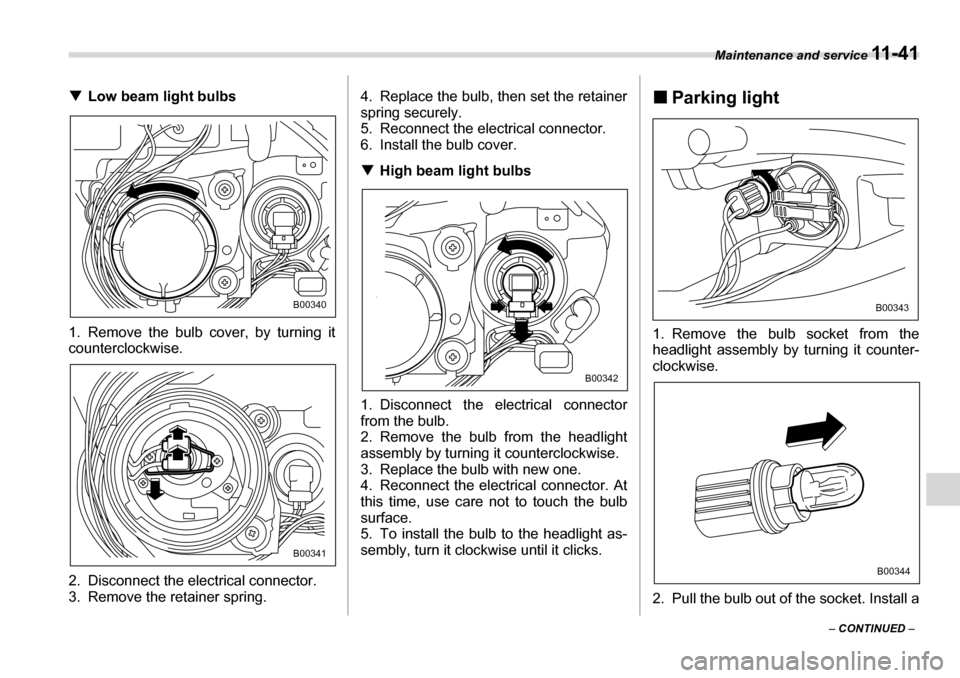
Low beam light bulbs
1. Remove the bulb cover, by turning it
counterclockwise.
2. Disconnect the electrical connector.
3. Remove the retainer spring. 4. Replace the bulb, then set the retainer spring securely.
5. Reconnect the electrical connector.
6. Install the bulb cover. T
High beam light bulbs
1. Disconnect the electrical connector
from the bulb.
2. Remove the bulb from the headlight
assembly by turning it counterclockwise.
3. Replace the bulb with new one.
4. Reconnect the electrical connector. At
this time, use care not to touch the bulb surface.
5. To install the bulb to the headlight as-
sembly, turn it clockwise until it clicks. „
Parking light
1. Remove the bulb socket from the
headlight assembly by turning it counter-
clockwise.
2. Pull the bulb out of the socket. Install a
B00340
B00341
B00342
B00343
B00344
Page 339 of 377
11 - 4 2 Maintenance and service
new bulb.
3. Set the bulb socket into the headlight
assembly and turn it clockwise until it
locks.
4. Install the headlight assembly and the
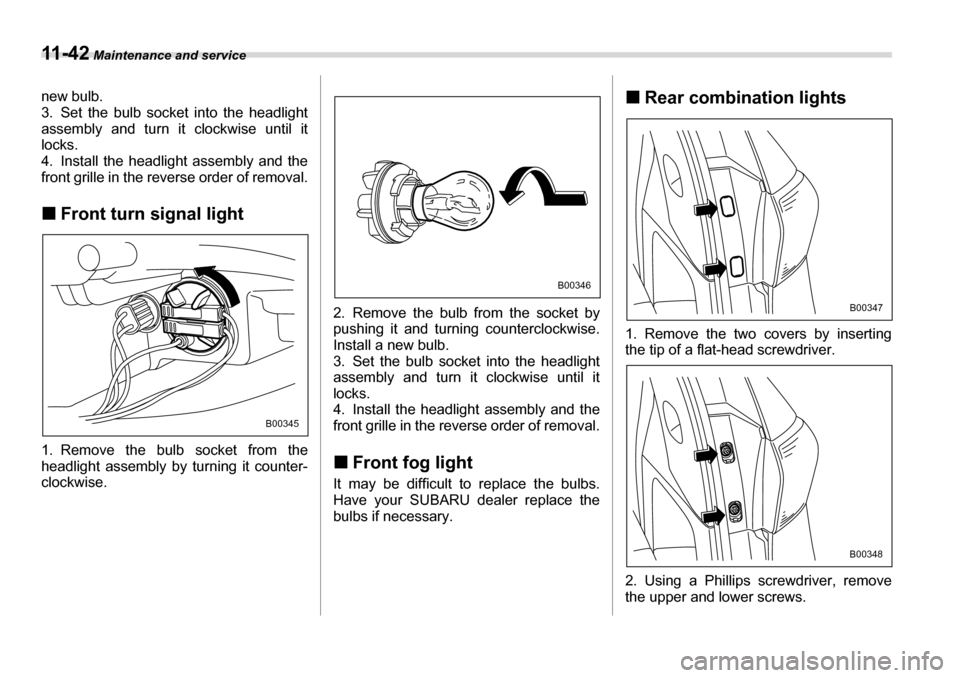
front grille in the reverse order of removal. „Front turn signal light
1. Remove the bulb socket from the
headlight assembly by turning it counter- clockwise. 2. Remove the bulb from the socket by
pushing it and turning counterclockwise.
Install a new bulb.
3. Set the bulb socket into the headlight
assembly and turn it clockwise until itlocks.
4. Install the headlight assembly and the
front grille in the reverse order of removal. „
Front fog light
It may be difficult to replace the bulbs.
Have your SUBARU dealer replace the
bulbs if necessary. „
Rear combination lights
1. Remove the two covers by inserting
the tip of a flat-head screwdriver.
2. Using a Phillips screwdriver, remove
the upper and lower screws.
B00345
B00346
B00347
B00348
Page 349 of 377
12-6 Specifications
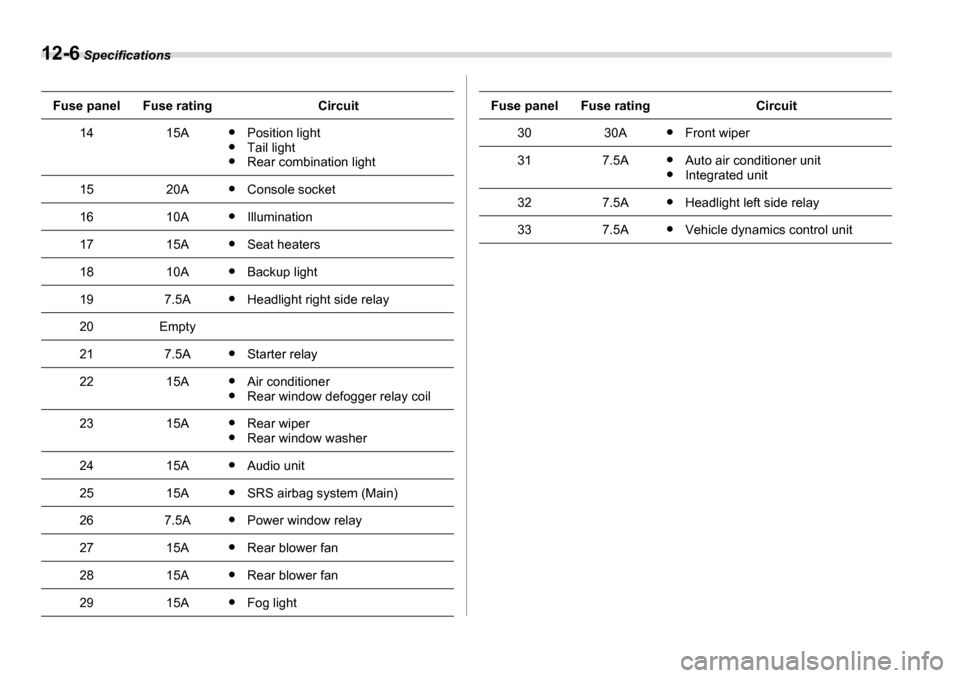
1415AyPosition light
y Tail light
y Rear combination light
1520AyConsole socket
1610AyIllumination
1715AySeat heaters
1810AyBackup light
197.5AyHeadlight right side relay
20Empty
217.5AyStarter relay
2215AyAir conditioner
y Rear window defogger relay coil
2315AyRear wiper
y Rear window washer
2415AyAudio unit
2515AySRS airbag system (Main)
267.5AyPower window relay
2715AyRear blower fan
2815AyRear blower fan
2915AyFog light
Fuse panelFuse ratingCircuit
3030AyFront wiper
317.5AyAuto air conditioner unit
y Integrated unit
327.5AyHeadlight left side relay
337.5AyVehicle dynamics control unit
Fuse panelFuse ratingCircuit
Page 350 of 377
Specifications 12-7
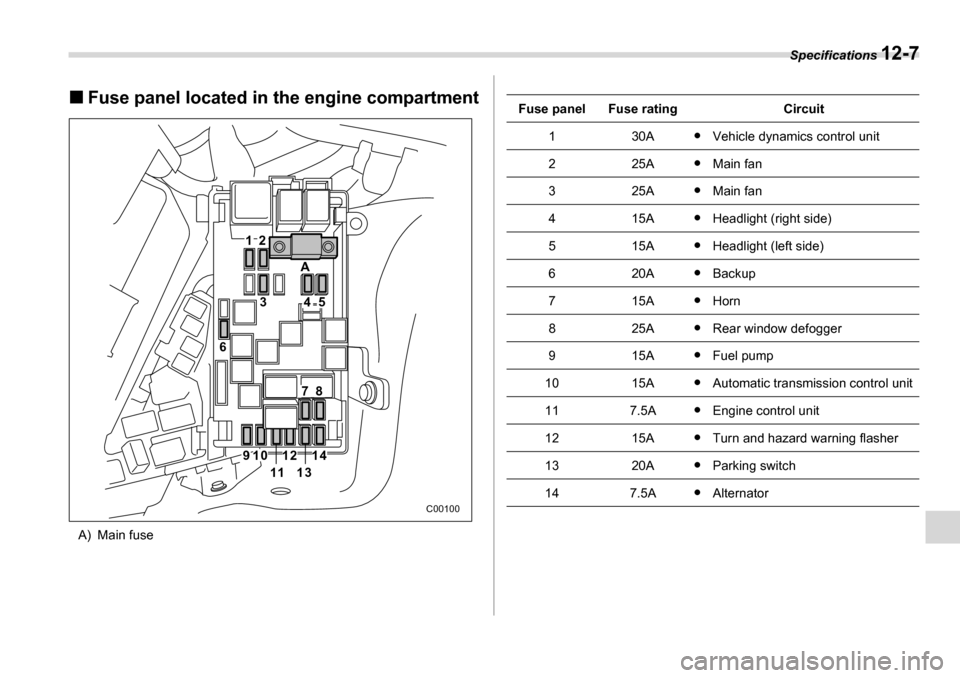
„Fuse panel located in the engine compartment
A) Main fuse
21
3
A
6
78
910
1113
1214
45
C00100
Fuse panelFuse ratingCircuit
130Ay Vehicle dynamics control unit
225AyMain fan
325AyMain fan
415AyHeadlight (right side)
515AyHeadlight (left side)
620AyBackup
715AyHorn
825AyRear window defogger
915AyFuel pump
1015AyAutomatic transmission control unit
117.5AyEngine control unit
1215AyTurn and hazard warning flasher
1320AyParking switch
147.5AyAlternator
Page 351 of 377
12-8 Specifications
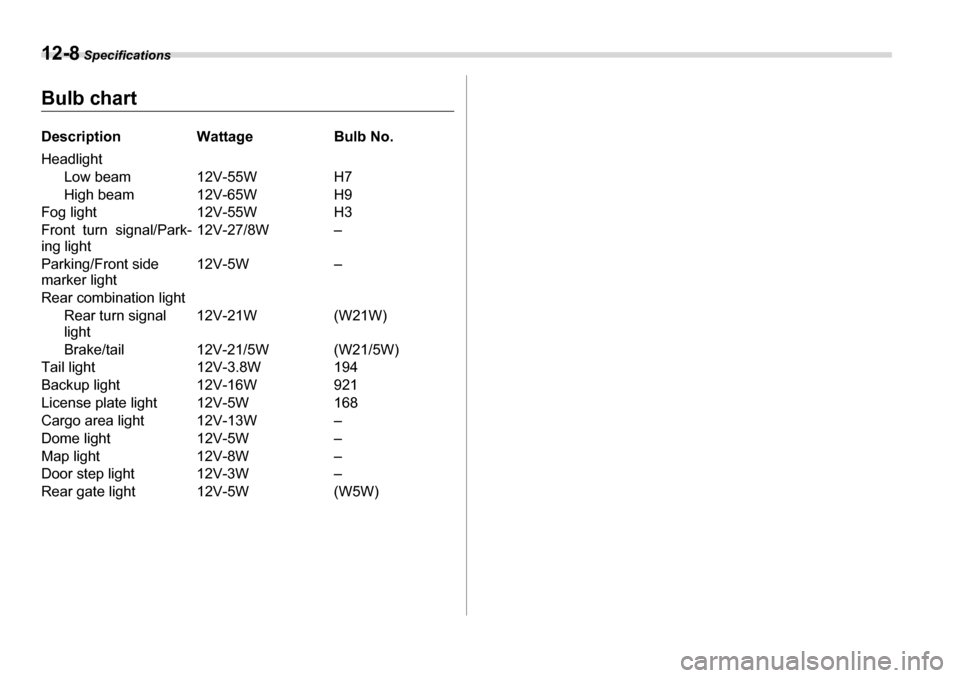
Bulb chart
Description Wattage Bulb No.
Headlight
Low beam 12V-55W H7
High beam 12V-65W H9
Fog light 12V-55W H3
Front turn signal/Park-
ing light 12V-27/8W –
Parking/Front side marker light 12V-5W –
Rear combination light Rear turn signal
light 12V-21W (W21W)
Brake/tail 12V-21/5W (W21/5W)
Tail light 12V-3.8W 194
Backup light 12V-16W 921
License plate light 12V-5W 168
Cargo area light 12V-13W –
Dome light 12V-5W –
Map light 12V-8W –
Door step light 12V-3W –
Rear gate light 12V-5W (W5W)
Page 371 of 377
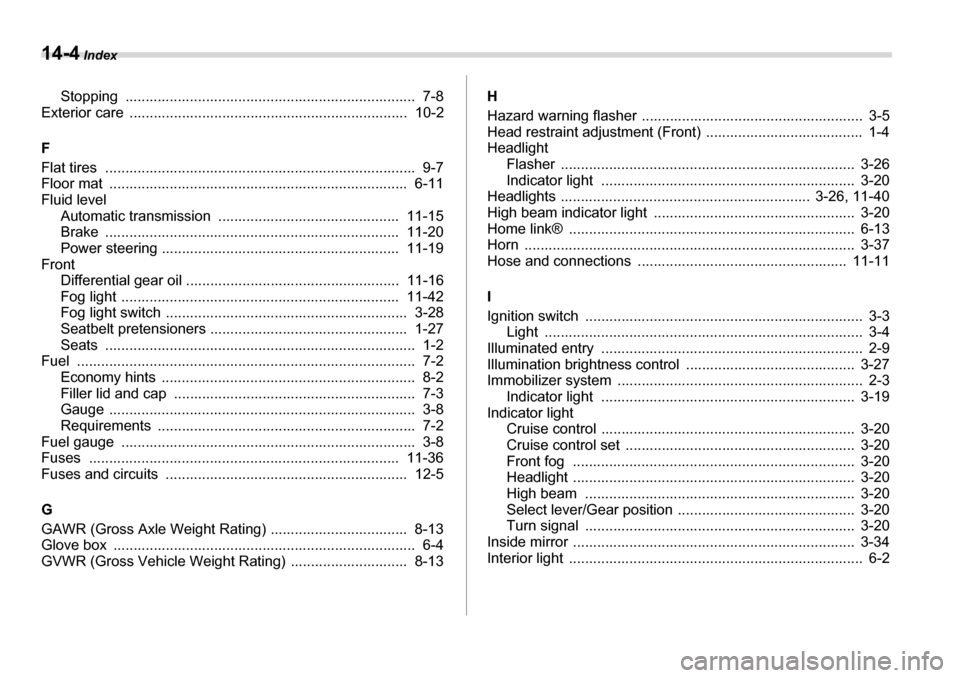
14-4 Index
Stopping ........................................................................ 7-8
Exterior care ..................................................................... 10-2 F
Flat tires ............................................................................. 9-7
Floor mat .......................................................................... 6-11 Fluid level
Automatic transmission ............................................. 11-15
Brake ......................................................................... 11-20
Power steering ........................................................... 11-19
Front Differential gear oil ..................................................... 11-16
Fog light ..................................................................... 11-42
Fog light switch ............................................................ 3-28
Seatbelt pretensioners ................................................. 1-27
Seats ............................................................................. 1-2
Fuel .................................................................................... 7-2
Economy hints ............................................................... 8-2
Filler lid and cap ............................................................ 7-3
Gauge ............................................................................ 3-8
Requirements ................................................................ 7-2
Fuel gauge ......................................................................... 3-8
Fuses ............................................................................. 11-36
Fuses and circuits ............................................................ 12-5 G
GAWR (Gross Axle Weight Rating) .................................. 8-13
Glove box ........................................................................... 6-4
GVWR (Gross Vehicle Weight Rating) ............................. 8-13 H
Hazard warning flasher ....................................................... 3-5
Head restraint adjustment (Front) ....................................... 1-4
Headlight
Flasher ......................................................................... 3-26
Indicator light ............................................................... 3-20
Headlights .............................................................. 3-26, 11-40
High beam indicator light .................................................. 3-20
Home link® ....................................................................... 6-13
Horn .................................................................................. 3-37
Hose and connections .................................................... 11-11 I
Ignition switch ..................................................................... 3-3 Light ............................................................................... 3-4
Illuminated entry ................................................................. 2-9
Illumination brightness control .......................................... 3-27
Immobilizer system ............................................................. 2-3 Indicator light ............................................................... 3-19
Indicator light Cruise control ............................................................... 3-20
Cruise control set ......................................................... 3-20
Front fog ...................................................................... 3-20
Headlight ...................................................................... 3-20
High beam ................................................................... 3-20
Select lever/Gear position ............................................ 3-20
Turn signal ................................................................... 3-20
Inside mirror ...................................................................... 3-34
Interior light ......................................................................... 6-2
Page 373 of 377
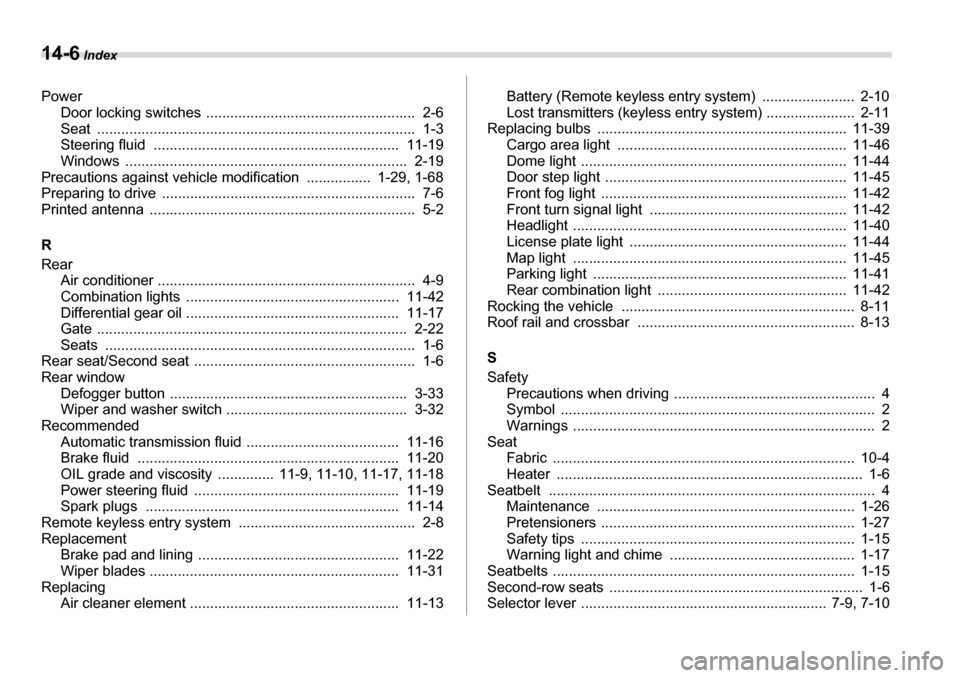
14-6 Index
Power Door locking switches .................................................... 2-6
Seat ............................................................................... 1-3
Steering fluid ............................................................. 11-19
Windows ...................................................................... 2-19
Precautions against vehicle modification ................ 1-29, 1-68
Preparing to drive ............................................................... 7-6
Printed antenna .................................................................. 5-2 R
Rear Air conditioner ................................................................ 4-9
Combination lights ..................................................... 11-42
Differential gear oil ..................................................... 11-17
Gate ............................................................................. 2-22
Seats ............................................................................. 1-6
Rear seat/Second seat ....................................................... 1-6
Rear window Defogger button ........................................................... 3-33
Wiper and washer switch ............................................. 3-32
Recommended
Automatic transmission fluid ...................................... 11-16
Brake fluid ................................................................. 11-20
OIL grade and viscosity .............. 11-9, 11-10, 11-17, 11-18
Power steering fluid ................................................... 11-19
Spark plugs ............................................................... 11-14
Remote keyless entry system ............................................ 2-8
Replacement Brake pad and lining .................................................. 11-22
Wiper blades .............................................................. 11-31
Replacing Air cleaner element .................................................... 11-13 Battery (Remote keyless entry system) ....................... 2-10
Lost transmitters (keyless entry system) ...................... 2-11
Replacing bulbs .............................................................. 11-39 Cargo area light ......................................................... 11-46
Dome light .................................................................. 11-44
Door step light ............................................................ 11-45
Front fog light ............................................................. 11-42
Front turn signal light ................................................. 11-42
Headlight .................................................................... 11-40
License plate light ...................................................... 11-44
Map light .................................................................... 11-45
Parking light ............................................................... 11-41
Rear combination light ............................................... 11-42
Rocking the vehicle .......................................................... 8-11
Roof rail and crossbar ...................................................... 8-13 S
Safety
Precautions when driving .................................................. 4
Symbol .............................................................................. 2
Warnings ........................................................................... 2
Seat Fabric ........................................................................... 10-4
Heater ............................................................................ 1-6
Seatbelt ................................................................................. 4 Maintenance ................................................................ 1-26
Pretensioners ............................................................... 1-27
Safety tips .................................................................... 1-15
Warning light and chime .............................................. 1-17
Seatbelts ........................................................................... 1-15
Second-row seats ............................................................... 1-6
Selector lever ............................................................. 7-9, 7-10