lock SUBARU TRIBECA 2008 Owners Manual
[x] Cancel search | Manufacturer: SUBARU, Model Year: 2008, Model line: TRIBECA, Model: SUBARU TRIBECA 2008Pages: 409, PDF Size: 5.75 MB
Page 247 of 409
collected and stored in memory to
allow the transmission to shift at the
most appropriate times for the current
condition of your vehicle. Optimized
shifting will be restored as the vehicle
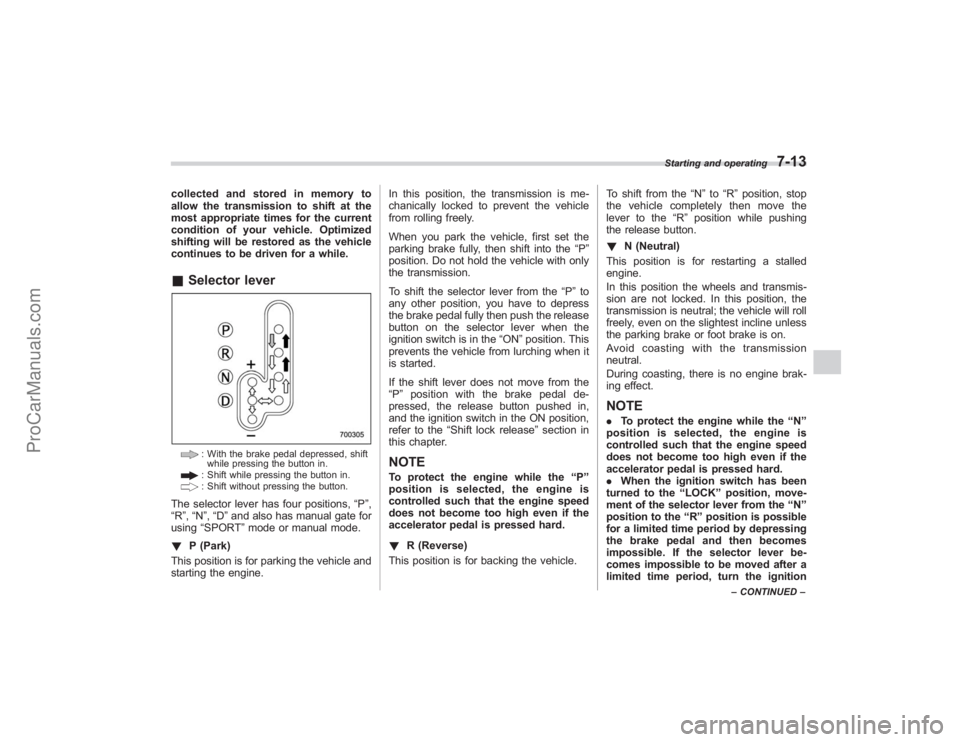
continues to be driven for a while.&Selector lever
: With the brake pedal depressed, shift
while pressing the button in.: Shift while pressing the button in.: Shift without pressing the button.
The selector lever has four positions, “P”,
“R ”,“N ”,“D ”and also has manual gate for
using “SPORT ”mode or manual mode.
! P (Park)
This position is for parking the vehicle and
starting the engine. In this position, the transmission is me-
chanically locked to prevent the vehicle
from rolling freely.
When you park the vehicle, first set the
parking brake fully, then shift into the
“P”
position. Do not hold the vehicle with only
the transmission.
To shift the selector lever from the “P”to
any other position, you have to depress
the brake pedal fully then push the release
button on the selector lever when the
ignition switch is in the “ON”position. This
prevents the vehicle from lurching when it
is started.
If the shift lever does not move from the
“ P ” position with the brake pedal de-
pressed, the release button pushed in,
and the ignition switch in the ON position,
refer to the “Shift lock release ”section in
this chapter.
NOTETo protect the engine while the “P ”
position is selected, the engine is
controlled such that the engine speed
does not become too high even if the
accelerator pedal is pressed hard.
! R (Reverse)
This position is for backing the vehicle. To shift from the
“N ”to “R”position, stop
the vehicle completely then move the
lever to the “R”position while pushing
the release button.
! N (Neutral)
This position is for restarting a stalled
engine.
In this position the wheels and transmis-
sion are not locked. In this position, the
transmission is neutral; the vehicle will roll
freely, even on the slightest incline unless
the parking brake or foot brake is on.
Avoidcoastingwiththetransmission
neutral.
During coasting, there is no engine brak-
ing effect.
NOTE. To protect the engine while the “N ”
position is selected, the engine is
controlled such that the engine speed
does not become too high even if the
accelerator pedal is pressed hard.
. When the ignition switch has been
turned to the “LOCK ”position, move-
ment of the selector lever from the “N ”
position to the “R ” position is possible
for a limited time period by depressing
the brake pedal and then becomes
impossible. If the selector lever be-
comes impossible to be moved after a
limited time period, turn the ignition
Starting and operating
7-13
– CONTINUED –
ProCarManuals.com
Page 248 of 409
7-14
Starting and operating
switch to the“ON ”position. You will
then be able to move the selector lever
to the “P ” position.
WARNING
Do not drive the vehicle with the
selector lever in the “N ” (neutral)
position. Engine braking has no
effect in this condition and the risk
of an accident is consequently in-
creased.
! D (Drive)
This position is for normal driving.
The transmission automatically shifts into
a suitable gear from 1st to 5th according to
the vehicle speed and the acceleration
you require.
When more acceleration is required in this
position, press the accelerator pedal fully
to the floor and hold that position. The
transmission will automatically downshift
to 4th, 3rd, 2nd or 1st gear. When you
release the pedal, the transmission will
return to the original gear position.
To use the SPORT mode, move the lever
from this position into the manual gate.
To use the manual mode, move the lever
from this position into the manual gate
then move it toward the “+”and “−”ends. !
While climbing a grade
When driving up a hill, undesired upshift to
4th or 5th gear is prevented from taking
place when the accelerator is released.
This minimizes the chance of subsequent
downshifting to a lower gear when accel-
erating again. This prevents repeated
upshifting and downshifting resulting in a
smoother operation of the vehicle.
NOTEThe transmission may downshift to 2nd
or 1st gear, depending on the way the
accelerator pedal is pressed to accel-
erate the vehicle again.& Selector lever reverse inhi-
biting functionThis function prevents accidental move-
ment of the selector lever to the “R ”
position while the vehicle is moving.
The function becomes operational when
the vehicle reaches a speed of approxi-
mately 6 mph (10 km/h). Once opera-
tional, it prevents the selector lever from
being moved from the “N”position to the
“ R ” position. When the vehicle speed
drops below 6 mph (10 km/h), the function
is canceled. The selector lever can then
be moved to the “R”and “P”positions.
When the ignition switch has been turned to the
“LOCK” position, movement of the
selector lever from the “N ”position to the
“R ”position is possible for a limited time
period by depressing the brake pedal and
then becomes impossible. Also, the se-
lector lever cannot be moved to the “R”
position after it has been placed in the “P ”
position and then placed again in the “N”
position.
When the movement of the selector lever
from the “N”position to the “R ” position
has become impossible, turn the ignition
switch back to the “ON”position then
move the selector lever to the “P”position.
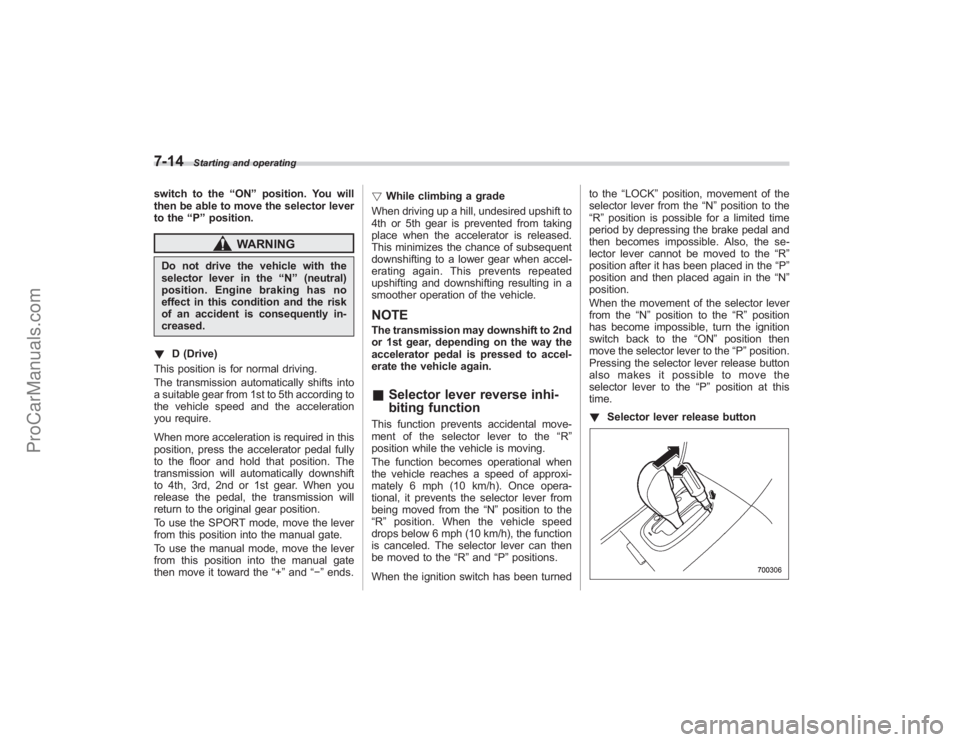
Pressing the selector lever release button
alsomakesitpossibletomovethe
selector lever to the “P ” position at this
time.
! Selector lever release button
ProCarManuals.com
Page 249 of 409
If you inadvertently have turned the igni-
tion switch to the“LOCK”position with the
selector lever in the “N”position, proceed
as follows. By referring to the “Shift lock
release ”section in this chapter, remove
the cover. Then, with a screwdriver in-
serted into the hole, move the selector
lever to the “P”position while pressing the
release button. If the selector lever re-
verse inhibiting function fails, have the
vehicle inspected by the nearest SUBARU
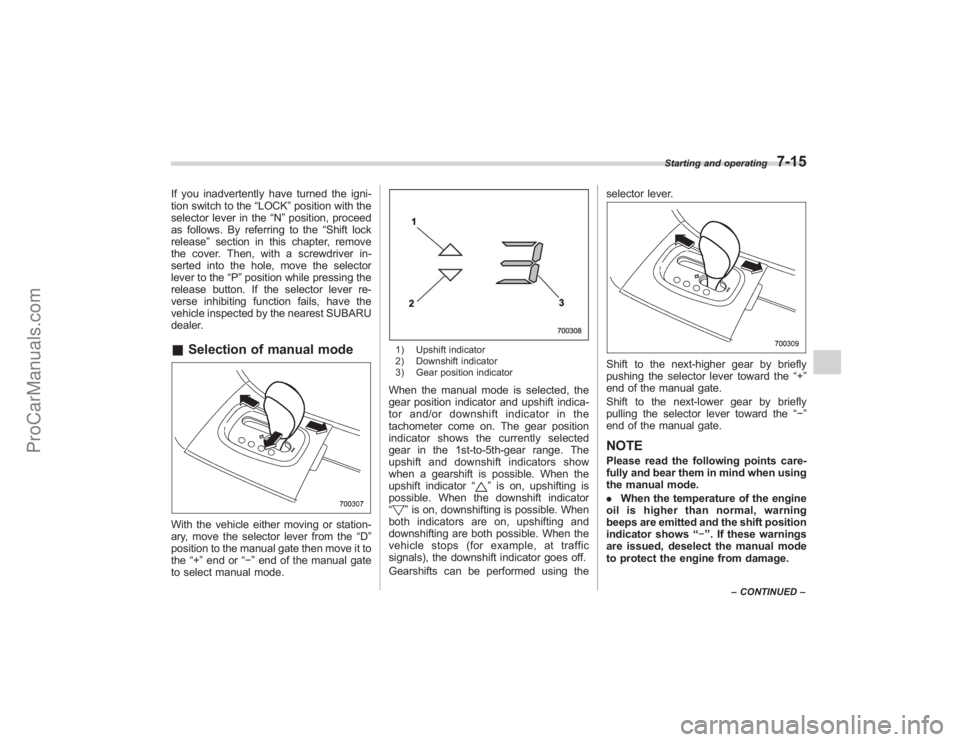
dealer.& Selection of manual modeWith the vehicle either moving or station-
ary, move the selector lever from the “D”
position to the manual gate then move it to
the “+”end or “−”end of the manual gate
to select manual mode.
1) Upshift indicator
2) Downshift indicator
3) Gear position indicatorWhen the manual mode is selected, the
gear position indicator and upshift indica-
tor and/or downshift indicator in the
tachometer come on. The gear position
indicator shows the currently selected
gear in the 1st-to-5th-gear range. The
upshift and downshift indicators show
when a gearshift is possible. When the
upshift indicator “
”is on, upshifting is
possible. When the downshift indicator
“
” is on, downshifting is possible. When
both indicators are on, upshifting and
downshifting are both possible. When the
vehicle stops (for example, at traffic
signals), the downshift indicator goes off.
Gearshifts can be performed using the selector lever.
Shift to the next-higher gear by briefly
pushing the selector lever toward the
“+”
end of the manual gate.
Shift to the next-lower gear by briefly
pulling the selector lever toward the “−”
end of the manual gate.NOTEPlease read the following points care-
fully and bear them in mind when using
the manual mode.
. When the temperature of the engine
oil is higher than normal, warning
beeps are emitted and the shift position
indicator shows “− ”. If these warnings
are issued, deselect the manual mode
to protect the engine from damage.
Starting and operating
7-15
– CONTINUED –
ProCarManuals.com
Page 250 of 409
7-16
Starting and operating
.The transmission does not automa-
tically shift up in the manual mode.
Perform gearshifts in accordance with
road conditions so that the tachometer
needle does not enter the red zone. If
the engine speed reaches a predeter-
mined level, a fuel-cut function will
operate. Shift up if this happens. Also,
the transmission may automatically
shift up to protect the engine.
. If you attempt to shift down when
the engine speed is too high, i.e., when
a downshift would push the tachometer
needle beyond the red zone, beeps will
be emitted to warn you that the down-
shift is not possible.
. If you attempt to shift up when the
vehicle speed is too low, the transmis-
sion will not respond.
. You can perform a skip-shift (for
example, from 4th to 2nd) by operating
the selector lever twice in rapid suc-
cession.
. The transmission automatically se-
lects 1st gear when the vehicle stops
moving.
. If the temperature of the automatic
transmission fluid becomes too high,
the “AT OIL TEMP ”warning light will
come on and upshifts to 5th gear will
not be possible. Immediately stop the
vehicle in a safe place and let the
engine idle until the warning light goes off.
&
Maximum speeds
WARNING
When down shifting, ensure that the
vehicle is not travelling at a speed
exceeding the Maximum Allowable
Speed for the gear which is about to
be selected. Failure to observe this
precaution can lead to engine over-
revving and this in turn can result in
engine damage.
In addition, sudden application of
engine braking caused by down
shifting when the vehicle is travel-
ling on a slippery surface can lead
to wheel locking; as a consequence,
control of the vehicle may be lost
and the risk of an accident in-
creased.
The following tables show the maximum
speeds that are possible with each differ-
ent gear.
When down shifting, it is important to
confirm that the current vehicle speed is
not in excess of the Maximum Allowable
Speed of the gear which is about to be
selected.
Position mph (km/h)
1 28 (45)
2 53 (85)
3 87 (140)
Never exceed posted speed limits.
NOTE. In order to prevent over-revving
during acceleration of the vehicle, the
transmission will automatically shift to
the next highest gear if the Maximum
Allowable Speed for the current gear is
exceeded.
. Similarly, in order to prevent over-
revving during deceleration of the
vehicle, the transmission will remain
in the current gear if the speed of the
vehicle is in excess of the Maximum
Allowable Speed for the gear to which
the selector lever has been moved.& Driving tips. On a road surface where there is a risk
of wheelspin (for example, a snow- or
gravel-covered road), you can pull away
from a standstill safely and easily by first
selecting the 2nd gear of the manual
mode.
. Always apply the foot or parking brake
when the vehicle is stopped in the “D”or
ProCarManuals.com
Page 251 of 409
“R”position.
. Always set the parking brake when
parking your vehicle. Do not hold the
vehicle with only the transmission.
. Do not keep the vehicle in a stationary
position on an uphill grade by using the
“D ”position. Use the brake instead.
. The engine may, on rare occasions,
knock when the vehicle rapidly acceler-
ates or rapidly pulls away from a standstill.
This phenomenon does not indicate a
problem.
. A slight reduction in output torque may
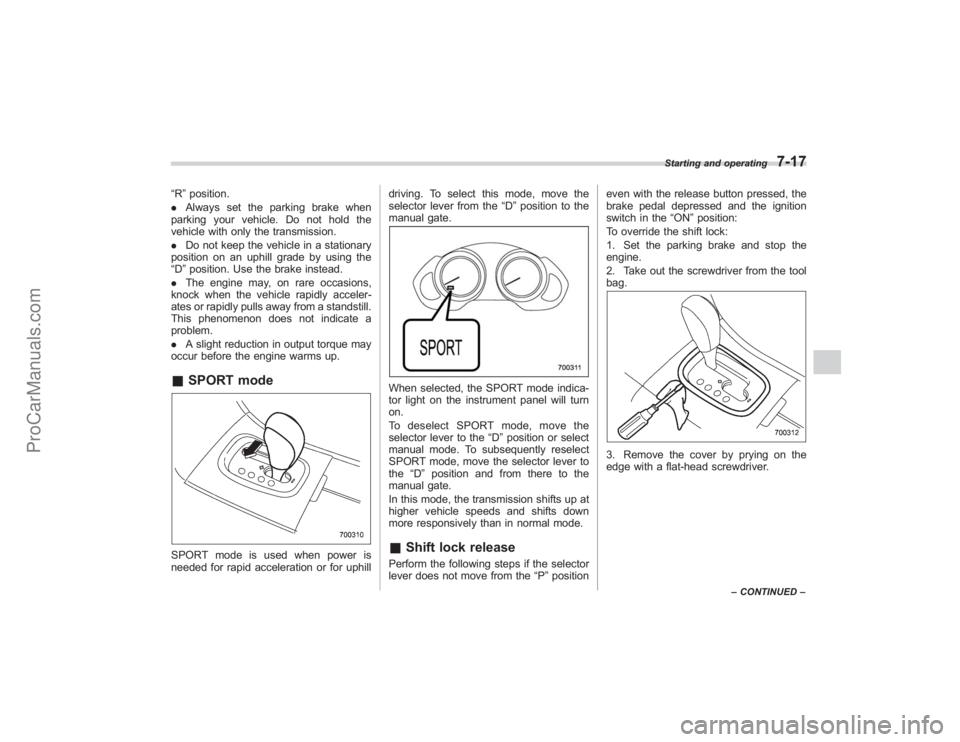
occur before the engine warms up.& SPORT modeSPORT mode is used when power is
needed for rapid acceleration or for uphill driving. To select this mode, move the
selector lever from the
“D”position to the
manual gate.
When selected, the SPORT mode indica-
tor light on the instrument panel will turn
on.
To deselect SPORT mode, move the
selector lever to the “D”position or select
manual mode. To subsequently reselect
SPORT mode, move the selector lever to
the “D”position and from there to the
manual gate.
In this mode, the transmission shifts up at
higher vehicle speeds and shifts down
more responsively than in normal mode.& Shift lock releasePerform the following steps if the selector
lever does not move from the “P”position even with the release button pressed, the
brake pedal depressed and the ignition
switch in the
“ON”position:
To override the shift lock:
1. Set the parking brake and stop the
engine.
2. Take out the screwdriver from the tool
bag.
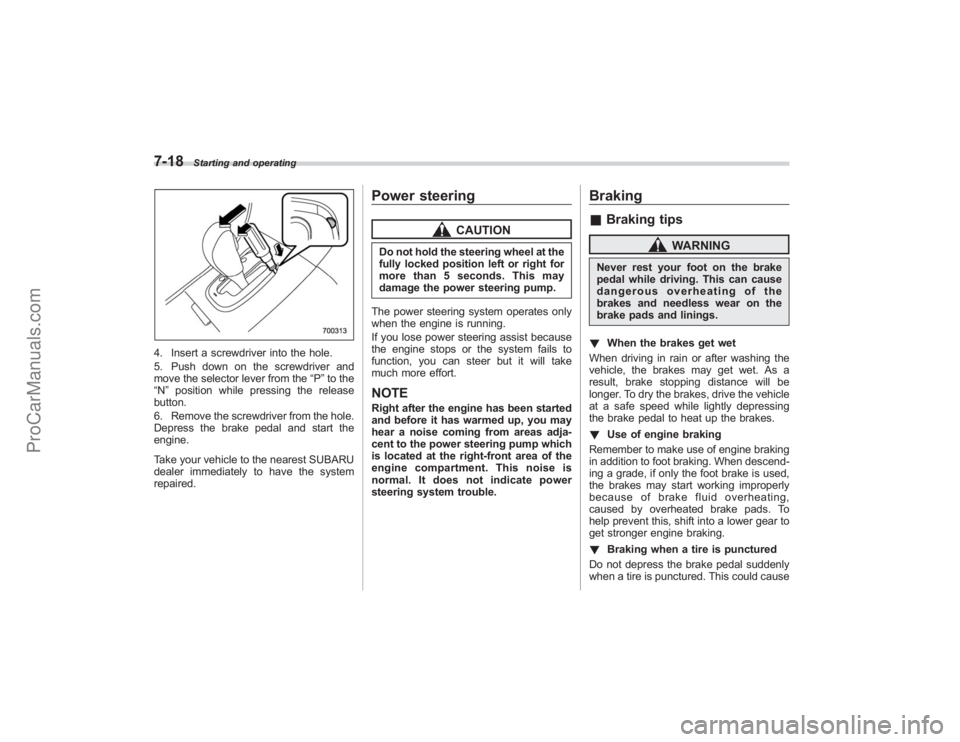
3. Remove the cover by prying on the
edge with a flat-head screwdriver.
Starting and operating
7-17
– CONTINUED –
ProCarManuals.com
Page 252 of 409
7-18
Starting and operating
4. Insert a screwdriver into the hole.
5. Push down on the screwdriver and
move the selector lever from the“P”to the
“N ”position while pressing the release
button.
6. Remove the screwdriver from the hole.
Depress the brake pedal and start the
engine.
Take your vehicle to the nearest SUBARU
dealer immediately to have the system
repaired.
Power steering
CAUTION
Do not hold the steering wheel at the
fully locked position left or right for
more than 5 seconds. This may
damage the power steering pump.
The power steering system operates only
when the engine is running.
If you lose power steering assist because
the engine stops or the system fails to
function, you can steer but it will take
much more effort.NOTERight after the engine has been started
and before it has warmed up, you may
hear a noise coming from areas adja-
cent to the power steering pump which
is located at the right-front area of the
engine compartment. This noise is
normal. It does not indicate power
steering system trouble.
Braking& Braking tips
WARNING
Never rest your foot on the brake
pedal while driving. This can cause
dangerous overheating of the
brakes and needless wear on the
brake pads and linings.
! When the brakes get wet
When driving in rain or after washing the
vehicle, the brakes may get wet. As a
result, brake stopping distance will be
longer. To dry the brakes, drive the vehicle
at a safe speed while lightly depressing
the brake pedal to heat up the brakes.
! Use of engine braking
Remember to make use of engine braking
in addition to foot braking. When descend-
ing a grade, if only the foot brake is used,
the brakes may start working improperly
because of brake fluid overheating,
caused by overheated brake pads. To
help prevent this, shift into a lower gear to
get stronger engine braking.
! Braking when a tire is punctured
Do not depress the brake pedal suddenly
when a tire is punctured. This could cause
ProCarManuals.com
Page 254 of 409
7-20
Starting and operating
the nearest SUBARU dealer.
ABS (Anti-lock Brake Sys-
tem)
WARNING
Always use the utmost care in
driving–overconfidence because
youaredrivingwithanABS
equipped vehicle could easily lead
to a serious accident.
CAUTION
. The ABS system does not always
decrease stopping distance. You
should always maintain a safe
following distance from other
vehicles.
. When driving on badly surfaced
roads, gravel roads, icy roads, or
over deep newly fallen snow,
stopping distances may be long-
er for a vehicle with the ABS
system than one without. When
driving under these conditions,
therefore, reduce your speed and
leave ample distance from other
vehicles.
. When you feel the ABS system
operating, you should maintain constant brake pedal pressure.
Do not pump the brake pedal
since doing so may defeat the
operation of the ABS system.
The ABS system prevents the lock-up of
wheels which may occur during sudden
braking or braking on slippery road sur-
faces. This helps prevent the loss of
steering control and directional stability
caused by wheel lock-up.
When the ABS system is operating, you
may hear a chattering noise or feel a slight
vibration in the brake pedal. This is normal
when the ABS operates.
The ABS system will not operate when the
vehicle speed is below approximately 6
mph (10 km/h).
& ABS system self-checkYou may feel a slight shock in the brake
pedal and hear the operating sound of
ABS from the engine compartment just
after the vehicle is started. This is caused
by an automatic functional test of the ABS
system being carried out and does not
indicate any abnormal condition.
ProCarManuals.com
Page 256 of 409
7-22
Starting and operating
Electronic Brake Force Dis-
tribution (EBD) systemThe EBD system maximizes the effective-
ness of the brakes by allowing the rear
brakes to supply a greater proportion of
the braking force. It functions by adjusting
the distribution of braking force to the rear
wheels in accordance with the vehicle’s
loading condition and speed.
The EBD system is an integral part of the
ABS system and uses some of the ABS
system ’s components to perform its func-
tion of optimizing the distribution of brak-
ing force. If any of the ABS components
used by the EBD function fails, the EBD
system also stops working.
When the EBD system is operating, you
may hear a chattering noise or feel a slight
vibration in the brake pedal. This is normal
and does not indicate a malfunction.
& Steps to take if EBD system
failsIf a malfunction occurs in the EBD system,
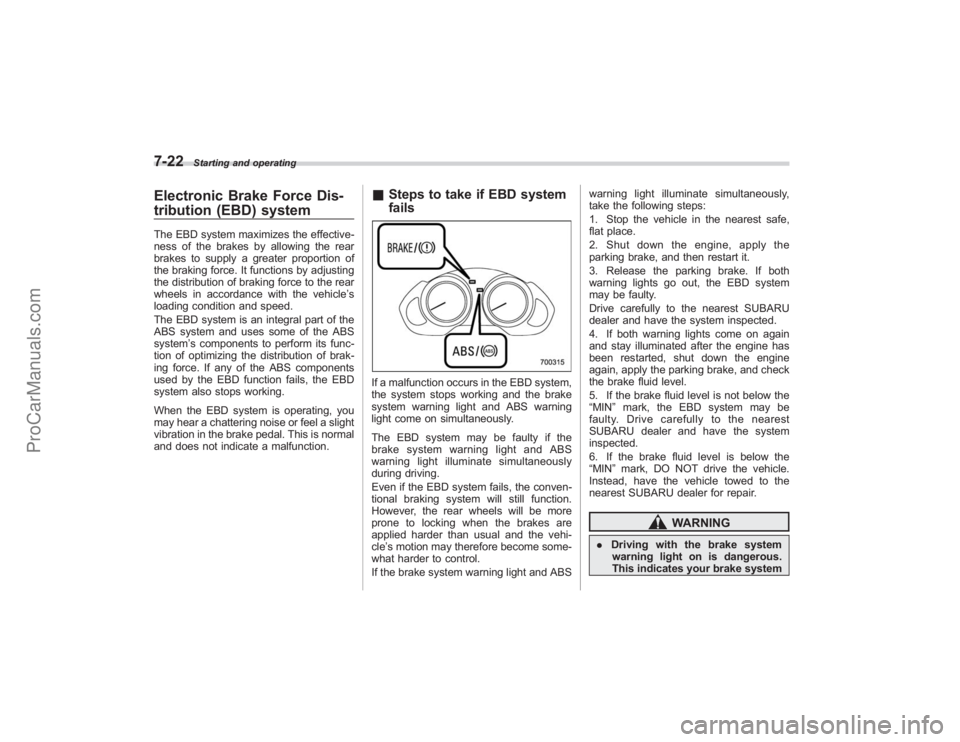
the system stops working and the brake
system warning light and ABS warning
light come on simultaneously.
The EBD system may be faulty if the
brake system warning light and ABS
warning light illuminate simultaneously
during driving.
Even if the EBD system fails, the conven-
tional braking system will still function.
However, the rear wheels will be more
prone to locking when the brakes are
applied harder than usual and the vehi-
cle’s motion may therefore become some-
what harder to control.
If the brake system warning light and ABS warning light illuminate simultaneously,
take the following steps:
1. Stop the vehicle in the nearest safe,
flat place.
2. Shut down the engine, apply the
parking brake, and then restart it.
3. Release the parking brake. If both
warning lights go out, the EBD system
may be faulty.
Drive carefully to the nearest SUBARU
dealer and have the system inspected.
4. If both warning lights come on again
and stay illuminated after the engine has
been restarted, shut down the engine
again, apply the parking brake, and check
the brake fluid level.
5. If the brake fluid level is not below the
“MIN
”mark, the EBD system may be
faulty. Drive carefully to the nearest
SUBARU dealer and have the system
inspected.
6. If the brake fluid level is below the
“MIN ”mark, DO NOT drive the vehicle.
Instead, have the vehicle towed to the
nearest SUBARU dealer for repair.
WARNING
. Driving with the brake system
warning light on is dangerous.
This indicates your brake system
ProCarManuals.com
Page 261 of 409
system. When the switch is pressed again
to reactivate the Traction Control system,
the“
”indicator light goes off.
With the Traction Control system deacti-
vated, traction enhancement offered by
Traction Control system is unavailable.
Therefore you should not deactivate the
Traction Control system except under
above-mentioned situations.
NOTE. When the switch has been pressed
to deactivate the Traction Control sys-
tem, the Traction Control system auto-
matically reactivates itself the next time
the ignition key is turned to the “LOCK ”
position and the engine is restarted.
. If the switch is held down for 10
seconds or longer, the indicator light
goes off, the Traction Control system is
activated, and the system ignores any
further pressing of the switch. To make
the switch usable again, turn the igni-
tion key to the “LOCK ”position and
restart the engine.
. When the switch is pressed to
deactivate the Traction Control system,
the vehicle ’s running performance is
comparable with that of a vehicle that
does not have a Traction Control
system. Do not deactivate the Traction
Control system except when absolutely necessary.
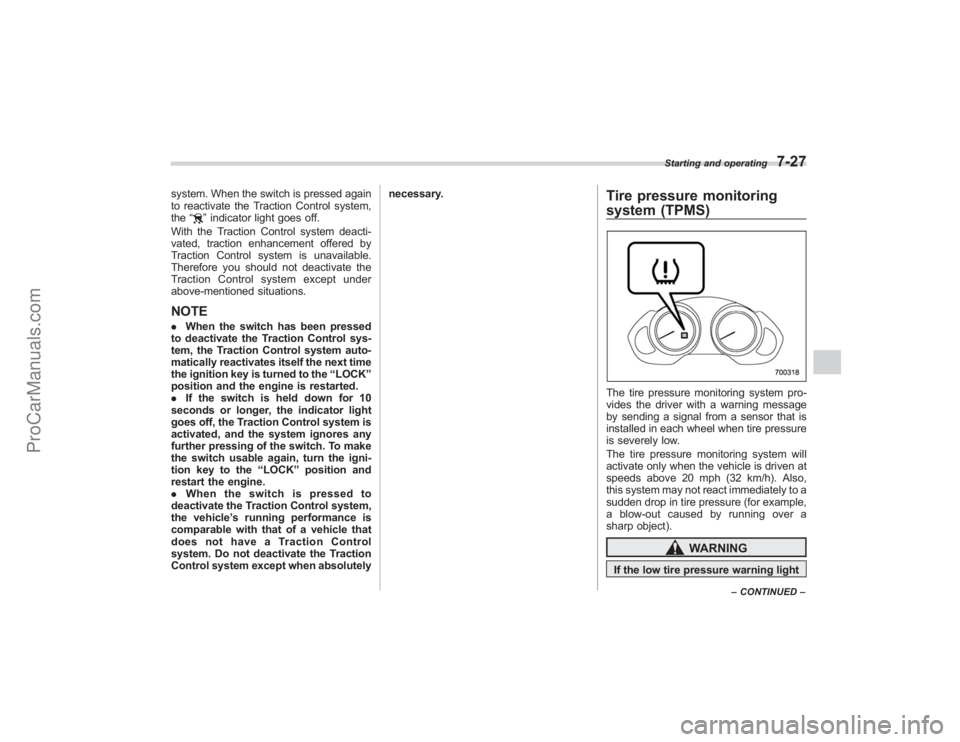
Tire pressure monitoring
system (TPMS)The tire pressure monitoring system pro-
vides the driver with a warning message
by sending a signal from a sensor that is
installed in each wheel when tire pressure
is severely low.
The tire pressure monitoring system will
activate only when the vehicle is driven at
speeds above 20 mph (32 km/h). Also,
this system may not react immediately to a
sudden drop in tire pressure (for example,
a blow-out caused by running over a
sharp object).
WARNING
If the low tire pressure warning light
Starting and operating
7-27
–
CONTINUED –
ProCarManuals.com
Page 264 of 409
7-30
Starting and operating
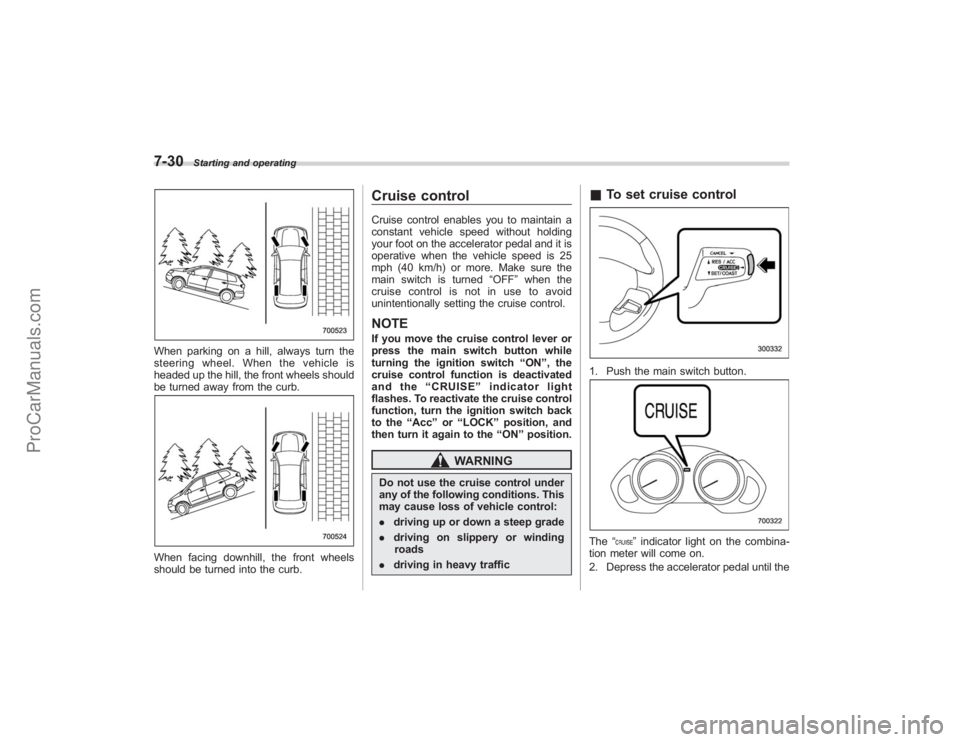
When parking on a hill, always turn the
steering wheel. When the vehicle is
headed up the hill, the front wheels should
be turned away from the curb.When facing downhill, the front wheels
should be turned into the curb.
Cruise controlCruise control enables you to maintain a
constant vehicle speed without holding
your foot on the accelerator pedal and it is
operative when the vehicle speed is 25
mph (40 km/h) or more. Make sure the
main switch is turned“OFF”when the
cruise control is not in use to avoid
unintentionally setting the cruise control.NOTEIf you move the cruise control lever or
press the main switch button while
turning the ignition switch “ON ”, the
cruise control function is deactivated
and the “CRUISE ”indicator light
flashes. To reactivate the cruise control
function, turn the ignition switch back
to the “Acc ”or “LOCK ”position, and
then turn it again to the “ON ”position.
WARNING
Do not use the cruise control under
any of the following conditions. This
may cause loss of vehicle control:
. driving up or down a steep grade
. driving on slippery or winding
roads
. driving in heavy traffic
&To set cruise control1. Push the main switch button.The “
”indicator light on the combina-
tion meter will come on.
2. Depress the accelerator pedal until the
ProCarManuals.com