brake light SUBARU TRIBECA 2008 User Guide
[x] Cancel search | Manufacturer: SUBARU, Model Year: 2008, Model line: TRIBECA, Model: SUBARU TRIBECA 2008Pages: 409, PDF Size: 5.75 MB
Page 218 of 409
6-10
Interior equipment
Electrical power (12V DC) from the battery
is available at any of the outlets when the
ignition switch is either in the“Acc”or “ON ”
position.
You can use an in-vehicle use electrical
appliance by connecting it to an outlet.
When both outlets are used at the same
time, the total power consumption of the
electric appliances must be 120W or less.
CAUTION
. Do not attempt to use a cigarette
lighter in the accessory power
outlet.
. Do not place any foreign objects,
especially metal ones such as
coins or aluminum foil, into the
accessory power outlet. That
could cause a short circuit. Al-
ways put the cap on the acces-
sory power outlet when it is not
in use.
. Use only electrical appliances
which are designed for 12V DC
and which consume less than
120W. Overloading the accessory
power outlet can cause a short
circuit. Do not use double adap-
ters or more than one electrical
appliance.
. If the plug on your electric appli- ance is either too loose or too
tight for the accessory power
outlet, this can result in a poor
contact or cause the plug to get
stuck. Only use plugs that fit
properly.
. Use of an electric appliance in the
accessory power outlet for a long
period of time while the engine is
not running can cause battery
discharge.
. Before driving your vehicle, make
sure that the plug and the cord
on your electrical appliance will
not interfere with your shifting
gears and operating the accel-
erator and brake pedals. If they
do, do not use the electrical
appliance while driving.
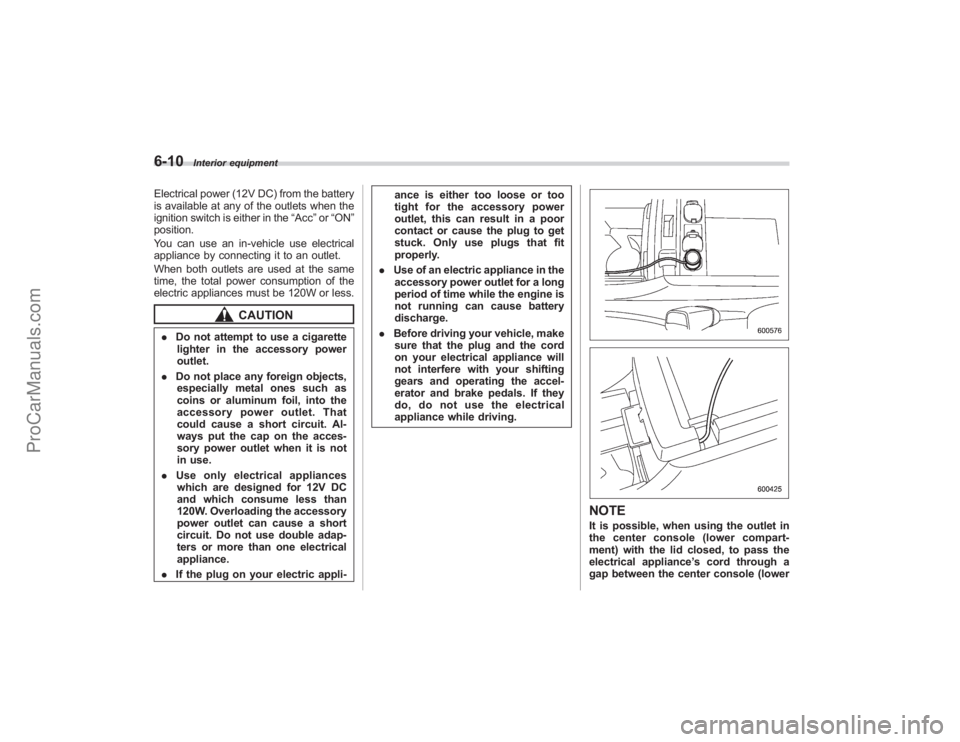
NOTEIt is possible, when using the outlet in
the center console (lower compart-
ment) with the lid closed, to pass the
electrical appliance ’s cord through a
gap between the center console (lower
ProCarManuals.com
Page 235 of 409
Fuel................................................................... 7-2
Fuel requirements ............................................ 7-2
Fuel filler lid and cap ........................................ 7-3
State emission testing (U.S. only) ................... 7-5
Preparing to drive ............................................ 7-7
Starting the engine ........................................... 7-7
Stopping the engine ......................................... 7-8
Remote engine start system (dealer option) ............................................... 7-8
Starting your vehicle ........................................ 7-9
Remote start safety features ............................. 7-9
Entering the vehicle while it is running via remote start ............................................................... 7-9
Entering the vehicle following remote engine start shutdown ....................................................... 7-9
Pre-heating or pre-cooling the interior of the vehicle ......................................................... 7-10
Service mode ................................................. 7-10
Remote transmitter programming and programmable feature option ........................ 7-10
System maintenance ....................................... 7-11
Automatic transmission ................................. 7-12
Selector lever................................................. 7-13
Selector lever reverse inhibiting function . ....... 7-14
Selection of manual mode .............................. 7-15
Maximum speeds ........................................... 7-16
Driving tips .................................................... 7-16
SPORT mode ................................................. 7-17 Shift lock release
............................................ 7-17
Power steering............................................... 7-18
Braking ........................................................... 7-18
Braking tips .................................................... 7-18
Brake system ................................................. 7-19
Disc brake pad wear warning indicators .......... 7-19
ABS (Anti-lock Brake System)...................... 7-20
ABS system self-check................................... 7-20
ABS warning light ........................................... 7-21
Electronic Brake Force Distribution (EBD)
system ......................................................... 7-22
Steps to take if EBD system fails .................... 7-22
Vehicle Dynamics Control system ................ 7-23
Vehicle Dynamics Control system monitor....... 7-25
Traction Control system OFF switch ................ 7-26
Tire pressure monitoring system
(TPMS) ......................................................... 7-27
Parking your vehicle ..................................... 7-29
Parking brake................................................. 7-29
Parking tips .................................................... 7-29
Cruise control ................................................ 7-30
To set cruise control ....................................... 7-30
To temporarily cancel the cruise control .......... 7-31
To turn off the cruise control ........................... 7-31
To change the cruising speed .. ....................... 7-32
Cruise control indicator light ........................... 7-33
Cruise control set indicator light ..................... 7-33
Starting and operating
7
ProCarManuals.com
Page 241 of 409
Preparing to driveYou should perform the following checks
and adjustments every day before you
start driving.
1. Check that all windows, mirrors, and
lights are clean and unobstructed.
2. Check the appearance and condition
of the tires. Also check tires for proper
inflation.
3. Look under the vehicle for any sign of
leaks.
4. Check that the hood and rear gate are
fully closed.
5. Check the adjustment of the seat.
6. Check the adjustment of the inside
and outside mirrors.
7. Fasten your seatbelt. Check that your
passengers have fastened their seatbelts.
8. Check the operation of the warning
and indicator lights when the ignition
switch is turned to the“ON”position.
9. Check the gauges, indicator and warn-
ing lights after starting the engine.NOTEEngine oil, engine coolant, brake fluid,
washer fluid and other fluid levels
should be checked daily, weekly or at
fuel stops.
Starting the engine
CAUTION
. Do not operate the starter motor
continuously for more than 10
seconds. If the engine fails to
start after operating the starter
for 5 to 10 seconds, wait for 10
seconds or more before trying
again.
. If you restart the engine while the
vehicle is moving, shift the se-
lector lever into the “N ” position.
Do not attempt to place the
selector lever of a moving vehicle
into the “P ” position.
1. Apply the parking brake.
2. Turn off unnecessary lights and ac-
cessories.
3. Shift the selector lever to the “P”or “N”
position (preferably “P ” position). The
starter will only operate when the select
lever is at the “P”or “N”position.
4. Turn the ignition switch to the “ON”
position and check the operation of the
warning and indicator lights. Refer to the
“ Warning and indicator lights ”section
(chapter 3).
5. Turn the ignition switch to the “START”position
without depressing the accelera-
tor pedal. Release the key immediately
after the engine has started.
If the engine does not start, try the
following.
(1) Turn the ignition switch to the
“LOCK ”position and wait for at least
10 seconds. After checking that the
parking brake is firmly set, turn the
ignition switch to the “START”position
while depressing the accelerator pedal
slightly (approximately a quarter of the
full stroke). Release the accelerator
pedal as soon as the engine starts.
(2) If this fails to start the engine, turn
the ignition switch back to the “LOCK”
position and wait for at least 10
seconds. Then fully depress the accel-
erator pedal and turn the ignition
switch to the “START”position. If the
engine starts, quickly release the
accelerator pedal.
(3) If this fails to start the engine, turn
the ignition switch again to the “LOCK”
position. After waiting for 10 seconds
or longer, turn the ignition switch to the
“START ”position without depressing
the accelerator pedal.
(4)
If the engine still refuses to start,
contact your nearest SUBARU dealer
for assistance.
6. Confirm that all warning and indicator
Starting and operating
7-7
– CONTINUED –
ProCarManuals.com
Page 242 of 409
7-8
Starting and operating
lights have gone out after the engine has
started. The fuel injection system auto-
matically lowers the idle speed as the
engine warms up.
While the engine is warming up, make
sure that the selector lever is at the“P”or
“N ”position and that the parking brake is
applied.
Stopping the engine
WARNING
Do not stop the engine when the
vehicle is moving. This will cause
loss of power to the power steering
and the brake booster, making steer-
ing and braking more difficult. It
could also result in accidental acti-
vation of the “LOCK ”position on the
ignition switch, causing the steering
wheel to lock.
The ignition switch should be turned off
only when the vehicle is stopped and the
engine is idling.
Remote engine start system
(dealer option)
WARNING
. Do not remote start a vehicle in
an enclosed environment (e.g.
closed garage). Prolonged opera-
tion of a motor vehicle in an
enclosed environment can cause
a harmful build-up of Carbon
Monoxide. Carbon Monoxide is
harmful to your health. Exposure
to high levels of Carbon Monox-
ide can cause headaches, dizzi-
ness or in extreme cases uncon-
sciousness and/or death.
. Before performing any servicing
of the vehicle, temporarily place
the remote engine start system in
service mode to prevent the
system from unexpectedly start-
ing the engine.
ProCarManuals.com
Page 243 of 409
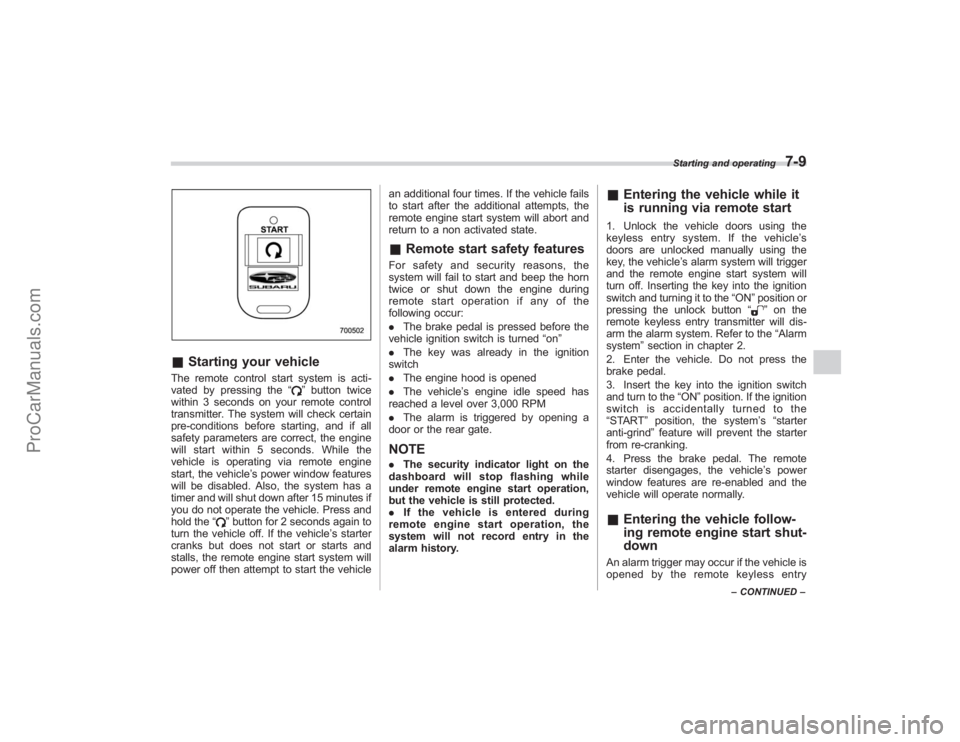
&Starting your vehicleThe remote control start system is acti-
vated by pressing the “
”button twice
within 3 seconds on your remote control
transmitter. The system will check certain
pre-conditions before starting, and if all
safety parameters are correct, the engine
will start within 5 seconds. While the
vehicle is operating via remote engine
start, the vehicle’ s power window features
will be disabled. Also, the system has a
timer and will shut down after 15 minutes if
you do not operate the vehicle. Press and
hold the “
”button for 2 seconds again to
turn the vehicle off. If the vehicle ’s starter
cranks but does not start or starts and
stalls, the remote engine start system will
power off then attempt to start the vehicle an additional four times. If the vehicle fails
to start after the additional attempts, the
remote engine start system will abort and
return to a non activated state.
&
Remote start safety featuresFor safety and security reasons, the
system will fail to start and beep the horn
twice or shut down the engine during
remote start operation if any of the
following occur:
. The brake pedal is pressed before the
vehicle ignition switch is turned “on ”
. The key was already in the ignition
switch
. The engine hood is opened
. The vehicle’ s engine idle speed has
reached a level over 3,000 RPM
. The alarm is triggered by opening a
door or the rear gate.NOTE. The security indicator light on the
dashboard will stop flashing while
under remote engine start operation,
but the vehicle is still protected.
. If the vehicle is entered during
remote engine start operation, the
system will not record entry in the
alarm history.
& Entering the vehicle while it
is running via remote start1. Unlock the vehicle doors using the
keyless entry system. If the vehicle ’s
doors are unlocked manually using the
key, the vehicle’ s alarm system will trigger
and the remote engine start system will
turn off. Inserting the key into the ignition
switch and turning it to the “ON”position or
pressing the unlock button “
”on the
remote keyless entry transmitter will dis-
arm the alarm system. Refer to the “Alarm
system ”section in chapter 2.
2. Enter the vehicle. Do not press the
brake pedal.
3. Insert the key into the ignition switch
and turn to the “ON”position. If the ignition
switch is accidentally turned to the
“START ”position, the system ’s “starter
anti-grind ”feature will prevent the starter
from re-cranking.
4. Press the brake pedal. The remote
starter disengages, the vehicle ’s power
window features are re-enabled and the
vehicle will operate normally.
& Entering the vehicle follow-
ing remote engine start shut-
downAn alarm trigger may occur if the vehicle is
opened by the remote keyless entry
Starting and operating
7-9
–CONTINUED –
ProCarManuals.com
Page 244 of 409
7-10
Starting and operating
transmitter within a few seconds immedi-
ately following remote engine start shut-
down.&Pre-heating or pre-cooling
the interior of the vehicleBefore exiting the vehicle, set the tem-
perature controls to the desired setting
and operation. After the system starts the
vehicle, the heater or air-conditioning will
activate and heat or cool the interior to
your setting.&Service modeIn service mode, the remote start function
is temporarily disabled to prevent the
system from unexpectedly starting the
engine while being serviced.
! To engage the service mode
Turn the ignition switch to the “ON ”
position, depress and hold the brake pedal
then, press and release the “
”button on
the remote control transmitter three times.
The system will pause for 1 second and
then flash the parking lights and honk the
horn three times indicating that the system
is in service mode. When attempting to
activate the remote start system while in
service mode, the parking lights will flash
and the horn will honk two times and will
not start. !
To disengage the service mode
Turn the ignition switch to the “ON ”
position, depress and hold the brake
pedal, then press and release the “
”
button on the remote control transmitter
three times. The system will pause for 1
second and flash the parking lights one
time indicating that the system has exited
service mode.
NOTEWhen taking your vehicle in for service,
it is recommended that you inform the
service personnel that your vehicle is
equipped with a remote control start
system.& Remote transmitter program-
ming and programmable fea-
ture optionNew transmitters can be programmed to
the engine starter system in the event that
remote transmitters are lost, stolen or
damaged. The remote engine start system
also has one programmable feature that
can be adjusted for user preference.
The remote engine starter system can be
programmed to either make an audible
horn chirp upon remote start activation or
not. Remote transmitter programming and
feature programming can be adjusted
using the following procedure. 1. Open the driver
’s door (the driver ’s
door must remain opened throughout the
entire process).
2. Insert the key into the vehicle’ s ignition
switch and turn to the “ON”position.
3. Locate the small black programming
button behind the fuse box cover, on the
driver ’s side left under the dashboard
panel.
4. Press and hold the black programming
button for 10 to 15 seconds. The horn will
honk and the parking lights will flash three
times to indicate that the system has
entered programming mode. At this point
you can perform either action (Step 5 or
Step 6).
5. To program a remote transmitter:
press and release the “
”button on each
transmitter. The horn will honk and the
parking lights will flash one time to indicate
a successful transmitter learn each time
the “
”button is pressed. You can
program up to eight transmitters.
6. To toggle the Horn Confirmation chirps
ON/OFF: press and release the brake to
toggle the feature. The horn will chirp and
the parking lights will flash one time to
indicate Confirmation Horn Chirps are
“OFF ”. The horn will honk and the parking
lights will flash 2 times to indicate Con-
firmation Horn Chirps are “ON”. Pressing
the brake pedal repeatedly will toggle the
ProCarManuals.com
Page 247 of 409
collected and stored in memory to
allow the transmission to shift at the
most appropriate times for the current
condition of your vehicle. Optimized
shifting will be restored as the vehicle
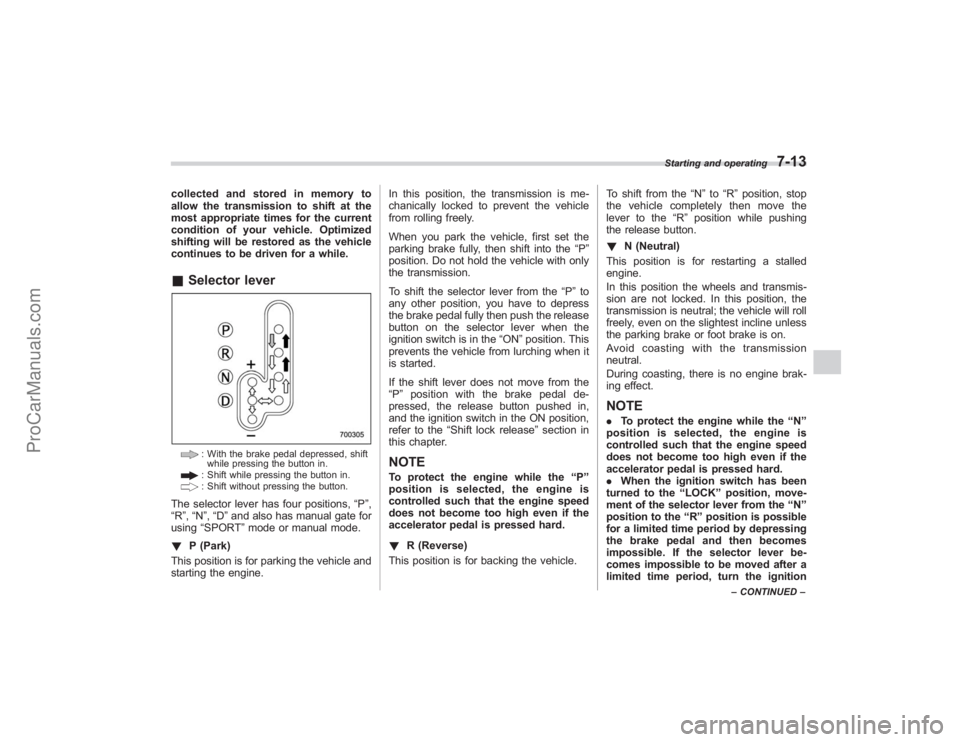
continues to be driven for a while.&Selector lever
: With the brake pedal depressed, shift
while pressing the button in.: Shift while pressing the button in.: Shift without pressing the button.
The selector lever has four positions, “P”,
“R ”,“N ”,“D ”and also has manual gate for
using “SPORT ”mode or manual mode.
! P (Park)
This position is for parking the vehicle and
starting the engine. In this position, the transmission is me-
chanically locked to prevent the vehicle
from rolling freely.
When you park the vehicle, first set the
parking brake fully, then shift into the
“P”
position. Do not hold the vehicle with only
the transmission.
To shift the selector lever from the “P”to
any other position, you have to depress
the brake pedal fully then push the release
button on the selector lever when the
ignition switch is in the “ON”position. This
prevents the vehicle from lurching when it
is started.
If the shift lever does not move from the
“ P ” position with the brake pedal de-
pressed, the release button pushed in,
and the ignition switch in the ON position,
refer to the “Shift lock release ”section in
this chapter.
NOTETo protect the engine while the “P ”
position is selected, the engine is
controlled such that the engine speed
does not become too high even if the
accelerator pedal is pressed hard.
! R (Reverse)
This position is for backing the vehicle. To shift from the
“N ”to “R”position, stop
the vehicle completely then move the
lever to the “R”position while pushing
the release button.
! N (Neutral)
This position is for restarting a stalled
engine.
In this position the wheels and transmis-
sion are not locked. In this position, the
transmission is neutral; the vehicle will roll
freely, even on the slightest incline unless
the parking brake or foot brake is on.
Avoidcoastingwiththetransmission
neutral.
During coasting, there is no engine brak-
ing effect.
NOTE. To protect the engine while the “N ”
position is selected, the engine is
controlled such that the engine speed
does not become too high even if the
accelerator pedal is pressed hard.
. When the ignition switch has been
turned to the “LOCK ”position, move-
ment of the selector lever from the “N ”
position to the “R ” position is possible
for a limited time period by depressing
the brake pedal and then becomes
impossible. If the selector lever be-
comes impossible to be moved after a
limited time period, turn the ignition
Starting and operating
7-13
– CONTINUED –
ProCarManuals.com
Page 250 of 409
7-16
Starting and operating
.The transmission does not automa-
tically shift up in the manual mode.
Perform gearshifts in accordance with
road conditions so that the tachometer
needle does not enter the red zone. If
the engine speed reaches a predeter-
mined level, a fuel-cut function will
operate. Shift up if this happens. Also,
the transmission may automatically
shift up to protect the engine.
. If you attempt to shift down when
the engine speed is too high, i.e., when
a downshift would push the tachometer
needle beyond the red zone, beeps will
be emitted to warn you that the down-
shift is not possible.
. If you attempt to shift up when the
vehicle speed is too low, the transmis-
sion will not respond.
. You can perform a skip-shift (for
example, from 4th to 2nd) by operating
the selector lever twice in rapid suc-
cession.
. The transmission automatically se-
lects 1st gear when the vehicle stops
moving.
. If the temperature of the automatic
transmission fluid becomes too high,
the “AT OIL TEMP ”warning light will
come on and upshifts to 5th gear will
not be possible. Immediately stop the
vehicle in a safe place and let the
engine idle until the warning light goes off.
&
Maximum speeds
WARNING
When down shifting, ensure that the
vehicle is not travelling at a speed
exceeding the Maximum Allowable
Speed for the gear which is about to
be selected. Failure to observe this
precaution can lead to engine over-
revving and this in turn can result in
engine damage.
In addition, sudden application of
engine braking caused by down
shifting when the vehicle is travel-
ling on a slippery surface can lead
to wheel locking; as a consequence,
control of the vehicle may be lost
and the risk of an accident in-
creased.
The following tables show the maximum
speeds that are possible with each differ-
ent gear.
When down shifting, it is important to
confirm that the current vehicle speed is
not in excess of the Maximum Allowable
Speed of the gear which is about to be
selected.
Position mph (km/h)
1 28 (45)
2 53 (85)
3 87 (140)
Never exceed posted speed limits.
NOTE. In order to prevent over-revving
during acceleration of the vehicle, the
transmission will automatically shift to
the next highest gear if the Maximum
Allowable Speed for the current gear is
exceeded.
. Similarly, in order to prevent over-
revving during deceleration of the
vehicle, the transmission will remain
in the current gear if the speed of the
vehicle is in excess of the Maximum
Allowable Speed for the gear to which
the selector lever has been moved.& Driving tips. On a road surface where there is a risk
of wheelspin (for example, a snow- or
gravel-covered road), you can pull away
from a standstill safely and easily by first
selecting the 2nd gear of the manual
mode.
. Always apply the foot or parking brake
when the vehicle is stopped in the “D”or
ProCarManuals.com
Page 251 of 409
“R”position.
. Always set the parking brake when
parking your vehicle. Do not hold the
vehicle with only the transmission.
. Do not keep the vehicle in a stationary
position on an uphill grade by using the
“D ”position. Use the brake instead.
. The engine may, on rare occasions,
knock when the vehicle rapidly acceler-
ates or rapidly pulls away from a standstill.
This phenomenon does not indicate a
problem.
. A slight reduction in output torque may
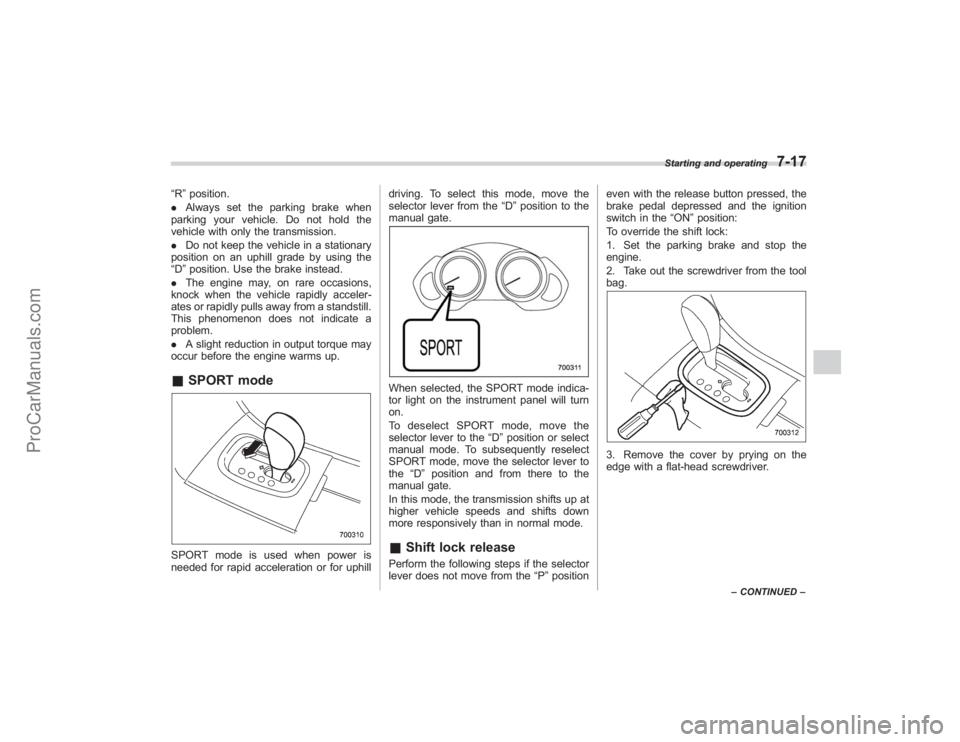
occur before the engine warms up.& SPORT modeSPORT mode is used when power is
needed for rapid acceleration or for uphill driving. To select this mode, move the
selector lever from the
“D”position to the
manual gate.
When selected, the SPORT mode indica-
tor light on the instrument panel will turn
on.
To deselect SPORT mode, move the
selector lever to the “D”position or select
manual mode. To subsequently reselect
SPORT mode, move the selector lever to
the “D”position and from there to the
manual gate.
In this mode, the transmission shifts up at
higher vehicle speeds and shifts down
more responsively than in normal mode.& Shift lock releasePerform the following steps if the selector
lever does not move from the “P”position even with the release button pressed, the
brake pedal depressed and the ignition
switch in the
“ON”position:
To override the shift lock:
1. Set the parking brake and stop the
engine.
2. Take out the screwdriver from the tool
bag.
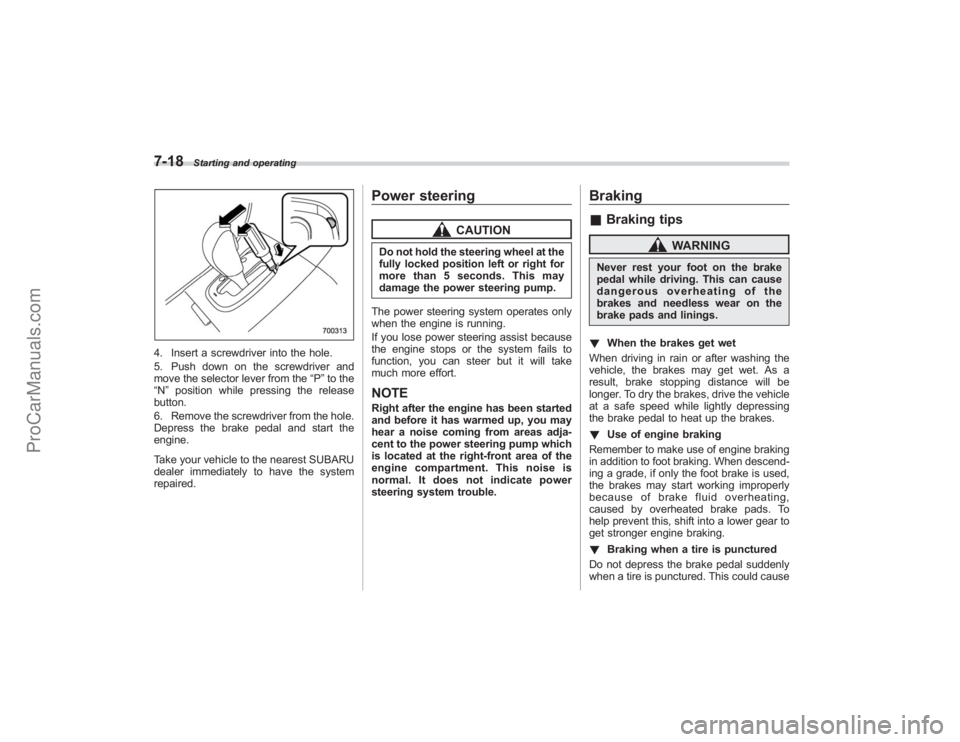
3. Remove the cover by prying on the
edge with a flat-head screwdriver.
Starting and operating
7-17
– CONTINUED –
ProCarManuals.com
Page 252 of 409
7-18
Starting and operating
4. Insert a screwdriver into the hole.
5. Push down on the screwdriver and
move the selector lever from the“P”to the
“N ”position while pressing the release
button.
6. Remove the screwdriver from the hole.
Depress the brake pedal and start the
engine.
Take your vehicle to the nearest SUBARU
dealer immediately to have the system
repaired.
Power steering
CAUTION
Do not hold the steering wheel at the
fully locked position left or right for
more than 5 seconds. This may
damage the power steering pump.
The power steering system operates only
when the engine is running.
If you lose power steering assist because
the engine stops or the system fails to
function, you can steer but it will take
much more effort.NOTERight after the engine has been started
and before it has warmed up, you may
hear a noise coming from areas adja-
cent to the power steering pump which
is located at the right-front area of the
engine compartment. This noise is
normal. It does not indicate power
steering system trouble.
Braking& Braking tips
WARNING
Never rest your foot on the brake
pedal while driving. This can cause
dangerous overheating of the
brakes and needless wear on the
brake pads and linings.
! When the brakes get wet
When driving in rain or after washing the
vehicle, the brakes may get wet. As a
result, brake stopping distance will be
longer. To dry the brakes, drive the vehicle
at a safe speed while lightly depressing
the brake pedal to heat up the brakes.
! Use of engine braking
Remember to make use of engine braking
in addition to foot braking. When descend-
ing a grade, if only the foot brake is used,
the brakes may start working improperly
because of brake fluid overheating,
caused by overheated brake pads. To
help prevent this, shift into a lower gear to
get stronger engine braking.
! Braking when a tire is punctured
Do not depress the brake pedal suddenly
when a tire is punctured. This could cause
ProCarManuals.com