alarm SUBARU TRIBECA 2008 Owners Manual
[x] Cancel search | Manufacturer: SUBARU, Model Year: 2008, Model line: TRIBECA, Model: SUBARU TRIBECA 2008Pages: 409, PDF Size: 5.75 MB
Page 24 of 409
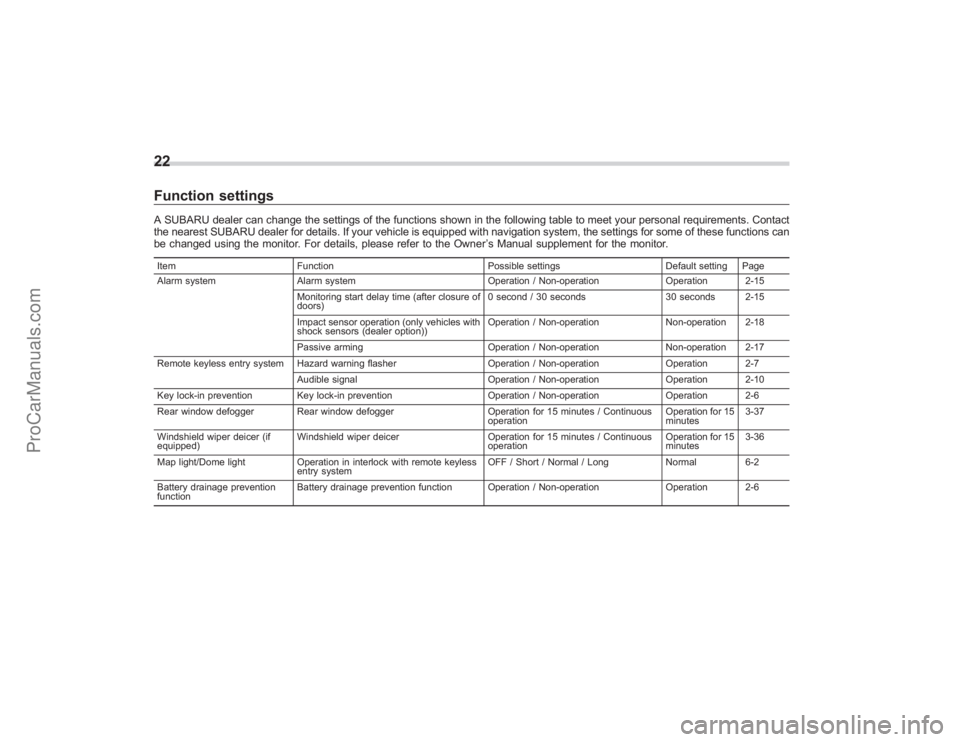
22Function settingsA SUBARU dealer can change the settings of the functions shown in the following table to meet your personal requirements. Contact
the nearest SUBARU dealer for details. If your vehicle is equipped with navigation system, the settings for some of these functions can
be changed using the monitor. For details, please refer to the Owner’s Manual supplement for the monitor.Item Function Possible settingsDefault setting Page
Alarm system Alarm system Operation / Non-operationOperation 2-15
Monitoring start delay time (after closure of
doors) 0 second / 30 seconds
30 seconds 2-15
Impact sensor operation (only vehicles with
shock sensors (dealer option)) Operation / Non-operation
Non-operation 2-18
Passive arming Operation / Non-operationNon-operation 2-17
Remote keyless entry system Hazard warning flasher Operation / Non-operationOperation 2-7
Audible signal Operation / Non-operationOperation 2-10
Key lock-in prevention Key lock-in prevention Operation / Non-operationOperation 2-6
Rear window defogger Rear window defogger Operation for 15 minutes / Continuous
operation Operation for 15
minutes3-37
Windshield wiper deicer (if
equipped) Windshield wiper deicer
Operation for 15 minutes / Continuous
operation Operation for 15
minutes3-36
Map light/Dome light Operation in interlock with remote keyless
entry system OFF / Short / Normal / Long
Normal6-2
Battery drainage prevention
function Battery drainage prevention function Operation / Non-operation
Operation 2-6
ProCarManuals.com
Page 95 of 409
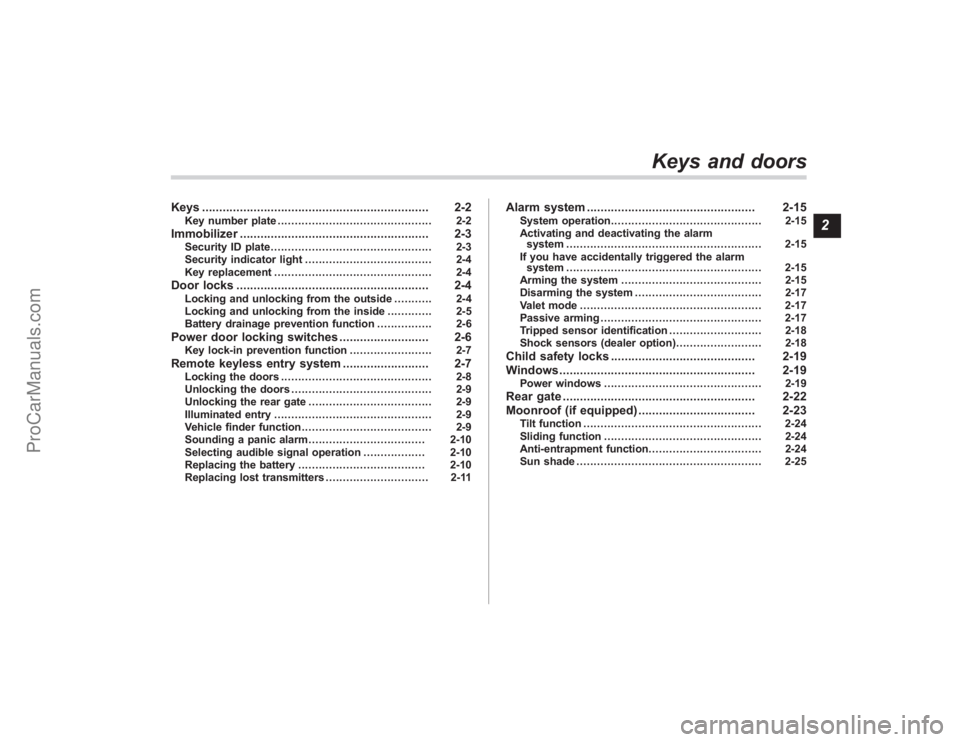
Keys.................................................................. 2-2
Key number plate ............................................. 2-2
Immobilizer....................................................... 2-3
Security ID plate ............................................... 2-3
Security indicator light ..................................... 2-4
Key replacement .............................................. 2-4
Door locks........................................................ 2-4
Locking and unlocking from the outside .. ......... 2-4
Locking and unlocking from the inside ............. 2-5
Battery drainage prevention function ................ 2-6
Power door locking switches.......................... 2-6
Key lock-in prevention function ........................ 2-7
Remote keyless entry system......................... 2-7
Locking the doors............................................ 2-8
Unlocking the doors ......................................... 2-9
Unlocking the rear gate .................................... 2-9
Illuminated entry .............................................. 2-9
Vehicle finder function ...................................... 2-9
Sounding a panic alarm .................................. 2-10
Selecting audible signal operation .................. 2-10
Replacing the battery ..................................... 2-10
Replacing lost transmitters .............................. 2-11
Alarm system................................................. 2-15
System operation ............................................ 2-15
Activating and deactivating the alarm system ......................................................... 2-15
If you have accidentally triggered the alarm system ......................................................... 2-15
Arming the system ......................................... 2-15
Disarming the system ..................................... 2-17
Valet mode ..................................................... 2-17
Passive arming ............................................... 2-17
Tripped sensor identification ........................... 2-18
Shock sensors (dealer option).. ....................... 2-18
Child safety locks.......................................... 2-19
Windows ......................................................... 2-19
Power windows .............................................. 2-19
Rear gate........................................................ 2-22
Moonroof (if equipped) .................................. 2-23
Tilt function.................................................... 2-24
Sliding function .............................................. 2-24
Anti-entrapment function ................................. 2-24
Sun shade ...................................................... 2-25
Keys and doors
2
ProCarManuals.com
Page 102 of 409
2-8
Keys and doors
entry system is located inside the key
head.
The keyless entry system has the follow-
ing functions.
.Locking and unlocking the doors and
rear gate without a key
. Unlocking the rear gate without key
. Sounding a panic alarm
. Arming and disarming the alarm sys-
tem. Refer to the next section “Alarm
system ”for detailed information.
The operable distance of the keyless entry
system is approximately 30 feet (10
meters). However, this distance will vary
depending on environmental conditions.
The system ’s operable distance will be
shorter in areas near a facility or electronic
equipment emitting strong radio waves
such as a power plant, broadcast station,
TV tower, or remote controller of home
electronic appliances.NOTEThe keyless entry system does not
operate when the ignition key is in-
serted in the ignition switch or when
any of the doors or the rear gate is not
fully closed.
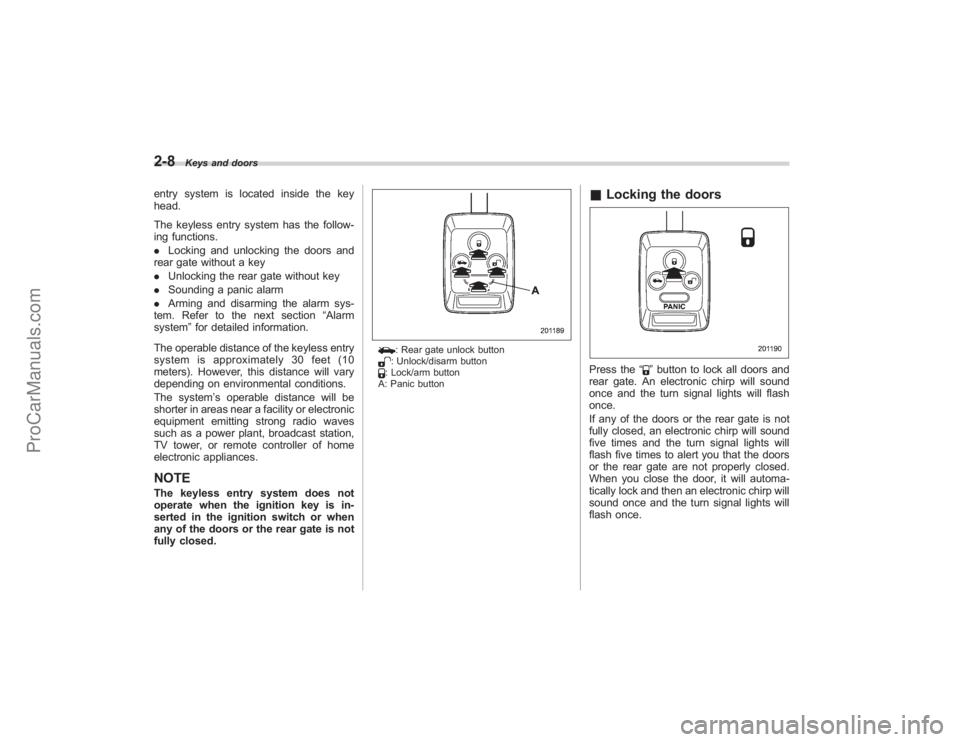
: Rear gate unlock button: Unlock/disarm button: Lock/arm button
A: Panic button
& Locking the doorsPress the “
”button to lock all doors and
rear gate. An electronic chirp will sound
once and the turn signal lights will flash
once.
If any of the doors or the rear gate is not
fully closed, an electronic chirp will sound
five times and the turn signal lights will
flash five times to alert you that the doors
or the rear gate are not properly closed.
When you close the door, it will automa-
tically lock and then an electronic chirp will
sound once and the turn signal lights will
flash once.
ProCarManuals.com
Page 104 of 409
2-10
Keys and doors
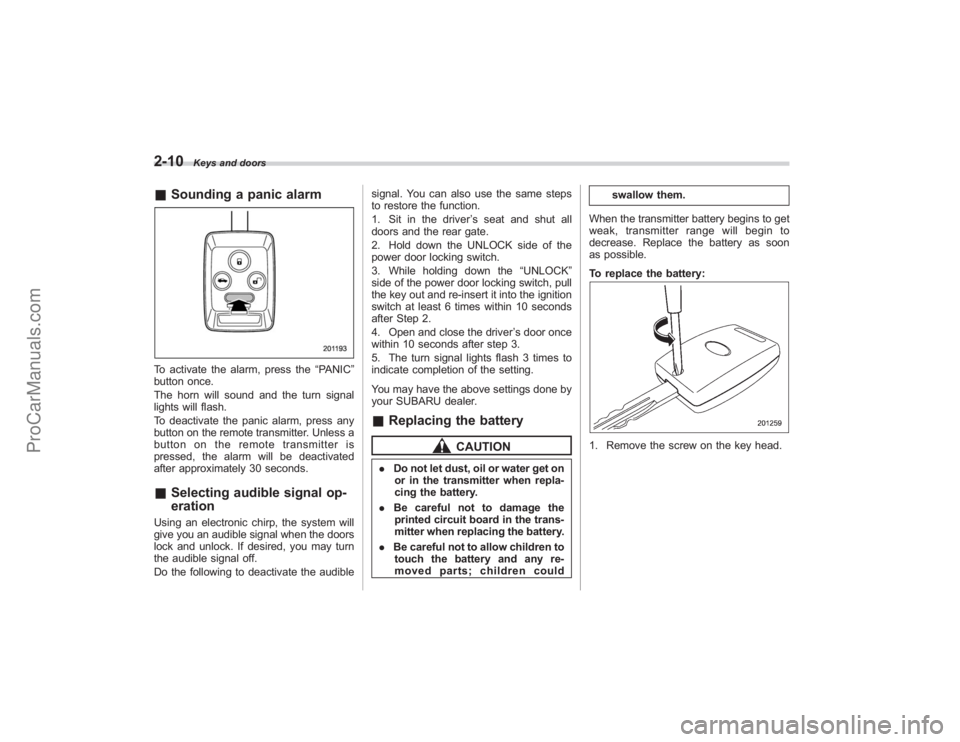
&Sounding a panic alarmTo activate the alarm, press the “PANIC”
button once.
The horn will sound and the turn signal
lights will flash.
To deactivate the panic alarm, press any
button on the remote transmitter. Unless a
button on the remote transmitter is
pressed, the alarm will be deactivated
after approximately 30 seconds.& Selecting audible signal op-
erationUsing an electronic chirp, the system will
give you an audible signal when the doors
lock and unlock. If desired, you may turn
the audible signal off.
Do the following to deactivate the audible signal. You can also use the same steps
to restore the function.
1. Sit in the driver
’s seat and shut all
doors and the rear gate.
2. Hold down the UNLOCK side of the
power door locking switch.
3. While holding down the “UNLOCK”
side of the power door locking switch, pull
the key out and re-insert it into the ignition
switch at least 6 times within 10 seconds
after Step 2.
4. Open and close the driver ’s door once
within 10 seconds after step 3.
5. The turn signal lights flash 3 times to
indicate completion of the setting.
You may have the above settings done by
your SUBARU dealer.
& Replacing the battery
CAUTION
. Do not let dust, oil or water get on
or in the transmitter when repla-
cing the battery.
. Be careful not to damage the
printed circuit board in the trans-
mitter when replacing the battery.
. Be careful not to allow children to
touch the battery and any re-
moved parts; children could swallow them.
When the transmitter battery begins to get
weak, transmitter range will begin to
decrease. Replace the battery as soon
as possible.
To replace the battery:
1. Remove the screw on the key head.
ProCarManuals.com
Page 109 of 409
Alarm systemThe alarm system helps to protect your
vehicle and valuables from theft. The horn
sounds and the turn signal lights flash if
someone attempts to break into your
vehicle.
The system can be armed and disarmed
with the remote transmitter.
The system does not operate when the
key is inserted into the ignition switch.
Your vehicle’s alarm system has been set
for activation at the time of shipment from
the factory. You can set the system for
deactivation yourself or have it done by
your SUBARU dealer.& System operationThe alarm system will give the following
alarms when triggered:
. The vehicle’ s horn will sound and the
turn signal lights will flash for 30 seconds.
. If any door (or the rear gate) remains
open after the 30-second period, the horn
will continue to sound for a maximum of 3
minutes. If the door (or the rear gate) is
closed while the horn is sounding, the
horn will stop sounding with a delay of up
to 30 seconds.
The alarm is triggered by: .
Opening a door or the rear gate
. Physical impact to the vehicle, such as
forced entry (only vehicles with shock
sensors (dealer option))
& Activating and deactivating
the alarm systemTo change the setting of your vehicle’ s
alarm system for activation or deactiva-
tion, do the following.
1. Disarm the alarm system (refer to
“Disarming the system ”in this section).
2. Sit in the driver ’s seat and shut all
doors (and the rear gate).
3. Turn the ignition switch to the “ON”
position.
4. Hold down the UNLOCK side of the
driver ’s power door locking switch, open
the driver ’s door within the following 1
second, and wait 10 seconds without
releasing the switch. The setting will then
be changed as follows:
If the system was previously activated:
The odometer/trip meter screen displays
“ AL oF ”and the horn sounds twice,
indicating that the system is now deacti-
vated.
If the system was previously deacti-
vated:
The odometer/trip meter screen displays “
AL on” and the horn sounds once,
indicating that the system is now acti-
vated.
NOTEYou may have the above setting
change done by your SUBARU dealer.& If you have accidentally trig-
gered the alarm system! To stop the alarm
Do any of the following operations:
. Press any button on the remote trans-
mitter.
. Turn the ignition switch to the “ON”
position.& Arming the system! To arm the system using remote
transmitter
1. Close all windows and the moonroof.
2. Remove the key from the ignition
switch.
3. Open the doors and get out of the
vehicle.
4. Make sure that the engine hood is
locked.
5. Close all doors (and the rear gate).
Keys and doors
2-15
– CONTINUED –
ProCarManuals.com
Page 111 of 409
.The 30-second standby time can be
eliminated if you prefer. Have it per-
formed by your SUBARU dealer.
. The system is in the standby mode
for a 30-second period after locking the
doors with the remote transmitter. The
security indicator light will flash at
short intervals during this period.
. If any of the following actions is
done during the standby period, the
system will not switch to the surveil-
lance state.
.Doors are unlocked using the
remote transmitter.
. Any door (including the rear gate)
is opened.
. Ignition switch is turned to the
“ ON ”position.& Disarming the systemBriefly press the “
”button (for less than
2 seconds) on the remote transmitter. The
driver ’s door will unlock, an electronic
chirp will sound twice, the turn signal
lights will flash twice and the indicator
light will go off.
To unlock all other doors and the rear
gate, briefly press the “
”button a
second time within 5 seconds.
NOTEIf the interval between the first and
second presses of the “
”button (for
unlocking of all of the doors and the
rear gate) is extremely short, the sys-
tem may not respond.
! Emergency disarming
If you cannot disarm the system using the
transmitter (i.e. the transmitter is lost,
broken or the transmitter battery is too
weak), you can disarm the system without
using the transmitter.
The system can be disarmed if you turn
the ignition switch from the “LOCK” to the
“ON ”position with a registered key.
& Valet modeWhen you choose the valet mode, the
alarm system does not operate. In valet
mode, the remote transmitter is used only
for locking and unlocking the doors and
rear gate and panic activation.
To enter the valet mode, change the
setting of your vehicle’ s alarm system for
deactivation mode. (Refer to “Activating
and deactivating the alarm system ”in this
section.) The security indicator light will
continue to flash once every 3 seconds
indicating that the system is in the valet
mode. To exit valet mode, change the setting of
your vehicle’
s alarm system for activation
mode. (Refer to “Activating and deactivat-
ing the alarm system ”in this section.)
& Passive armingWhen passive arming mode has been
programmed by the dealer, arming of the
system is automatically accomplished
without using the remote transmitter. Note
that in this mode, DOORS MUST BE
MANUALLY LOCKED.
! To enter the passive mode
If you wish to program the passive arming
mode, have it done by your SUBARU
dealer.
! Arming the system
CAUTION
In passive mode, the system will
automatically activate the alarm but
WILL NOT automatically lock the
doors. In order to lock the doors
you must either lock them as in-
dicated in step 4 below or with the
key once they have been closed.
Failure to lock the doors manually
will result in a higher security risk.
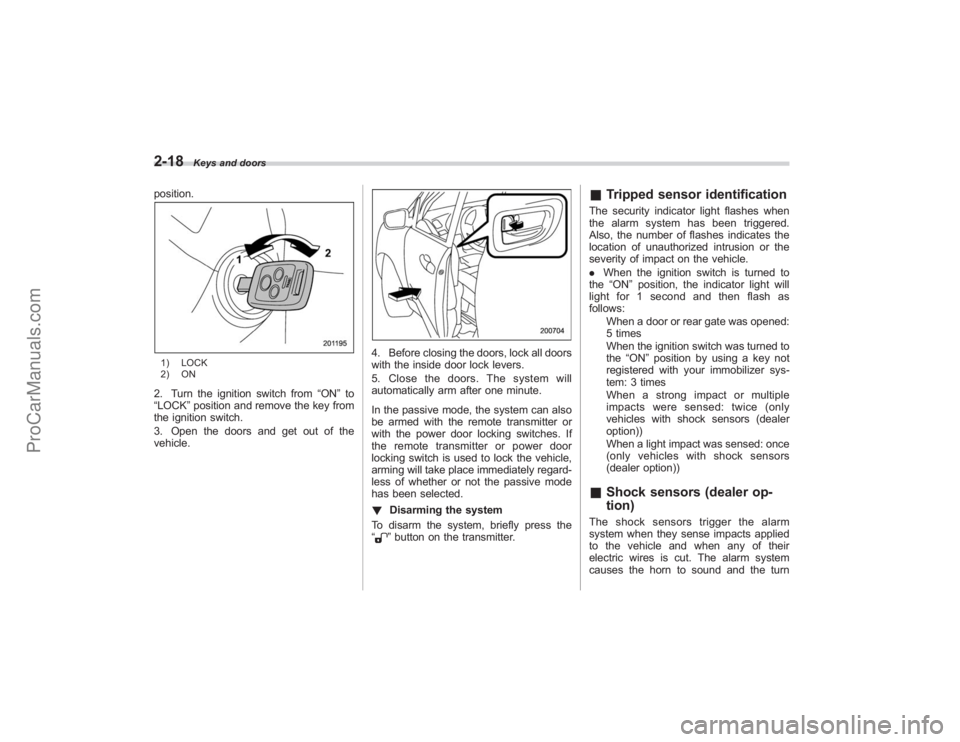
1. Turn the ignition switch to the “ON”
Keys and doors
2-17
–CONTINUED –
ProCarManuals.com
Page 112 of 409
2-18
Keys and doors
position.1) LOCK
2) ON2. Turn the ignition switch from“ON”to
“LOCK” position and remove the key from
the ignition switch.
3. Open the doors and get out of the
vehicle.
4. Before closing the doors, lock all doors
with the inside door lock levers.
5. Close the doors. The system will
automatically arm after one minute.
In the passive mode, the system can also
be armed with the remote transmitter or
with the power door locking switches. If
the remote transmitter or power door
locking switch is used to lock the vehicle,
arming will take place immediately regard-
less of whether or not the passive mode
has been selected.
! Disarming the system
To disarm the system, briefly press the
“
” button on the transmitter.
& Tripped sensor identificationThe security indicator light flashes when
the alarm system has been triggered.
Also, the number of flashes indicates the
location of unauthorized intrusion or the
severity of impact on the vehicle.
. When the ignition switch is turned to
the “ON”position, the indicator light will
light for 1 second and then flash as
follows:
When a door or rear gate was opened:
5 times
When the ignition switch was turned to
the “ON ”position by using a key not
registered with your immobilizer sys-
tem: 3 times
Whenastrongimpactormultiple
impacts were sensed: twice (only
vehicles with shock sensors (dealer
option))
When a light impact was sensed: once
(only vehicles with shock sensors
(dealer option))& Shock sensors (dealer op-
tion)The shock sensors trigger the alarm
system when they sense impacts applied
to the vehicle and when any of their
electric wires is cut. The alarm system
causes the horn to sound and the turn
ProCarManuals.com
Page 113 of 409
signal lights to flash for a short time when
the sensed impact is weak, but it warns of
a strong impact or multiple impacts by
sounding the horn and flashing the turn
signal lights, both lasting approximately 30
seconds.
If you desire, your SUBARU dealer can
connect them and set them for activation
or deactivation.NOTE.The shock sensors are not always
able to sense impacts caused by break-
ing in, and cannot sense an impact that
does not cause vibration (such as
breaking the glass using a rescue
hammer).
. The shock sensors may sense vi-
bration like those shown in the follow-
ing and trigger the alarm system.
Select the settings of the alarm system
and shock sensors appropriately de-
pending on where you usually park
your vehicle.
Example:
Vibration from construction site
Vibration in multistory car park
Vibration from trains
. You can have the sensitivity of the
shock sensors adjusted to your pre-
ference by your SUBARU dealer.
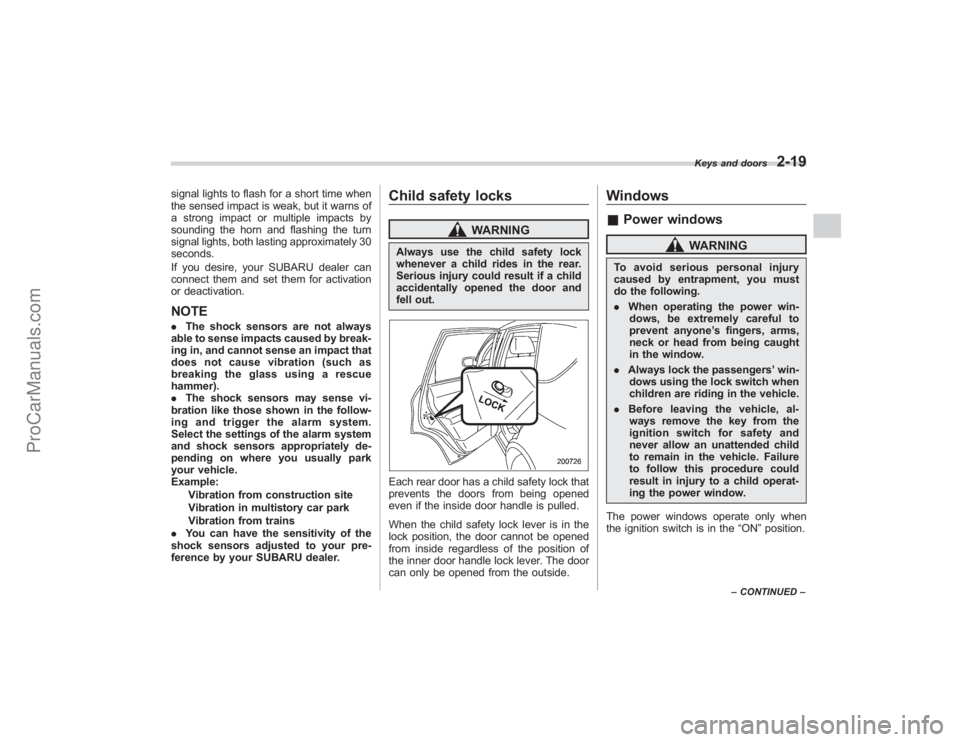
Child safety locks
WARNING
Always use the child safety lock
whenever a child rides in the rear.
Serious injury could result if a child
accidentally opened the door and
fell out.Each rear door has a child safety lock that
prevents the doors from being opened
even if the inside door handle is pulled.
When the child safety lock lever is in the
lock position, the door cannot be opened
from inside regardless of the position of
the inner door handle lock lever. The door
can only be opened from the outside.
Windows& Power windows
WARNING
To avoid serious personal injury
caused by entrapment, you must
do the following.
. When operating the power win-
dows, be extremely careful to
prevent anyone ’s fingers, arms,
neck or head from being caught
in the window.
. Always lock the passengers ’win-
dows using the lock switch when
children are riding in the vehicle.
. Before leaving the vehicle, al-
ways remove the key from the
ignition switch for safety and
never allow an unattended child
to remain in the vehicle. Failure
to follow this procedure could
result in injury to a child operat-
ing the power window.
The power windows operate only when
the ignition switch is in the “ON”position.
Keys and doors
2-19
– CONTINUED –
ProCarManuals.com
Page 139 of 409
The Vehicle Dynamics Control system
provides its ABS control through the
electrical circuit of the ABS system.
Accordingly, if the ABS is inoperative, the
Vehicle Dynamics Control system be-
comes unable to provide ABS control. As
a result, the Vehicle Dynamics Control
system also becomes inoperative, caus-
ing the warning light to come on. Though
both the Vehicle Dynamics Control and
ABS systems are inoperative in this case,
the ordinary functions of the brake system
are still available. You will be safe while
driving with this condition, but have your
vehicle checked at a SUBARU dealer as
soon as possible.NOTEIf the warning light behavior is as
shown in the following, the Vehicle
Dynamics Control system may be con-
sidered normal.
.The warning light comes on right
after the engine is started but goes out
immediately, remaining off.
. The warning light comes on after
engine startup and goes off while the
vehicle is subsequently being driven.
. The warning light comes on during
driving, but it goes out immediately and
remains off. !
Traction Control system OFF indi-
cator light
. It comes on when the Traction Control
system OFF switch is pressed.
. It also comes on when the Traction
Control system is deactivated.
NOTE. The light may stay on for a while
after the engine has been started,
especially in cold weather. This does
not indicate the existence of a problem.
The light should go out as soon as the
engine has warmed up.
. The indicator light comes on when
the engine has developed a problem
and the CHECK ENGINE warning light/
Malfunction indicator lamp is on.
The Vehicle Dynamics Control system is
probably faulty under the following condi-
tion. Have your vehicle checked at a
SUBARU dealer as soon as possible.
. The light does not go out even after the
lapse of several minutes (the engine has
warmed up) after the engine has started.
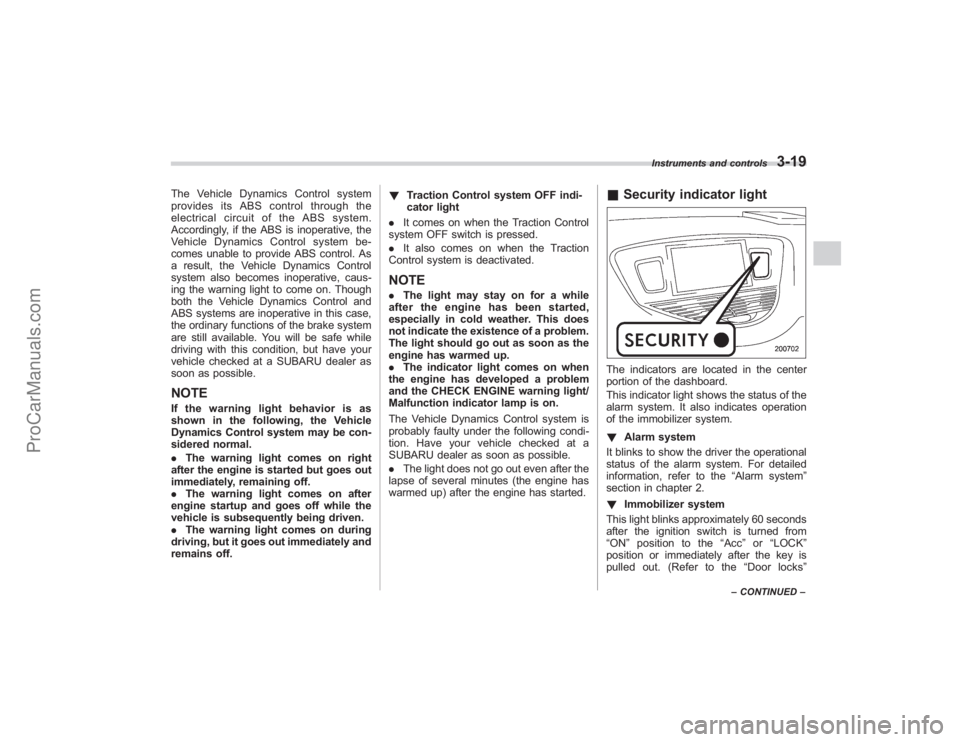
& Security indicator lightThe indicators are located in the center
portion of the dashboard.
This indicator light shows the status of the
alarm system. It also indicates operation
of the immobilizer system.
! Alarm system
It blinks to show the driver the operational
status of the alarm system. For detailed
information, refer to the “Alarm system”
section in chapter 2.
! Immobilizer system
This light blinks approximately 60 seconds
after the ignition switch is turned from
“ ON ”position to the “Acc ”or “LOCK ”
position or immediately after the key is
pulled out. (Refer to the “Door locks ”
Instruments and controls
3-19
–CONTINUED –
ProCarManuals.com
Page 243 of 409
&Starting your vehicleThe remote control start system is acti-
vated by pressing the “
”button twice
within 3 seconds on your remote control
transmitter. The system will check certain
pre-conditions before starting, and if all
safety parameters are correct, the engine
will start within 5 seconds. While the
vehicle is operating via remote engine
start, the vehicle’ s power window features
will be disabled. Also, the system has a
timer and will shut down after 15 minutes if
you do not operate the vehicle. Press and
hold the “
”button for 2 seconds again to
turn the vehicle off. If the vehicle ’s starter
cranks but does not start or starts and
stalls, the remote engine start system will
power off then attempt to start the vehicle an additional four times. If the vehicle fails
to start after the additional attempts, the
remote engine start system will abort and
return to a non activated state.
&
Remote start safety featuresFor safety and security reasons, the
system will fail to start and beep the horn
twice or shut down the engine during
remote start operation if any of the
following occur:
. The brake pedal is pressed before the
vehicle ignition switch is turned “on ”
. The key was already in the ignition
switch
. The engine hood is opened
. The vehicle’ s engine idle speed has
reached a level over 3,000 RPM
. The alarm is triggered by opening a
door or the rear gate.NOTE. The security indicator light on the
dashboard will stop flashing while
under remote engine start operation,
but the vehicle is still protected.
. If the vehicle is entered during
remote engine start operation, the
system will not record entry in the
alarm history.
& Entering the vehicle while it
is running via remote start1. Unlock the vehicle doors using the
keyless entry system. If the vehicle ’s
doors are unlocked manually using the
key, the vehicle’ s alarm system will trigger
and the remote engine start system will
turn off. Inserting the key into the ignition
switch and turning it to the “ON”position or
pressing the unlock button “
”on the
remote keyless entry transmitter will dis-
arm the alarm system. Refer to the “Alarm
system ”section in chapter 2.
2. Enter the vehicle. Do not press the
brake pedal.
3. Insert the key into the ignition switch
and turn to the “ON”position. If the ignition
switch is accidentally turned to the
“START ”position, the system ’s “starter
anti-grind ”feature will prevent the starter
from re-cranking.
4. Press the brake pedal. The remote
starter disengages, the vehicle ’s power
window features are re-enabled and the
vehicle will operate normally.
& Entering the vehicle follow-
ing remote engine start shut-
downAn alarm trigger may occur if the vehicle is
opened by the remote keyless entry
Starting and operating
7-9
–CONTINUED –
ProCarManuals.com