sport mode SUBARU TRIBECA 2008 Owners Manual
[x] Cancel search | Manufacturer: SUBARU, Model Year: 2008, Model line: TRIBECA, Model: SUBARU TRIBECA 2008Pages: 409, PDF Size: 5.75 MB
Page 21 of 409
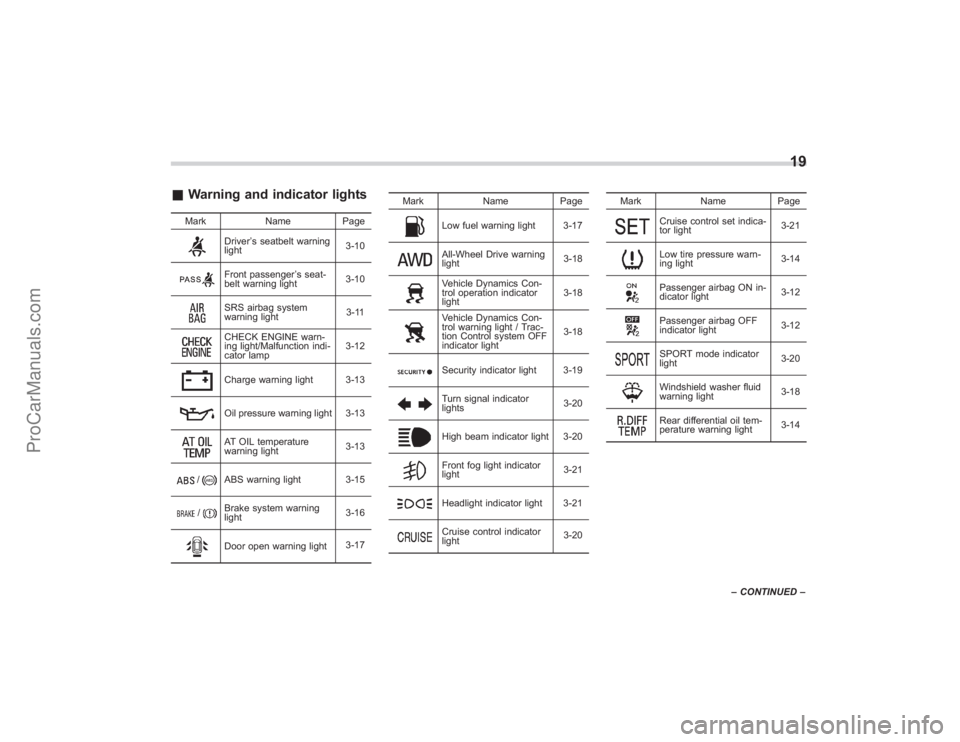
&Warning and indicator lights
Mark NamePage
Driver’s seatbelt warning
light 3-10Front passenger
’s seat-
belt warning light 3-10SRS airbag system
warning light 3-11CHECK ENGINE warn-
ing light/Malfunction indi-
cator lamp3-12Charge warning light 3-13Oil pressure warning light 3-13AT OIL temperature
warning light
3-13
/
ABS warning light 3-15
/
Brake system warning
light3-16Door open warning light
3-17Mark Name Page
Low fuel warning light 3-17All-Wheel Drive warning
light
3-18Vehicle Dynamics Con-
trol operation indicator
light3-18Vehicle Dynamics Con-
trol warning light / Trac-
tion Control system OFF
indicator light3-18Security indicator light 3-19Turn signal indicator
lights
3-20High beam indicator light 3-20Front fog light indicator
light3-21Headlight indicator light 3-21Cruise control indicator
light3-20Mark Name Page
Cruise control set indica-
tor light
3-21Low tire pressure warn-
ing light3-14Passenger airbag ON in-
dicator light
3-12Passenger airbag OFF
indicator light3-12SPORT mode indicator
light
3-20Windshield washer fluid
warning light3-18Rear differential oil tem-
perature warning light3-14
19
–
CONTINUED –
ProCarManuals.com
Page 121 of 409
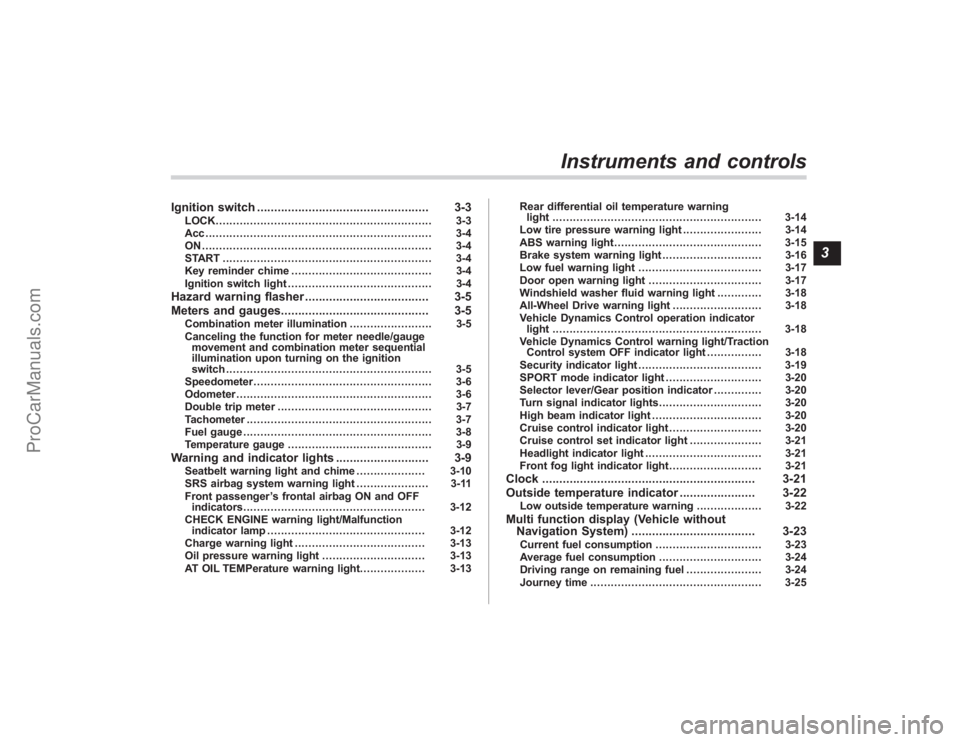
Ignition switch.................................................. 3-3
LOCK............................................................... 3-3
Acc.................................................................. 3-4
ON................................................................... 3-4
START ............................................................. 3-4
Key reminder chime ......................................... 3-4
Ignition switch light .......................................... 3-4
Hazard warning flasher .................................... 3-5
Meters and gauges. .......................................... 3-5
Combination meter illumination ........................ 3-5
Canceling the function for meter needle/gauge movement and combination meter sequential
illumination upon turning on the ignition
switch ............................................................ 3-5
Speedometer .................................................... 3-6
Odometer ......................................................... 3-6
Double trip meter ............................................. 3-7
Tachometer ...................................................... 3-7
Fuel gauge ....................................................... 3-8
Temperature gauge .......................................... 3-9
Warning and indicator lights ........................... 3-9
Seatbelt warning light and chime .................... 3-10
SRS airbag system warning light ..................... 3-11
Front passenger ’s frontal airbag ON and OFF
indicators ..................................................... 3-12
CHECK ENGINE warning light/Malfunction indicator lamp .............................................. 3-12
Charge warning light ...................................... 3-13
Oil pressure warning light .............................. 3-13
AT OIL TEMPerature warning light. .................. 3-13Rear differential oil temperature warning
light ............................................................. 3-14
Low tire pressure warning light ....................... 3-14
ABS warning light ........................................... 3-15
Brake system warning light ............................. 3-16
Low fuel warning light .................................... 3-17
Door open warning light ................................. 3-17
Windshield washer fluid warning light ............. 3-18
All-Wheel Drive warning light .......................... 3-18
Vehicle Dynamics Control operation indicator light ............................................................. 3-18
Vehicle Dynamics Control warning light/Traction Control system OFF indicator light ................ 3-18
Security indicator light .................................... 3-19
SPORT mode indicator light ............................ 3-20
Selector lever/Gear position indicator .............. 3-20
Turn signal indicator lights .............................. 3-20
High beam indicator light ................................ 3-20
Cruise control indicator light ........................... 3-20
Cruise control set indicator light ..................... 3-21
Headlight indicator light .................................. 3-21
Front fog light indicator light ........................... 3-21
Clock.............................................................. 3-21
Outside temperature indicator ...................... 3-22
Low outside temperature warning ................... 3-22
Multi function display (Vehicle without
Navigation System) .................................... 3-23
Current fuel consumption ............................... 3-23
Average fuel consumption .............................. 3-24
Driving range on remaining fuel ...................... 3-24
Journey time .................................................. 3-25
Instruments and controls
3
ProCarManuals.com
Page 130 of 409
3-10
Instruments and controls
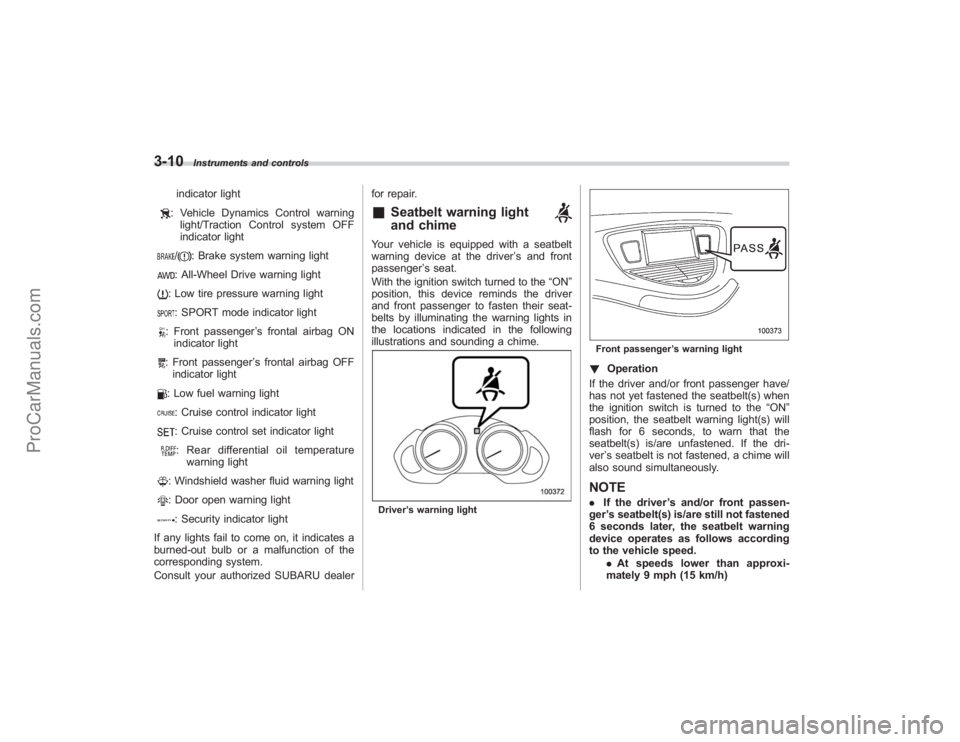
indicator light: Vehicle Dynamics Control warninglight/Traction Control system OFF
indicator light/
: Brake system warning light
: All-Wheel Drive warning light: Low tire pressure warning light: SPORT mode indicator light: Front passenger ’s frontal airbag ON
indicator light: Front passenger ’s frontal airbag OFF
indicator light: Low fuel warning light: Cruise control indicator light: Cruise control set indicator light: Rear differential oil temperature warning light: Windshield washer fluid warning light: Door open warning light: Security indicator light
If any lights fail to come on, it indicates a
burned-out bulb or a malfunction of the
corresponding system.
Consult your authorized SUBARU dealer for repair.
&
Seatbelt warning light
and chime
Your vehicle is equipped with a seatbelt
warning device at the driver
’s and front
passenger ’s seat.
With the ignition switch turned to the “ON”
position, this device reminds the driver
and front passenger to fasten their seat-
belts by illuminating the warning lights in
the locations indicated in the following
illustrations and sounding a chime.Driver ’s warning light
Front passenger ’s warning light! Operation
If the driver and/or front passenger have/
has not yet fastened the seatbelt(s) when
the ignition switch is turned to the “ON”
position, the seatbelt warning light(s) will
flash for 6 seconds, to warn that the
seatbelt(s) is/are unfastened. If the dri-
ver ’s seatbelt is not fastened, a chime will
also sound simultaneously.NOTE. If the driver ’s and/or front passen-
ger ’s seatbelt(s) is/are still not fastened
6 seconds later, the seatbelt warning
device operates as follows according
to the vehicle speed.
.At speeds lower than approxi-
mately 9 mph (15 km/h)
ProCarManuals.com
Page 140 of 409
3-20
Instruments and controls
section in chapter 2.)
If the indicator light does not flash, it may
indicate that immobilizer system may be
faulty. Contact your nearest SUBARU
dealer immediately.
In the event that an unauthorized key (for
example, an unauthorized duplicate) is
used, the security indicator light comes
on.&
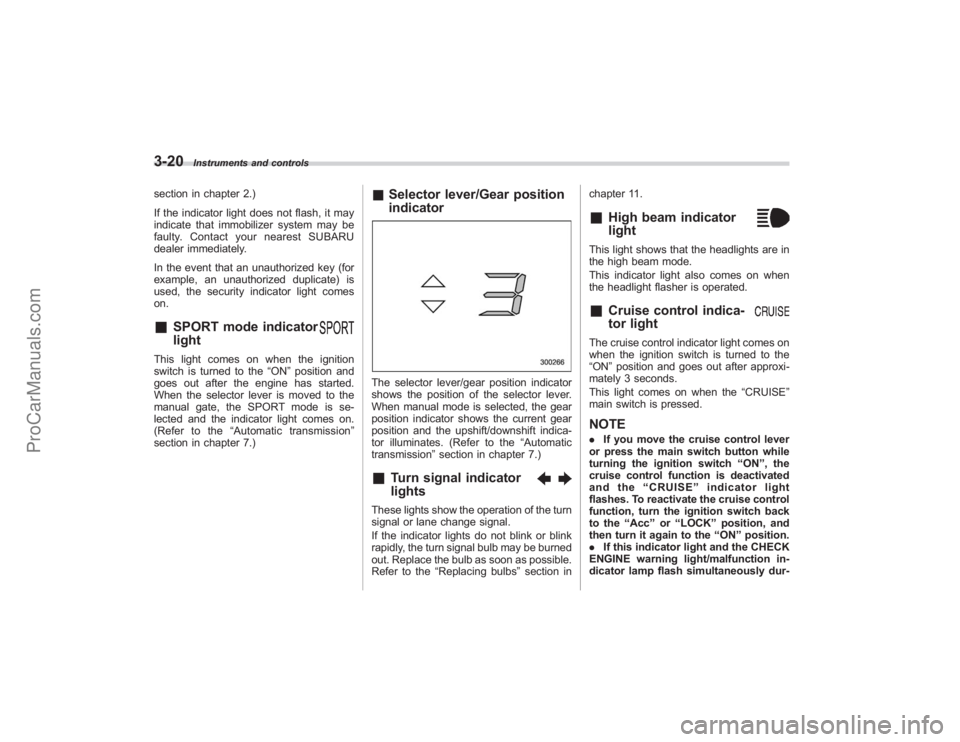
SPORT mode indicator
light
This light comes on when the ignition
switch is turned to the“ON”position and
goes out after the engine has started.
When the selector lever is moved to the
manual gate, the SPORT mode is se-
lected and the indicator light comes on.
(Refer to the “Automatic transmission ”
section in chapter 7.)
& Selector lever/Gear position
indicatorThe selector lever/gear position indicator
shows the position of the selector lever.
When manual mode is selected, the gear
position indicator shows the current gear
position and the upshift/downshift indica-
tor illuminates. (Refer to the “Automatic
transmission” section in chapter 7.)&
Turn signal indicator
lights
These lights show the operation of the turn
signal or lane change signal.
If the indicator lights do not blink or blink
rapidly, the turn signal bulb may be burned
out. Replace the bulb as soon as possible.
Refer to the“Replacing bulbs ”section in chapter 11.
&
High beam indicator
light
This light shows that the headlights are in
the high beam mode.
This indicator light also comes on when
the headlight flasher is operated.&
Cruise control indica-
tor light
The cruise control indicator light comes on
when the ignition switch is turned to the
“ON
”position and goes out after approxi-
mately 3 seconds.
This light comes on when the “CRUISE”
main switch is pressed.NOTE. If you move the cruise control lever
or press the main switch button while
turning the ignition switch “ON ”, the
cruise control function is deactivated
and the “CRUISE ”indicator light
flashes. To reactivate the cruise control
function, turn the ignition switch back
to the “Acc ”or “LOCK ”position, and
then turn it again to the “ON ”position.
. If this indicator light and the CHECK
ENGINE warning light/malfunction in-
dicator lamp flash simultaneously dur-
ProCarManuals.com
Page 185 of 409
!XM
TM
satellite radio
XM
TM
is a continental U.S. based satellite
radio service that offers more than 160
coast to coast channels, including music,
news, sports, talk and children ’s program-
ming. XM
TM
provides digital quality audio
and text information, including song title
and artist name. A service fee is required
to receive the XM
TM
service. For more
information, contact your SUBARU dealer
or XM
TM
at
www.xmradio.com or call 1-800-
XMRADIO (1-800-967-2346) for U.S.www.xmradio.ca or call 1-877-GET-XMSR
(1-877-438-9677) for Canada.
! Satellite radio reception
Satellite radio signals are best received in
areas with a clear view of the open sky. In
areas where there are tall buildings, trees,
tunnels or other structures that may
obstruct the signal of the satellites, there
may be signal interruptions. Other circum-
stances that may result in signal loss
include driving near a wall, steep cliff or
hill, or driving on the lower level of a multi-
tiered road or inside a parking garage.
To help reduce this condition, satellite
radio providers have installed ground-
based repeaters in heavily populated
areas. However, you may still experience
reception problems in some areas. !
Displaying satellite radio ID of tuner
When you activate satellite radio, you
should have your satellite radio tuner ID
ready because each tuner is identified by
its unique satellite radio tuner ID.
The satellite radio ID will be needed when
you activate satellite radio and receive
satellite radio customer support.
The satellite radio ID can be found on the
audio display by tuning the channel to “0”.
Turn the “TUNE TRACK ”button (4) to
select the satellite radio channel.
! Band selection button
Push the “SAT”button (1) when the radio
is off to turn on the radio.
Push the “SAT”button when the radio is
on to select SAT1, SAT2 or SAT3 recep-
tion.
! Channel selection
Press “
”of the TUNE TRACK button (4)
to select the next channel and press “
”
of the button to select the previous
channel.
Keep pressing “
”of the button to
change to the next channel continuously
and keep pressing “
”of the button to
change to the previous channel continu-
ously. !
Category selection
Press “
”or “
”of the SEEK FLDR
button (7) to display the current category.
Press “
”again to select the next
category, and press “
”again to select
the previous category.
! Channel scan
Press the “SCAN”button (8) to change the
radio to the SCAN mode. In this mode, the
radio scans through the channels until a
station is found. The radio will stop at the
station for 5 seconds while displaying the
channel number, after which scanning will
continue until the entire channel has been
scanned from the low end to the high end.
Also during the category selection, chan-
nel scan can be performed in that cate-
gory.
Press the “SCAN”button again to cancel
the SCAN mode and to stop on any
displayed channel.
! Selecting preset channels
Presetting a channel with a preset button
(10) allows you to select that channel in a
single operation. Up to six, SAT1, SAT2
and SAT3 channels each may be preset.
! How to preset channels
1. Press the “SAT”button (1) to select
SAT1, SAT2 and SAT3 reception.
Audio
5-9
– CONTINUED –
ProCarManuals.com
Page 196 of 409
5-20
Audio
!XM
TM
satellite radio
XM
TM
is a continental U.S. based satellite
radio service that offers more than 160
coast to coast channels, including music,
news, sports, talk and children ’s program-
ming. XM
TM
provides digital quality audio
and text information, including song title
and artist name. A service fee is required
to receive the XM
TM
service. For more
information, contact your SUBARU dealer
or XM
TM
at
www.xmradio.com or call 1-800-
XMRADIO (1-800-967-2346) for U.S.www.xmradio.ca or call 1-877-GET-XMSR
(1-877-438-9677) for Canada.
! Satellite radio reception
Satellite radio signals are best received in
areas with a clear view of the open sky. In
areas where there are tall buildings, trees,
tunnels or other structures that may
obstruct the signal of the satellites, there
may be signal interruptions. Other circum-
stances that may result in signal loss
include driving near a wall, steep cliff or
hill, or driving on the lower level of a multi-
tiered road or inside a parking garage.
To help reduce this condition, satellite
radio providers have installed ground-
based repeaters in heavily populated
areas. However, you may still experience
reception problems in some areas. !
Displaying satellite radio ID of tuner
When you activate satellite radio, you
should have your satellite radio tuner ID
ready because each tuner is identified by
its unique satellite radio tuner ID.
The satellite radio ID will be needed when
you activate satellite radio and receive
satellite radio customer support.
The satellite radio ID can be found on the
audio display by tuning the channel to “0”.
Turn the “TUNE/TRACK ”button (4) to
select the satellite radio channel.
! Band selection button
Push the “SAT”button (1) when the radio
is off to turn on the radio.
Push the “SAT”button when the radio is
on to select SAT1, SAT2 or SAT3 recep-
tion.
! Channel selection
Press “
”of the TUNE TRACK button (4)
to select the next channel and press “
”
of the button to select the previous
channel.
Keep pressing “
”of the button to
change to the next channel continuously
and keep pressing “
”of the button to
change to the previous channel continu-
ously. !
Category selection
Press “
”or “
”of the SEEK FLDR
button (7) to display the current category.
Press “
”again to select the next
category, and press “
”again to select
the previous category.
! Channel scan
Press the “SCAN”button (8) to change the
radio to the SCAN mode. In this mode, the
radio scans through the channels until a
station is found. The radio will stop at the
station for 5 seconds while displaying the
channel number, after which scanning will
continue until the entire channel has been
scanned from the low end to the high end.
Also during the category selection, chan-
nel scan can be performed in that cate-
gory.
Press the “SCAN”button again to cancel
the SCAN mode and to stop on any
displayed channel.
! Selecting preset channels
Presetting a channel with a preset button
(10) allows you to select that channel in a
single operation. Up to six, SAT1, SAT2
and SAT3 channels each may be preset.
! How to preset channels
1. Press the “SAT”button (1) to select
SAT1, SAT2 and SAT3 reception.
ProCarManuals.com
Page 235 of 409
Fuel................................................................... 7-2
Fuel requirements ............................................ 7-2
Fuel filler lid and cap ........................................ 7-3
State emission testing (U.S. only) ................... 7-5
Preparing to drive ............................................ 7-7
Starting the engine ........................................... 7-7
Stopping the engine ......................................... 7-8
Remote engine start system (dealer option) ............................................... 7-8
Starting your vehicle ........................................ 7-9
Remote start safety features ............................. 7-9
Entering the vehicle while it is running via remote start ............................................................... 7-9
Entering the vehicle following remote engine start shutdown ....................................................... 7-9
Pre-heating or pre-cooling the interior of the vehicle ......................................................... 7-10
Service mode ................................................. 7-10
Remote transmitter programming and programmable feature option ........................ 7-10
System maintenance ....................................... 7-11
Automatic transmission ................................. 7-12
Selector lever................................................. 7-13
Selector lever reverse inhibiting function . ....... 7-14
Selection of manual mode .............................. 7-15
Maximum speeds ........................................... 7-16
Driving tips .................................................... 7-16
SPORT mode ................................................. 7-17 Shift lock release
............................................ 7-17
Power steering............................................... 7-18
Braking ........................................................... 7-18
Braking tips .................................................... 7-18
Brake system ................................................. 7-19
Disc brake pad wear warning indicators .......... 7-19
ABS (Anti-lock Brake System)...................... 7-20
ABS system self-check................................... 7-20
ABS warning light ........................................... 7-21
Electronic Brake Force Distribution (EBD)
system ......................................................... 7-22
Steps to take if EBD system fails .................... 7-22
Vehicle Dynamics Control system ................ 7-23
Vehicle Dynamics Control system monitor....... 7-25
Traction Control system OFF switch ................ 7-26
Tire pressure monitoring system
(TPMS) ......................................................... 7-27
Parking your vehicle ..................................... 7-29
Parking brake................................................. 7-29
Parking tips .................................................... 7-29
Cruise control ................................................ 7-30
To set cruise control ....................................... 7-30
To temporarily cancel the cruise control .......... 7-31
To turn off the cruise control ........................... 7-31
To change the cruising speed .. ....................... 7-32
Cruise control indicator light ........................... 7-33
Cruise control set indicator light ..................... 7-33
Starting and operating
7
ProCarManuals.com
Page 246 of 409
7-12
Starting and operating
on the old batteries before removing them
to ensure that the new batteries are
inserted properly (battery“+”should be
pointed away from the transmitter circuit
board on both batteries).
3. Carefully snap the case halves back
together, then test the remote control.NOTEThis device complies with Part 15 of
the FCC Rules and with RSS-210 of
Industry Canada. Operation is subject
to the following two conditions: (1) This
device may not cause harmful inter-
ference, and (2) this device must
accept any interference received, in-
cluding interference that may cause
undesired operation.
Changes or modifications not ex-
pressly approved by the party respon-
sible for compliance could void the
user ’s authority to operate the equip-
ment.
Automatic transmissionThe automatic transmission is electroni-
cally controlled and provides 5 forward
speeds and 1 reverse speed. Also, it has a
manual mode and a SPORT mode.
WARNING
Do not shift from the “P ” or “N ”
position into the “D ” or “R ” position
while depressing the accelerator
pedal. This may cause the vehicle
to jump forward or backward.
CAUTION
. Shift into the “P ” or “R ” position
only after the vehicle is comple-
tely stopped. Shifting while the
vehicle is moving may cause
damage to the transmission.
. Do not race the engine for more
than 5 seconds in any position
except the “N ” or “P ” position
when the brake is set or when
chocks are used in the wheels.
This may cause the automatic
transmission fluid to overheat.
. Avoid shifting from one of the
forward driving positions into the “
R ” position or vice versa until
the vehicle has completely
stopped. Such shifting may
cause damage to the transmis-
sion.
. When parking the vehicle, first
securely apply the parking brake
and then place the selector lever
in the “P ” position. Avoid parking
for a long time with the selector
lever in any other position as
doing so could result in a dead
battery.
NOTE. When the engine coolant tempera-
ture is still low, your vehicle ’s auto-
matic transmission will up-shift at high-
er engine speeds than when the cool-
ant temperature is sufficiently high in
order to shorten the warm-up time and
improve driveability. The gearshift tim-
ing will automatically shift to the nor-
mal timing after the engine has warmed
up.
. Immediately after ATF (automatic
transmission fluid) is replaced, you
may feel that the automatic transmis-
sion operation is somewhat unusual.
This results from invalidation of data
which the on-board computer has
ProCarManuals.com
Page 247 of 409
collected and stored in memory to
allow the transmission to shift at the
most appropriate times for the current
condition of your vehicle. Optimized
shifting will be restored as the vehicle
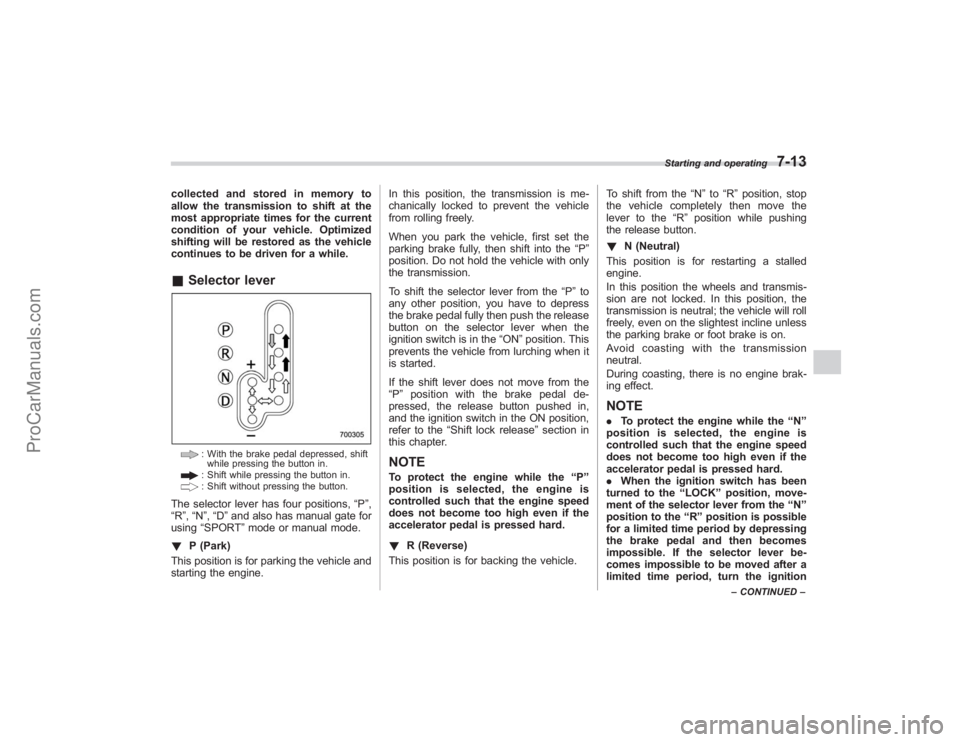
continues to be driven for a while.&Selector lever
: With the brake pedal depressed, shift
while pressing the button in.: Shift while pressing the button in.: Shift without pressing the button.
The selector lever has four positions, “P”,
“R ”,“N ”,“D ”and also has manual gate for
using “SPORT ”mode or manual mode.
! P (Park)
This position is for parking the vehicle and
starting the engine. In this position, the transmission is me-
chanically locked to prevent the vehicle
from rolling freely.
When you park the vehicle, first set the
parking brake fully, then shift into the
“P”
position. Do not hold the vehicle with only
the transmission.
To shift the selector lever from the “P”to
any other position, you have to depress
the brake pedal fully then push the release
button on the selector lever when the
ignition switch is in the “ON”position. This
prevents the vehicle from lurching when it
is started.
If the shift lever does not move from the
“ P ” position with the brake pedal de-
pressed, the release button pushed in,
and the ignition switch in the ON position,
refer to the “Shift lock release ”section in
this chapter.
NOTETo protect the engine while the “P ”
position is selected, the engine is
controlled such that the engine speed
does not become too high even if the
accelerator pedal is pressed hard.
! R (Reverse)
This position is for backing the vehicle. To shift from the
“N ”to “R”position, stop
the vehicle completely then move the
lever to the “R”position while pushing
the release button.
! N (Neutral)
This position is for restarting a stalled
engine.
In this position the wheels and transmis-
sion are not locked. In this position, the
transmission is neutral; the vehicle will roll
freely, even on the slightest incline unless
the parking brake or foot brake is on.
Avoidcoastingwiththetransmission
neutral.
During coasting, there is no engine brak-
ing effect.
NOTE. To protect the engine while the “N ”
position is selected, the engine is
controlled such that the engine speed
does not become too high even if the
accelerator pedal is pressed hard.
. When the ignition switch has been
turned to the “LOCK ”position, move-
ment of the selector lever from the “N ”
position to the “R ” position is possible
for a limited time period by depressing
the brake pedal and then becomes
impossible. If the selector lever be-
comes impossible to be moved after a
limited time period, turn the ignition
Starting and operating
7-13
– CONTINUED –
ProCarManuals.com
Page 248 of 409
7-14
Starting and operating
switch to the“ON ”position. You will
then be able to move the selector lever
to the “P ” position.
WARNING
Do not drive the vehicle with the
selector lever in the “N ” (neutral)
position. Engine braking has no
effect in this condition and the risk
of an accident is consequently in-
creased.
! D (Drive)
This position is for normal driving.
The transmission automatically shifts into
a suitable gear from 1st to 5th according to
the vehicle speed and the acceleration
you require.
When more acceleration is required in this
position, press the accelerator pedal fully
to the floor and hold that position. The
transmission will automatically downshift
to 4th, 3rd, 2nd or 1st gear. When you
release the pedal, the transmission will
return to the original gear position.
To use the SPORT mode, move the lever
from this position into the manual gate.
To use the manual mode, move the lever
from this position into the manual gate
then move it toward the “+”and “−”ends. !
While climbing a grade
When driving up a hill, undesired upshift to
4th or 5th gear is prevented from taking
place when the accelerator is released.
This minimizes the chance of subsequent
downshifting to a lower gear when accel-
erating again. This prevents repeated
upshifting and downshifting resulting in a
smoother operation of the vehicle.
NOTEThe transmission may downshift to 2nd
or 1st gear, depending on the way the
accelerator pedal is pressed to accel-
erate the vehicle again.& Selector lever reverse inhi-
biting functionThis function prevents accidental move-
ment of the selector lever to the “R ”
position while the vehicle is moving.
The function becomes operational when
the vehicle reaches a speed of approxi-
mately 6 mph (10 km/h). Once opera-
tional, it prevents the selector lever from
being moved from the “N”position to the
“ R ” position. When the vehicle speed
drops below 6 mph (10 km/h), the function
is canceled. The selector lever can then
be moved to the “R”and “P”positions.
When the ignition switch has been turned to the
“LOCK” position, movement of the
selector lever from the “N ”position to the
“R ”position is possible for a limited time
period by depressing the brake pedal and
then becomes impossible. Also, the se-
lector lever cannot be moved to the “R”
position after it has been placed in the “P ”
position and then placed again in the “N”
position.
When the movement of the selector lever
from the “N”position to the “R ” position
has become impossible, turn the ignition
switch back to the “ON”position then
move the selector lever to the “P”position.
Pressing the selector lever release button
alsomakesitpossibletomovethe
selector lever to the “P ” position at this
time.
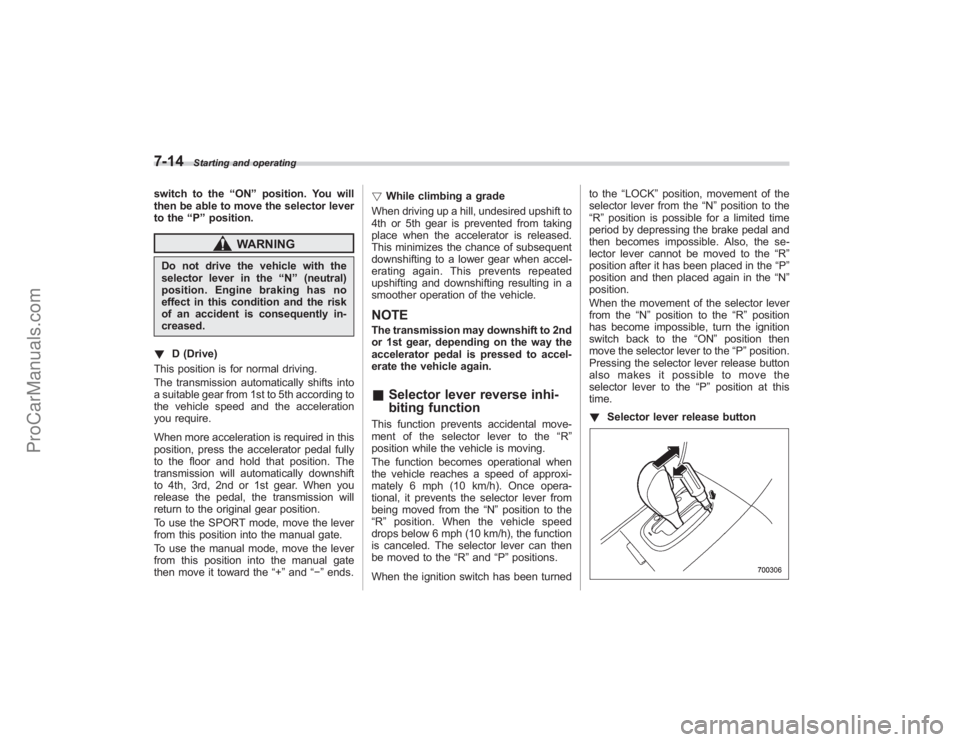
! Selector lever release button
ProCarManuals.com