reset SUBARU TRIBECA 2014 1.G User Guide
[x] Cancel search | Manufacturer: SUBARU, Model Year: 2014, Model line: TRIBECA, Model: SUBARU TRIBECA 2014 1.GPages: 426, PDF Size: 6.37 MB
Page 198 of 426
NOTE
While you are holding down either sideof the“TUNE TRACK”button, thetuning frequency will not stop chan-ging even if the frequency of a recei-vable station is reached.
!Seek tuning
If you press the“”or“”side of the“SEEK FLDR”button (7), the radio willautomatically search for a receivablestation and stop at the first one it finds.This function may not be available, how-ever, when radio signals are weak. In suchasituation,performmanualtuningtoselect the desired station.
!Automatic tuning (SCAN)
Press the“SCAN”button (8) to change theradio to the SCAN mode. In this mode, theradio scans through the radio band until astation is found. The radio will stop at thestation for 5 seconds while displaying thefrequency, after which scanning will con-tinue until the entire band has beenscanned from the low end to the highend. Press the“SCAN”button again tocancel the SCAN mode and to stop on anydisplayed frequency.
Press the“”or“”side of the“SEEKFLDR”button (7) again to cancel the scanmode and to stop on any displayed
frequency.
When the“SCAN”button is pressed forautomatic tuning, stations are scanned inthe direction of low frequencies to highfrequencies only.
Automatic tuning may not function prop-erly if the station reception is weakened bydistancefrom the station or proximity totall buildings and hills.
!Selecting preset stations
Presetting a station with a preset button(10) allows you to select that station in asingle operation. Up to six, AM, FM1 andFM2 stations each may be preset.
!How to preset stations
1. Press the“FM AM”button (2) to selectFM1, FM2, or AM reception.
2. Press the“SCAN”button (8) or tunethe radio manually until the desired stationfrequencyis displayed.
3. Press and hold one of the presetbuttons (10) to store the frequency. If thebutton is pressed briefly, the precedingselection will remain in memory.
NOTE
.If the connection between the radioand battery is broken for any reasonsuch as vehicle maintenance or radioremoval, all stations stored in the
preset buttons are cleared. If thisoccurs, it is necessary to reset thepreset buttons..If a cell phone is placed near theradio, it may cause the radio to emitnoise when it receives calls. This noisedoes not indicate a radio malfunction.
!Satellite radio mode (if equipped)
To receive satellite radio, it is necessary toinstall the SUBARU genuine satellitereceiver (optional part) and to enter intoa contract with a satellite radio networkservice such as“Sirius XMTMsatelliteradio”(for U.S.A. only)or“Sirius satelliteradio”(for Canada only). For details,please contact your SUBARU dealer.
!Sirius satellite radio (for Canadaonly)
Sirius satellite radio is a recent innovationthat allows the listener to experiencedigital sound quality and to have a greatervariety of channels.
Use of satellite radio (Sirius) requires atuner, antenna and a service contract. Fordetails, please contact your SUBARUdealer or visit Sirius Satellite Radio atwww.sirius.ca or call 1-888-539-7474 formore information. Sirius, the Sirius doglogo, channel names and logos are trade-marks of SIRIUS Satellite Radio Inc.
Audio5-7
–CONTINUED–
Page 199 of 426
5-8Audio
!Sirius XMTMSatellite Radio Acti-vation (for U.S.A. only)
Models with Sirius XMTMare eligible for a3-month complimentary subscription tothe Sirius XMTMSatellite Radio service.
Activation process:
You can activate the XM Satellite Radiofromthe website of the XM Satellite Radio.For details, visit the website.
!Satellite radio reception
Satellite radio signals are best received inareas with a clear view of the open sky. Inareas wherethere are tall buildings, trees,tunnels or other structures that mayobstruct the signal of the satellites, theremay be signal interruptions. Other circum-stances that may result in signal lossinclude driving near a wall, steep cliff orhill, or driving on the lower level of a multi-tiered road or inside a parking garage.
To help reduce this condition, satelliteradio providers have installed ground-based repeaters in heavily populatedareas. However, you may still experiencereception problems in some areas.
!Displaying satellite radio ID oftuner
When you activate satellite radio, youshould have your satellite radio tuner ID
ready because each tuner is identified byits unique satellite radio tuner ID.
The satellite radio ID will be needed whenyou activate satellite radio and receivesatellite radio customer support.
The satellite radio ID can be found on theaudio display by tuning the channel to“0”.
Turn the“TUNE TRACK”button (4) toselect the satellite radio channel.
!Band selection button
Push the“SAT”button (1) when the radiois off to turn on the radio.
Push the“SAT”button when the radio ison to select SAT1, SAT2 or SAT3 recep-tion.
!Channel selection
Press“”of the“TUNE TRACK”button(4) to select the next channel and press“”of the button to select the previouschannel.
Keep pressing“”of the button tochange to the next channel continuouslyand keep pressing“”of the button tochange to the previous channel continu-ously.
!Category selection
Press“”or“”of the“SEEK FLDR”button (7) to display the current category.Press“”again to select the next
category, and press“”again to selectthe previous category.
!Channel scan
Press the“SCAN”button (8) to change theradio to the SCAN mode. In this mode, theradio scans through the channels until astation is found. The radio will stop at thestation for 5 seconds while displaying thechannel number, after which scanning willcontinue until the entire channel has beenscanned from the low end to the high end.
Also during the category selection, chan-nel scan can be performed in that cate-gory.
Press the“SCAN”button again to cancelthe SCAN mode and to stop on anydisplayed channel.
!Selecting presetchannels
Presetting a channel with a preset button(10) allows you to select that channel in asingle operation. Up to six, SAT1, SAT2and SAT3 channels each may be preset.
!How to preset channels
1. Press the“SAT”button (1) to selectSAT1, SAT2 and SAT3 reception.
2. Press the“SCAN”button (8) or the“TUNE TRACK”button (4) to select thechannel.
3. Press and hold one of the preset
Page 200 of 426
buttons (10) to store the channel. If thebutton is pressed briefly, the precedingselection will remain in memory.
NOTE
If the connection between the radio andbattery is broken for any reason suchas vehicle maintenance or radio re-moval, all channels stored in the presetbuttons are cleared. If this occurs, it isnecessary to reset the preset buttons.
!Display selection
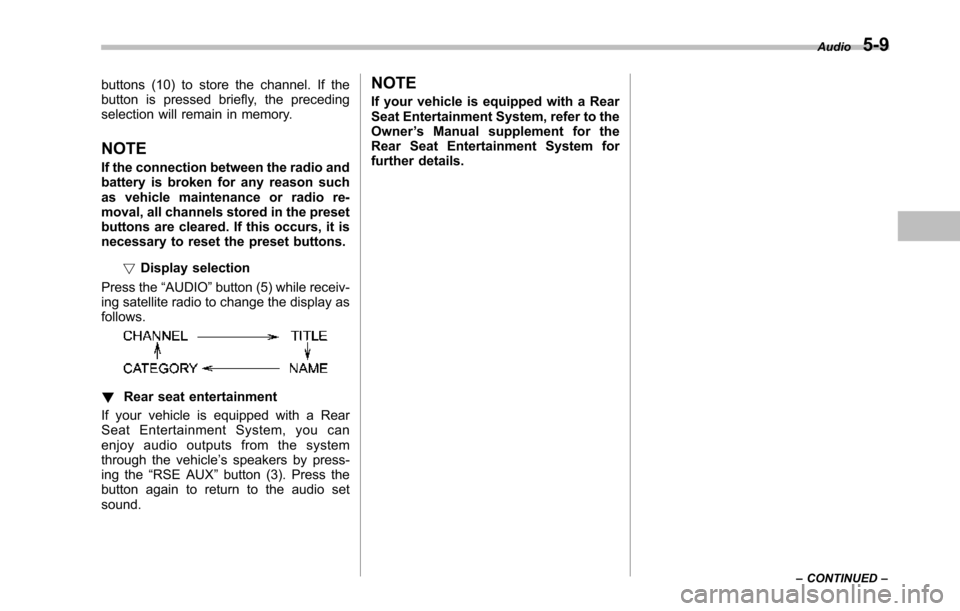
Press the“AUDIO”button (5) while receiv-ing satellite radio to change the display asfollows.
!Rear seat entertainment
If your vehicle is equipped with a RearSeat Entertainment System, you canenjoy audio outputs from the systemthrough the vehicle’s speakers by press-ing the“RSE AUX”button (3). Press thebutton again to return to the audio setsound.
NOTE
If your vehicle is equipped with a RearSeat Entertainment System, refer to theOwner’s Manual supplement for theRear Seat Entertainment System forfurther details.
Audio5-9
–CONTINUED–
Page 206 of 426
Type B audio set (if equipped)
The audio set will operate only when the ignition switch is in the“Acc”or“ON”positions.
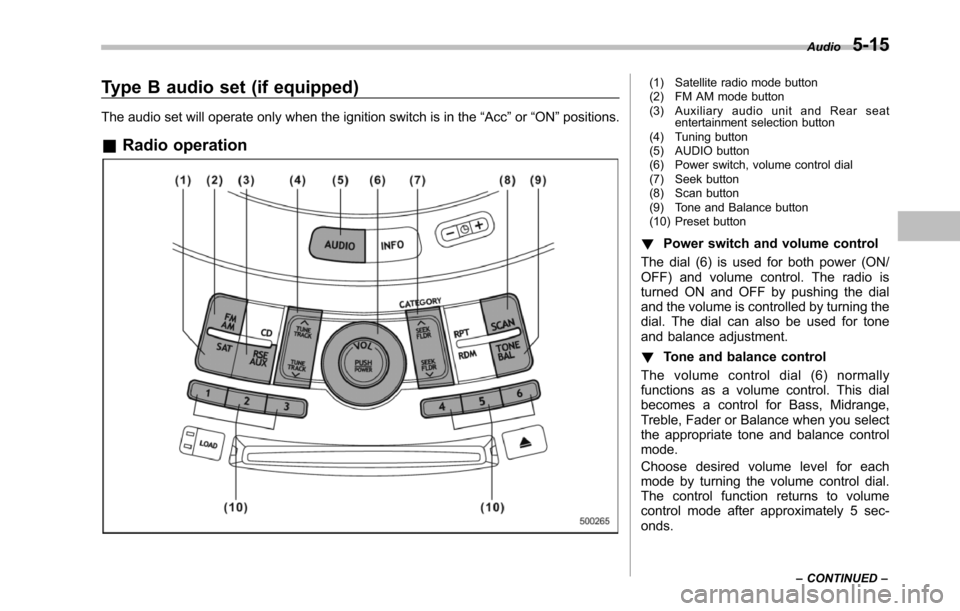
&Radio operation
(1) Satellite radio mode button(2) FM AM mode button(3) Auxiliary audio unit and Rear seatentertainment selection button(4) Tuning button(5) AUDIO button(6) Power switch, volume control dial(7) Seek button(8) Scan button(9) Tone and Balance button(10) Preset button
!Power switch and volume control
The dial (6) is used for both power (ON/OFF) and volume control. The radio isturned ON and OFF by pushing the dialand the volume is controlled by turning thedial. The dial can also be used for toneand balance adjustment.
!Tone and balance control
The volume control dial (6) normallyfunctions as a volume control. This dialbecomes a control for Bass, Midrange,Treble, Fader or Balance when you selectthe appropriate tone and balance controlmode.
Choose desired volume level for eachmode by turning the volume control dial.The control function returns to volumecontrol mode after approximately 5 sec-onds.
Audio5-15
–CONTINUED–
Page 209 of 426
5-18Audio
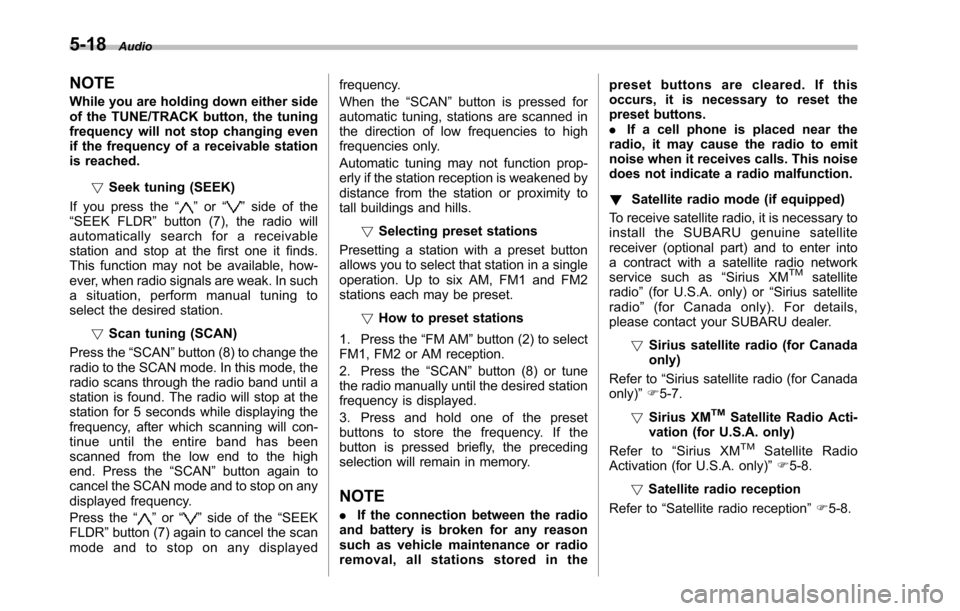
NOTE
While you are holding down either sideof the TUNE/TRACK button, the tuningfrequency will not stop changing evenif the frequency of a receivable stationis reached.
!Seek tuning (SEEK)
If you press the“”or“”side of the“SEEK FLDR”button (7), the radio willautomatically search for a receivablestation and stop at the first one it finds.This function may not be available, how-ever, when radio signals are weak. In suchasituation,performmanualtuningtoselect the desired station.
!Scan tuning (SCAN)
Press the“SCAN”button (8) to change theradio to the SCAN mode. In this mode, theradio scans through the radio band until astationis found. The radio will stop at thestation for 5 seconds while displaying thefrequency, after which scanning will con-tinue until the entire band has beenscannedfrom the low end to the highend. Press the“SCAN”buttonagain tocancel the SCAN mode and to stop on anydisplayed frequency.
Press the“”or“”side of the“SEEKFLDR”button (7) again to cancel the scanmode and to stop on any displayed
frequency.
When the“SCAN”button is pressed forautomatic tuning, stations are scanned inthe direction of low frequencies to highfrequencies only.
Automatic tuning may not function prop-erly if the station reception is weakened bydistance from the station or proximity totall buildings and hills.
!Selecting preset stations
Presetting a station with a preset buttonallows you to select that station in a singleoperation. Up to six AM, FM1 and FM2stations each may be preset.
!How to preset stations
1. Press the“FM AM”button (2) to selectFM1, FM2 or AM reception.
2. Press the“SCAN”button (8) or tunethe radio manually until the desired stationfrequency is displayed.
3. Press and hold one of the presetbuttons to store the frequency. If thebutton is pressed briefly, the precedingselection will remain in memory.
NOTE
.If the connection between the radioand battery is broken for any reasonsuch as vehicle maintenance or radioremoval, all stations stored in the
preset buttons are cleared. If thisoccurs, it is necessary to reset thepreset buttons..If a cell phone is placed near theradio, it may cause the radio to emitnoise when it receives calls. This noisedoes not indicate a radio malfunction.
!Satellite radio mode (if equipped)
To receive satellite radio, it is necessary toinstall the SUBARU genuine satellitereceiver (optional part) and to enter intoa contract with a satellite radio networkservice such as“Sirius XMTMsatelliteradio”(for U.S.A. only) or“Sirius satelliteradio”(for Canada only). For details,please contact your SUBARU dealer.
!Sirius satellite radio (for Canadaonly)
Refer to“Sirius satellite radio (for Canadaonly)”F5-7.
!Sirius XMTMSatellite Radio Acti-vation (for U.S.A. only)
Refer to“Sirius XMTMSatellite RadioActivation (for U.S.A. only)”F5-8.
!Satellite radio reception
Refer to“Satellite radio reception”F5-8.
Page 210 of 426
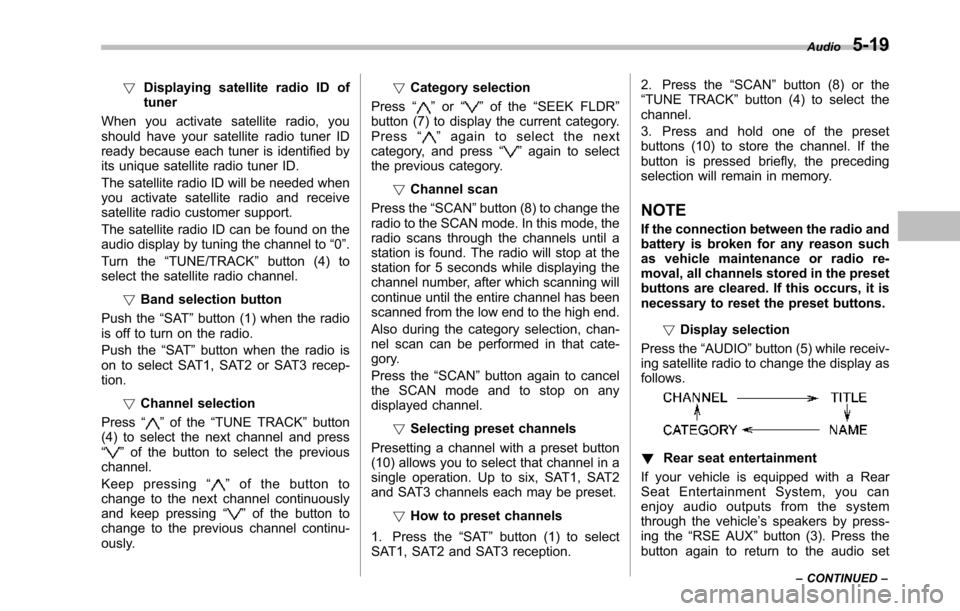
!Displaying satellite radio ID oftuner
When you activate satellite radio, youshould have your satellite radio tuner IDready because each tuner is identified byits unique satellite radio tuner ID.
The satellite radio ID will be needed whenyou activate satellite radio and receivesatellite radio customer support.
The satellite radio ID can be found on theaudio display by tuning the channel to“0”.
Turn the“TUNE/TRACK”button (4) toselect the satellite radio channel.
!Band selection button
Push the“SAT”button (1) when the radiois off to turn on the radio.
Push the“SAT”button when the radio ison to select SAT1, SAT2 or SAT3 recep-tion.
!Channel selection
Press“”of the“TUNE TRACK”button(4) to select the next channel and press“”of the button to select the previouschannel.
Keep pressing“”of the button tochange to the next channel continuouslyand keep pressing“”of the button tochange to the previous channel continu-ously.
!Category selection
Press“”or“”of the“SEEK FLDR”button (7) to display the current category.Press“”again to select the nextcategory, and press“”again to selectthe previous category.
!Channel scan
Press the“SCAN”button (8) to change theradio to the SCAN mode. In this mode, theradio scans through the channels until astation is found. The radio will stop at thestation for 5 seconds while displaying thechannel number, after which scanning willcontinue until the entire channel has beenscanned from the low end to the high end.
Also during the category selection, chan-nel scan can be performed in that cate-gory.
Press the“SCAN”button again to cancelthe SCAN mode and to stop on anydisplayed channel.
!Selecting preset channels
Presetting a channel with a preset button(10) allows you to select that channel in asingle operation. Up to six, SAT1, SAT2and SAT3 channels each may be preset.
!How to preset channels
1. Press the“SAT”button (1) to selectSAT1, SAT2 and SAT3 reception.
2. Press the“SCAN”button (8) or the“TUNE TRACK”button (4) to select thechannel.
3. Press and hold one of the presetbuttons (10) to store the channel. If thebutton is pressed briefly, the precedingselection will remain in memory.
NOTE
If the connection between the radio andbattery is broken for any reason suchas vehicle maintenance or radio re-moval, all channels stored in the presetbuttons are cleared. If this occurs, it isnecessary to reset the preset buttons.
!Display selection
Press the“AUDIO”button (5) while receiv-ing satellite radio to change the display asfollows.
!Rear seat entertainment
If your vehicle is equipped with a RearSeat Entertainment System, you canenjoy audio outputs from the systemthrough the vehicle’s speakers by press-ing the“RSE AUX”button (3). Press thebutton again to return to the audio set
Audio5-19
–CONTINUED–
Page 253 of 426
7-6Starting and operating
inspect your vehicle’s emission controlsystem. If your vehicle does not pass thistest, some states may deny renewal ofyour vehicle’s registration.
Your vehicle is equipped with a computerthat monitors the performance of theengine’s emission control system. Certi-fied emissioninspectors will inspect theOn-Board Diagnostic (OBDII) system aspart of the state emission inspectionprocess. The OBDII system is designedto detect engine and transmission pro-blems that might cause the vehicle emis-sions to exceed allowable limits. OBDIIinspectionsapply to all 1996 model yearand newer passenger cars and trucks.Over 30 states plus the District of Colum-bia have implemented emission inspec-tion of the OBDII system.
.The inspection of the OBDII systemconsists of a visual operational check ofthe“CHECK ENGINE”warning light/mal-function indicator light (MIL) and anexamination of the OBDII system with anelectronic scan tool.
.A vehiclepasses the OBDII systeminspection if proper operation of the“CHECK ENGINE”warning light is ob-served, there are no stored diagnostictrouble codes, and the OBDII readinessmonitors are all complete.
.A vehiclefails the OBDII inspection ifthe“CHECK ENGINE”warning light is notproperly operating (light is illuminated or isnot working due to a burned out bulb) orthere is one or more diagnostic troublecodes stored in the vehicle’s computer.
.A state emission inspection may reject(not pass or fail) a vehicle if the number ofOBDII system readiness monitors“NOTREADY”is greater than one. If thevehicle’s battery has been recently re-placed or disconnected, the OBDII systeminspection may indicate that the vehicle isnot ready for the emission test. Under thiscondition, the vehicle driver should beinstructed to drive his/her vehicle for a fewdays to reset the readiness monitors andreturn for an emission re-inspection.
.Owners of rejected or failing vehiclesshould contact their SUBARU Dealer forservice.
Some states still use dynamometers intheir emission inspection program. Adynamometer is a treadmill or roller-liketesting device that allows your vehicle’swheels to turn while the vehicle remains inone place. Prior to your vehicle being puton a dynamometer, tell your emissioninspectornot to place your SUBARUAWD vehicle on a two-wheel dynam-ometer.Otherwise, serious transmis-sion damage will result.
The U.S. Environmental ProtectionAgency (EPA) and states using two-wheeldynamometers in their emission testingprogram have EXEMPTED SUBARUAWD vehicles from the portion of thetesting program that involves a two-wheeldynamometer. There are some states thatuse four-wheel dynamometers in theirtesting program. When properly used, thisequipment should not damage a SUBARUAWD vehicle.
Under no circumstances should the rearwheels be jacked off the ground, norshould the driveshaft be disconnected forstate emission testing.
Page 274 of 426
Tire pressure monitoring
system (TPMS)
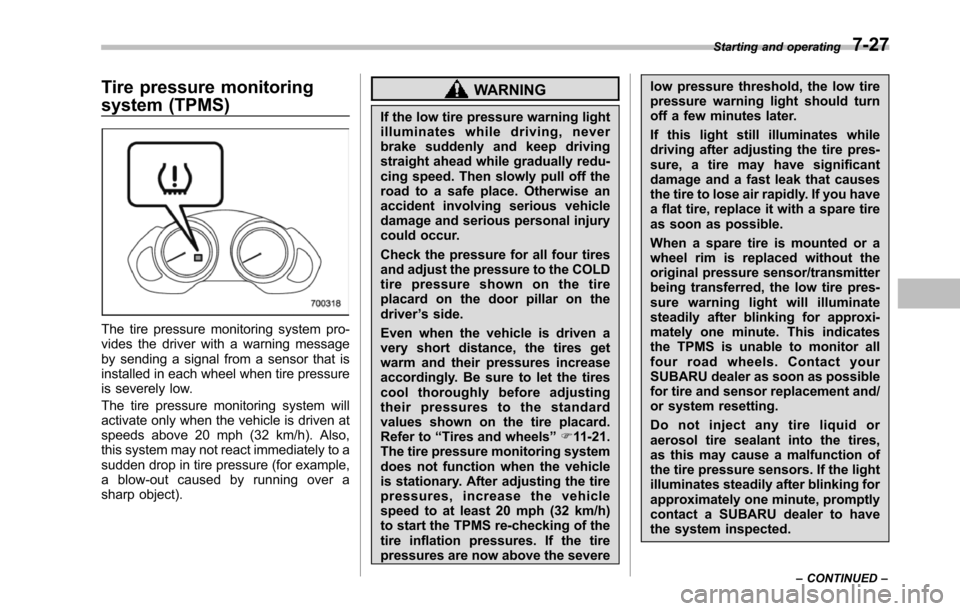
The tire pressure monitoring system pro-vides the driver with a warning messageby sending a signal from a sensor that isinstalled in each wheel when tire pressureis severely low.
The tire pressure monitoring system willactivate only when the vehicle is driven atspeeds above 20 mph (32 km/h). Also,this system may not react immediately to asudden drop in tire pressure (for example,a blow-out caused by running over asharp object).
WARNING
If the low tire pressure warning lightilluminates while driving, neverbrake suddenly and keep drivingstraight ahead while gradually redu-cing speed. Then slowly pull off theroad to a safe place. Otherwise anaccident involving serious vehicledamage and serious personal injurycould occur.
Check the pressure for all four tiresand adjust the pressure to the COLDtire pressure shown on the tireplacard on the door pillar on thedriver’s side.
Even when the vehicle is driven avery short distance, the tires getwarm and their pressures increaseaccordingly. Be sure to let the tirescool thoroughly before adjustingtheir pressures to the standardvalues shown on the tire placard.Refer to“Tires and wheels”F11-21.The tire pressure monitoring systemdoes not function when the vehicleis stationary. After adjusting the tirepressures, increase the vehiclespeed to at least 20 mph (32 km/h)to start the TPMS re-checking of thetire inflation pressures. If the tirepressures are now above the severe
low pressure threshold, the low tirepressure warning light should turnoff a few minutes later.
If this light still illuminates whiledriving after adjusting the tire pres-sure, a tire may have significantdamage and a fast leak that causesthe tire to lose air rapidly. If you havea flat tire, replace it with a spare tireas soon as possible.
When a spare tire is mounted or awheel rim is replaced without theoriginal pressure sensor/transmitterbeing transferred, the low tire pres-sure warning light will illuminatesteadily after blinking for approxi-mately one minute. This indicatesthe TPMS is unable to monitor allfour road wheels. Contact yourSUBARU dealeras soon as possiblefor tire and sensor replacement and/or system resetting.
Do not inject any tire liquid oraerosol tire sealant into the tires,as this may cause a malfunction ofthe tire pressure sensors. If the lightilluminates steadily after blinking forapproximately one minute, promptlycontact a SUBARU dealer to havethe system inspected.
Starting and operating7-27
–CONTINUED–
Page 312 of 426
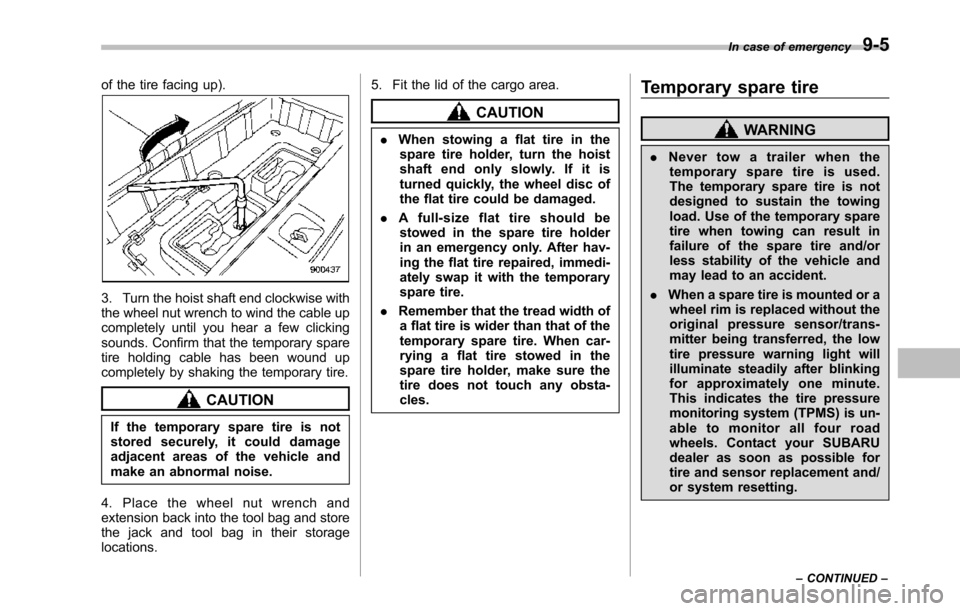
of the tire facing up).
3. Turn the hoist shaft end clockwise withthe wheel nut wrench to wind the cable upcompletely until you hear a few clickingsounds.Confirm that the temporary sparetire holding cable has been wound upcompletely by shaking the temporary tire.
CAUTION
If the temporary spare tire is notstored securely, it could damageadjacent areas of the vehicle andmake an abnormal noise.
4. Place the wheel nut wrench andextension back into the tool bag and storethe jackand tool bag in their storagelocations.
5. Fit the lid of the cargo area.
CAUTION
.When stowing a flat tire in thespare tire holder, turn the hoistshaft end only slowly. If it isturned quickly, the wheel disc ofthe flat tire could be damaged.
.Afull-sizeflattireshouldbestowed in the spare tire holderin an emergency only. After hav-ingthe flat tire repaired, immedi-ately swap it with the temporaryspare tire.
.Remember that the tread width ofa flat tire is wider than that of thetemporary spare tire. When car-rying a flat tire stowed in thespare tire holder, make sure thetiredoes not touch any obsta-cles.
Temporary spare tire
WARNING
.Never tow a trailer when thetemporary spare tire is used.The temporary spare tire is notdesigned to sustain the towingload. Use of the temporary sparetire when towing can result infailure of the spare tire and/orless stability of the vehicle andmay lead to an accident.
.When a spare tire is mounted or awheel rim is replaced without theoriginal pressure sensor/trans-mitter being transferred, the lowtire pressure warning light willilluminate steadily after blinkingfor approximately one minute.This indicates the tire pressuremonitoring system (TPMS) is un-able to monitor all four roadwheels. Contact your SUBARUdealer as soon as possible fortire and sensor replacement and/or system resetting.
In case of emergency9-5
–CONTINUED–
Page 318 of 426
SUBARU dealer as soon as possiblefor tire and sensor replacement and/or system resetting.
Do not inject any tire liquid oraerosol tire sealant into the tires,as this may cause a malfunction ofthe tire pressure sensors.
If the light illuminates steadily afterblinking for approximately one min-ute, promptly contact a SUBARUdealer to have the system inspected.
Jump starting
WARNING
.Battery fluid is SULFURIC ACID.Do not let it come in contact withthe eyes, skin, clothing or thevehicle.
If battery fluid gets on you,thoroughly flush the exposedarea with water immediately. Getmedical help if the fluid hasentered your eyes.
If battery fluid is accidentallyswallowed, immediately drink alarge amount of milk or water,and obtain immediate medicalhelp.
Keep everyone including chil-dren away from the battery.
.The gas generated by a batteryexplodes if a flame or spark isbrought near it. Do not smoke orlight a match while jump starting.
.Never attempt jump starting if thedischarged battery is frozen. Itcould cause the battery to burstor explode.
.Whenever working on or arounda battery, always wear suitable
eye protectors, and remove metalobjects such as rings, bands orother metal jewelry.
.Be sure the jumper cables andclamps on them do not haveloose or missing insulation.Do not jump start unless cablesin suitable condition are avail-able.
.A running engine can be danger-ous. Keep your fingers, hands,clothing, hair and tools awayfrom the cooling fan, belts andany other moving engine parts.Removing rings, watches andties is advisable.
.Jump starting is dangerous if it isdone incorrectly. If you are un-sure about the proper procedureforjump starting, consult a com-petent mechanic.
When your vehicle does not start due to arun down (discharged) battery, the vehiclemay be jump started by connecting yourbattery to another battery (called thebooster battery) with jumper cables.
In case of emergency9-11
–CONTINUED–