service SUBARU TRIBECA 2014 1.G User Guide
[x] Cancel search | Manufacturer: SUBARU, Model Year: 2014, Model line: TRIBECA, Model: SUBARU TRIBECA 2014 1.GPages: 426, PDF Size: 6.37 MB
Page 198 of 426
NOTE
While you are holding down either sideof the“TUNE TRACK”button, thetuning frequency will not stop chan-ging even if the frequency of a recei-vable station is reached.
!Seek tuning
If you press the“”or“”side of the“SEEK FLDR”button (7), the radio willautomatically search for a receivablestation and stop at the first one it finds.This function may not be available, how-ever, when radio signals are weak. In suchasituation,performmanualtuningtoselect the desired station.
!Automatic tuning (SCAN)
Press the“SCAN”button (8) to change theradio to the SCAN mode. In this mode, theradio scans through the radio band until astation is found. The radio will stop at thestation for 5 seconds while displaying thefrequency, after which scanning will con-tinue until the entire band has beenscanned from the low end to the highend. Press the“SCAN”button again tocancel the SCAN mode and to stop on anydisplayed frequency.
Press the“”or“”side of the“SEEKFLDR”button (7) again to cancel the scanmode and to stop on any displayed
frequency.
When the“SCAN”button is pressed forautomatic tuning, stations are scanned inthe direction of low frequencies to highfrequencies only.
Automatic tuning may not function prop-erly if the station reception is weakened bydistancefrom the station or proximity totall buildings and hills.
!Selecting preset stations
Presetting a station with a preset button(10) allows you to select that station in asingle operation. Up to six, AM, FM1 andFM2 stations each may be preset.
!How to preset stations
1. Press the“FM AM”button (2) to selectFM1, FM2, or AM reception.
2. Press the“SCAN”button (8) or tunethe radio manually until the desired stationfrequencyis displayed.
3. Press and hold one of the presetbuttons (10) to store the frequency. If thebutton is pressed briefly, the precedingselection will remain in memory.
NOTE
.If the connection between the radioand battery is broken for any reasonsuch as vehicle maintenance or radioremoval, all stations stored in the
preset buttons are cleared. If thisoccurs, it is necessary to reset thepreset buttons..If a cell phone is placed near theradio, it may cause the radio to emitnoise when it receives calls. This noisedoes not indicate a radio malfunction.
!Satellite radio mode (if equipped)
To receive satellite radio, it is necessary toinstall the SUBARU genuine satellitereceiver (optional part) and to enter intoa contract with a satellite radio networkservice such as“Sirius XMTMsatelliteradio”(for U.S.A. only)or“Sirius satelliteradio”(for Canada only). For details,please contact your SUBARU dealer.
!Sirius satellite radio (for Canadaonly)
Sirius satellite radio is a recent innovationthat allows the listener to experiencedigital sound quality and to have a greatervariety of channels.
Use of satellite radio (Sirius) requires atuner, antenna and a service contract. Fordetails, please contact your SUBARUdealer or visit Sirius Satellite Radio atwww.sirius.ca or call 1-888-539-7474 formore information. Sirius, the Sirius doglogo, channel names and logos are trade-marks of SIRIUS Satellite Radio Inc.
Audio5-7
–CONTINUED–
Page 199 of 426
5-8Audio
!Sirius XMTMSatellite Radio Acti-vation (for U.S.A. only)
Models with Sirius XMTMare eligible for a3-month complimentary subscription tothe Sirius XMTMSatellite Radio service.
Activation process:
You can activate the XM Satellite Radiofromthe website of the XM Satellite Radio.For details, visit the website.
!Satellite radio reception
Satellite radio signals are best received inareas with a clear view of the open sky. Inareas wherethere are tall buildings, trees,tunnels or other structures that mayobstruct the signal of the satellites, theremay be signal interruptions. Other circum-stances that may result in signal lossinclude driving near a wall, steep cliff orhill, or driving on the lower level of a multi-tiered road or inside a parking garage.
To help reduce this condition, satelliteradio providers have installed ground-based repeaters in heavily populatedareas. However, you may still experiencereception problems in some areas.
!Displaying satellite radio ID oftuner
When you activate satellite radio, youshould have your satellite radio tuner ID
ready because each tuner is identified byits unique satellite radio tuner ID.
The satellite radio ID will be needed whenyou activate satellite radio and receivesatellite radio customer support.
The satellite radio ID can be found on theaudio display by tuning the channel to“0”.
Turn the“TUNE TRACK”button (4) toselect the satellite radio channel.
!Band selection button
Push the“SAT”button (1) when the radiois off to turn on the radio.
Push the“SAT”button when the radio ison to select SAT1, SAT2 or SAT3 recep-tion.
!Channel selection
Press“”of the“TUNE TRACK”button(4) to select the next channel and press“”of the button to select the previouschannel.
Keep pressing“”of the button tochange to the next channel continuouslyand keep pressing“”of the button tochange to the previous channel continu-ously.
!Category selection
Press“”or“”of the“SEEK FLDR”button (7) to display the current category.Press“”again to select the next
category, and press“”again to selectthe previous category.
!Channel scan
Press the“SCAN”button (8) to change theradio to the SCAN mode. In this mode, theradio scans through the channels until astation is found. The radio will stop at thestation for 5 seconds while displaying thechannel number, after which scanning willcontinue until the entire channel has beenscanned from the low end to the high end.
Also during the category selection, chan-nel scan can be performed in that cate-gory.
Press the“SCAN”button again to cancelthe SCAN mode and to stop on anydisplayed channel.
!Selecting presetchannels
Presetting a channel with a preset button(10) allows you to select that channel in asingle operation. Up to six, SAT1, SAT2and SAT3 channels each may be preset.
!How to preset channels
1. Press the“SAT”button (1) to selectSAT1, SAT2 and SAT3 reception.
2. Press the“SCAN”button (8) or the“TUNE TRACK”button (4) to select thechannel.
3. Press and hold one of the preset
Page 209 of 426
5-18Audio
NOTE
While you are holding down either sideof the TUNE/TRACK button, the tuningfrequency will not stop changing evenif the frequency of a receivable stationis reached.
!Seek tuning (SEEK)
If you press the“”or“”side of the“SEEK FLDR”button (7), the radio willautomatically search for a receivablestation and stop at the first one it finds.This function may not be available, how-ever, when radio signals are weak. In suchasituation,performmanualtuningtoselect the desired station.
!Scan tuning (SCAN)
Press the“SCAN”button (8) to change theradio to the SCAN mode. In this mode, theradio scans through the radio band until astationis found. The radio will stop at thestation for 5 seconds while displaying thefrequency, after which scanning will con-tinue until the entire band has beenscannedfrom the low end to the highend. Press the“SCAN”buttonagain tocancel the SCAN mode and to stop on anydisplayed frequency.
Press the“”or“”side of the“SEEKFLDR”button (7) again to cancel the scanmode and to stop on any displayed
frequency.
When the“SCAN”button is pressed forautomatic tuning, stations are scanned inthe direction of low frequencies to highfrequencies only.
Automatic tuning may not function prop-erly if the station reception is weakened bydistance from the station or proximity totall buildings and hills.
!Selecting preset stations
Presetting a station with a preset buttonallows you to select that station in a singleoperation. Up to six AM, FM1 and FM2stations each may be preset.
!How to preset stations
1. Press the“FM AM”button (2) to selectFM1, FM2 or AM reception.
2. Press the“SCAN”button (8) or tunethe radio manually until the desired stationfrequency is displayed.
3. Press and hold one of the presetbuttons to store the frequency. If thebutton is pressed briefly, the precedingselection will remain in memory.
NOTE
.If the connection between the radioand battery is broken for any reasonsuch as vehicle maintenance or radioremoval, all stations stored in the
preset buttons are cleared. If thisoccurs, it is necessary to reset thepreset buttons..If a cell phone is placed near theradio, it may cause the radio to emitnoise when it receives calls. This noisedoes not indicate a radio malfunction.
!Satellite radio mode (if equipped)
To receive satellite radio, it is necessary toinstall the SUBARU genuine satellitereceiver (optional part) and to enter intoa contract with a satellite radio networkservice such as“Sirius XMTMsatelliteradio”(for U.S.A. only) or“Sirius satelliteradio”(for Canada only). For details,please contact your SUBARU dealer.
!Sirius satellite radio (for Canadaonly)
Refer to“Sirius satellite radio (for Canadaonly)”F5-7.
!Sirius XMTMSatellite Radio Acti-vation (for U.S.A. only)
Refer to“Sirius XMTMSatellite RadioActivation (for U.S.A. only)”F5-8.
!Satellite radio reception
Refer to“Satellite radio reception”F5-8.
Page 238 of 426
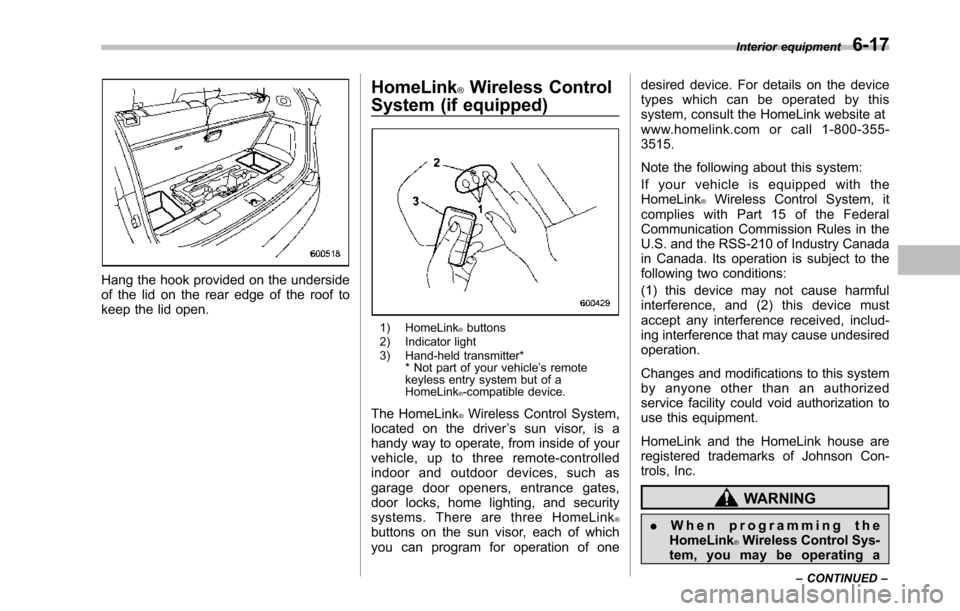
Hang the hook provided on the undersideof the lid on the rear edge of the roof tokeepthe lid open.
HomeLink®Wireless Control
System (if equipped)
1) HomeLink®buttons2) Indicator light3) Hand-held transmitter** Not part of your vehicle’s remotekeyless entry system but of aHomeLink®-compatible device.
The HomeLink®Wireless Control System,located on the driver’s sun visor, is ahandy way to operate, from inside of yourvehicle, up to three remote-controlledindoor and outdoor devices, such asgarage door openers, entrance gates,door locks, home lighting, and securitysystems. There are three HomeLink®buttons on the sun visor, each of whichyou can program for operation of one
desired device. For details on the devicetypes which can be operated by thissystem, consult the HomeLink website atwww.homelink.com or call 1-800-355-3515.
Note the following about this system:
If your vehicle is equipped with theHomeLink®Wireless Control System, itcomplies with Part 15 of the FederalCommunication Commission Rules in theU.S. and the RSS-210 of Industry Canadain Canada. Its operation is subject to thefollowing two conditions:
(1) this device may not cause harmfulinterference, and (2) this device mustaccept any interference received, includ-ing interference that may cause undesiredoperation.
Changes and modifications to this systemby anyone other than an authorizedservice facility could void authorization touse this equipment.
HomeLink and the HomeLink house areregistered trademarks of Johnson Con-trols, Inc.
WARNING
.When programming theHomeLink®Wireless Control Sys-tem, you may be operating a
Interior equipment6-17
–CONTINUED–
Page 248 of 426
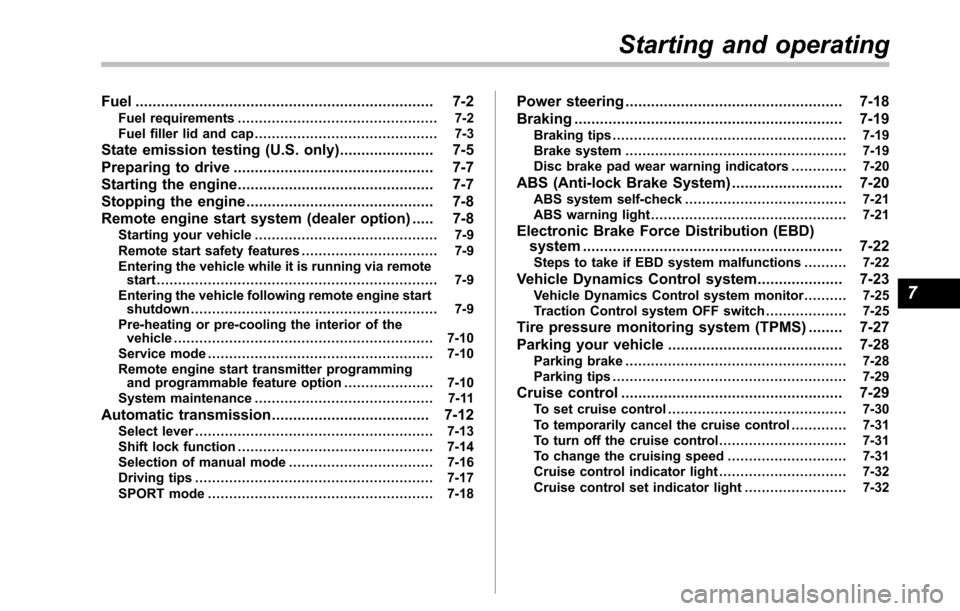
Fuel...................................................................... 7-2Fuel requirements............................................... 7-2Fuel filler lid and cap........................................... 7-3
State emission testing (U.S. only)...................... 7-5
Preparing to drive............................................... 7-7
Starting the engine.............................................. 7-7
Stopping the engine............................................ 7-8
Remote engine start system (dealer option)..... 7-8Starting your vehicle........................................... 7-9Remote start safety features................................ 7-9Entering the vehicle while it is running via remotestart.................................................................. 7-9Entering the vehicle following remote engine startshutdown.......................................................... 7-9Pre-heating or pre-cooling the interior of thevehicle............................................................. 7-10Service mode..................................................... 7-10Remote engine start transmitter programmingand programmable feature option..................... 7-10System maintenance.......................................... 7-11
Automatic transmission..................................... 7-12Select lever........................................................ 7-13Shift lock function.............................................. 7-14Selectionof manual mode.................................. 7-16Driving tips........................................................ 7-17SPORT mode..................................................... 7-18
Power steering................................................... 7-18
Braking............................................................... 7-19Braking tips....................................................... 7-19Brake system.................................................... 7-19Disc brake pad wear warning indicators............. 7-20
ABS (Anti-lock Brake System).......................... 7-20ABS system self-check...................................... 7-21ABS warning light.............................................. 7-21
Electronic Brake Force Distribution (EBD)system............................................................. 7-22Steps to take if EBD system malfunctions.......... 7-22
Vehicle Dynamics Control system.................... 7-23Vehicle Dynamics Control system monitor.......... 7-25Traction Control system OFF switch................... 7-25
Tire pressure monitoring system (TPMS)........ 7-27
Parking your vehicle......................................... 7-28Parking brake.................................................... 7-28Parking tips....................................................... 7-29
Cruise control.................................................... 7-29To set cruise control.......................................... 7-30To temporarily cancel the cruise control............. 7-31To turn off the cruise control.............................. 7-31To change the cruising speed ............................ 7-31Cruise control indicator light.............................. 7-32Cruise control set indicator light........................ 7-32
Starting and operating
7
Page 249 of 426
7-2Starting and operating
Fuel
CAUTION
Use of a fuel which is low in qualityor use of an inappropriate fueladditive may cause engine damage.
&Fuel requirements
The engine is designed to operate usingunleaded gasolinewith an octane ratingof87 AKI (90 RON) or higher.
!Fuel octane rating
This octane rating is the average of theResearch Octane and Motor Octanenumbers andis commonly referred to asthe Anti Knock Index (AKI).
Using a gasoline with a lower octanerating can causepersistent and heavyknocking, which can damage the engine.Do not be concerned if your vehiclesometimes knocks lightly when you driveup a hill or when you accelerate. Contactyour SUBARU dealer if you use a fuel withthe specified octane rating and yourvehicle knocks heavily or persistently.
!Unleaded gasoline
The neck of the fuel filler pipe is designedto accept only an unleaded gasoline filler
nozzle. Under no circumstances shouldleaded gasoline be used because it willdamage the emission control system andmay impair driveability and fuel economy.
!California fuel
If your vehicle was certified to CaliforniaEmission Standards as indicated on theunderhood tune-up label, it is designed tooptimize engine and emission controlsystem performance with gasoline thatmeets the clean burning low-sulfur Cali-fornia gasoline specifications. If you live inany other state than California, yourvehicle will operate on gasoline meetingFederal specifications. Gasoline sold out-side California is permitted to have highersulfur levels, which may affect the perfor-mance of your vehicle’s catalytic converterand may produce a sulfur exhaust odor orsmell. SUBARU recommends that you trya different brand of unleaded gasolinehaving lower sulfur to determine if theproblem is fuel related before returningyour vehicle to an authorized dealer forservice. The CHECK ENGINE warninglight/Malfunction indicator light may alsoilluminate. If this occurs, return to yourauthorized SUBARU dealer for diagnosis.If it is determined that the condition iscausedby the type of fuel used, repairsmay not be covered by your warranty.
!MMT
Some gasoline contains an octane-en-hancing additive called MMT (Methylcy-clopentadienyl Manganese Tricarbonyl). Ifyou use such fuels, your emission controlsystem performance may deteriorate andthe CHECK ENGINE warning light/Mal-function indicator light may illuminate. Ifthis happens, return to your authorizedSUBARU dealer for service. If it isdetermined that the condition is causedby the type of fuel used, repairs may notbe covered by your warranty.
!Gasoline for cleaner air
CAUTION
Do not let fuel spill on the exteriorsurfaces of the vehicle. Fuels con-taining alcohol may cause paintdamage, which is not covered underthe SUBARU Limited Warranty.
Yo u r u s e o f g a s o l i n e w i t h d e t e r g e n tadditives will help prevent deposits fromforming in your engine and fuel system.This helps keepyour engine in tune andyour emission control system workingproperly, and is a way of doing your partfor cleaner air. If you continuously use ahigh quality fuel with the proper detergentand other additives, you should never
Page 250 of 426
need to add any fuel system cleaningagents to your fuel tank.
Many gasolines are now blended withmaterials called oxygenates. Use of thesefuels can also help keep the air cleaner.Oxygenated blend fuels, such as MTBE(Methyl Tertiary Butyl ether) or ethanol(ethyl or grain alcohol) may be used inyour vehicle, but should contain no morethan 15% MTBE or 10% ethanol for theproper operation of your SUBARU.
In addition, some gasoline suppliers arenow producing reformulated gasolines,which are designed to reduce vehicleemissions. SUBARU approves the use ofreformulated gasoline.
If you are not sure what the fuel contains,you should ask your service stationoperators if their gasolines contain deter-gents and oxygenates and if they havebeen reformulated to reduce vehicle emis-sions.
As additional guidance, only use fuelssuited for your vehicle as explained in thefollowing.
.Fuel should be unleaded and have anoctane rating no lower than that specifiedin this manual.
.Methanol (methyl or wood alcohol) issometimes mixed with unleaded gasoline.
Methanol can be used in your vehicleONLYif it does not exceed 5% of the fuelmixtureANDif it is accompanied bysufficient quantities of the proper cosol-vents and corrosion inhibitors required toprevent damage to the fuel system. Do notuse fuel containing methanolEXCEPTunder these conditions.
.If undesirable driveability problems areexperienced and you suspect they may befuel related, try a different brand of gaso-line before seeking service at yourSUBARU dealer.
.Fuel system damage or driveabilityproblems whichresult from the use ofimproper fuel are not covered under theSUBARU Limited Warranty.
&Fuel filler lid and cap
!Refueling
Only oneperson should be involved inrefueling. Do not allow others to approachthe area of the vehicle near the fuel fillerpipe while refueling is in progress.
Be sure to observe any other precautionsthat are posted at the service station.
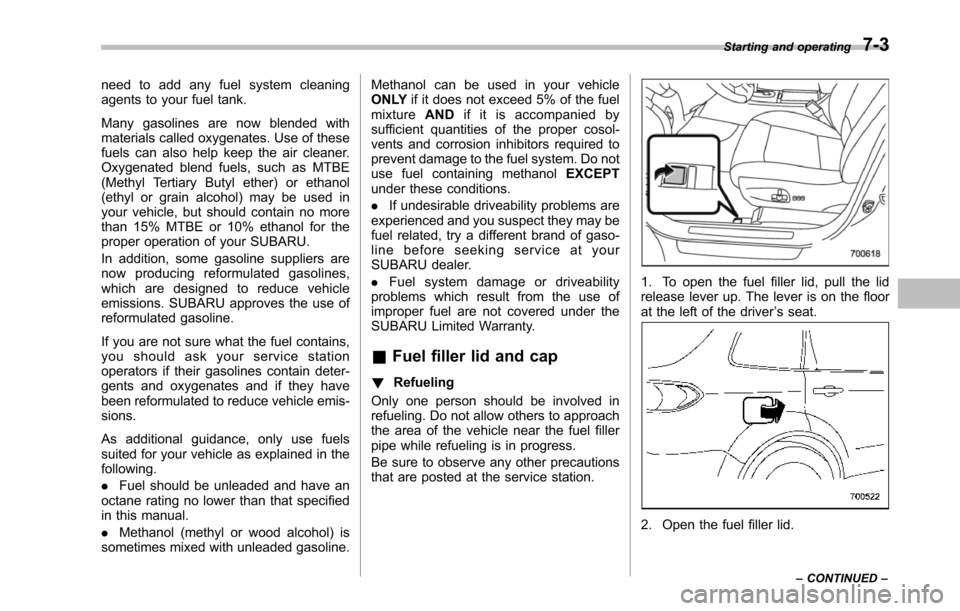
1. To open the fuel filler lid, pull the lidrelease lever up. The lever is on the floorat the left of the driver’s seat.
2. Open the fuel filler lid.
Starting and operating7-3
–CONTINUED–
Page 252 of 426
NOTE
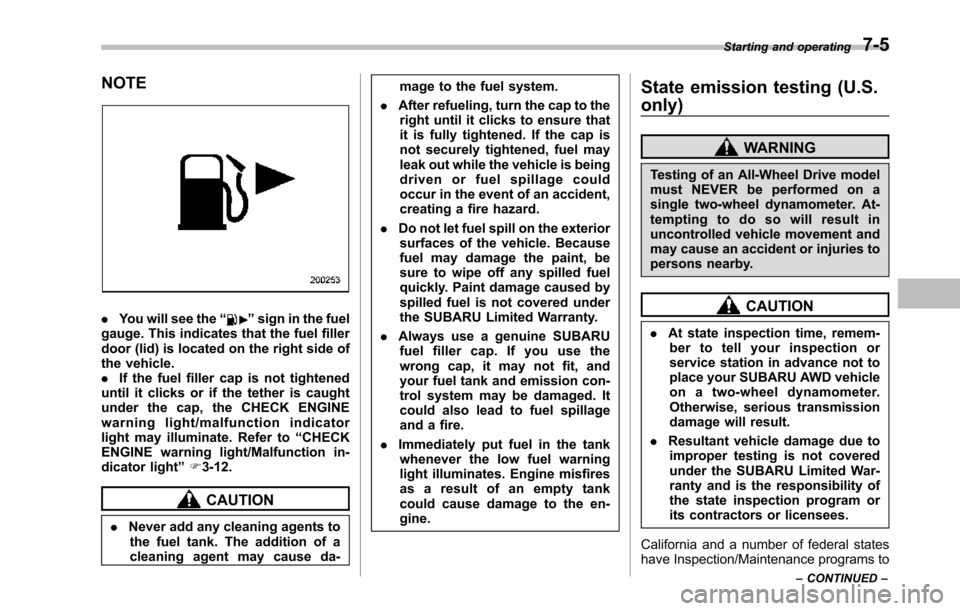
.You will see the“”sign in the fuelgauge. Thisindicates that the fuel fillerdoor (lid) is located on the right side ofthe vehicle..If the fuel filler cap is not tighteneduntil it clicks or if the tether is caughtunder the cap, the CHECK ENGINEwarning light/malfunction indicatorlight may illuminate. Refer to“CHECKENGINE warning light/Malfunction in-dicator light”F3-12.
CAUTION
.Never add any cleaning agents tothe fuel tank. The addition of acleaning agent may cause da-
mage to the fuel system.
.After refueling, turn the cap to theright until it clicks to ensure thatit is fully tightened. If the cap isnot securely tightened, fuel mayleak out while the vehicle is beingdriven or fuel spillage couldoccur in the event of an accident,creating a fire hazard.
.Do not let fuel spill on the exteriorsurfacesof the vehicle. Becausefuel may damage the paint, besure to wipe off any spilled fuelquickly. Paint damage caused byspilled fuel is not covered undertheSUBARU Limited Warranty.
.Always use a genuine SUBARUfuel filler cap. If you use thewrong cap, it may not fit, andyour fuel tank and emission con-trol systemmay be damaged. Itcould also lead to fuel spillageand a fire.
.Immediately put fuel in the tankwhenever the low fuel warninglight illuminates. Engine misfiresas a result of an empty tankcould cause damage to the en-gine.
State emission testing (U.S.
only)
WARNING
Testing of an All-Wheel Drive modelmust NEVER be performed on asingle two-wheel dynamometer. At-tempting to do so will result inuncontrolled vehicle movement andmay cause an accident or injuries topersons nearby.
CAUTION
.At state inspection time, remem-ber to tell your inspection orservice station in advance not toplace your SUBARU AWD vehicleon a two-wheel dynamometer.Otherwise, serious transmissiondamage will result.
.Resultant vehicle damage due toimproper testing is not coveredunderthe SUBARU Limited War-ranty and is the responsibility ofthe state inspection program orits contractors or licensees.
California and a number of federal stateshave Inspection/Maintenance programs to
Starting and operating7-5
–CONTINUED–
Page 253 of 426
7-6Starting and operating
inspect your vehicle’s emission controlsystem. If your vehicle does not pass thistest, some states may deny renewal ofyour vehicle’s registration.
Your vehicle is equipped with a computerthat monitors the performance of theengine’s emission control system. Certi-fied emissioninspectors will inspect theOn-Board Diagnostic (OBDII) system aspart of the state emission inspectionprocess. The OBDII system is designedto detect engine and transmission pro-blems that might cause the vehicle emis-sions to exceed allowable limits. OBDIIinspectionsapply to all 1996 model yearand newer passenger cars and trucks.Over 30 states plus the District of Colum-bia have implemented emission inspec-tion of the OBDII system.
.The inspection of the OBDII systemconsists of a visual operational check ofthe“CHECK ENGINE”warning light/mal-function indicator light (MIL) and anexamination of the OBDII system with anelectronic scan tool.
.A vehiclepasses the OBDII systeminspection if proper operation of the“CHECK ENGINE”warning light is ob-served, there are no stored diagnostictrouble codes, and the OBDII readinessmonitors are all complete.
.A vehiclefails the OBDII inspection ifthe“CHECK ENGINE”warning light is notproperly operating (light is illuminated or isnot working due to a burned out bulb) orthere is one or more diagnostic troublecodes stored in the vehicle’s computer.
.A state emission inspection may reject(not pass or fail) a vehicle if the number ofOBDII system readiness monitors“NOTREADY”is greater than one. If thevehicle’s battery has been recently re-placed or disconnected, the OBDII systeminspection may indicate that the vehicle isnot ready for the emission test. Under thiscondition, the vehicle driver should beinstructed to drive his/her vehicle for a fewdays to reset the readiness monitors andreturn for an emission re-inspection.
.Owners of rejected or failing vehiclesshould contact their SUBARU Dealer forservice.
Some states still use dynamometers intheir emission inspection program. Adynamometer is a treadmill or roller-liketesting device that allows your vehicle’swheels to turn while the vehicle remains inone place. Prior to your vehicle being puton a dynamometer, tell your emissioninspectornot to place your SUBARUAWD vehicle on a two-wheel dynam-ometer.Otherwise, serious transmis-sion damage will result.
The U.S. Environmental ProtectionAgency (EPA) and states using two-wheeldynamometers in their emission testingprogram have EXEMPTED SUBARUAWD vehicles from the portion of thetesting program that involves a two-wheeldynamometer. There are some states thatuse four-wheel dynamometers in theirtesting program. When properly used, thisequipment should not damage a SUBARUAWD vehicle.
Under no circumstances should the rearwheels be jacked off the ground, norshould the driveshaft be disconnected forstate emission testing.
Page 255 of 426
7-8Starting and operating
started. The fuel injection system auto-matically lowers the idle speed as theengine warms up.
While the engine is warming up, makesure that the select lever is at the“P”or“N”position and that the parking brake isapplied.
NOTE
.The engine may be difficult to startwhen the battery has been discon-nected and reconnected (for mainte-nance or other purposes). This diffi-culty is caused by the electronicallycontrolled throttle’sself-diagnosisfunction. To overcome it, keep theignition switch in the“ON”positionfor approximately 10 seconds beforestartingthe engine..To p r o t e c t t h e e n g i n e w h i l e t h eselect lever is in the“P”or“N”position, the engine is controlled sothat the engine speed may not becometoo high even if the accelerator pedal isdepressed hard.
Stopping the engine
WARNING
Do not stop the engine when thevehicle is moving. This will causeloss of power to the power steeringand the brakebooster, making steer-ing and braking more difficult. Itcould also result in accidental acti-vation of the“LOCK”position on theignition switch, causing the steeringwheel to lock.
The ignition switch should be turned offonly whenthe vehicle is stopped and theengine is idling.
Remote engine start system
(dealer option)
WARNING
.Do not start the engine using theremote start system in an en-closed environment (e.g. closedgarage). Prolonged operation ofa motor vehicle in an enclosedenvironment can cause a harmfulbuild-up of Carbon Monoxide.Carbon Monoxide is harmful toyour health. Exposure to highlevels of Carbon Monoxide cancause headaches, dizziness or inextreme cases unconsciousnessand/or death.
.Before performing any servicingof the vehicle, temporarily placethe remote engine start system inservice mode to prevent thesystem from unexpectedly start-ing the engine.