key SUBARU TRIBECA 2014 1.G Owner's Guide
[x] Cancel search | Manufacturer: SUBARU, Model Year: 2014, Model line: TRIBECA, Model: SUBARU TRIBECA 2014 1.GPages: 426, PDF Size: 6.37 MB
Page 131 of 426
2-26Keys and doors
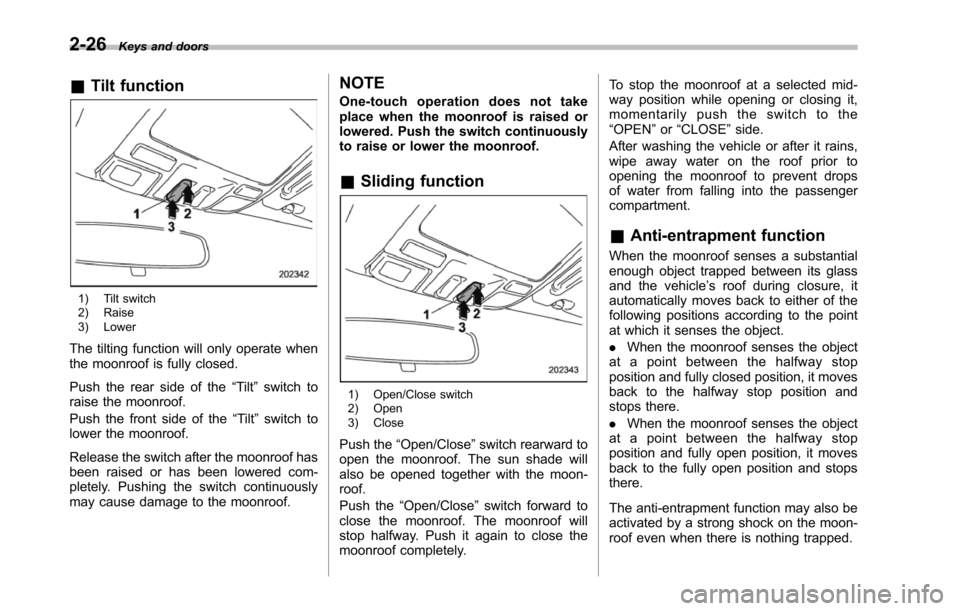
&Tilt function
1) Tilt switch2) Raise3) Lower
The tilting function will only operate whenthe moonroof is fully closed.
Push the rear side of the“Tilt”switch toraise the moonroof.
Push the front side of the“Tilt”switchtolower the moonroof.
Release the switch after the moonroof hasbeen raised or has been lowered com-pletely. Pushing the switch continuouslymay cause damage to the moonroof.
NOTE
One-touch operation does not takeplace when the moonroof is raised orlowered. Push the switch continuouslyto raise or lower the moonroof.
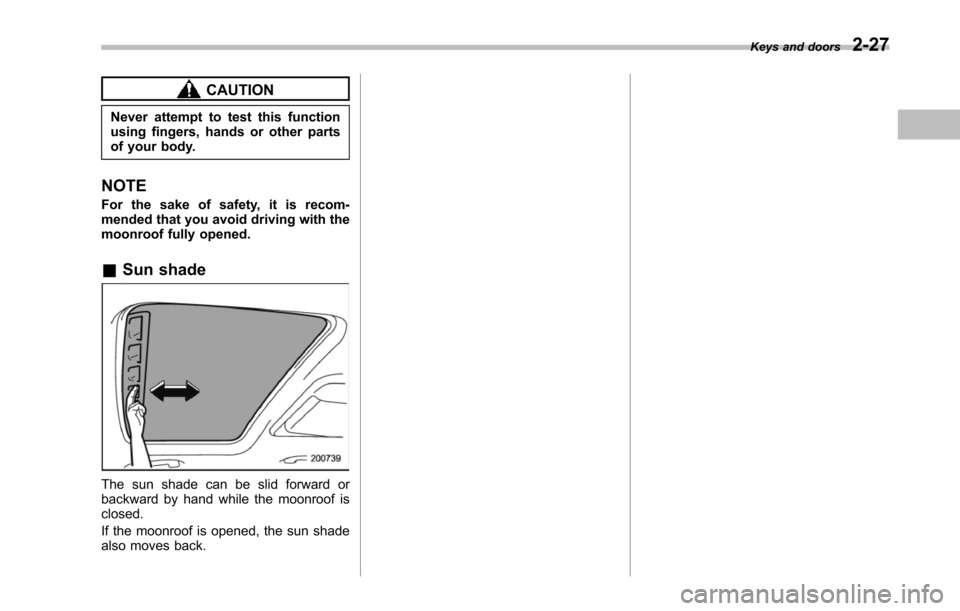
&Sliding function
1) Open/Close switch2) Open3) Close
Push the“Open/Close”switch rearward toopen the moonroof. The sun shade willalso be opened together with the moon-roof.
Push the“Open/Close”switch forward toclose the moonroof. The moonroof willstop halfway. Push it again to close themoonroof completely.
To stop the moonroof at a selected mid-way position while opening or closing it,momentarily push the switch to the“OPEN”or“CLOSE”side.
After washing the vehicle or after it rains,wipe away water on the roof prior toopeningthe moonroof to prevent dropsof water from falling into the passengercompartment.
&Anti-entrapment function
When the moonroof senses a substantialenough object trapped between its glassand the vehicle’s roof during closure, itautomatically moves back to either of thefollowing positions according to the pointat which it senses the object.
.When the moonroof senses the objectat a point between the halfway stopposition and fully closed position, it movesback to the halfway stop position andstops there.
.When the moonroof senses the objectat a point between the halfway stopposition and fully open position, it movesback to the fully open position and stopsthere.
The anti-entrapment function may also beactivated by a strong shock on the moon-roof even when there is nothing trapped.
Page 132 of 426
CAUTION
Never attempt to test this functionusing fingers, hands or other partsof your body.
NOTE
For the sake of safety, it is recom-mended that you avoid driving with themoonroof fully opened.
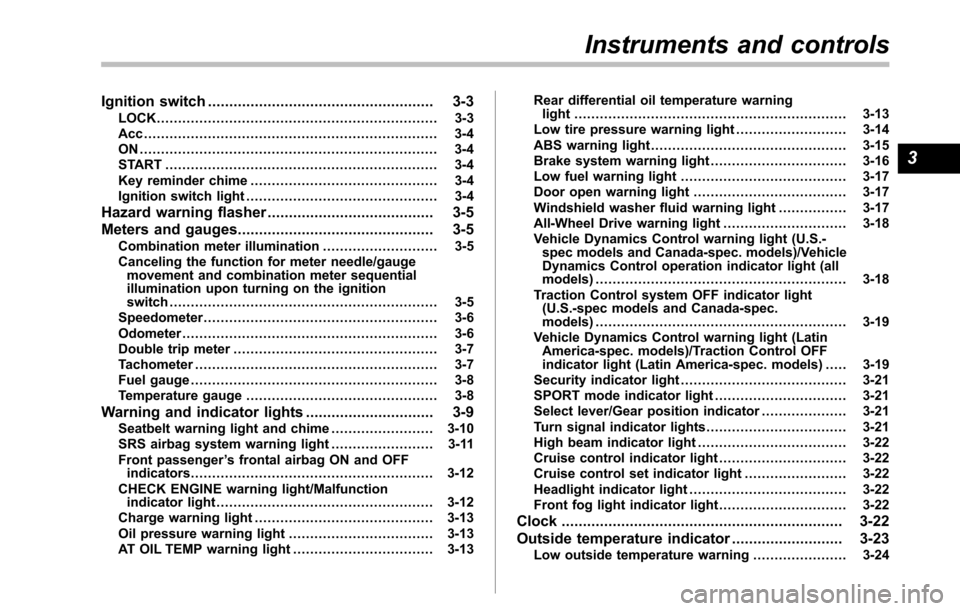
&Sun shade
The sun shade can be slid forward orbackward by hand while the moonroof isclosed.
If the moonroof is opened, the sun shadealso moves back.
Keys and doors2-27
Page 134 of 426
Ignition switch..................................................... 3-3LOCK.................................................................. 3-3Acc ..................................................................... 3-4ON ...................................................................... 3-4START ................................................................ 3-4Key reminder chime............................................ 3-4Ignition switch light............................................. 3-4
Hazard warning flasher....................................... 3-5
Meters and gauges.............................................. 3-5Combination meter illumination........................... 3-5Canceling the function for meter needle/gaugemovement and combination meter sequentialillumination upon turning on the ignitionswitch............................................................... 3-5Speedometer....................................................... 3-6Odometer............................................................ 3-6Double trip meter................................................ 3-7Tachometer......................................................... 3-7Fuel gauge.......................................................... 3-8Temperature gauge............................................. 3-8
Warning and indicator lights.............................. 3-9Seatbelt warning light and chime........................ 3-10SRS airbag system warning light........................ 3-11Front passenger’s frontal airbag ON and OFFindicators......................................................... 3-12CHECK ENGINE warning light/Malfunctionindicator light................................................... 3-12Charge warning light.......................................... 3-13Oil pressure warning light.................................. 3-13AT OIL TEMP warning light................................. 3-13
Rear differential oil temperature warninglight................................................................ 3-13Low tire pressure warning light.......................... 3-14ABS warning light.............................................. 3-15Brake system warning light................................ 3-16Low fuel warning light....................................... 3-17Door open warning light.................................... 3-17Windshield washer fluid warning light................ 3-17All-Wheel Drive warning light ............................. 3-18Vehicle Dynamics Control warning light (U.S.-spec models and Canada-spec. models)/VehicleDynamics Control operation indicator light (allmodels)........................................................... 3-18Traction Control system OFF indicator light(U.S.-specmodels and Canada-spec.models)........................................................... 3-19Vehicle Dynamics Control warning light (LatinAmerica-spec. models)/Traction Control OFFindicator light (Latin America-spec. models)..... 3-19Security indicator light....................................... 3-21SPORT mode indicator light............................... 3-21Select lever/Gear position indicator.................... 3-21Turn signal indicator lights................................. 3-21High beam indicator light................................... 3-22Cruise control indicator light.............................. 3-22Cruise control set indicator light........................ 3-22Headlight indicator light..................................... 3-22Front fog lightindicator light.............................. 3-22
Clock.................................................................. 3-22
Outside temperature indicator.......................... 3-23Low outside temperature warning...................... 3-24
Instruments and controls
3
Page 136 of 426
Ignition switch
WARNING
.Never turn the ignition switch to“LOCK”while the vehicle isbeing driven or towed becausethat will lock the steering wheel,preventing steering control. Andwhen the engine is turned off, ittakes a much greater effort thanusual to steer.
.Before leaving the vehicle, al-ways removethe key from theignition switch for safety andnever allow an unattended childto remain in the vehicle. Failureto follow this procedure couldresult in injury to a child orothers. Children could operatethe power windows, the moon-roof or other controls or evenmake the vehicle move.
CAUTION
Do not attach a large key holder orkey case to either key. If it bangedagainst your knees or hands whileyou were driving, it could turn theignition switch from the“ON”posi-
tion to the“Acc”or“LOCK”posi-tion, thereby stopping the engine.Also, if the key is attached to akeyholder or to a large bunch ofother keys, centrifugal force may acton it as the vehicle moves, resultingin unwanted turning of the ignitionswitch.
The ignition switch has four positions:LOCK, Acc, ON and START.
NOTE
.Keep the ignition switch in the“LOCK”position when the engine isnot running..Using electrical accessories for along time with the ignition switch in the“ON”or“Acc”position can cause thebattery to go dead.
.If the ignition switch will not movefrom the“LOCK”position to the“Acc”position, turn the steering wheelslightly to the left and right as you turnthe ignition switch.
&LOCK
The key can only be inserted or removedin this position. The ignition switch will lockthe steering wheel when you remove thekey.
If turning the key is difficult, turn thesteering wheel slightly to the right and leftas you turn the key.
The key can be turned from“Acc”to“LOCK”only when the select lever is in the“P”position.
Instruments and controls3-3
–CONTINUED–
Page 137 of 426
3-4Instruments and controls
&Acc
In this position the electrical accessories(radio, accessory power outlet, etc.) canbe used.
&ON
This is the normal operating position afterthe engine is started.
&START
CAUTION
Do not turn the ignition switch to the“START”position while the engineis running.
The engineis started in this position. Thestarter cranks the engine to start it. Whenthe key is released (after the engine hasstarted), the key automatically returns tothe“ON”position.
If your registered key fails to start theengine, pull out the key once (the securityindicator light will blink), and then insertthe key in the ignition switch and turn it tothe“START”position and again try to startthe engine.
NOTE
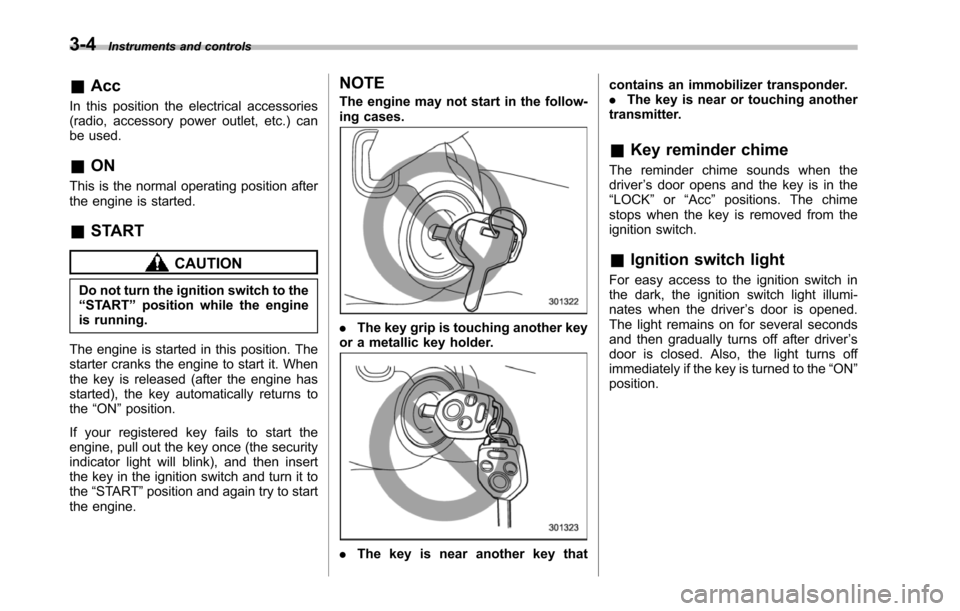
The engine may not start in the follow-ing cases.
.The key grip is touching another keyor a metallic key holder.
.Thekey is near another key that
contains an immobilizer transponder..The key is near or touching anothertransmitter.
&Key reminder chime
The reminder chime sounds when thedriver’s door opens and the key is in the“LOCK”or“Acc”positions. The chimestops when the key is removed from theignition switch.
&Ignition switch light
For easy access to the ignition switch inthe dark, the ignition switch light illumi-nates whenthe driver’s door is opened.The light remains on for several secondsand then gradually turns off after driver’sdoor is closed. Also, the light turns offimmediately if the key is turned to the“ON”position.
Page 154 of 426
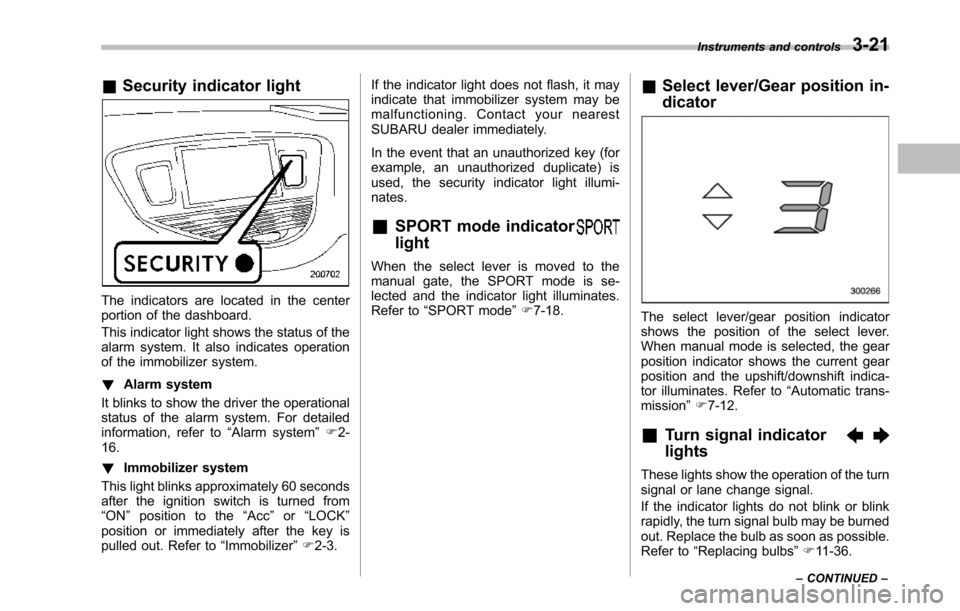
&Security indicator light
The indicators are located in the centerportion of the dashboard.
This indicator light shows the status of thealarm system. It also indicates operationof the immobilizer system.
!Alarm system
It blinks to show the driver the operationalstatus of the alarm system. For detailedinformation, refer to“Alarm system”F2-16.
!Immobilizer system
This light blinks approximately 60 secondsafter the ignition switch is turned from“ON”position to the“Acc”or“LOCK”position or immediately after the key ispulled out. Refer to“Immobilizer”F2-3.
If the indicator light does not flash, it mayindicate that immobilizer system may bemalfunctioning. Contact your nearestSUBARU dealer immediately.
In the event that an unauthorized key (forexample, an unauthorized duplicate) isused, the security indicator light illumi-nates.
&SPORT mode indicator
light
When the select lever is moved to themanual gate, the SPORT mode is se-lected and theindicator light illuminates.Refer to“SPORTmode”F7-18.
&Select lever/Gear position in-
dicator
The select lever/gear position indicatorshows the position of the select lever.When manual mode is selected, the gearposition indicator shows the current gearposition andthe upshift/downshift indica-tor illuminates. Refer to“Automatic trans-mission”F7-12.
&Turn signal indicator
lights
These lights show the operation of the turnsignal or lane change signal.
If the indicator lights do not blink or blinkrapidly, the turn signal bulb may be burnedout. Replace the bulb as soon as possible.Refer to“Replacing bulbs”F11-36.
Instruments and controls3-21
–CONTINUED–
Page 223 of 426
6-2Interior equipment
Interior light
When leaving your vehicle, make sure thelights are turned off to avoid batterydischarge.
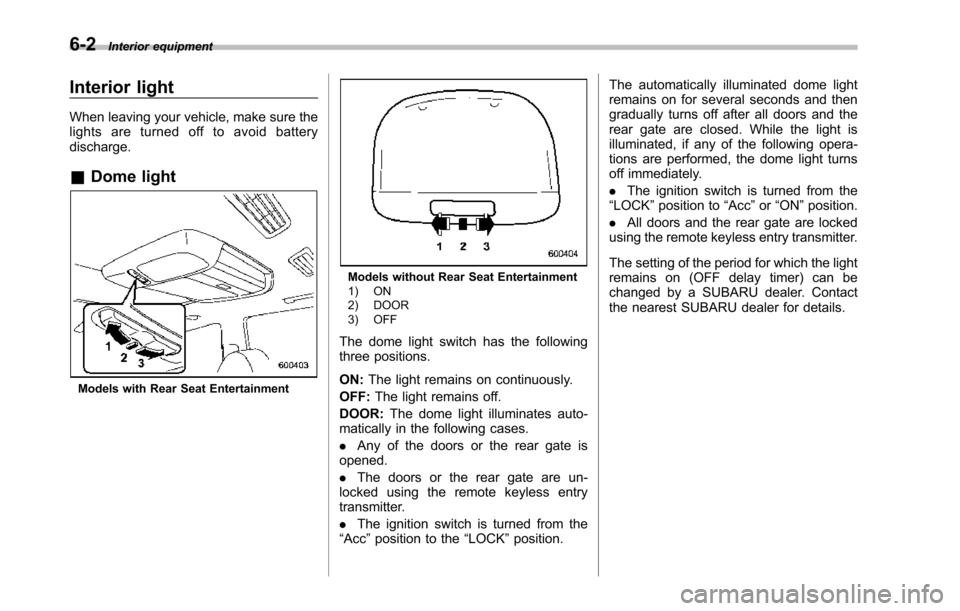
&Dome light
Models with Rear Seat Entertainment
Models without Rear Seat Entertainment1) ON2) DOOR3) OFF
The dome light switch has the followingthree positions.
ON:The light remains on continuously.
OFF:The light remains off.
DOOR:The dome light illuminates auto-matically in the following cases.
.Any of the doors or the rear gate isopened.
.The doors or the rear gate are un-locked using the remote keyless entrytransmitter.
.The ignition switch is turned from the“Acc”position to the“LOCK”position.
The automatically illuminated dome lightremains on for several seconds and thengradually turns off after all doors and therear gate are closed. While the light isilluminated, if any of the following opera-tions are performed, the dome light turnsoff immediately.
.The ignition switch is turned from the“LOCK”positionto“Acc”or“ON”position.
.All doors and the rear gate are lockedusing the remote keyless entry transmitter.
The setting of the period for which the lightremains on (OFF delay timer) can bechanged by a SUBARU dealer. Contactthe nearest SUBARU dealer for details.
Page 225 of 426
6-4Interior equipment
(automatic illumination - ON)..The doors are unlocked using theremote keyless entry transmitter.
.The ignition switch is turned from the“Acc”position to the“LOCK”position.
The automatically illuminated map lightsremain illuminated for several secondsand then gradually turn off after all doorsare closed.
While the lights are illuminated, if any ofthe following operations are performed,the map lights turn off immediately.
.The ignition switch is turned from the“LOCK”position to the“Acc”or“ON”position.
.All doors and the rear gate are lockedusing the remote keyless entry transmitter.
The setting of the period for which the lightremains illuminated (OFF delay timer) canbe changed by a SUBARU dealer. Con-tact your SUBARU dealer for details.
NOTE
If any of the doors or the rear gate isnot completely closed, the map lightswill remain illuminated as a result.However, the map lights are automati-cally turned off by the battery drainageprevention function to prevent thebattery from discharging. For details,
refer to“Battery drainage preventionfunction”F2-6.
&Automatic ambient light for
center console area (if
equipped)
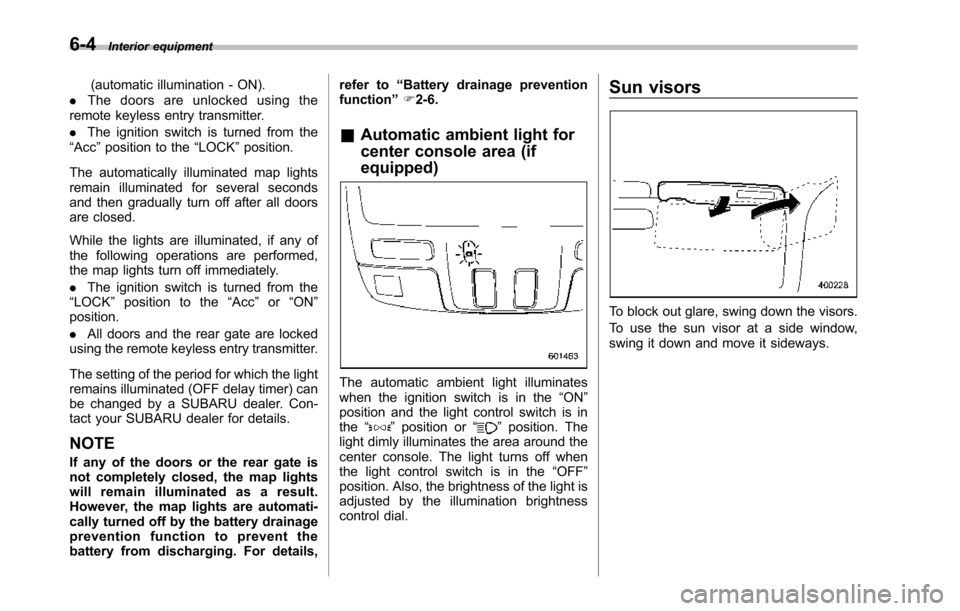
The automatic ambient light illuminateswhen the ignition switch is in the“ON”position and the light control switch is inthe“”position or“”position. Thelight dimly illuminates the area around thecenter console. The light turns off whenthe light control switch is in the“OFF”position. Also, the brightness of the light isadjusted by the illumination brightnesscontrol dial.
Sun visors
To block out glare, swing down the visors.
To use the sun visor at a side window,swing it down and move it sideways.
Page 227 of 426
6-6Interior equipment
Storage compartment
CAUTION
.Always keep the storage com-partment closed while driving toreduce the risk of injury in theevent of sudden stops or anaccident.
.Do not store spray cans, contain-ers with flammable or corrosiveliquids or any other dangerousitems in the storage compart-ment.
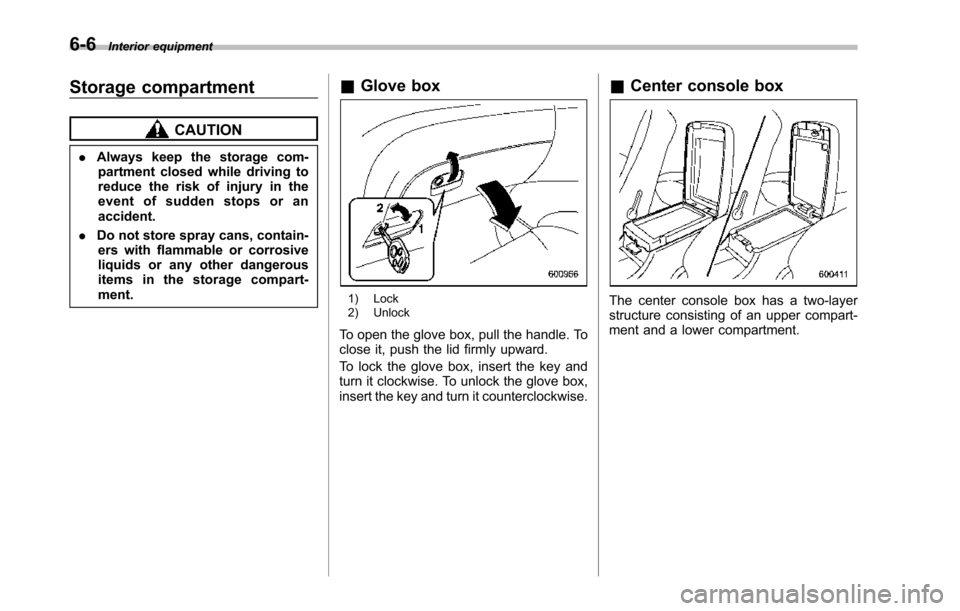
&Glove box
1) Lock2) Unlock
To open the glove box, pull the handle. Toclose it, push the lid firmly upward.
To lock the glove box, insert the key andturn it clockwise. To unlock the glove box,insert the key and turn it counterclockwise.
&Center console box
The center console box has a two-layerstructure consisting of an upper compart-ment and a lower compartment.
Page 238 of 426
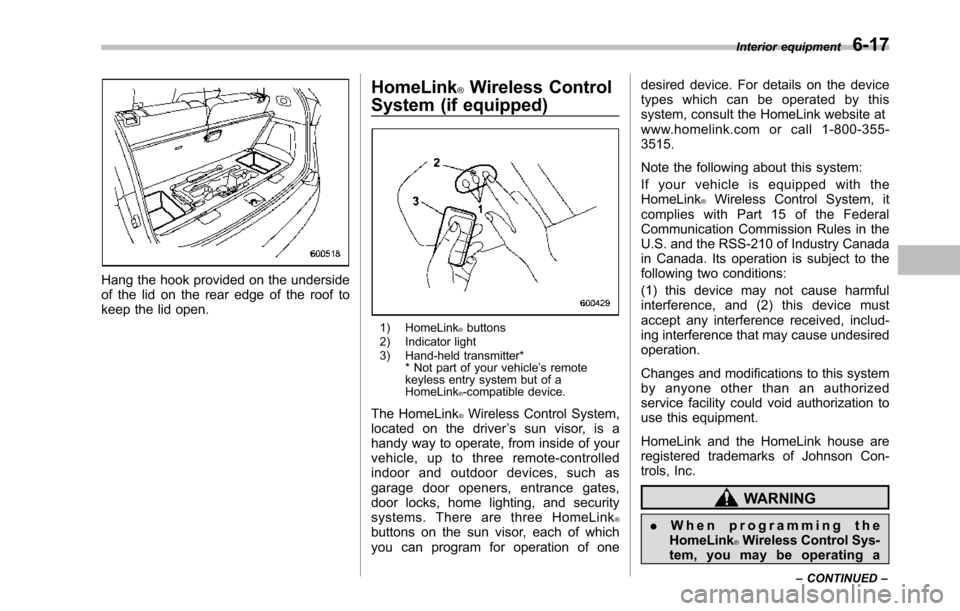
Hang the hook provided on the undersideof the lid on the rear edge of the roof tokeepthe lid open.
HomeLink®Wireless Control
System (if equipped)
1) HomeLink®buttons2) Indicator light3) Hand-held transmitter** Not part of your vehicle’s remotekeyless entry system but of aHomeLink®-compatible device.
The HomeLink®Wireless Control System,located on the driver’s sun visor, is ahandy way to operate, from inside of yourvehicle, up to three remote-controlledindoor and outdoor devices, such asgarage door openers, entrance gates,door locks, home lighting, and securitysystems. There are three HomeLink®buttons on the sun visor, each of whichyou can program for operation of one
desired device. For details on the devicetypes which can be operated by thissystem, consult the HomeLink website atwww.homelink.com or call 1-800-355-3515.
Note the following about this system:
If your vehicle is equipped with theHomeLink®Wireless Control System, itcomplies with Part 15 of the FederalCommunication Commission Rules in theU.S. and the RSS-210 of Industry Canadain Canada. Its operation is subject to thefollowing two conditions:
(1) this device may not cause harmfulinterference, and (2) this device mustaccept any interference received, includ-ing interference that may cause undesiredoperation.
Changes and modifications to this systemby anyone other than an authorizedservice facility could void authorization touse this equipment.
HomeLink and the HomeLink house areregistered trademarks of Johnson Con-trols, Inc.
WARNING
.When programming theHomeLink®Wireless Control Sys-tem, you may be operating a
Interior equipment6-17
–CONTINUED–