warning SUBARU TRIBECA 2014 1.G Workshop Manual
[x] Cancel search | Manufacturer: SUBARU, Model Year: 2014, Model line: TRIBECA, Model: SUBARU TRIBECA 2014 1.GPages: 426, PDF Size: 6.37 MB
Page 103 of 426
1-72Seat, seatbelt and SRS airbags
&SRS airbag system servicing
WARNING
.When discarding an airbag mod-ule or scrapping the entire vehi-cle damaged by a collision, con-sult your SUBARU dealer.
.The SRS airbag has no user-serviceable parts. Do not useelectrical test equipment on anycircuit related to the SRS airbagsystem. For required servicing ofthe SRS airbag, consult yournearest SUBARU dealer. Tamper-ing with or disconnecting thesystem’s wiring could result inaccidental inflation of the SRSairbag or could make the systeminoperative, which may result inserious injury.
CAUTION
If you need service or repair in areasindicated in the following list, havethe work performed by an author-ized SUBARU dealer. The SRS air-bag control module, impact sensorsand airbag modules are stored inthese areas.
.Under the center console
.Inside each front fender
.Steering wheel and column andnearby areas
.Top of the dashboard on frontpassenger’ssideandnearbyareas
.Each front seat and nearby area
.Inside each center pillar
.In each roof side (from the frontpillar to a point over the second-row seat)
.Between the second-row seatcushion and rear wheel houseon each side
.Under the second-row centerseat
In the event that the SRS airbag isdeployed, replacement of the systemshould be performed only by an author-ized SUBARU dealer. When the compo-nents of the SRS airbag system arereplaced, use only genuine SUBARUparts.
NOTE
In the following cases, contact yourSUBARU dealer as soon as possible.
.The front part of the vehicle was
involved in an accident in which onlythe driver’s SRS frontal airbag or bothdriver’sandfrontpassenger’sSRSfrontal airbags did not deploy..The pad of the steering wheel, thecover over the front passenger’s SRSfrontal airbag, or either roof side (fromthe front pillar to a point over thesecond-row seat) is scratched,cracked, or otherwise damaged..Center pillar, rear wheel house orrearfloor pan, or an area near theseparts, was involved in an accident inwhich the SRS side airbag and SRScurtain airbag did not deploy..The fabric or leather of either frontseatback is cut, frayed, or otherwisedamaged..The rear part of the vehicle wasinvolved in an accident in which noSRS airbag was deployed.
&Precautions against vehicle
modification
WARNING
To avoid accidental activation of thesystem or rendering the systeminoperative, which may result inserious injury, no modificationsshould be made to any components
Page 108 of 426
Immobilizer
CAUTION
FCC WARNING
Changes or modifications not ex-pressly approved by the party re-sponsible for compliance could voidthe user’s authority to operate theequipment.
The immobilizer system is designed toprevent an unauthorized person fromstarting the engine. Only keys registeredwith your vehicle’s immobilizer system canbe used to operate your vehicle. Even ifan unregistered key fits into the ignitionswitchand can be turned to the“START”position, the engine will automatically stopafter several seconds.
Each immobilizer key contains a trans-ponder in which the key’s ID code isstored. When a key is inserted into theignition switch and turned to the“ON”position, the transponder transmits thekey’s ID code to the immobilizer system’sreceiver. If the transmitted ID codematches the ID code registered in theimmobilizer system, the system allows theengine to be started. Since the ID code istransmitted and acted upon almost in-
stantly, the immobilizer system does notimpede normal starting of the engine.
If the engine does not start, pull out thekey once before trying again. Refer to“Ignition switch”F3-3.
This device complies with Part 15 ofthe FCC Rules and RSS-Gen of ICRules. Operation is subject to thefollowing two conditions: (1) this de-vice may not cause harmful interfer-ence, and (2) this device must acceptany interference received, includinginterference that may cause undesiredoperation.
CAUTION
.Do not place the key under directsunlight or anywhere it maybecomehot.
.Do not get the key wet. If the keygets wet, wipe it dry with a clothimmediately.
NOTE
To p r o t e c t y o u r v e h i c l e f r o m t h e f t ,please pay close attention to the fol-lowing security precautions.
.Never leaveyour vehicle unattendedwith its keys inside..Before leaving your vehicle, close all
windows and lock the doors and reargate..Do not leave spare keys or anyrecord of your key number in thevehicle.
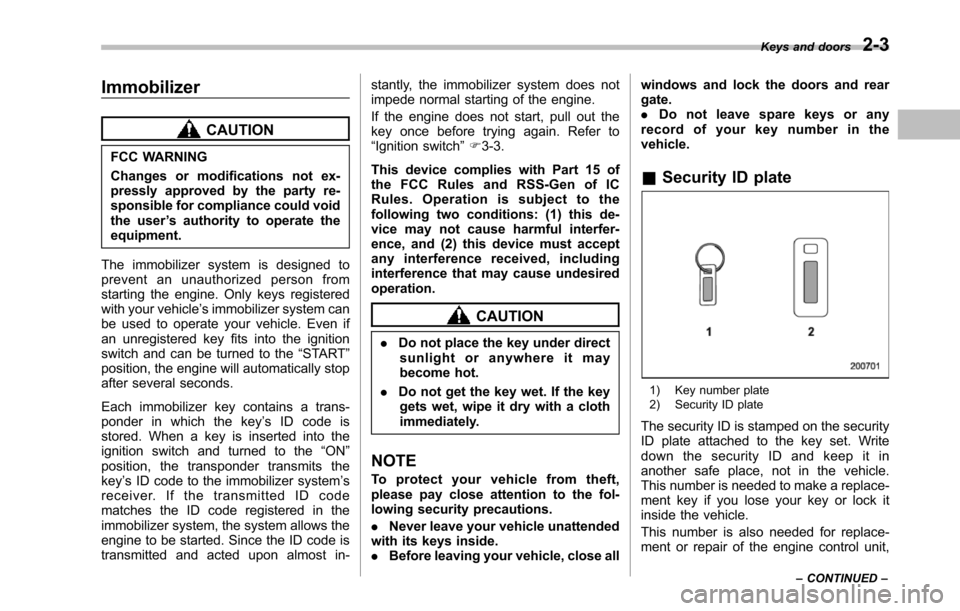
&Security ID plate
1) Key number plate2) Security ID plate
The security ID is stamped on the securityID plate attached to the key set. Writedown the security ID and keep it inanother safe place, not in the vehicle.This number is needed to make a replace-ment key if you lose your key or lock itinside the vehicle.
This number is also needed for replace-ment or repair of the engine control unit,
Keys and doors2-3
–CONTINUED–
Page 110 of 426
Door locks
&Locking and unlocking from
the outside
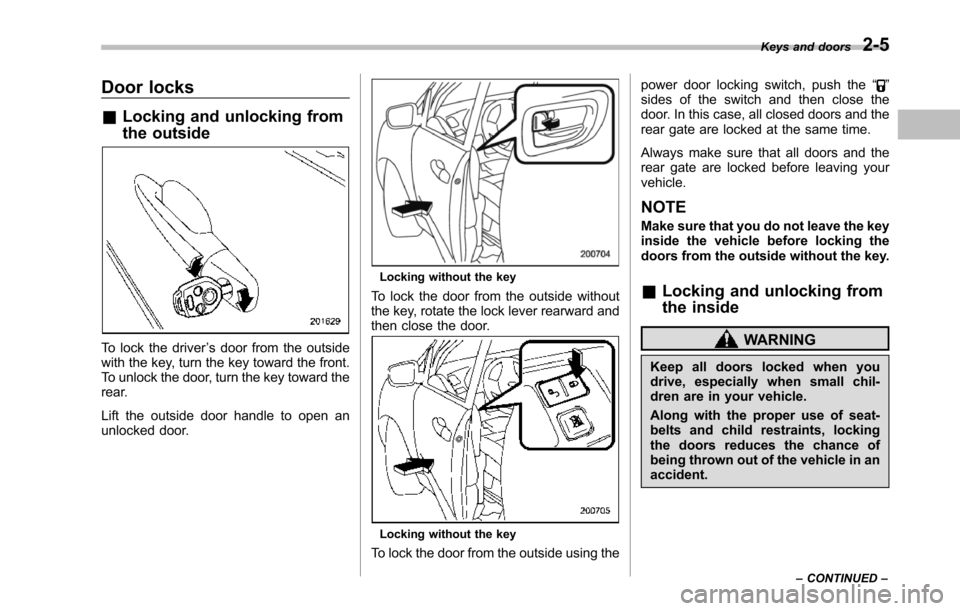
To lock the driver’s door from the outsidewith the key, turn the key toward the front.To unlock the door, turn the key toward therear.
Lift the outside door handle to open anunlocked door.
Locking without the key
To lock the door from the outside withoutthe key, rotate the lock lever rearward andthen close the door.
Locking without the key
To lock the door from the outside using the
power door locking switch, push the“”sides of the switch and then close thedoor. In this case, all closed doors and therear gate are locked at the same time.
Always make sure that all doors and therear gate are locked before leaving yourvehicle.
NOTE
Make sure that you do not leave the keyinside the vehicle before locking thedoors from theoutside without the key.
&Locking and unlocking from
the inside
WARNING
Keep all doors locked when youdrive, especially when small chil-dren are in your vehicle.
Along with the proper use of seat-belts and child restraints, lockingthe doors reduces the chance ofbeing thrown out of the vehicle in anaccident.
Keys and doors2-5
–CONTINUED–
Page 126 of 426
Child safety locks
WARNING
Always use the child safety lockwhenever a child rides in the rear.Serious injury could result if a childaccidentally opened the door andfell out.
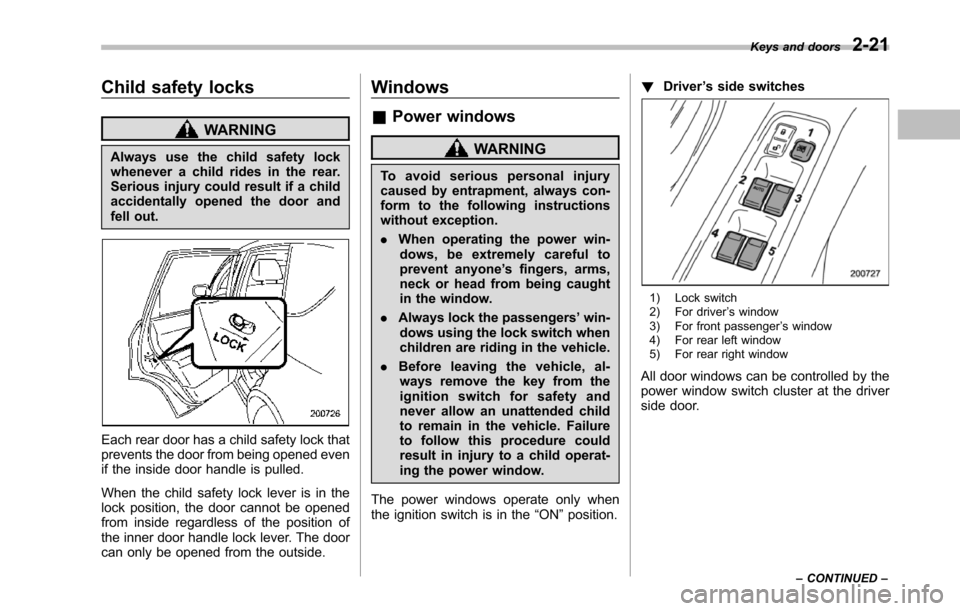
Each rear door has a child safety lock thatprevents the door from being opened evenif the inside door handle is pulled.
When the child safety lock lever is in thelock position, the door cannot be openedfrom inside regardless of the position ofthe inner door handle lock lever. The doorcan only be opened from the outside.
Windows
&Power windows
WARNING
To a v o i d s e r i o u s p e r s o n a l i n j u r ycausedby entrapment, always con-form to the following instructionswithout exception.
.When operating the power win-dows, be extremely careful toprevent anyone’s fingers, arms,neck or head from being caughtin the window.
.Always lockthe passengers’win-dows using the lock switch whenchildren are riding in the vehicle.
.Before leaving the vehicle, al-ways remove the key from theignition switch for safety andnever allow an unattended childto remain in the vehicle. Failureto follow this procedure couldresult in injury to a child operat-ing the power window.
The power windows operate only whentheignition switch is in the“ON”position.
!Driver’s side switches
1) Lock switch2) For driver’s window3) For front passenger’s window4) For rear left window5) For rear right window
All door windows can be controlled by thepower window switch cluster at the driverside door.
Keys and doors2-21
–CONTINUED–
Page 129 of 426
2-24Keys and doors
Rear gate
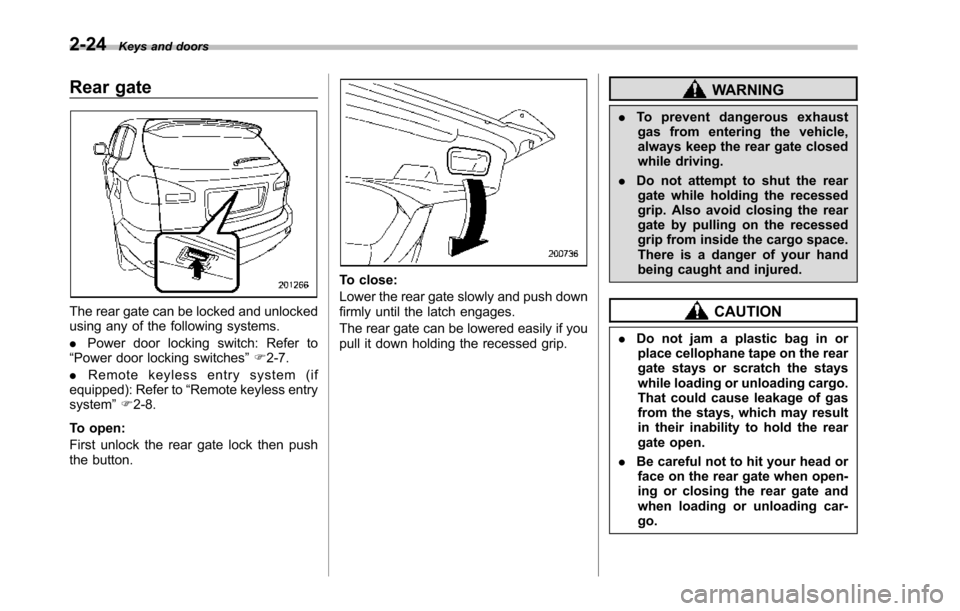
The rear gate can be locked and unlockedusing any of the following systems.
.Power door locking switch: Refer to“Power door locking switches”F2-7.
.Remote keyless entry system (ifequipped):Refer to“Remote keylessentrysystem”F2-8.
To open:
First unlock the rear gate lock then pushthe button.
To close:
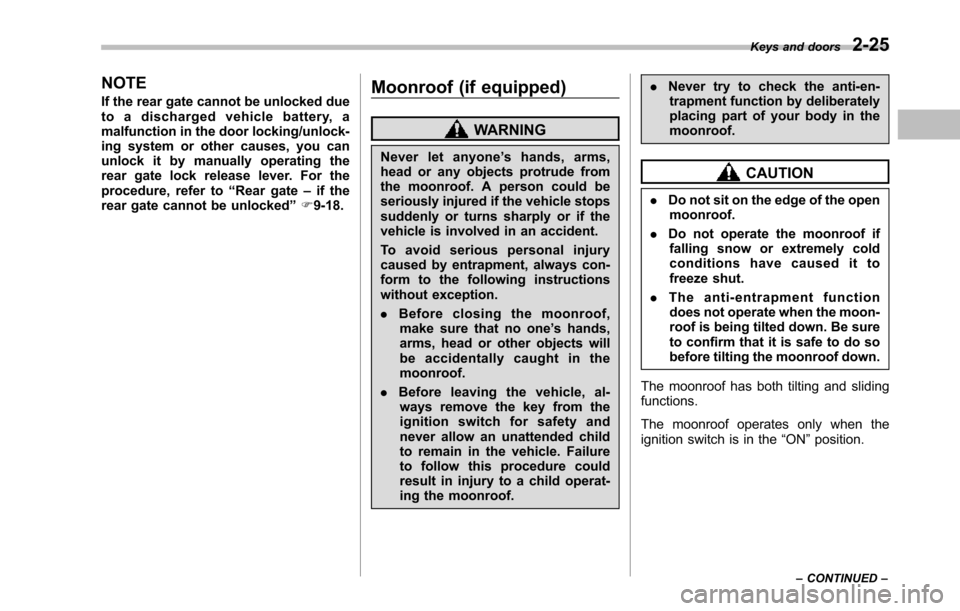
Lower the rear gate slowly and push downfirmly until the latch engages.
The rear gate can be lowered easily if youpull it down holding the recessed grip.
WARNING
.To prevent dangerous exhaustgas from entering the vehicle,always keep the rear gate closedwhile driving.
.Do not attempt to shut the reargate while holding the recessedgrip. Also avoid closing the reargate by pulling on the recessedgrip from inside the cargo space.There is a danger of your handbeing caught and injured.
CAUTION
.Do not jam a plastic bag in orplace cellophane tape on the reargate stays or scratch the stayswhile loading or unloading cargo.That could cause leakage of gasfrom the stays, which may resultin their inability to hold the reargate open.
.Be careful not to hit your head orface on the rear gate when open-ing or closing the rear gate andwhen loading or unloading car-go.
Page 130 of 426
NOTE
If the rear gate cannot be unlocked dueto a discharged vehicle battery, amalfunction in the door locking/unlock-ing system or other causes, you canunlock it by manually operating therear gate lock release lever. For theprocedure, refer to“Rear gate–if therear gate cannot be unlocked”F9-18.
Moonroof (if equipped)
WARNING
Never let anyone’shands,arms,head or any objects protrude fromthe moonroof. A person could beseriously injured if the vehicle stopssuddenly or turns sharply or if thevehicle is involved in an accident.
To a v o i d s e r i o u s p e r s o n a l i n j u r ycaused by entrapment, always con-form to the following instructionswithoutexception.
.Before closing the moonroof,make sure that no one’s hands,arms, head or other objects willbe accidentally caught in themoonroof.
.Before leaving the vehicle, al-ways remove the key from theignition switch for safety andnever allow an unattended childto remain in the vehicle. Failureto follow this procedure couldresult in injury to a child operat-ingthe moonroof.
.Never try to check the anti-en-trapment function by deliberatelyplacing part of your body in themoonroof.
CAUTION
.Do not sit on the edge of the openmoonroof.
.Do not operate the moonroof iffalling snow or extremely coldconditions have caused it tofreeze shut.
.The anti-entrapment functiondoes not operate when the moon-roof is being tilted down. Be sureto confirm that it is safe to do sobeforetilting the moonroof down.
The moonroofhas both tilting and slidingfunctions.
The moonroof operates only when theignition switch is in the“ON”position.
Keys and doors2-25
–CONTINUED–
Page 134 of 426
Ignition switch..................................................... 3-3LOCK.................................................................. 3-3Acc ..................................................................... 3-4ON ...................................................................... 3-4START ................................................................ 3-4Key reminder chime............................................ 3-4Ignition switch light............................................. 3-4
Hazard warning flasher....................................... 3-5
Meters and gauges.............................................. 3-5Combination meter illumination........................... 3-5Canceling the function for meter needle/gaugemovement and combination meter sequentialillumination upon turning on the ignitionswitch............................................................... 3-5Speedometer....................................................... 3-6Odometer............................................................ 3-6Double trip meter................................................ 3-7Tachometer......................................................... 3-7Fuel gauge.......................................................... 3-8Temperature gauge............................................. 3-8
Warning and indicator lights.............................. 3-9Seatbelt warning light and chime........................ 3-10SRS airbag system warning light........................ 3-11Front passenger’s frontal airbag ON and OFFindicators......................................................... 3-12CHECK ENGINE warning light/Malfunctionindicator light................................................... 3-12Charge warning light.......................................... 3-13Oil pressure warning light.................................. 3-13AT OIL TEMP warning light................................. 3-13
Rear differential oil temperature warninglight................................................................ 3-13Low tire pressure warning light.......................... 3-14ABS warning light.............................................. 3-15Brake system warning light................................ 3-16Low fuel warning light....................................... 3-17Door open warning light.................................... 3-17Windshield washer fluid warning light................ 3-17All-Wheel Drive warning light ............................. 3-18Vehicle Dynamics Control warning light (U.S.-spec models and Canada-spec. models)/VehicleDynamics Control operation indicator light (allmodels)........................................................... 3-18Traction Control system OFF indicator light(U.S.-specmodels and Canada-spec.models)........................................................... 3-19Vehicle Dynamics Control warning light (LatinAmerica-spec. models)/Traction Control OFFindicator light (Latin America-spec. models)..... 3-19Security indicator light....................................... 3-21SPORT mode indicator light............................... 3-21Select lever/Gear position indicator.................... 3-21Turn signal indicator lights................................. 3-21High beam indicator light................................... 3-22Cruise control indicator light.............................. 3-22Cruise control set indicator light........................ 3-22Headlight indicator light..................................... 3-22Front fog lightindicator light.............................. 3-22
Clock.................................................................. 3-22
Outside temperature indicator.......................... 3-23Low outside temperature warning...................... 3-24
Instruments and controls
3
Page 136 of 426
Ignition switch
WARNING
.Never turn the ignition switch to“LOCK”while the vehicle isbeing driven or towed becausethat will lock the steering wheel,preventing steering control. Andwhen the engine is turned off, ittakes a much greater effort thanusual to steer.
.Before leaving the vehicle, al-ways removethe key from theignition switch for safety andnever allow an unattended childto remain in the vehicle. Failureto follow this procedure couldresult in injury to a child orothers. Children could operatethe power windows, the moon-roof or other controls or evenmake the vehicle move.
CAUTION
Do not attach a large key holder orkey case to either key. If it bangedagainst your knees or hands whileyou were driving, it could turn theignition switch from the“ON”posi-
tion to the“Acc”or“LOCK”posi-tion, thereby stopping the engine.Also, if the key is attached to akeyholder or to a large bunch ofother keys, centrifugal force may acton it as the vehicle moves, resultingin unwanted turning of the ignitionswitch.
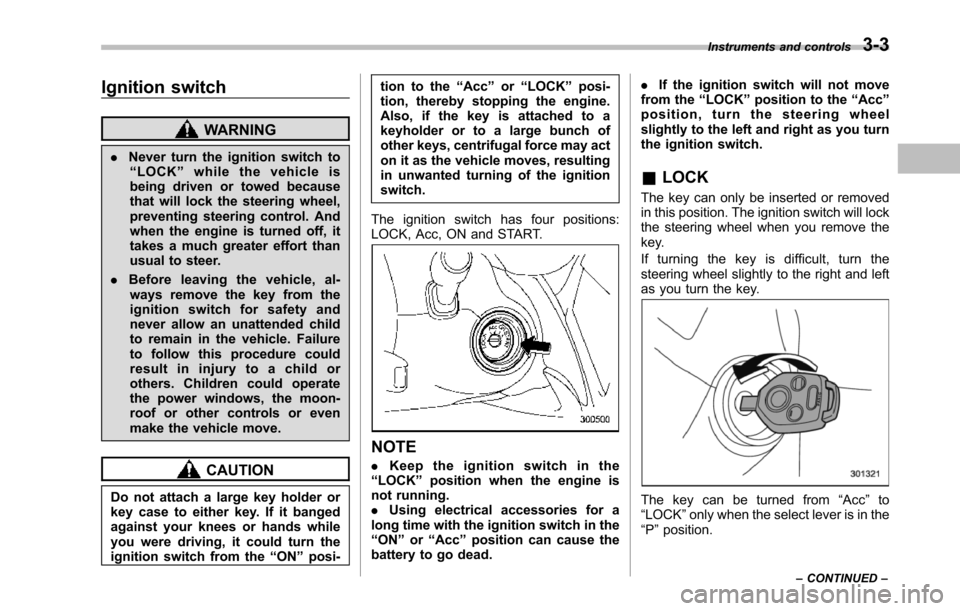
The ignition switch has four positions:LOCK, Acc, ON and START.
NOTE
.Keep the ignition switch in the“LOCK”position when the engine isnot running..Using electrical accessories for along time with the ignition switch in the“ON”or“Acc”position can cause thebattery to go dead.
.If the ignition switch will not movefrom the“LOCK”position to the“Acc”position, turn the steering wheelslightly to the left and right as you turnthe ignition switch.
&LOCK
The key can only be inserted or removedin this position. The ignition switch will lockthe steering wheel when you remove thekey.
If turning the key is difficult, turn thesteering wheel slightly to the right and leftas you turn the key.
The key can be turned from“Acc”to“LOCK”only when the select lever is in the“P”position.
Instruments and controls3-3
–CONTINUED–
Page 138 of 426
Hazard warning flasher
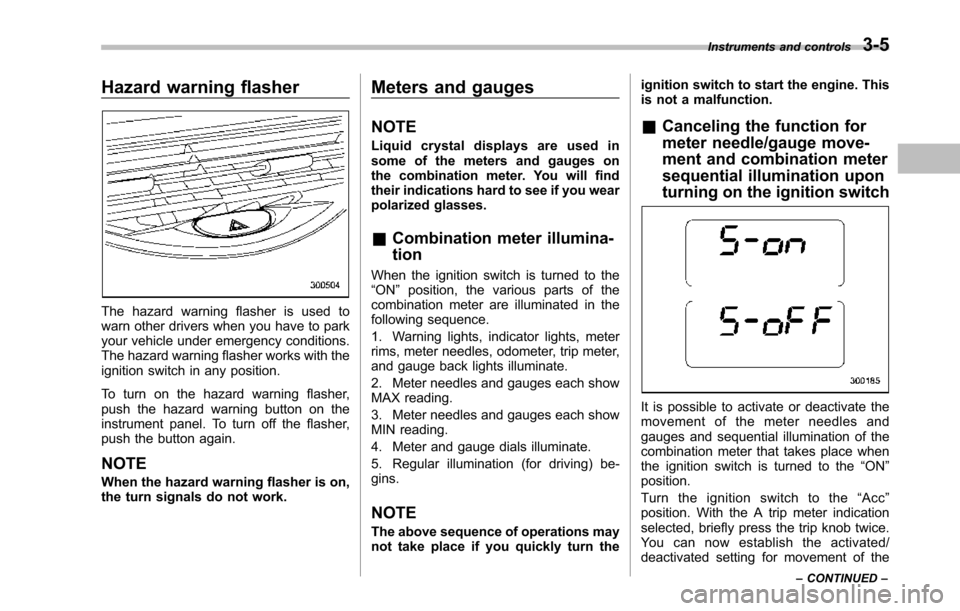
Thehazard warning flasher is used towarn other drivers when you have to parkyour vehicle under emergency conditions.The hazard warning flasher works with theignition switch in any position.
To turn on the hazard warning flasher,push the hazard warning button on theinstrumentpanel. To turn off the flasher,push the button again.
NOTE
When the hazard warning flasher is on,the turn signals do not work.
Meters and gauges
NOTE
Liquid crystal displays are used insome of the meters and gauges onthe combination meter. You will findtheir indications hard to see if you wearpolarized glasses.
&Combination meter illumina-
tion
When the ignition switch is turned to the“ON”position, the various parts of thecombinationmeter are illuminated in thefollowing sequence.
1. Warning lights, indicator lights, meterrims, meter needles, odometer, trip meter,and gauge back lights illuminate.
2. Meter needles and gauges each showMAX reading.
3. Meter needles and gauges each showMIN reading.
4. Meter and gauge dials illuminate.
5. Regular illumination (for driving) be-gins.
NOTE
The above sequence of operations maynot take place if you quickly turn the
ignition switch to start the engine. Thisis not a malfunction.
&Canceling the function for
meter needle/gauge move-
ment and combination meter
sequential illumination upon
turning on the ignition switch
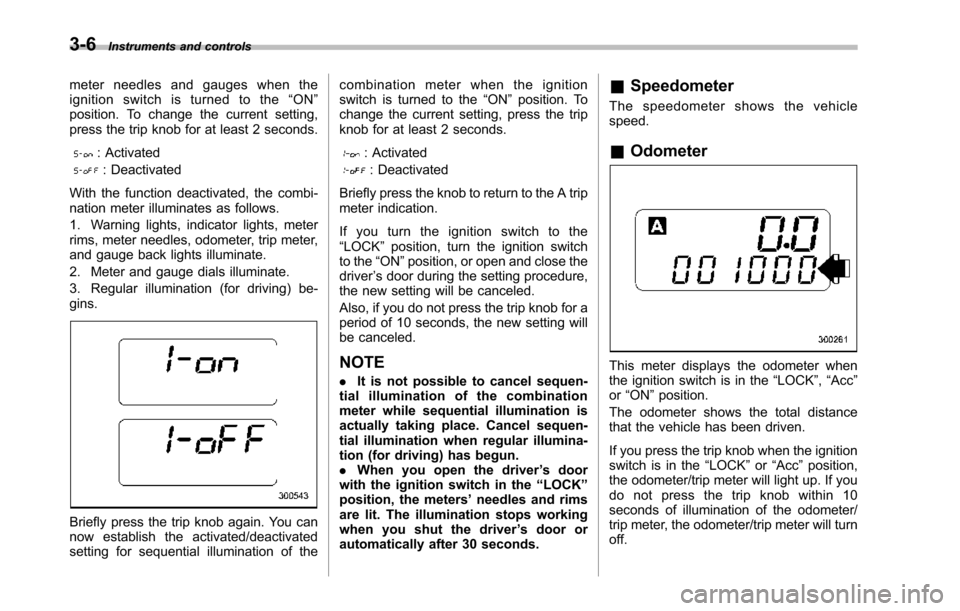
It is possible to activate or deactivate themovement of the meter needles andgauges and sequential illumination of thecombination meter that takes place whenthe ignition switch is turned to the“ON”position.
Turn the ignition switch to the“Acc”position. With the A trip meter indicationselected, briefly press the trip knob twice.Yo u c a n n o w e s t a b l i s h t h e a c t i v a t e d /deactivated setting for movement of the
Instruments and controls3-5
–CONTINUED–
Page 139 of 426
3-6Instruments and controls
meter needles and gauges when theignition switch is turned to the“ON”position. To change the current setting,press the trip knob for at least 2 seconds.
: Activated
: Deactivated
With the function deactivated, the combi-nation meter illuminates as follows.
1. Warning lights, indicator lights, meterrims, meter needles, odometer, trip meter,and gauge back lights illuminate.
2. Meter and gauge dials illuminate.
3. Regular illumination (for driving) be-gins.
Briefly press the trip knob again. You cannow establish the activated/deactivatedsetting for sequential illumination of the
combination meter when the ignitionswitch is turned to the“ON”position. Tochange the current setting, press the tripknob for at least 2 seconds.
: Activated
: Deactivated
Briefly press the knob to return to the A tripmeter indication.
If you turn the ignition switch to the“LOCK”position, turn the ignition switchto the“ON”position, or open and close thedriver’s door during the setting procedure,the new setting will be canceled.
Also, if you do not press the trip knob for aperiod of 10 seconds, the new setting willbe canceled.
NOTE
.It is not possible to cancel sequen-tial illumination of the combinationmeter while sequential illumination isactually taking place. Cancel sequen-tial illumination when regular illumina-tion (for driving) has begun..When you open the driver’s doorwith the ignition switch in the“LOCK”position, the meters’needles and rimsare lit. The illumination stops workingwhen you shut the driver’s door orautomatically after 30 seconds.
&Speedometer
The speedometer shows the vehiclespeed.
&Odometer
This meter displays the odometer whenthe ignition switch is in the“LOCK”,“Acc”or“ON”position.
The odometer shows the total distancethatthe vehicle has been driven.
If you press the trip knob when the ignitionswitch is in the“LOCK”or“Acc”position,the odometer/trip meter will light up. If youdo not press the trip knob within 10seconds of illumination of the odometer/trip meter, the odometer/trip meter will turnoff.