key battery SUBARU WRX 2016 User Guide
[x] Cancel search | Manufacturer: SUBARU, Model Year: 2016, Model line: WRX, Model: SUBARU WRX 2016Pages: 594, PDF Size: 19.43 MB
Page 113 of 594

Keys and doors/Remote keyless entry system
function display.
& Replacing the batteryRefer to “ Replacing battery ” F 11-50.
& Replacing lost transmittersIf you lose a transmitter or want to
purchase additional transmitters (up to
four can be programmed), your transmit-
ters should be reprogrammed for security
reasons. For details, contact your
SUBARU dealer and have the transmitters
programmed into the remote keyless entry
system.
& Welcome lighting (if
equipped)The welcome lighting turns on the head-
lights, interior lights, etc. for smooth
approaching to or exiting from the vehicle
at night or in a dark place.
NOTE . For the operation of the interior
lights, refer to “ Interior lights ” F 6-2.
. The factory setting (default setting)
of the operation duration of the head-
lights and the exterior lights is 30
seconds for both approaching and
exiting. This setting can be changed
to OFF (no operation), 30 seconds, 60
seconds, or 90 seconds, respectively for approaching and exiting at
SUBARU dealers. For more details,
contact a SUBARU dealer.
! Approaching
When it is dark and the light control switch
is in the “ AUTO ” position, if the doors are
unlocked using the unlock button on the
transmitter, the headlight low beams and
some exterior lights will illuminate. The
interior lights will also illuminate if the
dome light switch is in the “ DOOR ”
position.
The headlight low beams and the exterior
lights will illuminate for 30 seconds.
NOTE If the doors are locked using the lock
button on the transmitter or the lock
sensor on the door handle, the head-
lights and exterior lights will turn off.
! Exiting
When the light control switch is in the
“ AUTO ” position and the headlight indica-
tor light is on, if the ignition switch is turned
off or the key is removed from the ignition
switch, the headlight low beams and some
exterior lights will continue illuminating.
The headlights and exterior lights will turn
off under either of the following conditions. . 30 seconds have elapsed since the
driver ’ s door was opened and closed.
. The lock button on the transmitter or
the lock sensor on the door handle is
operated two times successively.
NOTE . If the light control switch is set to a
position other than “ AUTO ” position,
the headlights and the exterior lights
will turn off.
. When exiting from the vehicle, the
headlights and exterior lights will turn
off if the driver ’ s door is not opened
and closed within 3 minutes from turn-
ing on of the welcome lighting.
& Certification for Remote key-
less entry system ! U.S.-spec. models
FCC ID: CWTWB1U811
FCC ID: CWTWD1U781
CAUTION
FCC CAUTION
Changes or modifications not ex-
pressly approved by the party re-
sponsible for compliance could void
the user ’ s authority to operate the
equipment.2-24
Page 118 of 594
! To arm the system using the key-
less access function (if equipped)
1. Close all windows and the moonroof (if
equipped)
2. Turn the push-button ignition switch to
the “ OFF ” position.
3. Open the doors and get out of the
vehicle.
4. Make sure that the engine hood is
locked.
5. Close all doors and the trunk lid.
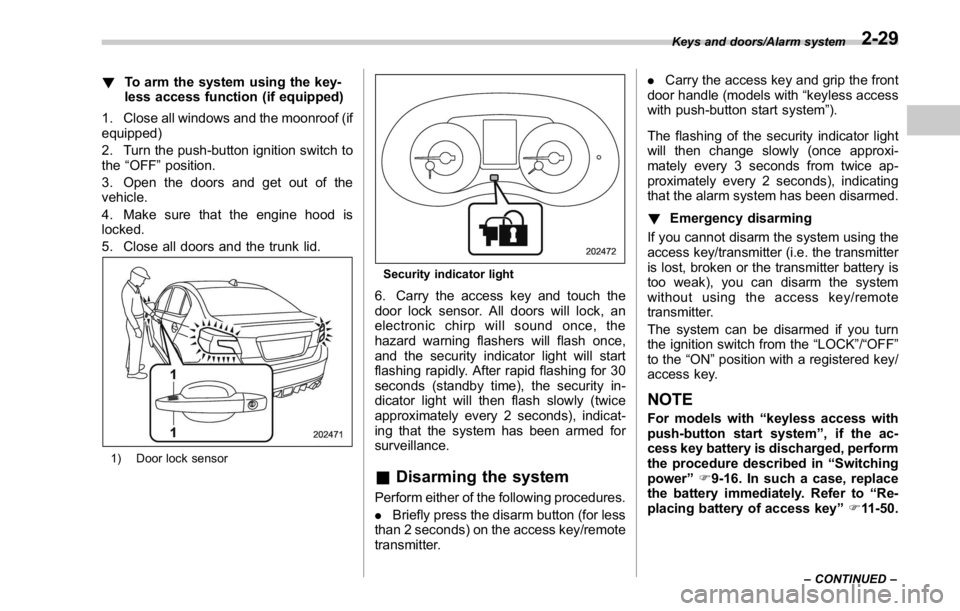
1) Door lock sensor Security indicator light
6. Carry the access key and touch the
door lock sensor. All doors will lock, an
electronic chirp will sound once, the
hazard warning flashers will flash once,
and the security indicator light will start
flashing rapidly. After rapid flashing for 30
seconds (standby time), the security in-
dicator light will then flash slowly (twice
approximately every 2 seconds), indicat-
ing that the system has been armed for
surveillance.
& Disarming the system Perform either of the following procedures.
. Briefly press the disarm button (for less
than 2 seconds) on the access key/remote
transmitter. . Carry the access key and grip the front
door handle (models with “ keyless access
with push-button start system ” ).
The flashing of the security indicator light
will then change slowly (once approxi-
mately every 3 seconds from twice ap-
proximately every 2 seconds), indicating
that the alarm system has been disarmed.
! Emergency disarming
If you cannot disarm the system using the
access key/transmitter (i.e. the transmitter
is lost, broken or the transmitter battery is
too weak), you can disarm the system
without using the access key/remote
transmitter.
The system can be disarmed if you turn
the ignition switch from the “ LOCK ” / “ OFF ”
to the “ ON ” position with a registered key/
access key.
NOTE For models with “ keyless access with
push-button start system ” , if the ac-
cess key battery is discharged, perform
the procedure described in “ Switching
power ” F 9-16. In such a case, replace
the battery immediately. Refer to “ Re-
placing battery of access key ” F 11-50.Keys and doors/Alarm system
– CONTINUED –2-29
Page 122 of 594
& Power window operation by
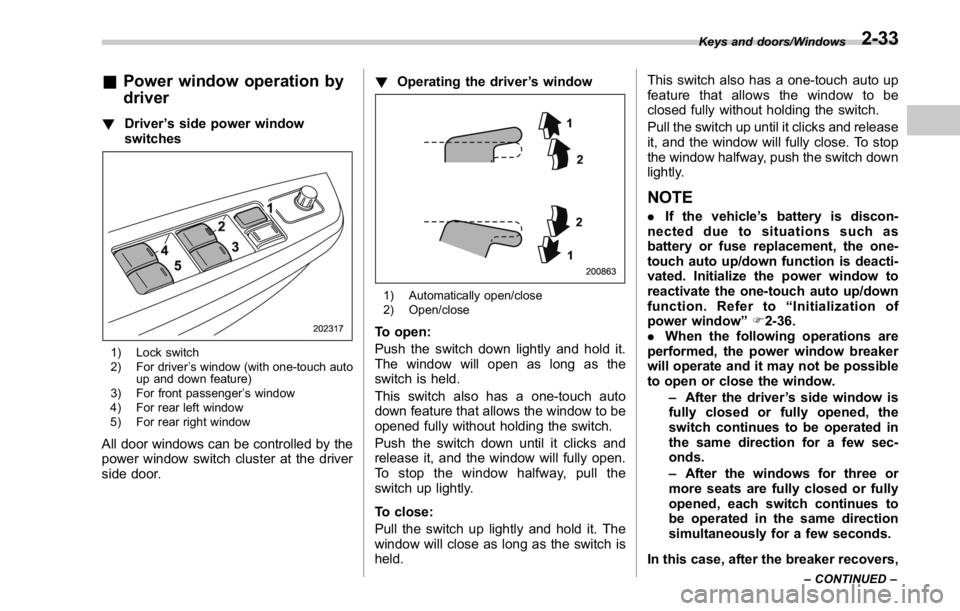
driver ! Driver ’ s side power window
switches
1) Lock switch
2) For driver ’ s window (with one-touch auto
up and down feature)
3) For front passenger ’ s window
4) For rear left window
5) For rear right window
All door windows can be controlled by the
power window switch cluster at the driver
side door. ! Operating the driver ’ s window
1) Automatically open/close
2) Open/close
To open:
Push the switch down lightly and hold it.
The window will open as long as the
switch is held.
This switch also has a one-touch auto
down feature that allows the window to be
opened fully without holding the switch.
Push the switch down until it clicks and
release it, and the window will fully open.
To stop the window halfway, pull the
switch up lightly.
To close:
Pull the switch up lightly and hold it. The
window will close as long as the switch is
held. This switch also has a one-touch auto up
feature that allows the window to be
closed fully without holding the switch.
Pull the switch up until it clicks and release
it, and the window will fully close. To stop
the window halfway, push the switch down
lightly.
NOTE . If the vehicle ’ s battery is discon-
nected due to situations such as
battery or fuse replacement, the one-
touch auto up/down function is deacti-
vated. Initialize the power window to
reactivate the one-touch auto up/down
function. Refer to “ Initialization of
power window ” F 2-36.
. When the following operations are
performed, the power window breaker
will operate and it may not be possible
to open or close the window.
– After the driver ’ s side window is
fully closed or fully opened, the
switch continues to be operated in
the same direction for a few sec-
onds.
– After the windows for three or
more seats are fully closed or fully
opened, each switch continues to
be operated in the same direction
simultaneously for a few seconds.
In this case, after the breaker recovers, Keys and doors/Windows
– CONTINUED –2-33
Page 123 of 594
Keys and doors/Windows
be sure to initialize the power windows.
If they are not initialized, the one-touch
auto up/down function will not operate.
Refer to “ Initialization of power win-
dow ” F 2-36.
! Anti-entrapment function
CAUTION. Never attempt to test this func-
tion using fingers, hands or other
parts of your body.
. The anti-entrapment function
may not operate properly if some
object gets trapped just before
the window fully closes.
NOTE . If a window detects an impact simi-
lar to that caused by trapping an object
(for example, when the vehicle encoun-
ters a deep pothole), the anti-entrap-
ment function may operate.
. The window cannot be operated for
a few seconds after the anti-entrap-
ment function operates.
. If the vehicle ’ s battery is discon-
nected due to situations such as
battery or fuse replacement, the anti-
entrapment function is deactivated.
Initialize the power window to reacti- vate the anti-entrapment function. Re-
fer to “ Initialization of power window ”
F 2-36.
While closing the driver ’ s window auto-
matically, if the window senses a sub-
stantial enough object trapped between
the window and the window frame, it
automatically moves down slightly and
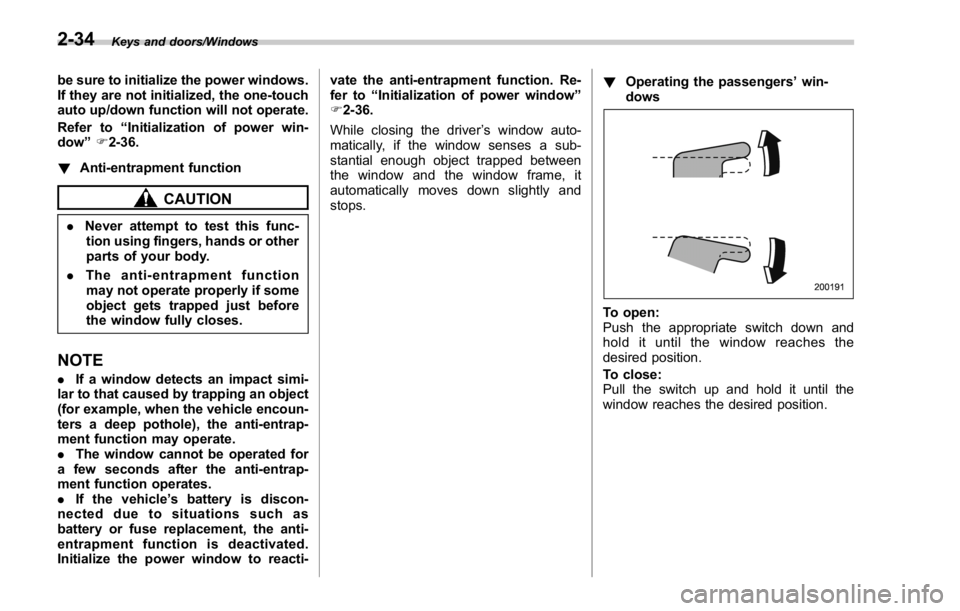
stops. ! Operating the passengers ’ win-
dows
To open:
Push the appropriate switch down and
hold it until the window reaches the
desired position.
To close:
Pull the switch up and hold it until the
window reaches the desired position.2-34
Page 125 of 594
Keys and doors/Trunk lid
& Initialization of power win-
dowIf the vehicle ’ s battery is disconnected due
to situations such as battery or fuse
replacement, the following functions will
be deactivated.
. One-touch auto up/down function
. Anti-entrapment function
Initialize the power window using the
following procedure to reactivate these
functions.
1. Close the driver ’ s door.
2. Turn the ignition switch to the “ ON ”
position.
3. Open the driver ’ s side window halfway
by pushing down the power window
switch.
4. Pull up the power window switch and
close the window completely. Continue
pulling up the switch for approximately 1
second after the window is closed com-
pletely.
5. Open the driver ’ s side window com-
pletely by fully pushing down the power
windows switch. Trunk lid WARNING. To prevent dangerous exhaust
gas from entering the vehicle,
always keep the trunk lid closed
while driving.
. Help prevent children, adults or
animals from locking themselves
in the trunk. On hot or sunny
days, the temperature in the
trunk could quickly become high
enough to cause death or serious
heat-related injuries including
brain damage to anyone locked
inside, particularly for small chil-
dren.
. When leaving the vehicle, close
all windows and lock all doors.
Also make certain that the trunk
is closed.
& To open and close the trunk
lid from outside The trunk lid can be opened using the
keyless access function or remote keyless
entry system. For details, refer to the
following section.
. For models with “ keyless access with push-button start system ” , refer to “ Open-
ing trunk ” F 2-15.
. For models without “ keyless access
with push-button start system ” , refer to
“ Opening the trunk lid ” F 2-23.
To close the trunk lid, lightly press the
trunk lid down until the latch engages.
NOTE Do not leave your valuables in the
trunk when you leave your vehicle.
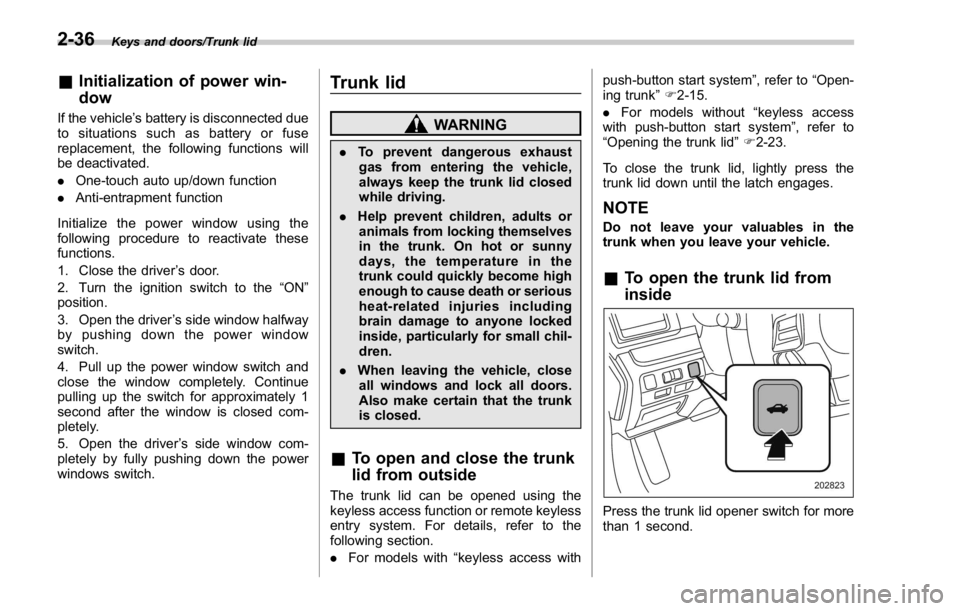
& To open the trunk lid from
inside
Press the trunk lid opener switch for more
than 1 second.2-36
Page 133 of 594
Instruments and controls/Ignition switch (models without push – button start system)
Ignition switch (models with-
out push-button start sys-
tem) WARNING. Never turn the ignition switch to
“ LOCK ” while the vehicle is
being driven or towed because
that will lock the steering wheel,
preventing steering control. And
when the engine is turned off, it
takes a much greater effort than
usual to steer.
. Before leaving the vehicle, al-
ways remove the key from the
ignition switch for safety and
never allow an unattended child
to remain in the vehicle. Failure
to follow this procedure could
result in injury to a child or
others. Children could operate
the power windows, the moon-
roof or other controls or even
make the vehicle move.
CAUTION
Do not attach a large key holder or
key case to either key. If it banged against your knees or hands while
you are driving, it could turn the
ignition switch from the “ ON ” posi-
tion to the “ ACC ” or “ LOCK ” posi-
tion, thereby stopping the engine.
Also, if the key is attached to a
keyholder or to a large bunch of
other keys, centrifugal force may act
on it as the vehicle moves, resulting
in unwanted turning of the ignition
switch.
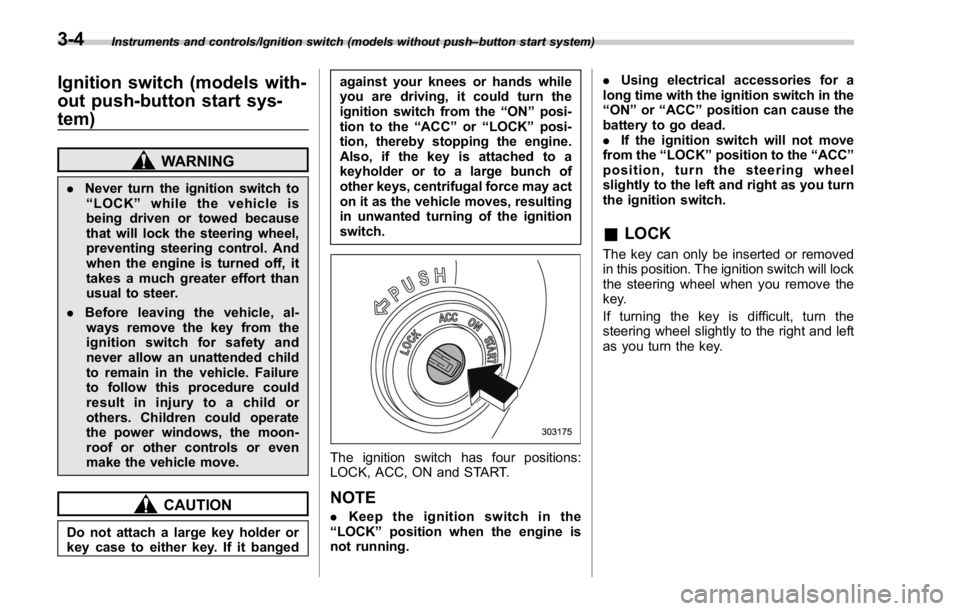
The ignition switch has four positions:
LOCK, ACC, ON and START.
NOTE . Keep the ignition switch in the
“ LOCK ” position when the engine is
not running. . Using electrical accessories for a
long time with the ignition switch in the
“ ON ” or “ ACC ” position can cause the
battery to go dead.
. If the ignition switch will not move
from the “ LOCK ” position to the “ ACC ”
position, turn the steering wheel
slightly to the left and right as you turn
the ignition switch.
& LOCK The key can only be inserted or removed
in this position. The ignition switch will lock
the steering wheel when you remove the
key.
If turning the key is difficult, turn the
steering wheel slightly to the right and left
as you turn the key.3-4
Page 135 of 594
Instruments and controls/Push – button ignition switch (models with push – button start system)
& Ignition switch lightFor easy access to the ignition switch in
the dark, the ignition switch light illumi-
nates when the driver ’ s door is opened or
when the driver ’ s door is unlocked using
the remote keyless entry transmitter.
The light remains illuminated for several
tens of seconds and then gradually turns
off under the following conditions.
. when the driver ’ s door is closed
. when the doors are unlocked using the
remote keyless entry transmitter
The light turns off immediately under the
following conditions.
. when the ignition switch is turned to the
“ ON ” position
. when all doors are locked using the
remote keyless entry transmitter Push-button ignition switch
(models with push-button
start system) & Safety precautions Refer to “ Safety precautions ” F 2-10.
& Operating range for push-
button start system
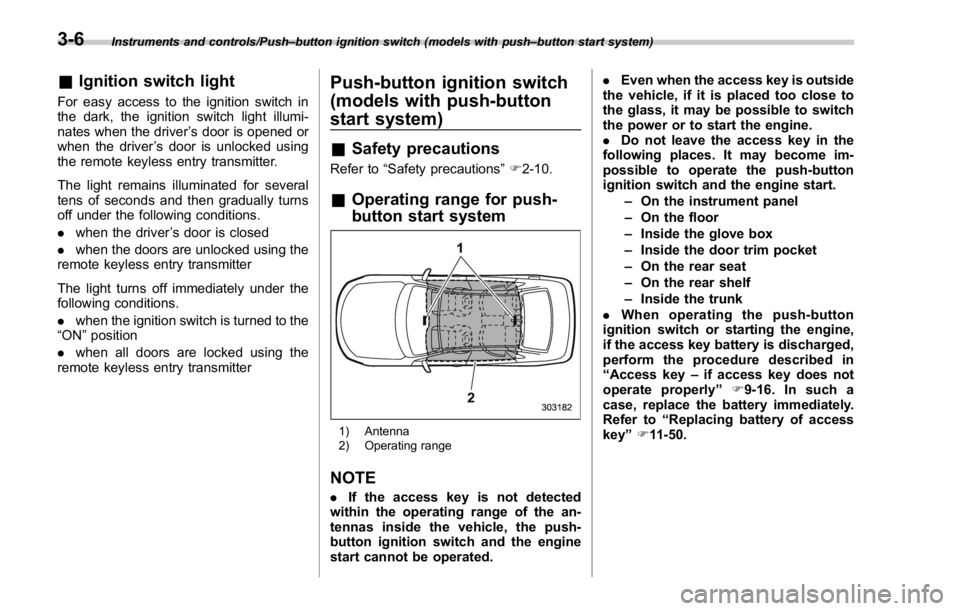
1) Antenna
2) Operating range
NOTE . If the access key is not detected
within the operating range of the an-
tennas inside the vehicle, the push-
button ignition switch and the engine
start cannot be operated. . Even when the access key is outside
the vehicle, if it is placed too close to
the glass, it may be possible to switch
the power or to start the engine.
. Do not leave the access key in the
following places. It may become im-
possible to operate the push-button
ignition switch and the engine start.
– On the instrument panel
– On the floor
– Inside the glove box
– Inside the door trim pocket
– On the rear seat
– On the rear shelf
– Inside the trunk
. When operating the push-button
ignition switch or starting the engine,
if the access key battery is discharged,
perform the procedure described in
“ Access key – if access key does not
operate properly ” F 9-16. In such a
case, replace the battery immediately.
Refer to “ Replacing battery of access
key ” F 11-50.3-6
Page 136 of 594
& Switching power
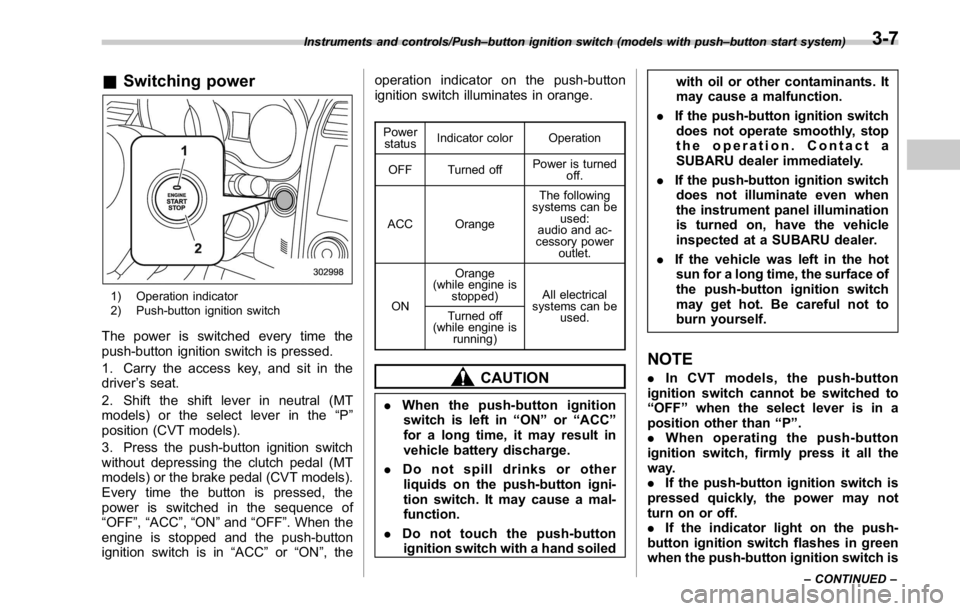
1) Operation indicator
2) Push-button ignition switch
The power is switched every time the
push-button ignition switch is pressed.
1. Carry the access key, and sit in the
driver ’ s seat.
2. Shift the shift lever in neutral (MT
models) or the select lever in the “ P ”
position (CVT models).
3. Press the push-button ignition switch
without depressing the clutch pedal (MT
models) or the brake pedal (CVT models).
Every time the button is pressed, the
power is switched in the sequence of
“ OFF ” , “ ACC ” , “ ON ” and “ OFF ” . When the
engine is stopped and the push-button
ignition switch is in “ ACC ” or “ ON ” , the operation indicator on the push-button
ignition switch illuminates in orange. Power
status Indicator color Operation
OFF Turned off Power is turned
off.
ACC Orange The following
systems can be
used:
audio and ac-
cessory power
outlet.
ON Orange
(while engine is
stopped) All electrical
systems can be
used.Turned off
(while engine is
running)
CAUTION
. When the push-button ignition
switch is left in “ ON ” or “ ACC ”
for a long time, it may result in
vehicle battery discharge.
. Do not spill drinks or other
liquids on the push-button igni-
tion switch. It may cause a mal-
function.
. Do not touch the push-button
ignition switch with a hand soiled with oil or other contaminants. It
may cause a malfunction.
. If the push-button ignition switch
does not operate smoothly, stop
the operation. Contact a
SUBARU dealer immediately.
. If the push-button ignition switch
does not illuminate even when
the instrument panel illumination
is turned on, have the vehicle
inspected at a SUBARU dealer.
. If the vehicle was left in the hot
sun for a long time, the surface of
the push-button ignition switch
may get hot. Be careful not to
burn yourself.
NOTE . In CVT models, the push-button
ignition switch cannot be switched to
“ OFF ” when the select lever is in a
position other than “ P ” .
. When operating the push-button
ignition switch, firmly press it all the
way.
. If the push-button ignition switch is
pressed quickly, the power may not
turn on or off.
. If the indicator light on the push-
button ignition switch flashes in green
when the push-button ignition switch isInstruments and controls/Push – button ignition switch (models with push – button start system)
– CONTINUED –3-7
Page 137 of 594
Instruments and controls/Hazard warning flasher
pressed, steering is locked. When this
occurs, press the push-button ignition
switch while turning the steering wheel
left and right.
! Battery drainage prevention func-
tion
When the push-button ignition switch is
left in the “ ACC ” or “ ON ” position for
approximately 1 hour, the push-button
ignition switch will be automatically
switched to “ OFF ” to prevent the battery
from going dead. (In CVT models, this
function is activated when the select lever
is in the “ P ” position.)
& When access key does not
operate properlyRefer to “ Access key – if access key does
not operate properly ” F 9-16. Hazard warning flasher
The hazard warning flasher is used to
warn other drivers when you have to park
your vehicle under emergency conditions.
The hazard warning flasher works regard-
less of the position of the ignition switch.
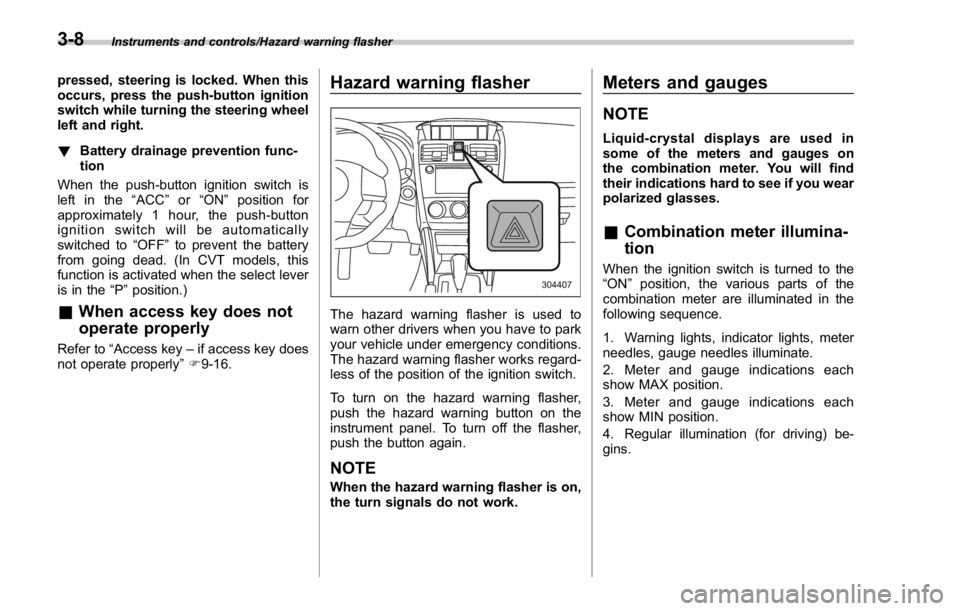
To turn on the hazard warning flasher,
push the hazard warning button on the
instrument panel. To turn off the flasher,
push the button again.
NOTE When the hazard warning flasher is on,
the turn signals do not work. Meters and gauges NOTE Liquid-crystal displays are used in
some of the meters and gauges on
the combination meter. You will find
their indications hard to see if you wear
polarized glasses.
& Combination meter illumina-
tion When the ignition switch is turned to the
“ ON ” position, the various parts of the
combination meter are illuminated in the
following sequence.
1. Warning lights, indicator lights, meter
needles, gauge needles illuminate.
2. Meter and gauge indications each
show MAX position.
3. Meter and gauge indications each
show MIN position.
4. Regular illumination (for driving) be-
gins.3-8
Page 161 of 594

Instruments and controls/Warning and indicator lights
Inside warning
chime Outside warning
chime Operation indicator
on push-button igni-
tion switch Status Action
Long beep
(continuous) —— Select lever position warning:
The driver ’ s door was opened while the
push-button ignition switch is in a posi-
tion other than “ OFF ” and the select
lever is in a position other than the “ P ”
position. Shift the select lever to the “ P ” position,
switch the push-button ignition switch to
“ OFF ” and exit the vehicle.
Ding —— The battery of the access key is low. Replace the battery of the access key.
Ding — Flashes in green (15
seconds max.) Steering lock warning:
The engine start procedure was per-
formed, but the steering is still locked. While turning the steering wheel right
and left lightly, depress the brake pedal
and press the push-button ignition
switch.
Ding — Flashes in orange System malfunction warning:
A malfunction was detected in the power
system or steering lock. Contact a SUBARU dealer immediately
and have the vehicle inspected.
NOTE An electronic chirp will sound while the select lever is in the “ R ” position. In this case, the select lever position warning chime
will not sound.3-32