trunk SUBARU WRX 2016 User Guide
[x] Cancel search | Manufacturer: SUBARU, Model Year: 2016, Model line: WRX, Model: SUBARU WRX 2016Pages: 594, PDF Size: 19.43 MB
Page 99 of 594
Keys and doors/Keyless access with push – button start system
. Opening the trunk
. Starting and stopping the engine. For
detailed information, refer to “ Starting and
stopping engine (models with push-button
start system) ” F 7-12.
. Arming and disarming the alarm sys-
tem. For detailed information, refer to
“ Alarm system ” F 2-25.
Locking and unlocking by the remote
keyless entry system can also be con-
trolled with the buttons on the access key.
For detailed information, refer to “ Remote
keyless entry system ” F 2-21.
A mechanical key is attached to each
access key. The mechanical key is used
for the following operations.
. Locking and unlocking the driver ’ s door
. Locking and unlocking the glove box
You cannot unlock the glove box without
using the mechanical key. You can keep
the glove box locked when you leave your
vehicle and the access key (with the
mechanical key removed) at a parking
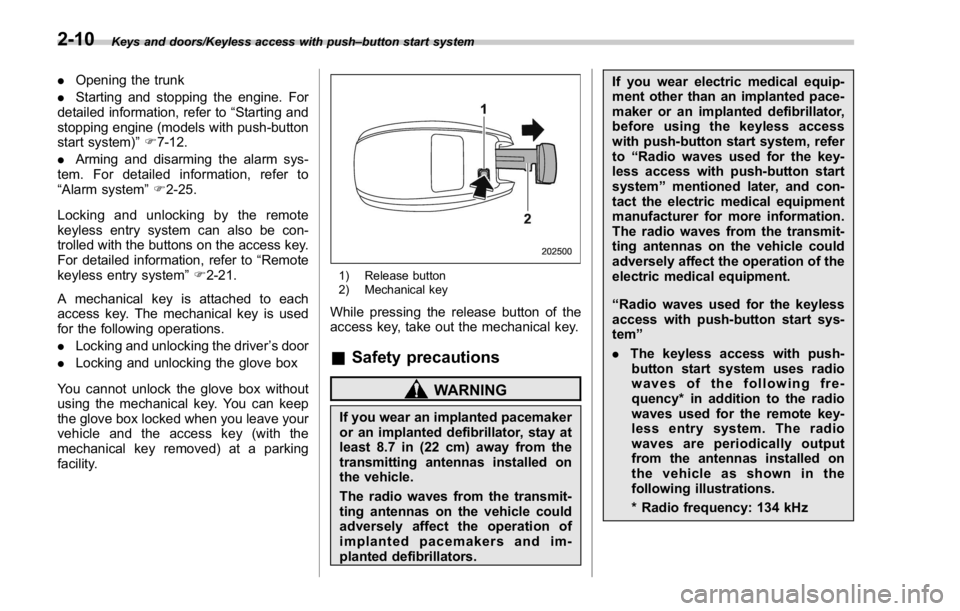
facility. 1) Release button
2) Mechanical key
While pressing the release button of the
access key, take out the mechanical key.
& Safety precautions
WARNING
If you wear an implanted pacemaker
or an implanted defibrillator, stay at
least 8.7 in (22 cm) away from the
transmitting antennas installed on
the vehicle.
The radio waves from the transmit-
ting antennas on the vehicle could
adversely affect the operation of
implanted pacemakers and im-
planted defibrillators. If you wear electric medical equip-
ment other than an implanted pace-
maker or an implanted defibrillator,
before using the keyless access
with push-button start system, refer
to “ Radio waves used for the key-
less access with push-button start
system ” mentioned later, and con-
tact the electric medical equipment
manufacturer for more information.
The radio waves from the transmit-
ting antennas on the vehicle could
adversely affect the operation of the
electric medical equipment.
“ Radio waves used for the keyless
access with push-button start sys-
tem ”
. The keyless access with push-
button start system uses radio
waves of the following fre-
quency* in addition to the radio
waves used for the remote key-
less entry system. The radio
waves are periodically output
from the antennas installed on
the vehicle as shown in the
following illustrations.
* Radio frequency: 134 kHz2-10
Page 102 of 594
& Locking and unlocking with
“ keyless access ” entry func-
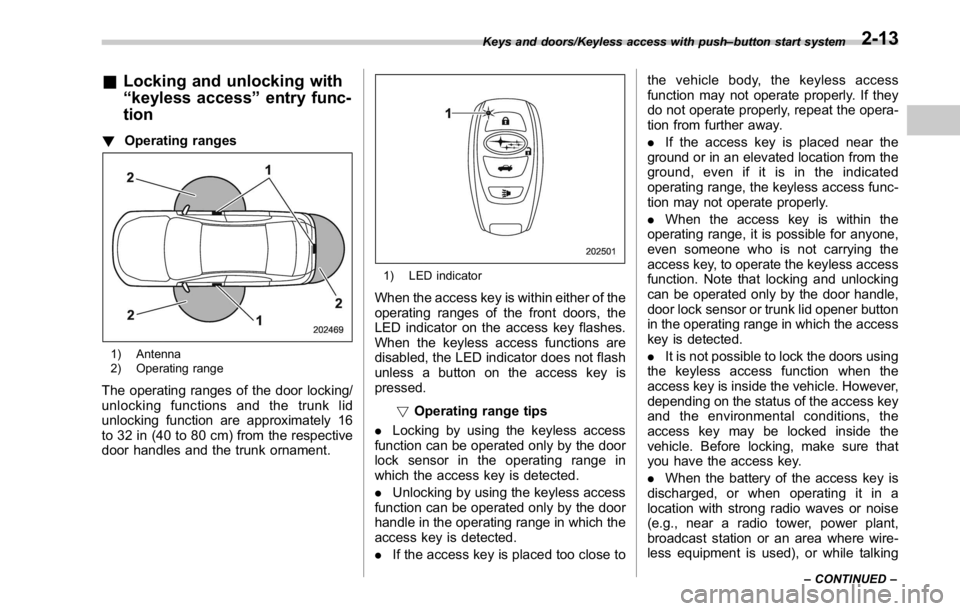
tion ! Operating ranges
1) Antenna
2) Operating range
The operating ranges of the door locking/
unlocking functions and the trunk lid
unlocking function are approximately 16
to 32 in (40 to 80 cm) from the respective
door handles and the trunk ornament. 1) LED indicator
When the access key is within either of the
operating ranges of the front doors, the
LED indicator on the access key flashes.
When the keyless access functions are
disabled, the LED indicator does not flash
unless a button on the access key is
pressed.
! Operating range tips
. Locking by using the keyless access
function can be operated only by the door
lock sensor in the operating range in
which the access key is detected.
. Unlocking by using the keyless access
function can be operated only by the door
handle in the operating range in which the
access key is detected.
. If the access key is placed too close to the vehicle body, the keyless access
function may not operate properly. If they
do not operate properly, repeat the opera-
tion from further away.
. If the access key is placed near the
ground or in an elevated location from the
ground, even if it is in the indicated
operating range, the keyless access func-
tion may not operate properly.
. When the access key is within the
operating range, it is possible for anyone,
even someone who is not carrying the
access key, to operate the keyless access
function. Note that locking and unlocking
can be operated only by the door handle,
door lock sensor or trunk lid opener button
in the operating range in which the access
key is detected.
. It is not possible to lock the doors using
the keyless access function when the
access key is inside the vehicle. However,
depending on the status of the access key
and the environmental conditions, the
access key may be locked inside the
vehicle. Before locking, make sure that
you have the access key.
. When the battery of the access key is
discharged, or when operating it in a
location with strong radio waves or noise
(e.g., near a radio tower, power plant,
broadcast station or an area where wire-
less equipment is used), or while talkingKeys and doors/Keyless access with push – button start system
– CONTINUED –2-13
Page 104 of 594
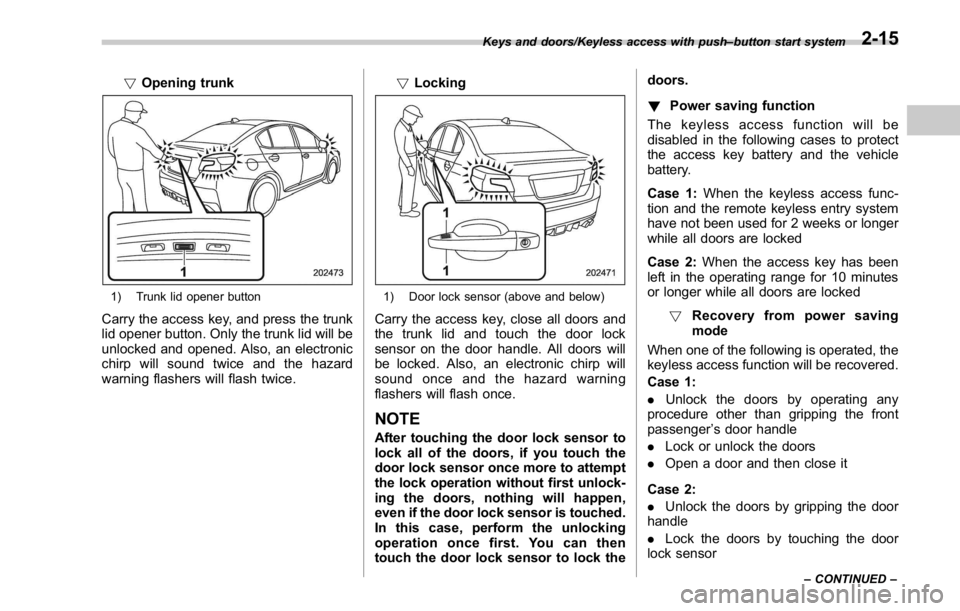
! Opening trunk
1) Trunk lid opener button
Carry the access key, and press the trunk
lid opener button. Only the trunk lid will be
unlocked and opened. Also, an electronic
chirp will sound twice and the hazard
warning flashers will flash twice. ! Locking
1) Door lock sensor (above and below)
Carry the access key, close all doors and
the trunk lid and touch the door lock
sensor on the door handle. All doors will
be locked. Also, an electronic chirp will
sound once and the hazard warning
flashers will flash once.
NOTE After touching the door lock sensor to
lock all of the doors, if you touch the
door lock sensor once more to attempt
the lock operation without first unlock-
ing the doors, nothing will happen,
even if the door lock sensor is touched.
In this case, perform the unlocking
operation once first. You can then
touch the door lock sensor to lock the doors.
! Power saving function
The keyless access function will be
disabled in the following cases to protect
the access key battery and the vehicle
battery.
Case 1: When the keyless access func-
tion and the remote keyless entry system
have not been used for 2 weeks or longer
while all doors are locked
Case 2: When the access key has been
left in the operating range for 10 minutes
or longer while all doors are locked
! Recovery from power saving
mode
When one of the following is operated, the
keyless access function will be recovered.
Case 1:
. Unlock the doors by operating any
procedure other than gripping the front
passenger ’ s door handle
. Lock or unlock the doors
. Open a door and then close it
Case 2:
. Unlock the doors by gripping the door
handle
. Lock the doors by touching the door
lock sensorKeys and doors/Keyless access with push – button start system
– CONTINUED –2-15
Page 108 of 594
! Canada-spec. models
This device complies with Industry
Canada licence-exempt RSS standard
(s). Operation is subject to the following
two conditions: (1) this device may not
cause interference, and (2) this device
must accept any interference, including
interference that may cause undesired
operation of the device.
Le présent appareil est conforme aux
CNR d ’ Industrie Canada applicables aux
appareils radio exempts de licence. L ’ ex-
ploitation est autorisée aux deux condi-
tions suivantes: (1) l ’ appareil ne doit pas
produire de brouillage, et (2) l ’ utilisateur
de l ’ appareil doit accepter tout brouillage
radioélectrique subi, même si le brouillage
est susceptible d ’ en compromettre le
fonctionnement. ! Mexico-spec. models
IFT
RLVDE1413-2269
14AHC
DENSO PIN Code Access (models
with “ keyless access with
push-button start system ” )
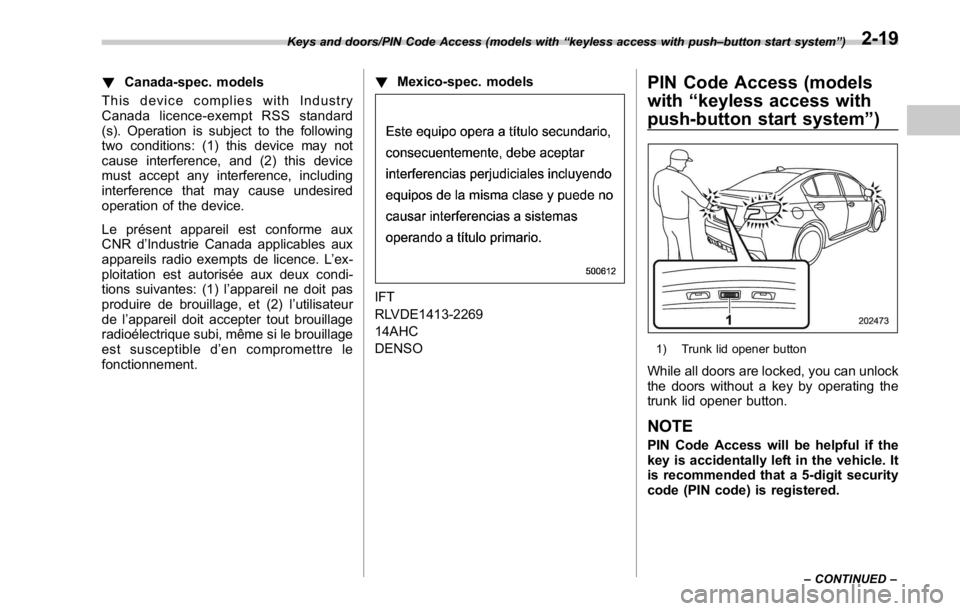
1) Trunk lid opener button
While all doors are locked, you can unlock
the doors without a key by operating the
trunk lid opener button.
NOTE PIN Code Access will be helpful if the
key is accidentally left in the vehicle. It
is recommended that a 5-digit security
code (PIN code) is registered.Keys and doors/PIN Code Access (models with “ keyless access with push – button start system ” )
– CONTINUED –2-19
Page 109 of 594

Keys and doors/PIN Code Access (models with “ keyless access with push – button start system ” )
& Registering a PIN code! Preparation
1. Close all doors (including the trunk).
2. Press and hold the “
” button on the
access key. Then all doors (including the
trunk) will be locked.
3. Keep the “
” button pressed, and
press the trunk lid opener button within 5
seconds after step 2.
4. Press and hold the above button for
more than 5 seconds. Then a chirp will
sound.
5. Press the “
” button on the access key
while the chirp sounds.
Then the chirp will stop and the prepara-
tion is complete.
NOTE If you do not press the “ ” button on
the access key, the chirp will sound for
30 seconds. In this case, the prepara-
tion for registering a PIN code does not
complete even if the chirp stops. ! Registration
For example, to register “ 32468 ” as the
PIN code, perform the following proce-
dure.
1. Press the trunk lid opener button three
times.
2. After a buzzer (ding) sounds once,
press the trunk lid opener button twice.
3. After a buzzer (ding) sounds once,
press the trunk lid opener button four
times.
4. After a buzzer (ding) sounds once,
press the trunk lid opener button six times.
5. After a buzzer (ding) sounds once,
press the trunk lid opener button eight
times.
6. Perform steps 1 to 5 again within
approximately 30 seconds after the buz-
zer starts sounding intermittently.
7. All doors will be unlocked and locked.
Then the PIN code will be registered.
NOTE . If you make an error during the
registration procedure, open the dri-
ver ’ s door and then close it. Then, start
over from the procedure described in
“ Preparation ” .
. To protect your vehicle from theft,
you cannot register “ 00000 ” , “ 11111 ” to “ 99999 ” or “ 12345 ” as a PIN code.
. Do not register your vehicle license
plate number or simple numbers such
as “ 11122 ” or “ 12121 ” as a PIN code.
Doing so will increase the risk of
vehicle theft.
. When you try to register “ 22222 ” ,
the registered PIN code will be deleted.
You cannot unlock the doors by PIN
Code Access until a new code is
registered.
. After registering a new PIN code,
make sure that you can unlock the
doors using the PIN code.
. When you delete the PIN code while
the keyless access function is dis-
abled, the keyless access function will
be enabled.
. Reregister the PIN code in the
following case.
– when you forget the PIN code
– when you want to change the PIN
code2-20
Page 110 of 594

& Unlocking Perform steps 1 to 5 described in “ Regis-
tration ” .
NOTE . You cannot unlock by PIN Code
Access in the following cases.
– when the access key is within the
operating ranges
– when the ignition switch is in the
“ ACC ” or “ ON ” position
. If you make an operation error
during the unlocking procedure, start
over with the unlocking procedure after
waiting for 5 seconds or longer.
. To protect your vehicle from theft, a
buzzer will sound if incorrect PIN codes
are entered five times continuously. If
this occurs, you cannot unlock the
doors by PIN Code Access for 5
minutes. Remote keyless entry system CAUTION. Do not expose the remote trans-
mitter to severe shocks, such as
those experienced as a result of
dropping or throwing.
. Do not take the remote transmit-
ter apart except when replacing
the battery.
. Do not get the remote transmitter
wet. If it gets wet, wipe it dry with
a cloth immediately.
. When you carry the remote trans-
mitteronanairplane,donot
press the button of the remote
transmitter while in the airplane.
When any button of the remote
transmitter is pressed, radio
waves are sent and may affect
the operation of the airplane.
When you carry the remote trans-
mitter in a bag on an airplane,
take measures to prevent the
buttons of the remote transmitter
from being pressed.
For models with “ keyless access with
push-button start system ” , the access
key is used as the transmitter for the remote keyless entry system. For models
without “ keyless access with push-button
start system ” , the transmitter for the
remote keyless entry system is located
inside the key head.
The remote keyless entry system has the
following functions.
. Locking and unlocking the doors with-
out a key
. Opening the trunk without a key
. Sounding a panic alarm
. Arming and disarming the alarm sys-
tem. For detailed information, refer to
“ Alarm system ” F 2-25.
The operable distance of the remote
keyless entry system is approximately 30
feet (10 meters). However, this distance
will vary depending on environmental
conditions. The system ’ s operable dis-
tance will be shorter in areas near a
facility or electronic equipment emitting
strong radio waves such as a power plant,
broadcast station, TV tower, or remote
controller of home electronic appliances.
NOTE . For models with “ keyless access
with push-button start system ” ,the
remote keyless entry system will not
be activated when the push-button
ignition switch is in any position other Keys and doors/Remote keyless entry system
– CONTINUED –2-21
Page 111 of 594
Keys and doors/Remote keyless entry system
than the “ OFF ” position.
. For models without “ keyless access
with push-button start system ” ,the
remote keyless entry system will not
be activated when the key is inserted in
the ignition switch.
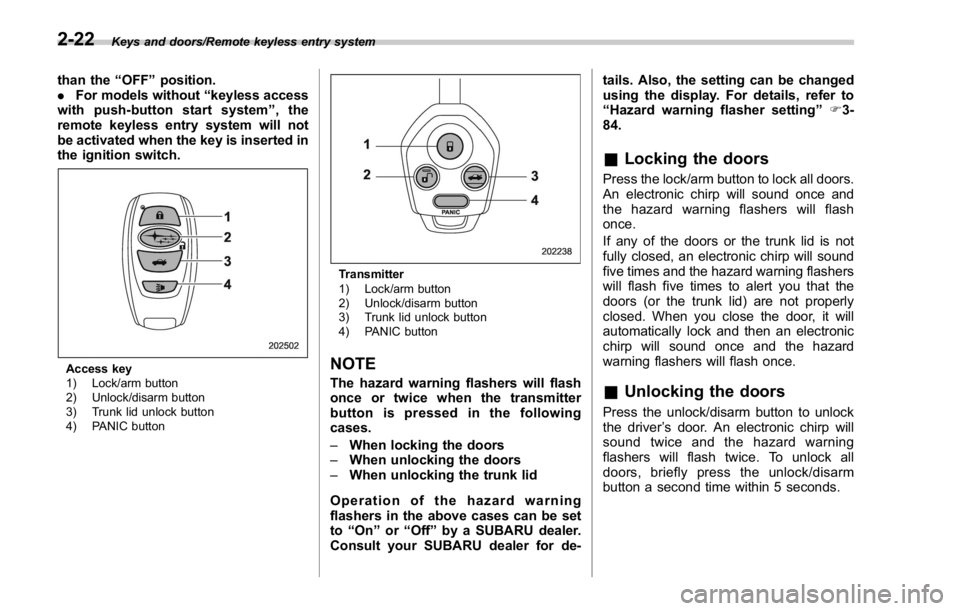
Access key
1) Lock/arm button
2) Unlock/disarm button
3) Trunk lid unlock button
4) PANIC button Transmitter
1) Lock/arm button
2) Unlock/disarm button
3) Trunk lid unlock button
4) PANIC button
NOTE The hazard warning flashers will flash
once or twice when the transmitter
button is pressed in the following
cases.
– When locking the doors
– When unlocking the doors
– When unlocking the trunk lid
Operation of the hazard warning
flashers in the above cases can be set
to “ On ” or “ Off ” by a SUBARU dealer.
Consult your SUBARU dealer for de- tails. Also, the setting can be changed
using the display. For details, refer to
“ Hazard warning flasher setting ” F 3-
84.
& Locking the doors Press the lock/arm button to lock all doors.
An electronic chirp will sound once and
the hazard warning flashers will flash
once.
If any of the doors or the trunk lid is not
fully closed, an electronic chirp will sound
five times and the hazard warning flashers
will flash five times to alert you that the
doors (or the trunk lid) are not properly
closed. When you close the door, it will
automatically lock and then an electronic
chirp will sound once and the hazard
warning flashers will flash once.
& Unlocking the doors Press the unlock/disarm button to unlock
the driver ’ s door. An electronic chirp will
sound twice and the hazard warning
flashers will flash twice. To unlock all
doors, briefly press the unlock/disarm
button a second time within 5 seconds.2-22
Page 112 of 594

NOTE If the interval between the first and
second presses of the unlock/disarm
button (for unlocking of all of the
doors) is extremely short, the system
may not respond.
& Opening the trunk lid The trunk lid opens when the “ ” button
is pressed continuously for at least 2
seconds. An electronic chirp will sound
twice and the turn signal lights will flash
twice.
& Vehicle finder function Use this function to find your vehicle
parked among many vehicles in a large
parking lot. Provided you are within 30 feet
(10 meters) of the vehicle, pressing the
lock/arm button three times in a 5-second
period will cause your vehicle ’ s horn to
sound once and its hazard warning
flashers to flash three times.
NOTE If the interval between presses is too
short when you press the lock/arm
button three times, the system may
not respond to the signals from the
access key/remote transmitter. & Sounding a panic alarm To activate the alarm, press the “ PANIC ”
button once.
The horn will sound and the hazard
warning flashers will flash.
To deactivate the panic alarm, press any
button on the access key/remote transmit-
ter. Unless a button on the access key/
remote transmitter is pressed, the alarm
will be deactivated after approximately 30
seconds.
& Selecting audible signal op-
eration (models without
“ keyless access with push-
button start system ” )Using an electronic chirp, the system will
give you an audible signal when the doors
lock and unlock. If desired, you may turn
the audible signal off.
Perform the following steps to deactivate
the audible signal. You can also use the
same steps to restore the function.
1. Sit in the driver ’ s seat and shut all
doors and the trunk. 2. Hold down the REAR (UNLOCK) side
of the power door locking switch.
3. While holding down the REAR (UN-
LOCK) side of the power door locking
switch, pull the key out and re-insert it into
the ignition switch at least 6 times within
10 seconds after Step 2.
4. Open and close the driver ’ s door once
within 10 seconds after Step 3.
5. The hazard warning flashers flash 3
times to indicate completion of the setting.
You may have the above settings done by
your SUBARU dealer. Also, the setting
can be changed using the multi function
display. For details, refer to “ Keyless
buzzer volume setting ” F 3-84.
You may also change the volume of the
audible signal by operating the multi Keys and doors/Remote keyless entry system
– CONTINUED –2-23
Page 115 of 594

Keys and doors/Alarm system
& System operationThe alarm system will give the following
alarms when triggered.
. The vehicle ’ s horn will sound for 30
seconds.
. The hazard warning flashers will flash
for 30 seconds.
If any of the doors or the trunk lid remains
open after the 30-second period, the horn
will continue to sound for a maximum of 3
minutes. If the door or the trunk lid is
closed while the horn is sounding, the
horn will stop sounding with a delay of up
to 30 seconds.
The alarm is triggered by:
. Opening any of the doors or the trunk
lid
. Physical impact to the vehicle, such as
forced entry (only models with shock
sensors (dealer option))
NOTE The alarm system can be set to trigger
the illumination of the following interior
lights.
. Map lights (for models with moon-
roof)
. Dome light (illuminates only when
the dome light switch is in the “ DOOR ”
position) The notifications regarding the map
lights (for models with moonroof) and
dome light are deactivated as the
factory setting. A SUBARU dealer can
activate the system. Contact your
SUBARU dealer for details.
& Activating and deactivating
the alarm system To change the setting of your vehicle ’ s
alarm system for activation or deactiva-
tion, do the following.
1. Disarm the alarm system. Refer to
“ Disarming the system ” F 2-29.
2. Sit in the driver ’ s seat and shut all
doors and the trunk lid.
3. Turn the ignition switch to the “ ON ”
position.
4. Hold down the REAR (UNLOCK) side
of the driver ’ s power door locking switch,
open the driver ’ s door within the following
1 second, and wait 10 seconds without
releasing the switch. The setting will then
be changed as follows.
If the system was previously activated:
The odometer/trip meter screen displays
“ AL OF ” and the horn sounds twice,
indicating that the system is now deacti-
vated. If the system was previously deacti-
vated:
The odometer/trip meter screen displays
“ AL ON ” and the horn sounds once,
indicating that the system is now acti-
vated.
NOTE You may have the above setting
change done by your SUBARU dealer.
& If you have accidentally trig-
gered the alarm system ! To stop the alarm
Perform any of the following operations.
. Press any button on the access key/
remote transmitter.
. Turn the ignition switch to the “ ON ”
position (models without “ keyless access
with push-button start system ” ).
. Turn the push-button ignition to the
“ ACC ” position (models with “ keyless
access with push-button start system ” ).
NOTE Only registered keys will stop the
alarm. If the key is not registered, the
alarm will not stop.2-26
Page 116 of 594
& Arming the system
NOTE . The system can be armed even if the
engine hood, the windows and/or
moonroof are open. Always make sure
that they are fully closed before arming
the system.
. When arming the system, if any of
the doors or the trunk lid is not fully
closed, an electronic chirp sounds five
times, the hazard warning flashers
flash five times to alert you that the
doors (or the trunk lid) are not properly
closed. When you close the door, doors
will automatically lock and the system
will automatically arm in 30 seconds.
. The 30-second standby time can be
eliminated if you prefer. Have it per-
formed by your SUBARU dealer.
. If you open the trunk using the
remote transmitter ’ s “
” button in
the surveillance state (or the standby
state), the system will be temporarily
placed in a standby state. The system
will go back to the surveillance state in
30 seconds upon locking the trunk.
. The system is in the standby state
for a 30-second period before arming
the system. The security indicator light
will flash at short intervals during this
period.
. If any of the following actions is done during the standby period, the
system will not switch to the surveil-
lance state.
– Doors (including the trunk lid)
are unlocked using the access key/
remote transmitter.
– Doors (including the trunk lid)
are unlocked using the keyless
access function (models with “ key-
less access with push-button start
system ” ).
– Any door (including the trunk lid)
is opened.
– The ignition switch is turned to
the “ ON ” position (models without
“ keyless access with push-button
start system ” ).
– Push-button ignition switch is
turned to the “ ACC ” position (mod-
els with “ keyless access with push-
button start system ” ).
! To arm the system using the access
key/remote transmitter
1. Close all windows and the moonroof (if
equipped).
2. Remove the key from the ignition
switch (models without “ keyless access
with push-button start system ” )/turn the
push-button ignition switch to the “ OFF ”
position (models with “ keyless access with
push-button start system ” ). 3. Open the doors and get out of the
vehicle.
4. Make sure that the engine hood is
locked.
5. Close all doors and the trunk lid.
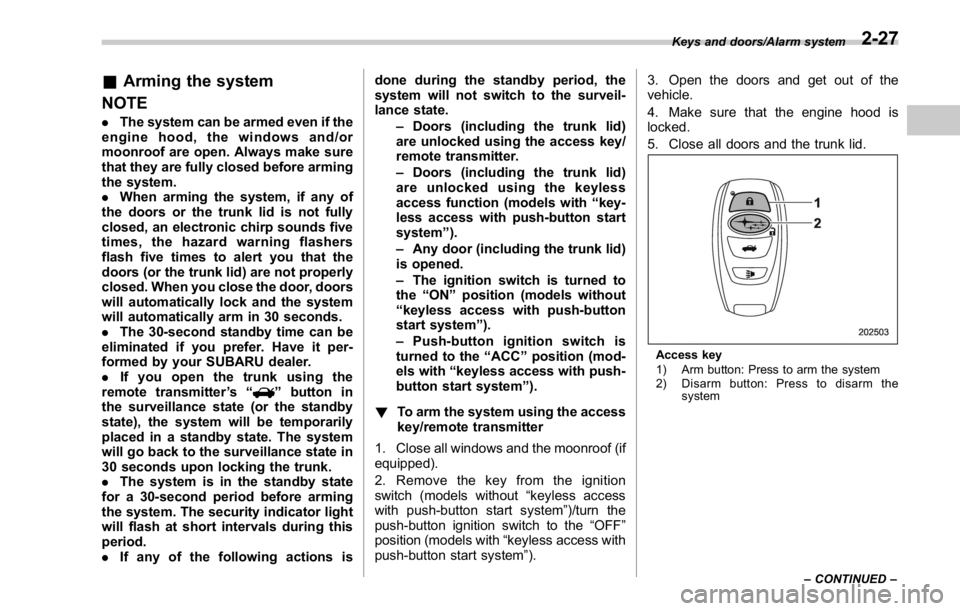
Access key
1) Arm button: Press to arm the system
2) Disarm button: Press to disarm the
systemKeys and doors/Alarm system
– CONTINUED –2-27