mirror SUBARU WRX 2016 Owner's Manual
[x] Cancel search | Manufacturer: SUBARU, Model Year: 2016, Model line: WRX, Model: SUBARU WRX 2016Pages: 594, PDF Size: 19.43 MB
Page 384 of 594
of the image on the monitor is
limited, you should always check
the rear view and the surround-
ing area with your eyes and
mirrors, and move backward at
a slow speed. Moving backward
only by checking the rear view
image from the camera could
cause an accident.
. Do not disassemble or modify the
camera, switch or wiring. If
smoke comes out or you smell
a strange odor, stop using the
rear view camera immediately.
Contact your SUBARU dealer
for an inspection. Continued use
may result in accident, fire or
electric shock.
CAUTION
. If your vehicle is washed with a
high-pressure washer, do not
allow water to contact the camera
directly. Entry of water into the
camera lens may result in con-
densation, malfunction, fire or
electric shock.
. Since the camera is a precision
device, do not subject it to strong
impacts. Otherwise, malfunction, fire or electric shock may occur.
. If mud or snow sticks to or is
frozen on the camera, you must
be very careful when removing it.
Otherwise, damage to the camera
may cause a fire or electric
shock. Pour water or lukewarm
water over the camera to remove
mud and ice, and wipe it with a
soft, dry cloth.
. Do not put a flame close to the
camera or wiring. Otherwise, da-
mage or fire may occur.
. When replacing the fuse, be sure
to use a fuse with the specified
rating. Use of a fuse with a
different rating may result in a
malfunction.
. If the rear view camera is used for
a long time while the engine is
not operated, the battery may
become completely discharged.
NOTE . Do not wipe the camera with alcohol,
benzine or paint thinner. Otherwise,
discoloration may occur. To remove
contamination, wipe the camera with a
cloth moistened with a diluted neutral
detergent and then wipe it with a soft, dry cloth.
. When waxing the vehicle, be careful
not to apply the wax to the camera. If it
comes in contact with the camera,
moisten a clean cloth with a diluted
neutral detergent to remove the wax.
. The camera lens has a hard coating
to help prevent scratches. However,
when washing the vehicle or cleaning
the camera lens, be careful not to
scratch the camera lens. Do not use a
washing brush directly on the camera
lens. The image quality of the rear view
camera may deteriorate.
. Strong light shined on the camera
lens may develop vertical lines around
the light source. This is not a malfunc-
tion.
. Under fluorescent light, the display
may flicker. However, this is not a
malfunction.
. The image of the rear view camera
may be slightly different from the
actual color of the objects.
& How to use the rear view
camera When the shift lever/select lever is set to
“ R ” , the rear view camera automatically
displays the rear view image from the
vehicle. When the lever is set to other
positions, the image before setting to “ R ”Interior equipment/Rear view camera
– CONTINUED –6-13
Page 385 of 594
Interior equipment/Rear view camera
is displayed.
1. Set the ignition switch to “ ON ” .
2. Set the shift lever/select lever to “ R ” .
NOTE . For models with the genuine
SUBARU navigation or audio system,
the image of the rear view camera has
priority over other screen displays.
Therefore, while the rear view camera
is in operation, the operations of other
screens are disabled. To operate other
screens, set the shift lever or select
lever to a position other than “ R ” .
. The image of the rear view camera
has priority over other screen displays.
. The image of the rear view camera is
horizontally reversed as is the case
with the vehicle rearview mirror or the
side view mirror.
. It may be difficult to see the image of
the rear view camera in the following
cases. This is not a malfunction of the
camera.
– The vehicle is in a dark place (at
night, in a tunnel, etc.).
– The vehicle is in an extremely hot
or cold place.
– An object (such as raindrops,
snow, dirt, etc.) that disturbs the
view of the rear view camera sticks to the lens of the camera.
– Strong light shined directly on
the camera lens (occasionally, there
are vertical lines on the screen).
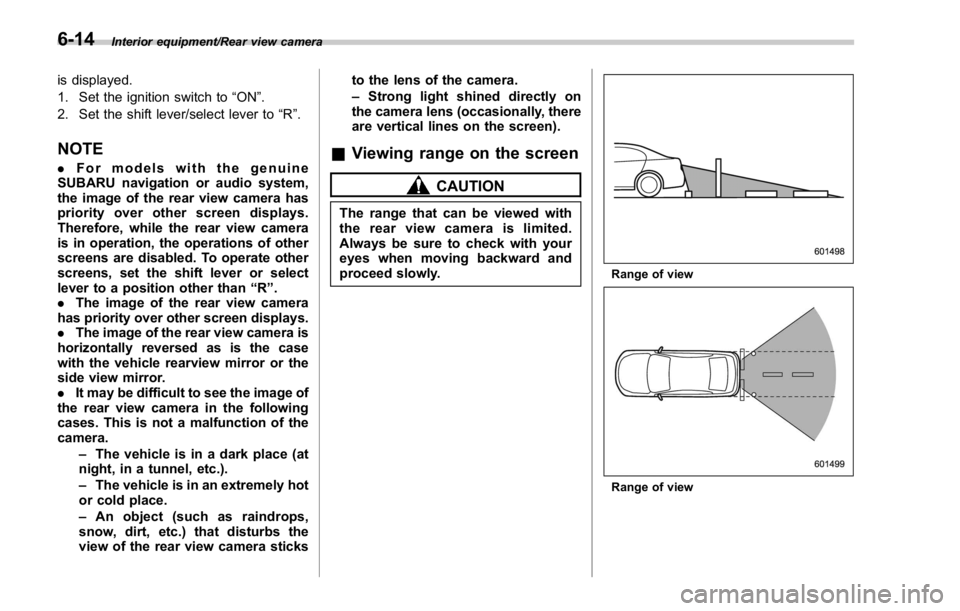
& Viewing range on the screen CAUTIONThe range that can be viewed with
the rear view camera is limited.
Always be sure to check with your
eyes when moving backward and
proceed slowly. Range of view
Range of view6-14
Page 397 of 594
Starting and operating/Preparing to drive
. A vehicle fails the OBDII inspection if
the “ CHECK ENGINE ” warning light is not
properly operating (light is illuminated or is
not working due to a burned out bulb) or
there is one or more diagnostic trouble
codes stored in the vehicle ’ s computer.
. A state emission inspection may reject
(not pass or fail) a vehicle if the number of
OBDII system readiness monitors “ NOT
READY ” is greater than one. If the
vehicle ’ s battery has been recently re-
placed or disconnected, the OBDII system
inspection may indicate that the vehicle is
not ready for the emission test. Under this
condition, the vehicle driver should be
instructed to drive his/her vehicle for a few
days to reset the readiness monitors and
return for an emission re-inspection.
. Owners of rejected or failing vehicles
should contact their SUBARU Dealer for
service.
Some states still use dynamometers in
their emission inspection program. A
dynamometer is a treadmill or roller-like
testing device that allows your vehicle ’ s
wheels to turn while the vehicle remains in
one place. Prior to your vehicle being put
on a dynamometer, tell your emission
inspector
not to place your SUBARU
AWD vehicle on a two-wheel dynam-
ometer. Otherwise, serious transmis-
sion damage will result. The U.S. Environmental Protection
Agency (EPA) and states using two-wheel
dynamometers in their emission testing
program have EXEMPTED SUBARU
AWD vehicles from the portion of the
testing program that involves a two-wheel
dynamometer. There are some states that
use four-wheel dynamometers in their
testing program. When properly used, this
equipment should not damage a SUBARU
AWD vehicle.
Under no circumstances should the rear
wheels be jacked off the ground, nor
should the driveshaft be disconnected for
state emission testing. Preparing to drive You should perform the following checks
and adjustments every day before you
start driving.
1. Check that all windows, mirrors, and
lights are clean and unobstructed.
2. Check the appearance and condition
of the tires. Also check tires for proper
inflation.
3. Look under the vehicle for any sign of
leaks, and check that no small animal is
under the vehicle.
4. Check that no small animal enters the
engine compartment.
5. Check that the hood and trunk lid are
fully closed.
6. Check the adjustment of the seat.
7. Check the adjustment of the inside
and outside mirrors.
8. Fasten your seatbelt. Check that your
passengers have fastened their seatbelts.
9. Check the operation of the warning
and indicator lights when the ignition
switch is turned to the “ ON ” position.
10. Check the gauges, indicator and warn-
ing lights after starting the engine.7-8
Page 445 of 594
Starting and operating/BSD/RCTA
BSD/RCTA (if equipped) The BSD/RCTA consists of rear radar with
Blind Spot Detection and Rear Cross
Traffic Alert.
These functions of BSD/RCTA are the
systems that detect objects and vehicles
to the rear and draw attention to the driver
when changing a lane or when driving in
reverse.
WARNINGThe driver is responsible for driving
safely. Always be sure to check the
surroundings with your eyes when
changing lanes or reversing the
vehicle.
The system is designed to assist the
driver by monitoring the rear and
side areas of the vehicle during a
lane change or reversing. However,
you cannot rely on this system
alone in assuring the safety during
a lane change or reversing. Over-
confidence in this system could
result in an accident and lead to
serious injury or death. Since the
system operation has various limita-
tions, the flashing or illumination of
the BSD/RCTA approach indicator
light may be delayed or it may not operate at all even when a vehicle is
present in a neighboring lane or
approaching from either side.
The driver is responsible for paying
attention to the rear and side areas
of the vehicle.
& System features BSD/RCTA has a function that detects an
invisible vehicle in a blind spot on an
adjacent lane or a vehicle approaching at
high speed while driving the vehicle (Blind
Spot Detection). It also has a function that
detects a vehicle approaching from the
right or left while driving the vehicle in
reverse (Rear Cross Traffic Alert).
The system uses radar sensors for the
following features.
NOTE The BSD/RCTA radar sensor has been
certified by the radio wave related laws
of the U.S. and Canada. When driving
in other countries, certification of the
country where the vehicle is driven
must be obtained. For certification in
the U.S. and Canada, refer to “ Certifica-
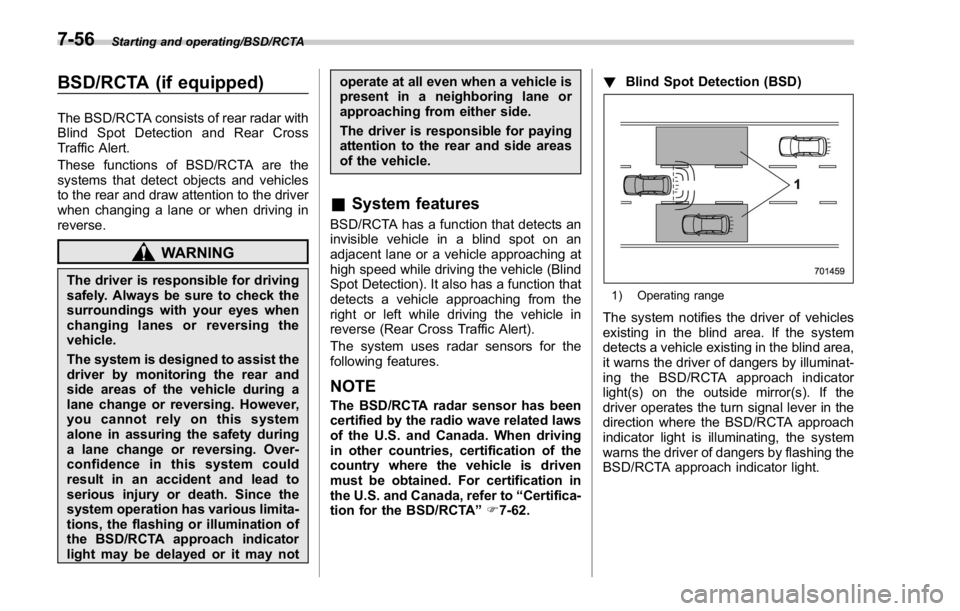
tion for the BSD/RCTA ” F 7-62. ! Blind Spot Detection (BSD)
1) Operating range
The system notifies the driver of vehicles
existing in the blind area. If the system
detects a vehicle existing in the blind area,
it warns the driver of dangers by illuminat-
ing the BSD/RCTA approach indicator
light(s) on the outside mirror(s). If the
driver operates the turn signal lever in the
direction where the BSD/RCTA approach
indicator light is illuminating, the system
warns the driver of dangers by flashing the
BSD/RCTA approach indicator light.7-56
Page 446 of 594
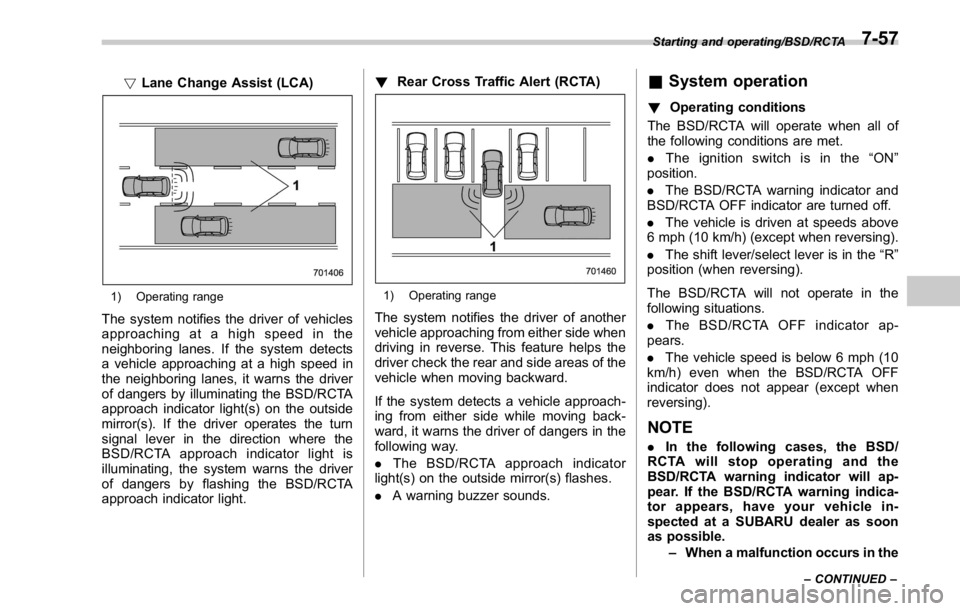
! Lane Change Assist (LCA)
1) Operating range
The system notifies the driver of vehicles
approaching at a high speed in the
neighboring lanes. If the system detects
a vehicle approaching at a high speed in
the neighboring lanes, it warns the driver
of dangers by illuminating the BSD/RCTA
approach indicator light(s) on the outside
mirror(s). If the driver operates the turn
signal lever in the direction where the
BSD/RCTA approach indicator light is
illuminating, the system warns the driver
of dangers by flashing the BSD/RCTA
approach indicator light. ! Rear Cross Traffic Alert (RCTA)
1) Operating range
The system notifies the driver of another
vehicle approaching from either side when
driving in reverse. This feature helps the
driver check the rear and side areas of the
vehicle when moving backward.
If the system detects a vehicle approach-
ing from either side while moving back-
ward, it warns the driver of dangers in the
following way.
. The BSD/RCTA approach indicator
light(s) on the outside mirror(s) flashes.
. A warning buzzer sounds. & System operation ! Operating conditions
The BSD/RCTA will operate when all of
the following conditions are met.
. The ignition switch is in the “ ON ”
position.
. The BSD/RCTA warning indicator and
BSD/RCTA OFF indicator are turned off.
. The vehicle is driven at speeds above
6 mph (10 km/h) (except when reversing).
. The shift lever/select lever is in the “ R ”
position (when reversing).
The BSD/RCTA will not operate in the
following situations.
. The BSD/RCTA OFF indicator ap-
pears.
. The vehicle speed is below 6 mph (10
km/h) even when the BSD/RCTA OFF
indicator does not appear (except when
reversing).
NOTE . In the following cases, the BSD/
RCTA will stop operating and the
BSD/RCTA warning indicator will ap-
pear. If the BSD/RCTA warning indica-
tor appears, have your vehicle in-
spected at a SUBARU dealer as soon
as possible.
– When a malfunction occurs in the Starting and operating/BSD/RCTA
– CONTINUED –7-57
Page 448 of 594
& BSD/RCTA approach indica-
tor light/warning buzzer When the BSD/RCTA is active, the BSD/
RCTA approach indicator light and warn-
ing buzzer will operate to alert the driver to
the presence of the following vehicles.
. Vehicles in the neighboring lanes
. Vehicles approaching from the left or
right rear side when reversing
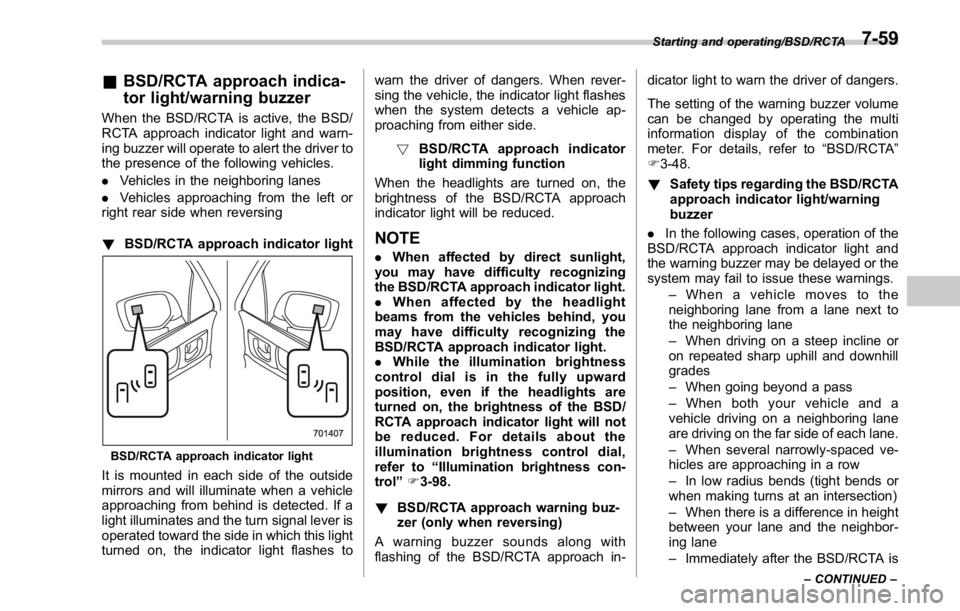
! BSD/RCTA approach indicator light
BSD/RCTA approach indicator light
It is mounted in each side of the outside
mirrors and will illuminate when a vehicle
approaching from behind is detected. If a
light illuminates and the turn signal lever is
operated toward the side in which this light
turned on, the indicator light flashes to warn the driver of dangers. When rever-
sing the vehicle, the indicator light flashes
when the system detects a vehicle ap-
proaching from either side.
! BSD/RCTA approach indicator
light dimming function
When the headlights are turned on, the
brightness of the BSD/RCTA approach
indicator light will be reduced.
NOTE . When affected by direct sunlight,
you may have difficulty recognizing
the BSD/RCTA approach indicator light.
. When affected by the headlight
beams from the vehicles behind, you
may have difficulty recognizing the
BSD/RCTA approach indicator light.
. While the illumination brightness
control dial is in the fully upward
position, even if the headlights are
turned on, the brightness of the BSD/
RCTA approach indicator light will not
be reduced. For details about the
illumination brightness control dial,
refer to “ Illumination brightness con-
trol ” F 3-98.
! BSD/RCTA approach warning buz-
zer (only when reversing)
A warning buzzer sounds along with
flashing of the BSD/RCTA approach in- dicator light to warn the driver of dangers.
The setting of the warning buzzer volume
can be changed by operating the multi
information display of the combination
meter. For details, refer to “ BSD/RCTA ”
F 3-48.
! Safety tips regarding the BSD/RCTA
approach indicator light/warning
buzzer
. In the following cases, operation of the
BSD/RCTA approach indicator light and
the warning buzzer may be delayed or the
system may fail to issue these warnings.
– When a vehicle moves to the
neighboring lane from a lane next to
the neighboring lane
– When driving on a steep incline or
on repeated sharp uphill and downhill
grades
– When going beyond a pass
– When both your vehicle and a
vehicle driving on a neighboring lane
are driving on the far side of each lane.
– When several narrowly-spaced ve-
hicles are approaching in a row
– In low radius bends (tight bends or
when making turns at an intersection)
– When there is a difference in height
between your lane and the neighbor-
ing lane
– Immediately after the BSD/RCTA is Starting and operating/BSD/RCTA
– CONTINUED –7-59
Page 551 of 594
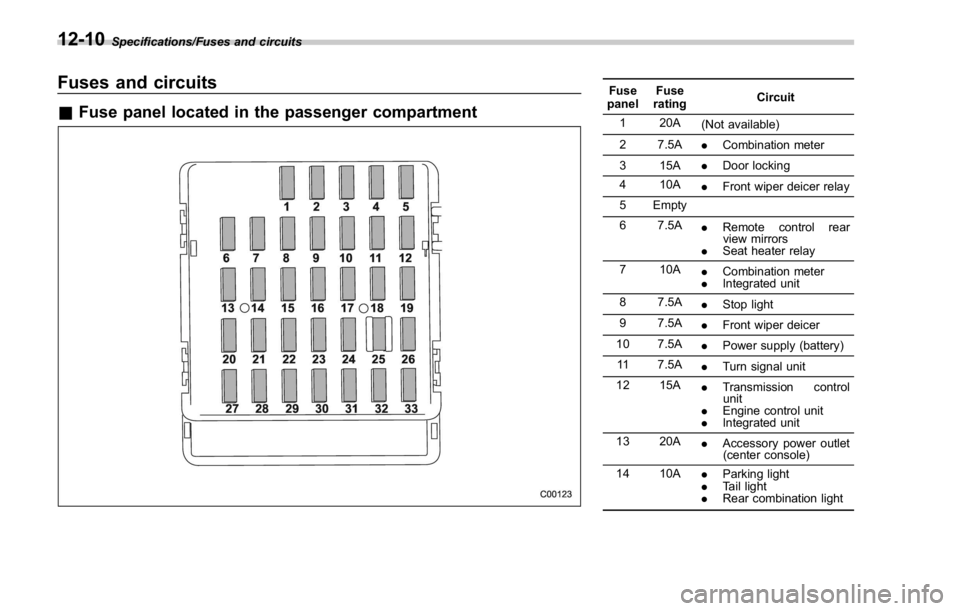
Specifications/Fuses and circuits
Fuses and circuits & Fuse panel located in the passenger compartment Fuse
panel Fuse
rating Circuit
1 20A
(Not available)
2 7.5A
. Combination meter
3 15A
. Door locking
4 10A
. Front wiper deicer relay
5 Empty
6 7.5A
. Remote control rear
view mirrors
. Seat heater relay
7 10A
. Combination meter
. Integrated unit
8 7.5A
. Stop light
9 7.5A
. Front wiper deicer
10 7.5A
. Power supply (battery)
11 7.5A
. Turn signal unit
12 15A
. Transmission control
unit
. Engine control unit
. Integrated unit
13 20A
. Accessory power outlet
(center console)
14 10A
. Parking light
. Tail light
. Rear combination light12-10
Page 553 of 594
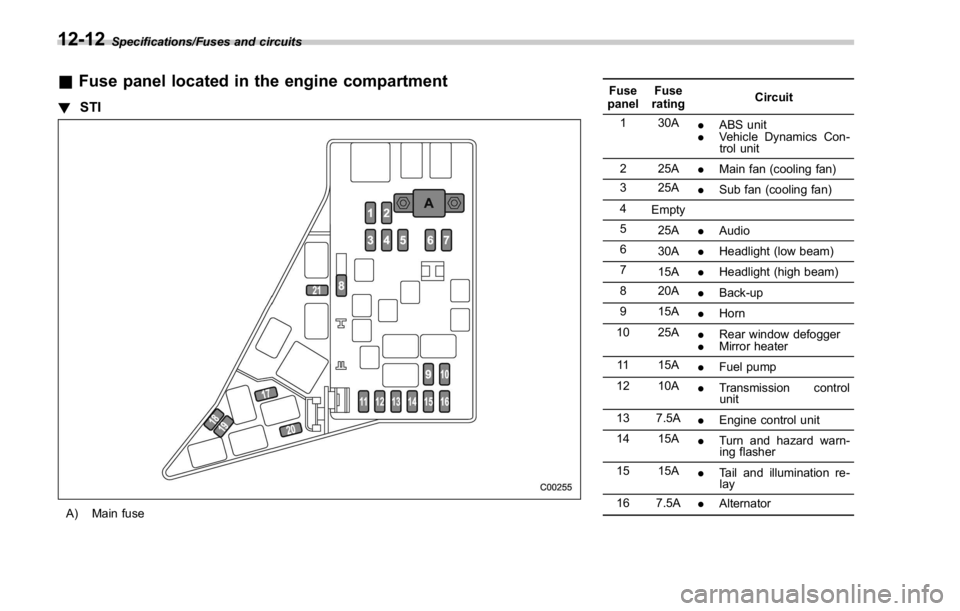
Specifications/Fuses and circuits
& Fuse panel located in the engine compartment! STI
A) Main fuse Fuse
panel Fuse
rating Circuit
1 30A
. ABS unit
. Vehicle Dynamics Con-
trol unit
2 25A
. Main fan (cooling fan)
3 25A
. Sub fan (cooling fan)
4
Empty
5
25A
. Audio
6
30A
. Headlight (low beam)
7
15A
. Headlight (high beam)
8 20A
. Back-up
9 15A
. Horn
10 25A
. Rear window defogger
. Mirror heater
11 15A
. Fuel pump
12 10A
. Transmission control
unit
13 7.5A
. Engine control unit
14 15A
. Turn and hazard warn-
ing flasher
15 15A
. Tail and illumination re-
lay
16 7.5A
. Alternator12-12
Page 555 of 594
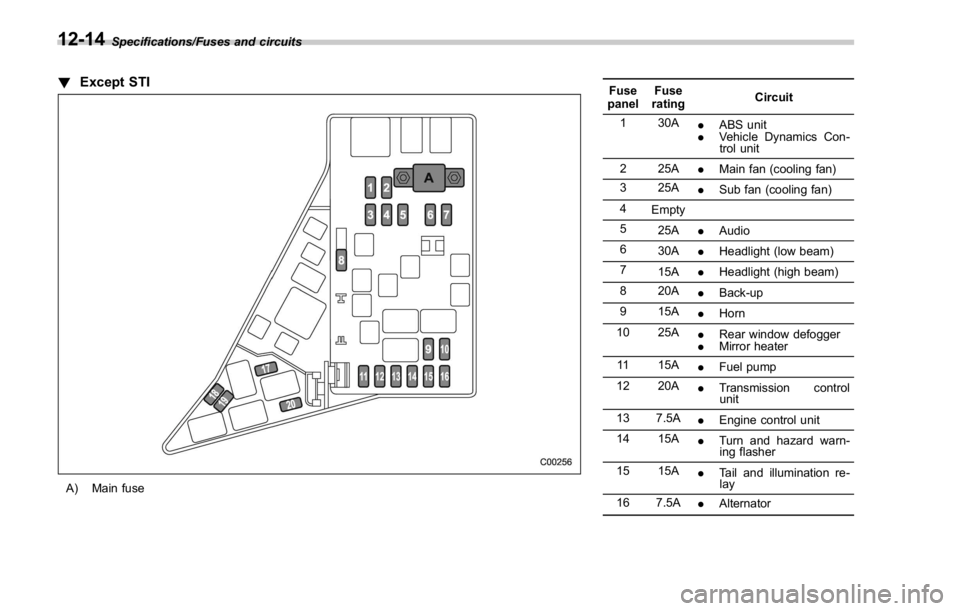
Specifications/Fuses and circuits
! Except STI
A) Main fuse Fuse
panel Fuse
rating Circuit
1 30A
. ABS unit
. Vehicle Dynamics Con-
trol unit
2 25A
. Main fan (cooling fan)
3 25A
. Sub fan (cooling fan)
4
Empty
5
25A
. Audio
6
30A
. Headlight (low beam)
7
15A
. Headlight (high beam)
8 20A
. Back-up
9 15A
. Horn
10 25A
. Rear window defogger
. Mirror heater
11 15A
. Fuel pump
12 20A
. Transmission control
unit
13 7.5A
. Engine control unit
14 15A
. Turn and hazard warn-
ing flasher
15 15A
. Tail and illumination re-
lay
16 7.5A
. Alternator12-14
Page 558 of 594
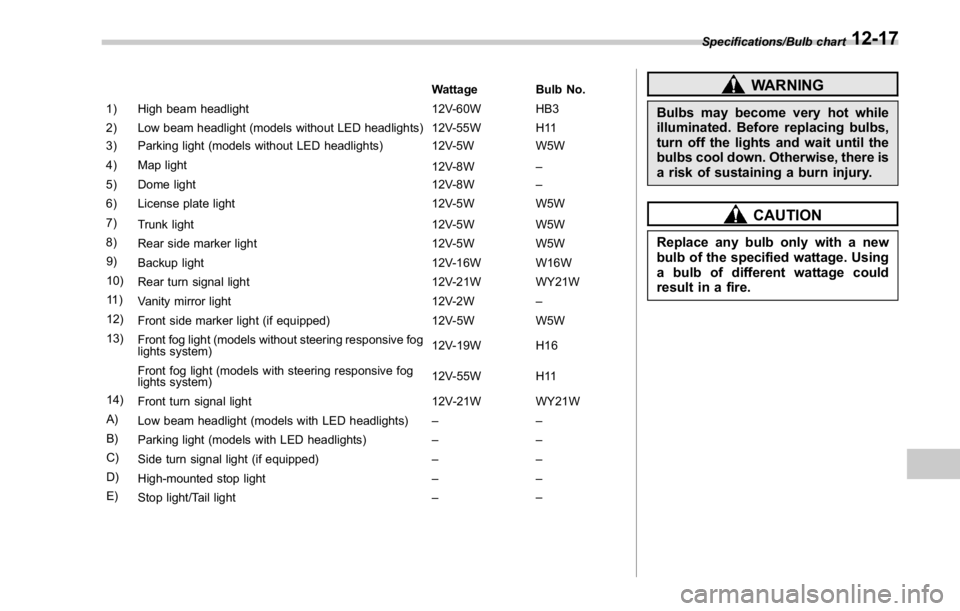
Wattage Bulb No.
1) High beam headlight 12V-60W HB3
2) Low beam headlight (models without LED headlights) 12V-55W H11
3) Parking light (models without LED headlights) 12V-5W W5W
4) Map light
12V-8W –
5) Dome light 12V-8W –
6) License plate light 12V-5W W5W
7)
Trunk light 12V-5W W5W
8)
Rear side marker light 12V-5W W5W
9)
Backup light 12V-16W W16W
10)
Rear turn signal light 12V-21W WY21W
11 )
Vanity mirror light 12V-2W –
12)
Front side marker light (if equipped) 12V-5W W5W
13)
Front fog light (models without steering responsive fog
lights system) 12V-19W H16
Front fog light (models with steering responsive fog
lights system) 12V-55W H11
14)
Front turn signal light 12V-21W WY21W
A)
Low beam headlight (models with LED headlights) ––
B)
Parking light (models with LED headlights) ––
C)
Side turn signal light (if equipped) ––
D)
High-mounted stop light ––
E)
Stop light/Tail light – – WARNINGBulbs may become very hot while
illuminated. Before replacing bulbs,
turn off the lights and wait until the
bulbs cool down. Otherwise, there is
a risk of sustaining a burn injury.
CAUTIONReplace any bulb only with a new
bulb of the specified wattage. Using
a bulb of different wattage could
result in a fire. Specifications/Bulb chart
12-17