wheel SUBARU WRX 2016 Service Manual
[x] Cancel search | Manufacturer: SUBARU, Model Year: 2016, Model line: WRX, Model: SUBARU WRX 2016Pages: 594, PDF Size: 19.43 MB
Page 343 of 594
Audio/Phone operation (Hands – free system for cellular phones)
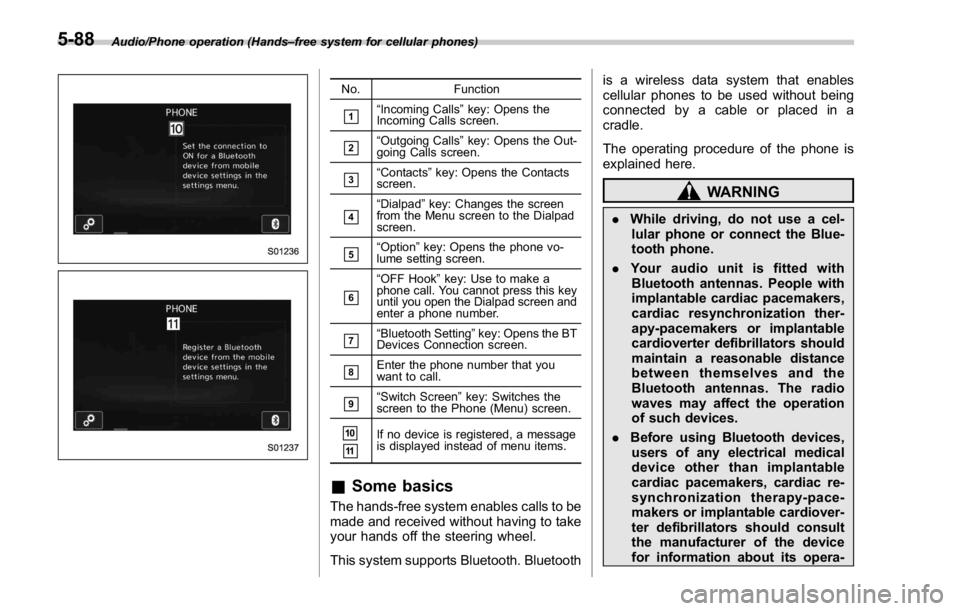
No. Function
& 1
“ Incoming Calls ” key: Opens the
Incoming Calls screen.
& 2
“ Outgoing Calls ” key: Opens the Out-
going Calls screen.
& 3
“ Contacts ” key: Opens the Contacts
screen.
& 4
“ Dialpad ” key: Changes the screen
from the Menu screen to the Dialpad
screen.
& 5
“ Option ” key: Opens the phone vo-
lume setting screen.
& 6
“ OFF Hook ” key: Use to make a
phone call. You cannot press this key
until you open the Dialpad screen and
enter a phone number.
& 7
“ Bluetooth Setting ” key: Opens the BT
Devices Connection screen.
& 8
Enter the phone number that you
want to call.
& 9
“ Switch Screen ” key: Switches the
screen to the Phone (Menu) screen.
& 10
& 11
If no device is registered, a message
is displayed instead of menu items.
& Some basics The hands-free system enables calls to be
made and received without having to take
your hands off the steering wheel.
This system supports Bluetooth. Bluetooth is a wireless data system that enables
cellular phones to be used without being
connected by a cable or placed in a
cradle.
The operating procedure of the phone is
explained here.
WARNING. While driving, do not use a cel-
lular phone or connect the Blue-
tooth phone.
. Your audio unit is fitted with
Bluetooth antennas. People with
implantable cardiac pacemakers,
cardiac resynchronization ther-
apy-pacemakers or implantable
cardioverter defibrillators should
maintain a reasonable distance
between themselves and the
Bluetooth antennas. The radio
waves may affect the operation
of such devices.
. Before using Bluetooth devices,
users of any electrical medical
device other than implantable
cardiac pacemakers, cardiac re-
synchronization therapy-pace-
makers or implantable cardiover-
ter defibrillators should consult
the manufacturer of the device
for information about its opera-5-88
Page 344 of 594
tion under the influence of radio
waves. Radio waves could have
unexpected effects on the opera-
tion of such medical devices.
CAUTIONDo not leave your cellular phone in
the vehicle. The temperature inside
mayrisetoalevelthatcould
damage the phone.
NOTE . If your cellular phone does not
support Bluetooth, this system cannot
function.
. In the following conditions, the sys-
tem may not function:
– The cellular phone is turned off.
– The current position is outside
the communication area.
– The cellular phone is not con-
nected.
– The cellular phone has a low
battery.
. When using the hands free function
and other Bluetooth functions at the
same time, the following problems may
occur:
– The Bluetooth connection may be cut.
– Noise may be heard when play-
ing back voice with the Bluetooth
function.
! Registering/connecting a Bluetooth
phone
To use the hands-free system for cellular
phones, it is necessary to register a
cellular phone with the system. Refer to
“ Registering/connecting Bluetooth ®
de-
vice ” F 5-81.
! Bluetooth phone condition dis-
play
The condition of the Bluetooth phone
appears on the upper right side of the
screen. Refer to “ Bluetooth phone condi-
tion display ” F 5-89.
! Using the phone switch/micro-
phone
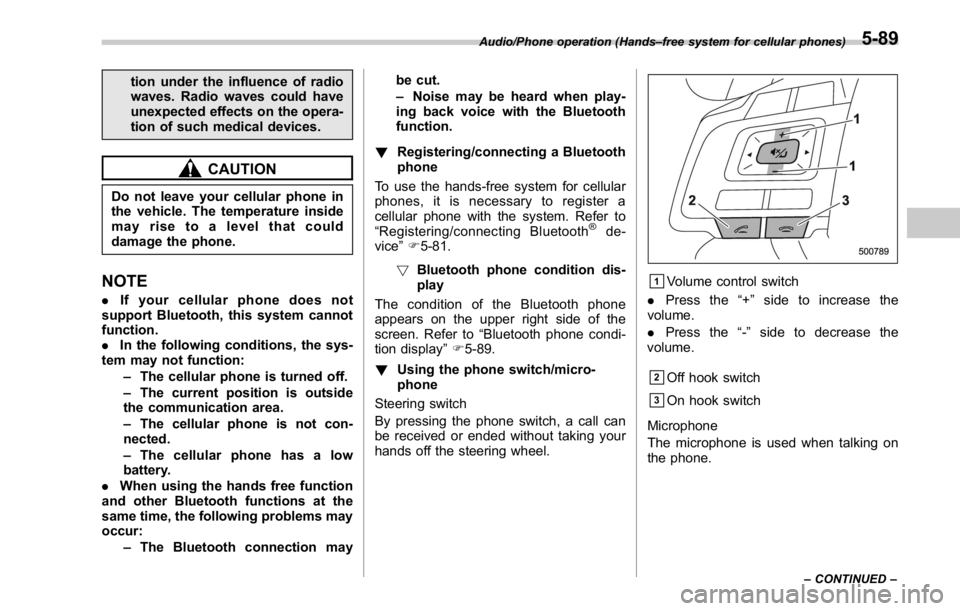
Steering switch
By pressing the phone switch, a call can
be received or ended without taking your
hands off the steering wheel. & 1
Volume control switch
. Press the “ + ” side to increase the
volume.
. Press the “ - ” side to decrease the
volume.
& 2
Off hook switch
& 3
On hook switch
Microphone
The microphone is used when talking on
the phone.Audio/Phone operation (Hands – free system for cellular phones)
– CONTINUED –5-89
Page 352 of 594
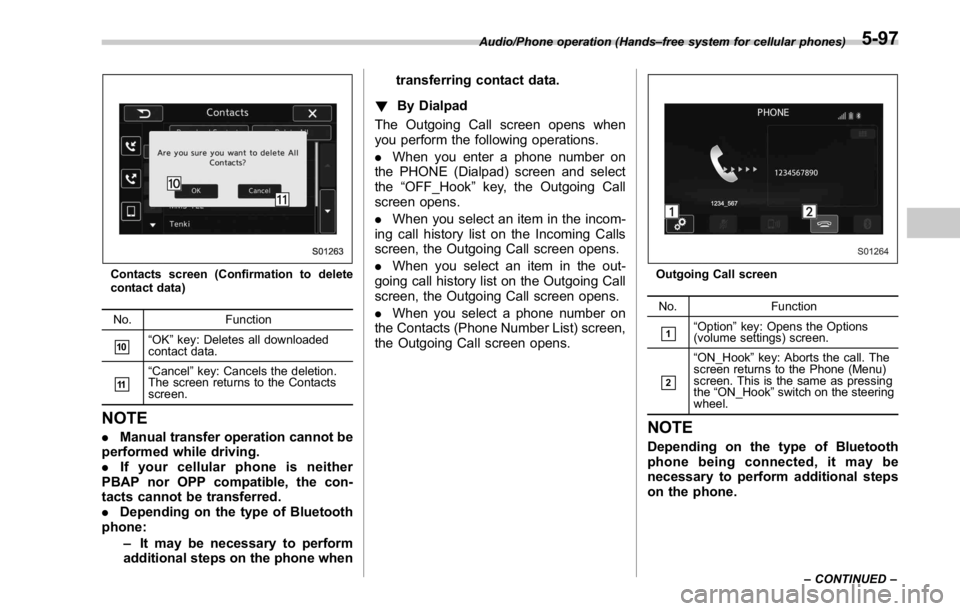
Contacts screen (Confirmation to delete
contact data)
No. Function
& 10
“ OK ” key: Deletes all downloaded
contact data.
& 11
“ Cancel ” key: Cancels the deletion.
The screen returns to the Contacts
screen.
NOTE . Manual transfer operation cannot be
performed while driving.
. If your cellular phone is neither
PBAP nor OPP compatible, the con-
tacts cannot be transferred.
. Depending on the type of Bluetooth
phone:
– It may be necessary to perform
additional steps on the phone when transferring contact data.
! By Dialpad
The Outgoing Call screen opens when
you perform the following operations.
. When you enter a phone number on
the PHONE (Dialpad) screen and select
the “ OFF_Hook ” key, the Outgoing Call
screen opens.
. When you select an item in the incom-
ing call history list on the Incoming Calls
screen, the Outgoing Call screen opens.
. When you select an item in the out-
going call history list on the Outgoing Call
screen, the Outgoing Call screen opens.
. When you select a phone number on
the Contacts (Phone Number List) screen,
the Outgoing Call screen opens. Outgoing Call screen
No. Function
& 1
“ Option ” key: Opens the Options
(volume settings) screen.
& 2
“ ON_Hook ” key: Aborts the call. The
screen returns to the Phone (Menu)
screen. This is the same as pressing
the “ ON_Hook ” switch on the steering
wheel.
NOTE Depending on the type of Bluetooth
phone being connected, it may be
necessary to perform additional steps
on the phone.Audio/Phone operation (Hands – free system for cellular phones)
– CONTINUED –5-97
Page 353 of 594
Audio/Phone operation (Hands – free system for cellular phones)
! By off hook switch
1. Press the
switch on the steering
wheel to display the phone top screen.
2. Check that the “ Call (Call) ” screen is
displayed.
& Receiving on the Bluetooth
phone! Incoming calls
When a call is received, the incoming call
screen is displayed with a sound.
. When you are on the Outgoing Call
screen, the screen changes to the Call
screen when the other party answers the
call.
. The “ Mute ” , “ Speaker ” , and “ Bluetooth ”
keys are disabled on the Outgoing Call
screen.
. When you receive a phone call while
the cellular phone is connected, the
screen changes to the Incoming Call
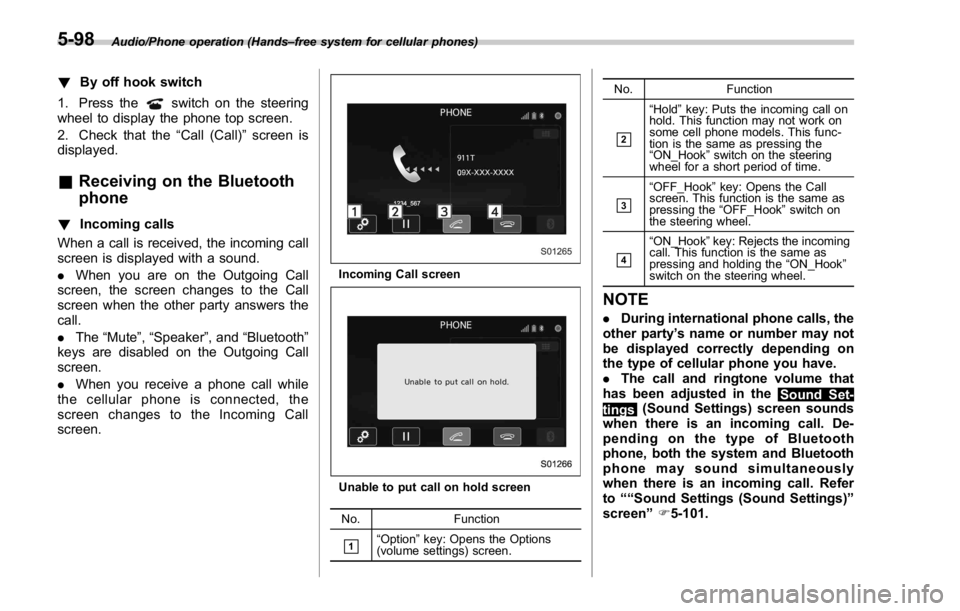
screen. Incoming Call screen
Unable to put call on hold screen
No. Function
& 1
“ Option ” key: Opens the Options
(volume settings) screen. No. Function
& 2
“ Hold ” key: Puts the incoming call on
hold. This function may not work on
some cell phone models. This func-
tion is the same as pressing the
“ ON_Hook ” switch on the steering
wheel for a short period of time.
& 3
“ OFF_Hook ” key: Opens the Call
screen. This function is the same as
pressing the “ OFF_Hook ” switch on
the steering wheel.
& 4
“ ON_Hook ” key: Rejects the incoming
call. This function is the same as
pressing and holding the “ ON_Hook ”
switch on the steering wheel.
NOTE . During international phone calls, the
other party ’ s name or number may not
be displayed correctly depending on
the type of cellular phone you have.
. The call and ringtone volume that
has been adjusted in the
Sound Set-
tings (Sound Settings) screen sounds
when there is an incoming call. De-
pending on the type of Bluetooth
phone, both the system and Bluetooth
phone may sound simultaneously
when there is an incoming call. Refer
to ““ Sound Settings (Sound Settings) ”
screen ” F 5-101.5-98
Page 355 of 594
Audio/Phone operation (Hands – free system for cellular phones)
No. Function
& 2
“ Mute ” key: Mutes your voice to the
other party. Press the “ Mute ” key
again to deactivate the Mute mode.
This key is disabled in the Private
mode.
& 3
“ Speaker ” key: Changes the mode to
Private mode. The other party ’ s voice
emits from the cell phone. Press the
“ Speaker ” key again to deactivate the
Private mode.
& 4
“ ON_Hook ” key: Ends the call. You
return to the Phone (Menu) screen
when ending outgoing calls and the
previous screen when ending incom-
ing calls. This function is the same as
pressing and holding the “ ON_Hook ”
switch on the steering wheel.
& 5
“ Dialpad ” key: Opens the Call (Dia-
lpad) screen.
& 6
“ Switch Screen ” key: Switches the
screen to the Phone (Menu) screen.
& 7
“ Dialpad ” key: Allows you to make
DTMF (Dual Tone Multi Frequency)
calls. The numbers you enter are sent
as tone signals.
NOTE . When cellular phone call is changed
to hands-free call, the hands-free
screen will be displayed and its func-
tions can be operated on the screen.
. Changing between cellular phone
call and hands-free call can be per- formed by operating the cellular phone
directly.
. Transferring methods and opera-
tions will be different depending on
the type of cellular phone you have.
. For the operation of the cellular
phone, see the manual that comes with
it.
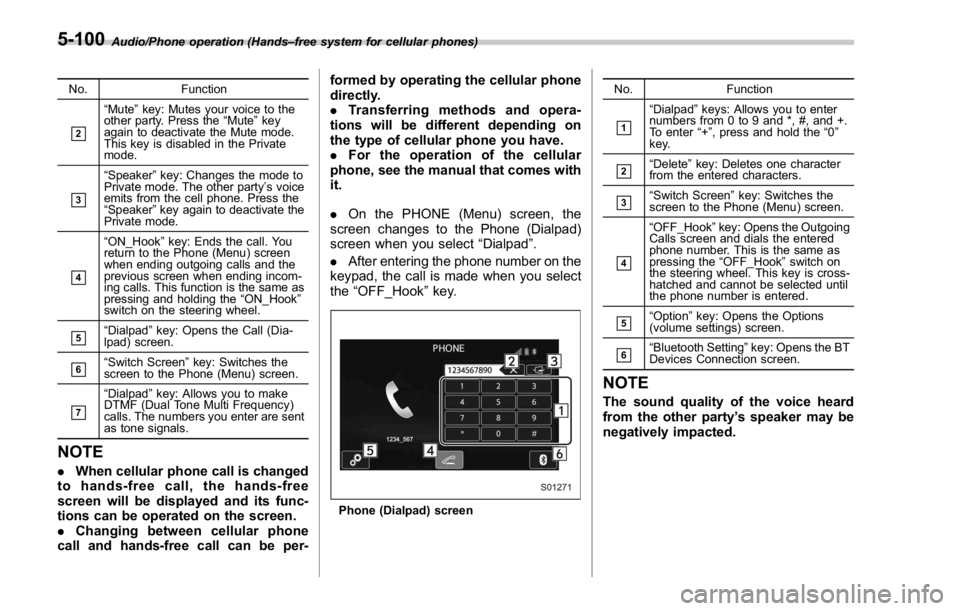
. On the PHONE (Menu) screen, the
screen changes to the Phone (Dialpad)
screen when you select “ Dialpad ” .
. After entering the phone number on the
keypad, the call is made when you select
the “ OFF_Hook ” key.
Phone (Dialpad) screen No. Function
& 1
“ Dialpad ” keys: Allows you to enter
numbers from 0 to 9 and *, #, and +.
To enter “ + ” , press and hold the “ 0 ”
key.
& 2
“ Delete ” key: Deletes one character
from the entered characters.
& 3
“ Switch Screen ” key: Switches the
screen to the Phone (Menu) screen.
& 4
“ OFF_Hook ” key: Opens the Outgoing
Calls screen and dials the entered
phone number. This is the same as
pressing the “ OFF_Hook ” switch on
the steering wheel. This key is cross-
hatched and cannot be selected until
the phone number is entered.
& 5
“ Option ” key: Opens the Options
(volume settings) screen.
& 6
“ Bluetooth Setting ” key: Opens the BT
Devices Connection screen.
NOTE The sound quality of the voice heard
from the other party ’ s speaker may be
negatively impacted.5-100
Page 364 of 594

“
Call a contact ” say the name of a
contact. For example:
“ Call a contact ” ,
“
John Smith ” or“ Call a contact ” ,
“
Mary Davis ”
. Short or abbreviated names in the
contacts list may not be recognized.
Change names in the contacts list to
full names.
. Sometimes a voice recognition re-
sult confirmation screen will be dis-
played. After confirming the result, say
“ Ye s ” or“ No ” .
. When the system recognizes multi-
ple names from the contacts list, a
name candidate list will be displayed
on the screen. If the desired name is
not displayed on the top of the screen,
say or select the number of the name
from the candidate list (number 1,
number 2, etc.) to select a name from
the candidate list.
. When a contact has multiple phone
numbers registered in the contacts list,
a candidate list will be displayed. If the
desired phone number is not displayed
on the top of the screen, say or select
the number of the desired phone
number from the candidate list (num-
ber 1, number 2, etc.) to select a phone
number from the candidate list. ! Voice command example: Dial
number
1. Press the talk switch.
2. Say the phone number.
. In the same manner as it is dis-
played on the screen, “ Dial
(Dial
“ Dial a
number ”
say the phone number.
. Say the phone number one digit at a
time.
For example, if the phone number is
2345678:
Say
“ two three four five six seven
eight ”
Do not say“ twenty three forty five
sixty seven eight ”
Calling to the following phone numbers
– 3 digit numbers (911, 411, 611)
– 7 digit numbers (Local phone num-
bers)
– 10 digit numbers (Area code +
Local phone number)
– 11 digit phone numbers (1 + Area
code + Local phone number)
. As the system cannot recognize
additional numbers, say the complete
number without stopping. Calling to other phone numbers
3. Say
“ Call ” or press the switch on
the steering wheel.
. When the system recognizes multi-
ple phone numbers, a phone number
candidate list will be displayed on the
screen. Pressing the
switch on the
steering wheel makes a call to the top
entry on the list. If the desired phone
number is not displayed on the top of
the screen, say the number of the
desired phone number from the candi-
date list to select a phone number from
the candidate list.
! Casual speech recognition
Due to natural language speech recogni-
tion technology, this system enables re-
cognition of a command when spoken
naturally. However, the system cannot
recognize every variation of each com-
mand. In some situations, it is possible to
omit the command for the procedure and
directly state the desired operation. Not all
voice commands are displayed in the
function menu. Audio/Voice command system operation
– CONTINUED –5-109
Page 396 of 594
surfaces of the vehicle. Because
fuel may damage the paint, be
sure to wipe off any spilled fuel
quickly. Paint damage caused by
spilled fuel is not covered under
the SUBARU Limited Warranty.
. Always use a genuine SUBARU
fuel filler cap. If you use the
wrong cap, it may not fit or have
proper venting and your fuel tank
and emission control system
may be damaged. It could also
lead to fuel spillage and a fire.
. Immediately put fuel in the tank
whenever the low fuel warning
light illuminates. Engine misfires
as a result of an empty tank
could cause damage to the en-
gine. Continuing to operate your
vehicle at an extremely low fuel
level may result in a reduction of
engine performance. State emission testing (U.S.
only) WARNINGTesting of an All-Wheel Drive model
must NEVER be performed on a
single two-wheel dynamometer. At-
tempting to do so will result in
uncontrolled vehicle movement and
may cause an accident or injuries to
persons nearby.
CAUTION. At state inspection time, remem-
ber to tell your inspection or
service station in advance not to
place your SUBARU AWD vehicle
on a two-wheel dynamometer.
Otherwise, serious transmission
damage will result.
. Resultant vehicle damage due to
improper testing is not covered
under the SUBARU Limited War-
ranty and is the responsibility of
the state inspection program or
its contractors or licensees.
California and a number of federal states have Inspection/Maintenance programs to
inspect your vehicle ’ s emission control
system. If your vehicle does not pass this
test, some states may deny renewal of
your vehicle ’ s registration.
Your vehicle is equipped with a computer
that monitors the performance of the
engine ’ s emission control system. Certi-
fied emission inspectors will inspect the
On-Board Diagnostic (OBDII) system as
part of the state emission inspection
process. The OBDII system is designed
to detect engine and transmission pro-
blems that might cause the vehicle emis-
sions to exceed allowable limits. OBDII
inspections apply to all 1996 model year
and newer passenger cars and trucks.
Over 30 states plus the District of Colum-
bia have implemented emission inspec-
tion of the OBDII system.
. The inspection of the OBDII system
consists of a visual operational check of
the “ CHECK ENGINE ” warning light/mal-
function indicator light (MIL) and an
examination of the OBDII system with an
electronic scan tool.
. A vehicle
passes the OBDII system
inspection if proper operation of the
“ CHECK ENGINE ” warning light is ob-
served, there are no stored diagnostic
trouble codes, and the OBDII readiness
monitors are all complete.Starting and operating/State emission testing (U.S. only)
– CONTINUED –7-7
Page 397 of 594

Starting and operating/Preparing to drive
. A vehicle fails the OBDII inspection if
the “ CHECK ENGINE ” warning light is not
properly operating (light is illuminated or is
not working due to a burned out bulb) or
there is one or more diagnostic trouble
codes stored in the vehicle ’ s computer.
. A state emission inspection may reject
(not pass or fail) a vehicle if the number of
OBDII system readiness monitors “ NOT
READY ” is greater than one. If the
vehicle ’ s battery has been recently re-
placed or disconnected, the OBDII system
inspection may indicate that the vehicle is
not ready for the emission test. Under this
condition, the vehicle driver should be
instructed to drive his/her vehicle for a few
days to reset the readiness monitors and
return for an emission re-inspection.
. Owners of rejected or failing vehicles
should contact their SUBARU Dealer for
service.
Some states still use dynamometers in
their emission inspection program. A
dynamometer is a treadmill or roller-like
testing device that allows your vehicle ’ s
wheels to turn while the vehicle remains in
one place. Prior to your vehicle being put
on a dynamometer, tell your emission
inspector
not to place your SUBARU
AWD vehicle on a two-wheel dynam-
ometer. Otherwise, serious transmis-
sion damage will result. The U.S. Environmental Protection
Agency (EPA) and states using two-wheel
dynamometers in their emission testing
program have EXEMPTED SUBARU
AWD vehicles from the portion of the
testing program that involves a two-wheel
dynamometer. There are some states that
use four-wheel dynamometers in their
testing program. When properly used, this
equipment should not damage a SUBARU
AWD vehicle.
Under no circumstances should the rear
wheels be jacked off the ground, nor
should the driveshaft be disconnected for
state emission testing. Preparing to drive You should perform the following checks
and adjustments every day before you
start driving.
1. Check that all windows, mirrors, and
lights are clean and unobstructed.
2. Check the appearance and condition
of the tires. Also check tires for proper
inflation.
3. Look under the vehicle for any sign of
leaks, and check that no small animal is
under the vehicle.
4. Check that no small animal enters the
engine compartment.
5. Check that the hood and trunk lid are
fully closed.
6. Check the adjustment of the seat.
7. Check the adjustment of the inside
and outside mirrors.
8. Fasten your seatbelt. Check that your
passengers have fastened their seatbelts.
9. Check the operation of the warning
and indicator lights when the ignition
switch is turned to the “ ON ” position.
10. Check the gauges, indicator and warn-
ing lights after starting the engine.7-8
Page 400 of 594
position and check the operation of the
warning and indicator lights. Refer to
“ Warning and indicator lights ” F 3-13.
5. Turn the ignition switch to the “ START ”
position without depressing the accelera-
tor pedal. Release the key immediately
after the engine has started.
If the engine does not start, try the
following.
(1) Turn the ignition switch to the
“ LOCK ” position and wait for at least
10 seconds. After checking that the
parking brake is firmly set, turn the
ignition switch to the “ START ” position
while depressing the accelerator pedal
slightly (approximately a quarter of the
full stroke). Release the accelerator
pedal as soon as the engine starts.
(2) If this fails to start the engine, turn
the ignition switch back to the “ LOCK ”
position and wait for at least 10
seconds. Then fully depress the accel-
erator pedal and turn the ignition
switch to the “ START ” position. If the
engine starts, quickly release the
accelerator pedal.
(3) If this fails to start the engine, turn
the ignition switch again to the “ LOCK ”
position. After waiting for 10 seconds
or longer, turn the ignition switch to the
“ START ” position without depressing
the accelerator pedal. (4) If the engine still refuses to start,
contact your nearest SUBARU dealer
for assistance.
6. Confirm that all warning and indicator
lights have turned off after the engine has
started. The fuel injection system auto-
matically lowers the idle speed as the
engine warms up.
While the engine is warming up, make
sure that the select lever is at the “ P ” or
“ N ” position and that the parking brake is
applied.
CAUTIONIf you restart the engine while the
vehicle is moving, shift the select
lever into the “ N ” position. Do not
attempt to place the select lever of a
moving vehicle into the “ P ” posi-
tion.
& Stopping the engine The ignition switch should be turned off
only when the vehicle is stopped and the
engine is idling.
WARNING
Do not stop the engine when the
vehicle is moving. This will cause
loss of power to the power steering and the brake booster, making steer-
ing and braking more difficult. It
could also result in accidental acti-
vation of the “ LOCK ” position on the
ignition switch, causing the steering
wheel to lock.Starting and operating/Starting and stopping the engine (models without push – button start system)
7-11
Page 401 of 594
Starting and operating/Starting and stopping engine (models with push – button start system)
Starting and stopping engine
(models with push-button
start system) & Safety precautionsRefer to “ Safety precautions ” F 2-10.
& Operating range for push-
button start systemRefer to “ Operating range for push-button
start system ” F 3-6.
& Starting engine
WARNING. There are some general precau-
tions when starting the engine.
Carefully read the precautions
described in “ General precau-
tions when starting engine ” F 7-
9.
. If the indicator on the push-
button ignition switch flashes in
green after the engine has
started, never drive the vehicle.
The steering is still locked, and it
may result in an accident. CAUTION. When the operation indicator on
the push-button ignition switch is
flashing in orange, there may be
a malfunction with the vehicle.
Contact a SUBARU dealer imme-
diately.
. If the indicator on the push-
button ignition switch is flashing
in green after the engine has
started, it means that the steering
is still locked. Depress the brake
pedal while moving the steering
wheel to the right and left, and
press the push-button ignition
switch.
. Do not continue pushing the
push-button ignition switch for
more than 10 seconds. Doing so
could cause a malfunction. If the
engine does not start, stop push-
ing the push-button ignition
switch and turn off the engine.
Wait 10 seconds, and then push
the push-button ignition switch
to start the engine.
NOTE
. When the push-button ignition
switch is pressed while depressing the clutch pedal (MT models) or the
brake pedal (CVT models), the engine
starter operates for a maximum of 10
seconds and after starting the engine,
the starter stops automatically.
. When the push-button ignition
switch is pressed while depressing
the clutch pedal (MT models) or the
brake pedal (CVT models), the engine
can be started regardless of the status
of the push-button ignition switch.
. If the security indicator light illumi-
nates when you attempt to start the
engine but the engine does not start,
press the push-button ignition switch
to switch the power to “ OFF ” and then
try to start the engine again.
. If the engine does not start, press
the push-button ignition switch without
depressing the clutch pedal (MT mod-
els) or the brake pedal (CVT models) to
switch the power to “ OFF ” . Then, while
depressing the clutch pedal (MT mod-
els) or the brake pedal (CVT models)
more forcefully, press the push-button
ignition switch.
. The engine start procedures may
not function depending on the radio
wave conditions around the vehicle. In
such a case, refer to “ Starting engine ”
F 9-17.
. If the vehicle battery is discharged,
the steering cannot be unlocked.7-12